Author: Mfidie

  • Guide to keep yourself and others safe on your site

    Guide to keep yourself and others safe on your site

    The pandemic is a reality we all, as a society, are facing and coping with. A lot of people are confined to their homes to maintain social distancing and end up being on the internet for a significant part of their day. When surfing on the internet day in and day out is one of the only options for entertainment, a lot of users end up asking themselves questions like, Am I safe while browsing through multiple sites? How Do I Verify a Website is Legitimate? The answers to such questions should be visible on your website to increase footfall and hence revenue through your online venture. So, follow these tips, and you will not regret:

    Answering the question, Is this website legit?

    Certain visible factors can help establish the legitimacy of your website with your users or customers. At the top of this list are Cheap SSL Certificates. They are visible to a random user’s eye as a lock and HTTPS on the left corner of the address bar, and most users are aware of its importance and tend to notice in case that lock is missing or Google marks your website as insecure.

    Installing a certificate for your website is affordable and accessible. The first tip would be to have an IP address for your website to link the SSL to. The next step would be to go ahead and invest in a certificate and then complete the configuration process to activate it. Upon activation, the certificate will need to be installed on the server, and then you would need to update your website to be able to use the https in its URL, and voila, you are done!

    Security Checks, Subscriptions, and Plugins

    Security checks are the best way to remain one step ahead of hackers and cyber crooks. There are several security options available in the market, including API security, security subscriptions, and plugin to ensure top-notch security. Regular checks can be beneficial in preemptive identification of threats on your website. Many monitoring services can enable you to automate the process. Vulnerabilities, once identified, can be worked upon to prevent future catastrophes. Security plugins can help protect your site against hackers.

    Using Reliable Passwords

    The first line of security that hackers face is your password. Making it an easy pass can be harmful to the safety of your website and its data. Be sure to use sufficiently long passwords, including an amalgam of alphabets, both upper and lower case, numerals, and special characters. Make sure never to use passwords that may be information that others can guess like your date of birth, hometown, etc. Your password should not be a legitimated word but a random combination of characters. Enabling 2-factor authentication adds another layer of security in case someone does end up cracking your password. 

    Pay attention to the host used

    Hosting is one of the main factors when selecting a host for your website, do thorough research, and choose a host with germane features and a sound security system in place. Looking out for hosts that have systems in place to deal with Denial of Service attacks and firewalls is the right choice. A good host keeps the website safe and ensures that the business is not at risk even in case of a cyber-attack. Make sure your host has the feature of providing a backup of data on your website, just in case.

    Keeping Everything Up to Date

    When it comes to security, no stone must be left unturned. Pay attention to all the software, plugin, scripts, and other extensions used by your website. Try to reduce the window between the time when an update for any of them is available and the time when you download and install the update. The shorter that window is, the less likely it is for hackers to take advantage. Each update brings along it updated security patches to safeguard your website and any clumsiness around that can cost you heavily. No vulnerable spot should be left unattended.

    Carefully think through Access Levels and Permissions

    Depending on the size and expansion of your organization there may be multiple individuals accessing different components of the website with different levels of access. The most effective saying is to give the only minimum required permission to everyone in the organization. The level of access comes with a significant amount of responsibility and hence should be only in the hands of a few trusted individuals. Also, give appropriate file and folder permissions to keep intruders at bay.

    Being careful with emails

    Human resources can be easily exploited. Hence email links must be opened carefully. Emails from untrusted sources must be dealt with, with utmost caution. Many such emails can be phishing emails through which a hacker can gain complete control of your system in case any of the employees open or download the attachment sent in the mail. Employees must be made aware through training and be prepared to foil for such attempts.

    Being aware of Cyber Attacks

    According to FinTech news, cyber-attacks in about 80% of the firms have seen a steep rise in the year 2020. With cyber-attacks on the rise, it is essential to know about the different kinds of attacks in the cyber world that impact websites and their data security. Common attacks like cross-site scripting and SQL injection can cause havoc on a website. 

    It is essential to be aware of the same and how they are caused. In a cross-site scripting attack, a malicious code is implanted inside the system and can be used to manipulate information or steal data. These can be prevented by adding a CSP header as part of the website code which stems from the amount of foreign and contaminated scripts from running.

    SQL Injection attacks can mess with the database of the website hindering its smooth running. It can be prevented by setting up queries that are parameterized and secure forms.

    In conclusion, it is a known fact that the users today are aware and alert and keeping up with them is what will set you up for success. Customers prioritize their safety when on the internet, and that is precisely the aspect in which your website should be impenetrable. So do follow the above tips and safeguard your data, your users’ information, and maintain a relationship of trust and loyalty with them.

  • The Best Apps for College Students

    The Best Apps for College Students

    College students have revolutionized their age since they have access to technology that was not present there back then. You can get more information on research paper help online. Here are the best and top apps that students in college must have:

    Studying apps

    Quizlet 

    The older generations used to have flashcards to assist them in studying. They were pieces of paper with one side containing a question, and the next page had the answer. Today’s kids do not have that time to find a paper and pen to jot down important things. Quizlet is the way to go. With it, you can create the flashcards, test yourself, play educative games, and connect with other students on the same platform. 

    StudyBlue

    It has a full library with flashcards, guides, and notes that students across the United States have made. The notes help students learn, and they can also interact in the areas they feel they are not firm to assist them even more. 

    Time Timer

    Many people are rooting for ways to get their focus on the check. It is easy to get distracted by social media when you are going through your notes and end up wasting precious minutes in it. College students get distracted the most when it comes to studying. With the Time Timer app, you get yourself a visual timer to help you create alerts and set it for specific things. 

    Communication Apps

    Spike

    Most college students do not often check their emails. When faced with this issue, turn to Spike as it is a conglomeration of all messaging services like emails, tasks, collaborations amongst team members, calls, and chats. It is available on all platforms and will help you as a student to keep your communication in check. 

    WhatsApp

    Most people are using the app since it gets used with hundreds of millions of people on the planet. College students can utilize this app to keep in touch with relatives and friends. It is free and is also a secure platform that offers end-to-end encryption of messages and allows you to send messages, make voice and video calls, record videos, and take photos, and also sharing documents. If you are studying abroad or you want to communicate with your friends, it is the app to use. 

    Apps for Health

    MedManage

    College students who have mental conditions or rely on certain drugs to keep them afloat during the day need this app. It helps you take your meds on time and can help you relieve your stress too. With it, you have portable access to the information on medication, such as the direction, warnings, and side effects. You have the reminders of dosage and a tracker that checks your consumption. You are also alerted on missed dosages that can get sent to up to five individuals. 

    BetterHelp

    The first time in college is the realization that you will not be meeting your family in a long time. You have to take care of yourself daily and attend classes. The app connects you to the nearest therapists, and you can talk to them in any manner you feel comfortable. You can either call, text or video call them to make contact. You can also have a conversation with them at any time of the day or night. You pay $40-$70 weekly to gain premium membership of having unlimited access.

  • Some basic things about 192.168.1.1 that you need to know

    Some basic things about 192.168.1.1 that you need to know

    192.168.1.1 address (some people mistakenly recorded 192.168.l.l) is a familiar website address that many internet users hear once. This is the IP address of the modem, people access the website when it is necessary to change the network configuration, update the wifi password or simply check the current internet status. However, there are a few modem manufacturers that do not like to use the 192.168.1.1 address as the default login address that changes to 192.168.0.1 or 10.0.0.1. Therefore, you also need to pay attention to log in correctly. Wifi password or simply check the current internet status

    How to access 192.168.1.1 address

    The first, you must connect to the network device via wifi or LAN cable, from there, you can access 192.168.1.1 address, In fact, 192.168.1.1 address is accessible from the phone; however, you cannot access while using 3G/ 4G LTE.

    When you have access to the modem management page, you can change many settings such as QoS (quality management, network speed), DNS, Proxy, LAN, WAN, change wifi password, dial PPPOE, Block wifi access by MAC address or via IP, WPS, DSL, and many other advanced options.

    192.168.1.1 address is a familiar website address that many internet users hear once

    In addition, if you are a person who is not knowledgeable about information technology, you should not change the parameters without your knowledge because it may cause disconnection of the network, incorrect network configuration, and failure to broadcast wifi or very weak waves.

    It can hardly be denied that nearly 100% of modems, routers on the market today require an account and password to log in. The reason for this is to secure, prevent those who have bad intentions when accessing the wifi network and proceed to edit the settings. For that reason, the modem will require an account to log into management.

    Default setting of IP Router 192.168.1.1

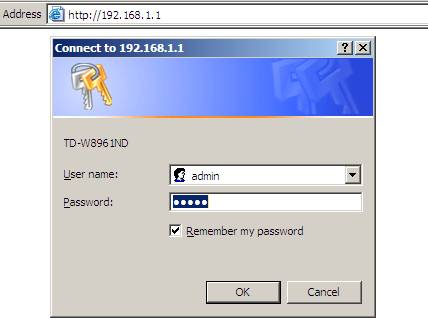
    When you connect to a wireless network on a PC, after you enter http://192.168.1.1 into your browser, the computer screen will open the Router configuration page. By default, the login ID and password for your router are “Admin” or “Administrator”. Another, you can get the account name and password printed on the back of the wifi transmitter.

    How to find Router IP address?

    The fact of the matter is that not all routers have the same IP address. They may have different IP addresses. In case if logging in 192.168.1.1 will not work on all routers, one can find them using different methods to see the login IP.

    Also, if you encounter other problems accessing the router at 192.168.1.1, you can try another address 192.168.8.1, 10.0.0.1 or 192.168.2.1.

    Set up wifi transmitter configuration

    Turn on / off wifi: If you are using a Wi-Fi router to browse the Internet on your PC, you should turn off the Wi-Fi feature on the router. This will help you to save electricity. You may turn OFF or ON by visiting page 168.192.1.1.

    Configure network settings: You can change your router’s general settings along with your ISP’s DNS or Gateway IP settings. You can even make your internet run faster by following the advice from your Internet service provider on the configuration page.

    192.168.1.1 is the IP address of the modem

    Recover Internet, wifi is down: Sometimes, your internet suddenly disconnected. Then you have to wait until the ISP technician comes to your home and fix it. However. router related issues if it can be overcome by yourself. Just access 192.168.ll and you are ready to fix the problem.

    Install protection system: It is important to maintain the security of your router so that no one can access your internet and internet browsing history. All routers have security settings that you can manually adjust to make your router safe from hackers.

    How to recover Admin name and password

    Default names are easy to guess, especially for regular router brands. When you restart the router, a safety sign will appear. In this case, you need to know the router name of the desired Wi-Fi router password to log out. Once you’ve typed in the web address, press the enter button, and find the login window. When you locate the correct address, please login with the router’s admin password. You can also use the “Command Prompt” command to get the correct IP. Also, click “Connect to the Internet” if you don’t use a proxy server.

    Netgear WNDR3700 router provides you with a Web-based control program to perform router restarts.

    The only way to recover the Router username and password is to reset it. This can be done through the following steps:

    First, you should find the reset button on your Router. You will probably get it on the top of the router.

    After that, you need to press and hold the button for 10 seconds. Then release when all LED lights blink.

    Wait a minute, then connect it to your PC. Open the browser and type 192.168.1.1 into the URL bar and press Enter.

    Here your username and password will be admin. You will be prompted to modify the password after logging in for the first time.

    There are several reasons why you might want to reset your router login password to www.192.168.1.1. One of the common reasons is that you forgot the router password. Under WPA2 encryption, passwords need to be case sensitive and contain no spaces. Therefore it becomes difficult to retain the password.

    Some reasons why you cannot access 192.168.1.1

    Change IP: In this case, you need to reset the Modem to get the default IP range of 192.168.1.1. However, many modems already have a customer account, i.e. a contract account, if the Reset modem will lead to a loss of account configuration, the Internet will not be accessible. In this case, we advise you to tell the network technician so they can give you detailed instructions or do it for you.

    There are many reasons why you cannot access 192.168.1.1

    Having one or more Wi-Fi devices is also a common cause. When there is more than one wifi device inside the system, accessing 192.168.1.1 page will be very error-prone. At this point, you need to identify the access address so you can log in to the system.

    The above are a few basic things about 192.168.1.1 that you need to grasp

  • Miles of Smiles: 3 Marketing Strategies for Dental Practitioners

    Miles of Smiles: 3 Marketing Strategies for Dental Practitioners

    Miles of Smiles: 3 Marketing Strategies for Dental Practitioners

    The dentistry profession is a dynamic one. Not only is it growing, but it is also adjusting with the times. One aspect of this would be its marketing side of the job. Sure, the old ways still work fine, and you will get noticed regardless. But how do you stand out among the rest and attract clients to try your services more than the rest?

    Here’s a list of what to consider when marketing your dental practice and how to measure their effectiveness.

    Connect locally

    There is truly something about the tried and tested classic word-of-mouth. This is how much good work eventually makes headlines. The traditional approach of creating good relationships with your clients works wonders up to this day. It is wise then to walk the extra mile and establish friendships among them while creating excellent work.

    Have your assistant aid you in this. By maximizing both your relational skills, it can go a long way. Keep a light and friendly atmosphere. Be involved locally and actively in various ways. Focus on genuinely connecting with people through simple conversations and local events- celebrations, non-profit involvement, and the like.

    Never underestimate the network of people this strategy can reach. Those testimonials will come in handy, especially when nowadays everybody has a social media account with lots of connections. It’s the perfect time to connect with people. The word-of-mouth works well that way for good reason.

    Go Digital

    Everyone has moved to the digital world when it comes to pretty much everything including marketing. Since online is the new norm, everything is faster and on the internet. With the platform for advertising changed, you need to adapt to it by going digital. There are plenty of ways to do this.

    Create a page

    Most people spend their time on social media. This is where you can use this to your advantage. By creating a page or a website, not only do you get noticed locally, but you also open your network to a whole lot of opportunities. 

    You’ll never know who is out there reading and wanting to give it a try, so market your page well, complete with photos, videos, and all. You can also include in your page blogs and testimonials to further increase your authenticity and gather clients.

    Join groups

    Be involved in a community where you can extend your marketability. There are plenty of groups out there dedicated to the promotion of local services and businesses. By being active in such, you can extend your reach locally. 

    Use call-tracking

    It is used nowadays by various businesses to gather data and spot potential clients early on. In the past, they usually made a call-back approach and asked callers how they heard about their companies. Now, it has evolved into software technology that uses cookies to identify and gather data.

    There is a call-tracking software out there that is effective, especially in the field of dentistry. It can even offer insight to improve your marketing. For more information, you can visit this link: https://callscaler.com/call-tracking-for-dentists/

    Utilize Search Engine Optimization

    It is a tool designed to make you visible to the internet with the search of a keyword you set. This is what businesses opt for nowadays for them to be easily searchable online. It is wise then to utilize this feature available and in the most effective way possible.

    A way to do this would be to specify the keyword to fit to whatever people search normally. An example would be to use the “best dentist in” then the name of your city. This would narrow down their search to you, and you will maximize the SEO to your utmost advantage.

    Advertise via Tri-media

    With all set in motion, there is another proven and tested medium to market your dental services- one that you should consider: Tri-media. This is traditional advertising using television, radio, and print. Although some would shun away from it due to its high expense, it still is a powerful way to get your message across and advertise.

    Television

    Getting into television indeed is a way to get noticed. This costs higher than most, but if you are able to do so, you set yourself on top of the competition. Clients will most likely visit your dental service because it surely is convincing to give it a try if you landed on television.

    Radio

    Many potential clients out there can be found via this channel. Radio has evolved and moved from the traditional broadcast to online programs. There are still plenty of people listening to the radio. Have your dental services advertised here to increase marketability.

    Print

    These include magazines, brochures, flyers, posters, etc. Landing your dental services into one of these can increase your chances of visitation to your office. If you can, you can even try billboards for a more significant effect. That massive amount of visibility can do wonders.

    Takeaway

    Marketing your dental service can be quite tasking. In the end, the mission is to cater to your clients excellently. Still, it would be nice to increase your income as well. Make use of these marketing strategies mentioned, and you can guarantee that your clients will increase in number.

  • How Secure are Mobile Hotspots? Problems & Solutions

    How Secure are Mobile Hotspots? Problems & Solutions

    How Secure are Mobile Hotspots? Problems & Solutions

    The convenience in setting up your mobile hotspot wherever you go is unmatchable, but it comes with some security concerns.

    Using the internet in public always comes with a risk. Similar is the case with mobile hotspots because you never know when you may encounter a hacker who can use your mobile hotspot without your permission.

    It is easy to hack into anyone’s mobile hotspot and if they exceed the data limit, you’re the one who’s going to pay for it. Heck, even a rookie hacker can hack your phone by just using your mobile hotspot.

    So, in this guide, we’ll be discussing some of the problems that come with using mobile hotspots and how to make it completely secure.

    How to Secure your Mobile Hotspots

    Have a look at some of the tips to secure your mobile hotspots so you never have to face any security breach:

    1. Always Use a VPN

    Another piece of advice that is so important for any mobile user is to always connect your device to a VPN (Virtual Private Network).

    This is basically an online privacy tool that keeps your online traffic encrypted so that no hacker can intercept your data.

    It also hides your original IP address and assigns you with a new IP address that is generally been used by other VPN users to prevent your device from hacking.

    Currently, there are so many VPN brands to choose from and every other VPN claims to provide strong encryption and doesn’t store data logs.

    Well, that’s not entirely true because when you start digging into their privacy policy, you’ll always find such a clause that tells you that if it’s against national interest of a country, they might be compelled to share users’ data to authorities.

    After testing over 200+ VPNs, ExpressVPN is the best VPN to have fast speed, strong encryption, and doesn’t store any kind of logs.

    At one time, it was compelled to share users’ data through its servers but the authorities didn’t find anything because ExpressVPN is truly a no-log VPN. The full analysis of it’s full-proof logs policy is mentioned in this extensive ExpressVPN review.

    2. Change Hotspot’s SSID

    Your mobile assigns your network a default name which is generally the name of the mobile which is also referred to as SSID (Service Set Identifier).

    If you do not change these names, it becomes easier for hackers to know what device you are using and what their vulnerabilities are. If they know that, they can exploit its weaknesses to their benefit.

    Changing the SSID name will not give away the original name of the device. Hackers will have a difficult time in finding out which device you are using and how to effectively hack that device.

    Once you have changed the SSID, make sure you test it out at your home before you use it in a public setting.

    3. Creating a Strong Password

    For improved data security, make sure to set a strong password for your network. A password which is unique, long, contains special characters, and the one that you change frequently, is the most secure password.

    At the same time, make sure you select WPA2 hotspot security. There are other options like WEP and WPA, but they aren’t as strong as WPA2.

    4. Never Give Out your Network Password

    It is possible that your friends may ask your mobile hotspot password to borrow some of your bandwidth. They might lend to someone else and it could end up in compromising your mobile security.

    Not just security, but some of these friends may end up streaming all the seasons of GOT or Breaking Bad and you’ll be the one paying the bills.

    Therefore, make sure you don’t share hotspot passwords with your friends. But even if you do, make sure to change it once in a while.

    Key Takeaways

    Mobile Hotspots are only secure when you’re in the house and the signals aren’t reaching outside of your house.

    However, when you are in the public setting you need to be more careful with your mobile hotspots because a skilled hacker can easily hack your device and steal your important information.

    The best way to keep your mobile hotspots secure from hackers is to get yourself a VPN and keep it turned ON whenever you’re in the public setting.

    There are other ways to keep your mobile hotspot protected which I have discussed in this guide. 

  • The Best Design and Prototyping Tool for UI/UX Designers -Wondershare Mockitt

    The Best Design and Prototyping Tool for UI/UX Designers -Wondershare Mockitt

    The rapid increase of prototyping and designing tools has made it easy to create apps and websites. UX/UI designers have their work cut because these tools make it easy to complete the designing projects within a very short time. Wondershare Mockitt is the best among the many tools you will find in the market. This is a platform developed to help you create highly interactive prototype and designs. You can work with it both online and offline. It has put all the necessary design tools in a strong cloud based platform where you can access them regardless of your location using an internet connection. With the tool, you do not have to install anything on your device. In terms of usability, Wondershare Mockitt has a user friendly interface that is well organised and uncluttered. It has ample features that make it a perfect choice for both beginners and experienced designers.

    Features and associated benefits of Mockitt

    Uncluttered User Interface

    The tool has a well organised and highly functional interface. This makes it a great option for new designers to start creating prototypes. No need to go through user manuals or extensive tutorials. 

    Easy to use controls

    Wondershare Mockitt has ready to use features that can help you create stunning UX/UI designs and generate interactive prototypes fast. 

    A vast collection of gestures, animation and transition effects

    These features bring life into your prototype and make it more appealing to end users. 

    Commenting, co-editing and feedback features

    The platform enables you to collaborate with your team to finish projects fast, get comments and feedback. This allows create satisfactory designs and improve workflow efficiency. 

    Dynamic widgets and simple designing of page states

    You can create page states rapidly and show effects within screen. 

    Master widget status

    The tool has master widgets you can edit wherever they appear on the screen. This makes it easy for you to work fast while reusing components on several screens. 

    Offline and online preview

    You can share your design safely with QR codes or URLs. Besides, you can also download full HTML demo package to allow offline reviewing. 

    Cloud based platform

    No installation is required to use Wondershare Mockitt. Besides, it works with all major PC operating systems.

    No coding knowledge needed

    Specs and codes for android, CSS and swift are generated automatically for any targeted device.

    After looking at the major features and benefits offered, let’s now look at how to create a prototype with Wondershare Mockitt. 

    How to design a prototype using Wondershare Mockitt

    Creating a prototype in Wondershare Mockitt is made easy by its intuitive interface. The interface has all the tools required to create a great design prototype. Here are steps to follow as you create your prototype in Mockitt. 

    Step 1: Create a blank project or use a template 

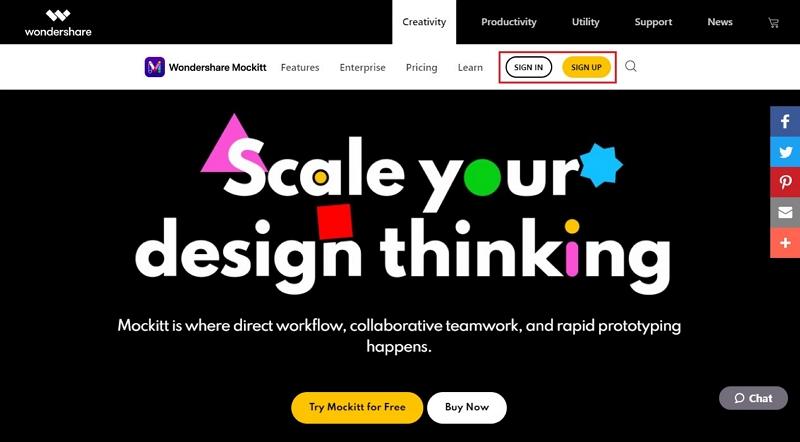
    After you log in to your Wondershare Mockitt online, you get an option to create a new project. 

    Click “Create” and then “Project” to create a new project and name it. 

    Select your targeted device i.e. the device that you are creating the prototype for. 

    Step 2: Design your app or website 

    Begin dragging the widgets and required objects into your first screen to develop the initial layout. 

    Add the screens and the extra page states.

    Create layouts for the additional page states.

    Double click an asset or icon to put it on the screen. 

    Use the properties panel found on the right side to edit according to the specifics you require. 

    Steps 3: Make your prototype design interactive 

    Link the interactive assets to their respective pages states or target pages. For instance, in case a log in button directs your users to a login page, you should link the button to the log in page. On the other hand, in case tapping an icon opens a menu of same page, you need to link to the right page state showing the menu. Do the same for all the interactions.

    Edit to add specific gestures that trigger the change and animation or transition effect going from a state to the other. 

    Step 4: Preview and share your interactive prototype 

    Step two and three guides you how you can create your prototype from a blank screen or a template. Once you are done it is time to preview and share it with others. 

    Generate a QR code or a share link.

    Set user permissions to access them. 

    You can also download the HTML for them to preview the interactive prototype offline. 

    The preview makes it is possible for potential users to give comments or give suggestions on how they view it and where you can improve. 

    How you get Wondershare Mockitt

    Depending on your prototyping needs, you can opt for the best package that suits those requirements. Wondershare Mockitt is available in free plan, personal plan and enterprise plan. For beginners, or those who want to test the tool, free plan is the best option. With this plan you can create three projects with twenty screens. 

    If you are an individual developer, personal package costing $ 69 is right for you. You get the opportunity to create unlimited projects and access 500 screens. For companies or developer working as a team the enterprise package is the best. You get three thousand screens and can create unlimited projects. You can add more members on board, comment on the mockups and use the premium templates. 

    Conclusion

    Wondershare Mockitt has managed to surpass the expectation of many UX/UI designers. It has been developed integrating features and technology used in top prototyping tools such as Sketch and others. One of its greatest aspects is that it is cloud based. Thus, it does not limit you. You have the opportunity to work from any device as long as it has internet connection. Whether you are a beginner or experienced UI/UX designer, Wondershare Mockitt is worth using. 

  • Invest In These 4 Things For A Seamless Gaming Experience

    Invest In These 4 Things For A Seamless Gaming Experience

    Considering how the current pandemic affected everyone’s life around the globe, the global gaming industry is now more active than ever. Working at home can get monotonous at times which is why there are millions of people that play online games they like.

    Since the internet is full of online games that you can choose according to your liking. For instance, any casino lover would love 25 free spins on registration no minimum deposit casino as he looking for his favourite game, while FPS gamer would go for graphics of the game.

    However, in order to enjoy any game, you need to invest in gadgets and accessories that can make your gaming experience more smooth and seamless. Keeping that in mind, we are here with some of the basic and vital things that you need when it comes to online gaming.

    A Decent Gaming Laptop

    If you already have a decent laptop or PC that is capable of handling online gaming, then you can skip this step. Although, if you don’t have one, then investing in one should be your first step. In addition to handling your gaming needs, your gaming laptop will be able to handle all your office work as well.

    All the decent gaming laptops have high performance processors & memory along with high-end graphics & sound quality, making them capable of doing every task that you throw at them.

    Fast And Stable Internet Connection

    The second most important thing here is a fast and stable internet connection. Since you won’t want your game to lag because of the speed of the internet, you need to get a speed of 6MBps per device. If possible, you should always go for ethernet as that will get you much better speed and a more stable connection when compared with wifi.

    Besides all this, the upload and download speed of your internet is going to play a vital role when it comes to online gaming. You might be already familiar with the download speed as that is something your service provider will share, however, the upload speed of the internet is equally important during your gaming sessions. The upload speed of your PC refers to the transfer speed from your PC to the internet.

    Gaming Routers

    Just like gaming PC and laptops, there are wifi routers that are specially designed for gamers. If you are facing speed issues with your internet connection even after upgrading to a better plan, you should definitely get yourself a gaming router that is much better than what you get from your service provider and will surely help you with ping issues as well.

    The only downside to gaming routers is their price. Before you invest a couple of hundred dollars with your wifi router, make sure to do some research online to get the best deal.

    Gaming Accessories

    Headphones: For a seamless gaming experience, you should definitely look for a great pair of gaming headphones with clear and crisp sound. Additionally, if you are into FPS games in which you will be communicating with your team members, then the quality of the microphone will be vital during the gaming sessions.

    Gaming Chair: If you are into long gaming sessions, then the best way to get yourself ready for those long sessions is to invest in a gaming chair that is comfortable and is also good for your posture.

    Mouse & Keyboard: Just like everything else, a normal keyboard and mouse are not designed for gaming and can hinder your gaming sessions. That is why you should opt for gaming mouse and keyboards that are designed keeping in mind the gaming needs of different players. Moreover, instead of going for the wireless option, try to opt for the wired one for much better connectivity and faster response.

    Overall Setup: Now that you are ready with your favourite games and all the relevant accessories for your PC, you just have to set them all up properly. Get all of your devices properly arranged and make sure that you can easily switch and access them with ease.

    Conclusion

    Lastly, you should only invest in high-quality gadgets and accessories only. There is no point in wasting your money while jeopardizing your online gaming experience unnecessarily.

  • How to Play Tablet Games on PC

    How to Play Tablet Games on PC

    Playing Android games on a tablet is often considered the best way to play. Tablet screens are larger than phones, and the sound is usually better. However, what if you could enhance the experience even further by playing your favourite tablet games on your PC!

    Playing tablet games on PC opens up the world of giant-sized monitors, massive sound setups, and unique control schemes. This article will show you how to play your tablet games on your PC and experience them in a whole new way.

    Tablet Games on PC Are Now a Reality

    There used to be a time not long ago when the idea of playing mobile games on a PC would’ve been ludicrous. PCs weren’t powerful enough to emulate a different platform or architecture. Things have come a long way since then. Today even a smartphone has superior computing power compared to the super-computers of old.

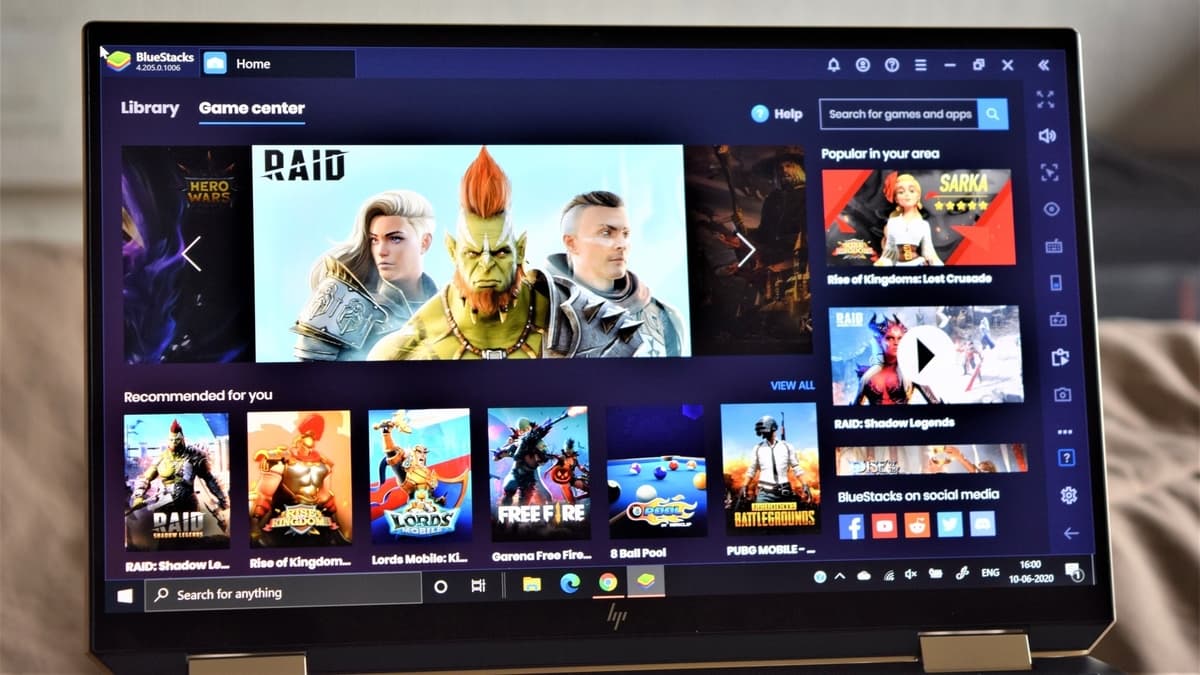
    The advance in computing power gives us access to options that we never had before, and one of those options is running Android games. The easiest way to run android games on your PC today is through a program called BlueStacks. The BlueStacks program allows you to set up a virtual Android platform on your PC and run android apps and games.

    Using BlueStacks, you can customize your virtual Android environment in unique and exciting ways, such as using your mouse pointer instead of the touchscreen. Customizing your controls in this manner has the added benefit of providing further accessibility for those who might have difficulty using a touchscreen.

    BlueStacks can take advantage of most of your PC’s multimedia hardware, including internal and external displays and your speaker system. Please note that not every Android app or game may take full advantage of such hardware. For example, some Android apps and games might have horizontal or vertical aspect ratio constraints or limitations in sound channels.

    If You’re on iOS, Don’t Scream – Stream!

    BlueStacks may be all well and good for android, but what if your tablet games run on iOS? While there is no direct counterpart for BlueStacks for iOS apps, all is not lost! Other PC programs allow you to stream and mirror your iOS device screen to your computer.

    Streaming can be especially useful for presentations or any scenario where you may need to show your screen to a group of people. If you want to show off that new iOS game, or your gaming skills, then streaming to your large PC display is the way to go.

    One of the best iOS screen mirroring and streaming programs is AirServer. With AirServer, you can stream and mirror your iPad or another iOS device on your PC with little effort. With support for full-speed 60 FPS mirroring, AirServer is ideal for most gaming purposes, allowing you to enjoy a larger screen with minimal lag.

    Set Your Tablet Games Free by Playing on PC

    So whether you’re looking to play on a larger screen with richer audio or just looking for different controls, playing on PC is the answer. While playing tablet games on your PC may not be as exciting as GoodLuckMate bonuses, it can still bring new life into your game.

    Along with the enhanced visuals and sound that comes from your beefier hardware, some games may perform better too! Since the average PC is several times more powerful than all but the most advanced tablet, you may notice higher framerates and even better network performance due to a faster network card in your PC. While these improvements aren’t guaranteed, and your experience may vary, it’s certainly worth noting.

    One final advantage of playing your Android games on PC is freedom from battery limitations. By playing your games on PC, you will no longer be draining your device’s battery or need to look for a charger during a heated match.

    Tablet Games on PC, Try it and See

    If you’re curious about what mobile games would be like on a PC, both BlueStacks and AirServer offer free versions so that you can “test the waters.”

    Playing tablet games with PC controls can completely change a game’s feel, sometimes offering specific advantages. If you’re looking for a bit of an edge in that shooting or racing game, give the PC experience a try. If nothing else, the new experience alone will be worth it!

  • Become An Expert At Microsoft’s Azure Kubernetes Service (AKS) With A Free Course

    Become An Expert At Microsoft’s Azure Kubernetes Service (AKS) With A Free Course

    Azure Kubernetes Service (AKS) is considered the next curve in cloud technology. With a single platform, users can get an overview of the entire IT operation, enabling them to better manage and control complex tasks. Microsoft’s new product comes with an intuitive API that is easy to source, plus it is open source. Multiple apps can now be managed across diverse pipelines. 

    Staying Ahead Of The Curve

    Any form of internet technology rapidly evolves. Cloud technology is no different. What is new today gets outdated tomorrow. Familiarising oneself with AKS will help users stay ahead of the curve. The free course developed by Mohamed Radwan serves as an ideal platform for the learning process. Mr Radwan’s work profile includes making his mark as a Principal Cloud DevOps in the UK. He has also added a feather in his cap by becoming a member of Microsoft MVPs community

    With the 5 comprehensive modules that make up the course, users will find it easier to grasp the new platform. They will find a direct pathway to concepts such as Docker, Kubernetes, and AKS. The user can then become an expert at applications such as containerization and modern engineering in Azure. 

    Practical Modules

    Real-life case studies are used in each module to enhance the learning experience. This makes it easier for the user to absorb the material at hand. Whether they are a beginner or more advanced, the step-by-step demos will provide a guided pathway. 

    Each of the 5 modules is available in English and Arabic (عربى). 

    The English version on the following YouTube channel:

    And the Arabic version on the following YouTube channel: 

    Course Structure And Modules 

    The AKS Deep Dive course is structured with 5 carefully planned modules that contain 37 lessons and a backed with 33 demos. Users can also access 70 video lessons. 

    Here are the 5 main modules:

    M1: Main Concepts Introduction

    The first module gives the participant an easy introduction to the new platform. The purpose of the module is to highlight concepts like application modernization and containers orchestration with ‘Container vs. Virtual Machine’.

    M2: The Complete Docker

    Once participants finish the first module, they are then taken right into Docker. The module covers everything they will need to know about the topic, an important cornerstone of AKS. Concepts that are covered here include Working with Docker compose and Understanding Networking in Docker. In addition to key concepts, participants will also gain an insight into lessons such as 

    Working with Docker containers, and Understanding multi-stage build.

    The highlight of the second module is the all important lesson on ‘How to build and run unit testing inside Docker container’. 

    M3: Get Practical With AKS Containerized Applications

    The third module focuses on practical, hands-on learning. This is designed to give a better understanding of how AKS functions in real world situations. Participants gain a deeper understanding of Kubernetes Resources and Objects are treated with extreme care, plus Kubernetes Architecture and Components. Other important concepts covered include Kubernetes (Kubectl and Dashboard), and Managing and upgrading AKS cluster.

    The key lesson covered in the module is Containerization security in Azure, which is then supplemented with an Introduction to OAM and DAPR.

    Participants will find their confidence boosted with sessions on important topics that cover 

    Creating and Deploying application to Windows Server container on AKS. There is also the 

    Demo on Working with Kubernetes manifest multi-container pod.

    M4: Advanced AKS Skills With Networking, Scaling, Helm

    The practical application of AKS continues with Module 4.Participants are given a complete understanding of advanced skills such as Understanding scaling applications in AKS and Configuring data volumes in AKS using Azure Disks.These lessons are further highlighted with illuminating demos that cover key areas like: Creating volumes with Azure Disks in AKS and Advanced networking with Azure Container Network Interface (CNI) in AKS.

    The key principle of the module is to enable the participant to develop expert-level skills to better apply AKS. Demos such as How to Deploy application to AKS using CI/CD with Azure Pipeline and

    How to deploy and provision AKS with Terraform are important to the cause. 

    M5: Focus On Security, Governance

    Themodule on Security and Governance completes the AKS picture. Since it is an important touchpoint of the platform, key concepts are given their due here: Securing data running on AKS, and Integrating Azure Active Directory with AKS and manage access using RBAC. Participants will also get a better understanding of Monitoring and logging containerized applications using Application Insight, Log Analytics and Azure Monitor.

    Demo sessions of the module are focused on guiding participants to practice key concepts like 

    Securing network traffic and cluster configuration file and Integrating Azure Active Directory with AKS.

    The course ends with one of the most important lessons of the entire AKS framework – 

    Getting started to Monitor AKS with Continuous Optimization Cloud (CCO) Dashboard. 

    Summary

    The free course designed and developed by Mr Radwan is completely focused on a community learning experience for Microsoft’s Azure Kubernetes Service (AKS). The modules provide an easy pathway for new users to gain a complete understanding of the new cloud platform. The lessons and demos included in each module draw from practical experiences of Mr Radwan’s expert skill set.

    The free course is available in two languages, English and Arabic (عربى). 

  • Importance of Cybersecurity and SSL Monitoring for Your Website

    Importance of Cybersecurity and SSL Monitoring for Your Website

    Companies need to comply with data privacy regulations to stay ahead of the competition and improve their visibility online and attract quality visitors. Data is a valuable asset for all businesses that store all personal information related to their customers and protect them against hackers. As per statistics, hacking attacks occur once in 39 seconds, which has made data privacy critical for companies as any data breach can result in the loss of valuable data for businesses. Organizations need to have robust security measures and protect against security breaches using reliable encryption methods by installing SSL certificates. 

    SSL certificate monitoring can be an effective approach in protecting your application against the risk of growing cyber-attacks by detecting changes in your certificates. Thus, they enable enterprises to take proactive security measures to safeguard their customer or business-related data without harming their reputation and enable them to conduct transactions in a safe SSL environment. 

    Why may SSL certificates be necessary for websites?

    SSL certificates help create encrypted communication between your server and the visitors’ browsers by establishing a secure session. This helps protect valuable information that may be shared in the process, which could be otherwise intercepted by other users in the absence of stringent security measures. Customers prefer to shop on websites that provide safety and security while they conduct transactions online. Thus, the SSL certificates act as a security seal for visitors and provide authenticity to your site that enables them to make online purchases. 

    Here are some of the key reasons why SSL security may be necessary for your website:

    Ensures site verification

    SSL certificates are required for preventing phishing attacks and any third-party interception of information that may be misused for gaining access to personal information, including credit card details, address, phone number and any other contact details. Besides, they also assist with verifying information across websites to prevent altering content by third-party users. Thus, HTTPS websites ensure secure communication between both parties and protect the privacy of information. 

    Create trust and assurance among visitors

    SSL certificates are essential for all types of businesses in these times, regardless of their size. They are critical for all types of business, especially those dealing with financial transactions. Besides, Google announced in July 2018 that all websites must use the HTTPS protocol; otherwise, a not secure warning would be displayed to the visitors, which could affect your rankings and website traffic. Thus, websites that use SSL certificates have an edge as they can build trust and assure their visitors regarding their site’s safety. 

    Boosts search engine rankings

    According to Gartner’s research statistics, almost 70% of the online shoppers do not go ahead with placing the order as they lack trust in the websites. On the other hand, 64% indicated that they did not complete a transaction due to the lack of an SSL certificate. Thus, businesses need to have SSL certificates on their website that adds credibility to their website. Besides, the type of SSL certificate you choose also makes a lot of difference in attracting traffic to your website and impacting your overall rankings.

    The growing need for SSL certificate monitoring for websites

    SSL plays a key role in data exchange, and if they are not monitored, they might be vulnerable to cyber threats. Besides, SSL certificates, which may be compromised in any manner, can harm the application’s performance. There are also chances that your certificate may be due to expiry, and effective monitoring is key to ensuring the successful processing of transactions. Most SSL certificates come with a validity period. Once they lose their validity, the application will not function properly, making it essential to monitor the certificates. Thus, SSL certificate monitoring tools help in effective monitoring of all the HTTPS certificates used by your business. They are equipped with alerting capabilities that warn users about the expiry of their SSL certificates. Besides, they can help you to track and provide alerts regarding changes made to the certificates. 

    Most of the SSL certificates are distributed across different networks among enterprises. It might not be easy to track the expiry or validation dates using manual methods. In such cases, SSL certificate monitoring tools can be useful in providing greater visibility regarding different certificate details that can considerably reduce the operational costs of managing multiple certificates. 

    How can SSL certificate monitoring be useful to enterprises?

    Over the years, there has been a dramatic increase in cyberattacks on enterprises with the evolution of emerging technologies such as Artificial Intelligence and the increasing use of cryptocurrencies in different forms. Ransomware attacks are directed at enterprises, which makes data protection extremely essential for cloud providers. SSL certificate monitoring can offer the best protection and act as a defence against data breaches.

    Besides, SSL certificate monitoring solutions can offer administrators greater control over their environment and help automate and centralize operations related to recognizing security threats and attacks. They can help identify compliance issues, expirations of the certificate, and end-to-end management of the life cycle using third-party integrations.

    They provide complete transparency in SSL certificate management processes to assist in effective deployment and renewal of such certificates. 

    Conclusion

    SSL certificate management needs to be an integral part of all enterprises that can help prevent security breaches and keep online communication safe from hackers. Besides, SSL certificates that are due to expire may cause additional stress and may increase businesses’ risk of losing their valuable customers. 

    Hence, effective SSL certificate management is key to ensuring a safe and secure environment and helps manage all the processes involved in monitoring the certificates. With timely notifications, you can be assured of renewing your SSL certificates due to expiry and ensure there is steady traffic to your websites.