Author: Mfidie

  • List of TCL Shops and showrooms in Ghana

    List of TCL Shops and showrooms in Ghana

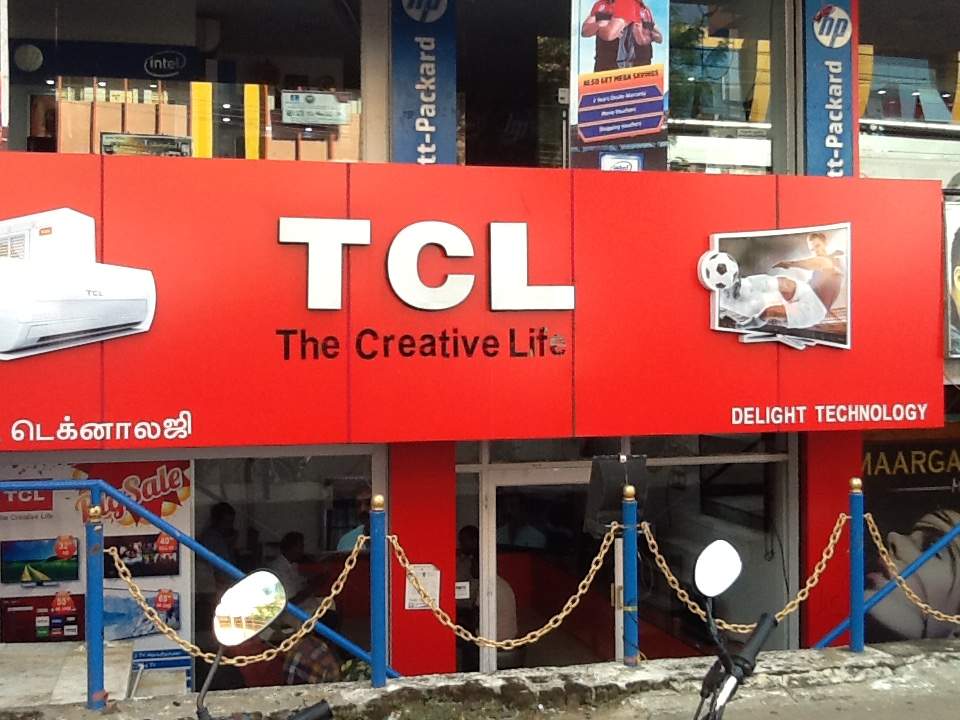
    The Chinese electronic brand (TCL) has taken over the world in no small measure thanks to its modern, stylish and affordable devices.

    If you are looking to buy or purchase goods from TCL, you will likely want to see their products in person before committing to buy any of them. Luckily, there are plenty of TCL shops and showrooms across the country, where you can find all their latest product and buy any accessories or parts that you need.

    It is no news that TCL has some of the finest electronic products on the market. Whether you are looking to buy the latest TV, cell phone, or smart watch, these products will surely fit your needs and your budget.

    About TCL

    TCL is a leading supplier of televisions, air conditioners, washing machines and other appliances. Headquartered in China, the company has operations worldwide with 10,000s of employees. In Africa alone, TCL has employed 1000s of people with about 300 business entities that sells products under TCL brand name across the continent.

    Why choose TCL product?

    TCL has been a leading manufacturer of TVs and other appliances for several years. It is one of the most trusted brands worldwide, with products sold in more than 170 countries. TCL offers exceptional sound quality and amazing audio innovations. What’s more, every TV is made out of their own factories so they are as affordable as possible while they still make sure they are of premium quality.

    TCL Shops and showrooms in Ghana with their location and contact

    Get your favorite TCL brand in a shop near you.

    Darkuman Branch

    Adjacent Tecno, Darkuman Junction

    0202698398

    North Industrial Area

    Opposite Melcom Plus, North Industrial Area

    0546257983

    Lapaz Branch

    Opposite the Tema Station, Nii Boi Junction, Lapaz

    0596913321

    Tema Comm.1 Branch

    Tema Community1. Opposite Prudential Bank

    0248101113

    Kumasi Branch

    Opposite Odike Ventures, Adum

    0546258047

    Tamale Branch

    Opposite the Forsmuel Shopping Centre

    0201863800

    Sunyani Branch

    Adjacent Melcom, Sunyani

    0248101113

    Takoradi Branch

    Adjacent the Post Office, Market Circle

    0247267496

    Ho Branch

    Opposite the main lorry station, Ho

    055005038

    Accra Central Branch

    Opposite Rawlings Park, adjacent Topman Shoes

    0592207955

    Conclusion

    TCL is a brand that has been around for many years with a strong presence in the African market. They are known for their quality TVs, but also have a range of other products. You can find the at their various shops and showrooms listed above across the country.
  • How to access and check your E-Payslip online in Ghana

    How to access and check your E-Payslip online in Ghana

    An e-payslip is an electronic equivalent of a paper payslip that your employer would provide you with on payday. It contains all the important information about your salary, such as how much you earned, how much tax was deducted, and how much money was contributed to your savings or pension fund.

    How to register for an E-Payslip account

    NB: If you are a new user registering for a payslip account for the first time, you will need a first-time registration code, which you can get it from your Head of Department. If you already have the code, you then move on to register for an account. To do so,

    1. Visit www.gogpayslip.com
    2. In the next window, you will be required to fill in the requird details.
    3. employees number and confirm it,
    4. enter your preferred password and confirm it,
    5. enter registration code, enter your email address
    6. Enter mobile number and confirm
    7. After entering your mobile number, you will be sent a confirmation code, enter the code to confirm your number.
    8. After filling with the required details, tap register to get an account.

    How to login to your E-Payslip account online

    Before you can be able to login, you might already have an account. If you don’t have, then follow the first procedures to create an account. To login,

    1. Visit www.gogpayslip.com
    2. Hit on continue
    3. In the sign in section, insert your Employe number and type in your password.
    4. Now, tap on My Payslip and getting into your account dashboard.
    5. Scroll through and select the month you want to account for and hit on generate.
    6. Scroll down and hit on print to print your payslip out. You can also save as pdf incase you want to have a copy on your computer.

    Why should I check my Payslip?

    It is a good practice to be checking your payslip on the regular. There can be changes in circumstances at any point in time such as an annual pay rise, a promotion, bonus payment, etc.

    What happens if there is an error on my Payslip

    The best option is to contact the Controller Accountant General Department office in your region, lodge your complaint and get your issue resolved.

    Controller Accountant General’s Department contact details

    Ashanti Regional Office – 0322022903

    Brong Ahafo Regional Office – 0330227269

    Central Regional Office – 0332132551

    Eastern Regional Office – 0342022571

    Greater Accra Regional Office – 0302228721

    Northern Regional Office – 0372022604

    Upper East Regional Office – 0382022213

    Upper West Regional Office – 0392022030

    Volta Regional Office – 0362026271

    Western Regional Office – 0312046007

    For any enquiries or difficulties, you can contact the office of the Controller Accountant General Departmnt to get your issue resolved.

    Conclusion

    The above is a guide on how to access and check your E-Payslip online in Ghana.

  • Prices of all PlayStation Consoles in Ghana & where to buy

    Prices of all PlayStation Consoles in Ghana & where to buy

    If you are a gamer, then you know the fact that gaming consoles can be quite costly, especially for people in the third world counties where prices of gaming consoles are expensive, due to importation costs. So, if you are looking to buy a gaming console such as PlayStation, you must be on the lookout for ways to get your hands on them cheaply.

    There are number of different PlayStation models available and the different models have different prices as well as where you can buy them. In this article, we look at the prices of PlayStation in Ghana and where you can buy them. This should help you decide which one to buy based on your budget and accessibility of the specific console.

    List of PlayStation, prices and where to buy in Ghana

    If you are a gaming enthusiast in Ghana, chances are you are looking for the best prices and the best places to buy a playstation console. The playstation has become a popular gaming system, offering gamers a wide range of games and features as well as an immersive gaming experience.

    Fortunately, Ghanaians have several options when it comes to purchasing a PlayStation console. Below is a list of the different PlayStation models available and their respective prices:

    PlaystationPrice
    PlayStation 2GHS 400
    Playstation 2 SlimGHS 500
    Playstation Portable (PSP)GHS 700
    Playstation 3GHS 850
    Playstation 3 SlimGHS 1,000
    Playstation VitaGHS 650
    Playstation 3 Super SlimGHS 1,200
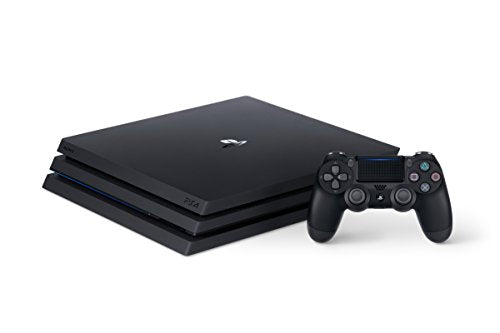
    Playstation 4GHS 2,300
    Playstation 4 SlimGHS 2,600
    Playstation 4 ProGHS 3,500
    Playstation ClassicGHS 1,300
    Playstation 5GHS 10,500 (Disc edition)
    GHS 8,500 (Standard edition)

    Where to buy New & Used Playstation at in Ghana

    Regardless of where you choose to buy your PlayStation from, make sure that you do your research and compare the prices to get the best possible deals. Online shops like Jiji Ghana, Tonaton, and Olx are some places where you can get both new and used PlayStation to buy.

    All you have to do is to visit their websites and type in the playstation model you want and a list of new and used Playstation will be on your screen to choose from. After getting your choice, contact the seller, agree on a fee and book an appointment to get your console.

    What is the best video game console?

    In 2019, PlayStation 4 Pro emerged as the overall best video game console whiles the PlayStation 4 Slim emerged as the most powerful video game console

    Conclusion

    When it comes to purchasing PlayStation console in Ghana, there are many options available. Prices range from low end models to high end models, so it is important to know what you are looking for before making a purchase.

  • WAEC Releases 2022 WASSCE Results; How To Check Now

    WAEC Releases 2022 WASSCE Results; How To Check Now

    The West African Examinations Council (WAEC) has released the examination results of candidates who sat for the 2022 West Africa Senior School Certificate Examination (WASSCE).

    WAEC released 2022 WASSCE results at around 07:21 am on Thursday, 1st December 2022. The WASSCE 2022 results release date is finally here and candidates can now check their results.

    It will be recalled that the results, which were scheduled to release earlier could not be released due to some system mishaps which have apparently been solved now.

    The WAEC Result Checker to access the WASSCE School 2022 exam results are available for GHS 17. You can use the checker to access your results on your phone. Read this article for further steps and contact 0555475811 if you need help.

    Shortcode for buying WASSCE Results Checker

    If you want to purchase a results checker for your WASSCE Results, dial *790*024# and follow the prompts to get your checker in just 30 seconds. The old shortcode *9404# does not work

    How to buy WASSCE Results Checker with Mobile Money instantly

    With this method, you get the checker card and instructions to check right after you have paid.

    Kindly follow the steps below to buy your BECE Results Checker and pay with Mobile Money (MTN, AirtelTigo, Vodafone).

    1. Visit fastcheckers.com with your smartphone or PC
    2. Choose the card type you want to buy. eg: WAEC eResults Checker
    3. Enter the number of cards you want to buy and the amount will be automatically calculated
    4. Click on “Buy Now”
    5. You will be taken to a new screen where you enter your name and phone number (Card details will be sent via SMS to the phone number you enter here)
    6. Click on “Proceed to Payment”
    7. On the next screen, choose Mobile Money and enter your MoMo number. You’ll be sent an OTP to confirm.
    8. Confirm the payment on your phone.
    9. You will instantly receive an SMS with the WASSCE Results Checker PIN and Serial and instructions to check.

    You can easily buy as many WASSCE Result Checkers/PINS as you want via Mobile Money and receive them via SMS instantly. Note that if you face any problems, you can call the Results Checker Ghana call centre on 0555475811 and you will be attended to.

    How to get your WASSCE Results Checker PIN via WhatsApp

    IKE is running a special offer for all those who want the PIN to be sent directly to their phones via SMS or WhatsApp. He is giving out the WASSCE Pin for just GHS 17.

    Kindly call us on 0555475811 for help.

    Just follow the steps below to get your results checker.


    Step 1: Send MTN Mobile Money GHS 17 to 0535462067, Subscriber (Isaac)

    Step 2: Send the name on your Mobile Money Account you used to send the money or the Merchant Name back to 0535462067 through WhatsApp.

    Step 3: You will receive the SERIAL and PIN to check your MAY/JUNE 2020 results once the payment is confirmed. It takes 5-10 minutes for us to send the card to you after verifying your payment.

  • Code for MTN Mashup and how to enjoy

    Code for MTN Mashup and how to enjoy

    The MTN deals available on mobile phones are some of the best deals around and makes it possible for you to get some good deals without spending your entire life savings on it.

    If you are willing to spend less money on credit but do longer calls, text and browse the internet, then you have to take advantage of the MTN Mashup.

    What is MTN Mashup

    MTN Mashup is a service from MTN Ghana that allows their customers to enjoy low-cost calls, free SMS and also browse the internet for less.

    What is the code for MTN Mashup

    To enjoy the MTN mashup, you need to be a customer of the mobile telecom and you must also know the code for the mashup service. The code for MTN Mashup is *567#.

    What are the packages for MTN Mashup

    1. With the daily plan which cost GHS 1 for the least, you get to choose between 25 minutes talk time and 25MB of data, 20 minutes talk time and 30MB of data, 15 minutes talk time and 35MB of data or 50MB of data only. You also get to browse WhatsApp for free and also access Wikipedia for free.
    2. With the weekly plan which cost GHS 5 for the least, you get to choose between 125 minutes talk time and 125MB of data, 100 minutes talk time and 150MB of data, 50 minutes talk time and 200MB of data or 250MB of data only. You also get to browse WhatsApp, Facebook and twitter for free and also access Wikipedia for free.
    3. With the monthly plan which cost GHS 10 for the least, you get to choose between 250 minutes talk time and 250MB of data, 200minutes talk time and 300MB of data, 150 minutes talk time and 350MB of data or 500MB of data only. You also get to browse WhatsApp, Facebook and Twitter for free and also access Wikipedia for free.

    How to subscribe to MTN Mashup

    1. Dial *567#
    2. Select option 1 (proceed to buy bundle)
    3. You will be asked to choose whether you are doing the bundle for yourself or for others.
    4. If you are doing it for yourself, choose option 1
    5. Now, all the available Mashup will be provided to you to choose from.
    6. Choose the best option you want to subscribe to.
    7. Activate and make payment with your airtime or MoMo and enjoy.
    8. If you want to do it for others, you choose option 2 and insert the recipient phone number when you get to STEP 4.

    How to check your MTN Mashup balance

    1. Dial *567#
    2. Select option 99
    3. Select option 6
    4. MTN Ghana will send you an SMS containing your Mashup balance.

    How to deactivate MTN Mashup

    You might be no longer interested in the MTN Mashup service and you want to deactivate it so you move to a different service. To deactivate the MTN Mashup, send “STOP” through SMS to 567.

    Does MTN Mashup expire?

    Before activating, you will be asked to choose between days, weeks, or months. If the said time reaches and you are not done with your talk time or data, the service will expire and you will have to do a new one so it is advisable to choose a service you can be able to use before the said time reaches.

    Conclusion

    MTN Mashup is a great offer from MTN Ghana to their customers to enjoy talk time and data in diverse ways. Follow the procedures above to subscribe if you want to enjoy any of the mashup offers.

  • Kids tablets in Ghana and their prizes

    Kids tablets in Ghana and their prizes

    Tablets are great tech gifts, whether you are looking to buy one for your child or give one as a gift to another kid. But with so many different kids’ tablets on the market, how can you find the right one?

    A kid’s tablet is similar to a regular tablet in most ways, but it is meant to be used by children, so it is important to find the right one that fits your child’s needs. If you want to keep your child safe and secure online, it is also important that you choose the right one that comes with the right security features and parental controls.

    What are kids’ tablets?

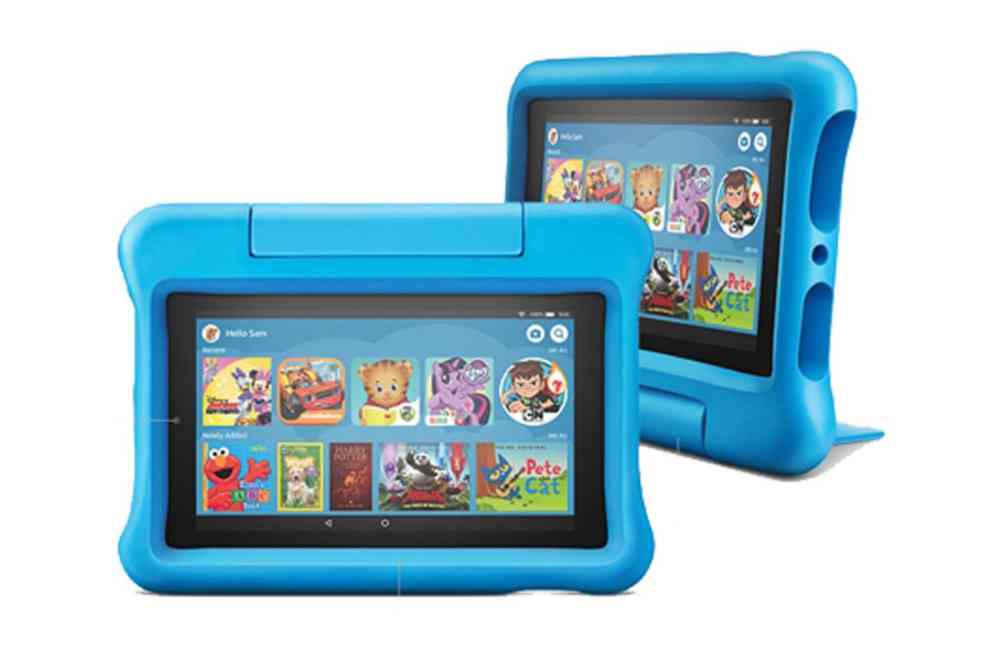
    Kid’s tablets are a relatively new technology that is becoming increasingly popular. It is a device that has been made specifically for kids, which means it comes with parental controls and has limited access to the internet.

    How expensive are kids’ tablets?

    The great thing about kids’ tablets is that they are really affordable, so parents don’t need to worry about breaking the bank by buying one for their child.

    Kids tablets in Ghana and their prizes

    TabletPrice (GHS)Specs
    Amazon fire 7GHS 1,400Display: 7” Storage: 16GB RAM: 1GB Battery: Up to 7 hours Camera: 2MP front and rear-facing
    Amazon fire HD 10GHS 2,500Display: 10.1” Storage: 32GB RAM: 3GB
    Bebe B-2040 PRO Dual SIMGHS 1,050Display: 10.1” Storage: 64GB RAM: 4GB Battery: 4000mAh Camera: 5.0MP Rear, 2.0MP front
    Bebe B42GHS 660Display: 7” Storage: 32GB OS: Android 8.1 RAM: 2GB Battery: 3000mAh Camera: 2MP+2.0MP
    Bebe B52GHS 545Display: 7” Storage: 16GB OS: Android 8.1 RAM: 2GB Battery: 3000mAh Camera: 2.0MP/2.0MP
    Bebe B55 HDGHS 545Display: 7” Storage: 16GB RAM: 2GB Battery: 3000mAh Camera: 5.0MP Rear, 0.3MP Front
    Bebe Tab B88 Dual SIM HDGHS 850Display: 8” Storage: 16GB RAM: 3GB Battery: 3000mAh Camera: 2MP+5MP
    Bebe-Tab B2050 AndroidGHS 1,050Display: 10.1” Storage: 64GB OS: Android 10.0 RAM: 4GB Battery: 4000mAh Camera: 5.0MP Rear, 2MP Front
    Bebe-Tab B45 AndroidGHS 545Display: 7” Storage: 32GB RAM: 2GB Battery: 3000mAh Camera: 2MP front, 2MP Rear
    Bebe-Tab B58 AndroidGHS 660Display: 7” Storage: 32GB OS: Android 9 RAM: 2GB Battery: 3000mAh Camera: 5.0MP Rear, 2MP Front
    Bebe-Tab B787 AndroidGHS 660Display: 7” Storage: 32GB OS: Android 8 RAM: 2GB Battery: 3000mAh Camera: 2MP Back, 5MP Front Face Unlock Wi-Fi
    Lenosed K14 AndroidGHS 888Display: 8” Storage: 128GB OS: Android 7 RAM: 4GB Battery: 4000mAh Camera: 8MP Back, 5MP Front Face Unlock
    Discover Note 9 PlusGHS 1,200Display: 10.1” Storage: 64GB OS: Android 9 RAM: 4GB Battery: 6000mAh Camera: 13MP Back, 8MP Front Dual SIM Face Unlock Bluetooth Wi-Fi
    Huawei MatePad T8GHS 1,800Display: 8” Storage: 16GB OS: Android 10 RAM: 32GB Battery: 5100mAh Camera: 5MP Front, 2.2MP Back Wi-Fi Bluetooth
    IDino Note Book 3 AndroidGHS 1,150Display: 7” Storage: 64GB OS: Android 10 RAM: 4GB Battery: 4000mAh Camera: 13MP/5MP
    Apple iPad (2021)GHS 3,360Display: 10.2” Storage: 64GB OS: iOS RAM: 1GB Battery: Up to 10 hours Camera: 12MP Front, 8MP Back Wi-Fi

    Conclusion

    The one thing that would need to consider when purchasing a tablet for a child is durability. These devices are not as durable as other devices on the market so it may not be worth spending a little more money for peace of mind.

  • How to check WAEC WASSCE Results 2022 | ghana.waecdirect.org

    How to check WAEC WASSCE Results 2022 | ghana.waecdirect.org

    If you are looking for the surest way to check your 2022 WASSCE results, it is through the Ghana WAECDirect Portal. WAEC will soon release the results for the 2022 WASSCE and as such, you will need to check the results as fast as you can.

    Here at Mfidie.com, we advise that you prepare adequately for the results. This means buying the results checker cards as soon as possible and keeping them while also knowing the steps to check the results.

    If you are a parent/guardian, you might need additional information about your ward including their index number and year of completion (most likely 2022).

    In this article, we have broken down everything you need to check the WAEC WASSCE 2022 Results. Do have a read, share, and leave a comment if you have any issues.

    https://mfidie.com/2022-wassce-results-release-date-full-guide/

    What do you need to check WAEC WASSCE Results 2022?

    To check your WASSCE 2022 Results, you need to have the following:

    • Results Checker PIN and Serial, which you can purchase on ResultsChecker Ghana or Simply Dial *790*024#
    • Your Index Number
    • Your Year of Completion
    • A compatible browser on your phone or PC, eg: Google Chrome. Don’t use Safari or Opera Mini

    How to buy WAEC WASSCE Results Checker PIN with Mobile Money

    You can easily buy as many WASSCE Result Checkers/PINS as you want via MoMo and receive them via SMS instantly.

    Kindly follow the steps below to buy your BECE Results Checker and pay with Mobile Money (MTN, AirtelTigo, Vodafone):

    1. Visit fastcheckers.com with your smartphone or PC
    2. Choose the card type you want to buy. eg: WAECDirect Results Checker
    3. Enter the number of cards you want to buy and the amount will be automatically calculated
    4. Click on “Buy Now”
    5. Enter your name and phone number (Card details will be sent via SMS to the phone number you enter here)
    6. Click on “Proceed to Payment”
    7. On the next screen, choose Mobile Money and enter your MoMo number. You’ll be sent an OTP to confirm.
    8. Confirm the payment on your phone.
    9. You will instantly receive an SMS with the WASSCE Results Checker PIN and Serial and instructions to check.

    How To Check 2022 WAEC WASSCE Results – ghana.waecdirect.org

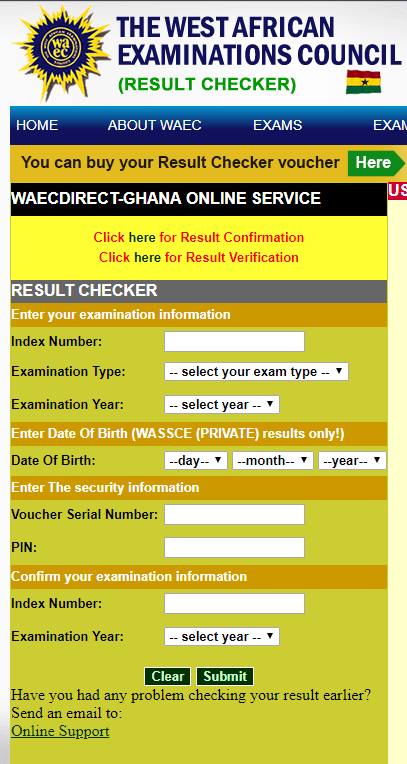
    1. Visit the WAEC WASSCE Result Checker Online Portal via the link: http://ghana.waecdirect.org
    2. Enter your Index Number.
    3. Select the Type of Examination (e.g. WASSCE School).
    4. Select your Examination Year eg. 2022.
    5. Enter the Serial Number found on the Voucher purchased (Starts with WGR)
    6. Enter the 12-digit Personal Identification Number (PIN) on your Voucher eg. 012345678912.
    7. Confirm your Index Number and Examination Year. This is to ensure that your examination information is correct.
    8. Click on Submit and wait for the display in the popup window. Your results will be displayed in a few seconds.

    WAEC Contact Details

    Head Office

    Kindly share this article with friends and family, you may be helping someone.

  • Kudus Mohammed Named As ‘TECNO Player Of The Match’ Award Winner

    Kudus Mohammed Named As ‘TECNO Player Of The Match’ Award Winner

    Mohammed Kudus was named the ‘TECNO player of the match’ award alongside winning Ghana’s player of the match for the game against South Korea in the ongoing 2022 World Cup in Qatar. TECNO is proud to sponsor the Ghana Football Association as the official smartphone partner to honor outstanding Black star players during this 2022 World Cup season in Qatar.

    Black Star technical advisor Chris Hughton presented the latest TECNO CAMON 19 PRO Mondrian Edition award to Mohammed Kudus. After receiving the award, Kudus thanked TECNO for the kind gesture and is excited about future collaborations with the brand.

    Mohammed Salisu was the first player to win the ‘TECNO Player Of The Match’ award for his stellar performance against Portugal in their opening match against Portugal.

    The Ghana Black Stars have truly owned the spotlight with remarkable play and boundary-breaking performances and TECNO is excited to urge the Blackstars on to victory this World Cup season with its latest CAMON 19 series, a device that comes with everything that users love – great camera, stylish look and a smartphone experience that delivers a truly one-of-a-kind aesthetic.

    The Black Stars are ready to hit the field again and Own the Spotlight on their next match against Uruguay. GO Blackstars, Stop At Nothing!

  • Where to buy Cheap Laptops in Ghana

    Where to buy Cheap Laptops in Ghana


    The truth is that many mini laptops serving as alternatives are also beyond budget. Just put your mind at rest because there are other top-quality laptops with lovely specs you could get at a lower price. The goodness is that some of the places highlighted below are sells cheap and affordable laptops ranging from a thousand Ghana and above.

    A portable personal computer is referred to as a laptop. The majority of a desktop computer’s components are also included in this device, including speakers, a monitor, a keyboard, and a pointing device such as a trackpad or touchpad.

    Utilizing an AC adapter to draw power from the mains, a laptop may also be utilized without an outlet by using a rechargeable battery.

    Other names for laptops include notebook computers, ultrabooks, and netbooks. Since they are lightweight and portable, this might also be called a portable computer.

    Jumia makes the process of purchasing your new portable computer easier and quicker; you can discover affordable laptops and laptop sales in Ghana here.

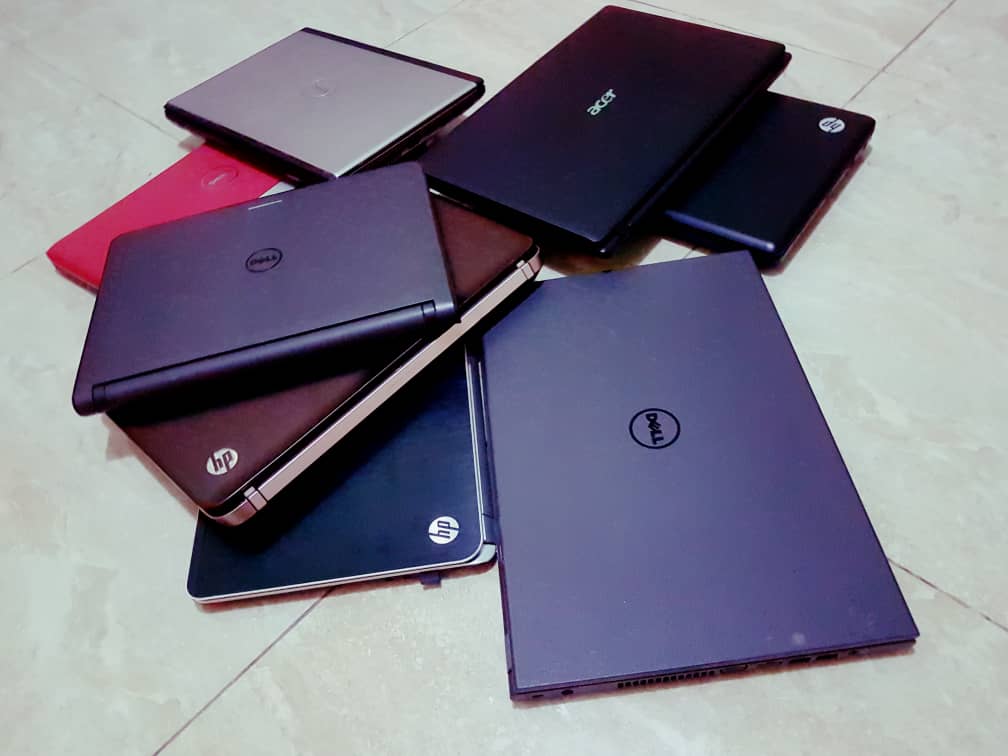
    To make the matter more interesting, the UK-used version is cheaper, you might decide to go for cheaper foreign-used laptops, but it is always advisable to buy from reliable and trusted places like Jumia, Jiji, Tonaton, OLX, or any renounced and trusted deals.

    Lists of the top 5 places to buy cheap laptops in Ghana

    1. Jumia

    Jumia is an e-commerce website that sells all kinds of products, ranging from groceries to tech-related stuff. Recently, Jumia has gained substantial popularity in Ghana and Nigeria due to the fact that they provide affordable and cheap products.

    When it comes to technology and digital products Jumia delivers the best. To get the best deal then you have to monitor their “BLACK FRIDAY” promo.

    Laptop brands on Jumia

    1. Apple
    2. Hp
    3. Dell
    4. Lenovo, etc.

    Note: For exquisite laptops, you have to contact their customer care support to aid you in the process of purchasing.

    2. Jiji Ghana

    Jiji is also a multi-vendor website where anyone can upload a product and sell it. Jiji provides a lightweight environment, which makes it possible for everyone to navigate their website and app.

    Since Jiji is a multi-vendor, they enforce strict rules to protect both the customer and the seller. The biggest online marketplace in Ghana, Jiji, links Genuine Buyers and Sellers. Since its 2014 inception, Jiji has provided services to more than 200 million consumers across five nations.

    Brands of laptops on jiji Ghana

    Since Jiji is a multi-vendor you can get any type of product to buy, there is no limit to what you can buy on Jiji.

    1. Apple
    2. Dell
    3. Samsung
    4. Lenovo
    5. Hp
    6. Predator
    7. Alienware, etc.

    3. OLX Ghana

    In a remarkable length of time, OLX has become one of Ghana’s top e-commerce sites. You may choose from a wide selection of high-quality items and benefit from first-rate logistics support.

    They provide a huge selection of goods, including computers, mobile phones, toys, speakers, footwear, hair products, chargers, meals, wristwatches, printers, and more.

    By offering the option of pay-on-delivery or bank transfer, the OLX shopping site makes payments simple and convenient. The choice to pay in installments is also available to merchants.

    4. Tonaton

    In Ghana, Tonaton used to be a well-liked online retailer for all things technological. Tonaton, one of Africa’s largest e-commerce platforms, was formed by the merger of two of the best Nigerian online malls.

    Before being bought, Tonaton was one of Ghana’s biggest online malls. Tonaton was also a powerful offline and online retailer in addition to being a pioneer in composite e-commerce.

    Tonaton sells anything you might imagine, including high-end brands of electronics, mobile phones, laptops, apparel, cosmetic items, home goods, kitchenware, building supplies, and much more.

    Laptop brands on tonaton

    Just like Jiji, tonaton is a multi-vendor you can get any type of product to buy, there is no limit to what you can buy on Jiji.

    1. Apple
    2. Dell
    3. Samsung
    4. Lenovo
    5. Hp
    6. Predator
    7. Alienware, etc.

    5. Freddies Corner

    Both offline and online operations are handled by Freddie’s Corner Ghana. They offer everything electronic for sale. It gained popularity in 2016 and has been able to keep it up to this point.

    You can browse a variety of electronic product lines, including everything from televisions to mobile phones, on their website. Unlisted goods can be purchased directly from their brick-and-mortar stores. Across Ghana

    Conclusion

    Cheap is relative and depends on the task you want to do with the laptop. You can visit any of these site to cross-check the various prices of the laptop you want before making a purchase. Hope this pice helps.

  • WASSCE Results Checker 2022: How To Check On Phone with MoMo & Shortcode

    WASSCE Results Checker 2022: How To Check On Phone with MoMo & Shortcode

    The West Africa Examinations Council has now released results for all Senior High School Students who participated in the 2022 WASSCE in Ghana.

    The 2022 option for checking results is now available on the WAEC Ghana site for checking.

    The WASSCE Provisional Results 2022 is not released yet; however, WAEC has said that the 2022 WASSCE results will be released today 30th November 2022. If you want to be reminded when results are released, click here and leave your phone number.

    In this tutorial, we will teach you how to check your WASSCE results instantly online without the need for a scratch card but by using MoMo. If you need help, call our service center on 0555475811.

    https://mfidie.com/2022-wassce-results-release-date-full-guide/

    How to buy WASSCE Results Checker with Mobile Money

    You can easily buy as many WASSCE Result Checkers/PINS as you want via Mobile Money and receive them via SMS instantly.

    Kindly follow the steps below to buy your BECE Results Checker and pay with Mobile Money (MTN, AirtelTigo, Vodafone):

    1. Visit fastcheckers.com with your smartphone or PC
    2. Choose the card type you want to buy. eg: WAECDirect Results Checker
    3. Enter the number of cards you want to buy and the amount will be automatically calculated
    4. Click on “Buy Now”
    5. You will be taken to a new screen where you enter your name and phone number (Card details will be sent via SMS to the phone number you enter here)
    6. Click on “Proceed to Payment”
    7. On the next screen, choose Mobile Money and enter your MoMo number. You’ll be sent an OTP to confirm.
    8. Confirm the payment on your phone.
    9. You will instantly receive an SMS with the WASSCE Results Checker PIN and Serial and instructions to check.

    Code for Checking WASSCE Results on Phone

    If you will prefer to use a shortcode, dial *790*024# to buy a WASSCE results checker and check your results fast. This code has been tested and works all the time.

    How to get your WASSCE Results Checker PIN on WhatsApp with Mobile Money

    You can get the WASSCE Pin at selected Internet Cafes and bookshops across the country for GHS 18 or GHS 20. Beware of scammers who may say they are selling it cheap. They may only take advantage of you and try to charge you very low prices.

    IKE is running a special offer for all those who want the PIN to be sent directly to their phones via SMS or WhatsApp. He is giving out the WASSCE Pin for just GHS 17.

    Kindly call us on 0555475811 for help.

    Just follow the steps below to get your results checker.


    Step 1: Send MTN Mobile Money GHS 17 to 0535462067, Subscriber (Isaac)

    Step 2: Send the name on your Mobile Money Account you used to send the money or the Merchant’s Name back to 0535462067 through WhatsApp.

    Step 3: You will receive the SERIAL and PIN to check your WASSCE MAY/JUNE 2022 results once the payment is confirmed. It takes 5-10 minutes for us to send the card to you after verifying your payment.


    Kindly send a WhatsApp message for further instructions or clarifications.

    Note: Not all phone calls can be answered due to the number of people calling. Follow the steps on paying to get the PIN through WhatsApp. Don’t try WhatsApp Calling as that slows the process.

    All you need to check your WASSCCE results in 2022 is your PIN which we will provide for you. If you need help, contact our Customer Service on 0555475811.

    How to check WASSCE Results 2022 online

    Here is how to check WAEC results online. You need to connect your PC or your mobile phone with any internet network connection. Please don’t use Opera Mini for these steps.

    Follow the step-by-step instructions given below, if you get stuck, call us on 0555475811 or send a WhatsApp message to IKE at 0535462067 for help or for your PIN (Instructions on that above).

    Here is a step by step instruction on how to check WASSCE 2022 Results:

    1. Use any browser, preferably Google Chrome, and visit eresults.waecgh.org or ghana.waecdirect.org (if your card starts with WGR).
    2. On the next screen, enter your 10 Index Number: Eg: 0072302043
    3. Enter your WAEC exam year of completion. Eg: 2022
    4. Enter the exam type you sat for. Eg: WASSCE School 2022
    5. Now, you will need to enter your 10 Digit Pin here. Enter the secret Pin.
    6. Submit your personal information and patiently wait for your results.
    7. A new screen will pop up confirming your results.

    Confirm your WASSCE Results 2022 with a Scratch Card

    If you already have a scratch card and would not prefer the PIN Method (which is more convenient), then this is how to use the scratch card to check your results.

    1. Visit the Waec Result Checker Online Portal via the link below;
      http://ghana.waecdirect.org
    2. Enter your Index Number.
    3. Select the Type of Examination (e.g. WASSCE).
    4. Select your Examination Year eg. 2022.
    5. Enter the Card Serial Number found on the reverse side of your Scratch card.
    6. Enter the 12-digit Personal Identification Number (PIN) on your Scratch card eg. 012345678912.
    7. Confirm your Index Number and Examination Year. This is to ensure that your examination information is correct.
    8. Click on Submit and wait for the display in the popup window. This may take several seconds.

    WAEC Contact Details

    Head Office

    Kindly share this article with friends and family, you may be helping someone.