It’s the last week of February 2021 and the results for 2021 BECE candidates have still not been released. This means that the placements, which are usually after the results have been released are also delayed.
Usually, results are expected to roll in 45 days after the end of the examinations; but in recent years, this has become more and more unlikely.
Parents, Candidates as well as teachers are looking forward to the results. In this article, we look at the reasons why the 2021 BECE and subsequently the CSSPS Placements for the 2021 candidates have been delayed.
Reasons why the 2021 BECE Results & Placement
Late re-opening date for SHS 1 Students for 2022/2023 academic year
SHS 1 students will resume on the 4th of April 2022 as per the timetable released by the Ghana Education Service. This means that there is still more than 2 months for Students and Parents to prepare for school. Therefore, WAEC is not under so much “Pressure” to release the results.
As a result, parents can still have the opportunity to prepare for school should the results and placements even be released in early March of this year.
Timing of BECE Exams and Nov/Dec examinations
Due to the repercussions of the COVID-19 pandemic and its effects on the general academic calendar, most of the exams conducted by WAEC tend to be written close to each other.
This means that there is more pressure on those marking (BECE has the most candidates). Last year, the BECE and WASSCE Private (NOV/DEC) were written so close to each other.
Also, the same system is used for uploading and releasing results so the workers at WAEC evidently have more to handle, hence the delay.
BECE 2021 Release Date
The most important information right now is that the marking of BECE Results is now completed.
So when will the 2021 BECE Results be out? Reliable sources indicate that the 2021 BECE Results is expected to be out from 1st March 2022 to 5th March 2022. All BECE Candidates will then be able to check their results on the WAEC eResults Portal.
This is because, the official checking site, eresults.waecgh.org has already included 2021 in the years one can check the BECE results, giving the indication that the results will soon be uploaded to be checked.
BECE candidates, therefore, have to prepare by buying their checker cards now, to prevent shortages and pressure when the results are finally released. You can buy the eresults checker (for checking BECE 2021 results) by visiting Results Checker Ghana.
How to buy BECE Results Checker with Mobile Money instantly
Gone are the days when people have to move from internet cafe to internet cafe all in search of WAEC Scratch Cards. Now, with innovation, the process is easy and can be completed in just 2 minutes.
Be careful not to fall prey to fraudsters who might try selling cheap and fake cards to you.
Kindly follow the steps below to buy your BECE Results Checker and pay with Mobile Money (MTN, AirtelTigo, Vodafone).
Choose the card type you want to buy. eg: WAEC eResults Checker
Enter the number of cards you want to buy and the amount will be automatically calculated
Click on “Buy Now”
You will be taken to a new screen where you enter your name and phone number (Card details will be sent via SMS to the phone number you enter here)
Click on “Proceed to Payment”
On the next screen, choose Mobile Money and enter your MoMo number. You’ll be sent an OTP to confirm.
Confirm the payment on your phone.
You will instantly receive an SMS with the BECE Results Checker PIN and Serial and instructions to check.
You can easily buy as many BECE Result Checkers/PINS as you want via Mobile Money and receive them via SMS instantly. Note that if you face any problems, you can call the Results Checker Ghana call center on 0555475811 and you will be attended to.
No matter what sports you’re into, there’s always a different feel when you get to bet for your beloved teams, may it be in person or in apps like the Betway app. Betting in apps vs. betting in person is debated among punters of all levels and disciplines.
But there is no correct answer that applies to everyone. So which option should you choose? Well, only one way to find out. This article will help you weigh those factors to consider before deciding how to bet.
Pros and cons of betting apps
Pros
Betting in apps like the Betway app is much more convenient, safer, and faster than betting in person. You don’t have to leave your house, you save on gas and travel time, and you can even place wagers in bed with your mobile phone.
It allows for more bonus offers and promotions than land-based sportsbooks, which is a great way to add value to your bets. Many sportsbooks (especially offshore ones) also offer better odds and bonuses than local books, which can be good for the player.
Betting in apps also offers greater anonymity than betting in person. Even if you’re betting at a game, people will see what you put on your slip, but no one can see what bets you’re putting on through an app.
Cons
The convenience provided also comes with the price of having betting apps to be addictive in nature if left unattended. Unlike in-person betting, there are no operational hours as you can bet any time and any amount you want. This is why practicing self-control and having a set budget before you bet is always a wise move, both personally and financially.
Pros and cons of betting in person
Pros
Betting in person makes it easier to see stats and information before placing a bet. You can browse through multiple screens with stats and odds before you place your wager.
It may also be more convenient if there is a local sportsbook that you trust. Sportsbooks are usually also casinos, so if you like playing games after betting on sports, it might make sense for you to visit one.
Cons
The first major disadvantage is that you have to deal with the public. This can be annoying, especially if it’s crowded at the sportsbook and you have to wait in line to place your bet. It is also inconvenient if you don’t feel like getting off the couch or leaving home and you want to place a bet right now.
Another disadvantage of betting in person is that you can only bet on what’s on the board at that time. The lines might not come out until an hour before a game, so you might have to make your bets without knowing a team’s injury report, for example.
Comparing the two
It’s a little harder to make an app seem like a community. You can try, for example, with comments and forums, but it’s not the same as being able to look someone in the eye or read their body language.
Another challenge is that people can be very different on apps than in person. Have you ever been surprised by how someone looks or acts when you finally meet them after interacting through an app?
Apps are easier to use, safer, and more convenient than betting in person. The challenge with betting in apps is that it can be hard to develop the kind of community feeling that can come with meeting people face to face.
Though it all comes down to personal preference, betting in apps is the go-to option these days, especially if you’re new to the scene.
Placing your bets in apps
Betting in apps has many advantages over betting in person. It is easier, more convenient, and more private. It enables you to play for longer by giving you better odds. And it is ultimately less costly—especially if you are betting on your cell phone bill. These reasons make betting in apps like the Betway app the better choice.
Dental email marketing is all the rage these days. With competition increasing, marketers do their best to get new clients into their offices. Email opens rates seem to be good enough for some dental practices, but they’re not willing to take it any further than that. They’re satisfied with sending out emails and getting a 5% click-through rate (CTR).
If you feel like your dental email campaign could use improvement, keep on reading! Below are some of the best practices used by top marketers in dental email marketing. Take note and how they can help you improve your campaign today.
Keep it short
When writing your email campaigns, try limiting yourself to just one or two sentences per paragraph at most. If you want to add more information, be sure your client can access it by simply clicking on a link. Doing this allows the user to stay within the email while still getting important information without wasting space in your message.
Send it at a decent hour
When sending dental emails to your clients, make sure that time of day matters too. When most people are at work, sending out an email is not optimal for opening rates. You will compete with work emails and find that people may not even see yours until later in the night. That’s why 9:00 AM-10:30 AM seems to be optimal for dental email marketing campaigns since most people check their email over morning coffee or breakfast before they start their day.
Use clear, attractive subject lines
Many dental practices choose to use their patients’ first names in the email subject line. This is a good start, but it doesn’t do all that much for you. Remember that people often don’t open emails when they see an unidentified sender and subjects irrelevant to them. If your message is important enough for someone to read, why not make it easy on yourself? You can save time by using a specific phrase or even just “dental email” instead and making the individualized aspect come across in the actual email message itself.
Include phone numbers
Don’t be afraid to give out your office phone number every once in a while! Most services are available by phone, so it can’t hurt to include your contact information in the email. If clients are interested enough, they’ll call. If not, you’ve at least given them that option.
Try using videos
Nowadays, people love watching dental videos. You might consider sending out short 3 minute videos to your clientele highlighting topics of interest or personalizing your practice services to better address their needs.
Incorporate social media
Next time you send out an email campaign, make sure it includes a link to your business’s Facebook page or Twitter account! People are becoming more social day by day, and if you don’t incorporate these aspects into your message, you could be missing out on potential clients seeking more info about what you offer.
With these simple dental email marketing best practices in mind, you will be well on your way to expanding your clientele and acquiring new patients. If you’re not already using email campaigns in your dental practice, now’s the time!
It’s 2022 and Parents, Stakeholders as well as candidates are eagerly waiting for news on the release of the 2021 BECE Results. The exams which was taken last year is the last step before candidates enter Senior High Schools in Ghana.
In this article, we will explain what exactly the BECE Result Checker is, for those who are hearing of the term for the first time, as well as give details as to how every parent or candidate can get one from a reliable source as well as how to check the BECE Results for the candidate.
What is BECE Result Checker?
The BECE Result Checker is a combination of a PIN and Serial number which is generated by WAEC’s systems and made available to candidates to be used to check their results via the eresults.waecgh.org portal.
Usually, resellers buy the BECE Result Checker from WAEC directly and make it available on various platforms like fastcheckers.com. Without the BECE Result Checker (sometimes called the eresults Checker), you would not be able to check your BECE Results online.
When will the BECE Results be out?
The BECE Results for 2021 is expected to be fully rolled out and available to the public from 1st March 2022 to 5th March 2022. All BECE Candidates will then be able to check their results on the WAEC eResults Portal – eresults.waecgh.org.
How to buy BECE 2021 Result Checker on Phone with Mobile Money
Follow the instructions below to buy your BECE Results Checker with MoMo easily.
On the next screen, enter your Index Number: Eg: 0070202043
Enter your WAEC exam year of completion. Eg: 2021
Enter the exam type you sat for. Eg: BECE School 2021
Now, you will need to enter your 10 Digit Pin here. Enter the secret Pin.
Submit your personal information and patiently wait for your results.
A new screen will pop up confirming your results.
Download as PDF, screenshot it or print your results
BECE Result Checker Code
The code to check BECE results does not work well anymore. Many people have paid money through it but have not received their code. Therefore it is not advisable to use it, as you may lose your money.
The West Africa Examinations Council will soon release results for all Junior High School Students who participated in the 2021 Basic Education Certificate Examination (BECE). The 2021 Basic Education Certificate Examination (BECE) started on Monday, 15th November 2021 and ended on Friday, 19th November 2021.
This year, there is a new system for checking the 2021 BECE Results, similar to the 2020 method which we will inform you about.
Knowing your BECE result is the first thing to do when seeking a sense of your future study life. This is because you need the results to know which SHS you have been placed in.
In this tutorial, we will teach you how to check your BECE results instantly online on your phone with Mobile Money.
Yes. The 2021 BECE Results for Ghanaian Candidates been released by WAEC Ghana. The 2021 BECE results were released on 28th February 2022.
Students are now able to check their 2021 BECE results all over the country.
This year saw the largest number of registered candidates sit for the examination.
The BECE result checker process has been simplified and candidates can check online for their results. We have prepared the best way to check your BECE results
For all your questions call our service centre on 0535462067.
All you need to check your BECE results in 2021 is your PIN which we will provide for you. If you need help, contact our BECE Pin sales customer care, 0535462067 for inquiries on getting your PIN. You can contact him via WhatsApp.
How to buy BECE Results Checker PIN with Mobile Money
You can easily buy as many Result Checker PINS as you want via Mobile Money and receive them via SMS instantly.
Kindly follow the steps below to buy your BECE Results Checker and pay with Mobile Money (MTN, AirtelTigo, Vodafone):
Choose the card type you want to buy. eg: WAEC eResults Checker
Enter the number of cards you want to buy and the amount will be automatically calculated
Click on “Buy Now”
You will be taken to a new screen where you enter your name and phone number (Card details will be sent via SMS to the phone number you enter here)
Click on “Proceed to Payment”
On the next screen, choose Mobile Money and enter your MoMo number. You’ll be sent an OTP to confirm.
Confirm the payment on your phone.
You will instantly receive an SMS with the BECE Results Checker PIN and instructions to check.
How to get your BECE Results Checker PIN (WhatsApp Method)
You can get the BECE Pin at selected Internet Cafes and bookshops across the country for GHS 18 or GHS 20. Beware of scammers too who will only take advantage of you and try to charge you at very low prices, they are not real. Save your money.
IKE is running a special offer for all those who want the PIN to be sent directly to their phones via SMS or WhatsApp. We are giving out the BECE Pin for just GHS 17.
You will need to send Mobile Money of GHS 17 and contact the number via WhatsApp to receive your Pin Instantly.
Here is how to check the 2021 BECE results online. Some people are using shortcodes that only take their money and don’t check for them. We have shared how to buy the scratch card or PIN via fastcheckers.com
Scroll down and enter your 10 Index Number: Eg: 0070202043
Enter the Index Number again to confirm. Eg: 0070202043
Enter the exam type you sat for. Eg: BECE School or BECE Private
Choose your BECE exam year. Eg: 2020
Now, you will need to enter your 12 Digit Serial Number here. Enter the Serial Number.
Next, enter your alphanumeric PIN: Eg: A1B2C3D4E5F9
Submit your exam information and click on “Agree” to accept the terms.
Upon successful completion, you will be redirected to a page that displays your results.
Screenshot it, print it, or save it as a PDF to use at a later date.
Please note that due to pressure on the system, sometimes the WAEC site goes off. So if the site is not opening for you, try late at night or early in the morning. You can also be checking every 30 minutes.
Kindly share this article with friends and family, you may be helping someone.
WAEC Ghana Grading System for BECE
The grading system for BECE gives a Ghanaian candidate with an excellent score an A1 and B2 grade, a good score candidate gets a B3, a credit candidate gets a C4, C5, and C6 grade, and finally, a “pass” student gets a D7 and E8 grade.
In simple terms, below is the BECE grading scale or the used BECE grading system 2020:
Excellent
A1
75% – 100%
Very good
B2
70% – 74%
Good
B3
65%- 69%
Credit
C4
60% – 64%
Credit
C5
55% – 59%
Credit
C6
50% – 54%
Pass
D7
45% – 49%
Pass
E8
40% – 45%
Failure
F9
0% – 44%
Here is a list of the subjects that are usually tested at the Basic Education Certificate Examination:
English Language
Mathematics
Ghanaian language and culture
Integrated Sciences
Social Studies
Basic Design and Technology
Information Communication Technology
French (optional)
Religious and Moral Education
Remember that we are running a special offer for all those who want the PIN to be sent directly to their phones via SMS or WhatsApp. We are giving out the BECE Pin for just GHS 17 (Genuine Cards from WAEC).
You will need to send Mobile Money of GHS 17 and contact 0535462067 via SMS or WhatsApp to receive your Pin Instantly.
Frequently Asked Questions about checking BECE Results Online and on Phone in Ghana
What is BECE Results Checker PIN?
The PIN stands for Personal Identification Number. It is a unique 12-digit number that is required to access the service. The service enables access to a candidate’s results and also allow requests for result confirmation and verification. The PIN is found on a Serial and Pin bought online or on a valid scratch card.
What is a Results Checker scratch card?
A scratch card is a slip that holds the PIN required to access the service. The scratch card applicable for eResults service is appropriately marked.
Where can I buy a BECE Results checker scratch card?
A Scratch card may be purchased at the regional offices of WAEC and at any other outlets. We recommend buying from Sir Ike by calling 0535462067 or 0555475811.
How many times can I check my results?
You may check your results up to a maximum of 3 (three) times, 1 unit for each use, with 1 (one) scratch card. In order to check further after exhausting the 3 (three) units, you will need to purchase another scratch card which will entitle you to another 3 (three) units.
Can I use one scratch card or PIN to check more than one result?
No. You may only use one scratch card with only one result. To either check, confirm or verify another result of interest, you will require a new scratch card. If you misuse a scratch card by attempting to use it against another result different from the first, you will be penalised as having used the card, and will be presented with the appropriate error message.
What is the shortcode to check BECE results?
The code to check BECE results does not work well anymore. Many people have paid money through it but have not received their code. You can however use the website: fastcheckers.com to get a PIN for the results.
The actual date for the release of the BECE is not yet known. Due to the delays from the coronavirus and the academic calendar, WAEC will communicate when they will release the results a few weeks after the exams are taken. Currently, it is expected that the 2021 BECE results will be released in early March 2022.
In this tutorial, we will teach you how to check your results instantly online without the need for a scratch card.
Although the results are yet to be released, it will be good to buy the result checker for BECE and keep it to check the results late.
This will help to prevent shortages or any price increases.
Note: Not all phone calls can be answered due to the number of people calling. Follow the steps on paying the getting the PIN through WhatsApp.
All you need to check your BECE results in 2021 is your PIN which we will provide for you. If you need help, contact our BECE Pin sales executive, IKE on 0535462067 via WhatsApp.
How to get your BECE Results Checker PIN
You can get the BECE Pin at selected Internet Cafes and bookshops across the country for GHS 18 or GHS 20. Beware of scammers too who will only take advantage of you and try to charge you at very low prices.
IKE is running a special offer for all those who want the PIN to be sent directly to their phones via SMS or WhatsApp. He is giving out the BECE Pin for just GHS 17.
Step 1: Send MTN Mobile Money GHS 17 to 0535462067, Subscriber (Isaac)
Step 2: Send the name on the Mobile Money Account you used to send the money or the Merchant Name back to 0535462067 through WhatsApp.
Step 3: You will receive the SERIAL and PIN to check your BECE 2021 results once the payment is confirmed. It takes 2-4 minutes to send the card after payment.
Kindly send a WhatsApp message for further instructions or clarifications.
How to check your 2021 BECE Results on Phone
After you have purchased your BECE 2021 Pins on fastcheckers.com, follow the steps below to check your results.
On the next screen, enter your Index Number: Eg: 0070202043
Enter your WAEC exam year of completion. Eg: 2021
Enter the exam type you sat for. Eg: BECE School 2021
Now, you will need to enter your 10 Digit Pin here. Enter the secret Pin.
Submit your personal information and patiently wait for your results.
A new screen will pop up confirming your results.
Download or print your results
Confirm your BECE Results 2021 with a Scratch Card
If you already have a scratch card and would not prefer the PIN Method (which is more convenient), then this is how to use the scratch card to check your results.
Businesses across the board rely on their sales, and marketing teams to generate sales leads and close deals.
Yet, for some marketers, investing in digital marketing strategies feels like a mountainous task that requires plenty of resources to work.
Any strategy (digital or otherwise) worth its salt will require time, planning, and finances to work. So, you might as well join the bandwagon.
If your team isn’t ready to dip their toe in seemingly complex tactics, here are simple but effective digital tactics for improving sales leads.
Focus on Creating Positive Experiences
All the interactions that potential customers have with your business impact their perception of you.
If their perception is negative your marketing efforts will be dampened.
Here are some actions you can take to create positive experiences among potential customers.
Understand your buyer’s journey. In an era of self researching, much of the prospect’s journey happens without a salesperson. You can influence their decisions by paying attention to the content they read and pages they linger on and initiating meaningful conversations based on this.
Be agile. Buyer needs and interests can change in the course of the purchase journey and you should be agile and flexible enough to accommodate them. Sticking to strictly laid down procedures may mean missing opportunities to engage, innovate, and grow to meet growing demands.
Personalize experiences. Relationships are everything. Improve your “likeability factor” and make your sales leads feel special by personalizing their experience. Craft messages that resonate with your leads, remember names and details, ask insightful questions, and be an active listener.
Use Email Marketing
Don’t underestimate email marketing’s power to promote goods/services, develop relationships with leads and keep them updated.
According to research, properly executed email marketing campaigns can earn your business $36 – $45 for every dollar you sink in.
These returns are great but pay attention to the words properly executed—because that’s what will earn you $$
Here are tips to help you get the strategy right:
Know who is in charge. Most of us email CEOs believing them to be the right contact persons, which may not always the case. Before emailing, find out who the decision-maker is and target them directly.
Create profit-oriented emails. Brands are constantly looking for ways to boost revenues. Let your emails clearly demonstrate how your solutions can help your target company maximize profits.
Offer your leads something. Give out free consultations, trials, or training, useful checklists, templates, and industry reports to incentive prospects to try out your solutions.
Work on your subject lines. Most people skim subject lines and only open those that pique their interest. Let the subject line communicate the purpose of the email, keep it short and avoid using click baits. In the latter’s case, your email might appear like spam and find itself in the trash.
Create Relevant Content
People don’t buy because they have found content on your website. They buy because the message you’re sharing is relevant to them.
How do you ensure your content is relevant? By, first understanding who your message needs to appeal to.
Here are people within an organization who may influence the purchase process and the content they might want to see:
End-users. Most teams overlook this lot, forgetting that they are the ones interacting with the business solutions you offer. They may be interested in watching demos, reading unbiased customer reviews and case studies, and attending webcasts.
Researchers. This group comprises junior staff instructed by their bosses to research solutions and report back. They scour the internet looking for these solutions, so grab their attention with white papers, demos, and product overviews.
Finance decision-makers. The finance team doesn’t necessarily look at the technical aspects of your solutions but they want to know if it’s worth paying for. ROI calculators, datasheets, and webinars that demonstrate value are good choice content.
Executives. This group juggles your solution’s ability to help them attain their goals and the financial implication of the investments. Share content that discusses key business challenges your solutions can tackle and expected outcomes. Executives look at white papers, industry reports, case studies, and ROI calculators.
Up to 74 percent of marketing teams include web forms in their lead generation strategies. And as far as lead generation tools go, 49.7 percent indicated that web forms offer the highest conversations.
Web forms work.
Embedding web forms on websites is a near-effortless way of connecting with interested visitors.
Place them in strategic places to help site visitors access gated content, sign up for a service or newsletter, and get in touch with you.
Here are some benefits of incorporating web forms
Automating lead capture. Manually checking which offerings/web pages appeal to your visitors can be tedious and a waste of company resources. Web forms smoothen the process by bringing interested parties to you.
Improved targeting. Web forms provide data that reveals visitor interests and needs. You can use the information to improve your buyer personas and share highly relevant content with subscribers.
Utilizing passive data collection. Through web forms, website activities like downloading content or signing up for webinars, your team can activate workflows to nurture and convert these leads.
5. Make Cold Calls
Making real connections is a tough but crucial starting point for business relationships.
What better way is there to initiate conversations with sales leads than through cold calling?
Research by RAIN Group backs this. Senior-level buyers prefer being contacted through the phone while 82 percent of buyers agree to meetings with vendors who contact them.
If you want to improve sales leads and generate revenues, put together your value proposition and pick up the phone.
Best practices include:
Change your mindset. Long have salespeople struggled with the “nagging salesman” title. When you pick up the phone, you’re not a nag, rather a professional who can solve problems and help partner companies thrive. Go in with this mindset.
Research your prospect. You want to connect with brands that may be interested in the solutions you provide. Look up their industry, the challenges they endure along with their expectations, and your capacity to handle them.
Leverage sales triggers. Is your target company expanding? Have they secured new funding? Perhaps new C-suite executes have been appointed? Look for events that may create opportunities for you to work together.
Try not to overwhelm the prospect. While trying to win over the prospect, many salespeople overshare information, leaving the prospect a little giddy and not knowing what to think about. Share just enough information to interest them in a
All candidates who wrote the 2021 Basic Education Certificate Examination (BECE) will be looking forward to when their results will be released. Although the results were rumoured to be out this year, it seems very unlikely.
In this article, we will look at what likely dates the BECE will be out for both public and private who took the examinations a few months ago.
We encourage you to share this article with your family, friends and mates so they will also be updated on the release date for the 2021 BECE.
Why do we need to know when 2021 BECE Results will be released?
Depending on what your interests are in the examinations, you likely need the information on the release of the BECE exams to take some sort of next action.
The Ghana Education Service (GES) would primarily use the info on candidates’ results to do the Computerised School Selection Placement System. This means that, without the release of the results, school placements will not be out.
Candidates will be looking forward to knowing how well they fared in the exams. The BECE is undoubtedly the biggest exam yet for most of the people who took it. Knowing how well you performed in the exams will help boost your overall morale in the long academic journey.
Parents and guardians also need the information quickly, to continue with the CSSPS Placement so that they can buy all that they need for their wards SHS.
When will 2021 BECE Results be out?
So when will the 2021 BECE Results be released? The BECE Results for 2021 Candidates were released on 28th February 2022. All BECE Candidates are now able to check their results on the WAEC eResults Portal.
How to check 2021 BECE Results
After you have purchased your BECE 2021 Pins on fastcheckers.com, follow the steps below to check your results.
On the next screen, enter your Index Number: Eg: 0070202043
Enter your WAEC exam year of completion. Eg: 2021
Enter the exam type you sat for. Eg: BECE School 2021
Now, you will need to enter your 10 Digit Pin here. Enter the secret Pin.
Submit your personal information and patiently wait for your results.
A new screen will pop up confirming your results.
Download or print your results
BECE Ghana Grading for 2021
The grading system for BECE gives a Ghanaian candidate with an excellent score an A1 and B2 grade, a good score candidate gets a B3, a credit candidate gets a C4, C5, and C6 grade, and finally, a “pass” student gets a D7 and E8 grade.
In simple terms, below is the BECE grading scale or the used BECE grading system 2021:
Intepretation
Grade
Percentage Score
Excellent
A1
75% – 100%
Very good
B2
70% – 74%
Good
B3
65%- 69%
Credit
C4
60% – 64%
Credit
C5
55% – 59%
Credit
C6
50% – 54%
Pass
D7
45% – 49%
Pass
E8
40% – 45%
Failure
F9
0% – 44%
Here is a list of the subjects that are usually tested at the Basic Education Certificate Examination:
Recently, the world saw a drastic phase that left every sector in tatters. Nothing was left unaffected by the wrath of the COVID-19 virus. The pandemic took the world by storm and within months, every organization, from the corporate world to the education sector, was closed down for an indefinite period of time.
However, these organizations couldn’t stay put for long due to the nature of their work. Before we knew it, they had shifted everything to the remote method of working. However, this increased the painstaking work of the human resource department. HR managers and HR executives from all over the world started shifting their work to software-based methods. They began investing in tools that would help them in evaluating the demographics of the organization, the earnings, the deductions, and everything else. Platforms such as Paylocity offer features that make their work a walk in the park.
Here are some of the best and basic tools that an HR manager or an HR executive must use in 2021 to make their work efficient and effective, and bring out the best output:
Paylocity: Paylocity offers a complete package to the HR managers and executives to evaluate the employees’ progress and their work. The features integrated into this software are useful for organizations of all sizes to manage and keep a track of their employees’ performance, benefits, requests, deductions, engagement, time-offs, compensation, incentives, and much more. The support channel of Paylocity includes live chat support, call support, and an online live community to solve any kind of issue that may come up during the functioning of the software and business hours.
EddyHR: EddyHR is a software-based management system that comes with an HR suite consisting of all the necessary features that an HR would need in order to keep a track of the activities of the employees. The software is quite simple and easy to manage while still having all the necessary components to call itself a successful software. The software has an in-house customer support team that is ever-ready to help you in times of need. Sometimes there may be technical issues that you cannot deal with on your own. Hence, having an active support team is definitely a boon.
Zoho People: Zoho People is one of the best HR management systems in the world and is widely popular. It is a cloud-based HR software developed to focus on the all-around development of the employees, help them adapt to the changes in the organization, and make the HR management process agile and smooth. Zoho People doesn’t use absurd spreadsheets to keep a track of the employees. The software provides the HR managers with a database of the employees with comparisons. It enables smart HR workflows and insightful analytics of the employees. Tracking attendance, scheduling shifts, efficient tracking of day-offs, and converting time to timesheets, everything is possible with Zoho People.
Factorial: Factorial is another leading platform for HR managers making their work easier and more efficient. This software allows HR managers to track the holidays and absence records of employees, and is equipped with features such as team calendars, holiday policies, and customized absences. Factorial makes time tracking and shift management a piece of cake and HRs can generate custom reports and track employee time. Preparing HR reports and analytics had never been easier, Factorial makes everything more efficient and easy for the HR managers.
Conclusion: The work of HR is not an easy one. It falls upon them to manage every employee and see that they are working efficiently and effectively in favor of the organization. Keeping the track of the progress of the employees, looking after their grievances, evaluating their performance, keeping their leave records, and maintaining the records and analytics of the employees are parts of an HR manager’s job. The tools and platforms that are mentioned above provide a systematic procedure to the HR department and help them in doing their job in the most optimum manner. These software-based platforms need the HR to feed the data and as a result, a perfectly calculated analytical record is produced by the software which is helpful in keeping track of the employees’ growth and progress.
As signs became more popular, then prices fell, so the signs became even more popular, and now we are seeing them everywhere from hospitals to garage waiting rooms.
As a result of their popularity, many apps have been created and/or adapted to work on or for digital signs. Here are a few of the more popular digital sign apps that digital sign owners can use on their digital signs.
The KitCast App
Let’s start with an app that allows you to use your digital sign software on your mobile device.
People use KitCast to create the content for their digital signs, and they use it to control their digital signs (define content lists, set schedules, etc.).
If you have and use the KitCast for Android TV app, then you do not need a PC or laptop to control your digital signs, you can use your mobile device so long as you have an Internet connection.
Weather Apps
There are now so many of these that are compatible with digital signs that it seems unfair to single just one out.
These have become oddly popular for a range of reasons. In some cases, it simply allows people in waiting rooms something to look at, but some retailers are using weather reports to sell things like sun cream or umbrellas.
Having weather reports running also seems to gather the attention of passersby, especially within indoor areas like in malls.
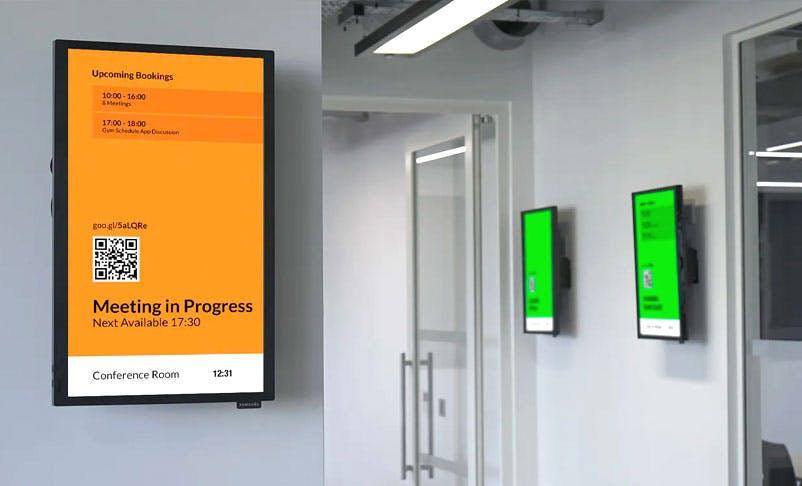
Room Booking Apps
The level of interactivity seems to vary depending on the hardware available. In some cases, people are simple able to see which rooms are available or which theater/cinema seats are available.
However, with the right hardware, people are able to book rooms using interactive signs that are powered by room-booking apps that have live updates. In some cases, the signs have wireless payment hardware that means people can book and pay using just a digital sign.
The YouTube App
This is a rather odd addition to the list. While we all know that the YouTube app is popular simply because it is already installed into every Android phone straight out of the factory, it turns out that digital sign users are using this app quite a lot too.
People are uploading their digital content onto YouTube, setting up a playlist and then looping it on their digital signs. This means they need not worry about server maintenance, but it does rely on both the YouTube server up time and a constant Internet connection.
You will also need YouTube premium otherwise your videos may keep being interrupted with advertisements.
Web Page Apps
At first, this may seem like a stunning under-utilization of digital signs. After all, why have a digital sign and only run a web page?
They may as well screen print the web page and put it up as a poster. Web page apps seem like a waste of time, but you have to remember that modern websites are very sophisticated.
The people who use web page apps on their digital signs are typically those who have live-updated websites. For example, a company that trades in currency may have a web page app that casts its web pages.
Those same web pages may offer up-to-date currency prices. The web-page app may also flip web pages every 20 seconds too, so that people can see several pages in a single session.
The Google Slides App
Also known as the poor man’s KitCast. If you want a very cut-down and basic version of a digital sign app, then Google Slides is an “Okay” option.
Digital sign owners add the Google slide app to their digital sign, they create slides, add them to a flash drive, plug in the flash drive and run the slides through the app.
If you are a small retailer with a very tight budget, then this is a pretty cheap option, otherwise, you should use another method for displaying your content on digital signs.