Category: For Ghanaians

  • MTN Ghana gathers music industry to rethink streaming income for local artists

    MTN Ghana gathers music industry to rethink streaming income for local artists

    For many Ghanaian musicians, streaming has transformed how music reaches audiences, but turning those streams into a stable paycheck remains a challenge. That gap between digital reach and real earnings was the focus of MTN Ghana’s Digital Music Conference, held at MTN House in Accra.

    The conference was a refreshed edition of MTN’s earlier event. It brought together artists, industry leaders, and creators under one roof to rethink how musicians and other music stakeholders can build sustainable income from their work. MTN Ghana used the gathering to restate its commitment to building a resilient and inclusive digital economy, one where creative talent can thrive alongside technological growth.

    Why streaming income is hard to turn into a livelihood

    Even as listeners move to digital platforms, many artists see only small fractions of revenue due to complicated royalty structures, distribution costs, and limited financial education. For Ghanaian artists, the challenge is often compounded by data costs and the difficulty of getting fair deals from aggregators and labels. The conference aimed to unpack these issues and help creators understand the business side of music.

    Streaming offers reach, but reach does not automatically translate into earnings. An artist may have thousands of plays and still struggle to pay for studio time or equipment. This is why conversations like the ones at MTN House are necessary. They push the music industry to move beyond the excitement of going viral and to focus on building systems that actually pay creators.

    What the conference offers the Ghana music community

    The gathering at MTN House was not just a talk shop. It provided a space for artists to connect directly with industry leaders and other creators. By having these groups in one room, MTN is helping to break down the silos that often leave musicians on their own when negotiating royalties or building their brands. For up-and-coming artists, such a meeting can be a way to learn how streaming platforms work, what data matters, and how to build an audience that supports them beyond music sales.

    MTN Ghana’s part in this is tied to its role as a telecom and digital services provider. With mobile money, data bundles, and digital platforms, MTN is one of the main channels through which many Ghanaians access the internet and pay for content. By supporting music industry conversations, the company is positioning itself as not only a network provider but also a participant in the creative economy.

    What artists should take away

    For musicians, the practical value of a conference like this is in understanding that streaming income isn’t just about the number of plays. It is about how those plays are monetized, how rights are managed, and how artists can build other revenue streams like live shows, merchandise, and partnerships. The conference also highlights the need for digital literacy, so creators can read their analytics, understand their contracts, and make informed decisions about their music careers.

    But the event alone will not solve the income problem. Artists still need to follow up with action, whether that means negotiating better rates, finding a trustworthy distributor, or learning to market themselves directly to fans. Industry leaders, for their part, need to make the digital music space more transparent and fair.

    MTN Ghana’s decision to host this refreshed edition shows that the conversation about music income is still far from over. For Ghanaian artists, the practical takeaway is clear: to turn streams into livelihoods, they need to understand the business, build their digital skills, and work with partners who have a genuine stake in their success. The next step is to put the lessons from MTN House into practice.
  • Journalists trained to cover cybercrime without harming investigations

    Journalists trained to cover cybercrime without harming investigations

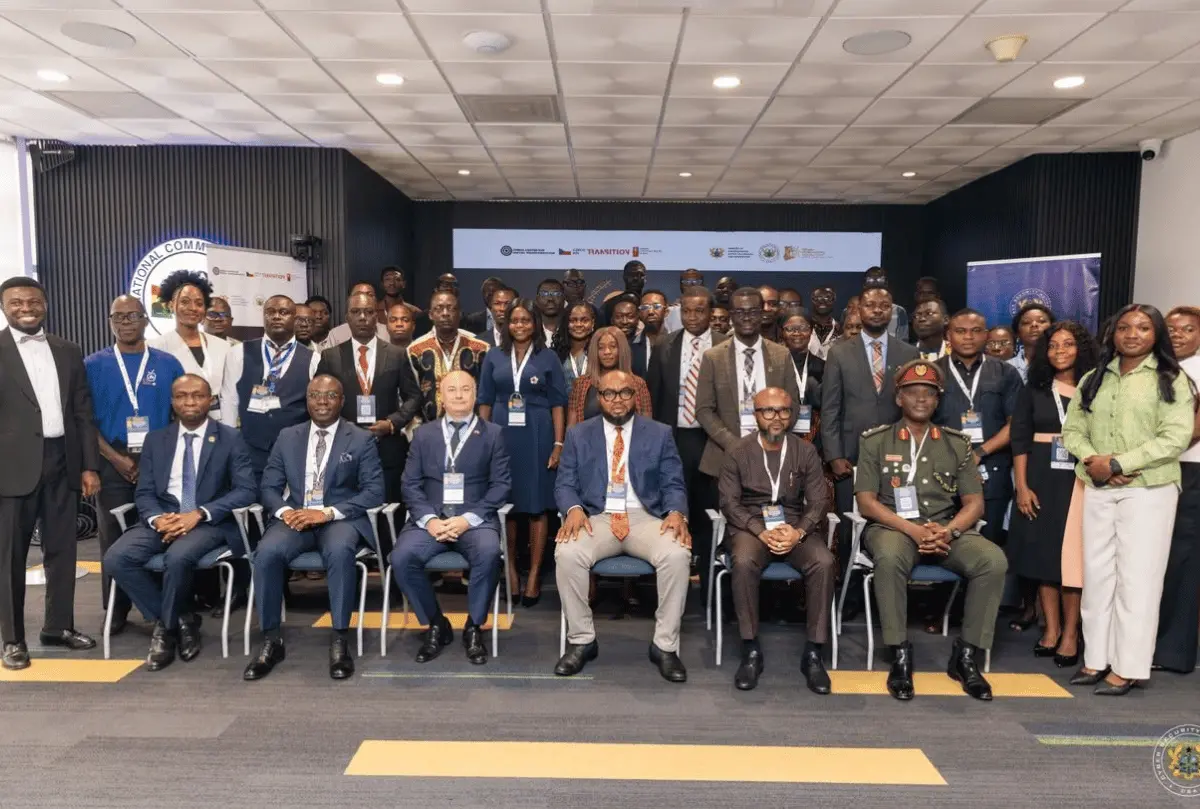
    How a journalist reports a cybercrime story can either protect the public or put an investigation at risk. A wrong detail might tip off a suspect, while incomplete information could leave readers exposed. That is the balance media practitioners in Ghana are now learning to strike under a new capacity building project.

    The National Community Media Cyber Capacity Building Project, known as NCMCCBP, opened its first day with a training session focused on “Reporting Responsibly Without Compromising Investigations.” The session gave journalists practical guidance on covering cybercrime in a way that supports law enforcement while still informing the public.

    A shared responsibility between media and security agencies

    Cybercrime affects people across Ghana, from individuals who fall for mobile money fraud to businesses that lose data. Community media outlets often report these cases early, sometimes before the police have completed their work. That makes the relationship between reporters and investigators important.

    The training appears designed to help journalists understand what can be published, when publication should wait, and how to phrase details so they do not compromise evidence or alert suspects. It also encourages reporters to play a role in public education, helping communities recognise scams and avoid becoming victims.

    For community media, this is not just about avoiding harm. It is also about building trust. Readers expect accurate and useful information. Investigators expect discretion. The journalist sits in the middle, and the NCMCCBP training seems to be addressing that position directly.

    What responsible reporting requires in practice

    Responsible cybercrime reporting involves more than changing a name or hiding a phone number. Journalists may need to verify facts with official sources, avoid publishing unconfirmed claims, and explain basic cybersecurity steps to the public.

    Some practical points that are often covered in such sessions include:

    • Not naming suspects before formal charges are confirmed
    • Avoiding details that could help fraudsters replicate a scam
    • Using clear, simple language so readers know how to protect themselves
    • Working with law enforcement to know what can be shared safely

    These habits protect both the integrity of investigations and the safety of readers. For community media, which often serve smaller towns and districts, the effect can be even stronger because the audience is closer to the story.

    Why this matters for Ghana’s cyber safety

    Ghana has seen a rise in cybercrime cases, including online fraud, phishing, and identity theft. Public awareness remains one of the strongest defence tools. When journalists report responsibly, they do more than break news. They teach people how to spot danger.

    The NCMCCBP is expected to continue beyond this first session, with more training likely to deepen the skills of media practitioners across the country. Journalists who attended now have a clearer sense of how to balance speed, accuracy, and discretion.

    For media houses, the takeaway is simple. Cybercrime stories carry real consequences. A well-reported piece can alert a community. A careless one can set an investigation back. Training like this is a step toward making sure the media in Ghana is part of the solution, not an accidental barrier.

    As more sessions unfold, readers and newsrooms alike should pay attention to how these lessons are applied. In the end, responsible reporting is not a restriction. It is a way of making sure the truth comes out without costing anyone their safety.

  • MTN Ghana now uses Ghana Card to track MoMo loan defaulters

    MTN Ghana now uses Ghana Card to track MoMo loan defaulters

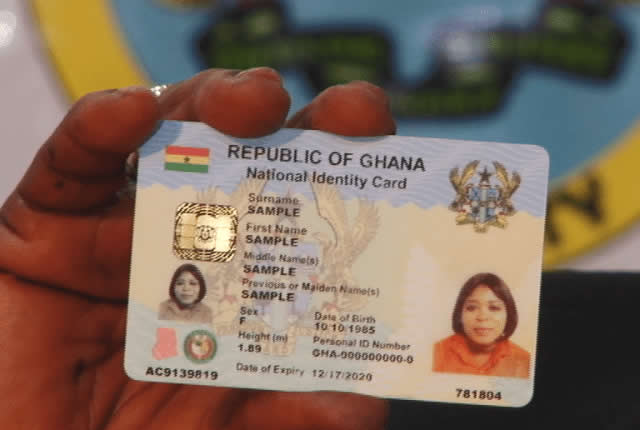
    For a while now, some people have taken mobile money loans and tried to escape repayment by dumping their SIM cards. The idea seems simple: if the number is gone, the lender cannot find you. But MTN Ghana has moved to close that loophole by linking loan records to the Ghana Card, the national identity card.

    The move means that borrowing on MoMo is no longer tied only to a phone number. It is tied to your identity. For many Ghanaians, that changes the risk of skipping repayment.

    How Ghana Card changes MoMo borrowing

    Previously, a MoMo loan was often linked to the SIM registration details. If a borrower changed or dropped the SIM, the lender had little way to trace them. But the Ghana Card provides a more stable identifier because it is a nationally recognised ID that every citizen and resident is expected to have.

    MTN Ghana is now using Ghana Card data to track loan defaulters. This means that even if you change your MoMo number, your loan history can follow you through your Ghana Card. The aim is to reduce the losses that mobile money lenders face when customers refuse to pay.

    For regular borrowers, the practical effect is simple: the days of disappearing from your loan obligations by changing a SIM are over. If you borrow, the lender knows who you are beyond the number you use.

    What this means for borrowers

    If you use MoMo loans, this development should change how you think about borrowing. Late repayment or defaulting is no longer just a problem with one phone number. It can affect your reputation with the lender and may influence your ability to borrow in the future.

    This is especially important for people who rely on MoMo loans for emergencies, small business capital, or school fees. The convenience of quick loans comes with a responsibility to pay back. With the Ghana Card link, there is a stronger record of who borrows and who does not pay.

    For honest borrowers, this may not feel like a big change. But it also means that your good repayment history can be tracked, which could help you access larger loans or better terms later.

    The limits to watch

    Details about how exactly MTN Ghana uses Ghana Card data are still limited. It is not clear whether the information is shared with other lenders or credit bureaus, or if it is only used internally within MTN.

    There are also questions about privacy. The Ghana Card is a sensitive form of identification. Linking it to financial behaviour requires strong data protection so that people do not suffer unfair consequences from mistakes or fraud.

    Borrowers should also remember that not all loan apps or lenders may have the same access to Ghana Card data. The move by MTN Ghana is specific to its MoMo loan service for now.

    What to keep in mind

    If you borrow money through MoMo, treat the loan seriously. Your Ghana Card now connects you to your borrowing history in a deeper way than before.

    Make a repayment plan before taking a loan. Understand the terms, especially interest and repayment period. And always update your contact details with your lender if you change your number, so you do not miss payment reminders.

    The use of Ghana Card data is a clear sign that mobile money lending is becoming more formal. That is good for reducing default rates, but it also means borrowers must be more careful. Hiding behind a new SIM is no longer a reliable escape.

  • NCA Extends 5G Spectrum Application Deadline and Clarifies Ownership Rules

    NCA Extends 5G Spectrum Application Deadline and Clarifies Ownership Rules

    The National Communications Authority (NCA) has extended the application window for 5G spectrum by three weeks. The regulator also took steps to clarify exactly which companies are qualified to bid, as the country moves toward the next generation of mobile networks.

    The extension means operators have more time to prepare and submit their applications. The NCA’s decision to tighten ownership rules adds a layer of clarity for anyone considering a bid. Together, these changes give the industry a clearer picture of how the 5G licensing process will unfold.

    More time for applicants

    The three week extension is practical for telecom companies. Preparing a spectrum application involves detailed technical plans, financial projections, and compliance documents. Additional time can make a real difference, especially for operators that need to finalise partnerships or secure board approvals.

    The extension also benefits the regulator. A longer window can lead to more complete applications and reduce the chance of errors or missing information. For the public, it means the process is not being rushed, which is useful when the outcome will affect mobile services for years.

    Clearer rules for ownership

    The NCA’s move to tighten ownership rules gives structure to the bidding process. By defining who qualifies, the regulator can assess applicants in a more consistent way. This type of requirement is often used in spectrum auctions to ensure transparency and to make sure that successful bidders meet national standards.

    For potential bidders, the clarified ownership rules mean they need to look closely at their shareholding structure before applying. Companies with complex ownership chains may need to provide extra information. This could affect both established network operators and new entrants looking to offer 5G services in Ghana.

    What this means for Ghana’s 5G future

    The push toward 5G is about more than faster phones. The next generation of mobile networks is expected to support lower latency, better reliability, and new use cases across industries. Businesses could use 5G for real time data, smart logistics, and improved communication systems. For everyday users, it could mean smoother video calls, quicker downloads, and more stable connections in crowded areas.

    However, the success of 5G in Ghana will depend on more than spectrum licenses. Coverage, device availability, and affordable data plans will all play a part. The NCA’s latest decision is an early step in that longer process.

    The application deadline now gives operators three additional weeks to get their submissions in order. Interested companies should use this time to study the ownership requirements and confirm they are eligible. For the rest of us, the next important step is seeing how the bids come in and what it might mean for the future of mobile internet in Ghana.

  • MTN Ghana Warns Dealers: SIM Cards Must Not Sell Above GHS 10

    MTN Ghana Warns Dealers: SIM Cards Must Not Sell Above GHS 10

    If you have bought a new SIM card in Ghana recently, you may have noticed that the price can vary depending on where you go. Some vendors ask for small amounts, while others charge much more. MTN Ghana has now stepped in to remind dealers that the price of a SIM card is fixed, and selling it above that amount is not allowed.

    In a warning to its dealers, MTN Ghana said SIM cards should not be sold for more than GHS 10. The company is asking its authorised dealers to respect this limit. The message is simple: the SIM card itself costs a fixed amount, and any extra charges are not permitted.

    Why the GHS 10 SIM card price cap matters

    For many Ghanaians, the SIM card is the first step to getting connected. Whether you are buying a new line for a phone, a modem, or a tablet, the SIM is essential. When the price goes beyond the official amount, it adds an unnecessary cost for the customer. This can be a real burden, especially for people on low incomes or those who need a new number quickly.

    The price cap also helps protect consumers from unfair practices. Without a clear limit, some dealers might take advantage of customers who do not know the correct price. MTN’s warning is a reminder that there is a standard price, and everyone should be treated fairly. It also gives customers the confidence to challenge a charge that seems too high.

    SIM cards are widely available across Ghana, from MTN stores to small roadside vendors. Because they are so common, competition should normally keep prices low. But in some areas, customers may not have many options. That is why a clear, enforced price cap matters. It sets a baseline that protects the buyer regardless of where they shop.

    What to do if a dealer overcharges you

    If you are asked to pay more than GHS 10 for a MTN SIM card, you do not have to accept it. The first step is to politely question the price. You can point out that MTN has stated the official price is GHS 10. Many dealers will correct the charge once you ask.

    If the dealer refuses to lower the price, you should consider reporting the issue. MTN has channels for customers to complain, and the company has made it clear that it does not want its dealers selling above the cap. You can also choose to buy your SIM card from a different seller, such as an MTN branded shop or a dealer who follows the rules.

    It is also a good idea to keep your receipt after purchasing a SIM card. A receipt gives you proof of what you paid. If you need to file a complaint, that proof can help the company take action against the dealer.

    The GHS 10 price cap is not just a number. It is a way to make sure that getting connected remains affordable for everyone. Like any consumer protection measure, it only works if customers know their rights and are willing to speak up when those rights are ignored.

  • Omaya Care Wins Ghana’s First AI Innovation Challenge

    Omaya Care Wins Ghana’s First AI Innovation Challenge

    Omaya Care, a health-focused startup, has won Ghana’s first AI Innovation Challenge. The competition was designed to reward artificial intelligence solutions that address real problems in health. For a country still building its reputation in the technology space, the win is more than a personal achievement for the startup. It is a signal that homegrown ideas backed by AI can gain recognition and support.

    The AI Innovation Challenge attracted attention because it focused on health, a sector where many Ghanaians feel the daily effects of limited access, high costs, and delays. By using AI to tackle such issues, startups like Omaya Care are showing that technology does not have to be abstract. It can be applied directly to improve lives.

    A milestone for the local AI ecosystem

    This was the first edition of the challenge in Ghana, which makes Omaya Care’s victory a piece of history. It shows that the country has enough creative thinkers and technical talents to compete in an area that is often dominated by larger markets. For other startups, the competition serves as a reminder that local problems can inspire global-class solutions.

    The challenge also puts pressure on policymakers and investors to take AI more seriously. If the government and private sector want to build on this momentum, they will need to create more opportunities for testing, funding, and scaling AI products.

    Why health matters in this context

    Health is one of the most promising areas for AI in Africa. Many clinics still depend on manual processes, and patients often travel long distances to see specialists. AI can assist with early diagnosis, patient monitoring, and the management of health records. It can also help healthcare workers make faster decisions with fewer resources.

    Ghana, like many African countries, has a young population that is comfortable with mobile phones and digital tools. That makes it easier to introduce AI-powered health services. But trust remains a challenge. People need to know that AI systems are accurate, secure, and respectful of their privacy. A local winner like Omaya Care can help build that trust by showing that AI is not a foreign concept but a practical tool for local needs.

    What this means for local startups

    For Ghanaian startups, the takeaway is clear: there is space for deliberate, problem-solving technology. Young companies do not need to copy what works in Silicon Valley. They can look at challenges in their own communities, and build solutions using AI.

    Still, the win is just the beginning. The details of Omaya Care’s solution have not been fully shared, and the startup will need to prove that its product works outside a competition setting. Will it be affordable? Can it be used by people who are not tech-savvy? Can it be deployed in rural areas? These are the questions that will determine whether the startup makes a lasting impact.

    For now, the recognition is well deserved. It puts Ghana’s name on the map in the conversation about AI in African healthcare, and it offers a clear example for the next generation of innovators.

  • Ghana to Host Continental AI Hackathon in Accra as Africa’s AI Ambitions Take Shape

    Ghana to Host Continental AI Hackathon in Accra as Africa’s AI Ambitions Take Shape

    Accra is set to become the meeting point for Africa’s next wave of artificial intelligence talent. This September, over 200 young innovators from more than a dozen countries will converge on the Ghanaian capital for a 48-hour continental AI hackathon. The event signals a shift from talk about AI to concrete action, and Ghana is positioning itself as a central player in that transition.

    For years, conversations about AI in Africa have focused on potential. This hackathon shifts attention to execution. Instead of panels and policy papers, participants will spend two full days building solutions. For young Ghanaians interested in AI, this is a rare chance to work alongside peers from across the continent, share ideas, and put skills to the test.

    What the hackathon means for participants

    The format is intense: 48 hours of ideation, coding, and prototyping. Participants will likely tackle real-world problems using AI tools and techniques. That kind of pressure is common in hackathons, but the continental scale adds another layer. Working with people from different countries means exposing yourself to new approaches and new ways of thinking.

    For many attendees, the value may not only come from the projects they build. The connections made during the event could lead to collaborations that outlast the weekend. As Africa builds its AI ecosystem, networks like these are just as important as the technology itself.

    Why Accra is the right host

    Choosing Accra as the host city is not random. Ghana has quietly built a reputation as a welcoming hub for tech events and innovation. The country has a growing startup scene, a young population comfortable with mobile technology, and a history of hosting Pan-African gatherings. By bringing together innovators from across the continent, the hackathon reinforces that position.

    It also sends a message to the rest of Africa: Ghana wants to be part of the AI conversation in a practical way. For local participants, having the event on home soil removes travel barriers. That means more Ghanaians can take part, learn from regional experts, and showcase what the country’s tech community has to offer.

    What to watch next

    The event is still months away, so details like specific themes, challenges, and prizes have not been shared yet. What is clear is that the hackathon will bring a concentrated burst of AI energy to Accra. For young Ghanaians considering a career in AI, this is a good time to sharpen your skills and watch for announcement about how to get involved.

    For the wider ecosystem, the value of this event could go beyond the 48 hours. If even a fraction of the projects built in Accra turn into real products or businesses, the hackathon will have done its job. Ghana’s role as host places the country at the centre of Africa’s push to turn AI ambition into execution, and the benefits could be felt long after the laptops close.

  • NCA Prepares Ghana’s Telecom Industry for 5G Spectrum Allocation

    NCA Prepares Ghana’s Telecom Industry for 5G Spectrum Allocation

    The National Communications Authority (NCA) has moved one step closer to allocating 5G spectrum to mobile network operators in Ghana. At its Tower in Accra, the regulator held a Pre-Application Briefing for prospective applicants, a step that signals progress in the process to licence spectrum in the 700 MHz, 2.3 GHz and 3 GHz mid bands.

    This briefing is part of the Request for Applications (RFA) process. Under Ghana’s Electronic Communications Act, 2008 (Act 775), the NCA is required to follow a transparent and fair process when assigning spectrum. The pre-application briefing is meant to help interested operators understand the rules, conditions and expectations before they submit formal applications.

    Why This Matters for 5G in Ghana

    5G is often discussed as a leap for mobile internet, but the practical value depends on available spectrum. The three bands the NCA has identified serve different purposes. The 700 MHz band typically carries coverage over longer distances and works well inside buildings. The 2.3 GHz and 3 GHz bands can carry more data but may not travel as far. By making these bands available, the NCA is giving operators room to design networks that combine broad coverage with extra capacity.

    What does that mean for Ghanaians? Mobile operators that receive these licences will be able to plan their 5G rollouts. Consumers may eventually see faster mobile data, better performance in crowded areas like markets and bus terminals, and improved connections for businesses that rely on real-time data. But the real benefit will take time. Licence allocation does not equal constant 5G coverage.

    What Comes Next in the Application Process

    The briefing is just the beginning. Interested companies now have to prepare and submit their applications based on the terms presented by the NCA. The regulator will then assess the applications, and if everything goes according to plan, assign the licences to qualified bidders or applicants.

    It is important to note that the NCA did not announce specific dates, fees, or the number of licences on offer in the public summary of this briefing. Those details are likely to come as the process advances. Telecom operators and industry watchers will be looking out for the next steps, especially the formal invitation to apply.

    Who Should Pay Attention

    This news matters most to the major mobile network operators in Ghana, including MTN, Vodafone Ghana and AirtelTigo, as well as new players that may be interested in entering the market. But it also matters to consumers, businesses and developers who work with mobile technology. The spectrum available now will shape the quality and speed of mobile data in the coming years.

    For regular Ghanaians, the expectation of 5G has been around for a while. This briefing is a concrete sign that Ghana is moving from discussions to action. However, it is still early. After licences are assigned, operators will need to invest in equipment, masts and devices that support 5G before any real change reaches the average phone.

    The NCA’s pre-application briefing is a solid step, but it is not the finish line. Prospective applicants now have to move. For the public, the next useful thing to watch for is the NCA’s official call for applications and the publication of any licence conditions. The more transparent the process, the easier it will be for operators to plan and for Ghanaians to know when 5G will actually arrive on their phones.

  • After Agona Swedru MoMo Robbery: Safety Tips for Ghanaian Mobile Money Users

    After Agona Swedru MoMo Robbery: Safety Tips for Ghanaian Mobile Money Users

    Mobile money has become a part of daily life for millions of Ghanaians. It is fast, convenient, and helps many people who do not have access to traditional banking. But this convenience also comes with risks. In Agona Swedru, police are currently hunting suspects after a mobile money robbery. This incident is a reminder that criminals are paying attention to how we use MoMo. For anyone who uses mobile money regularly, knowing how to protect yourself is not optional.

    What Happened in Agona Swedru?

    Reports from Agona Swedru indicate that mobile money users were robbed. The police have launched a search for the suspects. While specific details about the robbery are still emerging, the event highlights a growing concern: mobile money agents and customers are being targeted by criminals who see MoMo transactions as an opportunity. In many cases, robbers watch agents or customers when they withdraw cash or make large transfers. They strike when the person is least expecting it.

    This is not an isolated case. Similar incidents have been reported in other parts of Ghana. The convenience of mobile money has unfortunately created new opportunities for crime. For the average Ghanaian, this means being extra careful when handling MoMo transactions, especially in public places.

    Practical Safety Tips for MoMo Users

    Staying safe with mobile money does not require giving up the service. It just means being more aware of your surroundings and taking a few precautions. Here are some steps that can help reduce your risk:

    • Avoid large cash withdrawals in busy or poorly lit areas. If you need to take out a significant amount, find a safe location such as inside a shop or near a police station. Preferably, go during the day.
    • Do not display large amounts of cash in public. After withdrawing, put the money away quickly. Count your cash discreetly, not on the street.
    • Use mobile money transfers instead of cash when possible. For payments to businesses or family, sending MoMo directly to their wallet reduces the need to carry physical cash.
    • Be careful when using an agent. Avoid sharing your PIN or letting anyone see you enter it. Always check that the agent is using an official MoMo terminal.
    • Stay alert to anyone watching you. If you notice someone hanging around an agent point for too long, consider waiting until they leave or using a different agent.
    • Keep your phone secure. Your mobile money wallet is tied to your SIM card. Use a SIM lock or app lock to prevent unauthorized access if your phone is stolen.

    These tips may seem basic, but many people skip them in the rush of daily life. Taking an extra minute to be careful can save you from losing hard-earned money.

    What About Agents? They Need Protection Too

    Mobile money agents are often the frontline of the service. They handle large amounts of cash daily, which makes them attractive targets. If you are an agent or know one, remind them to vary their routine, avoid keeping too much cash overnight, and consider installing security cameras or alarm systems. Community awareness also helps. Neighbors and customers can look out for suspicious activity around agent shops.

    Agents should also ensure they have insurance coverage for cash on the premises. Some mobile money operators offer such options. It is worth checking.

    The robbery in Agona Swedru is a sobering event. But it does not mean mobile money is unsafe. It means we must adapt our habits. As the service grows, so does the need for personal security awareness. The police are working to catch the suspects. In the meantime, every MoMo user has a role to play in staying safe. Share these tips with family and friends. A little caution goes a long way.

  • MTN Ghana acknowledges role of Ghanaians in company’s growth

    MTN Ghana acknowledges role of Ghanaians in company’s growth

    In a recent statement, MTN Ghana acknowledged the vital role that Ghanaians have played in the company’s achievements. Michael Gbewonyo, the Chief Internal Audit and Forensic Officer, highlighted that the company recognizes the unique contributions of its stakeholders, including customers, employees, and partners, to its success.

    Why this recognition matters

    For a telecom giant like MTN, operating in a competitive market, acknowledging local stakeholders builds trust and loyalty. Many Ghanaians have been loyal customers for years, and this message reinforces that their patronage is valued. It also signals that MTN sees itself as part of Ghana’s ecosystem, not just a foreign corporation. In a sector where customer retention is key, such recognition can encourage positive word-of-mouth and deepen community ties.

    Ghana’s telecom industry has seen rapid growth, with mobile money, data services, and digital solutions becoming integral to daily life. MTN’s acknowledgment of local contributions underscores the mutual dependency between service providers and users. When a company openly credits its stakeholders, it fosters a sense of ownership among Ghanaians, who often feel that large corporations overlook their role.

    What this means for MTN’s stakeholders

    For everyday users, this statement is a reminder that their voice matters. MTN’s recognition could translate into better customer service or initiatives that address local needs. Employees may also feel more motivated, knowing their work is appreciated at the highest level.

    • Customers: A stronger connection to the brand, potentially leading to increased loyalty.
    • Employees: A boost in morale and pride in their contributions.
    • Business partners: Reassurance that collaboration is valued.

    While specific initiatives were not mentioned, such public acknowledgments often precede community-focused programs or enhanced engagement strategies. Ghanaians should watch for tangible actions that follow these words.

    Looking ahead

    As MTN Ghana continues to expand its services, maintaining this appreciation will be crucial. The company’s success in Ghana depends on the continued support of its stakeholders. This recognition is a positive step, but the real test will be whether it leads to meaningful changes that benefit Ghanaians. For now, it serves as a reminder that even large corporations rely on the people they serve.