Category: For Ghanaians

  • Digital Fraud in Ghana Jumps 48%: What Bank of Ghana’s New Rules Mean for Your Money

    Digital Fraud in Ghana Jumps 48%: What Bank of Ghana’s New Rules Mean for Your Money

    Digital fraud in Ghana has surged by 48% in 2025, according to the Bank of Ghana. The central bank has responded by tightening regulations on fintech companies. For ordinary Ghanaians who rely on mobile money and payment apps daily, this change signals both risks and protections.

    Why Digital Fraud Is Rising

    The exact reasons behind the 48% jump are not detailed in the warning, but the trend is clear: more people are using digital financial services, and fraudsters are following. Mobile money platforms, payment apps, and online banking have become everyday tools for millions of Ghanaians, from paying for goods to sending money to family. This convenience also creates opportunities for criminals who use phishing, SIM swapping, and other tactics to steal money.

    Bank of Ghana’s Response

    To address the rising threat, the Bank of Ghana is tightening fintech rules. While the specific measures have not been fully outlined, the central bank’s warning suggests stronger oversight of digital payment providers. This could mean stricter know-your-customer (KYC) requirements, increased transaction monitoring, and tougher penalties for non-compliance. For users, the immediate effect may be more identity checks when opening accounts or conducting large transactions.

    What This Means for Mobile Money and Payment Apps

    If you use mobile money services from MTN, Vodafone, or AirtelTigo, or payment apps like Zeepay or Hubtel, you may notice changes. Registration processes could become longer as providers verify your details more thoroughly. Transaction limits might be adjusted for new accounts. The idea is to make it harder for fraudsters to operate, but it also means more steps for legitimate users.

    For businesses that accept digital payments, stricter rules can reduce the risk of chargebacks and stolen funds. However, they may also need to update their systems to comply with new requirements. The Bank of Ghana is essentially trying to balance innovation with security, making the fintech ecosystem safer without slowing it down.

    How to Protect Yourself

    While regulators work on tightening rules, individuals can take simple steps to stay safe:

    • Never share your PIN, password, or one-time code with anyone, even if they claim to be from your bank or mobile money provider.
    • Beware of calls or messages asking for personal information. Scammers often impersonate customer service.
    • Keep your phone’s operating system and mobile money app updated to patch security holes.
    • Use strong, unique passwords for every financial app.
    • Report any suspicious activity to your service provider immediately.

    The 48% increase in fraud is a wake-up call for everyone using digital money. The Bank of Ghana’s tighter rules are a step in the right direction, but they work best when users also stay vigilant. As the rules roll out, pay attention to updates from your mobile money provider and adjust your habits accordingly. Digital payments are here to stay, but they require a new level of caution from both regulators and consumers.
  • MTN MoMo Users Can Now Invest Directly With IC Asset Managers

    MTN MoMo Users Can Now Invest Directly With IC Asset Managers

    Mobile money in Ghana is no longer just for sending money or paying bills. A new partnership between IC Asset Managers (Ghana) Ltd and MTN MoMo means that millions of mobile money users can now invest directly through the MoMo app, bypassing traditional bank accounts or brokerages.

    IC Asset Managers has launched IC Wealth on the MTN MoMo platform. The service gives MoMo customers access to the IC Liquidity Fund, a regulated investment product managed by IC Asset Managers. This move brings formal investment opportunities to everyday Ghanaians who may not have had easy access before.

    What IC Wealth Offers MoMo Users

    Through IC Wealth on the MoMo app, users can invest in the IC Liquidity Fund directly from their mobile money wallets. The fund is regulated by the Securities and Exchange Commission (SEC) in Ghana. This means the product falls under official oversight, giving investors a layer of protection.

    The IC Liquidity Fund is designed as a low-risk, short-term investment vehicle. It is suitable for individuals who want to earn returns on idle cash without locking it away for long periods. Users can likely invest small amounts, making it accessible for people who are new to investing.

    IC Asset Managers is one of Ghana’s established fund managers. By bringing their product onto the MoMo app, they are removing barriers that often keep people from investing. No need to visit a bank, fill out lengthy forms, or maintain a minimum balance that is too high for the average person.

    Why This Matters for Mobile Money Users

    Mobile money penetration in Ghana is deep. Millions of Ghanaians use MoMo daily for transactions, but many have never invested in a formal financial product. This partnership makes investing as easy as sending money.

    Traditionally, to invest in a mutual fund you would need a bank account, identity documents, and a trip to a fund manager’s office. IC Wealth on MoMo removes those steps. If you have a MoMo wallet, you can potentially start investing with whatever amount you have, as long as it meets the fund’s minimum (the source does not specify the minimum, but such funds typically allow small starting amounts).

    This is especially useful for young professionals, students, and informal sector workers who may not have bank accounts but use mobile money. It brings them into the formal investment ecosystem, helping them grow their savings beyond just keeping cash in a wallet.

    How to Use IC Wealth on MoMo

    While the source does not give step-by-step instructions, the partnership means users will find the IC Wealth option within the MTN MoMo app. After selecting it, they can read about the IC Liquidity Fund, check the terms, and invest directly from their MoMo balance.

    Because the app already has your identity information (MoMo accounts are registered with Ghana Card or other ID), you may not need to submit additional documentation for small investments. However, there may be a verification step for larger amounts, as required by regulation.

    The IC Liquidity Fund is a collective investment scheme. Your money is pooled with other investors and managed by professionals at IC Asset Managers. Returns are paid out periodically. You can also withdraw your money when needed, though some funds have a notice period or fees.

    What to Consider Before Investing

    Even though the IC Liquidity Fund is low-risk, all investments carry some risk. The SEC registration means the fund follows rules, but it does not guarantee profits. Users should read the terms carefully, understand fees, and consider how long they can keep their money invested.

    Another thing to note is that this is not a savings account with a guaranteed interest rate. The fund’s returns depend on the performance of the assets it holds. Past performance does not guarantee future results.

    This partnership also signals a trend in Ghana’s fintech space: mobile money platforms are becoming gateways to more financial services. We have seen MoMo offer loans, insurance, and now investments. This could push other asset managers to partner with mobile networks, giving Ghanaians more choice.

    Looking Ahead

    IC Wealth on MTN MoMo is a practical step toward financial inclusion in Ghana. For the average MoMo user, it offers a simple way to start investing without needing a bank account. As more people use the service, it will be interesting to see how IC Asset Managers expands its product range on the platform.

    If you use MoMo and have been thinking about investing but found it complicated, this is worth exploring. Open the MoMo app, look for IC Wealth, and read about the IC Liquidity Fund. Make sure you understand the terms before committing your money.

  • Ghana Card biometric verification now mandatory: what changes and how to prepare

    Ghana Card biometric verification now mandatory: what changes and how to prepare

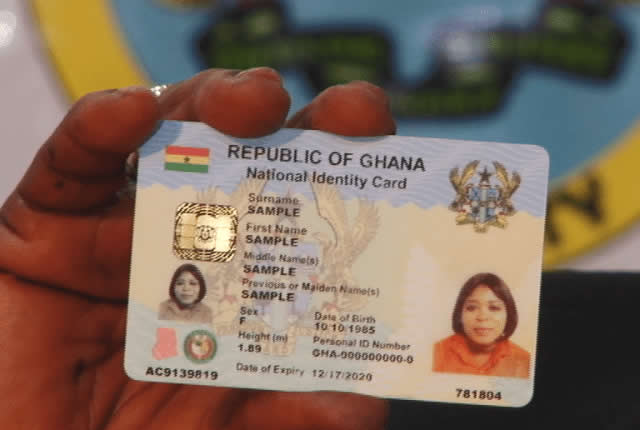
    If you have used your Ghana Card for any official transaction recently, you may have noticed a change. The government has introduced a new requirement that makes biometric verification mandatory whenever your Ghana Card is checked. This is not a minor update — it affects how banks, telecom operators, government agencies, and other organisations confirm your identity.

    The change is rooted in the need to improve security and reduce fraud. Previously, organisations could verify a Ghana Card by simply scanning the details on the card or checking the number. Now, they must use biometric matching — typically your fingerprints — to confirm that the person presenting the card is actually the rightful owner. This is a significant shift in how identity verification works in Ghana.

    What the new law requires

    Under the new law, every verification of a Ghana Card must include a biometric check. This means that any institution that needs to verify your identity using the card must capture your fingerprints or another biometric identifier and match it against the data stored by the National Identification Authority (NIA).

    The process is not optional for these institutions. They are legally required to perform biometric verification before accepting the Ghana Card as proof of identity. This applies to both in-person and, where possible, remote verifications. The NIA has been working to upgrade its systems to handle the increased volume of biometric checks.

    Who this affects

    This change affects every Ghanaian who uses their Ghana Card for official purposes. That includes:

    • Bank customers — opening accounts, applying for loans, or conducting high-value transactions will now require biometric verification.
    • Mobile money users — registering SIM cards, performing KYC updates, or making large transfers will trigger biometric checks.
    • Government service users — accessing services like passport applications, driver’s licence renewals, or tax registration will demand biometric confirmation.
    • Businesses — companies that verify customer identities (e.g., financial institutions, telecoms, insurance firms) must update their verification systems to comply.

    If you have already enrolled your biometrics with the NIA, the process should be straightforward. However, if your fingerprints are worn or your data has not been captured properly, you may encounter delays.

    Steps to take

    To avoid any disruption, here are practical steps you can take:

    • Check your biometric status — if you have your Ghana Card, visit an NIA registration centre to confirm that your fingerprints are on record and match the NIA database.
    • Update your details — if you lost your card or your data is outdated, you may need to go through the re-registration or replacement process at the NIA.
    • Carry your card — biometric verification will still require you to present your physical card or at least your card number, so keep it handy.
    • Be prepared for delays — during the initial rollout, some organisations may face technical issues or longer queues. Plan ahead for important transactions.

    The government has indicated that the new requirement is part of broader efforts to secure identity systems and combat identity theft. For everyday users, the key is to ensure your biometric data is up to date and accessible.

    If you have not yet registered for a Ghana Card, now is a good time to do so. The NIA continues to run registration exercises across the country. Without a properly verified card, you may find it increasingly difficult to access essential services.

  • MTN Ghana: Fibre Internet Is Now a Home Essential, Not a Luxury

    MTN Ghana: Fibre Internet Is Now a Home Essential, Not a Luxury

    For many Ghanaians, fibre internet still feels like a premium service reserved for high-income households. But MTN Ghana is pushing back against that idea. Richard Acheampong, the company’s Chief Home Officer, recently argued that fibre broadband has moved from being a luxury to a necessity for modern life.

    Speaking about the growing importance of home connectivity, Acheampong noted that many people still question why they need fibre when mobile data works fine. His point is that as more activities move online, the reliability and speed of fibre make it a practical requirement for families and businesses.

    Why Fibre Matters More Than Ever

    The shift to remote work, online learning, and digital entertainment has changed what Ghanaians expect from their home internet. Mobile data can be convenient, but it often struggles with consistent speed and data caps. Fibre offers a stable connection that can handle multiple devices and heavy usage without slowing down.

    For a household with children attending virtual classes, parents working from home, and everyone streaming videos, fibre becomes the backbone that keeps everything running. Acheampong’s message is clear: this is no longer a nice-to-have but a tool that supports daily productivity and education.

    MTN Ghana has been expanding its fibre network to reach more homes across the country. The company sees this as part of its broader effort to bridge the digital divide. By making fibre more accessible, they hope to change the perception that it is only for the affluent.

    What This Means for Ghanaian Households

    For the average Ghanaian family, the decision to switch to fibre often comes down to cost and availability. While fibre plans can be more expensive than mobile data, the value lies in the quality of service. A stable connection means fewer interruptions during important video calls or online exams.

    Businesses also stand to benefit. Small and medium enterprises that operate from home can rely on fibre for seamless communication with clients and suppliers. This can improve efficiency and open up new opportunities that require a dependable internet link.

    However, challenges remain. Fibre infrastructure is still concentrated in urban areas, leaving many rural communities without access. MTN’s expansion efforts will need to address this gap to truly make fibre a nationwide essential.

    For now, the conversation is shifting. As Acheampong suggests, Ghanaians should start viewing fibre internet as a utility like electricity or water. It powers the digital activities that are becoming central to everyday life.

    The practical takeaway is clear: if your household relies heavily on the internet for work, school, or business, investing in fibre could save you time and frustration. It is worth comparing plans from different providers to find one that fits your budget and needs. As more Ghanaians make the switch, the idea of fibre as a luxury will likely fade away.

  • Airtel Money’s $10 Billion London IPO: What It Means for Ghanaian Users

    Airtel Money’s $10 Billion London IPO: What It Means for Ghanaian Users

    Airtel Money, the mobile financial services arm of Airtel Africa, is preparing for a major public listing on the London Stock Exchange. The company is targeting a valuation of $10 billion and expects the IPO to take place by late 2026. For Ghanaian users of Airtel Money, this development could bring changes to the services they use every day.

    What the IPO Means for Airtel Money’s Growth

    Going public allows a company to raise capital from investors by selling shares. For Airtel Money, the $10 billion target signals confidence in its business model and growth prospects. The funds raised could be used to expand operations, improve technology, and enter new markets. In Ghana, where mobile money is a key part of daily life for millions, this could mean better services and more competition.

    Airtel Money is already a significant player in Ghana’s mobile money space, competing with MTN MoMo and other providers. The IPO could give Airtel Money the financial muscle to invest in features like higher transaction limits, faster transfers, and more merchant partnerships. For users, that might translate into a smoother experience and more options for sending and receiving money.

    Impact on Airtel Ghana Customers

    For the average Airtel Ghana subscriber who uses Airtel Money, the IPO is unlikely to bring immediate changes. However, over time, the additional capital could lead to improvements. Airtel Money might introduce new services such as savings products, loans, or insurance, following the trend of other mobile money platforms. It could also expand its agent network, making it easier to deposit and withdraw cash in rural areas.

    One area to watch is pricing. With more funding, Airtel Money could afford to lower transaction fees or offer promotions to attract users. This would put pressure on competitors like MTN MoMo to respond, potentially benefiting all mobile money users in Ghana. On the other hand, if Airtel Money focuses on profitability after listing, fees might not drop significantly.

    Another consideration is regulatory oversight. As a publicly listed company, Airtel Money will face stricter reporting and governance requirements. This could increase transparency and trust among users who are concerned about the safety of their funds. In Ghana, the Bank of Ghana regulates mobile money operators, and a public listing adds an extra layer of accountability.

    What This Means for Mobile Money Competition in Ghana

    Ghana’s mobile money market is dominated by MTN MoMo, which holds the largest market share. Airtel Money’s IPO could help it close the gap. With access to international capital, Airtel Money can invest in marketing, technology, and agent incentives to win more customers. This competition is healthy for the ecosystem because it drives innovation and better service.

    However, the IPO is still a few years away, and much can change. The success of the listing depends on market conditions, regulatory approvals, and Airtel Money’s financial performance. For now, Ghanaian users should see this as a positive sign that Airtel Money is committed to long-term growth.

    It is also worth noting that Airtel Money operates across multiple African countries, so the IPO’s impact will not be limited to Ghana. The company’s ability to scale and share best practices across markets could benefit Ghanaian users indirectly.

    What to Watch for in the Coming Years

    Between now and late 2026, Airtel Money will likely make moves to strengthen its position ahead of the IPO. This could include partnerships, technology upgrades, or new product launches. Ghanaian users should keep an eye on announcements from Airtel Ghana regarding Airtel Money services.

    If you use Airtel Money, consider exploring its full range of features. The more you use the platform, the more you can benefit from any improvements that come. Also, compare it with other mobile money options to ensure you are getting the best value for your transactions.

    The $10 billion IPO is a big step for Airtel Money, but its real impact will be measured by how it improves the lives of everyday users in Ghana. For now, the news is a reminder that mobile money remains a dynamic and competitive space in the country.

  • MTN Ghana to Pay 40% More for 5G Spectrum Due to Market Dominance

    MTN Ghana to Pay 40% More for 5G Spectrum Due to Market Dominance

    The National Communications Authority (NCA) has officially opened the application process for 5G spectrum in Ghana, inviting telecom operators to bid for eleven lots across three frequency bands. However, one major player will face a steeper price: MTN Ghana, designated as having Significant Market Power (SMP), will be required to pay 40% more for the spectrum than any other applicant.

    What the Spectrum Auction Means for Ghana’s 5G Rollout

    The NCA is offering spectrum in the 700 MHz, 2600 MHz, and 3500 MHz bands, which are commonly used for 5G networks globally. The 700 MHz band is particularly valuable because it can cover large areas and penetrate buildings well, making it ideal for widespread coverage. The higher bands offer more capacity for faster speeds in dense urban areas.

    This auction is a critical step toward commercial 5G services in Ghana. While some operators have already conducted trials, access to licensed spectrum is necessary for full-scale deployment. The NCA’s decision to impose a premium on MTN reflects its regulatory approach to level the playing field, given MTN’s dominant position in the market.

    Why MTN Pays More: The SMP Designation

    MTN Ghana has long been classified as having Significant Market Power by the NCA, meaning it holds a large share of the telecom market and can influence prices and competition. Under this classification, the regulator can impose additional obligations to prevent anti-competitive behavior. The 40% surcharge on spectrum fees is one such measure.

    This is not the first time MTN has faced such treatment. In previous spectrum allocations and interconnection rate determinations, the SMP status has led to higher costs for MTN. The rationale is that MTN’s size gives it advantages in bidding, and the premium helps ensure that smaller operators can still compete for spectrum without being outbid.

    For MTN, this means its 5G rollout will be more expensive than its rivals. The company will need to factor in the additional cost when planning its network investments and pricing strategies. For other operators like Vodafone Ghana, AirtelTigo, and new entrants, the lower spectrum price could accelerate their 5G plans.

    Practical Implications for Ghanaian Consumers and Businesses

    For everyday Ghanaians, the spectrum auction is a behind-the-scenes development that will shape the future of mobile internet. 5G promises faster download and upload speeds, lower latency, and the ability to connect many more devices simultaneously. This could improve experiences for streaming, video calls, online gaming, and cloud services.

    Businesses stand to benefit even more. Industries like agriculture, healthcare, education, and logistics could use 5G for real-time monitoring, remote diagnostics, smart farming, and automated systems. However, the benefits depend on how quickly and widely operators deploy the networks.

    The premium on MTN may lead to a more competitive landscape. If other operators can launch 5G at lower cost, they might offer more affordable plans or better coverage to attract customers. MTN, on the other hand, may need to justify its higher prices through superior service or exclusive features.

    It is also worth noting that the NCA has not yet announced the reserve prices or the exact timeline for the auction. Operators will need to submit applications and meet eligibility criteria. The process is expected to be competitive, especially for the prime 700 MHz spectrum.

    What to Watch Next

    Ghana’s 5G journey is still in its early stages. The spectrum auction will determine which operators get the licenses and how much they pay. After that, network deployment will take months or even years. Consumers should not expect widespread 5G coverage immediately, but the groundwork is being laid.

    For now, the key takeaway is that the NCA is actively managing the market to prevent MTN from dominating the next generation of mobile technology. Whether this leads to faster, cheaper, or more widespread 5G for Ghanaians will depend on how operators respond to the regulatory environment.

  • SSNIT Launches Visa Prepaid Card for Contributors: What You Need to Know

    SSNIT Launches Visa Prepaid Card for Contributors: What You Need to Know

    If you are a contributor to Ghana’s Social Security and National Insurance Trust (SSNIT), you may soon have a new way to access your benefits and make everyday payments. SSNIT has launched a Visa prepaid card as part of its Membership Value Programme, giving contributors a digital payment option linked to their SSNIT account.

    The card is designed to make it easier for contributors to receive and use their SSNIT benefits without relying solely on bank accounts or cash. It is a prepaid card, meaning you can only spend the money loaded onto it, and it works anywhere Visa is accepted, both in Ghana and abroad.

    How the SSNIT Visa Prepaid Card Works

    The card is not a credit card. It is a prepaid card that SSNIT will load with benefits or payments due to you as a contributor. This could include pension payments, lump sum withdrawals, or other disbursements from your SSNIT account. Once the money is on the card, you can use it to pay for goods and services at merchants that accept Visa, withdraw cash from ATMs, or make online purchases.

    To get the card, you need to be an active SSNIT contributor. The card is issued as part of the Membership Value Programme, which aims to provide additional benefits to contributors beyond the standard pension scheme. SSNIT has not yet announced a specific date for when the card will be available to all contributors, but it is expected to roll out in phases.

    One key advantage of the prepaid card is that it does not require a bank account. This makes it accessible to contributors who may not have a formal bank account but still want a secure and convenient way to receive and use their SSNIT benefits. It also reduces the need to visit SSNIT offices or banks to collect payments, saving time and travel costs.

    Who Can Use the Card and What Are the Benefits?

    The card is intended for all SSNIT contributors who are enrolled in the Membership Value Programme. If you are already a contributor, you may be automatically eligible, but you should check with SSNIT or your employer for details on how to sign up for the programme.

    For contributors, the card offers several practical benefits:

    • Convenience: You can access your SSNIT benefits without needing a bank account. The card works at millions of Visa acceptance points worldwide, including ATMs, shops, and online stores.
    • Security: Prepaid cards are safer than carrying cash. If the card is lost or stolen, you can report it to SSNIT or the issuing bank to block it and protect your funds.
    • Financial inclusion: For contributors who are unbanked or underbanked, the card provides a gateway to digital payments and financial services. You can use it to pay bills, buy groceries, or send money to family.
    • No debt risk: Since it is a prepaid card, you cannot spend more than the amount loaded. This helps you avoid debt and manage your spending.

    However, there may be some limitations. Prepaid cards often come with fees, such as ATM withdrawal fees, monthly maintenance fees, or transaction fees. SSNIT has not yet published the full fee schedule for this card, so contributors should review the terms carefully before using it. Also, the card may not be accepted at all merchants, especially smaller shops that do not have Visa payment terminals.

    What This Means for Ghana’s Digital Payments Landscape

    The introduction of the SSNIT Visa prepaid card is a step towards greater digital financial inclusion in Ghana. Many Ghanaians still rely on cash for daily transactions, and prepaid cards can help bridge the gap between cash and digital payments. By giving contributors a card that works on the Visa network, SSNIT is tapping into an existing payment infrastructure that is widely used in Ghana and internationally.

    For the fintech ecosystem, this move could encourage more partnerships between government agencies and payment networks. It also signals that SSNIT is modernizing its services to meet the needs of a digitally savvy population. Contributors who are used to mobile money or bank cards will find the prepaid card familiar and easy to use.

    However, the success of the card will depend on how well SSNIT communicates the benefits and terms to contributors, and how easily contributors can get the card and load funds. If the process is straightforward and fees are reasonable, the card could become a popular tool for managing retirement benefits.

    How to Get Started

    If you are an SSNIT contributor and want to get the Visa prepaid card, the first step is to ensure you are enrolled in the Membership Value Programme. You can check with your employer or contact SSNIT directly for information on how to register. Once enrolled, SSNIT will provide instructions on how to receive and activate your card.

    Keep in mind that the card is not yet available to all contributors. SSNIT is expected to announce a rollout schedule soon. In the meantime, you can prepare by gathering your SSNIT number and personal identification documents, which you will likely need to apply for the card.

    The SSNIT Visa prepaid card is a practical innovation that makes it easier for contributors to access their benefits and participate in the digital economy. While details on fees and availability are still limited, the card represents a positive step towards financial inclusion and convenience for Ghanaian workers.

  • Ride with MoMo: How Ghana’s Tro-Tro Drivers Can Now Accept Mobile Money Payments

    Ride with MoMo: How Ghana’s Tro-Tro Drivers Can Now Accept Mobile Money Payments

    For many Ghanaians, the daily tro-tro ride is a familiar routine. But one thing that hasn’t changed much is how passengers pay. Cash is still king, and drivers often struggle with giving change or handling large volumes of coins and notes. Now, a new system called Ride with MoMo aims to change that by letting passengers pay their fare using mobile money.

    What Is Ride with MoMo?

    Ride with MoMo is a QR-based mobile money payment system designed specifically for Ghana’s transport sector. It was launched by MobileMoney, the company behind the MoMo service. The system allows tro-tro drivers and other transport operators to accept payments from passengers using their mobile money wallets.

    Instead of handing over cash, passengers can scan a QR code displayed in the vehicle and pay the exact fare from their MoMo account. The driver receives the payment instantly into their own MoMo wallet. No card machines, no cash handling, and no need for change.

    How It Works for Drivers and Passengers

    For drivers, the process is straightforward. They need to register for the service, after which they receive a unique QR code. This code can be printed and placed inside the vehicle. When a passenger wants to pay, they simply scan the code using their mobile money app, enter the fare amount, and confirm the payment.

    Passengers don’t need any special app. If they already have a MoMo wallet, they can use the standard MoMo app or USSD code to scan the QR code and pay. The system works with any smartphone that has a camera and the MoMo app installed.

    One key advantage is that the payment is instant. The driver sees the money in their wallet immediately, which removes the risk of fake payments or bounced checks. For passengers, it means they don’t have to worry about carrying exact change or finding a driver who can break a large note.

    Why This Matters for Ghana’s Transport Sector

    Ghana’s tro-tro industry is largely informal and cash-based. Drivers often start their day with a float of small notes and coins to give change, but running out of change is a common headache. Passengers sometimes end up paying more than the fare because the driver cannot break their note.

    Ride with MoMo addresses this problem directly. By moving payments to mobile money, both drivers and passengers can transact without the limitations of physical cash. For drivers, it also means they don’t have to handle dirty or damaged notes, and they can keep better track of their daily earnings since every transaction is recorded digitally.

    There is also a safety angle. Drivers who carry less cash are less attractive targets for thieves. And passengers don’t need to pull out their wallets in crowded vehicles, reducing the risk of pickpocketing.

    What Drivers Should Know Before Signing Up

    While the system sounds convenient, there are a few things drivers should consider. First, both the driver and the passenger need a smartphone with internet access to use the QR code feature. In areas with poor network coverage, the payment might not go through smoothly.

    Second, drivers will need to educate their passengers about the new payment option. Many passengers are used to paying cash and may not immediately trust a digital payment system. Drivers may need to explain how it works and reassure passengers that the payment is secure.

    Third, there may be transaction fees. Mobile money transfers usually come with a small charge, and it is not yet clear whether the driver or the passenger will bear this cost. Drivers should check the terms of service before signing up.

    The Bigger Picture for Digital Payments in Ghana

    Ride with MoMo is part of a broader push to digitize payments in Ghana. Mobile money is already widely used for person-to-person transfers, bill payments, and even savings. Extending it to transport is a natural next step.

    If successful, this system could pave the way for similar solutions in other informal sectors like market trading or street food vending. It also aligns with the government’s goal of promoting a cash-lite economy.

    For now, the success of Ride with MoMo will depend on adoption. Drivers need to see the value in signing up, and passengers need to feel comfortable using their phones to pay for a ride. If both sides embrace it, Ghana’s tro-tro rides could become a lot smoother.

    What to Watch Next

    If you are a tro-tro driver or a frequent passenger, keep an eye out for the Ride with MoMo QR codes in vehicles. The service is still new, so availability may be limited at first. Drivers interested in registering should contact their MoMo agent or check the official MobileMoney channels for details on how to sign up.

    For passengers, the next time you board a tro-tro and see a QR code, you might not need to dig for cash. Just scan and go.

  • MTN Ghana and Telecel Set to Bid for 5G Spectrum as Government Ends Exclusive Deal

    MTN Ghana and Telecel Set to Bid for 5G Spectrum as Government Ends Exclusive Deal

    Ghana’s mobile network landscape is about to shift. The government has decided to end a ten-year exclusive concession held by a state-backed provider for 5G spectrum. This move clears the way for MTN Ghana and Telecel to submit bids for 5G licenses in the coming weeks.

    For years, the exclusive arrangement limited competition and kept 5G deployment in the hands of one operator. Now, with the concession scrapped, the country’s two dominant carriers can directly apply for the spectrum needed to roll out next-generation mobile services.

    What This Means for Mobile Users

    5G promises faster download and upload speeds, lower latency, and the ability to connect many more devices at once. For everyday users in Ghana, this could mean smoother video streaming, quicker file downloads, and more reliable connections in crowded areas. Businesses may also benefit from improved connectivity for remote work, IoT applications, and digital services.

    However, 5G adoption will not happen overnight. Even after licenses are awarded, operators will need to invest in infrastructure, including new base stations and fiber backhaul. Coverage will likely start in major cities like Accra and Kumasi before expanding to other regions. Users will also need 5G-compatible phones, which are still more expensive than 4G devices.

    Competition Could Drive Better Offers

    With both MTN Ghana and Telecel vying for spectrum, competition may lead to more attractive pricing and service packages. MTN Ghana is the market leader with the largest subscriber base, while Telecel has been expanding its network and services. A direct bidding process could push both companies to offer better value to win customers.

    That said, the cost of acquiring spectrum and building 5G networks is high. Operators may initially focus on premium plans or data-heavy users to recoup their investment. Budget-conscious consumers might not see immediate benefits, but over time, as 5G becomes more widespread, prices are expected to drop.

    Background on the Exclusive Concession

    The exclusive concession was originally granted to a state-backed provider, which had sole rights to 5G spectrum for ten years. This arrangement limited the ability of other operators to enter the 5G market. Critics argued it stifled competition and slowed down the rollout of advanced mobile services in Ghana.

    By scrapping the concession, the government is opening up the market. This aligns with broader efforts to improve digital infrastructure and increase internet access across the country. The move also signals a more competitive telecom environment, which could attract further investment.

    What to Watch Next

    The bidding process is expected to take place in the coming weeks. Both MTN Ghana and Telecel will need to submit detailed proposals, including their plans for coverage, pricing, and technology deployment. The National Communications Authority (NCA) will evaluate the bids and award the spectrum licenses.

    Once awarded, the real work begins. Operators will need to secure sites for towers, obtain permits, and install equipment. Ghanaian users should keep an eye on announcements from MTN and Telecel about their 5G rollout timelines and compatible devices.

    For now, the end of the exclusive concession is a positive step toward faster and more widely available mobile internet in Ghana. But the full impact will only be clear once the networks are live and users can experience 5G for themselves.

  • Flick Technologies Unveils Budget-Friendly Flick Action Camera: A GoPro Alternative

    Flick Technologies Unveils Budget-Friendly Flick Action Camera: A GoPro Alternative

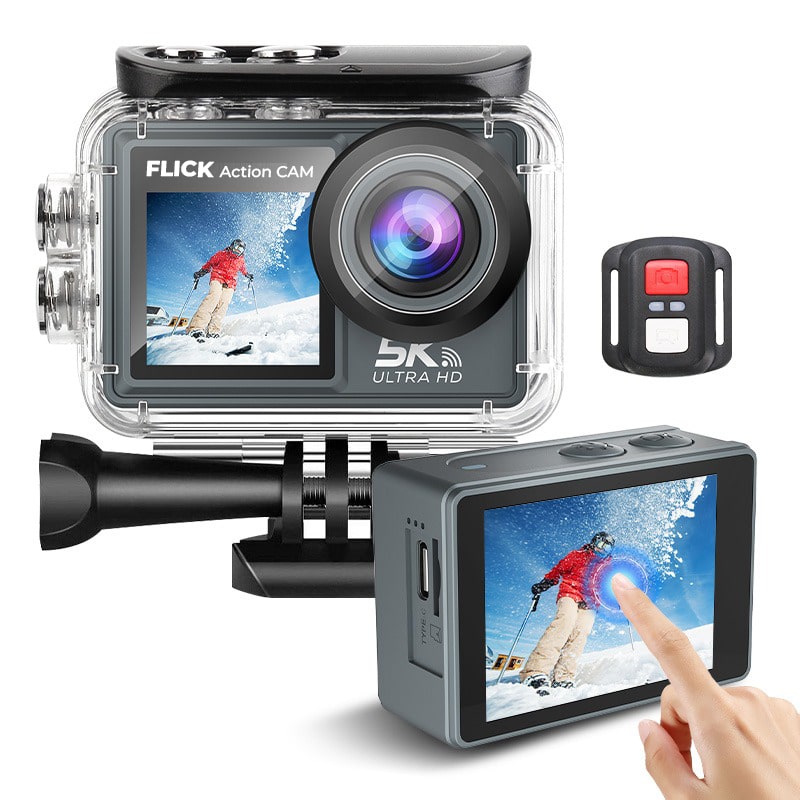
    Flick Technologies has officially introduced the Flick Action Camera, a powerful yet affordable alternative to high-end action cams. With cutting-edge features, this 5K UHD device offers an exceptional combination of premium quality and budget-friendly pricing, available for only GHS 1950.

    The Flick Action Camera provides crystal-clear 5K video resolution, a 170-degree wide-angle lens, and Electronic Image Stabilization (EIS) to ensure smooth, professional-grade footage. It also boasts dual touch screens— a 2.0-inch main display and a 1.3-inch front screen— for enhanced usability and versatility when capturing moments.

    Built for adventure, the Flick Action Camera is waterproof up to 30 meters and includes a comprehensive set of accessories to tackle various environments, whether you’re hiking, diving, or cycling. It also supports features like time-lapse, slow motion, fast motion, and loop recording, making it ideal for all types of content creation.

    Additional features include:

    • 50MP photo resolution for stunning still images.
    • WiFi connectivity and remote control for seamless operation.
    • Diving mode and distortion correction for optimal underwater shots.
    • Support for wireless microphones and memory cards up to 128GB.

    Flick Technologies is committed to delivering high-quality products at an affordable price. The Flick Action Camera offers a premium filming experience without the steep cost, making it an ideal choice for adventurers, vloggers, and content creators looking for top-tier performance on a budget.

    The Flick Action Camera is available now. Don’t miss out on the chance to capture every moment in stunning detail!

    Place your order at Flick Action Camera or contact us at +233530501110.