Category: Vodafone

  • Vodafone Ghana Mifi: Price, Discount, How To Buy Data, Check Balance & More

    Vodafone Ghana Mifi: Price, Discount, How To Buy Data, Check Balance & More

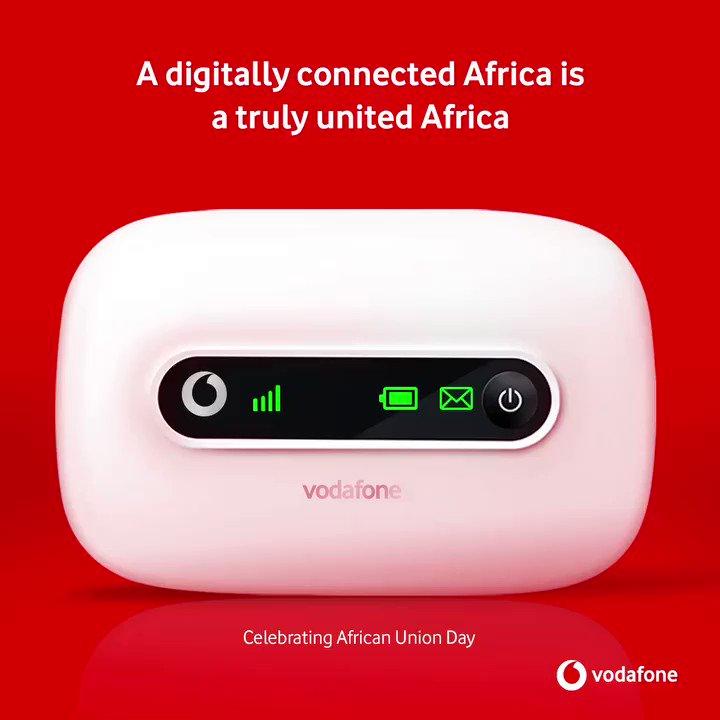
    Vodafone Ghana Mifi is a portable Wi-Fi device which allows up to 5 Wi-Fi devices eg: iPhones, iPad, mobile gaming devices, Pcs and android devices to use a secure mobile internet.

    The Mifi charges using USB and can be placed anywhere for the best network coverage and then share this network with many devices through Wi-Fi.

    Types Of Vodafone Mifi

    There are two types of Vodafone Mifi available and they are

    • The 4G Mifi R18
    • The 3G Mifi R207

     Prices Of Vodafone Mifi

    The 4G Vodafone Mifi costs GHS 599 and it comes with free 6GB which will last for 1 month at initial purchase.

    The 3G Vodafone Mifi costs GHS 375 and also comes with free 6 GB for one month at the initial purchase.

    Benefits Of Using Vodafone Mifi

    • It helps you work for a longer period without internet interruption, Mifi gives you a stable connection, unlike your phone hotspot that a phone call can interrupt your internet connection.
    • Save phone battery life, getting a Mifi helps you connect more devices to the MiFi internet connection without using your phones internet connection, this will help save the battery of your phone because turning on Wi-Fi hotspot drains a lot of phone battery.
    • It doesn’t need any USB cable to connect before working but rather works using Wi-Fi and can be used anywhere. One benefit about this Mi-Fi is, you can also use USB tethering to connect the network with your laptop.

    Things To Note When You First Buy Your Vodafone MiFi

    The first you need to charge your device until the battery is full before using it

    There are four indicators on the device and they are network indicator, the Wi-Fi indicator, SMS indicator and the battery indicator.

    The signal turns blue when the MiFi is connected to the network, if it turns red it means your Mifi is trying to connect to a network.

    The battery also turns blue when the battery is above 50% and it turns red when the battery is below 50%

    How To Connect Your Vodafone MiFi To Your PC

    Turn on the Mifi and then on your computer go to the network setting.

    You will see your Mifi network available on the available networks.

    You will find your network ID at the back of your Mifi when you finally find your network id in the available networks, select the network and you will be asked to type in your Security Key, the security key is also at the back of your Mifi.

    Enter the security key and also take note that the security is case sensitive meaning if the key starts with a capital letter and you type in a small letter it will prompt you that you have typed a wrong password.

    How To Connect Your Vodafone MiFi To Your Your Phone

    On your phone go to Settings and then turn on your Wi-Fi connection

    You will find your Mifi network select it and type in the security key which can be found at the back of the Mifi

    How To Check Your Vodafone MiFi Balance

    With Vodafone Mifi, you will need to remove the sim card inside the Mifi and then put it inside a different phone to check your Mifi however you can trace the amount of data you’ve used on the Mifi and can even use that to know the amount of data left on your device.

    How To Bundle On Vodafone MiFi

    The Vodafone Mifi comes with a sim card and as stated earlier you will be given free 6GB and when the free 6GB is exhausted, you will need to buy new data.

    Here Is How To Buy Data on MiFi Using Vodafone Cash

    1. Dial *110#
    2. Select 3: Buy Airtime and Bundles
    3. Now select your preferred bundle
    4. Enter your PIN
    5. Confirm payment to enjoy your bundle

    Conclusion

    A MiFi is one a must-have device which gives you so many benefits such as connecting all your devices all at ones, having an uninterrupted connection and many more.

    In this article, we went through the Vodafone Ghana Mifi prices, how to set it up, how to load data and how to check our data balance.
  • How to activate Vodafone GHS 5 for 5GB for 7 days

    How to activate Vodafone GHS 5 for 5GB for 7 days

    Having trouble getting your money’s worth from your data plan? There are plenty of ways to get the most out of your data, and we will be walking you through them in this article. We will be talking about activating a GHS 5 plan on Vodafone Ghana network that will get you 5GB of data valid for 7 days.

    Before you can start using your Vodafone GHS 5, however, you will have to set up your internet on your phone or laptop depending on the data service you are using.

    How to activate Vodafone GHS 5 for 5GB for 7 days

    The Vodafone GHS 5 for 5GB for 7 days bundle offer mostly comes under the made4u or the BOSSU weekend. Also, the mad4u offer is not stable and keeps changing as time goes on.

    To activate using the made4u offer,

    1. Dial *530#
    2. The available offers will show up on your screen
    3. Look through and locate the GHS 5 for 5GB for 7 days
    4. Choose the option and activate the offer.

    NB: You have to have the GHS 5- GHS 6 in your Vodafone balance before you can activate because you can’t use Vodafone cash for this offer. If the 5GB for 7 days offer is not available at the time of wanting to activate, there will surely be an enticing offer to choose from.

    To activate using the BOSSU weekend offer,

    1. Dial *5588#
    2. Choose option 3 (Bossu weekend)
    3. Press option 1
    4. Choose your payment option (Airtime or Vodafone cash)
    5. Your selected service will be successfully activated

    NB: This service is only available for your weekend thrills. You will enjoy 5GB of data from Vodafone throughout the weekend.

    How do I get unlimited data on Vodafone?

    Customers who prefer to go for unlimited data on Vodafone can dial *900# and choose from the options that will be shown.

    How do I get free data on Vodafone?

    Upgrade to Vodafone 4G and receive free 4GB data. To do so, visit any Vodafone office for a new 4G SIM. On activation, you will be credited with free data to surf the internet.

    Conclusion

    With how hard it is to get a deserving data worth your money, this Vodafone 5GB for GHS 5 is worth the amount. Follow the steps and activate and enjoy. Note that, the fee could change based of the currency rate in the country.

  • How to check your Vodafone data balance

    How to check your Vodafone data balance

    You may find yourself in a situation where you need to check how much data you have left on your current Vodafone plan before you get charged. You could check your Vodafone data balance by logging into the MyVodafone app. However this may be inconvenient if you are not near your computer or are unable to use the Internet at that moment.

    Sometimes your monthly data allowance can be used up in the blink of an eye, and you don’t even realise it until your data has already been used. Checking your Vodafone data balance regularly means you’re never caught off-guard by any unexpected charges and you can work to avoid overages as much as possible.

    Learn how to check your Vodafone data balance and then do it on the go, so you don’t have to worry about exceeding your data limits.

    About Vodafone Ghana

    Vodafone Ghana is one of the leading telecommunication companies in Ghana providing reliable and quality services to its customers. The company offers a wide range of services including mobile phone, internet and data services.

    How to check your Vodafone data balance

    Checking your data balance helps you to better manage your usage and keep track of your data plan.

    Check your data balance using MyVodafone app

    1. Download and install the MyVodafone App from Google Play Store or Apple App Store.
    2. Sign up with your Vodafone number.
    3. Once you sign up into your dashboard, you can see your data balance on the top left corner of the screen.
    4. You can also see a detailed breakdown of your data plan by clicking on the ‘‘View Plan’’ button in the app.

    Check your Vodafone data balance using USSD code

    Method 1

    1. On your Vodafone number, dial *124#
    2. Your account balance will be displayed on your screen where you can also see your remaining data.

    Method 2

    1. Dial *700#
    2. Choose option 2 (check bundle)
    3. Your remaining data balance will be displayed on your screen.

    Method 3

    1. Dial *126#
    2. Your data balance will be displayed on your screen including all your other bundle bonus.

    Check your Vodafone data balance online

    1. Visit Vodafone Ghana website and log into your account. Sign up with your vodafone number if you don’t have an account yet.
    2. Once you are logged in, click on the ‘My Account’ tab and select the ‘Data Balance’ option.
    3. This will show you your current data balance and other details about your plan.

    How to buy data on vodafone with Vodafone cash

    1. Make sure you have enough money in your Vodafone cash wallet
    2. Dial *110#
    3. Choose option 3 (Buy airtime or data)
    4. Select option 2 (Buy data)
    5. Choose option 1 (Self)
    6. Select the data type you want
    7. Select the amount to purchase
    8. Enter your pin
    9. Confirm your purchase

    How to buy data on Vodafone with airtime

    1. Make sure you have enough airtime for the said data you want to purchase
    2. Dial *700#
    3. Choose option 1 (Buy data)
    4. Select the data type you want
    5. Select the amount to purchase
    6. Choose your payment option (airtime)
    7. Confirm payment

    Vodafone shortcodes and their service

    ShortcodeService
    100Call centre
    *119*Number# SendCall me back
    600Porting
    175050 Number reservation (Text #book+space+the number to 175)
    1080Access code for fixed prepaid lines
    *150#Roaming enquiry
    *151#VIS (Vodafone Information Service)
    *124#Account balance
    *134*PINReload
    *484*1#Reseller balance
    *142#Swipe card service menu access
    *126#To check bundle information
    *127#To know a mobile number
    *127*11#General news
    *200#Vodafone Red offer
    *505#SOS credit
    *700#Vodafone mobile internet (Packages, bundles and more)
    *145#Agent Sim registration
    *313#Vodafone live radio
    *404#Deactivating from VF Mini Pack
    *900#FBB bill payment and balance info
    *400#To check for your sim registration
    *474#Micro payment
    *566#Super Hour
    *543#Vodafone Good Morning
    *480#Vodafone Unlimited Offers
    *110#Vodafone Cash
    *591#Vodafone Cash Agent Helpline
    *510#Agent Application Code
    558Register Vodafone Cash by sending register to shortcode
    *530#Made For Me
    *533#Yendi Agoro
    *565#Number For Life
    *7070#Vodafone Supreme
    *556#Vodafone Vim offers
    *5888#Vodafone X
    ##21# or ##002#Deactivate from VF Mini pack

    Conclusion

    It is important to check your data balance regularly so that you can keep track of how much data you are using and avoid overage fees. With the methods mentioned above, checking your Vodafone Ghana data balance is easy and convenient.

  • Vodafone Cash: 4 reasons why you need it

    Vodafone Cash: 4 reasons why you need it

    Vodafone cash is a pay as you go mobile service which allows you to purchase airtime in advance of needing it, and so doesn’t require that you top up your phone credit on an ongoing basis. It is ideal for anyone who might only use their phone sporadically to make emergency purchases.

    Also, there are times when we need money immediately. This might be because of an emergency, or maybe you want to buy something and don’t have physical funds on you.

    Whatever the reason, there are some situations in which Vodafone cash can be very useful since it can provide you cash right away without having to wait for days or even weeks.

    4 reasons why you need Vodafone cash

    1. It’s fast
    2. It’s convenient
    3. It’s safe
    4. It’s easy to use

    Its fast

    Are you looking for a fast and convenient way to pay your bills or transfer money? Vodafone cash is the answer. With Vodafone cash, you can instantly pay for goods and services or transfer money to anyone in Ghana and beyond with just some few steps.

    It’s convenient

    Vodafone cash is the ideal way to send money quickly, easily and securely. With Vodafone cash, you can make payments online, in store and even to other Vodafone cash customers.

    Whether you are shopping for groceries or sending money to friends and family, Vodafone cash makes it easy to stay on top of your finances.

    It’s safe

    Vodafone cash is an innovative mobile money transfer service that enables you to safely and securely send, receive, and store money on your mobile phone. This service offers great convenience and security for users, making it the perfect solution for any number of money transactions.

    It’s easy to use

    Vodafone cash is incredibly convenient service that makes it easy for customers to send and receive money with just some few steps.

    All you have to do is register your mobile number, set up a PIN and you are ready to start using the service. You don’t have to set up any complex code or password, all you need is your registered Vodafone cash number and 4-digit PIN.

    Conclusion

    Vodafone cash is an easy and convenient way to manage your finances. With its user-friendly interface, reliable security features and low fees, you can be sure that you are making the right decision when you choose Vodafone cash.

  • 5 things you can do on Vodafone cash for an easier life

    5 things you can do on Vodafone cash for an easier life

    It’s always fascinating to access services of Vodafone, Ghana especially Vodafone Cash. Vodafone cash unarguably offers services which make life convenient for its subscribers and it is shockingly at no cost. Users can thus conduct transactions across other networks like MTN, and AitelTigo and still pay nothing.

    What Can I Use Vodafone Cash for?

    You may be unsettling on what Vodafone Cash can be used for, in order to make life easier for you. Well, Vodafone Cash can be used conveniently for the following;

    • Sending and receiving cash anywhere in Ghana
    • Buying airtime and internet bundles
    • Paying bills (e.g., DSTV, ECG, GoTV, Ghana Water, StarTimes, box office, school fees and many more)
    • Transferring money to bank accounts
    • Buying online tickets for events

    Sending and receiving cash anywhere in Ghana

    A subscriber of Vodafone cash can at the comfort of his or her home, either send or receive money from any part of the country. Users of the service can also send money to both Vodafone and Non-Vodafone numbers. You can do this by simply;

    1. Dial *110# on your mobile phone
    2. Select # 1 to transfer money
    3. You can then select #1 to transfer to Vodafone numbers or #2 to send money to other networks (MTN, Glo, AirtelTigo)
    4. Users can also select #6 to send money to unregistered contacts
    5. Follow prompts to confirm and validate transfer
    6. Subscribers can likewise receive money from Vodafone users, Non-Vodafone networks and unregistered people.

    Buying airtime and internet bundles

    Gone are the days you had to queue to buy Vodafone airtime for your internet bundle subscription. With Vodafone Cash, a subscriber can easily buy airtime for him or herself and also for others (both Vodafone users and other networks).

    You can also subscribe directly to internet packages like Special Bundle using your Vodafone Cash. You can easily do this by;

    1. Dialing *110# on your mobile device.
    2. Select #3 to buy airtime or bundles.
    3. Follow prompts to purchase either for yourself or others regardless of the network they are using.

    Transferring money to bank accounts

    You can send money from your Vodafone cash wallet to your bank accounts without moving to the bank. And it can be done swiftly by just following some few prompts. A subscriber of Vodafone cash can transfer money to bank accounts by;

    1. Dialing *110# on his or her mobile phone
    2. Select send money.
    3. Choose to bank account.
    4. Select bank name.
    5. Enter bank account number.
    6. Enter amount to transfer.
    7. Enter pin to confirm and approve transaction.

    How to Register for Vodafone Cash

    To subscribe to Vodafone cash, you must first be in possession of a registered active Vodafone sim a valid Ghana card. You can the proceed to register by;

    1. Visiting any authorized Vodafone Cash merchant or the nearest Vodafone office with your Ghana card.
    2. Foreigners are however required to provide a valid passport to be eligible for registration.
    3. The Vodafone merchant will then capture your personal details, verify and upload to the Vodafone database.
    4. Afterwards, you will receive an SMS message with a default PIN.
    5. Enter the PIN to create a new Vodafone Cash PIN (4 digits).
    6. Subscribers must note that they will need their secret PIN to authorize all transactions they undertake.

    Conclusion

    Vodafone cash has made life easier. With just your mobile phone, your vodafon sim and an Internet connection, you can do a lot within a minute that could have been done with hours.

  • How to borrow money from Vodafone cash in Ghana

    How to borrow money from Vodafone cash in Ghana

    Have you ever asked how to borrow money from Vodafone cash in Ghana? Then you are lucky to be reading this article as we will be giving you all the answers you want here. The questions How do I borrow from vodafone cash in Ghana?

    Borrowing money can be tricky business, especially if you’re dealing with strangers and especially when it comes to your credit score. That’s why online loans are becoming more popular by the day.

    Vodafone Cash in Ghana offers easy access to small personal loans that can help get you back on your feet if you’re short on cash or have an unexpected expense come up.

    You can complete their application process quickly and receive your funds almost immediately after approval, which means you don’t have to worry about missing bills or losing out on opportunities because of having too little money on hand.

    What is Vodafone cash?

    Vodafone cash is a mobile money platform that is available in Ghana. It is a convenient and secure way to send, receive and store money, shop online and make payments.

    It offers a range of services, such as airtime top-up, bills payment, international remittances, and money transfer. With Vodafone cash, you can access financial services anytime, anywhere, at the touch of a button.

    How to register for Vodafone cash

    You can register using any of the following:

    • Text “Register” to 558 or dial *558# for self registration
    • Visit any mobile money agent or Vodafone retail shop
    • Fill out a Vodafone Cash application

    You will be required to present the following details:

    1. Name
    2. Date of Birth
    3. Address
    4. Vodafone Mobile Number
    5. Ghana Card details

    Activate your account

    After registration follow these prompts:

    1. Dial *110#
    2. Select 0 to activate and follow with your preferred PIN.
    3. Enter PIN again to confirm.

    How to borrow money from Vodafone cash

    Requirements

    Before you can be able to borrow money from Vodafone, you must first,

    1. Have a valid and registered Vodafone SIM.
    2. Register Vodafone cash with your Vodafone SIM.
    3. Be a regular Vodafone cash user.

    Steps to borrow

    1. Dial *110#
    2. Choose option 5 (financial services)
    3. Select option 3 (loans)
    4. Choose your loan option (Ready loan)
    5. Select option 2 (Request ready loan)
    6. Select 1 (Opt in)
    7. Type in available amount
    8. Confirm with your PIN

    NB: You will receive a message after confirmation and if you qualify, you will be given the loan. If you don’t qualify, you will be told why you don’t qualify and will be required to do such in order to qualify in the future.

    How to Repay

    Deposit amount into your Vodafone cash wallet.

    1. Dial *110#
    2. Select option 5 (financial services)
    3. Select option 3 (loans)
    4. Choose loan option (Ready loan)
    5. Select option 4 (loan repayment)
    6. Enter your PIN to continue
    7. Follow the necessary prompts and make your loan payment.

    NB: You will receive a message if you were successful in your loan payment. If not to, you will be told why it was not successful.

    Fees and charges

    The Loan service attracts a fixed monthly interest. This fee is added to the loan amount to give the customer the value to pay back, before or on the due date. When the due date elapses, a penalty fee of 12.5% is applied for defaulting.

    How do I know I am eligible for Ready Cash?

    You must have an active Vodafone Cash account and be active on their GSM network. You must also be at least 18 years to apply and being with Vodafone for at least 6 months and active on Vodafone cash for at least 3 months.

    How many times can I tataka loan on Vodafone Ready Cash

    You can request for the loan as many as possible, but you only have on loan account at a time.

    What happens if I can’t repay my Vodafone Ready Cash loan on time?

    You will be charged an additional rate of 12.5% as a penalty until full repayment is made.

    Conclusion

    Borrowing money from Vodafone cash in Ghana is a great option if you are in need of quick access to funds. With easy registration and mobile access, it makes the process convenient and secure. The interest rates are also quite reasonable. All in all, this is a good way to get some extra cash when you need it.

  • Vodafone Ghana Broadband: Bundles prices, Areas, & how to apply

    Vodafone Ghana Broadband: Bundles prices, Areas, & how to apply

    With so much to choose from and the amount of information to take in, it can be daunting if you’re looking at options for getting Vodafone Ghana Broadband in your area, especially if you don’t know exactly what to look out for, or what kind of bundles will work best with your current budget

    Vodafone Ghana is one of the largest broadband service providers in the country. The company offers a variety of bundles that are tailored toward the needs of different customers. Their standard home plan comes with 10Mbps download speeds, which is perfect for basic browsing or light streaming. But if you’re looking for more bandwidth, Vodafone has plenty of other options as well from 50Mbps to 500Mbps, all with unlimited downloads.

    The Internet has become an essential part of our lives, whether for work or for leisure. So it’s no surprise that Vodafone broadband is giving us the chance to get connected at home or on the go. With a range of bundles that offer different levels of data allowance, you’re sure to find one that suits your needs

    Vodafone Broadband Bundle prices

    The various packages are designed in a way to suit your online needs. Regardless of your wants, you will get an offer that best fits you. Note that, all packages are valid for 30 days and speed depends on the quality of your landline and area.

    Browser

    This package gives you 20GB for GHC 85 and will last for a month. This is a perfect Vodafone Ghana fixed broadband package, especially for people that surf the internet regularly and probably want to stay online.

    If you must keep up with your friends and relatives through Facebook, Twitter, snap chat, Instagram and check up your emails, then this is an affordable and sustainable broadband package for you.

    Streamer

    You will have 40GB at a cost of GHC125 in this package and it will last for a month. This package is best for a person that likes streaming from the internet like watching movies and videos, live streaming events, etc. The good thing is that the speeds will allow easy and convenient streaming.

    Webmaster

    As the name suggests, this is a package for people whose lifestyle is on the websites making calls through Skype, Google Hangouts, Yahoo IM, or Facebook and making downloads that are fast. People whose lifestyle is to network socially browse more and reach for clients regularly. For GHC 180, you get up to 80GB. This package will deliver the fastest speed within your region.

    Downloader

    This package has a monthly subscription of GHC 250 which in turn allows you access to 200GB. This is capable of handling all your download concerns. No need to worry about those large files for up to 30 days before it expires. It is great value for your money.

    Office

    This goes for a monthly subscription charge of GHC 400 for 500GB. With the heavy internet usage in the office, it is the most ideal hence its name. Since at times is hard to regulate employees on what to do with the internet other than office work, this package will give them room to be able to express themselves freely. The reliable speeds are a plus.

    Area visibility

    To know if your area is available to access Vodafone broadband, visit https://myvodafone.vodafone.com.gh/pap/index.php?sid=check to check your area availability. You can also call customer care, mention your area, and then hear from them whether your area is visible or not.

    How to apply

    To apply for Vodafone broadband, you must first check if your area is eligible for broadband server or not. to do so, visit https://myvodafone.vodafone.com.gh/pap/index.php?sid=check to check. After checking, if you are visible, you then scroll down on the same homepage and start your application process.

    Installation cost

    You do not have to strain too much if you do not have heavy data requirements. To access the broadband data package you need an extra installation cost of GHC150 apart from the regular monthly fees. The installation fee is paid once and unless you are moving to a new place, you won’t pay any installation fee again.

    How can I buy Vodafone broadband?

    Dial *900# on any Vodafone number and follow the prompts to subscribe.

    Conclusion

    By now you should have a good idea of your monthly internet usage. If you’re a casual user, keep your internet package small. More than likely it’ll be fine for what you need.

    But if you’re a serious gamer or movie buff then opt for higher-speed plans or bigger data packages. In that case, larger packages might make more sense as they provide more value compared to their lower-speed counterparts at any given price point.

  • How to Pay DSTV Subscription With Vodafone Cash

    How to Pay DSTV Subscription With Vodafone Cash

    The next time you are going to pay your DSTV subscription, you can use Vodafone cash to pay to make subscription more simple and easy.

    About DSTV Subscriptions

    Dstv is a subscription-based satellite television service. It is available in a variety of different packages and offers over 130 channels in both English and Afrikaans.

    Is it safe to pay DSTV subscription with vodafone cash?

    Yes. Vodafone cash is a reliable payment service and thus, you don’t need to be afraid using them for DSTV subscription renewal. It is safe to use for your DSTV subscriptions. You can either use the vodafone app or you use the vodacash USSD code to make payment.

    Steps to pay DSTV subscription with vodafone cash

    To pay your DSTV subscription with vodafone cash so you can continue watching your favourite movies and sports, follow the steps below.

    1. On your phone, dial *110#
    2. Choose option “4” to make payments with Vodafone Cash.
    3. Choose “1” to pay your DStv bill.
    4. Select option “3” for utilities.
    5. Select option “3” again for a DStv subscription.
    6. Enter your smart card or IUC number.
    7. Also, enter one (1) for the amount due or “2” to input the amount you want to pay.
    8. Reply with option “2” and continue the payment with your Vodafone Cash.
    9. Now, enter the amount you would want to pay for the DStv subscription and press send.
    10. Finally, enter your Vodafone cash PIN to complete the payment.
    11. You will receive an SMS indicating your payment has been made successfully.

    How long does it take for payment to reflect

    Payment is instant. You dont need to wait for days before you see the effect. Once you make a successful payment, your subscription has been activated for the next 30 days.

    NB: Incase you encounter any problem in the process, call the Vodafone customer care on 100 and lodge your complain. You will be assisted to and then, you can make your payment and enjoy your DSTV.

    Conclusion

    Vodafone cash has made it more easier to make your subscriptions payment without needing to go stand in a queue. With vodacash, even as the comfort of your hope and following the steps above, you can pay for your subscriptions any time and any day.

  • How to Stop Auto Renewal of Data on MTN, Vodafone, Airteltigo and Glo

    How to Stop Auto Renewal of Data on MTN, Vodafone, Airteltigo and Glo

    In this tutorial, I will be discussing how to stop auto renewal of data in your MTN, Vodafone, Airteltigo and Glo lines so that you can continue using the services without having to renew the data every time it finishes. This process will work on all platforms; iOS and Android.

    Data auto renewal

    Some phone networks offer auto-renewal for data packages. This means that when you purchase a data package for your phone, it will automatically renew at the end of your billing cycle if you don’t make any changes to your plan.

    This might be useful for some people who are very busy and forget about their data plans. For others, this can be an expensive mistake as they fail to turn off auto-renewal before their original package expires.

    Why you want to stop data auto renewal

    Data is expensive in Ghana and it’s easy for the auto renewal system for data plans to rack up costs. You may not want auto renewal your data because its not everyday you will have money for that.

    But the problem is that, most people don’t know how to stop this from happening.

    How to stop data auto renewal on MTN Ghana

    You may have activated auto renewal data for a certain subscription and you now want to stop but finding it difficult to do so. Well, that’s not easy.

    To stop auto renewal data on MTN Ghana through SMS,

    1. Open your phone menu and tap on the messaging app.
    2. Now, on the message app, send STOP to 138.
    3. All your data auto renewal subscriptions will be cancelled.
    4. You can now buy your airtime without worrying about getting deducted when your data finishes.

    To stop auto renewal data on MTN Ghana through USSD code,

    1. On your dial pad, dial *175#.
    2. Select option one (My subscriptions).
    3. All services you have subscribed to will appear.
    4. Select all the MTN services you want to unsubscribe.
    5. Follow the prompts to cancel your MTN Subscriptions.

    How to stop data auto renewal on Vodafone Ghana

    There are two USSD code you can use to unsubscribe for Vodafone data auto renewal. One for direct data unsubscription and the other for all subscriptions on your phone.

    To directly unsubscribe from data auto renewal,

    1. On your keypad, dial *700*3#
    2. All your data subscriptions will unsubscribe.
    3. You can now buy your airtime and not worry about auto subscription.

    To unsubscribe from all subscriptions,

    1. Dial *463# and press send.
    2. Select option one (My subscriptions).
    3. Choose option one again (View subscriptions)
    4. All your Vodafone subscriptions will appear here. Now, you choose from the pop up the ones you want to unsubscribe.
    5. Follow the prompts to cancel your Vodafone subscriptions.

    How to stop data auto renewal on AirtelTigo Ghana

    To stop data auto renewal subscription on airteltigo Ghana,

    1. Dial *100# and press send.
    2. Select option four (Content Services)
    3. Select Deactivate subscriptions.
    4. A list of all your Airteltigo Subscriptions will appear. Now, select from the list the ones your want to unsubscribe.
    5. Follow the prompts to cancel your Airteltigo Subscriptions.

    How to stop data auto renewal on Glo Ghana

    To stop auto renewal data on Glo Ghana,

    1. Open your phone menu and tap on the messaging app.
    2. Now, on the message app, send CANCEL to 555 OR 127 and your data auto renewal subscriptions will be cancelled.
    3. You can now buy your airtime without worrying about getting deducted when your data finishes.

    Conclusion

    Auto renewal can be quite annoying especially when you are not ready to subscribe for it anymore. Its best to follow the steps above and stop all data auto renewal subscriptions on your phone.

  • How to Check Data Balance on MTN, Airteltigo, Vodafone and Glo

    How to Check Data Balance on MTN, Airteltigo, Vodafone and Glo

    If you have been wondering how to check your mobile data balance on MTN, AirtelTigo, Vodafone or Glo, then read on to find out more. Its sometimes necessary to check data balance when making an important download in order not to get stucked on the way.

    About MTN, Vodafone, AirtelTigo and Glo Ghana balance check

    They are methods provided by the various network providers for their customers which can be used to check data balance in order to know how much is available for use and if there is the need for a top up.

    How to check your data balance on MTN Ghana

    Follow these steps to check your MTN Ghana data balance, using the MTN Ghana USSD code format.

    • On your Android or iOS smartphone, open your call dialer.
    • Dial *124#, and send.
    • You will get a pop-up containing all your current active data bundles and other balances.

    You can also use another USSD code to check all your active data bundles on the go.

    1. Dial *138#
    2. Choose option 1 (proceed to buy bundle)
    3. Select 99 (more)
    4. Choose option 7 (more)
    5. Select option 3 (check bundle balance)
    6. You will get a pop-up and also a text message from MTN, containing all your current active data bundles.

    How to check your data balance on Vodafone Ghana

    Follow these steps to check your Vodafone Ghana data balance, using the Vodafone Ghana USSD code format.

    1. On your Android or iOS smartphone, open your call dialer.
    2. Dial *124#, and send.
    3. You will get a pop-up containing all your current active data bundles and other balances.

    You can also use another USSD code to check all your active data bundles on the go.

    1. On your dial pad, dial *126#
    2. A popup will show on your screen which contains all your available data bundles.
    3. You will also receive an SMS from Vodafone contains your data balance.

    How to check your data balance on AirtelTigo ghana

    Follow these steps to check your Airteltigo Ghana data balance, using the airteltigo USSD code format.

    1. On your Android or iOS smartphone, open your call dialer.
    2. Dial *124#, and send.
    3. You will get a pop-up containing all your current active data bundles and other balances.

    You can also use another USSD code to check all your active data bundles in separate.

    1. On your dial pad, dial *504#
    2. A popup will show on your screen which contains all your available data bundles.
    3. You will also receive an SMS from airteltigo which contains all your data balance.

    How to check your data balance on Glo Ghana

    Follow these steps to check your Glo Ghana data balance, using the Glo USSD code format.

    1. On your Android or iOS smartphone, open your call dialer.
    2. Dial *124#, and send.
    3. You will get a pop-up containing all your current active data bundles and other balances.

    You can also use another USSD code to check all your active data bundles in separate.

    1. Dial *555# on your mobile phone.
    2. Look through the menu that pops up and select option 8 (No. and Balance)
    3. In the next menu, select option 3 (Check your balance).
    4. Then select option 3 again and all your active data balance will be shown to you.

    Conclusion

    I can understand how confusing it can be for you in your search for how to can check your data balance in Ghana. The above process can be your guide now with less stress.