Most often, when we have a new phone, it is usually difficult to configure the internet settings and we are left with no choice but to go to the Customer Service of the Network Operator for your phones and other devices to be configured. Well, I bring you the recommended internet settings for all the networks in Ghana.
For android users, you can just use the “General” settings that I have used on every android phone and it works perfectly.
How to set up internet settings in Ghana
Go to your device’s settings
Go to wireless and settings
Select Mobile networks
Select Access Points Names
Create new APN by taping the “+” sign or pressing Menu and selecting new APN
Select Name and enter “General”
Select APN and enter “internet”
Save the Settings
Activate to use new Access Point Name
The Configuration above should work for every device. However, I attach below network-specific configurations, which are especially useful for feature phones.
Airtel Ghana Internet Settings
Homepage: myairtel.gh.airtel.com Connection name: airtelwap Data Bearer: Packet data Access Point Name (APN): wap User name: [Leave Empty] Password: [Leave Empty] Proxy Server Address: 10.93.85.88 Proxy Port number: 9401
Glo Ghana Internet Settings
Homepage: www.gloworld.com/gh Connection name: Glo Data Bearer: Packet data Access Point Name (APN): internet User name: [Leave Empty] Password: [Leave Empty] IP Address: 10.161.85.4 Port: 8799
MTN Ghana Internet Settings
Homepage: mtnloaded.com.gh Connection name: MTN Data Bearer: Packet data Access Point Name (APN): wap User name: [Leave Empty] Password: [Leave Empty] IP Address: 172.017.003.005 Port : 8080
TiGO Ghana Internet Settings
Homepage: www.tigo.com.gh Connection name: tigo Data Bearer: Packet data Access Point Name (APN): wap User name: [Leave Empty] Password: [Leave Empty] IP Address: 010.004.001.007 Port: 8080
Vodafone Ghana Internet Settings
Homepage: www.vodafone.com Connection name: vodafone Data Bearer: Packet data Access Point Name (APN): wap User name: [Leave Empty] Password: [Leave Empty] IP Address: 172.024.097.001 Port: 8080
Did these help solve your problem? If no, just leave a message in the comments below and I will get back to you.
The notion of Free Browsing has been around for a long time.
The idea that you can be on a telecommunications network and not pay but enjoy data packages is one that amuses and will continue to amuse a lot of people. But is free browsing real?
Well, to some extent, I would agree that there has been a lot of “free browsing” that have been available since the days of java phones and “dead sims”. However, let us concentrate on current occurrences and see if this browsing is really “free”.
Rumoured 2021 Free Browsing Cheats
Rumoured Glo Ghana 2021 Free Browsing Cheat
This one readily comes to memory as I write this post, particularly because I am a “Big Glo Customer” and the emergence of this so-called free browsing trick affected me negatively. My first experience with this promise of cheap and almost free data was in June 2017 on Facebook. I was sharing posts onto facebook groups when I chanced upon a message encouraging people to pay for Glo data at ridiculously low prices.
Data were available to purchase with the seller seeming not to lose anything.
I contacted a few friends about how legit this data offer was. The outcome was quite simple: “Someone has been able to hack Glo and they are sharing data but some greedy ones are selling it”. I don’t know how true this hack thing was but what I did find out was that, yes, data has been sold and it was working perfectly well! Could this be a free browsing cheat well executed?
Well, I heard all the data “vanished” after some time. I personally believed this “free browsing” was real because during the period it was “active”, my network (Glo) became terribly slow.
Rumoured Vodafone Ghana 2021 Free Browsing Cheat
Among my friends, Vodafone and MTN have garnered a lot of respect because of their “tight security”. Oh, I do believe those two have tight security but as to how tight, I do not know.
In the case of the Vodafone Free browsing, it appears the discoverers of this trick could even auto-renew whatever bundle they came “stole”. The whole of last month, I had to respond to a lot of WhatsApp messages from people asking me if 6GB of Vodafone Data was been sold for GHS 30 and GHS 20. I became suspicious as there seemed to be no fixed price for the data, but rather a seemingly “reduce price to gain more buyers” methodology.
After speaking to someone I met online, he confirmed my suspicions. There was indeed Vodafone Free Browsing cheats that delivered 6GB and 2GB data, which could also varnish. According to him, Vodafone Ghana knew what was up but “it seemed they had no way to stop it”. Before writing this article, I contacted another person who was on social media selling the Vodafone Data. He maintained that it was a mistake and that he had never sold any Vodafone Data.
My take on Free Browsing Cheats and Tricks
It’s human nature to love free things, and people will continue to go in for this. The telecommunications network here in Ghana, if they really want to stop these “Free Browsing Cheats and Data thefts” will have to consider dropping their data charges and adding more value to the data they provide.
Vodafone X started well but after the price increase in the bundles somewhere in August 2015, coupled with recent dissatisfaction on social media, Vodafone may have to rethink the offer. Tigo Tribe and Big Time Datahas also got a lot of people puzzled after the introduction of the “0.10 GHS” subscription and as for MTN Pulse, it just does not seem enough for anyone.
Do you believe in free browsing cheats? Let’s hear you in the comments section below.
Like many other telecommunication companies in Ghana, Vodafone, formerly known as Ghana Telecom or Onetouch has gathered for itself many customers in Ghana.
With effective and cheap data packages, text packages, reduced call tariffs and unrivalled international call rates, Vodafone has maintained a strong bond with its users over the years.
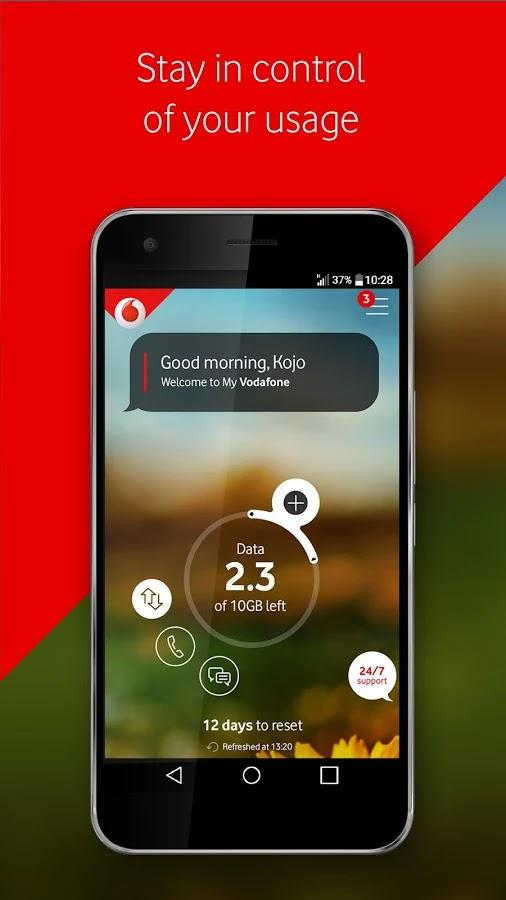
To further make the administration of the Vodafone Ghana sim cards easier for users, the company decided to launch the My Vodafone Ghana App just as has been done by some other Telcos in the past.
In this article, we shall look at the features of the My Vodafone Ghana App and what you can use them for.
If you are an existing Vodafone Ghana subscriber seeking an even more interesting way of enjoying your Vodafone experience, then this is for you. Also, if you are thinking of switching from another network to Vodafone, you should jump on the content of this article too as it tends to grow and polish your interest in Ghana’s finest Telecommunication network.
Features Of The My Vodafone Ghana App
Vodafone Cash Option
The My Vodafone Ghana app has the Vodafonecash feature which enables users to check their Vodafone cash balance, transfer money to other people and also pay bills, buy airtime and perform other primary and secondary Vodafone cash transactions right from the app with very few clicks and selections.
If you are a frequent user of Vodafone Cash, you know how annoying the shortcode method can be sometimes. The long wait for it to load sometimes and also how soon the timeout is in most cases.
The App should solve these problems for you and make you more comfortable using your most-reliable electronic payment method.
In-built Store Finder
Locating a customer care office nearby is one thing that becomes usually difficult for most network users especially in times of urgent needs.
It is okay to call the customer care line to chat with representatives regarding your problems but sometimes, you could further be directed to visit the nearest centre for your problem to be solved and this becomes a big problem for many people.
To resolve this challenge, the My Vodafone Ghana app comes with an in-built store finder feature which enables the user to see in real-time the nearest Vodafone Offices in their locality and enable them to connect and book an appointment where need be.
An Exciting Vodafone TV Feature
How about some extra features to an already exciting Vodafone app? Sounds interesting right? The Vodafone Ghana app has just the right features to keep its users on the platform for so many hours.
Aside from performing basic Vodafone Cash functionalities and purchasing data and other products from the Vodafone Ghana app, a user can also actually watch wonderful and educational content with the Vodafone TV feature on the Vodafone app platform. The Vodafone TV feature provides the user with contents such as the Vodafone Healthline experience and many others.
You get to watch promotional contents about new and existing Vodafone offers and services as well! What’s more interesting than this?
Offers And Extras
If you are an existing Vodafone Ghana subscriber, then you already know that when it comes to juicy offers and packages, there is none other compared to Vodafone Ghana.
The likes Of Deewa Offer, Vodafone red and many other wonderful offers are very competitive and user-friendly offers that have existed for a while to make the Vodafone experience an even better one compared to the other networks.
As such, it is only right and beautiful that Vodafone includes the Offers and Extras feature in its app to give users an easy approach to accessing all their existing and future offers.
Help And Support
Once in a long or short while (depending on how you use your Simcard), you may be required to contact your service provider for some enquiries regarding certain issues.
While this could be done by simply dialling the Vodafone Customer care line on your mobile phone, it sometimes gets laborious. In fact, not everyone likes to be typing numbers here and there.
With the Vodafone app, there is a help and support option where users can easily get in touch with their service provider for help with just a single click.
Truly, the Vodafone app gives the user a wonderful experience worth the time.
Conclusion
Owning a Vodafone sim card is in itself so much joy and pride. It doesn’t only come with that cheerful and colourful red look but it comes with a wide range of products and offers that always keep your smile broad and beautiful.
But, administering your Simcard and accessing such products and offers can be particularly stressful especially for those using ‘Yam phones’.
To make the Vodafone experience more interesting, Vodafone Ghana has launched the My Vodafone Ghana app to be used by customers for all transactions.
This app can be used on almost all Smartphones – both android systems and IOS.
In this article, we spoke about the features of this great app designed by Vodafone Ghana for its multitude of users. I hope you find this article appealing and helpful in your quest to enjoy the new Vodafone experience.
Kindly do well to leave your comments, questions, remarks or reservations regarding this post in the comment box below.
Please share with your friends and family as well, they may need it.
Many people love browsing at night, not because they can not sleep but browsing at nights is one of the best feelings you will ever get if you have a lot of videos and files to download.
Browsing at night has a different internet speed when making downloads as compared to making these downloads at day time.
You will also agree with me that when it comes to midnight packages in telcos, Vodafone Ghana has one of the most affordable night packages for its customers.
Vodafone has a night bundle offer called Vodafone Night King Bundle that subscribers can purchase to browse from 12:00 am to 4:00 am at a lower cost.
Meaning you can purchase it anyway but it will only start to work from 12:00 am and when it is 4:00 am it will be exhausted.
What Are The Prices Of Vodafone Night King Offer?
Vodafone has two kinds of night bundles
Night King 1
Night King 2
The Night King 1 cost GHS 2.15 and you will be given 2GB to be used from 12:00 am to 4:00 am.
The Night King 2 also cost GHS 5.40 and then you will be given 7.5GB to be used from 12:00 am to 4:00 am.
How To Activate The Vodafone Night King Bundle
As stated earlier there are two types of night bundle so to activate for the Night King 1 bundle simply dial the USSD code *700*71#.
Also to activate the Vodafone Night King 2 simply dial *700*72#.
When you are done, you will receive a message telling you that you have successfully activated the Vodafone Night King bundle.
Things To Note When Purchasing The Vodafone Night King Bundle
You can purchase the bundle any time of the day but it can only be used from 12:00 am to 4:00 am and when it is 4:00 am, the bundle will not work again until the next day when it is 12:00 am again.
When you purchase a midnight bundle and you exhaust all of them whiles still making downloads or surfing, then you can continue doing whatever you are doing using your data balance or if you don’t have any bundle, it will be deducted from your balance at a fee of 12.5p/MB.
How To Unsubscribe To Vodafone Night Bundle?
Maybe you have subscribed to the auto-renewing of the bundle because you are always found browsing at night and right now you do not want to browse at night again, you can choose to unsubscribe. To do this all you have to do is to dial 9090 and then follow the voice prompt to unsubscribe.
Conclusion
Vodafone night bundle is the best for people who make movie downloads or download huge files at night because, with Vodafone night bundle, you can get a huge amount of data and then pay less for it to be used from 12:00 am to 4:00 am.
Vodafone has been one of the best networks we have here in Ghana when it comes to data connectivity and also voice call rates, they are among the best.
There might be a time that someone might need credit or data and will be asking you for help, luckily for you the person might be using Vodafone and you are also using Vodafone and having a lot of data or airtime on your phone and will want to help in sharing with him or her.
But the problem is how to go about it? Well, this article got you covered as in this article, I am going to take you through how to transfer credit and also how to transfer data to another Vodafone user. So without wasting much time, let’s get started.
Before proceeding on how to transfer credit to another Vodafone user, the first thing you need to keep in mind is that you can only send airtime to another Vodafone prepaid subscriber. Also, we first have to know the code for sending Vodafone airtime.
And the short for transferring Vodafone credit is *516#
So How Do You Send Credit To Another Vodafone User?
To send credit to another Vodafone user you have to dial* 516*the recipient number*the amount you want to transfer*your password#.
Eg: if I am going to send GHS 1 to 0201206620 and my password is 1234, I will then dial *516*02012066261*1234# and then hit send to send the airtime.
Also take note that the transaction fee is GHS 0.05 so if you are sending credit, always make sure you have enough credit to cover the transaction fee.
The above steps were for sending Vodafone credit in the Cedis value, but what if you want to small credit that is in Pesewas? Let’s say you want to send 50 Pesewas to someone? To send Vodafone credit in Pesewas follow these steps.
Dial *516*recipient number*amount in Pesewas*password#
So sending 0.50 Pesewas Vodafone credit will be like this: *516*0201206626*0*50*1234#.
How To Send Send Vodafone Data To Another Vodafone User
Dial *700#
Type in 4: Bundle For Someone.
Now select the type of data you want to bundle for that special person.
Select the type of data you want to buy according to your credit balance.
Now choose what to pay with, either to pay with your airtime or pay with Vodafone Cash.
Enter the recipients’ number (which we all know it must be a Vodafone number).
You will then be prompt to type in your Pin (please note that if you have never sent credit to someone before or you have never changed your pin before, then your default pin is 1234).
Now press 1 to confirm the transaction.
Conclusion
Now you can share your airtime and data with your loved one, in this article we went through how to send Vodafone credit to another Vodafone user and also how to send data to another Vodafone user.
Vodafone is by far one of the best networks we have here in Ghana. They also have one of the best internet connections and also when it comes to affordable data bundles, to me, Vodafone is the best.
You might be a Vodafone user, and as a loyal customer you have been calling and texting every day and has been wondering if there is a way of making unlimited calls on Vodafone, the answer is yes, there is.
That’s why in this article, I am going to take you through all the Vodafone unlimited call offers that you can subscribe to.
Vodafone Deewa Offer
This offer allows any Vodafone user to make unlimited calls and unlimited SMS to his or her family and friends for 24 hours.
It cost GHS 0.50 to activate this offer and it lasts for 24 hours.
How To Subscribe To Vodafone Deewa Offer
Dial *5050#
Enter 1: Buy Deewa Offer
Buy by pressing 1
Now select how you want to make the payment, you can choose pay using airtime or pay using Vodafone Cash.
Vodafone Supreme Monthly Offer
The Vodafone Supreme Monthly offers you free calls to Vodafone numbers and also gives you double bonus anytime you top up any amount from GHS 2 and above.
How To Register For Vodafone Supreme Monthly Offer
To register for the Vodafone Supreme Monthly offer dial 7070 you will then be briefed about the minutes you will get and then ask you to press 1 to activate or 2 to cancel.
This offer gives you 1000 minutes to be used within a month on on-net calls.
The price for this offer is GHS 11 and in case you exhaust all your minutes, you can again reactivate the 30- days offer again.
Vodafone Baako Pe! Offer
This offer is similar to MTN Free After 1 as this offer too allows you to make a call and only pay for the first minute.
You will be charged GHS 0.30 and after that, you can make calls to any network and still pay for that amount.
How To Subscribe To Vodafone Baako Pe!
Dial *135#
Select 1: Activate Baako Pe
Confirm by pressing 1.
Vodafone Bossu Weekend Offer
Maybe you are busy in weekdays and only becomes free at weekends and you are wondering if you can make unlimited calls on Vodafone and pay less, then the answer is yes, you can.
Vodafone has an offer that gives you 300 minutes to call all networks and 5GB of data for as low as GHS 5.40.
How To Subscribe To Vodafone Bossu Weekend Offer
Dial *5588#
Select 3: Bossu Weekend
Type in 1 to activate
Now select how you want to make the payment either using Vodafone cash or airtime.
Now select 1 to confirm.
Conclusion
If you are always fond of making calls every day, maybe you are a businessman or woman and your work involves always making a call, then it is time to look through the Vodafone calls offers we’ve just gone through as it will help you save a lot of money.
Vodafone Ghana will began rolling out its 4G services to the general public in Ghana from 19th March 2019.
Vodafone Ghana got the 4G licence from the National Communications Authority (NCA), at the end of 2018. The NCA gave the telecom company one slot of the 2x5MHz frequency spectrum in the 800MHz band for mobile services.
The rollout of Vodafone’s 4G service was supposed to start somewhere in the second quarter of this year. However, it seems to have come a little bit earlier than that.
Vodafone will now become the second telecom operator in Ghana to run the 4G network, rivals MTN Ghana.
How to check if your phone and sim card support Vodafone 4G
To check if you can enjoy Vodafone Ghana’s 4G service:
Dial *700# on your Vodafone handset
Select option 6 (Check 4G Status)
Select option 1 (Check 4G Phone or SIM Readiness)
You will receive a prompt that gives you the status of your phone and SIM Card
Alternatively, you can just dial *700*6*1# and you will instantly receive the prompt to know your status.
Meaning of Results and how to get Vodafone 4G
If the result of the *700*6*1# check says that your phone and SIM are both 4G ready, then you don’t have to worry. You can start enjoying Vodafone Ghana’s 4G right away.
However, if it says your SIM is 4G ready, but your phone is not, this is because your phone does not support 4G or LTE services. You will have to get a new phone.
If the results indicate that your SIM is not 4G ready, you can visit any of Vodafone Ghana’s shop and have a 4G SIM.
This initial deployment of Vodafone Ghana’s 4G is happening in major cities in the country. Already, Vodafone Ghana has more than 200 sites, where customers can access the 4G service all across the country.
In Ghana, Vodafone cash comes in mind when we are talking about the best mobile money networks in Ghana with fewer fraud issues.
A Brief Introduction About Vodafone Ghana
Vodafone Ghana came into existence on 17 August 2008 when they acquired 70% of Ghana Telecom from the Ghana government at a cost of $900 million.
After the deal was made, Vodafone took over and the network name was changed from Ghana Telecom to Vodafone Ghana making the company own 70% whiles the government of Ghana owned 30% and in 2016, the company became the second-largest telecommunication operator in Ghana.
On March 2015, Vodafone Ghana launched its mobile money platform naming it Vodafone Cash, this service was launched for customers to safely make transactions without the need to always carry cash and join the queue at the bank.
When this feature became available it has indeed helped a lot of customers, evaluating the need to walk miles to make payment.
What can you do using Vodafone Cash?
For transferring money
For topping up airtime and bundles
For requesting for loans
If you are a Vodafone user and you want to do any of these then you first need to register your sim card for Vodafone Cash, in this article, I am going to take you through how to register your Vodafone Cash
How To Register For Vodafone Cash In Ghana
Before getting started, you need to have a valid national ID. It could be the Ghana card, voters ID card, drivers license or travelling passport.
You also need to have your registered Vodafone sim card ready (obviously) because you are about to register for Vodafone Cash.
You can then follow the steps below to register for Vodafone Cash in Ghana:
Visit the nearest Vodafone cash agent with your identification card to register or call the Vodafone customer care line 100 and tell them you want to register Vodafone Cash.
An authorized agent will take all the information needed from you and then set it up for you.
Within short minutes you will receive a confirmation message that your account has been activated.
Press 0 to activate your account and then you will be prompted to enter your PIN. Type in your secret PIN and never share it with anyone not even the Vodafone customer care agent.
You will then be asked to fill the Vodafone Cash Customer Application Form. Fill in your first and last name, date of birth, gender, residential address, ID type, number and email, after that hit Register.
Wait for a confirmation message and email and after that follow the procedure by selecting 0 to confirm your account.
Set up a PIN and then confirm it.
Conclusion
If you have ever been wondering if you can register for Vodafone cash without visiting their office, then the answer is yes you can.
To do so dial 100 which is their customer service line or filling the Vodafone Cash Customer Application form on the official website.
Humans as we are, the need to depend on one another from time to time becomes inevitable.
Sharing airtime has become very popular amongst mobile phone users across the world today.
For that reason, most of the mobile network companies in Ghana in particular have provided services for transferring airtime from one account to the other.
In this article, we shall take a look at Vodafone Ghana’s unique solution to airtime transfer from one user account to the other.
To transfer airtime from one Vodafone account to the other, there are two known ways. The first way is the use of the “Cedi value only” method and the second is using the “Cedi and Pesewas value” method.
The Cedi value only method is used to send airtime from 1 cedi and above without any decimals. (for example: 1 cedi, 2 cedis, 5 cedis or 100 cedis). The Cedi and pesewas value is used to send airtime amounts including decimals (Examples: 0.20 Cedis, 0.50 cedis, 1.45 cedis and so on).
1. Using The Cedi Value Only Method
a. Dial *516# and send
b. Dial the recipient’s number
c. Enter the amount you wish to send (1 cedi and above)
d. Enter your password (The default password is 1234)
2. Using Cedi And Pesewas Value Method
a. Dial *516#
b. Dial the number of the recipient
c. Enter the Cedi value of the amount you want to send.
d. Enter the Pesewas value of the amount you wish to send without the decimal point. (Example: 30 for 30Pesewas)
e. Enter your password (Default password is 1234)
Notes: 1. Vodafone Charges a flat fee of 7 Pesewas or 0.07 GHC on every airtime transfer from user to user.
2. You can only transfer from one prepaid users’ account to another prepaid user’s account. Postpaid customers are not qualified for this service.
3. You can only transfer amounts between 20 Pesewas and 50 Cedis at a time. Anything below or above these thresholds would not go through.
4. You need to have an extra airtime of 7 Pesewas or more aside the amount you wish to send before your transaction goes through. (example: If you are transferring 20 cedis airtime, you must have at least 20 cedis 7 Pesewas worth of airtime in your account.)
Conclusion
I hope this article was helpful in solving your quest to send airtime from your prepaid Vodafone line to another Vodafone line.
Be sure to check your balance and also ensure that you are using a prepaid simcard as well as your recipient too.
If you have any questions or comments on this article, don’t forget to use the comment box. I’ll be glad to read your views.
Vodafone Ghana is undoubtedly one of the biggest mobile network operators in Ghana.
When it comes to calling and data packages too, Vodafone is one of the go-to networks as they have some wonderful packages for all.
Vodafone’s latest offer is the talk of the town.
If you’re a businessman looking for an offer to help limit the amount you spend on calls, or a family person trying to keep up with your relatives, Vodafone has the right package for you.
In this article, we’ll talk about the Vodafone Deewa package which is the new-ish in town.
How Does Deewa Work?
The Vodafone Deewa offer is a promotion by Vodafone Ghana which gives customers unlimited calls and SMS to all Vodafone lines at a very low cost.
The offer is available to all registered prepaid subscribers of Vodafone Ghana.
The offer can be subscribed to alongside all other offers. Which means that subscribing to this offer does not take you off any other offer you may have subscribed to in the past.
Subscription for the service, unlike for other networks can be done throughout the week. That’s to say, from Monday through Sunday, you can always subscribe to the Vodafone Deewa promotion.
What is in the Vodafone Deewaa package?
In the table below, you’ll see the details of the package(s) associated with the Vodafone Deewa offer.
Name
Price
Shortcode
Details
Duration
Vodafone Deewa Offer
GHS 0.50
*5050#
Unlimited calls to Vodafone lines + 2 minutes call to other networks and unlimited SMS to all Vodafone lines
24 Hours
How To Subscribe to Vodafone Deewaa
1. Dial *5050# or call 5050
2. Follow the prompts to signup.
Conclusion: The Vodafone Deewa offer is perfect for those who make so many
Phone calls in a day, especially to Vodafone lines. This offer can be auto-renewed or subscribed to as a one-time bundle with a manual subscription.
These choices are made during the subscription phase. However, if you wish to stop the auto-renewal after already subscribing, just dial *5050# and select “Cancel Auto-renewal” option from the list.