Package delivery has come far since its conception, but how does VIP Parcel Service work? Why does it exist, and how can you use it to your advantage? Find out everything you need to know in this article.
What is VIP Parcel service?
VIP parcel service a courier service company duly registered in 2014 and regulated by the Postal and Courier Services Regulatory Commission of Ghana. The company is currently the fastest, most reliable, cost effective and efficient means of sending and receiving parcels across several locations in Ghana.
How does vip parcel service works?
The VIP parcel service is a means of sending parcels via VIP buses quickly from their origin location to destinations. It’s a simpler, cheaper alternative for consumers who need their goods delivered on time. With this service, items can be tracked online. Packages are delivered as soon as they’re scanned by a courier at the terminal.
Is VIP parcel service a scam?
Many people often ask whether VIP Parcel Service is a scam. They are afraid they will send their valuables somewhere only to have them never make it back. The good news is that the company has taken steps to make sure that doesn’t happen. The service is real and not a scam.
How to be safe with VIP parcel service
VIP parcel service is legit and with any legit businesses, there are third parties who tries to make bad money out of careless or unsuspecting individuals. Below are some few things to note when dealing with VIP parcel service in order to be on the safer side.
Go directly to the terminal authorities to give out your sending information and make the necessary payment.
Never make payment to any third party either than the right sources.
If possible, make sure your packages are given to the VIP bus driver before leaving the Station.
Provide correct details on the parcel you are delivering so that you can be contacted incase of any misfortunes.
Sending parcel from one place to the other has been made easier with VIP parcel service. Unlike the olden days you have to pass through alot to do such. With VIP parcel in existence, your parcel can be safely delivered without you having to worry about it. Just take them to the bus terminal point, make the necessary payment and wait for them to be safely delivered.
If you’re looking to watch the latest blockbusters, or catch up on shows you might have missed when they were first aired, you need Showmax. The global streaming service offers access to thousands of hit movies and TV shows on any device, but how do you get Showmax Ghana?
What are the different subscriptions available? And how much does it cost? This article answers all these questions and more, so read on to find out what Showmax Ghana has to offer!
What is Showmax Ghana?
Showmax is an African on-demand video streaming service that offers TV series, movies and TV shows from the US and across Africa. The service has launched in South Africa first but will be rolling out to other African countries and Ghana was not an exception.
How does Showmax Ghana compare to Netflix?
Netflix has traditionally been the most successful online streaming service but Showmax Ghana is on a different level. It has more channels than Netflix with over 4,000 TV shows and movies available to subscribers at any given time.
Shows like The Walking Dead, Suits and Breaking Bad are only available through Showmax in Ghana so be prepared to pay an annual subscription fee if you want to get them.
Showmax prices in Ghana
Showmax Ghana is a subscription service that offers a variety of packages for customers. This range of options is designed to suit various budgets. The price for these services depends on the package one chooses to subscribe to, the payment mode (online or offline) and the channels.
Showmax Ghana subscription packages
The Showmax Ghana subscription provides customers with one-time sign-up charges. Customers can also enjoy discounts on a monthly subscription which is half the price of the one-time sign up.
Before you subscribe to any service of any kind, you must know the price and cost of that service. Showmax has; Standard Plan, Mobile-Only Plan, Mobile-Only Pro Plan, Pro Pan.
The Showmax Standard plan subscription in Ghana is GHS 45.99. per month.
The Showmax Mobile Only plan subscription in Ghana GHS 22.99 per month.
The Showmax Mobile-Only Pro plan subscription in Ghana is GHS 59.99 per month.
The Showmax Pro plan subscription in Ghana is GHS 119.99 per month.
What devices are supported?
Showmax has an app for almost any device. It is available on
iOS
Android devices
Windows Phone
Amazon Fire TV Stick and Tablet (Kindle Fire)
Chromecast
Samsung Smart TV.
The show can also be accessed through a web browser on any laptop or desktop computer.
Which channels are available on Showmax?
You can view both international and local TV shows on Showmax. You’ll have your pick of channels, with access to a wide variety of live streams including news, sports, entertainment or kids programming, etc.
Conclusion
For those who are looking for a new video streaming service to try out, Showmax Ghana may be the perfect choice. You will be able to save by subscribing to packages and you can sign up without downloading any apps. All in all, Showmax is worth checking out!
If you’re an expat living in Ghana, one of the first things you’ll want to do is figure out where you can buy the items that you need from around the world.
While there are some modern supermarkets and convenience stores, for the most part, most Western products are hard to find outside of Accra and other major cities.
Thankfully, Melcom Ghana allows you to find all of the shops that carry your favorite products and see their current prices online so that you can make sure they have what you need before heading out to shop.
About Melcom Ghana
Melcom Ghana is a department store chain based in Accra, Ghana. The company sells a variety of merchandise including clothing, furniture, electronics and appliances. Melcom has been operating since 1978 with its headquarters located at Mamprobi in Accra.
How to shop on Melcom Ghana online
Customers can now shop on melcom directly from the comfort of their home on the melcom online website.
To shop on Melcom Ghana using their online process, you first need to create an account on their website.
Create an account
Visit Melcom.com and click on signup
Fill the form with your name, your email and password.
After successfully signing up, you will be required to fill in your default billing address and delivery address.
Insert delivery and billing details and then save. Congrats! You have an account now.
Make an order
Now, you have an account with melcom and you can freely make an order online and get your product or goods delivered to you at ease.
Visit Melcom.com
All goods and products available will be displayed.
Glance through using the search tab and look for the product you desire to purchase and save them in cart.
Make payment and your product will be delivered to you at your comfort.
How to check on Melcom Ghana products prices
On melcom.com, you can explore the site or search for specific stores products. As you browse, you’ll see detailed product information on each page with options to compare prices with nearby competitors.
How to Find a Melcom Shop in Ghana
Melcom Ghana is the biggest shopping center in Ghana and they have various shops across the country. Anywhere you are in Ghana, there is a possibility a melcom shop is around you.
The company has branches in,
Melcom Accra Central Branch
Melcom Plus – Kaneshie Branch
Melcom Dansoman Branch
Melcom Spintex Road Branch
Melcom Madina Branch
Melcom Plus Teshie Nungua Branch
Melcom Kisseman Branch
Melcom Kumasi Adum Branch
Melcom Ashongman Branch
Melcom Plus Tema Branch
Melcom Adabraka Branch
Melcom Ashaiman Branch
Melcom Assin Fosu Branch
Melcom Koforidua Branch 1
Melcom Koforidua Branch 2
Melcom Plus – Achimota Branch
Melcom Kumasi Manhyia Branch
Melcom East Legon Branch
Melcom Lapaz Branch
Melcom Weija Branch
Melcom Cape Coast Branch
Melcom Kasoa Branch
Melcom Swedru Branch
Melcom Takoradi Branch
Melcom Kumasi Tanaso Branch
Melcom Hohoe Branch
Melcom Obuasi Branch
Melcom Nkawkaw Branch
Melcom Techiman Branch
Melcom Bolgatanga Branch
Melcom Ho Branch
Melcom Kumasi Adiebeba Branch
Melcom Koforidua Main Branch
Melcom Aflao Branch
Melcom Sunyani Branch
Melcom Tarkwa Branch
Melcom Wa Branch
Melcom Tamale Branch
Finding a melcom shop around you has been made simple. To find a melcom store around you, use the Melcom Store Finder and get yourself sorted.
Conclusion
Checking prices online is easy, even for international shoppers. Sites like Melcom make it even easier to find the exact products you’re looking for, get pricing information about any seller in the country, and buy them with your convenient payment method.
In recent times, oraimo has been in the news for all the right reasons. From the super sound FreePods Pro to their soundbars and more, oraimo is fast establishing itself as a brand that produces well-engineered gadgets, home appliances, and tech accessories for everyday use.
With quick charging becoming a required capability in the smartphone world, oraimo has come up with a revolutionary piece of technology that takes smartphone and device charging to the next level.
Enjoy amazing discounts on orders including AniFastTM series products. Use discount code MfidieAF at checkout.
Introducing AniFast smart-charging
For the average smartphone user, any phone charger with quick-charging capability is enough for powering up their device. It’s as simple as walking into the nearest gadgets shop and picking up the most affordable or robust-looking charger.
However, that’s a dangerous way to go about things, as users often end up with chargers that do not meet the recommended standards of their device’s manufacturer. This is where oraimo’s AniFast smart-charging technology steps in as a game changer.
oraimo AniFast technology
Every smartphone has a fast-charging protocol specified by the device manufacturer. The problem is, the average user does not pay much attention to such specifications when buying a replacement charger – ending up with chargers that power the phone alright, but also, damage and shorten the device’s lifespan.
AniFast comes with smart charging technology; you can charge phones and other devices quickly and conveniently. With “low current” feature, AniFast is specifically designed for use with low-current USB devices.
So whether your smartphone’s charging protocol demands to have 5V 1A, 5V 2A, 5V 2.4A, 9V 2A, 12V 1.5A, or 12V 1.67A current flowing through, AniFast would intelligently adapt to the required protocol in order to protect the battery while fuelling up the device.
Who is AniFast for?
AniFast is for everyday consumers using multiple mobile devices such as laptops, smartphones, and tablets while on the go. Such users need to have their devices powered at all times and will benefit from smart and quick device charges. AniFast-enabled power banks can be used to keep smartwatches powered as well.
What devices can be powered with AniFast chargers and power banks?
AniFast-enabled chargers and power banks can be used to power smartphones, as well as low-current devices like smartwatches; including the Apple iWatch, and also portable hand fans or any such small device that needs charging.
Now, if you’re wondering how a 40,000mAh power bank can charge an iWatch without causing any damage, just remember that AniFast adapts to the device’s recommended charging protocol; eliminating the risk of overcurrent and(or) overcharge.
Overheating and its associated disadvantages, such as bloated batteries, is a common issue faced by most smartphone and battery-powered tech users. With AniFast, however, that risk is nonexistent as – once again – the technology is designed to detect and switch to your device’s recommended charging protocol – keeping the charging temperature cool and controlled.
AniFast will charge anything fast without compromising the structural integrity of said device’s battery.
oraimo power accessories with AniFast
oraimo Toast 10 Byte II
Features:
Wide view LED Smart Display – Battery at a Glance
10000mAh High Capacity – Efficient Charging
Universal Compatability – Easy Charging
2.4A Max Fast Charging – Quickly replenish energy
Anti-scratch texture – Durable and Comfortable
oraimo Toast 10 flash powerbank
Features:
2.4A max fast charging
Power on the go
Dual recharging modes
Safe, high-quality circuit chip
oraimo Traveler 3 Byte (27000mAh Power Bank)
This power reservoir will keep your devices juiced up while you’re on the go – providing you with multi-layered protection (see closing paragraph) to ensure your smartphones or watches do not heat up due to being overcharged.
Measuring 159*81*32, the Traveller 3 Byte doesn’t take up much space and can snugly fit in your pockets. You can also track the charging progress of any connected device with the LED display.
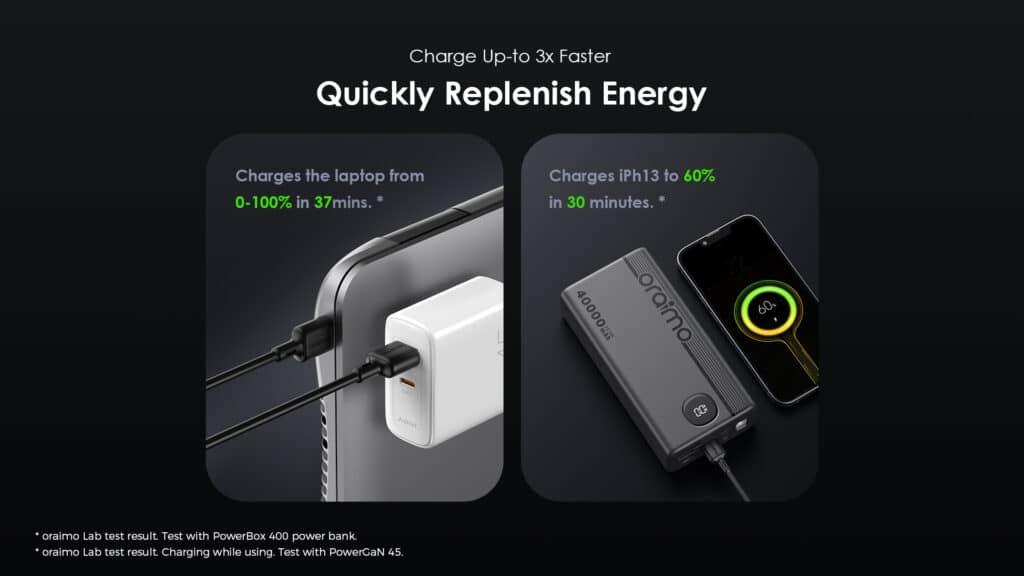
You don’t often get a laptop and smartphone charger in the same brick, but with the PowerGaN 45, you can have the best of both worlds. This charger will resurrect your dead laptop battery from 0-100 in only 37 minutes. With the multi-layered protection feature, you can rest assured that the right amount of current is flowing to get your computer powered up. Also, it supports all devices, including your iPhone, Apple Watch and other Apple devices. No one is left out of the party.
Features:
AniFast technology
GaN Tech – 3 Times Faster
5A Charging Speed
PD3.0 & QC3.0 & PE2.0 Compatible
Multi-protection
Improved Durability
Scratch & Smudge Resistant
oraimo Firefly 3 fast charging kit with micro USB
The Firefly 3 is not your regular charging brick; this brick is supported by oraimo’s AniFast, meaning you are assured of fast charging at a reasonable price point. Like all other power solutions from oraimo, support for Apple devices is guaranteed.
Firefly 3 has a LED display to track your charging process. Isn’t this smart?
Every Firefly 3 comes with an oraimo DuraLine 2 Data Cable (Micro USB/Lightning/Type-C) that supports fast charging, high-speed syncing with any device, and the cable’s durability to stand different use cases. Per the package specification, the cable is 1m in length with an output of 5V 2A Max.
For Charger specs:
Model: OCW-U66S
Input: 100-240V-50/60Hz, 0.35A
Output: 5.0V = 2.0A 10.0W
AniFast Technology FAQs
Which oraimo power accessories come with AniFast?
AniFast supports oraimo PowerBox 400, oraimo PowerGaN 45W Charger, and more.
Is AniFast safe for iPhones or Apple devices?
Yes, AniFast-enabled chargers and power banks are safe for iPhones and other Apple devices. There’s nothing to worry about, as these were designed to comply with Apple’s charging protocols for each device. I say this as an Apple user, so take my word for it. AniFast would charge your iPhone and Apple devices fast and safely – with no risk of overheating or bloating the battery.
Where do I buy oraimo AniFast chargers and power banks?
You can buy oraimo devices powered by the Anifast technology. In case we missed any question on AniFast, or you have a question, kindly comment below, and I will be glad to provide an update with an answer!
Final words: The AniFast Guarantee
AniFast Instantly identifies any connected device and adjusts voltage output for tailored, optimized charging speed. With oraimo AniFast, you can charge your mobile devices as fast and conveniently as possible. No matter what phone, tablet, or watch you have, oraimo AniFast will deliver the fastest possible charge
7-Layers of Protection
oraimo AniFast employs a comprehensive safety system for your devices – guaranteeing you peace of mind. The layers are:
Overheat protection
Output overvoltage
Input overvoltage protection
V0 highest Grade fireproof
Short circuit protection
Protection from overcharge and over discharge
Output overcurrent protection
Support for low–current devices
Automatically switches charging mode to protect low-current devices once it recognizes their charging protocol.
oraimo smart charging chip intelligently identifies your mobile phone’s fast–charging protocol in order to deliver the speediest possible charge
Charge devices up to 3x faster
Quickly replenish energy
PowerGaN 45 charges laptops from 0 – 100% in just 37 minutes
oraimo PowerBox 400 power bank charges iph13 to 60% in only 30 minutes
We hope the article helped you comprehend the potential of the oraimo Anifast technology and how it intelligently identifies your mobile’s fast–charging protocol to deliver the fastest possible charge. Remember, AniFast technology charges anything faster!
YouTube has recently announced its new YouTube Studio, which makes it easier than ever to produce, publish and analyze videos on the platform.
In this list of top things you can do with YouTube studio, we’ll explore its incredible potential for people who want to find new ways to reach their target audience and make their videos go viral.
What is Youtube Studio?
YouTube Studio is a suite of editing tools in your Youtube app that allows users to create different types or effects on their videos. YouTube Studio features a simple editing interface with tools for trimming, adding titles and captions, and overlaying graphics.
How important is YouTube studio
YouTube has a broad reach and serves as a platform for many creatives to display their work, ideas, or content. YouTube has become the go-to destination for viewing all types of content on the internet, with 72 hours worth of video uploaded to the site every minute.
How to access YouTube studio on your channel
Click on the Creator Studio button in your YouTube navigation panel.
The next page that opens will look like this:
Once there, go to the upper right hand corner and click on the Switch to studio mode button.
Things you can to with YouTube studio
There are alot of things that can be done with the YouTube studio. Those familiar with its usage may have known more but those who are yet to involve must know a few.
1. Video Editing and Enhancement
There are so many ways to get creative on YouTube. The use of video editing and effects can greatly enhance your video production. In the past, this would require a lot of expensive equipment that only professionals could afford, but thanks to advances in technology anyone with a computer and a free online editing software such as Youtube Studio Pro is able to edit their own videos in order to make them more visually appealing.
2. Schedule videos
YouTube studio will save you the stress of having to pos studio one after the other at different plan times. You can just schedule all videos and their allocated time of release the the studio will do the rest.
3. Drafting videos
Youtube studio can be used to draft videos so when it’s ready to be published, you don’t need to upload them again.
4. Uploading Video
Unlike the initial times when you have to upload videos directly from the app or website, YouTube studio canso do same. It can be used to upload videos when ready for publishing.
5. Viewing analytics
Youtube studio has it all for you to follow hpw well your video is doing by showing you all the necessary analytics of your published videos on its dashboard.
6. Creating playlist
You can create playlist of your favourite uploads with YouTube studio which can help you keep memories and also help you to easily retrieve old videos that has gone down to the pecking order.
7. Adding Annotations to a Video
YouTube studio allows creators to add annotations and information to the video. There are two options: soundless or with a narration track. YouTube Studio offers tools to edit clips from your video, which helps reduce the need for post-production editing on programs like Adobe Premier. It also gives access to different formats for videos, including 360-degree videos and VR videos for viewers who want to explore more of what is happening in a scene.
Conclusion
YouTube has made being an entertainer more accessible than ever before. All it takes is a webcam and editing software to make your own videos. With the right tools, you can be up and running in less than five minutes! These are the best ways to use YouTube Studio to start your online entertainment career.
Snapchat streaks are just one way to keep in touch with your friends on Snapchat, but they’re also the only way to see the total number of days you and your friend have been snapping each other. However, if your score and your streak has disappeared and you want to restore it, then this guide is for you.
About snapchat streak score
Snapchat streak score is the measure of how many consecutive days you have chatted with a friend on Snapchat. Keep in mind that Snapchatters can only be added as friends for 7 days before being dropped from the list if they have not been chatted with. As the name suggests, keeping a streak alive for longer will increase its value up to 10 pointpoints.
How does snapchat streak works
Snapchat users engage in a streak when they go more than two days without snapping each other. Streaks are scored on the number of consecutive days that two people have snapped each other and can be seen by anyone who sends them messages.
If you send somebody a message, but they don’t respond, you will still be able to see that you have a one-day or two-day streak with them on the app.
How do you loose your snapchat streak score
Snapchat streaks are the way that you can tell how much someone cares about you. If you don’t talk to them for a while, they’ll end the streak by flipping over their name and drawing a line through it, which indicates that they’re no longer interested in talking to you.
How to restore your snapchat streak score
It turns out that Snapchat’s score can be easily fixed. All you need to do is make a quick change on your account settings.
Open Snapchat and sign in to your account.
Tap Settings.
Towards the bottom, go to the Supports section.
Tap I Need Help, then Snapstreaks.
From the What if my Snapstreak has gone? option, choose Let us know.
Select My Snapstreaks disappeared.
Fill in the form; include as much information as possible.
Hit Send to submit your form.
How to keep your snapstreak going
Send a snap to your friend at least one time in 24 hours – A message, picture, or video from Memories will not count.
Receive and open a snap from that same friend within that same 24-hour timeframe.
Send and receive Snaps from the same individual – A group message won’t count.
Conclusion
It can be hard to keep up with how many people you are chatting with on Snapchat, and losing a connection in the chat can also make it difficult. Luckily, if you know what happened and what caused your streak to break, it is relatively easy to get it back going again.
Uber is great at whisking you from place to place, but sometimes you have to make multiple stops along the way or change your destination entirely. After all, the whole point of Uber is getting from point A to point B quickly and easily.
In this post, we’ll go over how to add multiple stops on the Uber app so that you can get around town as quickly and conveniently as possible. All you have to do is follow these instructions, and before you know it, you’ll be at your final destination.
Uber multiple stops
If you need to make a few stops before reaching your final destination, you don’t have a problem. Uber makes it easy to add multiple stops.
How to add multiple stops on the uber app
Start by opening the Uber app and tapping on the menu icon in the top left corner.
Next, select Settings from the menu.
In the Settings menu, tap on Multi-destination trips.
From here, you can toggle multi-destination trips on or off.
If you want to add multiple stops, make sure it is turned on.
When multi-destination trips are enabled, when you’re headed somewhere on your list of destinations, press and hold down anywhere on the map.
After a few seconds, a blue dot will appear. Tap that blue dot to save that as one of your destinations.
You’ll also see an Add Stop button below the map where you selected your destination for that stop.
Conclusion
Adding multiple stops to your Uber ride is a great way to make sure you get where you’re going, even if your plans change. It can save you money by preventing you from having to take multiple Uber rides.
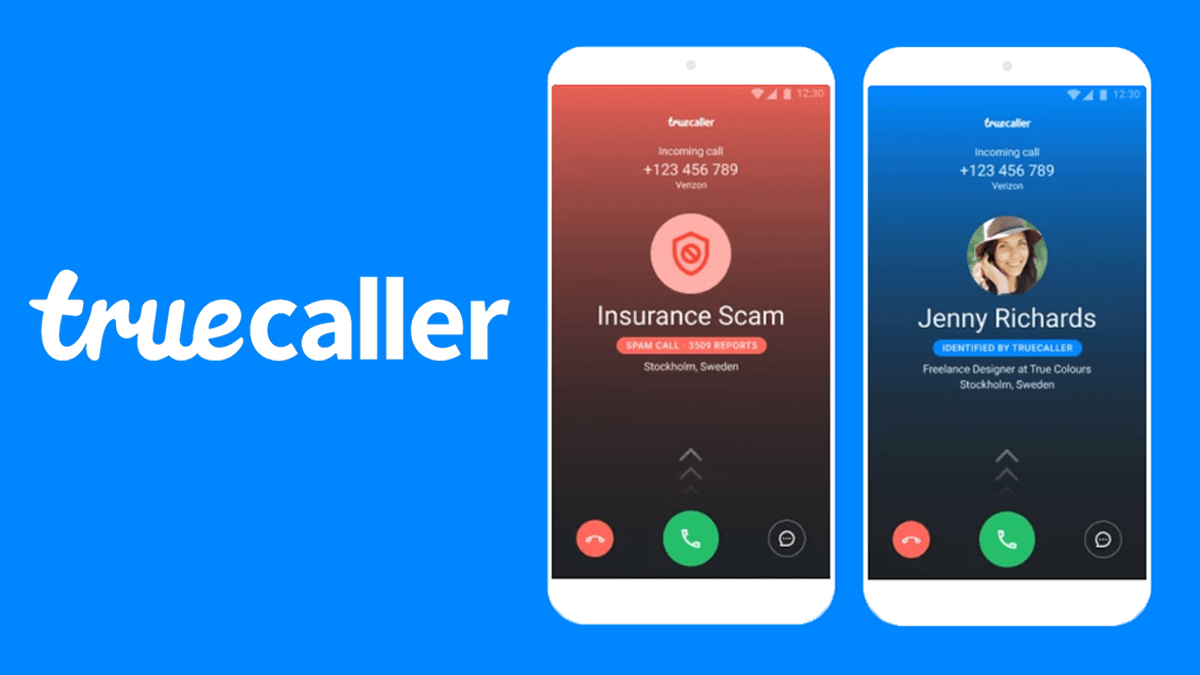
In addition to identifying unknown numbers, truecaller also allows you to report unwanted calls as spam, which you can then choose to block in the future.
There are numerous reasons why you may want to report an unknown number as spam; these include scareware calls and phishing attempts, or simply someone who won’t stop calling you. Here’s how to use truecaller to identify and report scammers
About truecaller
Truecaller is a Swedish company that allows people to identify unknown callers, numbers, or businesses. It also helps with the process of reporting fraud or scams by connecting users with relevant authorities.
When you receive a phone call from someone not in your contacts list, the app will ask you if you want to identify the number. Once identified, it’s up to you whether or not you want to answer their call.
How does truecaller works
Truecaller searches your phone contacts, social media networks, address book, and call logs. If there is a match with the number you are looking up (given access), it will give you their name if they are in your address book.
If they are not in your address book or social media profile but you have their phone number saved as a contact, then it will let you know that this number belongs to someone with this particular phone number who has at least once called you.
How to use truecaller to identify scammers
Download the app for your phone
Register or login with your credentials.
Run the search for the number you want to investigate.
Click on their name and a screen will pop up with all of their info.
If they are identified as a scammer, click on report.
You can also call them from your truecaller app by clicking on their number if you have a premium account and then pressing Call.
Press the Record button before you answer. You’ll be able to talk with them live.
When they hang up, it will automatically save the conversation in your folder.
How to use truecaller to report scammers
Once you’ve identified a number that’s either called you or sent you a message as a scammer, open the Truecaller app on your phone and tap on the Profile icon in the top right corner.
Tap on the Block button under their name to block them so they can’t bother you again.
To report the number, tap on their profile to view all their information.
Tap on Report in red text at bottom of their profile. A popup window will then open, giving you two options: I don’t know or Spam.
If you think it’s a spam number that is not yet blocked by Truecaller, choose I don’t know as your reason for reporting them so we can keep improving our detection mechanisms.
If you’re sure it’s a scammer, choosing Spam will make sure they get banned from using Truecaller.
Once you’ve chosen your reason for reporting, tap on Report, and scammed numbers will be kept away from you.
How to block scammers with truecaller
On the Truecaller app, you can set up phone numbers you want ignored. This can be very helpful if you are dealing with a scammer who keeps calling your phone number and you are unable to get them off of the line. You can block their number on the app so that they cannot contact you at all from that point forward. To do this,
Open and log into the app with your credentials.
Go to My Number in the left-hand menu on the app and click Blocked Numbers in the right-hand menu.
From there, you will see a list of any blocked phone numbers. Find the number that is bothering you by scrolling through or searching for it by name or number.
Click on it to confirm it is blocked, then click Block Contact to finalize the process.
Conclusion
Use Truecaller to find out who’s on the other end of a phone call. If it is a number that you don’t recognize, tap Block on the contact details page.
The person will be prevented from texting or calling you again. You can also tap Report in order to send your complaint about the number directly to Truecaller for further investigation. Remember, it’s always better to be safe than sorry.
Snapchat users love to send and receive Snaps with their friends, but they all want to make sure they keep their streaks going as long as possible. Luckily, it’s not hard to get creative and find new ways to maintain your streaks.
These are some of the hottest tips out there right now that will help you keep those streaks alive.
What is a snapchat streak
A snap streak is when two people send a snap to each other every day for at least three consecutive days.
You and the other person will then have a rainbow-coloured number in between both of your names that indicates how many consecutive days you’ve been sending snaps to each other.
Once you break this streak, it won’t show up anymore unless the other person sends another snap in order to re-add their streak.
Is snapchat streak important
Snapchat streaks may seem insignificant to some, but for other people, keeping up their streak with someone can become a huge point of pride.
If you’re a regular user of the social media app and are aiming to maintain the longest streak possible, there are a few tips and tricks you can use to make it happen. It’s all about what works best for you.
How to set up a snapchat streak
If you’re unfamiliar with what a snap streak is, it’s essentially when two people send consecutive snaps to one another. In other words, if you and a friend send each other snaps on the same day for over three days in a row, then congratulations, you’ve created a streak.
Tips to maintain snapchat streaks
Here are some ideas on how to maintain snap streakstreaks. These tips can also help with creating new streaks and are a good idea to use all the time in general.
1. Include family and friends in your story, no one wants to be left out
Family always want to create memories. You can use such opportunity to always create something wite family online and that can prolong your streaks lifespan.
2. Use polls or questions in the texts you send. Remember those text barcodes
Keep your chat as much active as it should be. You can be adding new formats in your text to make it more lively such as polls for the other partner to answer questions and feel active.
3. Send new content that’s unique and original. People want to see something fresh.
Be an explorer. Surf the Internet as much as you can. Fetch out new trends and find new contents everydays.
4. Schedule your stories so it doesn’t get boring
People have busy lives and they will appreciate that you’ve taken time to schedule things out.
5. Find the right group of people to easily connect to
Some people are boring. No matter how active you will be with them, it still gets boring on their end. Its best you find the right talkative crop of people that won’t just be listeners but will also engage in everything on board.
6. Send something everyday
Even if there is nothing to talk about, just send mething for the sake of your streak. You can even send a blank sheet and thats ok to maintain your score.
Conclusion
Overall, it’s really quite simple to maintain your Snap streaks. Like any new commitment, it may take a while to get used to. But in the end, you’ll find that the effort is worth it and by building deeper connections with others on Snapchat, you’ll be able to expand upon those connections in a way you otherwise would not have been able to.
Affiliate marketing is one of the best ways to make money online. In fact, it’s also one of the most popular ways Ghanaians earn their living online.
Although affiliate marketing can be hard work, in many cases you only need to spend an hour or two per day to make some serious money online through affiliate marketing.
Here are some of the top affiliate marketing websites in Ghana that you can join if you want to make money online.
What is affiliate marketing
Affiliate marketing, in simplest terms, is the process of earning a commission by promoting other people’s products.
An affiliate marketer will find a product or service they want to promote, and then send traffic to their advertiser’s website using online marketing techniques. If the visitor completes a purchase, then the affiliate marketer earns commission for that sale.
How does affiliate marketing works?
Affiliate marketing is a simple way to make some money with your website or social media handle. Find a company that sells the type of products you are interested in and sign up as an affiliate. You get paid whenever someone buys something from their site after clicking on your link.
Is it advisable to do affiliate marketing in Ghana
Affiliate marketing is growing in popularity in the internet age, and with good reason. Especially for new or small businesses, it’s a cost-effective way to advertise your product or service.
There are lots of international affiliate marketing companies that operate from Ghana. So, if you are interested, you should have no trouble finding one. All you need to a signup and there you go.
Top Affiliate marketing websites to join in Ghana
There are many websites that offer affiliate marketing opportunities for bloggers and influencers but it’s important to find a company with a good reputation and great rates so you can earn the most from your efforts. Below are some top affiliate marketing websites for Ghanaians.
1. Jumia Affiliates
Jumia affiliate program is an online marketplace that provides offers and pricing transparency to sellers and buyers. This innovative platform enables anyone to sign up, promote items to draw buyers and get paid.
You could earn up to 13% commission if someone buys an item with your referral link. Jumia pays affiliates at the end of every month according to the payment method chosen.
3. Amazon Affiliate
If you are interested in making money by shopping on Amazon, then check out the Amazon Affiliates program. Make money doing what you already do online. Signing up to be an associate for amazon is totally free, you would be offered up to 10% commission upon referrals.
4. Fiverr Affiliates
Fiverr affiliate is a great place to start. One way people use Fiverr is by doing blast posting which is just promoting someone else’s product on their fan page.
As an affiliate, you would be paid up to $150 for every user who registers through your referral link with also support services being provided through your affiliate programs.
5. SEMRush Affiliates
Semrush is a search engine marketing tool that helps SEO beginners/experts find keywords that will make their website rank high in search engine result pages.
With semrush affiliates, you can earn up to 40% recurring commission for every SEMrush subscription sale.
6. Shopify Affiliates
Shopify is an eCommerce platform that helps to connect buyers and sellers with similar interests.
A Shopify affiliate is a user of the Shopify platform that earns commissions by referring new customers to their Shopify store. You will be making 20% commission on all sales generated from these referrals.
7. Coursera Affiliates
With the Coursera affiliate program, you will be recommending online courses to your loyal followers. Anytime a follower signs up for a programme at Coursera with your referral link, you will earn 20-45% in commissions depending on the course which is signed up.
Conclusion
Ghanaian entrepreneurs and online marketers who want to increase their business online should sign up for one of these affiliate marketing websites. This will allow them to start earning an income from home through a business that they can do from the comfort of their home.