Author: Shepherd Yaw Morttey

  • Functions and Price of the New Nokia 3310

    Functions and Price of the New Nokia 3310

    Nokia 3310, sometimes called the mother of all phones and referred to as a “tank” by a lot of people is set to be back – in a way modern consumers will be willing to buy. Ever since I heard Nokia will be bringing back this phone, I have wondered if it would be worth it and what functionalities the phone would bring to the user.

    There are a lot of typical things you can do with the phone, and a lot more you can’t. So when the phone is available later this year, think twice before you purchase it. Here at Mfidie.com, we bring you features of the soon to be made available Nokia 3310.

    Nokia 3310 BatteryLife

    Functions

    Phone Calls and SMS

    Obviously! Every phone should be able to make phone calls and the Nokia 3310 is no different. HMD Global claims the phone would be able to last 22.1 hours on phone calls alone. So this is obviously the kind of phone you want if you want to have long phone calls and do not want to worry about your battery life.

    Multimedia

    The New Nokia 3310 has a 2 MP Camera with a LED flash light. That would be enough to take a photo, but I don’t see you using those pictures on social media. 2 MP is obviously very low quality. The phone also has an MP3 player built in so you can listen to your favorite songs if you have a memory card inserted into the phone. Talking about Music, the phone has the usual 3.5mm jack and Bluetooth pairing so you can listen to your songs via a Bluetooth enabled listening device. The battery can last a massive 51 hours while listening to music. Great!

    Internet Browsing

    If you would want to be stuck with an Opera Browser on a 2.5G network, then this phone is right for you. You can access web pages with the in-built Opera browser. Remember to read our post on why Opera Mini browser may not be the best browser for Smart Phones. The User Experience with this browser may not be much, but will be useful if you just need to check something really fast and your iPhone is down on battery. On a 2.5G network, browsing will be to a certain degree slow too.

    Other Functionalities

    With the Nokia 3310, you can take notes in text or record your own voice notes. The phone also allows you to set up an alarm and reminders so you are always informed and on time. There is also a calculator and the weather functionality.

    Nokia 3310 Grey
    Nokia 3310 Grey

    Nokia 3310’s Fly In the Ointment

    Social Media

    You want to WhatsApp, Snapchat or check out friends on Facebook? Forget it! The Nokia 3310 does not have apps for social media. If you however have a friend who wants to quit Twitter, this is the perfect phone for them.

    Overall User Experience

    This phone will not have a “QWERTY” keyboard and you would have to go back to texting with an alphanumeric keypad. If you were good with T9, you should be fine. However, if predictive text is not your thing, you may want to go back to texting “in de old fashn way”. The phone also does not provide a lot of customizations to the interface. Users are therefore stuck with the very old boring “app drawer”.

    Conclusion

    The new Nokia 3310 may not be your first choice phone, but it will essentially be a good choice for a backup, especially in arrears where there is bad power supply or for users travelling into low network coverage areas. But at a global retail price of €49 (GHS 250), I don’t see a lot of Ghanaians getting this phone.

    Would you trade GHS 250 for the new Nokia 3310? Comment below.

  • How to go back to an Older Version of WhatsApp: A Step by Step Guide by Mfidie.com

    How to go back to an Older Version of WhatsApp: A Step by Step Guide by Mfidie.com

    Over the last days, WhatsApp has been trending with the latest update. This update adds additional functionality to the app in a revamp style of the “status”. Although a lot of Users are happy with the update and are enjoying the user experience, a few more people seem not to love the idea and would rather go for an older version of WhatsApp. Check out what people have been saying about the update on Social Media. Now how do you get a WhatsApp Older Version that you are used to?

    First of all, Whatsapp does not allow users to downgrade their version of the application. We would have to do this through the manual way, but relax, it is easy and not harmful. This guide applies to Android Smart Phone users only.

    WhatsApp does not want you to downgrade your app
    WhatsApp does not want you to downgrade your app

    How to Downgrade your WhatsApp

    1. On your Androip Phone, Go to Settings > Security and toggle on the Unknown Sources option that will allow you to install apps from third-party sources. The box next to “Unknown Sources” should be unchecked.
    2. You’ll get a prompt warning you that installing apps from unknown sources could put your device at risk. Tap on OK.
    unchecked. 2.You’ll get a prompt warning you that installing apps from unknown sources could put your device at risk. Tap on OK.
    unchecked.
    2. You’ll get a prompt warning you that installing apps from unknown sources could put your device at risk. Tap on OK.
    1. Open WhatsApp on your device and go to Settings > Chats > Chat Backup and click on the green back up option to take a complete backup.
    Open WhatsApp on your device and go to Settings > Chats > Chat Backup and click on the green back up option to take a complete backup.
    Open WhatsApp on your device and go to Settings > Chats > Chat Backup and click on the green back up option to take a complete backup.
    1. Uninstall WhatsApp from your device by going to Settings > Applications Manager and Tap on WhatsApp. Then Tap Uninstall.
    4.Uninstall WhatsApp from your device by going to Settings > Applications Manager and Tap on WhatsApp. Then Tap Uninstall.
    4. Uninstall WhatsApp from your device by going to Settings > Applications Manager and Tap on WhatsApp. Then Tap Uninstall.
    1. Open your smartphone browser and go to this link. It leads to WhatsApp version 2.17.60. Download V2.17.60 APK file. Download the file and wait for it to finish loading.
    5.Open your smartphone browser and go to this link. It leads to WhatsApp version 2.17.60. Download V2.17.60 APK file.
    5. Open your smartphone browser and go to this link. It leads to WhatsApp version 2.17.60. Download V2.17.60 APK file.
    1. You can click  on the notification to open the download for install or Go to the Downloads folder on your Android phone and tap on the downloaded APK file.
    1. On the next screen, tap Install at the bottom right to begin the installation.
    6.Go to the Downloads folder on your Android phone and tap on the downloaded APK file. 7. On the next screen, tap Install at the bottom right to begin the installation.
    6. Go to the Downloads folder on your Android phone and tap on the downloaded APK file. 7. On the next screen, tap Install at the bottom right to begin the installation.
    1. Open WhatsApp, Verify your number and Click on Restore. That’s it! You are back on the good old whatsapp.


    8.Open WhatsApp, Verify your number and Click on Restore. That’s it! You are back on the good old whatsapp.
    8. Open WhatsApp, Verify your number and Click on Restore. That’s it! You are back on the good old whatsapp.

    Once you do all these, remember to disable automatic updates for your WhatsApp. Would you go back to an older version of the app? Was this guide useful? Leave a comment.


  • I don’t like the New WhatsApp Update (WhatsApp Status) and this is why

    I don’t like the New WhatsApp Update (WhatsApp Status) and this is why

    Another WhatsApp Update! It has been said countless times that “Change is a Constant” and we should expect it, whether positive or negative. WhatsApp has been one of the best Instant Messaging (IM) apps in a very long time and it has kept this position by constantly changing and offering the best services for a very small charge and more recently, even for free.

    Features such as group chats, end to end encryption, voice and video calling and two step verification have all been necessary updates to make the application relevant. Is the addition of the new Status feature really relevant? I don’t think so.

    To many of its users, WhatsApp is a fundamental IM app – and that’s all they want it to be. Personally, it’s frustrating each minute I pick up my device, launch WhatsApp and see that Status thing. I simply don’t like it and I am thinking of reverting to an earlier version of the app. Well, the feature was not an opt-in and so I may have to cope it with sooner. I may not be a fan of the status feature right now, but in reality, what I don’t like is the new overall update to the app.

    Why I don’t like the Whatsapp Update

    1. Old Status is gone!

      Yeah! If you haven’t realized, old status is gone. You can’t write those one liner text emoji updates there anymore to let people know what you have been up to. Even more recently, most people have used the old status as a way to advertise their goods and services; and in just one update its gone? For most people – even those who enjoy the new status, it would be great to have the old status back. It has been rumored to come back in a new update as “tagline”. I can’t wait for that.

    2. Mobile Data Usage

      When you are not on Wi-Fi all you think about is “Mobile Data”. For Instagram and Snapchat, there is a built in mechanism, which users can use to reduce the amount of data they use in the apps. You can read about that here – How to use less data on Instagram and Snapchat. However, WhatsApp does not have this for their Status. This means you are likely to use 5X more data on WhatsApp if you are going to frequent the status feature. What’s worse in this case is that once you start viewing a status, the next status in line starts loading and plays automatically. Ahba! WhatsApp should have included mobile data controls for their status feature and I expect to see that in subsequent updates. Until then, sorry.

    3. Where are my contacts?

      At first glance, it is difficult to even send a message to a new contact, because that functionality has been “revamped”. You will have to tap the bottom right green floating bar to access your contacts, and there are no statuses attached to them. Well, status now are media files. I loved to be able to scroll through my contacts and snoop, reading status and checking profile photos every now and then. Thanks to this Update, I can’t enjoy that anymore.

    When you first get the status feature in the whatsapp update
    When you first get the status feature in the whatsapp update

    There are other reasons why I don’t like this update, but which may be able to control. One of these is the privacy settings. Well, I don’t expect all of my contacts to be seeing my updates, If I am going to be using it like I use snapchat. This could get a lot of people into trouble. Most people won’t check those privacy settings and as it is in every social media app (I can’t refer to WhatsApp as a mere IM anymore), privacy is key.

    Don’t be surprised if you don’t see status from me. Just know this – I don’t like it.

    Have you tried the status feature yet? Any reason why you like or hate it? Let’s hear you in the comments section below.

  • Why do we say WhatsApp “DP” when it’s just a profile photo?

    Why do we say WhatsApp “DP” when it’s just a profile photo?

    The internet slang that is quite the norm – WhatsApp DP. When I first heard the word DP, I was sort of confused as to what it meant. Someone asked me innocently – “Shepherd, won’t you change your WhatsApp DP?’.

    I was very new on WhatsApp then and in order to prove to the person that I was very tech savvy, I refused to ask what the “WhatsApp DP” actually meant. I spent the next thirty or so minutes scrambling through all of WhatsApp’s settings just to find where this “DP” thing was hidden. I had no luck. There was nothing I could find in the settings like DP or some words which could be shortened as such.

    Later that day though, I realized what my dear friend was referring to as a DP was actually a profile picture. I was confused then, why call something DP when you could just say Profile Picture or PP? Sometime later, I found out the real meaning of “DP”. “DP” actually stood for Display Photo. DP aka Display Photo is how BBM calls its version of “Profile Photo”. BBM was leading the Instant Messaging (IM) race on mobile then and it had quite a lot of users.

    BBM was released in 2006; the first version of WhatsApp came out in 2010.

    Many of the people who started using WhatsApp might have had prior experience or interaction with BBM. It is no surprise that the WhatsApp Profile Photo overtime continued to be referred to as a DP – an unworthy adaptation of the now almost defunct Black Berry Messenger. In my opinion, the continuous use of “DP” instead of “Profile Photo” is typical case of the “Bandwagon Effect”.

    Bonus

    Did you know you can hide your WhatsApp Profile Photo from people who are not in your contact list? This is especially useful if you want to make sure no one is stalking you just because they have your contact on your phone? It’s simple and takes just less than two minutes to do.

    On iOS:

    1. Go to your WhatsApp application and open “Settings”, see the picture.
    2. Tap on “Account” option and then follow “Privacy” button.
    3. On this screen you can see the second and third options of “Profile Photo” and “Status”
    4. Open both options one by one and set them to “My Contacts” if you want to show your profile picture to your contacts only and to hide them from everyone, choose “Nobody” from the options. You’re done.

    On Android:

    1. Open WhatsApp application on your phone.
    2. Go to Settings -> Account -> Privacy.
    3. Look for Profile photo , click on it and select “My contacts” if you want to show your profile picture to your contacts only and to hide them from everyone, choose “Nobody” from the options. You’re done.

    I don’t see people referring to the “DP” rightly as a profile photo anytime in the future. Did you even know DP meant display photo? Let’s hear what you think below.

  • How to use Twitter’s 140 Characters Rule to the fullest

    Everyone seems to be making updates and changes nowadays and Twitter has just made a big change to the way tweets work. This is important!

    Twitter is limiting what types of content will use up its 140-character limit.

    Slow down. This is twitter

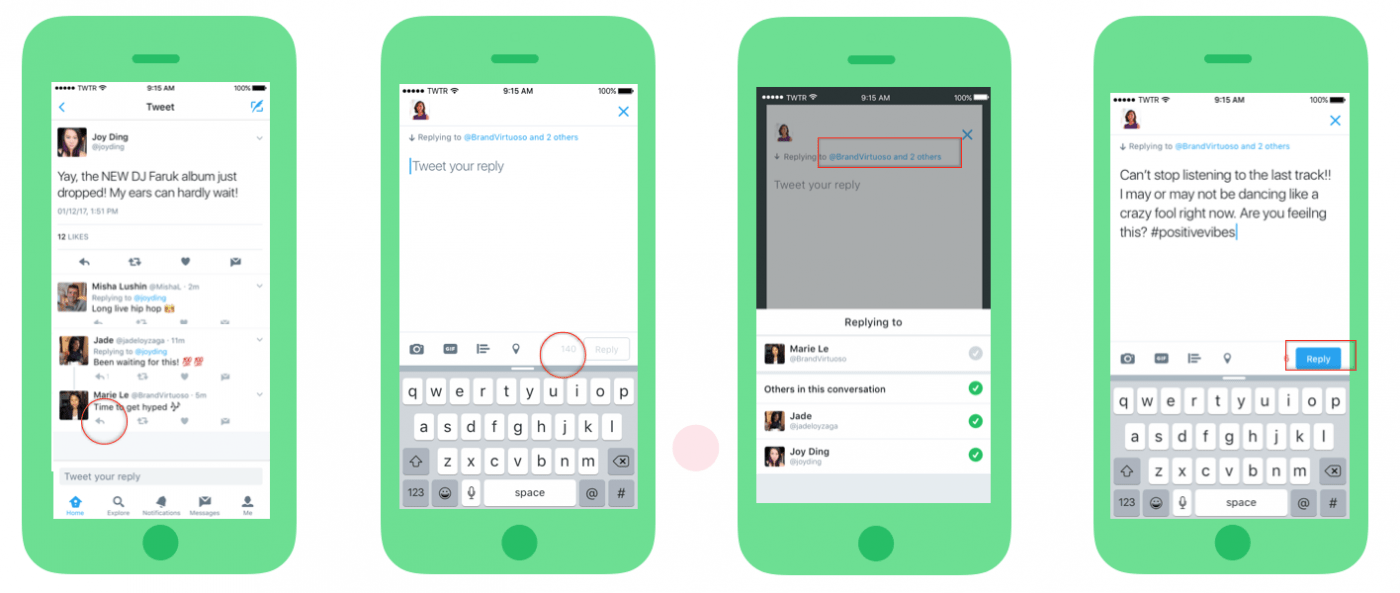
    Now, @names in replies, media attachments (like photos, GIFs, videos) and quoted Tweets will no longer be counted against the valuable 140 characters that make up a tweet. This means that people can interact more and attach more without having to give up some bits of their text.

    Well Done Twitter. Now we can express ourselves more

    But how can you make use of these new changes? Well, here are a few tips.

    • Say More when you reply a tweet

    With this new update, @names will no longer count against the 140 characters. Now, whenever you start a tweet in reply to another user, you still have room to say everything you wanted to in your tweet, without having to consider the length of their Twitter handle.

    You could even add Media files at the end of the tweet and it would still not count into the 140 characters. Say more, express yourself better.

    • More Visuals, Engage your followers.

    A study by Twitter found that photos average a 35% boost in Retweets and videos get a 28% boost.

    Visuals give you more reach and engagements on twitter

    Although Visuals present numerous benefits, they had the tendency to reduce the length of what has to be said. That is in the past now! Photos, Videos and GIFS added at the end of tweets will not add up to the 140 Characters. Go on and add that meme.

    Why? At least we will manage this new update

    Do you love twitter? What do these updates mean to you? Tweet at me @Pidho1, let’s get the convo going. 

  • Top Dating Apps in Ghana (2017) according to Google Play Store

    Top Dating Apps in Ghana (2017) according to Google Play Store

    This post was part of the Valentine Series. 

    We look at the top Dating Apps in Ghana, according to Google Play Store! 14th February is Valentines Day. In this era of  technology and smartphones, technology the love affairs go online too.

    In February 2017, Mfidie.com put up posts dubbed “#ValentineSpecial” with a focus on Technology and our love lives. This was the third Post in the series.

    You can read the first part here: #ValentineSpecial: For Lovers – Every Couple should be using this app and the second part here: #ValentineSpecial: Valentine Messages for your Boyfriend or Girlfriend

    Well, if you are single and looking to date, there are a lot of online resources you can resort to. Most likely, you will be tempted to check out an app that would link you to a possible match.

    We look at the top 10 dating apps on the Google Play Store. You should check them out especially if you are single and have still not found a date for Valentine or if you simple want to “explore”.

    Top 10 Dating Apps in Ghana

    Tap on the name of the app to automatically download it from the Google Play Store.

    Rank App Name Publisher
    1 Hitwe – meet people for free Hitwe
    2 Meet4U – Chat, Love, Flirt! WILDEC LLC
    3 OkCupid Dating okcupid.com
    4 Mingle2: Online Dating & Chat Minglenet
    5 FastMeet: Chat, Flirt and Love Mobiljoy
    6 Find Real Love—Premium Dating WILDEC LLC
    7 Jelly – Meet new People Jaumo
    8 Sugar Mommas Dating Apprelate
    9 Adult Dating Găsește Millionai Online Dating, Meet and Date
    10 Moco – Chat, Meet People JNJ Mobile, Inc

    What do you make of these Dating Apps in Ghana? Do you use any dating app that is not on the list? What do you think of these apps?

    Share your thoughts with us in the comments below and don’t forget to share, tweet and rate this post.

    This post originally appeared as part of Mfidie.com’s “Valentine Special” series in February.

  • How to prevent someone from Hacking your Whatsapp using 2 step verification

    How to prevent someone from Hacking your Whatsapp using 2 step verification

    Hackers are always looking for ways to exploit individuals. Most people share sensitive information on social media every day and it is important to stay safe when using our various mobile apps. In this tutorial, we look at how to enable WhatsApp’s feature for Android, iOS and Windows Phone – the 2 step verification.

    When activated, this feature would enable you to verify your number on Whatsapp on a new device more securely by using a six-digit passcode.

    This would prevent someone from cutting you off WhatsApp and installing the app on a new device even if they successfully clone your phone number or have access to your text messages. It is strongly recommended to activate this feature and this tutorial will guide you right through it.

    When activated, this feature would enable you to verify your number on Whatsapp on a new device more securely by using a six-digit passcode.

    This would prevent someone from cutting you off WhatsApp and installing the app on a new device. It is strongly recommended to activate this feature and this tutorial will guide you right through it.

    How to Activate 2 Step Verification on WhatsApp to stop hacking

    1. Open Whatsapp, tap on the menu button and go to your settings. Click on “Account”

      Open Whatsapp, tap on the menu button and go to your settings. Click on "Account"
      Open Whatsapp, tap on the menu button and go to your settings. Click on “Account”
    2. Under account, tap on “two-step verification”. On the next screen, tap on “enable”. You will then be presented with a screen to enter a “6-digit passcode”.

      Under account, tap on “two-step verification”. On the next screen, tap on “enable”. You will then be presented with a screen to enter a “6-digit passcode”.
    3. Enter your 6 digit passcode and make sure it is passcode you can remember, but another person can not guess. Don’t use a birthday or an anniversary.
      On the next screen, you would be required to enter an email address which you can use to reset your passcode in any case you forget it.
      You could skip this, but I recommend you enter an email you have access to and confirm the email on the next screen.

      Enter your 6 digit passcode and make sure it is passcode you can remember, but another person can not guess. Don't use a birthday or an anniversary. On the next screen, you would be required to enter an email address which you can use to reset your passcode in any case you forget it. You could skip this, but I reccommend you enter an email you have access to and confirm the emal on the next screen.
      Enter your 6 digit passcode and make sure it is passcode you can remember, but another person can not guess. Don’t use a birthday or an anniversary. On the next screen, you would be required to enter an email address which you can use to reset your passcode in any case you forget it. You could skip this, but I recommend you enter an email you have access to and confirm the email on the next screen.
    4. Whatsapp will take a few seconds to apply the settings. Once completed, tap on “Done”. That’s great. You have enabled two step verification for your WhatsApp account.

      Whatsapp will take a few seconds to apply the settings. Once completed, tap on "Done". That's great. You have enabled two step verification for your whatsapp account.
      Whatsapp will take a few seconds to apply the settings. Once completed, tap on “Done”. That’s great. You have enabled two step verification for your WhatsApp account.

    Kindly note that if you ever receive an email to disable 2-step verification, but didn’t request it, do not click on the link.

    It could mean that someone is attempting to verify your phone number (hack you) on WhatsApp.


    Hackers will always try to steal your information and get into your WhatsApp. it is your responsibility to secure your account.

  • Review: Tuxler VPN

    Review: Tuxler VPN

    Tuxler VPN is becoming increasingly popular in Ghana for some reasons I do not know. Today, we look at what VPN is and review Tuxler.

    What is a VPN?

    VPN is an acronym which stands for “Virtual Private Network”. A VPN connection, gives a network of internet devices the ability to securely connect with others on the Internet as if they were part of the same private network. It’s Virtual. There are no physical cables present in this type of connection.
    VPN was mostly used to access sensitive information across large corporate networks, This time, it is available to almost all internet users.

    Why would you need to use a VPN?

    1. Anonymity on the internet

      There are many reasons a person would want to stay anonymous on the internet. Mostly for the bad, but a few more people stay anonymous for all the good reason. You would not want someone tracking you everywhere you go, right? Internet stalking could be dangerous. A VPN helps you to stay anonymous but you should also watch your browsing habits.

    2. Privacy

      There are some things that are best done Privately – like sharing sensitive information or online banking. Even when you are shopping online, you would need a certain amount of Privacy. Believe it or not, everyone on the internet is a target of a hack. A VPN can help you gain a fair amount of privacy when you surf the internet.

    3. Freedom and Security

      Not a lot of people would have imagined the Internet would get this big in the 21st The internet seems to be a real world, coupled with real world problems – Freedom and Security. VPN provides security by “hiding” your actual location. This gives you the freedom to say and do things you couldn’t have done with your real identity. Heard of Edward Snowden?

    Tuxler VPN in Use
    Tuxler VPN in Use

    My experience with Tuxler

    1. Easy to Set Up

      It was very easy to set up Tuxler on a PC running Windows 8.1, with the Google Chrome Browser. I opened Chrome, Installed the Tuxler app and Installed the Extension. That was all and Tuxler was well set up.

    2. Slow Internet

      Using Tuxler slowed my internet by more than 80%. Maybe because it was free and a paid version would be much better. The slow nature of Tuxler got my spirits down.

    Should you use Tuxler? It’s a matter of what you need to do. Are you willing to sacrifice speed for Privacy and Security? The Choice is yours. However, there are various other ways to be secured on the Internet without a VPN. They shall be covered in the coming weeks.

    Download Tuxler VPN from the Chrome Store and Start using now

    Have you used a VPN before or would you try one? Let’s hear what you make of Tuxler. Leave a comment below.

  • Is an antivirus necessary for an android smartphone?

    Is an antivirus necessary for an android smartphone?

    Do you use an antivirus on your android phone?

    Sometime this year, a friend posted in a WhatsApp group that he had lost all of his contacts because his phone was attacked by a virus. Another friend quickly suggested that he installed a certain anti virus on his phone to prevent such loss.

    I couldn’t help but think of the many reasons that could lead to the loss of contacts. At a point, I imagined his contacts may just be “hidden” or his “contacts” app does not even have permission to access this “contacts’. Anyway, I later realized he was running Android version 5.1 Lollipop. Did he really need an antivirus on his phone? I doubt it.

    What is an anti-virus?

    In simple terms, an antivirus is any software (or app) that is used to detect and destroy computer viruses. Your smartphone is a computer too. The Android OS has been taunted over the years has been very vulnerable to viruses and with this “fear of viruses”

    Do you need an antivirus?

    You certainly don’t need an antivirus if you run Android version 4.2 and above. This is because Google includes automatic scanning as part of the Play Services to keep you and your device safe.

    Google’s security services for Android are designed to provide the best security for mobile devices — by default and free for all Android users. As a result, data about the Android ecosystem has shown that Android users face very low risk from potentially harmful applications and other threats. Users can, of course, use any solution they would like, either in addition to or as a replacement for the Google solution, but our goal is to make that purely a matter of choice, not a matter of protection.

    As an added step of protection, you should only install apps from the Google Play Store and avoid pirating or installing apps from other sources. Most often, these side-loaded apps (apps that have been installed) outside of the play store. Most of these “cracked” apps contain malicious software.

    Percentage of Android Version Users Worldwide
    Percentage of Android Version Users Worldwide

    What can you do to be safe?

    • Make sure Android Device Manager is on
      Be prepared if you ever lose your phone by confirming Android Device Manager is set up on your device. Make sure to sign in with your Google Account and turn on “Remotely locate this device” and “Allow remote lock and erase.”
    • Encrypt your device
      Encryption helps keep your data safe if you lose your device. If your Android device is running Jelly Bean (Android 4.1) or higher, you can encrypt the data on your device in Settings > Security > Encrypt phone.
    • Review Security Settings
      Go to Settings > Security and review all of the options there. Make sure they are satisfactory enough for you and you understand what all of those mean.

    If you are still interested in android antivirus and would want to check them out, there is a lot on the play store. My favourite of them is ESET Mobile Security & Antivirus. Most of these anti-viruses apps on the play store offer additional functionality you can explore. All the best!

    Have you ever used an antivirus on your android smartphone? Do you look forward to using one? Let us know in the comments.

  • Tonaton vs OLX Ghana, where should you buy from?

    Tonaton vs OLX Ghana, where should you buy from?

    It’s a battle. Tonaton vs OLX!

    Recently, I have been using Tonaton and OLX for a variety of purposes. Most importantly, in January alone, I have bought and sold more than 4 goods between these two services. I decided to write this for users of these sites or for those who would want to start buying from either Tonaton or OLX.
    If you have not tried online classifieds before, you should check out the last part of this post.

    History

    The name “Tonaton” means “Buy and Sell” and is by far the most popular online classifieds. Tonaton.com started somewhere in 2013 at a time where online business was not quite the thing. I heard about tonaton first time on Viasat 1 television. About two years later, Tonaton.com moved forward to enhance online security by becoming Ghana’s first online classifieds to require physical or electronic ID verification of posters on the platform.

    OLX is the world’s leading classifieds platform in growth markets and is available in more than 40 countries and over 50 languages. Here in Ghana, OLX.com.gh became Tonaton’s competitor and fierce rival with a lot of adverts coupled with the very good OLX app. “OLX” is said to have been derived from “OnLine eXchange”.

    Where should you buy from?

    Security

    When buying from online, one of the factors we all have to look at is security. How sure are you the person selling the goods actually has the good. How do you know he/she claims to be who they are? What about buying something and realizing it is totally different from what was advertised? Both Tonaton and OLX offer some level of security for their users.

    OLX verifies it’s sellers using three main parameters. These are phone, email and Facebook. A user can be verified once they complete the phone verification and can post ads straight away. OLX also displays clearly which verifications a user has passed. Therefore, the buyer knows and is able to make a sound decision. Personally, I would prefer to buy from someone who has at least a phone and facebook verification on OLX. Emails can always be created and dumped and there is nothing scammers would not do.

    Tonaton has more stringent verification procedures and when followed, these users become “Tonaton Members” with a blue badge to show. These users are verified by phone, a photo ID and their business or home locations if any. This means you can trust that these sellers are real people. According to Tonaton, verified members can easily be traced by them if they ever perpetuate evil or dupe buyers. Sounds easy, huh?

    Value Added Services

    VAS is very important to users. What else can we benefit from an online classifieds website? Well, I dare to say Tonaton is way ahead of OLX in this regard. Tonaton have their very own “delivery system” where you can choose for Tonaton to deliver what you have bought. How does this work? It’s simple! Tonaton goes to the seller, inspects the goods and brings it to you. You inspect the goods delivered by tonaton and only pay when you are satisfied it is what you want. I did not readily find any any VAS exclusive to OLX. There is the usual contact the seller via email directly on the website, and the option to view the locality of the seller.

    Customer Satisfaction and User Interface Friendliness

    It took a while to get this post together, as I did not want to it solely reflect my views only. I spoke to a few friends and sought out to understand why they would use either OLX or Tonaton. I realised when wanting to buy something, most people visit both classifieds site to check if there are any people selling the stuff they needed. One observation I made was people claimed the stuff on OLX were less expensive than those on Tonaton. A lot of the people I spoke to were happier to have bought from OLX rather than Tonaton. This was because of the unverifiable claim that prices on OLX were less. A friend also added that more ads on Tonaton had already been sold but were still lurking on the site. The storry was different for OLX.

    Moreover, I personally think OLX has a better User Interface (both website and mobile app) than Tonaton. The OLX site is somewhat kind of semi-minimal and allows you to focus on the most important thing: buying! Tonaton’s website is a bit more clumsy and sometimes annoying, coupled with adverts; makes it less user friendly.

    The Verdict

    Tonaton OLX
    Security 4 3
    VAS 4 2
    Customer Satisfaction 3 4
    UI Friendliness 2 4
    Total (Out of 20) 13 13

    The decision as to where you would buy from should be an informed one based on what is most important to you. Security, Value Added Services, Customer Satisfaction and User Interface Friendliness.

    A friend posted this ad on OLX and got 3 different buyers in just 2 hours

    What do you think? Does Tonaton beat OLX? Don’t forget to read our 6 tips on how to buy safely on Tonaton and OLX.