Category: Education

  • Is GES finally releasing BECE 2020 SHS Placement This Week? What should you do?

    Is GES finally releasing BECE 2020 SHS Placement This Week? What should you do?

    Breaking: Placements to be released on Sunday, February 21st. – https://mfidie.com/ges-shs-placement-released-sunday-feb-21-2021/


    A lot of students who wrote the 2020 Basic Education Certification Examination (BECE) have already checked their results.

    The results, which was released late, on 16th December 2020 have been fairly good and JHS graduates are now anticipating a new phase of their life — going to Senior High School (SHS).

    SHS are part of the schools that are reopening — after they were closed due to the Coronavirus — after major stakeholder consultations.

    SHS students going to SHS 1 are expected to report to school on the 10th of March 2021. However, no one knows for sure which school they are going to because placements have not been released yet.

    Due to the lack of information surrounding the release of the BECE CSSPS Placement into Senior High Schools, the rumour mill has been very engaged.

    Generally, the concession is that the SHS placements would come out in February 2021 with some even predicting that it will be tomorrow 16th February 2021. However, the Ghana Education Service (GES) has not released any statement to that effect.

    The SHS Placements is unlikely to be released tomorrow. However, we are optimistic that it is released this month so that parents can prepare.

    In fact, the GES in the statement has advised the general public to beware of fake news portals and rather follow the GES official social media handles on Facebook (ges.gov.gh) Twitter (@gheduservice), Instagram (@gheduservice), and the official website (ges.gov.gh) for credible information.

    Is BECE Placement Out?

    No. The 2020 BECE Placements are not yet out. The Director-General of the Ghana Education Service (GES) has however confirmed that School Placement will be out on Sunday, 21st February 2021.

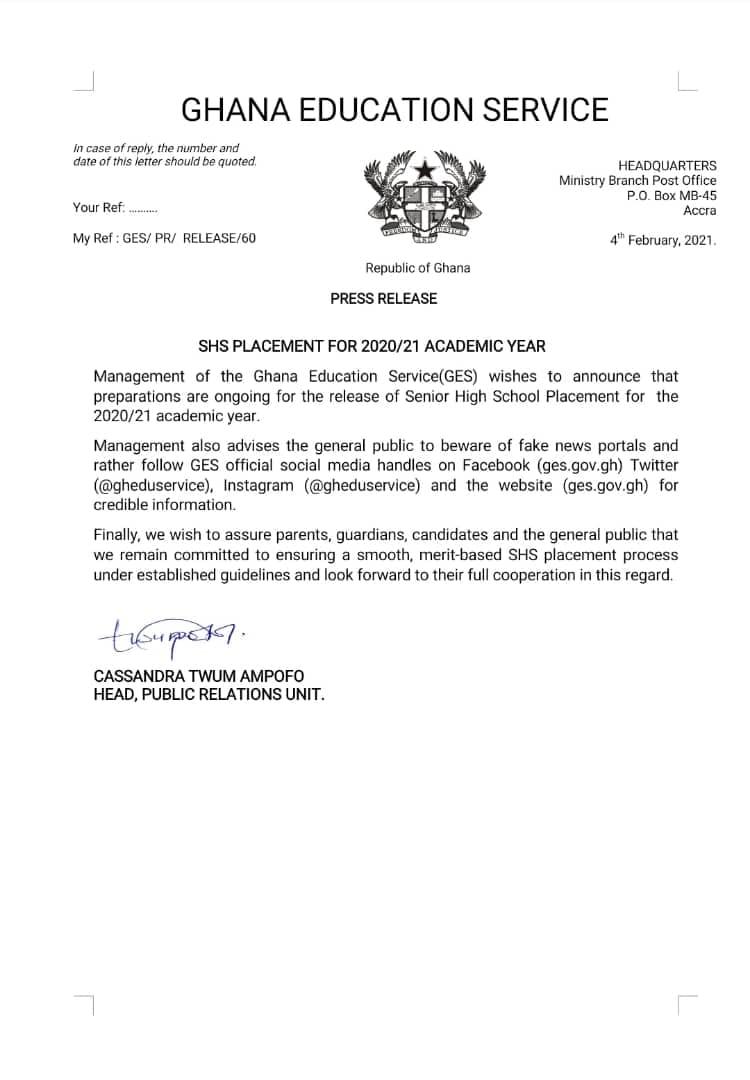
    Statement from the Ghana Education Service on 4th February 2021.

    As of today, no new information regarding the release of SHS placement for the 2020/21 academic year has been made available yet.

    What should you do as you wait for CSSPS Placement for 2020 BECE Graduates?

    If you are a parent or graduate still waiting for placements to be available, you can take some steps now, so you don’t find yourself wanting when the placements are finally out.

    Here are some preparations you should start making as you wait for the school placements to be out.

    Get in touch with a Placements Card Seller so you can be among the first people to check

    When the placements are finally released, there will be mad rush and the CSSPS system might even go down.

    Some people might need to even do self-placement and might miss the schools they would have wanted.

    To prevent these issues, it is good to know right now, who you will buy your placement checker for. We recommend buying from Sir Ike.

    You can send them a WhatsApp message or Kindly call 0555475811 for inquiries.

    Start buying things for school

    First off, make sure you are enrolled on the National Health Insurance scheme with an active subscription, otherwise, renew your NHIS on your phone as soon as possible.

    You need to start buying all the things needed for Senior High School. You need to do this fast because once placements are out, all the prices are going to shoot up.

    Items that SHS students need to buy to school include a chop box, mattress, boarding shirts, some books and footwear.

    These are items that all SHS in Ghana take as part of their prospectus.

    Make a budget for first term/year at school

    As a parent, you need to make sure that your ward has all the financial support they can receive while they are in school. It will be useful to have savings set aside for each term for all their needs.

    This usually comes after you have bought everything needed for school.

    Follow GES and other credible sources of information on the 2020 SHS School Placement

    Also, remember to follow credible sources when the school placement comes out. You can send us a WhatsApp now and we will alert you when the placement drops.

    Also keep checking the official GES handles as they will announce once the placements are out.
  • SHS School Placement: GES gives a new update on the online release

    SHS School Placement: GES gives a new update on the online release

    The Ghana Education Service has given an update on when the 2020 School Placement will be released.

    This comes after some fraudsters have given fake updates and dates about when the school placement for the BECE candidates would be released.

    According to the Ghana Education Service, students and parents are to remain calm as the GES remains committed towards providing a smooth placement process.

    Preparations are ongoing for the release of SHS placement for 2020/21 academic year. Meanwhile beware of fake news. Here at Mfidie.com, we will only give you credible information on therelease of the SHS results.

    Find a copy of the press release below:

    Here is a full transcript of the Press Release by GES on school placement:

    Accra 4. February, 2021.
    SHS PLACEMENT FOR 2020/21 ACADEMIC YEAR

    Management of the Ghana Education Service(GES) wishes to announce that preparations are ongoing for the release of Senior High School Placement for the 2020/21 academic year.

    Management also advises the general public to beware of fake news portals and rather follow GES official social media handles on Facebook (ges.gov.gh) Twitter (@gheduservice), Instagram (@gheduservice) and the website (ges.gov.gh) for credible information.

    Finally, we wish to assure parents, guardians, candidates and the general public that we remain committed to ensuring a smooth, merit-based SHS placement process under established guidelines and look forward to their full cooperation in this regard.


    CASSANDRA TWUM AMPOFO HEAD,
    PUBLIC RELATIONS UNIT

  • Why 2020 SHS, BECE Placement is delaying & when it will be released

    Why 2020 SHS, BECE Placement is delaying & when it will be released

    BECE candidates who wrote their exams in the last year, 2020, are still waiting for placements to come out.

    A lot of the candidates and their parents have complained about the seeming delay of the placements.

    Without the placements, students can not be posted to their schools. It is also a point of anxiety since many people are expecting particular schools, depending on the grades which they have already checked.

    Going to Senior High School (SHS) will surely make a lot of the young students happy.

    Why then, does it seem like the Ghana Education Service (GES) is delaying bringing out the placements and when exactly will the 2020 School Placement in SHS come out for the BECE candidates?

    We attempt to answer the questions below.

    Why has 2020 School Placement Delayed?

    Covid-19 and the late writing of the BECE in 2020

    The first and most obvious reason why the BECE Placements in SHS have not been released is because the BECE itself was written very late.

    Covid-19 prevented the BECE from been written as scheduled. The 2020 BECE was written from 14th to 18th September 2020. This is a very big deviation from how it has been over the years.

    By the mere fact that the BECE was delayed, all other results and processes that depend on it are expected to be delayed. This is the major cause of the delay of the CSSPS school placements.

    Timing of the release of BECE Results

    When the BECE is written, a lot of people usually look out for the results and only after that do people start searching for the placements.

    The 2020 BECE results were released on the evening of 16th December 2020. The timing of the release of the results meant that students could check their results just before the Christmas holidays.

    However, at the point that the results were released, the workers at GES and CSSPS would have most likely been preparing to go on break and therefore work on placement would be at a slow pace.

    Also, there was a general election in Ghana and a little sense of unrest, which would see a lot of individuals not going to work at all for some days, after the elections, for safety reasons.

    Due to these, it is only natural that the school placements will be delayed.

    A lot more candidates are going to SHS

    This year, a significant more people who completed JHS will be going to SHS, especially because it is free and their is more infrastructure to take in more students.

    This also means that, a lot of people have to be processed into schools which is a greater work load. In the past, the CSSPS has been criticised for making unforgivable errors.

    With more people and a desire to minimise, if not eliminate errors, it makes sense that they are taking their time to make sure everyone is happy with their placements.

    What can you do while waiting for Placements?

    For inquiries, you can call our call center on 0555475811

    Once Placements are out, we will notify all those who are on our WhatsApp. You can also save our WhatsApp number – 0535462067 and check our profile photo. We will update it once Placement is out or the checkers are out.

    Remember that, you can buy Placement checkers when they are available so that you can check early before the system crashes.

    Is the 2020 SHS Placement Checker for BECE Candidates out?

    No, the 2020 Placement Checker is not out. The Placement Checkers to view schools for 2020 BECE are expected to be out before the ending of February 2021. Till then, candidates will not be able to check their school placements.

    How to buy your SHS Placement E-Voucher Online with Mobile Money

    Ike is running a special offer for all those who want the Placement E-voucher to be sent directly to their phones via SMS or WhatsApp. We are giving out the BECE Placement Checker for just GHS 15.

    Follow the instructions below to get your SHS Placement Checker fast:

    1. Send MTN Mobile Money GHS 15 to 0535462067, Subscriber (Isaac)
    2. Send the name on the Mobile Money Account you used to send the money or the Merchant Name back to 0535462067 through WhatsApp
    3. You will receive the SERIAL and PIN to check your SHS School Placement 2020 once the payment is confirmed. It takes about 5 – 10 minutes to send the card after payment.

    Kindly send a WhatsApp message for further instructions or clarifications.

    How to check your SHS School Placement Online

    If you have completed your BECE, the next step is to check your SHS School Placement. Here is how to check your SHS School Placement very fast:

    1. Visit the CSSPS SHS Placement Checker Portal
    2. Enter your 10-digits BECE index number followed by the year. eg. 100000000020
    3. Enter the eVoucher Code (12-digits voucher no.)
    4. 
Click on the Proceed button
    5. Wait for a new window with your SHS Placement to show up
    6. Print the School Placement you received or save it as PDF to print later
    7. Present it at your given Senior High School.

    Please note that it is best to use Google Chrome Browser for the checking of the SHS School Placement. Also, Don’t use Opera Mini at all as it delays the process of showing the results.

  • NOV/DEC Results 2020 Out: Buy PIN with Mobile Money & Check on Phone

    NOV/DEC Results 2020 Out: Buy PIN with Mobile Money & Check on Phone

    The West Africa Examinations Council has released results for all Senior High School Students who participated in the 2020 NOV/DEC. The results were released around 8:10 PM on Tuesday, 18th February 2021.

    The NOV/DEC Results 2020 is now available on the WAEC Site.

    In this tutorial, we will teach you how to check your results instantly online without the need for a scratch card.

    All you need to check your WASSCCE results in 2020 is your PIN which we will provide for you. If you need help, contact our NOV/DEC Pin sales executive, IKE on 0535462067 through WhatsApp. For enquiries or questions, call 0555475811.

    How to get your NOV/DEC Results Checker PIN

    You can get the NOV/DEC Pin at selected Internet Cafes and bookshops across the country for GHS 18 or GHS 20. Beware of scammers who may say they are selling it cheap. They may only take advantage of you and try to charge you at very low prices.

    IKE is running a special offer for all those who want the PIN to be sent directly to their phones via SMS or WhatsApp. He is giving out the NOV/DEC Pin for just GHS 17.

    No need to call. The number is busy due low to many people buying. Just follow the steps below to get your results checker. If you want to call for help, call 0555475811 and our customer service will attend to you.

    (Please don’t call the payment line)


    Step 1: Send MTN Mobile Money GHS 17 to 0535462067, MTN MoMo (Isaac)

    Step 2: Send the name on your Mobile Money Account you used to send the money or the Merchant Name back to 0535462067 through WhatsApp.

    Step 3: You will receive the SERIAL and PIN to check your NOV/DEC 2020 results once the payment is confirmed. It takes 5-10 minutes for us to send the card to you after verifying your payment.


    Please don’t call the Payment line on WhatsApp. You can send a WhatsApp message or call 0535462067 for further instructions or clarifications.

    Note: Not all phone calls can be answered due to the number of people calling. Follow the steps on paying and getting the PIN through WhatsApp. Don’t try WhatsApp Calling as that slows the process.

    All you need to check your NOV/DEC results in 2020 is your PIN which we will provide for you. If you need help, contact our NOV/DEC Pin sales executive, IKE on 0535462067 via WhatsApp only. You can call 0535462067 for all inquiries about 2020 NOV/DEC results and more.

    Check your NOV/DEC Results 2020 with a PIN (Fast Method)

    Here is how to check WAEC results online. You need to connect your PC or your mobile phone with any internet network connection. Please don’t use Opera Mini for these steps.

    Follow the step by step instructions given below, if you get stuck, call 0535462067 or send a WhatsApp message for further instructions.

    Here is how to check your NOV/DEC results:

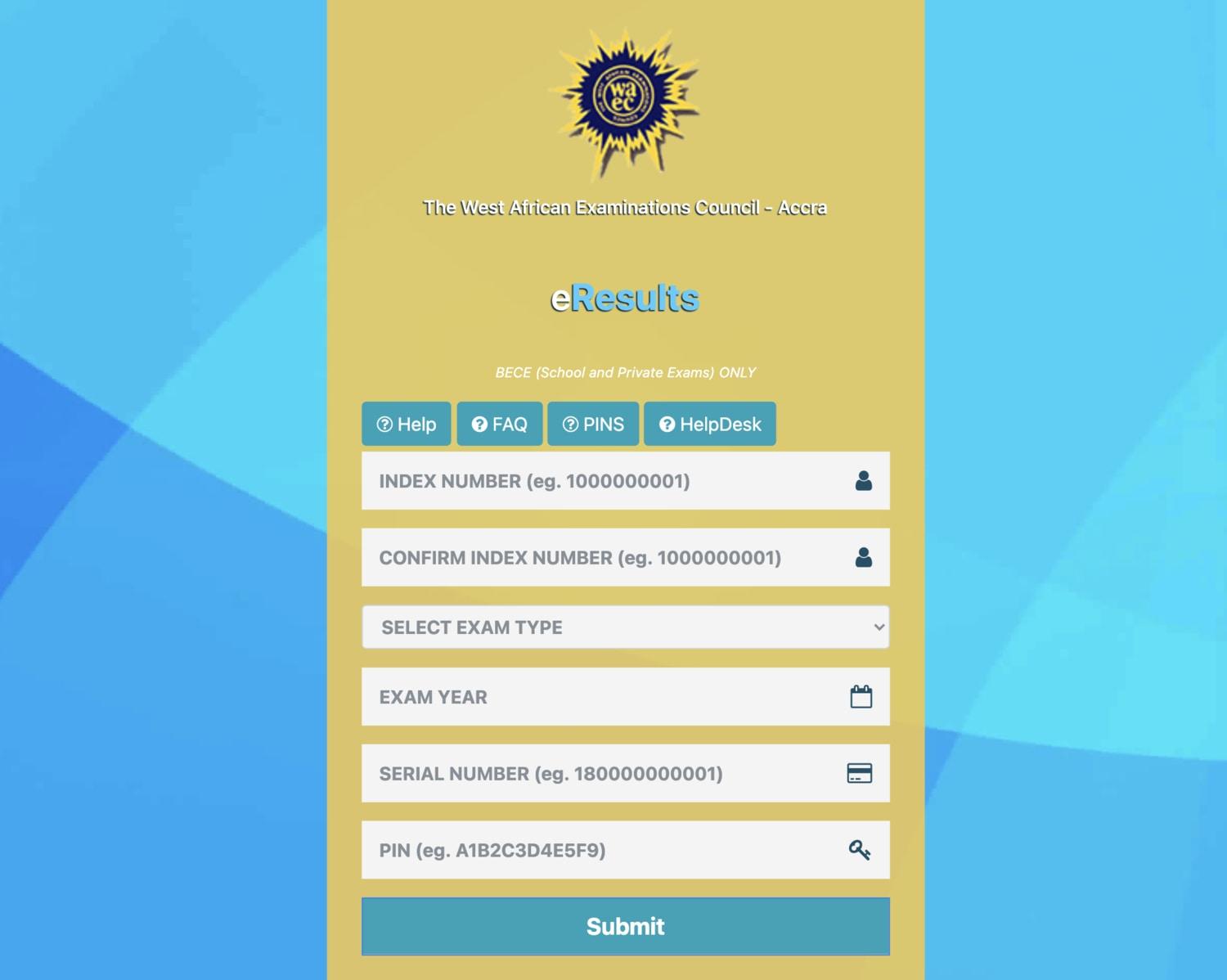
    • Use any browser, preferably Google Chrome, and visit eresults.waecgh.org
    • Scroll down and enter your 10 Index Number: Eg: 0070202043
    • Enter the Index Number again to confirm. Eg: 0070202043
    • Enter the exam type you sat for. Eg: WASSCE School or WASSCE Private
    • Choose your BECE exam year. Eg: 2020
    • Now, you will need to enter your 12 Digit Serial Number here. Enter the Serial Number.
    • Next, enter your alphanumeric PIN: Eg: A1B2C3D4E5F9
    • Submit your exam information and click on “Agree” to accept the terms.
    • Upon successful completion, you will be redirected to a page that displays your NOV/DEC results.
    • Screenshot it, print it, or save it as a PDF to use at a later date.

    Check your NOV/DEC Results 2020 with a Scratch Card

    If you already have a scratch card and would not prefer the PIN Method (which is more convenient), then this is how to use the scratch card to check your results.

    1. Visit the Waec Result Checker Online Portal via the link below;
      http://ghana.waecdirect.org
    2. Enter your Index Number.
    3. Select the Type of Examination (e.g. NOV/DEC).
    4. Select your Examination Year eg. 2003.
    5. Enter the Card Serial Number found on the reverse side of your Scratch card.
    6. Enter the 12-digit Personal Identification Number (PIN) on your Scratch card eg. 012345678912.
    7. Confirm your Index Number and Examination Year. This is to ensure that your examination information is correct.
    8. Click on Submit and wait for the display in the popup window. This may take several seconds.

    WAEC Contact Details

    Head Office

    Kindly share this article with friends and family, you may be helping someone.

    Searches related to when will WAEC NOV/DEC result 2020/2020 be out:

    1. is 2020 nov/dec result out
    2. when is nov/dec 2020 result coming out
    3. waec nov/dec result 2020/2021
    4. waec result 2020/2021 for nov/dec
    5. is waec 2021 out
    6. when did waec 2021 end
    7. when will 2021 waec result be out
    8. how to check nov/dec result without scratch card
  • Steps to Check BECE Placement into SHS. Placement Cards and Checker available

    Steps to Check BECE Placement into SHS. Placement Cards and Checker available

    Prospective Senior High School students who wrote the Basic Education Certificate Examination a few months ago can be able to check their school placement on their phones via online method, starting from Sunday, 8th September 2019.

    The Computerized School Selection and Placement System (CSSPS) will allow the students to see the schools they have been admitted to and the programme they have been offered.

    Buy BECE Placement Checker Online with Mobile Money

    You can send money now for the card and check the placement

    Ike is running a special offer for all those who want the Placement Checker to be sent directly to their phones via SMS or WhatsApp. We are giving out the BECE Placement Checker for just GHS 15.

    Follow the instructions below:

    Step 1: Send MTN Mobile Money GHS 15 to 0535462067, Subscriber (Isaac).

    Step 2: Send the name on the Mobile Money Account you used to send the money or the Merchant Name you used for the transaction, back to 0535462067 through WhatsApp

    Step 3: You will receive the SERIAL and PIN (12 Digit eVoucher) through WhatsApp to check your School Placement 2019 once the payment is confirmed. It takes less than 35 minutes to send the card after payment.

    The CSSPS is a system used by the Ghana Education Service (GES) to place qualified Basic Education Certificate Examination (BECE) candidates into Senior High School (SHS), Technical Institutes (TI) and Vocational Institutes.

    Latest Information from Ghana Education Service (GES)

    The Placement portal will be opened on the evening of Sunday 8th September 2019.

    You can, therefore, check your Placement from that time. Each placement card can be used by a student an unlimited number of times.

    1st year Green and single Track will go to school on the 15th of September 2019.

    1st year Gold will also return on the 12th of November 2019.

    What to do when you see error 502 Bad Gateway on CSSPS Website for checking placement

    If you are checking your placement and you see error 502 bad gateway, it means that a lot of people are also checking the result and the system is down as a result of that.

    It is not a problem with the eVoucher Code. You will have to wait for a while and then try to check again.

    When will 2019 School Placement Checker into SHS come out?

    The 2019 Placement Checker is out so you can buy it now by following the steps above. From Sunday, September 8th 2019, you will be able to check the results from the CSSPS portal.

    From that time and date, you will be able to buy and check the school placements.

    Be careful not to get frauded

    Please be sure not to get frauded by people who claim to be selling the result checker cards; very cheap yet won’t send you the card. Also, the SMS method that people are using will just chop your bundle without giving you the needed results.

    Shortcode to check BECE School Placement

    In the past, students could send their index number to the shortcode 1060 to check their CSSPS School Placement. However, that method does not work any longer, you might waste your credit when you try it.

    How to check BECE Placement Online on a mobile phone or PC from Wednesday

    In order for you to check your CSSPS placement online, follow the steps below;

    • The first step is to ensure you have the placement checker, which we will be selling when it is available.
    • Ensure that you have access to a computer that has Internet access.
    • Using your computer, visit the CSSPS result checker online portal
    • Proceed to enter your BECE index number. It should be 10 digits. And also your year of examination. For example, if your index number is 1234567890 and the year of your examination is 2018, this is what you will input: 123456789018.
    • On your checker, you will get a serial number. Enter the serial number found on top the scratch card in the field designated for it.
    • Enter your PIN (Personal Identification Number) that will also be found on the scratch card you had purchased.
    • After you are done, you then click submit. Be patient and wait for the results window to pop up. If you are successful, the CSSPS placement checker print form option will appear. Click on print to print out your form.

    You can read more here.

  • WAEC releases 2020 BECE provisional results; How to Check on Phone

    WAEC releases 2020 BECE provisional results; How to Check on Phone

    The West African Examinations Council (WAEC) has released the provisional results of the 2020 Basic Education Certificate Examinations (BECE).

    A total of 531,707 candidates made up of 269,408 males and 262,299 females sat for the examination in September but the results of 497 candidates have been cancelled for engaging in various forms of examination malpractice.

    The Council announced in a statement dated Wednesday, December 16 and signed by the Head of Affairs, Agnes Teye-Cudjoe, that the results will be dispatched to the various Junior High Schools through Metropolitan, Municipal and District Directors of Education.

    WAEC in the same statement said it has also withheld the results of 977 candidates pending the conclusion of investigations into various cases of alleged examination malpractice.

    The statement added that the results have not yet been sent to the Junior High Schools (JHS) but are currently available online at the Council’s website – eresults.waecgh.org. The results can also be checked by following the steps here.

    “A total of 531,707 candidates made up of 269,408 males and 262,299 females sat for the examination. This figure is 2.78% higher than the 2019 candidature of 517,332. The candidates were from a total of 17,436 schools and the examination was administered at 2,012 centres. Out of the total number of candidates who initially registered, 1.59% were absent,” the statement said.

    How to buy your BECE Scratch Card with Mobile Money

    You can get the BECE Pin at selected Internet Cafes and bookshops across the country for GHS 18 or GHS 20. Beware of scammers too who will only take advantage of you and try to charge you at very low prices.

    IKE is running a special offer for all those who want the PIN to be sent directly to their phones via SMS or WhatsApp. He is giving out the BECE Pin for just GHS 17.

    Step 1: Send MTN Mobile Money GHS 17 to 0535462067, Subscriber (Isaac)

    Step 2: Send the name on the Mobile Money Account you used to send the money or the Merchant Name back to 0535462067 through WhatsApp.

    Step 3: You will receive the SERIAL and PIN to check your 2020 BECE results once the payment is confirmed. It takes 2-4 minutes to send the card after payment.

    Kindly send a WhatsApp message for further instructions or clarifications.

    The BECE result checker process has been simplified and candidates can check online for their results. We have prepared the best way to check your BECE results

    All you need to check your BECE results in 2020 is your PIN which we will provide for you. If you need help, contact our BECE Pin sales executive, IKE on 0535462067 for your PIN. You can contact him through WhatsApp by clicking the link.

    How to check 2020 BECE Results on Phone

    Follow the steps below to check your 2020 BECE results very fast on your phone or other mobile devices:

    1. Use any browser, preferably Google Chrome, and visit eresults.waecgh.org
    2. Scroll down and enter your 10 Index Number: Eg: 0070202043
    3. Enter the Index Number again to confirm. Eg: 0070202043
    4. Enter the exam type you sat for. Eg: BECE School or BECE Private
    5. Choose your BECE exam year. Eg: 2020
    6. Now, you will need to enter your 12 Digit Serial Number here. Enter the Serial Number.
    7. Next, enter your alphanumeric PIN: Eg: A1B2C3D4E5F9
    8. Submit your exam information and click on “Agree” to accept the terms.
    9. Upon successful completion, you will be redirected to a page that displays your results.
    10. Screenshot it, print it, or save it as a PDF to use at a later date.

    Please note that due to pressure on the system, sometimes the WAEC site goes off. So if the site is not opening for you, try late at night or early in the morning. You can also be checking every 30 minutes.

  • How to Check BECE 2020 Results on Phone with Mobile Money or Code

    How to Check BECE 2020 Results on Phone with Mobile Money or Code

    The West Africa Examinations Council has released results for all Junior High School Students who participated in the 2020 Basic Education Certificate Examination (BECE).

    This year, there is a new system for checking the 2020 BECE Results, which we will inform you about.

    Knowing your BECE result is the first thing to do when seeking a sense of your future study life.

    In this tutorial, we will teach you how to check your BECE results instantly online on your phone with Mobile Money.

    If you need help, call our service centre on 0555475811 or send us a WhatsApp message.

    Is 2020 BECE Results Out?

    Yes. The 2020 BECE Results for Ghanaian Candidates have been released by WAEC Ghana. The 2020 BECE results are released around 3.30PM on 16th December, 2020.

    Students can now check their 2020 BECE results all over the country.

    This year saw the largest number of registered candidates to sit for the examination.

    The BECE result checker process has been simplified and candidates can check online for their results. We have prepared the best way to check your BECE results

    For all your enquiries call our service centre on 0555475811.

    All you need to check your BECE results in 2020 is your PIN which we will provide for you. If you need help, contact our BECE Pin sales customer care, 0555475811 for enquiries on getting your PIN. You can contact him via  WhatsApp.

    How to get your BECE Results Checker PIN

    You can get the BECE Pin at selected Internet Cafes and bookshops across the country for GHS 18 or GHS 20. Beware of scammers too who will only take advantage of you and try to charge you at very low prices, they are not real. Save your money.

    IKE is running a special offer for all those who want the PIN to be sent directly to their phones via SMS or WhatsApp. We are giving out the BECE Pin for just GHS 17.

    You will need to send Mobile Money of GHS 17 and contact the number via WhatsApp to receive your Pin Instantly.

    Kindly call 0555475811 or send a WhatsApp.

    How to check 2020 BECE Results on Phone

    Here is how to check the 2020 BECE results online. Some people are using shortcodes that only take their money and don’t check for them. We have shared how to buy the scratch card or PIN to check above.

    Kindly call 0555475811 or send a WhatsApp.

    You need to connect your PC or your mobile phone with any internet network connection. Please don’t use Opera Mini for these steps.

    This method is the new way of checking BECE results since the old way does not work anymore

    Follow the steps below to check your 2020 BECE results very fast on your phone or other mobile devices:

    1. Use any browser, preferably Google Chrome, and visit eresults.waecgh.org
    2. Scroll down and enter your 10 Index Number: Eg: 0070202043
    3. Enter the Index Number again to confirm. Eg: 0070202043
    4. Enter the exam type you sat for. Eg: BECE School or BECE Private
    5. Choose your BECE exam year. Eg: 2020
    6. Now, you will need to enter your 12 Digit Serial Number here. Enter the Serial Number.
    7. Next, enter your alphanumeric PIN: Eg: A1B2C3D4E5F9
    8. Submit your exam information and click on “Agree” to accept the terms.
    9. Upon successful completion, you will be redirected to a page that displays your results.
    10. Screenshot it, print it, or save it as a PDF to use at a later date.

    Please note that due to pressure on the system, sometimes the WAEC site goes off. So if the site is not opening for you, try late at night or early in the morning. You can also be checking every 30 minutes.

    Kindly share this article with friends and family, you may be helping someone.

    WAEC Ghana Grading System for BECE

    The grading system for BECE gives a Ghanaian candidate with an excellent score an A1 and B2 grade, a good score candidate gets a B3, a credit candidate gets a C4, C5, and C6 grade, and finally, a “pass” student gets a D7 and E8 grade.

    In simple terms, below is the BECE grading scale or the used BECE grading system 2020:

    ExcellentA175% – 100%
    Very goodB270% – 74%
    GoodB365%- 69%
    CreditC460% – 64%
    CreditC555% – 59%
    CreditC650% – 54%
    PassD745% – 49%
    PassE840% – 45%
    FailureF90% – 44%

    Here is a list of the subjects that are usually tested at the Basic Education Certificate Examination:

    • English Language
    • Mathematics
    • Ghanaian language and culture
    • Integrated Sciences
    • Social Studies
    • Basic Design and Technology
    • Information Communication Technology
    • French (optional)
    • Religious and Moral Education

    Remember that we are running a special offer for all those who want the PIN to be sent directly to their phones via SMS or WhatsApp. We are giving out the BECE Pin for just GHS 17 (Genuine Cards from WAEC).

    You will need to send Mobile Money of GHS 17 and contact 0535462067 via SMS or WhatsApp to receive your Pin Instantly.

    For help or clarification, call us on 0555475811.

  • WAEC Releases 2020 WASSCE Results; How to Check now

    WAEC Releases 2020 WASSCE Results; How to Check now

    The West African Examinations Council (WAEC) has released the examination results of candidates who sat for the 2020 West Africa Senior School Certificate Examination (WASSCE).

    WAEC released the results at around 03:57 pm on Friday, 13th November 2020. The WASSCE 2020 results release date is finally here and candidates can now check their results.

    It will be recalled that the results, which were scheduled to release earlier could not be released due to some system mishaps which have apparently been solved now.

    The WAEC Result Checker to access the WASSCE School 2020 exams results are available for GHS 17. You can use the checker to access your results on phone. Read this article for further steps and contact 0555475811 if you need help.

    How to get your WASSCE Results Checker PIN

    IKE is running a special offer for all those who want the PIN to be sent directly to their phones via SMS or WhatsApp. He is giving out the WASSCE Pin for just GHS 17.

    Kindly call us on 0555475811 for help.

    Just follow the steps below to get your results checker.


    Step 1: Send MTN Mobile Money GHS 17 to 0535462067, Subscriber (Isaac)

    Step 2: Send the name on your Mobile Money Account you used to send the money or the Merchant Name back to 0535462067 through WhatsApp.

    Step 3: You will receive the SERIAL and PIN to check your MAY/JUNE 2020 results once the payment is confirmed. It takes 5-10 minutes for us to send the card to you after verifying your payment.


    Kindly send a WhatsApp message for further instructions or clarifications.

    Note: Not all phone calls can be answered due to the number of people calling. Follow the steps on paying to get the PIN through WhatsApp. Don’t try WhatsApp Calling as that slows the process.

    All you need to check your WASSCCE results in 2020 is your PIN which we will provide for you. If you need help, contact our Customer Service on 0555475811.

    Below is a photo showing the 2020 WASSCE Performance for core subjects.

    How to check WASSCE Results 2020 online

    Here is how to check WAEC results online. You need to connect your PC or your mobile phone with any internet network connection. Please don’t use Opera Mini for these steps.

    Follow the step by step instructions given below, if you get stuck, call us on 0555475811 or send a WhatsApp message to IKE on 0535462067 for help or for your PIN (Instructions on that above).

    Here is a step by step instructions= on how to check WASSCE result 2020:

    1. Use any browser, preferably Google Chrome, and visit ghana.waecdirect.org
    2. On the next screen, enter your 10 Index Number: Eg: 0070202043
    3. Enter your WAEC exam year of completion. Eg: 2020
    4. Enter the exam type you sat for. Eg: WASSCE School 2020
    5. Now, you will need to enter your 10 Digit Pin here. Enter the secret Pin.
    6. Submit your personal information and patiently wait for your results.
    7. A new screen will pop up confirming your results.
  • How to buy WAEC scratch card fast with MTN Mobile Money

    How to buy WAEC scratch card fast with MTN Mobile Money

    Every candidate who have taken their WAEC exams is looking forward to checking their results.

    You can get the WAEC/BECE/WASSCE/Nov Dec Pin at selected Internet Cafes and bookshops across the country for GHS 18 or GHS 20. Beware of scammers too who will only take advantage of you and try to charge you at very low prices.

    Some systems also sell it for cheap but after paying, the card doesn’t come.

    Sir IKE is running a special offer for all those who want the PIN to be sent directly to their phones via SMS or WhatsApp. He is giving out the WAEC/BECE/WASSCE/Nov Dec Pin for just GHS 17.

    If you need help, call our service centre on 0555475811.

    Time needed: 10 minutes

    Just follow the steps below to get your WAEC results checker scratch card by paying with MTN Mobile Money.

    1. Send MTN Mobile Money GHS 17 to 0535462067, Subscriber (Isaac)

      This is the first process.

    2. Send the name on the Mobile Money Account you used to send the money or the Merchant Name back to 0535462067 through WhatsApp.

      Send just the name and wait. Don’t add anything else. Also, don’t call the line as this puts pressure on the system.

    3. You will receive the SERIAL and PIN to check your MAY/JUNE 2020 or other WAEC results once the payment is confirmed. It takes about 5 minutes to send the card after payment.

      Sometimes, there are delays when there is a lot of pressure.


    If you need help, call our service centre on 0555475811. We are available to talk to you and help you.

    Check your WAEC/BECE/WASSCE/Nov Dec Results 2020 with a PIN (Fast Method)

    Here is how to check WAEC results online. You need to connect your PC or your mobile phone with any internet network connection. Please don’t use Opera Mini for these steps.

    Follow the step by step instructions given below, if you get stuck, WhatsApp IKE on 0535462067 for help or for your PIN (Instructions on that above).

    Here is how to check your WAEC/BECE/WASSCE/Nov Dec results without a Scratch Code:

    1. Use any browser, preferably Google Chrome, and visit ghana.waecdirect.org
    2. On the next screen, enter your 10 Index Number: Eg: 0070202043
    3. Enter your WAEC exam year of completion. Eg: 2020
    4. Enter the exam type you sat for. Eg: WASSCE School 2020 or BECE School 2020
    5. Now, you will need to enter your 10 Digit Pin here. Enter the secret Pin.
    6. Submit your personal information and patiently wait for your results.
    7. A screen will come up asking you to confirm your selection
    8. Confirm to see your results in a new window.

    Confirm your WAEC/BECE/WASSCE/Nov Dec Results 2020 with a Scratch Card

    If you already have a scratch card and would not prefer the PIN Method (which is more convenient), then this is how to use the scratch card to check your results.

    1. Visit the Waec Result Checker Online Portal via the link below;
      http://ghana.waecdirect.org
    2. Enter your Index Number.
    3. Select the Type of Examination (e.g. WAEC/BECE/WASSCE/Nov Dec).
    4. Select your Examination Year eg. 2003.
    5. Enter the Card Serial Number found on the reverse side of your Scratch card.
    6. Enter the 12-digit Personal Identification Number (PIN) on your Scratch card eg. 012345678912.
    7. Confirm your Index Number and Examination Year. This is to ensure that your examination information is correct.
    8. Click on Submit and wait for the display in the popup window. This may take several seconds.

    WAEC Contact Details

    Head Office

    Kindly share this article with friends and family, you may be helping someone.

  • Buy BECE Scratch Card Online; Pay with MoMo; Get Card Instantly

    Buy BECE Scratch Card Online; Pay with MoMo; Get Card Instantly

    The West Africa Examinations Council will soon release results for all Junior High School Students who participated in the 2020 Basic Education Certificate Examination (BECE). The BECE Results 2020 will then be available on the WAEC Site.

    Knowing your BECE result is the first thing to do when seeking a sense of your future study life, and we will teach you the easy way to check your BECE results.

    In this tutorial, we will teach you how to buy BECE Scratch Card Online so you can quickly check your results on the WAEC website.

    This year, 2020, saw the largest number of registered candidates to sit for the examination.

    How to buy your BECE Scratch Card with Mobile Money

    You can get the BECE Pin at selected Internet Cafes and bookshops across the country for GHS 18 or GHS 20. Beware of scammers too who will only take advantage of you and try to charge you at very low prices.

    IKE is running a special offer for all those who want the PIN to be sent directly to their phones via SMS or WhatsApp. He is giving out the BECE Pin for just GHS 17.

    Step 1: Send MTN Mobile Money GHS 17 to 0535462067, Subscriber (Isaac)

    Step 2: Send the name on the Mobile Money Account you used to send the money or the Merchant Name back to 0535462067 through WhatsApp.

    Step 3: You will receive the SERIAL and PIN to check your 2020 BECE results once the payment is confirmed. It takes 2-4 minutes to send the card after payment.

    Kindly send a WhatsApp message for further instructions or clarifications.

    The BECE result checker process has been simplified and candidates can check online for their results. We have prepared the best way to check your BECE results

    All you need to check your BECE results in 2020 is your PIN which we will provide for you. If you need help, contact our BECE Pin sales executive, IKE on 0535462067 for your PIN. You can contact him through WhatsApp by clicking the link.

    Check your BECE Results 2020 with a Scratch Card

    Here is how to check WAEC results online. You need to connect your PC or your mobile phone with any internet network connection. Please don’t use Opera Mini for these steps.

    Follow the step by step instructions given below to buy your BECE scratch card online; if you get stuck, call IKE on 0535462067 for help or for your PIN.

    Here is how to check your BECE results Code:

    1. Use any browser, preferably Google Chrome, and visit eresults.waecgh.org
    2. Scroll down and enter your 10 Index Number: Eg: 0070202043
    3. Enter the Index Number again to confirm. Eg: 0070202043
    4. Enter the exam type you sat for. Eg: BECE School or BECE Private
    5. Choose your BECE exam year. Eg: 2020
    6. Now, you will need to enter your 12 Digit Serial Number here. Enter the Serial Number.
    7. Next, enter your alphanumeric PIN: Eg: A1B2C3D4E5F9
    8. Submit your exam information and click on “Agree” to accept the terms.
    9. Upon successful completion, you will be redirected to a page that displays your results.
    10. Screenshot it, print it, or save it as a PDF to use at a later date.

    How to get your BECE Results Checker PIN

    You can get the BECE Pin at selected Internet Cafes and bookshops across the country for GHS 18 or GHS 20. Beware of scammers too who will only take advantage of you and try to charge you at very low prices, they are not real. Save your money.

    IKE is running a special offer for all those who want the PIN to be sent directly to their phones via WhatsApp only. We are giving out the BECE Pin for just GHS 17.

    You will need to send Mobile Money of GHS 17 and contact the number via WhatsApp to receive your Pin Instantly.

    Kindly text 0535462067 or send a WhatsApp.

    How to Check your BECE Results 2020 with a Scratch Card

    If you already have a scratch card and would not prefer the PIN Method (which is more convenient), then this is how to use the scratch card to check your results.

    1. Visit the Waec Result Checker Online Portal via the link below;
      http://ghana.waecdirect.org
    2. Enter your Index Number.
    3. Select the Type of Examination (e.g.  BECE).
    4. Select your Examination Year eg. 2003.
    5. Enter the Card Serial Number found on the reverse side of your Scratch card.
    6. Enter the 12-digit Personal Identification Number (PIN) on your Scratch card eg. 012345678912.
    7. Confirm your Index Number and Examination Year. This is to ensure that your examination information is correct.
    8. Click on Submit and wait for the display in the popup window. This may take several seconds.

    Kindly share this article with friends and family, you may be helping someone.

    WAEC Ghana Grading System for BECE

    The grading system for BECE gives a Ghanaian candidate with an excellent score an A1 and B2 grade, a good score candidate gets a B3, a credit candidate gets a C4, C5, and C6 grade, and finally, a “pass” student gets a D7 and E8 grade.

    In simple terms, below is the BECE grading scale or the used BECE grading system 2020:

    ExcellentA175% – 100%
    Very goodB270% – 74%
    GoodB365%- 69%
    CreditC460% – 64%
    CreditC555% – 59%
    CreditC650% – 54%
    PassD745% – 49%
    PassE840% – 45%
    FailureF90% – 44%

    Here is a list of the subjects that are usually tested at the Basic Education Certificate Examination:

    • English Language
    • Mathematics
    • Ghanaian language and culture
    • Integrated Sciences
    • Social Studies
    • Basic Design and Technology
    • Information Communication Technology
    • French (optional)
    • Religious and Moral Education

    Remember that we are running a special offer for all those who want the PIN to be sent directly to their phones via WhatsApp. We are giving out the BECE Pin for just GHS 17 (Genuine Cards from WAEC).

    You will need to send Mobile Money of GHS 17 and contact 0535462067 via WhatsApp to receive your Pin Instantly.