Category: MTN

2251

  • MTN Ghana gathers music industry to rethink streaming income for local artists

    MTN Ghana gathers music industry to rethink streaming income for local artists

    For many Ghanaian musicians, streaming has transformed how music reaches audiences, but turning those streams into a stable paycheck remains a challenge. That gap between digital reach and real earnings was the focus of MTN Ghana’s Digital Music Conference, held at MTN House in Accra.

    The conference was a refreshed edition of MTN’s earlier event. It brought together artists, industry leaders, and creators under one roof to rethink how musicians and other music stakeholders can build sustainable income from their work. MTN Ghana used the gathering to restate its commitment to building a resilient and inclusive digital economy, one where creative talent can thrive alongside technological growth.

    Why streaming income is hard to turn into a livelihood

    Even as listeners move to digital platforms, many artists see only small fractions of revenue due to complicated royalty structures, distribution costs, and limited financial education. For Ghanaian artists, the challenge is often compounded by data costs and the difficulty of getting fair deals from aggregators and labels. The conference aimed to unpack these issues and help creators understand the business side of music.

    Streaming offers reach, but reach does not automatically translate into earnings. An artist may have thousands of plays and still struggle to pay for studio time or equipment. This is why conversations like the ones at MTN House are necessary. They push the music industry to move beyond the excitement of going viral and to focus on building systems that actually pay creators.

    What the conference offers the Ghana music community

    The gathering at MTN House was not just a talk shop. It provided a space for artists to connect directly with industry leaders and other creators. By having these groups in one room, MTN is helping to break down the silos that often leave musicians on their own when negotiating royalties or building their brands. For up-and-coming artists, such a meeting can be a way to learn how streaming platforms work, what data matters, and how to build an audience that supports them beyond music sales.

    MTN Ghana’s part in this is tied to its role as a telecom and digital services provider. With mobile money, data bundles, and digital platforms, MTN is one of the main channels through which many Ghanaians access the internet and pay for content. By supporting music industry conversations, the company is positioning itself as not only a network provider but also a participant in the creative economy.

    What artists should take away

    For musicians, the practical value of a conference like this is in understanding that streaming income isn’t just about the number of plays. It is about how those plays are monetized, how rights are managed, and how artists can build other revenue streams like live shows, merchandise, and partnerships. The conference also highlights the need for digital literacy, so creators can read their analytics, understand their contracts, and make informed decisions about their music careers.

    But the event alone will not solve the income problem. Artists still need to follow up with action, whether that means negotiating better rates, finding a trustworthy distributor, or learning to market themselves directly to fans. Industry leaders, for their part, need to make the digital music space more transparent and fair.

    MTN Ghana’s decision to host this refreshed edition shows that the conversation about music income is still far from over. For Ghanaian artists, the practical takeaway is clear: to turn streams into livelihoods, they need to understand the business, build their digital skills, and work with partners who have a genuine stake in their success. The next step is to put the lessons from MTN House into practice.
  • MTN Ghana now uses Ghana Card to track MoMo loan defaulters

    MTN Ghana now uses Ghana Card to track MoMo loan defaulters

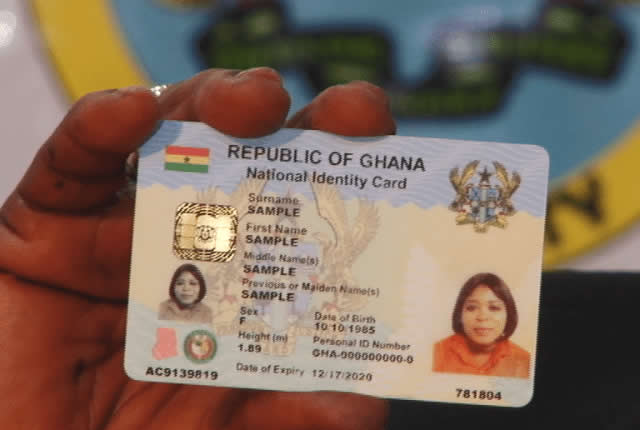
    For a while now, some people have taken mobile money loans and tried to escape repayment by dumping their SIM cards. The idea seems simple: if the number is gone, the lender cannot find you. But MTN Ghana has moved to close that loophole by linking loan records to the Ghana Card, the national identity card.

    The move means that borrowing on MoMo is no longer tied only to a phone number. It is tied to your identity. For many Ghanaians, that changes the risk of skipping repayment.

    How Ghana Card changes MoMo borrowing

    Previously, a MoMo loan was often linked to the SIM registration details. If a borrower changed or dropped the SIM, the lender had little way to trace them. But the Ghana Card provides a more stable identifier because it is a nationally recognised ID that every citizen and resident is expected to have.

    MTN Ghana is now using Ghana Card data to track loan defaulters. This means that even if you change your MoMo number, your loan history can follow you through your Ghana Card. The aim is to reduce the losses that mobile money lenders face when customers refuse to pay.

    For regular borrowers, the practical effect is simple: the days of disappearing from your loan obligations by changing a SIM are over. If you borrow, the lender knows who you are beyond the number you use.

    What this means for borrowers

    If you use MoMo loans, this development should change how you think about borrowing. Late repayment or defaulting is no longer just a problem with one phone number. It can affect your reputation with the lender and may influence your ability to borrow in the future.

    This is especially important for people who rely on MoMo loans for emergencies, small business capital, or school fees. The convenience of quick loans comes with a responsibility to pay back. With the Ghana Card link, there is a stronger record of who borrows and who does not pay.

    For honest borrowers, this may not feel like a big change. But it also means that your good repayment history can be tracked, which could help you access larger loans or better terms later.

    The limits to watch

    Details about how exactly MTN Ghana uses Ghana Card data are still limited. It is not clear whether the information is shared with other lenders or credit bureaus, or if it is only used internally within MTN.

    There are also questions about privacy. The Ghana Card is a sensitive form of identification. Linking it to financial behaviour requires strong data protection so that people do not suffer unfair consequences from mistakes or fraud.

    Borrowers should also remember that not all loan apps or lenders may have the same access to Ghana Card data. The move by MTN Ghana is specific to its MoMo loan service for now.

    What to keep in mind

    If you borrow money through MoMo, treat the loan seriously. Your Ghana Card now connects you to your borrowing history in a deeper way than before.

    Make a repayment plan before taking a loan. Understand the terms, especially interest and repayment period. And always update your contact details with your lender if you change your number, so you do not miss payment reminders.

    The use of Ghana Card data is a clear sign that mobile money lending is becoming more formal. That is good for reducing default rates, but it also means borrowers must be more careful. Hiding behind a new SIM is no longer a reliable escape.

  • MTN Ghana Warns Dealers: SIM Cards Must Not Sell Above GHS 10

    MTN Ghana Warns Dealers: SIM Cards Must Not Sell Above GHS 10

    If you have bought a new SIM card in Ghana recently, you may have noticed that the price can vary depending on where you go. Some vendors ask for small amounts, while others charge much more. MTN Ghana has now stepped in to remind dealers that the price of a SIM card is fixed, and selling it above that amount is not allowed.

    In a warning to its dealers, MTN Ghana said SIM cards should not be sold for more than GHS 10. The company is asking its authorised dealers to respect this limit. The message is simple: the SIM card itself costs a fixed amount, and any extra charges are not permitted.

    Why the GHS 10 SIM card price cap matters

    For many Ghanaians, the SIM card is the first step to getting connected. Whether you are buying a new line for a phone, a modem, or a tablet, the SIM is essential. When the price goes beyond the official amount, it adds an unnecessary cost for the customer. This can be a real burden, especially for people on low incomes or those who need a new number quickly.

    The price cap also helps protect consumers from unfair practices. Without a clear limit, some dealers might take advantage of customers who do not know the correct price. MTN’s warning is a reminder that there is a standard price, and everyone should be treated fairly. It also gives customers the confidence to challenge a charge that seems too high.

    SIM cards are widely available across Ghana, from MTN stores to small roadside vendors. Because they are so common, competition should normally keep prices low. But in some areas, customers may not have many options. That is why a clear, enforced price cap matters. It sets a baseline that protects the buyer regardless of where they shop.

    What to do if a dealer overcharges you

    If you are asked to pay more than GHS 10 for a MTN SIM card, you do not have to accept it. The first step is to politely question the price. You can point out that MTN has stated the official price is GHS 10. Many dealers will correct the charge once you ask.

    If the dealer refuses to lower the price, you should consider reporting the issue. MTN has channels for customers to complain, and the company has made it clear that it does not want its dealers selling above the cap. You can also choose to buy your SIM card from a different seller, such as an MTN branded shop or a dealer who follows the rules.

    It is also a good idea to keep your receipt after purchasing a SIM card. A receipt gives you proof of what you paid. If you need to file a complaint, that proof can help the company take action against the dealer.

    The GHS 10 price cap is not just a number. It is a way to make sure that getting connected remains affordable for everyone. Like any consumer protection measure, it only works if customers know their rights and are willing to speak up when those rights are ignored.

  • MTN Ghana acknowledges role of Ghanaians in company’s growth

    MTN Ghana acknowledges role of Ghanaians in company’s growth

    In a recent statement, MTN Ghana acknowledged the vital role that Ghanaians have played in the company’s achievements. Michael Gbewonyo, the Chief Internal Audit and Forensic Officer, highlighted that the company recognizes the unique contributions of its stakeholders, including customers, employees, and partners, to its success.

    Why this recognition matters

    For a telecom giant like MTN, operating in a competitive market, acknowledging local stakeholders builds trust and loyalty. Many Ghanaians have been loyal customers for years, and this message reinforces that their patronage is valued. It also signals that MTN sees itself as part of Ghana’s ecosystem, not just a foreign corporation. In a sector where customer retention is key, such recognition can encourage positive word-of-mouth and deepen community ties.

    Ghana’s telecom industry has seen rapid growth, with mobile money, data services, and digital solutions becoming integral to daily life. MTN’s acknowledgment of local contributions underscores the mutual dependency between service providers and users. When a company openly credits its stakeholders, it fosters a sense of ownership among Ghanaians, who often feel that large corporations overlook their role.

    What this means for MTN’s stakeholders

    For everyday users, this statement is a reminder that their voice matters. MTN’s recognition could translate into better customer service or initiatives that address local needs. Employees may also feel more motivated, knowing their work is appreciated at the highest level.

    • Customers: A stronger connection to the brand, potentially leading to increased loyalty.
    • Employees: A boost in morale and pride in their contributions.
    • Business partners: Reassurance that collaboration is valued.

    While specific initiatives were not mentioned, such public acknowledgments often precede community-focused programs or enhanced engagement strategies. Ghanaians should watch for tangible actions that follow these words.

    Looking ahead

    As MTN Ghana continues to expand its services, maintaining this appreciation will be crucial. The company’s success in Ghana depends on the continued support of its stakeholders. This recognition is a positive step, but the real test will be whether it leads to meaningful changes that benefit Ghanaians. For now, it serves as a reminder that even large corporations rely on the people they serve.

  • MTN MoMo Users Can Now Invest Directly With IC Asset Managers

    MTN MoMo Users Can Now Invest Directly With IC Asset Managers

    Mobile money in Ghana is no longer just for sending money or paying bills. A new partnership between IC Asset Managers (Ghana) Ltd and MTN MoMo means that millions of mobile money users can now invest directly through the MoMo app, bypassing traditional bank accounts or brokerages.

    IC Asset Managers has launched IC Wealth on the MTN MoMo platform. The service gives MoMo customers access to the IC Liquidity Fund, a regulated investment product managed by IC Asset Managers. This move brings formal investment opportunities to everyday Ghanaians who may not have had easy access before.

    What IC Wealth Offers MoMo Users

    Through IC Wealth on the MoMo app, users can invest in the IC Liquidity Fund directly from their mobile money wallets. The fund is regulated by the Securities and Exchange Commission (SEC) in Ghana. This means the product falls under official oversight, giving investors a layer of protection.

    The IC Liquidity Fund is designed as a low-risk, short-term investment vehicle. It is suitable for individuals who want to earn returns on idle cash without locking it away for long periods. Users can likely invest small amounts, making it accessible for people who are new to investing.

    IC Asset Managers is one of Ghana’s established fund managers. By bringing their product onto the MoMo app, they are removing barriers that often keep people from investing. No need to visit a bank, fill out lengthy forms, or maintain a minimum balance that is too high for the average person.

    Why This Matters for Mobile Money Users

    Mobile money penetration in Ghana is deep. Millions of Ghanaians use MoMo daily for transactions, but many have never invested in a formal financial product. This partnership makes investing as easy as sending money.

    Traditionally, to invest in a mutual fund you would need a bank account, identity documents, and a trip to a fund manager’s office. IC Wealth on MoMo removes those steps. If you have a MoMo wallet, you can potentially start investing with whatever amount you have, as long as it meets the fund’s minimum (the source does not specify the minimum, but such funds typically allow small starting amounts).

    This is especially useful for young professionals, students, and informal sector workers who may not have bank accounts but use mobile money. It brings them into the formal investment ecosystem, helping them grow their savings beyond just keeping cash in a wallet.

    How to Use IC Wealth on MoMo

    While the source does not give step-by-step instructions, the partnership means users will find the IC Wealth option within the MTN MoMo app. After selecting it, they can read about the IC Liquidity Fund, check the terms, and invest directly from their MoMo balance.

    Because the app already has your identity information (MoMo accounts are registered with Ghana Card or other ID), you may not need to submit additional documentation for small investments. However, there may be a verification step for larger amounts, as required by regulation.

    The IC Liquidity Fund is a collective investment scheme. Your money is pooled with other investors and managed by professionals at IC Asset Managers. Returns are paid out periodically. You can also withdraw your money when needed, though some funds have a notice period or fees.

    What to Consider Before Investing

    Even though the IC Liquidity Fund is low-risk, all investments carry some risk. The SEC registration means the fund follows rules, but it does not guarantee profits. Users should read the terms carefully, understand fees, and consider how long they can keep their money invested.

    Another thing to note is that this is not a savings account with a guaranteed interest rate. The fund’s returns depend on the performance of the assets it holds. Past performance does not guarantee future results.

    This partnership also signals a trend in Ghana’s fintech space: mobile money platforms are becoming gateways to more financial services. We have seen MoMo offer loans, insurance, and now investments. This could push other asset managers to partner with mobile networks, giving Ghanaians more choice.

    Looking Ahead

    IC Wealth on MTN MoMo is a practical step toward financial inclusion in Ghana. For the average MoMo user, it offers a simple way to start investing without needing a bank account. As more people use the service, it will be interesting to see how IC Asset Managers expands its product range on the platform.

    If you use MoMo and have been thinking about investing but found it complicated, this is worth exploring. Open the MoMo app, look for IC Wealth, and read about the IC Liquidity Fund. Make sure you understand the terms before committing your money.

  • MTN Ghana: Fibre Internet Is Now a Home Essential, Not a Luxury

    MTN Ghana: Fibre Internet Is Now a Home Essential, Not a Luxury

    For many Ghanaians, fibre internet still feels like a premium service reserved for high-income households. But MTN Ghana is pushing back against that idea. Richard Acheampong, the company’s Chief Home Officer, recently argued that fibre broadband has moved from being a luxury to a necessity for modern life.

    Speaking about the growing importance of home connectivity, Acheampong noted that many people still question why they need fibre when mobile data works fine. His point is that as more activities move online, the reliability and speed of fibre make it a practical requirement for families and businesses.

    Why Fibre Matters More Than Ever

    The shift to remote work, online learning, and digital entertainment has changed what Ghanaians expect from their home internet. Mobile data can be convenient, but it often struggles with consistent speed and data caps. Fibre offers a stable connection that can handle multiple devices and heavy usage without slowing down.

    For a household with children attending virtual classes, parents working from home, and everyone streaming videos, fibre becomes the backbone that keeps everything running. Acheampong’s message is clear: this is no longer a nice-to-have but a tool that supports daily productivity and education.

    MTN Ghana has been expanding its fibre network to reach more homes across the country. The company sees this as part of its broader effort to bridge the digital divide. By making fibre more accessible, they hope to change the perception that it is only for the affluent.

    What This Means for Ghanaian Households

    For the average Ghanaian family, the decision to switch to fibre often comes down to cost and availability. While fibre plans can be more expensive than mobile data, the value lies in the quality of service. A stable connection means fewer interruptions during important video calls or online exams.

    Businesses also stand to benefit. Small and medium enterprises that operate from home can rely on fibre for seamless communication with clients and suppliers. This can improve efficiency and open up new opportunities that require a dependable internet link.

    However, challenges remain. Fibre infrastructure is still concentrated in urban areas, leaving many rural communities without access. MTN’s expansion efforts will need to address this gap to truly make fibre a nationwide essential.

    For now, the conversation is shifting. As Acheampong suggests, Ghanaians should start viewing fibre internet as a utility like electricity or water. It powers the digital activities that are becoming central to everyday life.

    The practical takeaway is clear: if your household relies heavily on the internet for work, school, or business, investing in fibre could save you time and frustration. It is worth comparing plans from different providers to find one that fits your budget and needs. As more Ghanaians make the switch, the idea of fibre as a luxury will likely fade away.

  • MTN Ghana to Pay 40% More for 5G Spectrum Due to Market Dominance

    MTN Ghana to Pay 40% More for 5G Spectrum Due to Market Dominance

    The National Communications Authority (NCA) has officially opened the application process for 5G spectrum in Ghana, inviting telecom operators to bid for eleven lots across three frequency bands. However, one major player will face a steeper price: MTN Ghana, designated as having Significant Market Power (SMP), will be required to pay 40% more for the spectrum than any other applicant.

    What the Spectrum Auction Means for Ghana’s 5G Rollout

    The NCA is offering spectrum in the 700 MHz, 2600 MHz, and 3500 MHz bands, which are commonly used for 5G networks globally. The 700 MHz band is particularly valuable because it can cover large areas and penetrate buildings well, making it ideal for widespread coverage. The higher bands offer more capacity for faster speeds in dense urban areas.

    This auction is a critical step toward commercial 5G services in Ghana. While some operators have already conducted trials, access to licensed spectrum is necessary for full-scale deployment. The NCA’s decision to impose a premium on MTN reflects its regulatory approach to level the playing field, given MTN’s dominant position in the market.

    Why MTN Pays More: The SMP Designation

    MTN Ghana has long been classified as having Significant Market Power by the NCA, meaning it holds a large share of the telecom market and can influence prices and competition. Under this classification, the regulator can impose additional obligations to prevent anti-competitive behavior. The 40% surcharge on spectrum fees is one such measure.

    This is not the first time MTN has faced such treatment. In previous spectrum allocations and interconnection rate determinations, the SMP status has led to higher costs for MTN. The rationale is that MTN’s size gives it advantages in bidding, and the premium helps ensure that smaller operators can still compete for spectrum without being outbid.

    For MTN, this means its 5G rollout will be more expensive than its rivals. The company will need to factor in the additional cost when planning its network investments and pricing strategies. For other operators like Vodafone Ghana, AirtelTigo, and new entrants, the lower spectrum price could accelerate their 5G plans.

    Practical Implications for Ghanaian Consumers and Businesses

    For everyday Ghanaians, the spectrum auction is a behind-the-scenes development that will shape the future of mobile internet. 5G promises faster download and upload speeds, lower latency, and the ability to connect many more devices simultaneously. This could improve experiences for streaming, video calls, online gaming, and cloud services.

    Businesses stand to benefit even more. Industries like agriculture, healthcare, education, and logistics could use 5G for real-time monitoring, remote diagnostics, smart farming, and automated systems. However, the benefits depend on how quickly and widely operators deploy the networks.

    The premium on MTN may lead to a more competitive landscape. If other operators can launch 5G at lower cost, they might offer more affordable plans or better coverage to attract customers. MTN, on the other hand, may need to justify its higher prices through superior service or exclusive features.

    It is also worth noting that the NCA has not yet announced the reserve prices or the exact timeline for the auction. Operators will need to submit applications and meet eligibility criteria. The process is expected to be competitive, especially for the prime 700 MHz spectrum.

    What to Watch Next

    Ghana’s 5G journey is still in its early stages. The spectrum auction will determine which operators get the licenses and how much they pay. After that, network deployment will take months or even years. Consumers should not expect widespread 5G coverage immediately, but the groundwork is being laid.

    For now, the key takeaway is that the NCA is actively managing the market to prevent MTN from dominating the next generation of mobile technology. Whether this leads to faster, cheaper, or more widespread 5G for Ghanaians will depend on how operators respond to the regulatory environment.

  • MTN Ghana and Telecel Set to Bid for 5G Spectrum as Government Ends Exclusive Deal

    MTN Ghana and Telecel Set to Bid for 5G Spectrum as Government Ends Exclusive Deal

    Ghana’s mobile network landscape is about to shift. The government has decided to end a ten-year exclusive concession held by a state-backed provider for 5G spectrum. This move clears the way for MTN Ghana and Telecel to submit bids for 5G licenses in the coming weeks.

    For years, the exclusive arrangement limited competition and kept 5G deployment in the hands of one operator. Now, with the concession scrapped, the country’s two dominant carriers can directly apply for the spectrum needed to roll out next-generation mobile services.

    What This Means for Mobile Users

    5G promises faster download and upload speeds, lower latency, and the ability to connect many more devices at once. For everyday users in Ghana, this could mean smoother video streaming, quicker file downloads, and more reliable connections in crowded areas. Businesses may also benefit from improved connectivity for remote work, IoT applications, and digital services.

    However, 5G adoption will not happen overnight. Even after licenses are awarded, operators will need to invest in infrastructure, including new base stations and fiber backhaul. Coverage will likely start in major cities like Accra and Kumasi before expanding to other regions. Users will also need 5G-compatible phones, which are still more expensive than 4G devices.

    Competition Could Drive Better Offers

    With both MTN Ghana and Telecel vying for spectrum, competition may lead to more attractive pricing and service packages. MTN Ghana is the market leader with the largest subscriber base, while Telecel has been expanding its network and services. A direct bidding process could push both companies to offer better value to win customers.

    That said, the cost of acquiring spectrum and building 5G networks is high. Operators may initially focus on premium plans or data-heavy users to recoup their investment. Budget-conscious consumers might not see immediate benefits, but over time, as 5G becomes more widespread, prices are expected to drop.

    Background on the Exclusive Concession

    The exclusive concession was originally granted to a state-backed provider, which had sole rights to 5G spectrum for ten years. This arrangement limited the ability of other operators to enter the 5G market. Critics argued it stifled competition and slowed down the rollout of advanced mobile services in Ghana.

    By scrapping the concession, the government is opening up the market. This aligns with broader efforts to improve digital infrastructure and increase internet access across the country. The move also signals a more competitive telecom environment, which could attract further investment.

    What to Watch Next

    The bidding process is expected to take place in the coming weeks. Both MTN Ghana and Telecel will need to submit detailed proposals, including their plans for coverage, pricing, and technology deployment. The National Communications Authority (NCA) will evaluate the bids and award the spectrum licenses.

    Once awarded, the real work begins. Operators will need to secure sites for towers, obtain permits, and install equipment. Ghanaian users should keep an eye on announcements from MTN and Telecel about their 5G rollout timelines and compatible devices.

    For now, the end of the exclusive concession is a positive step toward faster and more widely available mobile internet in Ghana. But the full impact will only be clear once the networks are live and users can experience 5G for themselves.

  • Shortcodes for All Telecel Ghana Services [Updated 2024]

    Shortcodes for All Telecel Ghana Services [Updated 2024]

    Have you ever been in a situation where you needed a Telecel Ghana service but could not find the right shortcode for it?

    Well, shortcodes are easy ways for us to get services faster and easier. In this article, we have all the relevant codes that you will need to enjoy all the special services that Telecel offers.

    In this article, we have prepared all the codes that Telecel users in Ghana will need for their day to day activities.

    Feel free to search for your preferred shortcode and use it.

    Shortcodes for Telecel Ghana

    The table below contains all the shortcodes for services that Telecel Ghana offers.

    Telecel ShortcodeDescription
    *700#Access data bundle menu
    *124#Balance enquiry. Check your credit balance.
    *500#Blackberry Offers
    *125#Browser packages
    *700*4#Bundle data for someone
    *700*1#Bundle for two devices
    585Caller tunes. Formerly 134
    *126#Check your balance on data bundles and promos
    *900#Check your broadband balance
    *127#Check your Telecel mobile number
    100Customer care
    Dial 555Family and friends
    *151#For more information on Telecel products and services
    *127*11#General news
    *134*PIN#New recharge code.
    PORT to 600Number portability
    02xxxxxxxx Simbox to 419Report SIM-Box fraud
    *565#Reserve your number to avoid losing it
    *150#Roaming enquiry
    655Support text number
    *505#To borrow credit
    *117*old pin*new pin* new pin#To change the transfer of credit default password. i.e 1234
    *126#To check bundle information
    *400#To know if your number is registered
    109To retrieve voice mail.
    *516*0208 xxx xxx *0*30*1234#Transfer credit in Cedis & Pesewas. Enter: *516*recipient’s number*credit in new Ghana cedis*credit in new Ghana pesewa*password# and send.
    *516*0208 xxx xxx*5*1234#Transfer credit in Cedis only. Enter: *516*recipient’s number*credit in new Ghana cedis*password# and send.
    *516#Transfer credit to another number
    *200#Telecel Red offers
    108Voicemail deposit. Formerly 2020.
    109Voicemail receiving
    0501000300Whatsapp line for Telecel Ghana

    What is Vodafone Red?

    Vodafone Red is a complete voice and data plan by Vodafone Ghana that gives on-net and off-net voice allowance, data, international calls and SMS. The Vodafone Red experience ensures that subscribers do not have different sim cards for different purposes.

    Vodafone red gives weekly and monthly integrated bundles, giving you matchless value to take care of all your communication needs in one plan. Click here to get all the Vodafone Red Packages.

  • MTN Ghana to Phase Out Scratch Cards by June 2024

    MTN Ghana to Phase Out Scratch Cards by June 2024

    Effective 30th June 2024, MTN Ghana will phase out its scratch cards, originally introduced in 2020. This means that from 1st July 2024, customers will no longer be able to recharge using unused MTN scratch cards.

    In a statement released on Thursday, May 23, 2024, Chief Sales and Distribution Officer, Samuel Addo, announced that customers can redeem the value of their scratch cards via credit transfer at any MTN Customer Experience Centre.

    Aligning with Digitalisation and Environmental Goals

    This initiative is part of MTN’s strategy to lead digital solutions in Ghana and support the Government of Ghana’s digitalisation agenda. Samuel Addo emphasized that phasing out scratch cards will help protect the environment, empower customers to drive digital usage, and enhance customer service efficiency.

    “The phasing out of the scratch cards is one of the avenues to help us protect the environment, empower customers to drive digital usage and make customer service delivery more efficient,” stated Addo.

    Encouraging Use of Digital Channels

    MTN Ghana encourages customers to continue using existing digital channels such as MoMo, Ayoba, and the myMTN app to recharge their accounts. As part of their commitment to a clean environment, MTN offers a 50% bonus on all recharges done via Mobile Money.

    Key Points

    • Phase-out Date: 30th June 2024
    • Last Recharge Date: 1st July 2024
    • Redemption: Credit transfer at any MTN Customer Experience Centre
    • Digital Channels: MoMo, Ayoba, myMTN app
    • Bonus Offer: 50% bonus on Mobile Money recharges