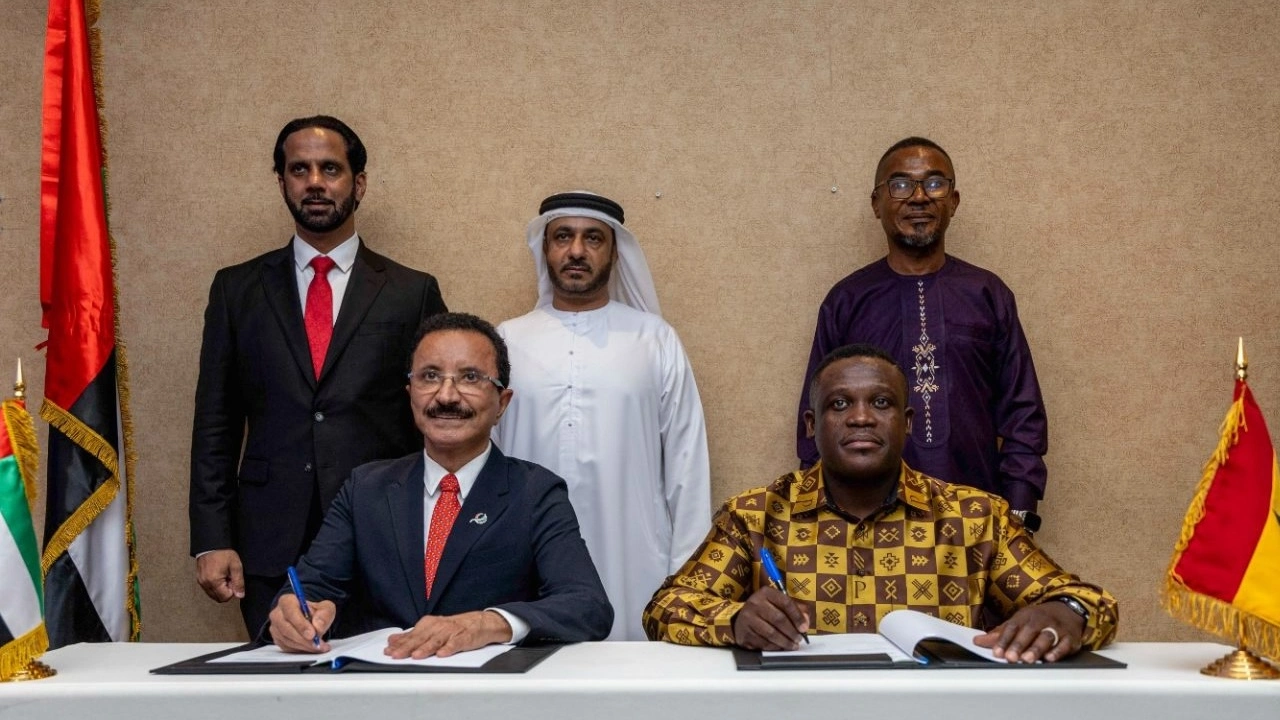
On May 29, 2025, in Accra, Ghana’s Minister of Communication, Digital Technology and Innovations, Samuel Nartey George, and Sultan Ahmed Bin Sulayem, Chairman of the UAE’s Ports, Customs and Free Zone Corporation (PCFC), signed a $1 billion memorandum of understanding to launch the Ghana-UAE Innovations and Technology Hub. According to the agreement, this new campus will accelerate Ghana’s digital transformation and position it as a regional leader in artificial intelligence and emerging tech.
A Campus Built for Tomorrow The first phase will cover a 25 km² site in Ningo-Prampram. The UAE’s PCFC will fund construction and development, while the Government of Ghana provides the land. Planners are drawing on the experience of Dubai’s AI firms, those that powered the UAE’s own tech push, to design facilities optimized for research, development, and collaboration.
Home to Global Tech Giants Organizers expect the hub to host over 11,000 companies under the PCFC umbrella. Big names already on board include Microsoft, Meta, Oracle, IBM, and Alphabet. These firms will use the site as a regional base for AI engineering, business-process outsourcing (BPO), knowledge-process outsourcing (KPO), and Africa-focused data generation for machine learning projects.
Why It Matters for Ghana Ghana has been building its tech reputation with proactive policies, a vibrant startup scene, and growing foreign interest. In April 2019, Google opened the continent’s first AI research center in Accra, an early sign of Ghana’s potential in this space.
Looking Ahead Ground-breaking is expected soon. Once operational, the hub should create thousands of jobs, boost skills development, and spur homegrown innovation. Consumers can look forward to smarter digital services, new career pathways, and closer ties between Ghana’s tech community and the world’s leading technology brands.
You have meticulously analysed the teams, meticulously scrutinised the statistics, and with confidence placed your bet on a match that promised to be thrilling. The anticipation mounts as the game approaches, only to be interrupted by Mother Nature or unexpected circumstances. Suddenly, the game is postponed, sending a shock through your system. A flood of questions floods your mind: will your carefully calculated bet be nullified? Will it be rescheduled for a new date? Or, worse still, will it simply vanish into thin air?
Rest assured, you are not alone in this situation. Postponed games, while disruptive, are an inherent part of the sporting landscape. Understanding how such situations are handled can transform a potentially stressful experience into an opportunity for informed decision-making. Peruse the text to the very end to discover more and to receive a one-of-a-kind promo code from Melbet Nigeria upon your initial deposit.
The Anatomy of a Postponed Match
A postponed match is more than just an inconvenience – it’s a multifaceted phenomenon born out of necessity. Natural elements like torrential rain, blizzards, or extreme heat can render playing conditions unsafe. Security threats, ranging from civil unrest to terrorist warnings, can cast a shadow over proceedings. Even the venue itself might fall short of regulatory standards, whether due to maintenance issues or unforeseen damage.
Player availability stands as another significant factor. Sudden injuries, international call-ups, or logistical nightmares can disrupt a team’s lineup, forcing organizers to reconsider the match’s viability. Additionally, the spectre of COVID-19 and other infectious diseases has introduced a new layer of complexity, with entire squads potentially sidelined due to health concerns.
Each of these scenarios sets off a chain reaction, impacting not only the teams involved but also the myriad stakeholders, including broadcasters, sponsors, and of course, bettors. Understanding these triggers is crucial, as they often dictate how bookmakers will handle existing wagers. For instance, a postponement due to weather might be treated differently from one caused by a positive COVID-19 test, influencing whether your bet remains valid or is subject to a refund.
Through the Looking Glass: Navigating the Labyrinth of Postponed Bets
Picture this: your carefully calculated bet hangs in the balance as the match you’ve wagered on is suddenly postponed. But what happens next isn’t as straightforward as you might think. Your bet doesn’t vanish into thin air; instead, it embarks on a fascinating journey through a complex maze of regulations and protocols.
The first fork in the road is determined by the nature of your wager itself. Pre-match bets, placed before the action begins, follow a relatively clear path. These bets are typically honored once the match is eventually played, provided the postponement wasn’t due to specific circumstances outlined in the bookmaker’s terms and conditions.
However, in-play bets, those placed during the match, introduce a whole new layer of complexity. These wagers can take several different routes depending on the timing and reason for the postponement. For instance, a bet on the first goalscorer might be voided if the match is significantly delayed, while a bet on the match result could be carried over to the new date.
The path your bet takes also depends heavily on the bookmaker’s specific policies. While most operators follow industry guidelines, subtle differences can significantly impact the outcome. Some may offer immediate refunds for certain types of postponements, while others might automatically roll your bet over to the new date.
The duration of the delay acts as another crucial variable. Temporary interruptions, like those caused by power failures or crowd disturbances, often trigger different rules than longer postponements requiring a complete rescheduling. In the case of short delays, your bet might remain valid as long as the match resumes within a specified timeframe.
The Great Postponement Puzzle: Decoding Betting Scenarios
In the intricate world of sports betting, postponements present a fascinating puzzle with multiple pieces to consider. Let’s explore the various scenarios you might encounter and how they’re typically resolved.
Rescheduled Encounters
When a match is postponed but later rescheduled, your bet generally carries over to the new date. However, the specifics can vary depending on the type of bet. Live bets on specific events, such as the first goalscorer or a particular half result, may be voided if the delay is significant. Pre-match bets, on the other hand, usually remain valid as long as the match is eventually played within a reasonable timeframe.
Void Bets: A Fresh Start
In cases where the postponement is indefinite or the match is ultimately canceled, your bet will typically be voided. This means your original bet is returned to you in full, effectively resetting the transaction as if it never occurred. While this might seem like a setback, it provides you with the opportunity to reassess and potentially place a new bet based on updated circumstances.
Refunds and Cashout Options
Depending on the situation and the bookmaker’s policy, you may be offered alternative solutions. Refunds return your original bet, providing you with betting funds to use elsewhere. Cashout options, meanwhile, allow you to settle the bet early based on the current odds, offering a way to secure potential profits or minimize losses before the new match date.
Accumulator Complexities
Accumulators introduce an additional layer of complexity when a leg is postponed. In most cases, the bookmaker will recalculate the accumulator, temporarily excluding the postponed leg from the equation. This ensures that your remaining bets aren’t unnecessarily jeopardized by the delay.
Streaming Snafus
When postponements stem from streaming issues rather than actual match disruptions, bookmakers implement specific rules to safeguard both parties. These rules often prioritize fair treatment for bettors while protecting the bookmaker from potential disputes arising from technical difficulties.
Special Circumstances
Certain unique situations require special consideration. For instance, postponements due to extreme weather might be handled differently from those caused by venue issues or player unavailability. Similarly, international matches may have different protocols compared to domestic fixtures.
The Art of Self-Defense in the World of Postponed Bets
While you can’t control the whims of fate that lead to match postponements, arming yourself with knowledge and proactive strategies can significantly mitigate potential risks. Here’s how to fortify your betting approach against the unpredictability of postponements.
Start by immersing yourself in the fine print – understanding your chosen bookmaker’s terms and conditions is your first line of defense. Pay particular attention to sections detailing postponement policies, void bet criteria, and refund procedures. This knowledge empowers you to anticipate how your bets might be affected in various scenarios.
Maintaining meticulous records of your bets is another crucial defensive measure. Keep a detailed log that includes bet type, amount staked, odds, and any relevant terms. This documentation serves as invaluable evidence in case of disputes or misunderstandings regarding postponements and their impact on your bets.
Staying informed is key to protecting your interests. Regularly check the status of your bets through the bookmaker’s platform, taking advantage of real-time updates and notifications. Many platforms offer push notifications or email alerts for important developments, ensuring you’re always in the loop regarding postponements or changes to your bets.
Choosing reputable bookmakers with a proven track record of fair postponement handling is a strategic move. Research customer reviews and industry ratings to identify platforms known for transparent communication and equitable treatment of bettors during postponements. While this doesn’t guarantee flawless outcomes, it significantly reduces the risk of encountering unfair practices.
Consider diversifying your betting portfolio by spreading bets across different matches and events. This strategy minimizes the impact of any single postponement on your overall betting activity. Additionally, it’s wise to familiarize yourself with alternative dispute resolution mechanisms offered by bookmakers, providing an extra layer of protection in case of disagreements.
Developing a proactive mindset also involves anticipating potential postponement scenarios. Before placing a bet, consider factors that could lead to a postponement, such as weather forecasts, venue history, or team news. While you can’t predict every eventuality, being prepared for potential disruptions can influence your betting decisions.
The Secret Art of Betting: Make the Most of Your Time with Melbet!
When a highly anticipated match is canceled, many bettors feel frustrated. However, those who know how to seize the opportunity can turn this situation into a chance for success. On the Melbet ng platform, users can find up-to-date information about canceled matches and unique strategies to help them win.
Instead of dwelling on what didn’t happen, focus on what can happen. This is when new opportunities for analysis, planning, and forecasting arise. Even though the game wasn’t played, you can still analyze your chances of winning using Melbet’s resources. The platform provides easy access to team information, uniforms, and past matches, allowing users to make informed decisions in the face of uncertain market conditions.
With the MELGIFT promo code, you can explore the world of betting and take advantage of an incredible 300% bonus on your initial deposit. This bonus isn’t just a number, it’s your path to significant winnings. Bet with confidence, knowing you have everything you need for successful gambling. Melbet.ng provides unique opportunities that will assist you in utilizing the moments before the whistle blows to develop a plan that will lead to the desired income in the future.
Conclusion
While postponements can be a bettor’s worst nightmare, they can also be an opportunity to turn uncertainty into advantage. By choosing reliable bookmakers, staying well-informed, and taking proactive measures to protect their interests, bettors can approach postponements with confidence.
It is important to remember that a postponement is not necessarily a catastrophe; it is simply a temporary setback on the path of betting. With the proper knowledge and preparation, bettors can ensure that their bets are in the best position to succeed when the opportunity arises.
The key to mastering postponements is education and vigilance. Understanding the intricacies of postponement management and defending one’s rights as a bettor can turn potential obstacles into strategic advantages. It is through these challenges that bettors have the greatest opportunity for growth and learning, proving that they can turn setbacks into stepping stones towards success.
Starlink is gearing up to launch its services in Ghana by the end of August 2024. This exciting news follows the successful completion of all necessary administrative and licensing procedures with the National Communications Authority (NCA). The service will be managed locally by Space X Starlink GH LTD.
This announcement marks a significant step forward in Ghana’s efforts to improve its digital infrastructure, especially in remote and underserved areas where traditional broadband services have struggled to reach. Starlink’s low Earth orbit (LEO) satellites are poised to deliver high-speed internet access across the country, bridging the digital divide and supporting vital sectors like education, healthcare, and business.
As Starlink prepares to enter the Ghanaian market, there is keen interest in its pricing model, particularly compared to existing data costs. Currently, internet data prices in Ghana vary widely, with mobile data packages from providers like MTN and Telecel costing between GHS 3 to GHS 15 per gigabyte, depending on the package and usage.
In contrast, Starlink’s pricing in other markets has typically been higher, reflecting the advanced technology and infrastructure required to deliver satellite-based internet. For instance, in the United States, Starlink charges approximately $110 per month for unlimited data, along with an upfront equipment cost of around $599. If similar pricing is adopted in Ghana, Starlink could be positioned as a premium service, particularly appealing to users in areas with limited access to reliable broadband. The affordability and value of Starlink’s offerings will likely be a crucial factor in its adoption across different demographics in the country.
The NCA, the regulatory body responsible for overseeing electronic communications in Ghana, played a key role in facilitating Starlink’s entry into the Ghanaian market. Established by Act 524 in December 1996 and later revised under the National Communications Authority Act, 2008 (Act 769), the NCA ensures that communication services in Ghana adhere to the highest standards of efficiency and competitiveness.
With this latest approval, the NCA continues to fulfill its mandate of fostering a connected and digitally inclusive Ghana. The regulatory body had previously deemed the sale and operation of Starlink services illegal in December 2023 due to the lack of necessary licensing and equipment type approval. However, with these issues now resolved, Starlink is cleared to begin offering its services.
The launch of Starlink’s services is expected to transform internet access in Ghana, particularly in regions that have long been overlooked by traditional broadband providers. By providing reliable, high-speed internet access via satellite, Starlink will empower communities, businesses, and individuals to participate more fully in the digital economy. This move aligns with the government’s broader agenda of digital transformation, aiming to position Ghana as a leader in the information and communications technology (ICT) sector within the West African sub region.
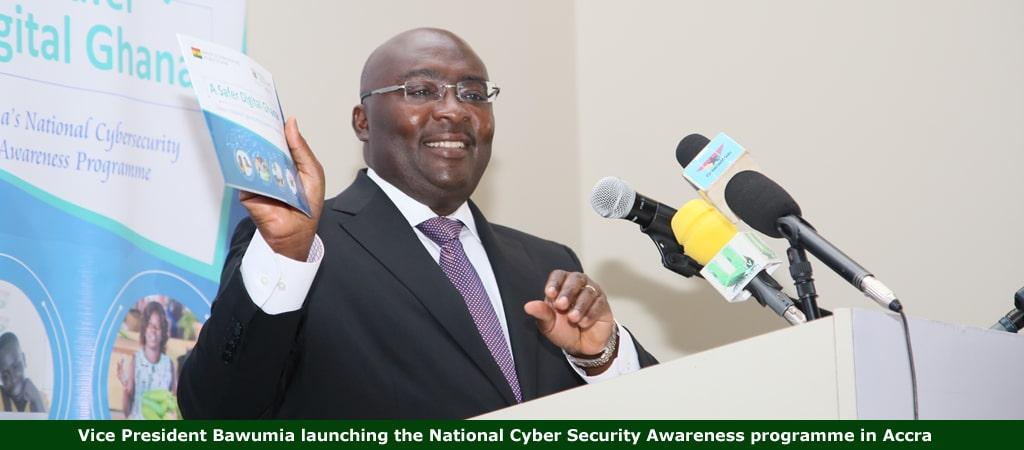
Accra, Ghana – Dr. Mahamudu Bawumia, Vice President and flagbearer of the New Patriotic Party (NPP), has proposed the adoption of mobile money as a common payment system across Africa to address trade barriers and financial challenges on the continent.
Speaking at the Interoperability Symposium organized by the Africa Prosperity Network (APN) in Accra, Dr. Bawumia highlighted long-standing issues hindering inter-African trade. These include low trading rates among African nations, low export rates, cumbersome payment systems, and pressure on foreign exchange.
Proposal for Mobile Money Interoperability
Dr. Bawumia suggested the implementation of a mobile money interoperability payment system for Africa to foster seamless trade among African countries.
“Trade payments and relationships are currently hampered by inadequate settlement systems, resulting in high costs, limited access, slow processing speeds, and a lack of transparency.”
He emphasized that making mobile money interoperable across African borders would enable citizens to trade more efficiently, but underscored the necessity of strong political will to achieve this vision.
“Without political will, it is not likely to be achieved. It takes a lot of effort to bring stakeholders together on a common platform.”
Dr. Bawumia’s Vision on Social Media
On his Facebook page, Dr. Bawumia elaborated on how an African mobile money interoperability payment system could function as a de facto common currency for trade, without the need for stringent economic requirements.
Referencing Ghana’s successful mobile money interoperability system, Dr. Bawumia noted that it could serve as a model for the rest of Africa. He stressed that Ghana’s system, which integrates transactions across telecoms, bank accounts, and e-zwich platforms, exemplifies how such a system can be implemented continent-wide.
“For me, having continental mobile money interoperability will ultimately achieve, to a greater extent, the objectives of a common currency without necessarily having a common currency in Africa. We should aim at pursuing this on an incremental basis.”
Dr. Bawumia proposed that countries like Ghana, Nigeria, and Côte d’Ivoire could lead this initiative, setting a precedent for other nations to follow.
Conclusion
Dr. Bawumia’s proposal, if realized, could significantly enhance trade and economic integration within Africa, promoting financial inclusion and reducing dependency on foreign exchange systems. The success of Ghana’s interoperability system offers a practical template for this ambitious project.
Leading provider of high-quality electronic products, Kora, today announced the launch of an unprecedented 7-day promotional campaign to reward customers with an unbeatable offer. Starting today, customers who purchase one Kora Strom Headset will receive a Kora Stud Bluetooth Speaker for free.
Unveiling the Promotion
The “Buy 1 Strom, Get 1 Stud Free” promotion is a bold move by Kora to address buyers’ needs while engraving the brand in the heart of the market. This exclusive offer is designed to attract both new and loyal customers by providing them with significant value.
“We are thrilled to launch this game-changing promotion,” said Belo Cida Haruna, Head of Marketing at Kora. “By providing our customers with an unparalleled opportunity to acquire two of our top-quality products for the price of one, we are not only expressing our gratitude for their ongoing support but also showcasing our commitment to delivering exceptional value.”
How to Get the Offer
The promotion is available exclusively through Kora’s official website, https://iplaykora.com. Customers simply need to add a Kora Strom Headset to their cart, and a Kora Stud Bluetooth Speaker will be automatically added at no additional cost. This offer is valid for seven days only, making it imperative for interested buyers to act quickly to take advantage of this limited-time deal.
Product Highlights
Kora Strom Headset
The Kora Strom Headset is renowned for its superior sound quality, comfortable fit, and durable design. It features noise-cancellation technology, ensuring an immersive listening experience. The headset is perfect for music enthusiasts, gamers, and professionals who require crystal-clear audio.
Kora Stud Bluetooth Speaker
The Kora Stud Bluetooth Speaker offers impressive sound clarity and powerful bass in a compact design. It is portable, making it ideal for both indoor and outdoor use. The speaker also boasts a long battery life, Bluetooth connectivity, and water-resistant features, making it a versatile addition to any audio setup.
Building Long-Lasting Relationships
By providing an irresistible offer to consumers, Kora is confident that this promotional campaign will foster long-lasting relationships with satisfied customers. This strategy not only boosts sales but also enhances customer loyalty by delivering exceptional value and quality.
Botswana has officially granted a license to SpaceX’s Starlink unit, marking the country as the latest in Africa to authorize the internet services provider. This decision comes in the wake of threats to restrict Starlink’s services in regions where it operates without proper licensing.
President Mokgweetsi Masisi, in a statement on his office’s official Facebook page, mentioned that regulators were urged to expedite the approval process for the license. The decision followed a recent meeting between President Masisi and Starlink executives in Dallas.
“I gave them two weeks to fast-track this, and they have already been given a license,” President Masisi confirmed.
Starlink has been facing pressure to halt operations in various countries where it lacks the necessary licenses. This scrutiny intensified after a Bloomberg News investigation in March exposed the widespread unauthorized use of the satellite network.
Last week, Zimbabwe also announced that it had granted an operating license to Starlink. The company, which currently serves over 2.6 million customers worldwide, provides broadband internet via a network of approximately 5,500 satellites, which SpaceX started deploying in 2019.
President Masisi indicated that Starlink services would soon be available in Botswana, offering crucial connectivity for farmers and residents in remote areas where traditional fixed broadband services are unavailable.
A spokesman for the Botswana Communications Regulatory Authority declined to comment on the development.
Despite the absence of an official operating license, some internet users and service providers in Botswana have publicly disclosed their use of Starlink’s services through roaming kits.
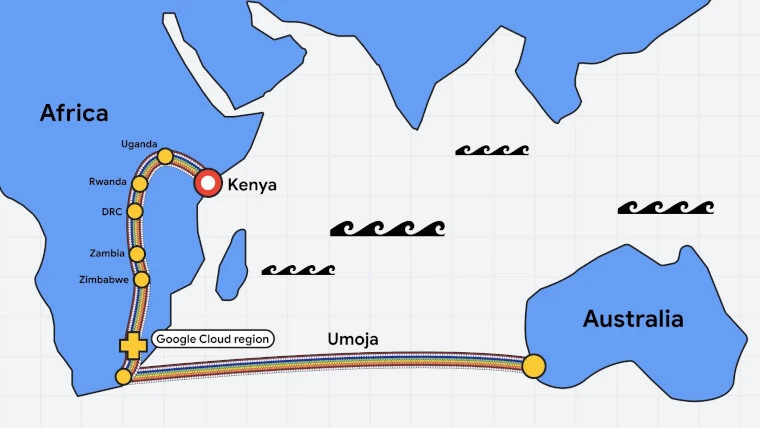
Google has announced plans to build the first subsea cable linking Africa and Australia. Named the Umoja cable, it will connect Western Australia with South Africa, enhancing global and regional digital infrastructure.
Key Project Details
The Umoja cable will include a terrestrial route from South Africa to Kenya, passing through Uganda, Rwanda, the Democratic Republic of the Congo, Zambia, and Zimbabwe. This section of the project is being developed in collaboration with Liquid Intelligent Technologies. However, specific capacity details and timelines have not been disclosed.
Enhancing Connectivity and Resilience
“This new intercontinental fiber optic route will significantly enhance our global and regional digital infrastructure,” said Dr. William S. Ruto, President of Kenya. He emphasized the importance of this initiative for ensuring the redundancy and resilience of the region’s connectivity, particularly in light of recent disruptions caused by subsea cable cuts.
Collaboration with Kenya
Google will sign a statement of collaboration with Kenya’s Ministry of Information Communications and the Digital Economy. This partnership aims to accelerate joint efforts in cybersecurity, data innovation, upskilling, and AI deployment.
Google’s Commitment to Africa
The name Umoja, derived from the Swahili word for unity, reflects Google’s Africa Connect initiative. This follows the launch of the Equiano cable, which connected Africa and Portugal in 2022. In 2021, Google committed to investing $1 billion in Africa, and to date, has invested $900 million. Additionally, Google launched its first African cloud region in Johannesburg in January 2023.
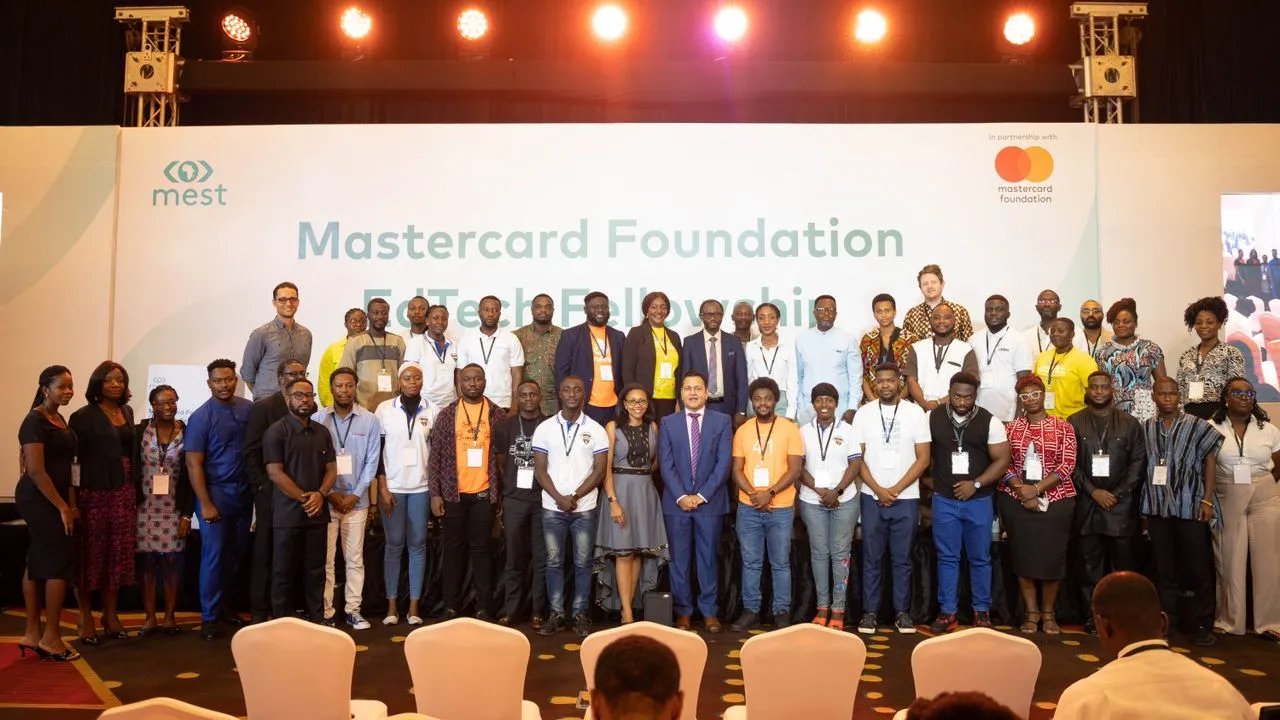
On Thursday, May 9th, in Accra, Ghana, the Mastercard Foundation in collaboration with MEST Africa officially kicked off their EdTech Fellowship program. The initiative has selected twelve promising startups aimed at transforming educational technology across Africa.
Launch Event Highlights
The event was graced by the presence of key figures including Ghana’s Minister of Education, Dr. Yaw Osei Adutwum, who not only discussed the strides being made in Ghana’s education sector but also formally launched the fellowship. Angela Duho, the Program Manager at MEST Africa, shared her excitement about the potential of the chosen companies to revolutionize the educational landscape.
Joseph Nsengimana, Director of the Mastercard Foundation Centre for Innovative Teaching and Learning, commented on the partnership’s goals, “Through our collaboration with MEST Africa, we aim to enhance access to high-quality, relevant education for underserved learners in Ghana and Africa by leveraging locally developed tech solutions.” In 2023, their programs successfully reached over 2.6 million learners across South Africa, Nigeria, and Kenya.
The 2023 EdTech Fellowship Cohorts
Overview of Selected Startups
DeafcanTalk: Tailors assistive technologies for Deaf students to foster inclusive education by eliminating communication barriers.
Coral Reef: Prepares students for the future workforce integrating AI, content creation, and EdTech services.
eCampus: An online platform enhancing learning through tech-driven solutions aimed at global scalability.
Inspiring Teachers: A nonprofit dedicated to boosting learning outcomes in Ghana through expert teacher training and program development.
Firefly IO: Innovates in STEAM and Robotics education to nurture creativity and problem-solving skills among students.
PerbiCubs: Addresses reading challenges among Ghanaian children with captivating digital tools.
Q Know Edtech: Makes quality education accessible through personalized tutoring and robust learning resources.
Alpha Virtual Academy: Provides comprehensive digital learning tools for K-9 schools in Ghana, enhancing educational quality and accessibility.
Wonderspaced: Creates educational content for primary students and educators, focusing on critical thinking and interactive learning.
Ayaprep: An educational app teaching mathematics in local Ghanaian languages to boost inclusivity.
Loozeele Academy: Offers STEM-focused education for early childhood in the Upper East region, making high-quality education affordable.
Dext Technology: Develops innovative, user-friendly tools for effective STEM education.
Panel Insights
A panel session, moderated by Bernard Avle, host of the CitiFM Morning Show, discussed various aspects of education in Ghana. Panelists examined the challenges faced by EdTech startups in scaling their operations and the existing policies that support the growing EdTech ecosystem.
The Mastercard Foundation EdTech Fellowship, facilitated by MEST Africa, is set to make significant strides in educational technology in Africa. By supporting these twelve startups, the program aims to foster innovation and create impactful educational solutions tailored to the needs of African learners.
MapAfrica Limited has introduced the Signboards App, an innovative platform designed to streamline personal advertising for professionals, freelancers, and gig workers. The app, conceived by Leonard Benkowsky, boasts a user-friendly interface that empowers users to create engaging text banners and seamlessly upload images, GIFs, and videos. It also facilitates sharing of contact details, offering a direct link between service providers and potential clients.
“We’re thrilled to launch Signboards App,” said Benkowsky. “Our vision is to offer professionals, freelancers, and gig workers a straightforward yet robust tool to market their services and effectively connect with clients.”
Key Features of the Signboards App:
Simple Text Banner Creation: Craft straightforward yet impactful text banners.
Media Upload: Effortlessly upload images, GIFs, and videos.
Contact Integration: Easily integrate your contact details for client interaction.
Keyword-Based Organization: Organize and discover content using relevant keywords.
Multi-Platform Availability: Access on both Android and iOS devices.
The Signboards App is now available for download on the Google Play Store and Apple App Store. Join today to transform how you connect with your audience.
Accra, April 25, 2024 — The National Communications Authority (NCA) has officially approved the application of Space X Starlink GH LTD, marking a significant step forward in satellite broadband services within Ghana. This approval allows Starlink to operate and provide its services across the nation, underlining Ghana’s commitment to expanding its digital infrastructure.
The decision by the NCA follows the recent policy approval of the Satellite Licensing Framework by the Ministry of Communications and Digitalisation, which aims to foster a more connected and digitally inclusive Ghana. The license issuance process for Starlink is currently underway and is expected to be finalized soon.
Reversal of Previous Stance on Starlink Operations
This approval comes after the NCA’s previous statement in December 2023, which declared the sale and operation of Starlink equipment and services as illegal due to the lack of a necessary license and type approval of their equipment. At that time, the NCA had cautioned the public against patronizing Starlink services and directed those engaged in its sale or operation to cease immediately, emphasizing the importance of adhering to Ghana’s Electronic Communications Act.
Background on the NCA’s Role
Established by Parliament through Act 524 in December 1996 and later updated by the National Communications Authority Act, 2008 (Act 769), the NCA serves as the statutory body responsible for licensing and regulating electronic communications in Ghana. Its approval for Starlink’s application is part of its mandate to ensure a competitive and efficient communications sector that supports the nation’s socio-economic development.
Impact on Ghana’s Digital Landscape
The introduction of Starlink’s services is anticipated to significantly boost internet availability and reliability across Ghana, particularly in remote and underserved areas where traditional broadband services are less viable. This move is expected to enhance various sectors including education, healthcare, and business, facilitating smoother communication and more robust connectivity.
As Starlink prepares to roll out its services following the completion of all administrative processes, the NCA’s decision is viewed as a pivotal development in Ghana’s journey towards enhanced national connectivity and digital inclusivity.