Author: Gabriel Agbobli

  • How to Withdraw Money From Your MTN Mobile Money Wallet Using the My MTN Mobile App

    How to Withdraw Money From Your MTN Mobile Money Wallet Using the My MTN Mobile App

    Are you tired of using USSD to cashout money from your MTN mobile money wallet? Are you in the middle of something important that using USSD could interrupt what you’re doing? Don’t worry at all, I’ve got you covered.

    MTN has proved to Ghanaians and the world that they are indeed one of the best telecommunications networks in Ghana and the African continent at large. These range from mobile money to data offers and all the other amazing features they provide.

    But over the past years, one of the problems that have been faced by many Ghanaians is the inability to withdraw money from their MTN momo wallet using the internet. As such, MTN has introduced the feature that finally allows users to withdraw money from their wallets using the internet.

    Therefore, in this article, I am going to show you how to withdraw money from your MTN mobile money wallet using the My MTN Mobile app.

    How to Withdraw Money From Your MTN Mobile Money Wallet Using the My MTN Mobile App

    Withdrawing money from your MTN mobile money wallet using the My MTN Mobile app is similar to the traditional one we all know about (i.e. USSD); but in this case, you will use the internet.

    The steps involved in withdrawing money from your MTN mobile money wallet using the My MTN Mobile app are as follows:

    • First of all, download the free My MTN Mobile App from the Google Play Store or the Apple App Store.
    • After downloading the mobile app from you’re the Play Store or the App Store, you will be asked to enter your mobile number and then confirm it by entering the OTP (One Time Password) that will be sent to you via SMS.
    • Once you have confirmed the number, tap on MoMo at the lower right corner of the screen.
    • Enter your MTN mobile money PIN.
    • Enter the four-digit OTP (One Time Password) that will be sent to you via SMS.
    • Tap on Cashout and confirm your request again by tapping on Allow Cashout. Then tap on Done.
    • Once the merchant issues the command at his end, you will be asked to enter your PIN and then confirm your payment.

    Conclusion

    Finally, you have been able to withdraw money from your MTN mobile money wallet using the My MTN mobile app in less than 2 minutes. Isn’t it faster than the traditional method we use (USSD)?

    The introduction of this feature will help us especially iPhone users whose internet connection goes off when they using USSD to withdraw money from their MTN mobile money wallet.

    Was this helpful? Make sure to share and bring your comments and suggestions in the comments section below.
  • Is the iPhone 6 worth buying in 2020?

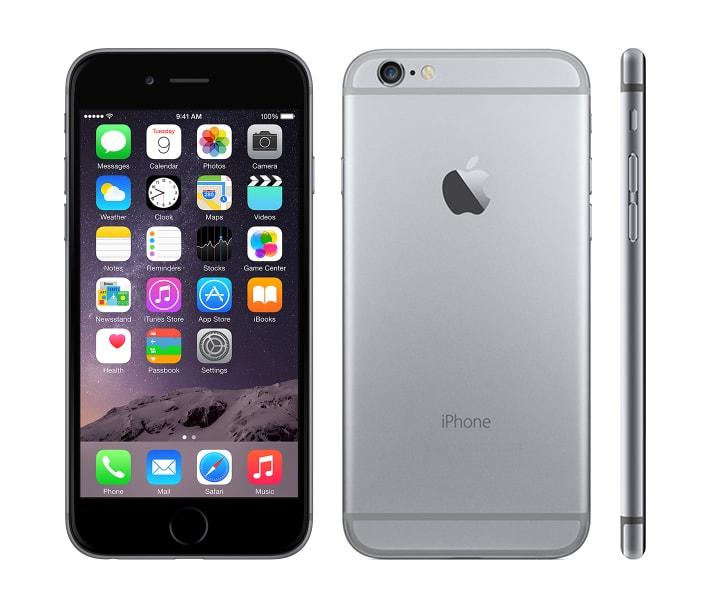
    Is the iPhone 6 worth buying in 2020?

    Is the iPhone 6 worth buying in 2020? Are you thinking of buying an iPhone 6 this year (2020)? If this is the question you have asked yourself then read on and let’s find out whether the iPhone 6 is worth buying in 2020.

    The iPhone 6 was the pacesetter in the Apple iPhone high-tech manufacturing process. The iPhone 6 is 5 years old (released in September 2015) as a request by iPhone users to have a bigger screen, which was available on only Android devices at that time.

    The iPhone 6 made a groundbreaking record at that time, in just a period of three (3) months, Apple sold out over 74 million iPhone 6 devices. This was a 40% increase than that of the previous iPhone, 5s.

    After 5 years, Apple has released not less than 10 new classes of iPhone but, many people are wondering whether the iPhone 6 is worth buying even after the 5 years. Well, the iPhone 6 still has some great features and some downfalls.

    In this article, we are going to look at the features the iPhone 6 has and the downfalls and after that, we will then make our final verdict.

    Some of The Amazing Features of The iPhone 6

    A Good Choice For Music

    If you have the intention of using your iPhone 6 for listening to music then you will never be disappointed with it. All the major music platforms that are used works perfectly on the iPhone 6; Apple Music, Audiomack, Spotify and the rest.

    To make it more interesting, the iPhone 6 supports the AirPods Pro and all the previous editions of AirPods, though some of the features of the AirPods Pro does not work exactly the way it does with the latest versions of the iPhone.

    Camera is Good

    One of the important things almost everyone inspects when buying a new phone is the camera and the picture quality. Because of that, every phone manufacturer always makes sure to upgrade their camera whenever they are producing new mobile phone models.

    The 5-years old iPhone 6 has a very neat camera that can take clear pictures no matter where you are.  Though the iPhone 6’s camera is not as neat as the subsequent iPhones, it can take some neat photos that can be shared either with your friends or on your social media pages.

    LTE Works Perfectly

    In this internet age where internet speed matters more than anything, the iPhone 6 tackles LTE as a pro and will deliver you with your crave for that fast LTE speed on the go.

    As with some of the features, although the iPhone 6 has a very fast LTE speed, it cannot be compared to the latest iPhones on the market. But, the difference between the iPhone 6 and the latest iPhones is not that great.

    Some Downfalls of the iPhone 6

    On the other hand, some of the downfalls of the iPhone 6 are:

    No iOS13 update

    Once the iOS13 was launched, many iPhone 6 users anticipated having that iOS update on their phones. But it came as a big surprise to everyone, the iPhone 6 was not included in the list of iPhones that supported iOS13 and will never be able to support it.

    Because of that, there are several features that cannot be accessed on the iPhone 6, some of which are the new Reminders app, the super awesome dark mode, editing features, etc.

    Poor Battery Life

    For those of us who use their mobile phone every minute, you will be disappointed with the iPhone 6. The only option you have is to carry around a power bank or an alternative battery or power source.

    If you want your iPhone 6 to last longer, then you need to make a lot of sacrifices like turning off your location, turn on lower power mode, and all the other ways of making your battery last longer.

    No Apple Arcade

    Apple Arcade is a video game subscription service available to all iPhone, iPad and Mac users which were launched in March 2019.

    Because the Apple Arcade was launched in 2019, the feature was made available for only iOS13 – supported devices which the iPhone 6 is not a part of. However, there are other alternative games available for on the Apple App Store.

    Conclusion and Final Verdict

    This is the part that we have all been waiting for, the conclusion and the final verdict.

    My final verdict is that the iPhone 6 is a very good iPhone to buy in 2020 if you’re someone who doesn’t use his/her very often. Also, if you’re looking for a cheap iPhone that can serve your basic needs then you can go for the iPhone 6.

    Otherwise, I would advise you to buy some of the newest models of the iPhone, at least one that supports iOS13. The reason why I recommend this is because of the features and the upgrades that these phones have over the iPhone 6.

    Finally, if you have any suggestion feel free to write it down in the comments section and let’s keep the debate going.

  • How to Play Pokémon Go on Your Phone

    How to Play Pokémon Go on Your Phone

    Pokémon Go is one of the most popular mobile games in the world created by Niantic Labs in collaboration with Nintendo. Since its launch in 2016, the mobile game has generated players from all over the world.

    This article is going to show you how to play Pokémon Go on your phone. Unlike most games, Pokémon Go is available for both Android and iOS users.

    If you think you can never get addicted to a mobile game, then read this article and try playing Pokémon Go and you will never regret it, trust me.

    How to play Pokémon Go on your phone

    To play Pokémon Go on your phone, you, first of all, need to download the free Pokémon Go mobile app from the Google Play Store or the Apple App Store for Android and iOS users respectively.

    Create an account and choose your first Pokémon

    After installing the Pokémon Go mobile app on your phone, you will be asked to customize your avatar and pick your first Pokémon (Bulbasaur, Charmander, or Squirtle).

    These selections will be made based on your preferences so you are at liberty to select the one that fits your preference and as you keep on playing the game you will discover all the others Pokémon in the wild.

    Head over to the PokéStop and Gym to collect items

    It’s now time to fill your inventory for you to catch more Pokémon. There are two (2) main ways that players can gain items in Pokémon Go – either by collecting items by visiting a PokéStop or buy purchasing them with your credit card, debit card, or any other payment option available.

    To find PokéStops on the map, always look out for large blue indicators; and once you are within the range of any of the numerous PokéStops, it will expand to show you an image of the landmark it is representing.

    Apart from that, several other landmarks can be found on the map and notable among them is the Gym. At the Gym, you will battle with the Pokémon that have been left behind by other players – once you reach the required level in the game.

    When you are the Gym, you’ll assemble a team of Pokémon to try and knock out those defending the Gym. After a successful knockout, you’ll also be allowed to leave your Pokémon behind and claim the Gym.

    Find a new Pokémon

    After roaming about your neighborhood looking for PokéStops you’ve probably come across a fair share of Pokémon. Pokémon appear randomly but, some Pokémon are likely to be found in certain locations.

    You can track the creatures in your location by using the Nearby function located at the bottom right of the game screen. The Nearby function allows you to select a Pokémon you’d like to find and the game will automatically give you a direction to its location.

    Catch some Pokémon

    Once you finally find the Pokémon you want, the first thing you will do is to walk close enough to interact with it. As soon as they get inside the ring surrounding your player, tap on them to initiate a battle.

    Before you can catch a Pokémon, you need to throw a PokéBall at it by swiping up your finger from the bottom of your screen. Once it is done properly, the PokéBall will hit the Pokémon and suck it in.

    To find out the difficulty of the catch, check the colour of the ring around the Pokémon. A red colour indicates a hard catch while green on the other hand indicates an easy catch.

    Conclusion

    So now you have it, a complete guide on how to play Pokémon Go on your phone. Read through the article thoroughly and you will be able to play Pokémon Go on your phone like a pro.

    But, in case you find any difficulty feel free to write it down in the comments section below and I will attend to you within the shortest possible time. Also, if you have any suggestions write it in the comments section below.

    More importantly, share this article with your friends and loved especially those who like playing games on their phones.

  • Sites and Apps That Can Help You Convert Dollars to Ghana Cedis

    Sites and Apps That Can Help You Convert Dollars to Ghana Cedis

    Do you want to convert some dollars to cedis or vice versa? Take a look at these top sites and apps that can help you convert dollars ($) to cedis (¢) on your mobile phone or computer.

    Converting dollars to cedis is very easy and fast in case you have a site or app that you can trust to give you the accurate and current exchange rate. The exchange rate is the amount of money you need to forgo to get another currency.

    For example, if the exchange rate of the dollar is GHS 5.20, it means that before you can get 1 dollar you need to forgo GHS 5.20. Exchange rates are not something that can be used for even 2 hours because they change at least every one hour.

    Therefore, to get the idea of the latest exchange rate on the international currency market, you need to have a reliable site or app.

    In this article, I’m going to show you some of the trusted and reliable sites and apps that can help you convert dollars to cedis or vice versa.

    Sites and Apps That Can Help You Convert Dollars to Ghana Cedis

    There are over a thousand and one sites and apps that can help you convert dollars to cedis but in this article, we are going to look at the once that I have tried before and recommend to you.

    Google

    If you have done conversion from one currency to the other then you have probably used Google search before. As the biggest search engine with over a billion searches every year, Google is one of the best currency converter sites in the world.

    Due to its broad users from all parts of the world, Google can convert from almost all the currencies in the world; as long as that currency is on the international currency market. Therefore, you can convert your dollar to cedis using this site.

    This site has one feature which makes it stand out from some of the other sites and apps, i.e. it gives you an exchange rate graph that shows you the previous exchange rates (past hours, weeks, and month).

    XE Currency

    XE Currency is one of the obvious choices when you think of currency conversion. XE Inc. started off as a website, but due to the number of viewers they had and the need to make it easily available, the introduced the mobile app also.

    The XE Currency is available for free to Android, iOS, and Windows users. Meaning no matter where you are or what device you’re using you can always convert your dollars to cedis or vice versa.

    XE Currency also has a user-friendly interface that helps you convert from all the major currencies in the world. Similar to Google, XE Currency also provides historic charts of the previous exchange rates.

    In addition, the app stores the most recent exchange rates offline and keeps track of world currencies and precious metals.

    CalConvert

    CalConvert is more than a currency converter because it also has a built-in calculator. The calculator has advanced mathematical functions, saves your calculation history, and allows you to convert hundreds of different units in addition to currency.

    CalConvert also has a website where you can perform all your exchange rate calculation and conversions.  Therefore, you can convert your dollars to cedis on either the free mobile app or website.

    In addition, the app has a 24-hour support feature that helps you chat with a customer service rep whenever the need arises.

    My Currency Converter

    My Currency Converter is one of the best currency converters in the world with a unique feature from all the other sites and websites. My Currency Converter will be a good choice for crypto traders.

    Apart from converting international currencies, My Currency Convert also supports cryptocurrencies (BitCoin, DogeCoin, and a host of others) that allows you to keep track of your money no matter where you are.

    The exchange rates in this app are updated automatically and convert all the rates to three decimal places; making it ideal for converting dollars to cedis.

    Conclusion

    Converting currencies is very easy, simple, and fast if you use the sites and apps recommended in this article. Interestingly, all the apps and sites listed in this article are free to use.

    Have you tried any other app or site that helped you convert your dollars to cedis? Feel free to write it down in the comments section below and I will add it to the list as soon as possible.

    Finally, make sure to share with your friends and loved ones. 

  • How to Register for Zeepay Mobile Money

    How to Register for Zeepay Mobile Money

    With several mobile money platforms emerging, choosing the best one that fits you could be a little bit confusing.

    Apart from the normal mobile network operator’s mobile money platforms, there are also other mobile money platforms that do not take into consideration your mobile network.

    Some of these are Moorle, Ayoba, Zeepay, etc. But in this article, we are only going to focus on how to register for Zeepay mobile money.

    What is Zeepay Mobile Money?

    Zeepay mobile money is a fast, convenient, affordable and electronic wallet service that allows customers to easily save, send, and receive money.

    Zeepay just like a physical wallet gives you somewhere to store your money, but even with more features and very high security.

    In addition, Zeepay has compatible Near Field Communication (NFC) that allows you to link your wallet to your NFC tag. This allows you to make transactions from your account even without a mobile phone.

    This feature is made possible by Zeepay in collaboration with other third-party partners including some selected banks.

    How to register for Zeepay Mobile Money

    There are two (2) ways of registering for Zeepay Mobile Money. There are

    Registration via USSD and registration via the Zeepay mobile app.

    How to register for Zeepay Mobile Money via USSD

    This option is good for persons without a smartphone and iPhone users. Because, non-smartphone users cannot download the Zeepay app and the app is also not available on the Apple App Store.

    • Dial *270#
    • Choose option 1 (Register).
    • Select your ID type (Voters ID, Passport, Drivers’ License, or SSNIT).
    • Enter your ID number.
    • Confirm the name found on the ID card and enter your Date of Birth in the required format (DD-MM-YYYY).
    • Enter your Residential address without the GPS code.
    • Enter your Ghana Post GPS (optional). If you don’t have any, enter NA.
    • Enter “1” to confirm your account creation.
    • Upon successful completion, a confirmation message with your 6-digit PIN will be sent to your mobile number via SMS.

    How to register for Zeepay Mobile Money using the Zeepay Mobile App

    Unlike the registration via USSD, this option is only available for Android users.

    • Download the Zeepay app from the Google Play Store.
    • After installation, open the app.
    • Select Add New Terminal.
    • Enter the required details and create your account.
    • Upon successful registration, a notification will be sent to you via SMS.

    What Are The Benefits of Zeepay Mobile Money?

    Due to the numerous mobile money options available on the market, before you select any mobile money platform you need to analyze the benefits and the disadvantages. Below are some of the benefits of signing-up for Zeepay mobile money:

    • There are lower fees for cash out and transfer services.
    • There is a Micro Insurance for as low as GHS 2.50.
    • You can also make a direct wallet – to – bank transactions.
    • Lastly, you can receive, convert, and transfer cash pick remittance into your Zeepay mobile wallet.

    Is Zeepay Mobile Money Safe?

    The answer is YES. Zeepay is a mobile money financial institution and as such, funds held in your Zeepay wallet are protected by Bank of Ghana regulations.

    Before you can register for a Zeepay account, your ID card will be required therefore it will be hard for fraudsters and criminals to use these services for their gain

    Another interesting thing is that, every transaction you make is stored on a database and even if your phone or SIM card is lost or stolen, your money will always be kept safe.

    How to Top Up Your Zeepay Mobile Money Wallet

    Zeepay Mobile Money merchant booth

    To top up your Zeepay account, you can link your mobile money wallet to your Zeepay wallet and top it up via mobile money. Also, you can top up your wallet by paying cash at any Zeepay mobile money merchant nationwide.

    Conclusion

    Zeepay mobile money is very quick and easy to register mobile money platform as compared to the other platforms; I created mine in less than 3 minutes.

    Depending on the type of your mobile device, choose the option that will fit and create your Zeepay mobile money wallet and enjoy the benefits that come with it.

    Have you used Zeepay before? If yes, feel free to share your experience in the comment section below, and if there’s something I left out feel free to write that also in the comment section below.

    Make sure to share this article with your friends and relatives.

  • Find Out How Old You Look With the Instagram Age Filter

    Find Out How Old You Look With the Instagram Age Filter

    Thinking of what to do in this COVID-19 quarantine boredom? Then I’m going to show you how you can reduce some of the boredom and the stress associated with this pandemic.

    We are living in a technological world where we have almost everything at our disposal. In the olden days, before you could take a photo then it means you are celebrating Christmas or a family reunion.

    In those days, you need to call a photographer who will take you the photo and present the hard copy in a month or two. But now, you can take as many as a million photographs on your mobile phone as long you have the storage space.

    That’s fun, right? Continue reading this article to know how to find out how old you look with the Instagram age filter, called “How Old I Look”.

    Instagram in recent times introduced the Disney characters filter which tells you the Disney character that you resemble and the Friends filter which also performs the same function as the Disney characters filter.

    This filter uses the latest face-scanning technology to analyze your face and will in turn tell you the age that corresponds with your face, I’m joking, it’s just for fun. Meaning, the younger face, the younger the age that will be displayed by the filter.

    How to Find Out How Old You Look With the Instagram Age Filter

    • To get started, make sure you have the latest version of Instagram on your device. Otherwise, you can’t use this filter.
    • Search for the profile of the Instagram user under the username @ferdaysss (Creator of the How Old I Look Instagram age filter).
    • Once you are on the profile page of @ferdayss, click on “filters” (this is the icon that looks like a smiley face with sparkles between the main grid and tagged photos), and the “How Old Do I Look” filter will automatically appear at the top.
    • Simply tap on “try it”, and when prompted with the stories screen, just tap and hold the circle button and the filter will proceed to guess your age. (Make sure to keep the phone still and your face fully contained within the frame).
    • If you’ve done this correctly, the filter will automatically assign your age. (If you are lucky, the age could be your actual age; but the probability is very low).
    • Also, you can save the “How Old Do I Look” filter for future guessing, by adding it in your main Stories filter list – simply click the “Add” button on the bottom of the page.

    Who Created The “How Old Do I Look” filter?

    The Instagram age filter is not an official filter from Instagram. It was created by Perdy Ferdinsyah (@ferdaysss) from Bandung, Indonesia. Perdy Ferdinsyah is the founder of Ica Ica Bot, which is an Indonesia social media app.

    Conclusion

    The “How Old Do I Look” filter is not a real face scanner and thus, is not an accurate filter. But, considering the boredom this COVID-19 pandemic has brought on us, this is worth it.

    Feel free to try this filter on your Instagram page and make sure to share this with your friends and loved ones.

    Finally, make sure to share this article with your friends and loved ones and lets breakdown the boredom the COVID-19 has imposed on us.

  • Wapsites You Can Use to Download Contents for Your Phone

    Wapsites You Can Use to Download Contents for Your Phone

    Are you looking for a Wapsite to download content for your phone? Do you like a Wapsite that is more easy and user-friendly? I guess your answer is YES! If not you probably wouldn’t have been here.

    To get the best contents for your phone, you need to visit a trusted and virus-free Wapsite. But, where can you find the best Wapsite?

    Don’t worry, because after you are done reading this article you will find answers to this question. In this article, I am going to recommend to you Wapsites you can use to download content for your phone.

    What are Wapsites?

    First of all, the question you might be asking is what are Wapsites? Well, Wapsites are mobile-friendly websites or portal that host content for your phone. Some of the contents on these Wapsites are apps, music, wallpapers, screensavers, games, etc.

    They are mostly known by some people as “mobile sites”. The WAP is an abbreviation for Wireless Application Protocol.

    Wapsites You Can Use to Download Contents for Your Phone

    There are many Wapsites available on the internet but below are my recommendations:

    Waptrick

    Waptrick is the best mobile source for free games, mp4 videos, photos, wallpapers, theme, screensavers and other mobile content.

    There are many categories that are available for you to choose from; therefore scan through the categories and select your preferred choice.

    Waptrendz

    Waptrendz, just as the name suggests is one of the best trending contents Wapsite on the internet. From here, you can find the latest blog news, music, wallpapers, ringtones, and videos.

    This is one of the best Wapsites that is generally suitable for all ages and contains all the latest stuff that your phone needs.

    Umnet

    Umnet is mainly known for its awesome collection of mobile applications as compared to the other Wapsites. Check Umnet for all the applications for your mobile device.

    One of the interesting features on this Wapsite is that it has an easy and user-friendly interface. Also, all the apps have small sizes thereby making it ideal for persons with smaller storage capacity on their devices.

    Wapkid

    Wapkid allows you easily download wallpapers, logos, themes, MP3 ringtones, java games, video clips, screensavers, photos, and other related contents.

    Just like other Wapsites, the user interface is very simple and all you need to do is to look for your favourite files and download.

    Zedge

    Zedge is productive and efficient and fits everyone no matter your age or preference. All you need to do is to search for your preferred content.

    Some of the contents that can be downloaded from this Wapsite include wallpapers, ringtones, notifications, photos, and other mobile contents.

    Toxicwap

    The last Wapsite on my list today is Toxicwap. This will be more beneficial to people who love watching movies and TV shows.

    You can download music, movies, TV series, Android apps and games, wallpapers, videos, etc. Toxicwap is one of the trusted Wapsite on the internet.

    Conclusion

    The Wapsites listed on this list are not the only ones available but they are the once that I’ve tried before and recommend for you.

    Are there other Wapsites that were not included in this list but were useful? Feel free to write it down in the comments section below and I will add it to the list.

  • How to Watch Adom TV and Joy Prime on Your Phone

    How to Watch Adom TV and Joy Prime on Your Phone

    Are you stuck somewhere thinking of how to watch your favourite show on Adom TV or Joy Prime? Worry no more, this article is going to show you how to watch Adom TV and Joy Prime on your phone wherever you are.

    Missing your favourite TV programme could be very painful especially when it’s a movie that you are following the story line. Unlike some movies where you can watch recap, some of them are aired only once and missing them for once means you can never watch them again.

    In order to help our cherished readers, we have done a little research on how to watch Adom TV and Joy Prime on your phone. The interesting thing about this is the fact that it’s available for both Android and iOS users.

    How to Watch Adom TV and Joy Prime on Your Phone

    There are several ways you can watch/stream Adom TV and Joy Prime on your phone. But, we are going to cover just a few in this article.

    The ways you can watch Adom TV and Joy Prime on your phone are as follows:

    How to Watch Adom TV and Joy Prime on Your Phone via the MyJoyOnline website

    The first method on our list today is how to watch Adom TV and Joy Prime on your phone via the MyJoyOnline website. Despite the name attached to the website, you can watch all the television stations owned the Multimedia Group Limited, i.e. Adom TV, Joy Prime, and the Joy News Channel on this website.

    To watch Adom TV and Joy Prime via the MyJoyOnline website,

    • Visit the official MyJoyOnline website on your phone.
    • Tap the three (3) horizontal bars on the upper right corner of the screen.
    • Select Live TV/Radio from the pop-up options.
    • To listen to Audio only, tap on the logo of your preferred TV station (Adom TV or Joy Prime) in the circular frame.
    • To watch the video, tap on the logo of your preferred station in the TV-like frame.

    Now enjoy your favourite Adom TV or Joy Prime programme.

    How to Watch Adom TV and Joy Prime on Your Phone via the MyJoyOnline mobile app

    To make it simpler to use, the Multimedia Group has designed a mobile app just like the web version of MyJoyOnline. And to watch Adom TV or Joy Prime through this app,

    • Download the official MyJoyOnline mobile app from the Google Play Store or the Apple App Store.
    • Open the MyJoyOnline app on your device.
    • On the upper left corner of the User Interface, tap on Watch Live TV.
    • Tap on the logo of your preferred TV stations and enjoy live TV on your mobile device.

    How to Watch Adom TV and Joy Prime on Your Phone via the Adom Online mobile app

    This app is similar to the MyJoyOnline mobile app in terms of everything. But the only exception is that, with this app, you can only watch Adom TV and Joy News.

    Apart from that, you can follow the steps listed under How to Watch Adom TV and Joy Prime on Your Phone via the MyJoyOnline mobile app.

    How to Watch Adom TV and Joy Prime on Your Phone via YouTube

    The last method on our list today is how to watch Adom TV and Joy Prime via YouTube.

    YouTube is one of the leading video streaming platforms and for any company to get more viewers, they need to stream their videos on YouTube and Multimedia Group Limited is no exception.

    To watch Adom TV and Joy Prime on your phone,

    • Visit the YouTube official website or download the mobile app.
    • Tap on the search icon and type Adom TV Live or Joy Prime live.
    • Click on the Search Icon and select the relevant option from the search results listed. (But, mostly, it will be the first result).
    • Enjoy your mobile TV broadcast.

    To know whether the broadcast is live or not, check for a red option with the inscription LIVE on the bottom left corner of the logo.

    Conclusion

    The entire streaming process is very quick and user-friendly; even for those who don’t have many ideas about tech.

    NOTE: Though all the methods listed in this article are free, standard internet data charges apply. Therefore, make sure to have a good internet data package from your network provider.

    Now, you’re all set to enjoy your favourite Adom TV and Joy Prime TV program on your mobile phone whenever and wherever for free.

    Please make sure to share this article with your friends and loved ones and make sure to subscribe to our newsletter and follow us on social media to get new articles every day.

  • How to Do a Reverse Image Search on iPhone Using Safari Browser

    How to Do a Reverse Image Search on iPhone Using Safari Browser

    One of the challenges of the internet nowadays especially, with those in the blogging space who deal with photos every day is copyright laws of some photos. To disallow people from using their photos, some websites usually attach a watermark to it.

    But is this an effective method of preventing copyright infringement? The answer is a big NO! Several technologies can be used to remove watermarks from photos.

    If you want to find the origin of a photo or where your photo is being used, the method you need to use is the Reverse Image Search method.

    A reverse image search can be done on your Android, iOS, macOS, or Windows device. But in this article, I am going to show you how to do a reverse image search on iPhone using the Safari browser.

    What is a Reverse Image Search?

    A reverse image search is when you upload a photo or a link to a photo to Google Photos which will look for the origin of the photo. Also, Google will find websites that have that particular image and related images featured on their site.

    Due to the intelligent built-in system, Google Photos automatically detect the subject of the photo and will bring up other websites related to it, for example, a tech blog.

    How to Do a Reverse Image Search on iPhone Using Safari Browser

    To perform a reverse image search on your iPhone using the Safari browser, the only requirement is the have the image or the link to the image on your iPhone. The steps in performing a reverse image search are:

    • Open the Safari browser app on your iPhone.
    • Visit the official Google Images website.
    • On your iPhone screen, tap on the share icon at the bottom of the window.
    • From the pop-down options provided, tap on the “Request Desktop Site” to reload the webpage. (The reason behind this is that the Safari browser does not allow performing a reverse image search while using the mobile site).
    • Click on the camera icon near the search bar to upload the image or enter the link into the search bar and tap on Search.
    • A list of all the websites with the image you inputted and other related photos will show up for you to browse through.

    That’s all it takes to perform a reverse image search on your iPhone using the Safari browser. You can perform this at no charge as many times as you want without any restriction.

    What Are The Importance of Reverse Image Search?

    With this, you can find information about something in a photo because a reserve image search will lead you to a website where you will find more information about that particular photo.

    It also helps to prevent plagiarism because you will know where it has been used before/originated from for you to give credit; thereby preventing plagiarism.

    Finally, a reverse search image will lead to finding similar photos like the one you searched for.

    Conclusion

    This article was written to guide you through the entire process of doing a reverse image search on your iPhone using Safari browser and I hope it served its purpose.

    In this article, I stated some of the benefits of reverse image search and its definition and mainly how to do a reverse image search on iPhone using Safari browser.

    Have you tried a reverse image search on your iPhone before? Feel free to write it down in the comment section below and add your suggestions as well.

  • How to Find Information About Someone Online For Free

    How to Find Information About Someone Online For Free

    Thinking of how to find information about your old friend you lost contact with? Or, are you thinking of how to find more information about your new date or partner? If you fit in any of these categories then you’re at the right place.

    In the olden days, finding information about someone was very difficult and sometimes involved spending money. But, due to technology and the use of the internet, finding information about someone is very easy and quick.

    On the up side, most of these methods of finding information about someone online is free and totally cost nothing; and that is our main focus for this article.

    How to Find Information About Someone Online For Free

    There are several ways of finding information about someone online for free. But, in this article, we are going to focus on five (5) of the most effective methods.

    Using Google

    On an average, about 1.2 billion searches are made on Google annually making it one the biggest and most used search engine in the world. Google has a very huge database that pulls resources from almost every website.

    Therefore, one of the very first places to look for information about someone online for free is Google. But, though you might find information about someone on Google, the data cannot be trusted to be accurate or current.

    This is because, Google can look for data as far back as the year 2000, and present it to you as if it is new. That notwithstanding, to get the best search results from Google, it is advisable to put the person’s name in quotation mark for example, “Kofi Kwadwo”.

    Finally, if you know a little more detail about the person, you can add to it. For, “Kofi Kwadwo Mfiidie.com”. This helps Google to narrow down the list of results and provide the more relevant one.

    Using Facebook

    As of the second quarter of 2020, Facebook had 2.7 billion monthly active users all over the world; making it one of the biggest social media platforms in the world.

    Looking at the number of active users, Facebook could be one of the best and effective places to look for information about someone online for free.

    With Facebook, you can find a profile picture of the person you are looking for to verify the person you are looking for and you can also find their occupation as well as where they live.

    To find information about someone on Facebook, type the name of the person in the search bar, and browse through the profile pictures to find the one that matches the personality of your choice.

    Using LinkedIn

    To find information about someone on LinkedIn, all you need to do is to type the full name of the person into the search bar. After the search, a list of persons with the name you inputted will be shown on the screen.

    LinkedIn is a professional social media platform and when you search for information, you will likely find those relating to the occupation of the person, the current job, and his/her position at the company (if applicable).

    Just like Facebook, there’s also a profile picture attached to the name of the person, making it easier to find your preferred person or information.

    Other Social Media Platforms

    After trying Facebook and LinkedIn and you are still not satisfied with the information you have, you can choose to search using other social media platforms.

    Currently, there are over 10 social media platforms and the fact that you couldn’t get information from one doesn’t mean you can’t find it from the others. Some of the other most used social media platforms are Instagram and Twitter.

    Trying out these other social media platforms could yield some relevant results.

    Other Search Engines

    Whenever we say search engines, the first one that comes to mind is Google and a lot of people think that is the only place to find information; that is FALSE! Other search engines also yield good results.

    Some of the search engines are Yahoo and Bing. Just like Google, typing the name and other details of the person will yield a list of results from these search engines.

    Conclusion

    All the methods listed in this article as stated earlier, are free and only require an active internet connection. Therefore, buy a data package from your network provider and enjoy your online information hunt.

    Have you tried using another method of finding information about someone online, aside from the ones listed here? If so, please feel free to write it down in the comments section below.