Author: Mfidie

  • How To Get More Channels On Multi Tv and Strong Decoder In Ghana 

    How To Get More Channels On Multi Tv and Strong Decoder In Ghana 

    Multi TV is one of Ghana’s free to air television which is widely used by most of the Ghanaian residence. It uses signals to reach decoder from a satellite known as Astra 2B, positioned at 28.2°E.

    Multi TV provides the live watching of news, events and videos from all the leading TV channel providers in Ghana.

    The channels on Multi TV can be limited and restricted to only a few stations. In that case, you may not be able to enjoy the content on your decoder to the fullest. If you are a Multi TV user, who wishes to have channels on your decoder, then this post will show you the exact thing you need to do so.

    But before that, you need to fully installed Multi TV system on your decoder before you can have access to those channels.

    The Multi TV satellite dish direction has to be positioned towards the east in other to have a successful installation. If you are a newbie to the multi TV system installation, you can call a specialist within your area to help mount the dish properly.

    After mounting the dish, you can then follow the few guides to get channels and more stations on your decoder. Depending on your receiver model, you can follow the below guide to see how to get Multi TV channels in Ghana

    How to Get Channels On Strong Box Decoder

    • Press MENU.
    • Press on the RIGHT volume button.
    • Input 0000 as password.
    • Select MANUAL SCAN and press OK.
    • Press the RED BUTTON on the remote and select transponder ASTRA 3A/3B.
    • Press the GREEN BUTTON to add TP list.
    • Input frequency 12522 in the space
    •  Go to symbol rate and input 27000
    •  Change the polarization to either V or H to make the bars change to green color.
    • Press OK to scan. Once the channels are On Exit and enjoy!

    The above steps of getting channels is a general step for all strong box. Let’s now see how to get more channels on specific decoders.

    SRT 4920/4922/4922A/4922D+

    • First press the MENU option
    • Now Select INSTALLATION and use 0000 as the password
    • Now go to MANUAL SCAN.
    • Press the RED BUTTON to choose 28.2 ASTRA 1N/2A/2F.
    • Use the CHANNEL DOWN button to select the FREQUENCY.
    • Now Press the GREEN Key and enter 12525 as the MULTI TV FREQUENCY.
    • Use CHANNEL DOWN button to select the SYMBOL RATE and then enter 30000
    • Set Polarization to vertical
    • Start scanning for channels
    • Press the EXIT button when done

    RT 4950/SRT 4950H/4950E/4950M/

    • Start by pressing MENU Choose INSTALLATION.
    • Select the MANUAL SCAN option before pressing OK.
    • Hit the SAT BUTTON and select ASTRA 2(28.2E)
    • Press the RED BUTTON and enter 12525
    • Use the CHANNEL DOWN button to select POLARIZATION.
    • Next, choose the VER option VOLUME RIGHT button

    Use CHANNEL D

    Channels Strongbox (SRT 4330) decoder

    • Press MENU on the remote.
    • Press OK and input 0000.
    •  Go to TRANSPONDER and select 28E ASTRA 2A/2B/2F.
    • Press the YELLOW button to edit.
    • Input 12522 on FREQUENCY.
    • Go to SYMBOL RATE and input 27000.
    • Press the RED button to scan and then press OK.
    • Press OK to save.
    • Press EXIT to leave menu when done

    Somotex Ash Box Decoder

    • Press MENU.
    • Select INSTALLATION.
    • Press the RED BUTTON to EDIT.
    • Input 12522 on the FREQUENCY.
    • Press OK.
    • Input 27000 on the SYMBOL RATE.
    • Select POLARITY and press the RIGHT button to select either Vertical or Horizontal.
    • Select SAVE and press OK.
    • Press on the BLUE button and OK to scan.
    • Press OK on YES.
    • Press EXIT when done.

    Digital combo decoder Vi/combo decoder T2/S2

    • Start by pressing the MENU button.
    • Use Volume Up to select INSTALLATION before proceeding to press OK.
    • Use Channel UP and DOWN to help you choose SATELLITE SETUP and press OK Select MANUAL SEARCH, which you can access by scrolling using Channel Down Scroll and select FREQUENCY Enter a FREQUENCY NUMBER Proceed to select SYMBOL RATE Then enter a SYMBOL RATE number Change POLARIZATION to (V) Start scanning for channels When the search is complete,
    • Press EXIT

    Somotex (MTV-1722)

    • Choose the MENU option
    • Scroll to INSTALLATION and select it
    • Scroll to the MANUAL SCAN option and select it
    • Under the Manual scan option select FREQUENCY
    • Set the FREQUENCY at 12525 Use 30000 as the SYMBOL RATE Set the POLARITY to vertical
    • Press the GREEN BUTTON on the remote control to start CHANNEL SEARCH
    • Press EXIT or OK to view

    Somotex (MTV-9800J)

    • Choose the MENU option
    • Select INSTALLATION after scrolling
    • Go ahead and choose SATELLITE LIST
    • The next thing is to select ASTRA 2A, 2B, 2D on the satellite list Save by pressing EXIT
    • Choose the TP list Press the GREEN BUTTON to add a new frequency Use 12525 as the Frequency
    • Set the SYMBOL RATE at 30000 Change the POLARITY to vertical
    • Start scanning for channels by double-clicking on the OK button
    • Press the OK button to save your new settings

    Quality Box Decoder

    • Press MENU.
    • Scroll down to DVB-S,
    • Click OK. Input 0000 and press OK.
    • Select DISH SETTINGS.
    • Click the YELLOW BUTTON on the remote to edit TP.
    • Scroll down to SYMBOL RATE and key in 27000
    • Scroll to YES and click OK.
    • Scroll to SERVICE SEARCH, click OK.
    • Scroll to START SCAN and click OK.

    Multi TV HD LI/ HD plus

    • On your remote, press MENU button
    • Select installation using addition volume button and then press OK.
    • Use the Channel Down to scroll and select “MANUAL SEARCH” and use OK to choose
    • Further, scroll down and select FREQUENCY
    • Enter a frequency number Next, move down and select the SYMBOL RATE
    • Enter a symbol rate number
    • On POLARIZATION, change it to (V) by using Volume up
    • Now, start Scanning for channels
    • When the scan is complete, go ahead and exit to view saved channels.
    • Press the Home button to choose the SYMBOL RATE and enter 30000
    • Press OK again to TICK the inputted Multi TV parameters.
    •  After the 9th step, the SIGNAL QUALITY bar will change to GREEN
    • Start scanning
    • Information will pop up requesting for NETWORK SEARCH and press OK
    • When “SEARCH ONLY FTA CHANNELS?” pops up, press OK
    • Lastly, press the EXIT button thrice

    How to get more Channels on your Multi TV

    • Press MENU on your Multi TV remote control
    • Select INSTALLATION
    • Go to channels and Select EDIT SATELLITE
    • Click on the YELLOW BUTTON to “Add” a new satellite. A new dialogue box will appear titled “Add Satellite”.
    • Fill the “Add Satellite” box using the information below and then select YES:

    Satellite: Astra 2B

    Longitude: 101 E

    Frequency: 12572

    Symbol Rate: 2854

    Polarization: V (Press the Right button to change the polarization from H to V)

    • Astra 2B should now appear in the list of Satellites under the EDIT SATELLITE menu.
    • Select Astra 2B and press OK.
    • Under EDIT TRANSPONDER, Press the YELLOW BUTTON and enter the following values each at a time:

    Frequency Symbol Rate Polarization

    12572 2854 V

    12599 3250 V

    12729 2725 V

    • Press EXIT 3times.
    • Press Menu > Installation > Install Satellite > Green Button (Scan)
    • You should now see additional TV channels and Radio stations.

    Alright, fellows, the above are some of the steps you can follow to get channels on your Multi TV in Ghana. These selected satellite decoders are what we use and provide a guide on. You can bookmark this page for future references as we will keep on updating these steps and adding more decoders guide as and when the need arises.

    If your decoder type is not listed here, you can comment with the model in the below box and we will have our able tech specialist to come to your aid.

  • Leaked: Infinix Hot 8 likely to be released next month; See Specs

    Leaked: Infinix Hot 8 likely to be released next month; See Specs

    It hasn’t been long since Infinix released the Hot 7 but new leaks surfacing online show that the new Infinix Hot 8 is already baked and ready to be served.

    According to 91Mobiles, they have seen a couple of retail box images of the Infinix Hot 8 already and believe it will be launched in India later this month.

    See the photo of the Infinix Hot 8 box below:

    The leaked image already gives out some information about the phone. Apart from the fact that the front display is going to sport a teardrop notch, it is also quite visible that at least one variant of the Infinix Hot 8 will have a 64GB storage space capacity and 4GB of Ram.

    Other specifications of the phone are currently unknown but it is expected that the phone will be considered ahead of the Infinix Hot 7 in overall specs and performance.

    As for price, it is speculated that it will be somewhere in the GHS 1000 range.

    Excited about the Infinix Hot 8 and want to know the price, specs and best deals to get it in Ghana, Nigeria or Kenya? Subscribe to Mfidie.com and be the first to know when the information becomes available.

  • Is Bitcoin the solution to keeping your savings “safe” as financial institutions continue to close down?

    Is Bitcoin the solution to keeping your savings “safe” as financial institutions continue to close down?

    According to reports, a massive ‘clean up’ of Ghana’s banking system has left tens of thousands of people wondering where their savings have gone. The crackdown has reduced the number of lenders by a third and resulted in the closure of 23 savings and loans firms. It also triggered a run on fund managers which caused a selling spree and mass liquidation of holdings.

    An estimated $1.6 billion has been wiped out, which is over a third of the assets that private fund managers supervise for retail and institutional investors. Ghana’s primary financial regulator, the Securities and Exchange Commission, has increased pressure on at least 20 fund managers it suspects of violating the rules.

    The SEC has blocked asset managers from receiving any new investments as they may be used to pay out existing investors. The massive run on holdings has left as many as 70,000 people desperately seeking answers as to where their savings have gone. Lord Mensah, a senior finance lecturer at the University of Ghana, commented;

    It’s cutting across all the finance houses and when it happens like that the government needs to step in to build confidence again. There’s nothing we can do apart from making sure that we create that necessary environment to regain investors’ confidence again.

    The issue Ghana faces is more about having adequate system and controls in place to ensure that there is no room for such things to happen.

    Bitcoin is The Solution

    Crypto industry observer ‘Rhythm Trader’ said that financial management should not need a middleman and bitcoin, with its ever-expanding network, is the answer.

    The savings of tens of thousands wiped-out overnight. This is why saving your wealth should be simple and not need a middleman. Bitcoin fixes this.

    Many would argue that bitcoin’s volatility is keeping the masses at bay, coupled with the fact that it is a high-risk investment. But for thousands of Ghanaians, what they perceived to be traditional investments have proved to be a much higher hazard.

    Can bitcoin solve the savings crisis? Add your comments below.

  • The Top Online Ecommerce Shops In Ghana You Can Buy From

    The Top Online Ecommerce Shops In Ghana You Can Buy From

    Ecommerce shops in Ghana are now getting much better and powerful. With the increase in demand for digital products and the rise in peoples’ trust in the online business, a lot for online shops has been created.

    Unlike years back, when most people fear to buy things online.

    Today, people feel ease to key their credit cards on the internet stores to purchase any goods they want with a high percentage believe that they will get their products. We have seen the coming into being of many online shops in Ghana for the past years. Each day, new Ghanaian online shops are being created and these stores offer a wide variety of products that anyone from Ghana and beyond can buy have it shipped to wherever he/she stays in Ghana.

    The like of Jumia and that of Kikuu has been the talk of the day. Most people feel like these two popular stores are the only shops in Ghana that offer great products at a cheaper price. But little do they know there are others that can compete with these stores. In this post, we are going to look at these Ghanaian owned online shops you can buy from. So without wasting further time lets dive to the point.

    Below are some of the online stores you can buy from in Ghana:

    • Jumia
    • Kikuu
    • Zoobashop
    • Superprice
    • Melcom Ghana

    Now let’s look at these sites in details. What they sell and how you can purchase from the site.

    Jumia Ghana

    Jumia is currently one of the leading online shops in Africa selling all categories of products. It has operations in almost all the Africa countries including Ghana. Jumia Ghana has grown to the stage where all their products can easily be accessed from every corner of the country.

    With its best delivery method and supportive staff, customers turn to love them most. Jumia Ghana offers a variety of products ranging from Phones & Tablets, Electronics, Computing, Fashion, Home & Office, Health & Beauty, Gaming, Accessories, Clothing, Grooming & Healthcare Kits, Diapering, Grocery. etc. It has recently added a section for travel that allows one to book hotels. If you are from the capital city, you can use the Jumia food section to order food and get it delivered to your location within the city.

    Kikuu

    Kikuu is a Chinese based store with operations in Ghana. Kikuu has been one of my favourite stores for online shopping. the products offer on this shopping site are amazing because of the price, the time taken to get the goods in Ghana, and the payment method used for buying items. A lot of people have fallen for this site also.

    The Kikuu shop is well patronized by students and unemployed graduates. Most students use this site for their benefit. I got to know of this site way back in 2016 when I was in the university through a female friend. This friend of mine by then knew of this shop which she uses to make some decent amount of money on campus.

    During that time, the store was not all that popular among the students. So most people who were aware of it bought products at cheaper prices and then sold them to their colleague students at a profit margin. What makes Kikuu the best is the fact that they have their agents all over the regions and district capitals of Ghana.

    Once you shop on this store, you are given a tracking page most especially when you use the app. With the tracking, you get to know the status of your order at any checkpoint.

    Zoobashop

    Another great e-commerce shop in Ghana that has been in the system for some time now is the Zoobashop.

    It offers products ranging from home appliance, phones, groceries, food and drinks, beauty, fashion, baby products, books & games, kids and toys. This site was once among and still belong to the largest market online shop in Ghana.

    Zoobashop has a well define product categories which allows you to easily navigate through the site to find what so ever product you want. Check the site here to see for yourself.

    Melcom Ghana

    Melcom shopping Centre is not a new deal to many since they are already familiar with their local brick and mortar stores. Every ordinary Ghanaian knows of this shopping Centre.

    Melcom in its quest to be among the business that serves customers both online and offline created the Melcom online shopping Centre.

    This online shop serves as the digital presence of the Melcom Shopping Centre. On this shop, you can easily order goods and service that you could have order offline when you visit the physical shop outlet.

    Thanks to the internet and the coming into existence of the Melcom online shop, today you can sit in the comfort of your home and order these same products then get them delivered to your home with no extra cost.

    SuperPrice

    Just like zoobashop.com, the superprice online shopping site also offers great products that you can easily add to your cart. electronics products and other items such as cloths include the Zoobashop.

    The website has a wide variety of items such as smartphones, Men’s Fashion, Women’s Fashion, Kids & Baby Fashion, TV Audio & Video, Home & Living, Beauty & Perfumes, Sports & Fitness, Landline Phones, Books & Other Categories.

    Other Online Shops In Ghana Are:

    The aforementioned are some of the e-commerce shops in Ghana. Anyone can make a purchase from these sites and get them delivered to his or her home address anywhere in the country.

  • The Best Banking Apps you can use in Ghana right now

    The Best Banking Apps you can use in Ghana right now

    The banking system in Ghana has seen great changes in recent times thanks to the advancement in Fintech. With the invention of smartphones and the increase in the development of mobile apps, a lot of mobile banking apps have been released to satisfy the needs to Ghanaian bank customers.

    Gone were the days where you have to walk to the banking hall before you can make a withdrawal or deposit to your account.

    Today, with the help of these apps, one can easily transact business on his/her smartphone right in the comfort of their homes. These days, every banking service in Ghana has an app tailored to meets its customer’s choice.

    Most people even consider banking app before selecting a bank to deal with, an indication that financial technology has huge potential. There are many banking apps out there that anyone can installed and begin to transact. But what we do is to look for the best ones for our readers and anyone who is also on a mission for finding the best banking apps in Ghana.

    All the mobile banking apps listed below are free to download through PlayStore and Appstore. However, using them will attract charges from your cell phone carrier’s messaging, and data usage.


    UBA Mobile Banking App

    When talking of the best mobile banking apps in Ghana, there is no doubt that the UBA Banking app is number one. I have been a lover of this app from day one.

    The UBA Mobile Banking App has completely enhanced mobile banking experience to its customers. Using this app, you can easily access all the Banking services offered by this great institution.

    You can quick log-in within a few seconds with the biometric option (facial and fingerprint) on devices that support this feature, send and receive money from the app, mobile top-up, check account balance, see transaction history, pay bills and many more.

    The best thing that, users can easily access their bank and card statement right from this app.

    Download UBA mobile banking app

    ABSA Ghana

    The Absa Mobile App gives you the ability to carry your bank conveniently in your pocket. when you install this app, you enjoy the freedom that comes with doing your banking from anywhere at any time for free.

    With the Absa Ghana app, you can access your accounts, send money, and withdraw cash any time you wish to do so.

    No need to visit the bank hall for that. Buy airtime and pay your bills directly from your phone, use your Mobile Wallet to pay for goods and services on the fly, check your balances and transaction history at the comfort of your home.

    Download ABSA Ghana app

    Fidelity Mobile Banking

    Another great app that is loved by many mobile banking app users is the fidelity mobile banking app. Fidelity bank has been one of the fastest-growing banking services in Ghana and it is of no surprise that their app is liked by many of the users.

    With the app, you have nothing to worry about. No more hustles that people go through before having access to their balance or transaction details, especially when they travel to a place in which the bank has no branch.

    The app allows you easy access to all your accounts at Fidelity Bank Ghana while enabling you to make secure transactions and payments. Manage your money with convenient, safe and easy to use the mobile app from Fidelity Bank Ghana Ltd.

    Download the Fidelity Mobile Banking app

    UMB SpeedApp

    Just like any of the above-mentioned apps, the UMB SpeedApp has also come and added to the list of the best apps we have here in Ghana. The UMB SeedApp gives Customers the benefit of monitoring a real-time account balance in a secure and simplified way.

    When you install the app, you can:

    • Check Account Balances
    • Check Transaction History
    • Airtime top-up for Self & Others
    • Bill Payment Services
    • Request Services – Statement, Cheque Book, etc.
    • Locate Branch & ATM
    • Product Information
    • Bancassurance Services
    • Funds Transfer Services
    • Loan Services
    • Investment Services
    • Card Services
    • Standing Order Services
    • Forex Rates

    Download the UMB SpeedApp

    ADB Mobile Banking 2.0

    This is an app offered by the Agric Development Bank of Ghana. The app is good for accessing all the services provided by this bank.

    From checking of an account balance to getting instant access to all the transactions conducted with the bank. Transfer funds, view loans details and deposit balances, confirm cheques, order cheque books and access forex rates while saving time and cost.

    Below are some of the things you can do with the app:

    1. View recent transactions and check your balances
    2. Pay someone new or someone you’ve paid before
    3. Transfer money between own accounts
    4. Perform instant payment to other banks
    5. View term deposit
    6. View loan balances
    7. Reset forgotten password
    8. Pay bills online
    9. Air time top-up
    10. Account statements
    11. Forex Rates
    12. Find your nearest branch or cash machine

    Download the ADB Mobile Banking 2.0

    Slydepay

    Slydepay is not affiliated to any bank but has the all in one integration of most of the banking service in Ghana. The app has come to make the life of an ordinary Ghanaian easy and simple. People who were previously considered unbanked can now use this app to make all the transaction that any bank account user could do.

    Using the Slydepay mobile banking app, you can pay bills, transfer money from the app, top-up Airtime from any service provider, cross transfer cash from one mobile money service provider to the other, link and Verify your debit/credit card in your Slyde account and keep track of all your transactions in one place.

    Download Slydepay

    Final Words

    Banks keep adding new features to make your banking experience a favourable one on these apps. Each update from the developers comes with new features or make an improvement to some already existing feature. It is also worth mentioning that, some features mention in these apps (like fingerprint-based features) may not work on all device due to compatibility issues.

    But what we do know is that you can have some of the basic ones, when you install your desired app.

  • Infinix Note 6: Price, Specs, Features, Best Deals and where to buy

    Infinix Note 6: Price, Specs, Features, Best Deals and where to buy

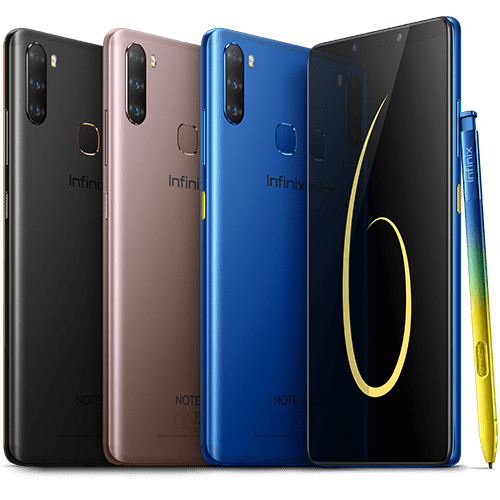
    The Infinix Note Series is back again with the Infinix Note 6 featuring a much better XPen and the all refreshing HiOS 5.0. This means that unline the Note 5, there is no Android One on this year’s Infinix Note device.

    The Infinix Note 6 is also exciting as it is a good low priced choice in the stylus smartphones section – where you have the likes of the Samsung Note devices.

    Key Specs of the Infinix Note 6

    Display6.10-inch 1080x2160pixels
    RAM and Storage4GB RAM; 64GB internal storage
    ProcessorMediaTek P35 Octa-core Processor
    CameraRear: Triple (16M+8M+2M) with Flash Support
    Front: 16 MP
    SecurityFingerprint Scanner
    Battery4000mAh
    Operating SystemRuns Android 9 Pie with HiOS 5.0
    NetworkSupports 4G networks

    Features of the Infinix Note 6

    The Upgraded XPen

    The newly upgraded X Pen combines AI and AR technology to redefine the fun of drawing experiences that go beyond the norm. It empowers your inspiration with a whole new perspective to generate genius ideas.

    Experience the transcendent AR drawing with X Pen. The entire world around you is your canvas, you can create immersive sketches or notes in any space within reach, and even have your friends join in and share in the creating.

    X Pen significantly optimizes handwriting recognition and improves the adaptability to various forms of writing scenarios. It intelligently identifies written content and provides further options, such as keywords search, telephone number recognition to contact storage, handwritten text converted into E- documents and others further operations. Enjoy your intelligent and efficient office lifestyle anytime, anywhere.

    It’s so convenient to point out what you want to measure with X Pen and see the results on the screen right away. With augmented reality technology, X Pen becomes your accurate smart tool to measure the objects in the real world.

    Amoled Display

    The AOD function exclusively designed for the NOTE 6 allows basic information to always be on display with minimum power consumption. That’s the AMOLED hands-off experience for checking the time without touching your cellphone.

    The premium AMOLED FHD+ panel delivers you better quality for a vivid experience. It is also your canvas, which makes your hand-painted expressions more colourfully vibrant and inspirational.

    Intelligent Triple-camera

    The NOTE 6 16MP Triple-camera with an intelligent 120-degree wide-angle camera, helps you document the amazing fun moments in your life, not only the beauty in your eyes but also your style and your special scenic views.

    The Camera also comes with the following features:

    • 16 MP Wide Angle
    • AR Emoji
    • Advanced Portrait
    • Google Lens and
    • AR Stickers

    Battery Power and Charging

    Long standby experience requires a coherent integration of hardware and software. The AI battery lab app optimizes power management intelligently according to various scenarios. The NOTE 6 will provide a 3-day-life battery, through its 4000 mAh batteries. Use constantly without worrying.

    Performance and Software

    Exceptional experience and fast operations supporting algorithms are the hallmarks of NOTE 6’s MediaTek® P35 Octa-core 12-nanometer processor. Fully supports most algorithms for AR applications even with upgrades.

    XOS 5.0 powered by Android™ 9 Pie provides you with an intelligent, efficient and customized experience.

    Difference between Infinix Note 6, Infinix Note 5 and Infinix Note 5 Pro

    FeatureInfinix Note 6Infinix Note 5Infinix Note 5 Pro
    Display6.01-inch Amoled FHD+
    18:9 aspect ratio
    1080 x 2160 pixels
    6-inch HD Full Display,
    18:9 aspect ratio
    6-inch FHD+
    IPS LCD capacitive touchscreen
    1080 x 2160 pixels
    RAM and Storage4GB RAM; 64GB internal storage3GB RAM; 32GB internal storage4GB RAM; 64GB internal storage
    ProcessorMediaTek P35 Octa-core ProcessorMediaTek Helio P23 ProcessorOcta-core 2.0GHz MediaTek Helio P23 MT6763T
    Camera16MP Wide-angle Triple Camera (16M+8M+2M)   16MP Selfie Camera12MP main camera
    16MP selfie camera
    12MP + 5MP rear camera
    16MP selfie camera
    SecurityFingerprint Scanner (Rear)Fingerprint Scanner (Rear)Fingerprint Scanner (Rear)
    Battery4000mAh non-removable Li-Po Battery4500mAh4500mAh non-removable Li-Po Battery
    Operating SystemAndroid 9Runs Android 8.1 OreoRuns Android 8.1 Oreo
    StylusYesNoYes
    NetworkSupports 4G networksSupports 4G networksSupports 4G networks

    Price and Availability of the Infinix Note 6

    Price of Infinix Note 6 in Nigeria

    The Infinix Note 6 is retailing in shops across Nigeria at 65,000 Naira.

    Price of Infinix Note 6 in Ghana

    StorePriceContact
    Mfidie Shop (Nationwide Delivery)GHS 10590546090871
    Jumia Ghana (Nationwide Delivery)GHS 10590544991140
  • StarTimes Ghana: Offers, Channels, Subscription Prices, Contacts & More

    StarTimes Ghana: Offers, Channels, Subscription Prices, Contacts & More

    Every day, hundreds of TV viewers are switching from analogue to digital simply because they want to enjoy more interesting channels with better quality pictures and sounds. with the coming into being of different decoders providers, a lot of content are available for streaming.

    Each decoder offers different content for viewers. The StarTimes decoder is one of those that is loved by many. So far StarTimes has been the only decoder that serves millions of Ghanaians with best and quality content at a high signal rate.

    Depending on your StarTimes package you can watch whatsoever you wish to watch. From movies to international news, music videos, sports, documentaries etc.

    In recent times, there has been a rise in the demand for information about this new decoder in the Country. Many want to know the available offers, channels, subscriptions and other relevant information around the StarTimes decoder before they can make a decision.

    We have taken it to ourselves to provide you with all the information you need to know concerning the StarTimes decoder. So if you are here because of that, then make sure to stick to the post to the end and you will get all that you need to know about the StarTimes Ghana.

    What Content Can You Watch Using StarTimes Decoder

    StarTimes has over 400 authorized channels that any user can choose to subscribe for. The company’s goal is to make sure an average Ghanaian has the best service at an affordable package. The StarTimes TV packages have been arranged to help interested individuals choose which suit their budget without sacrificing great viewing experience.

    The StarTimes Ghana offers 4 subscription packages which need to be renewed on a monthly basis. Below are the StarTimes bouquet budgets and the available channels that you may want to know:

    • StarTimes Nova channels Ghana
    • StarTimes super bouquet channels in Ghana
    • StarTimes Smart channels in Ghana
    • StarTimes Chinese bouquet channels

    How much is Startimes in Ghana?

    • StarTimes Decoder cost only is 90.00, you get a 1-month subscription
    • Cost of Dish + cable + lnb is GHS 75.00
    • Decoder + Dish + cable + lnb is GHS 165.00 (that is if you are buying from Startimes recognized outlets)

    STARTIMES NOVA Channels in Ghana
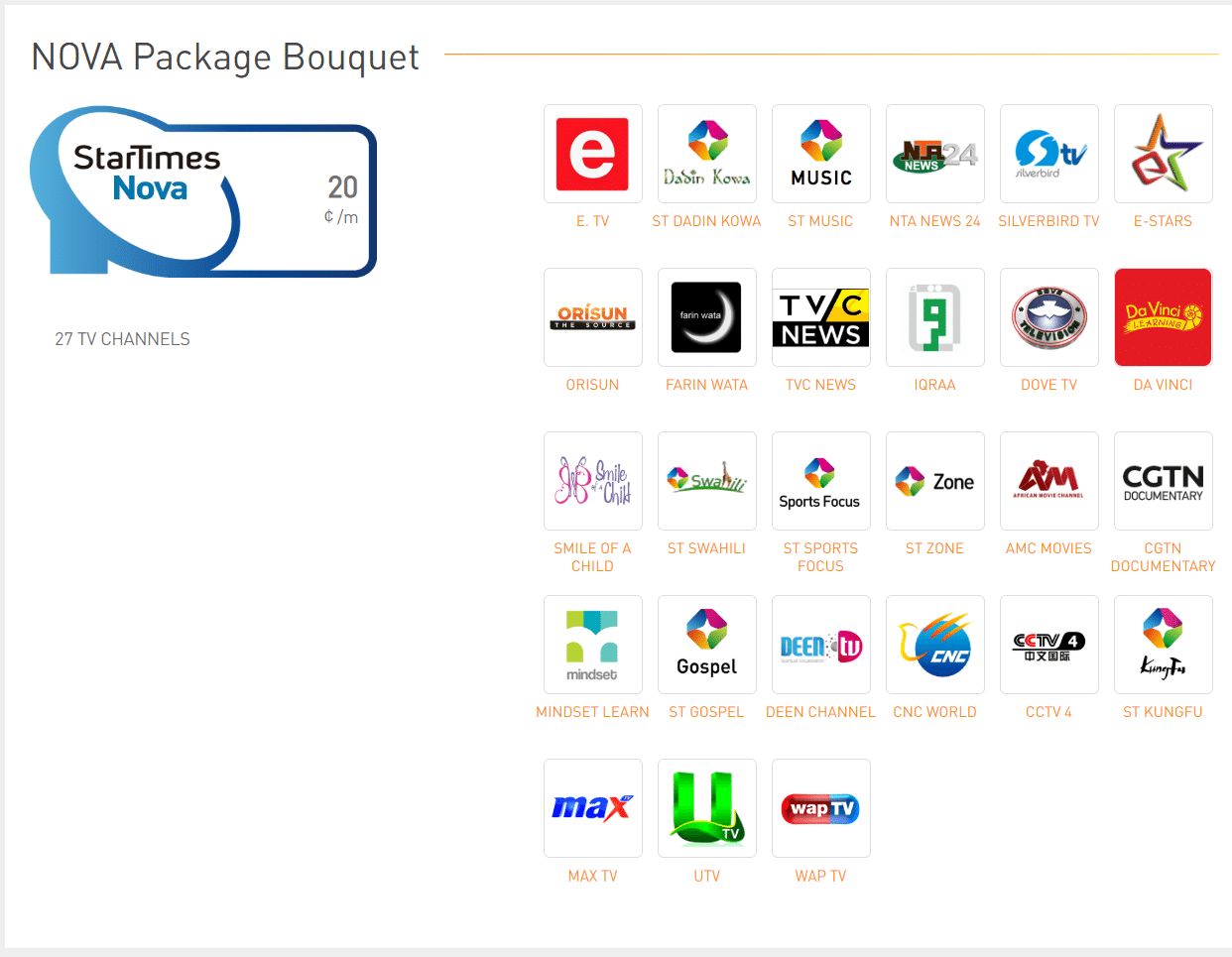
    This monthly subscription gives you access to 27 uninterrupted channels for a price of GHS 20. The nova channels Ghana are put into various categories including news, entertainment, religion, music, and children.

    Movies & Series

    Watch the latest movies and series in ST Guide available on Channel 99, ST Zone on Channel 129, and AMC Movie in Channel 185.

    News

    News channel available in the StarTimes nova offer are CGTN news on Channel 266, TVC News in Channel 270, CNC World in Channel 273, NTA News 24 in Channel 433.

    Entertainment

    If you love to entertain yourself then this got you covered. You can satisfy your entertainment ego by watching various StarTimes channels. Get access to the ST Kungfu on Channel 155, E. TV on Channel 160, ST Swahili Channel 400, ST Dadin Kowa on Channel 404, GTV on Channel 454, Farin Wata Channel 470, Orisun Channel 47, SilverBird TV on Channel 493, MAX TV Channel 530, and UTV Channel and E star available on channel 190.

    Religion

    Religious channels available in this bouquet are ST Gospel which is accessible on Channel 360, Deen TV Channel 365, IQRAA Channel 366, and watch Dove TV on Channel 508.

    Music

    Whether you love local, gospel, rap, blues, rock or reggae, Startimes has various music channels. For local and international music then tune in to channels like Trace Africa, Gospel Music, Nigezie, ST music, ST Naija and ST SA music. Documentary: You can watch CGTN Documentary on StarTimes Nova Bouquet Channel 231.

    Kids

    Kids shows are not left on this package. You can give your kids a joyful moment when you subscribe to this offer. Be it cartoons, creative stimulation or educative exposure, just tune in to Smile of a Child available on channel 306, Davinci Learning on channel 308, and Mindset Learn on channel 309.

    STARTIMES SMART Channels and Prices in Ghana

    This bouquet has 36 TV channels and a monthly subscription price of GHS 35. Smart bouquet channel list includes:

    • Movies & Series – ST Guide, ST Zone, IROKO 2, ST Novella E, ST Zone, ST Sino Drama, Fox Life, AMC Series, AMC Movie, and ST Yoruba.
    • General Entertainment – ST Kungfu, E. TV , E Stars, ST Swahili, ST Dadin Kowa, GTV, Farin Wata, Orisun, SilverBird TV, MAX TV, UTV , ST One, E! Eng, and ST Africa 2.
    • Startimes sports channels – ST Sports Focus, ST Sports Arena, Fox Sports 2, and EuroSports News.
    • Documentary – CGTN Documentary, Nat Geo Wild, Viasat N, Viasat H, and Animaux.
    • News – BBC, Aljazeera, France 24 E, CGTN news, TVC News, CNC World, NTA News 24, and Africa News.
    • Kids – Smile of A Child, Davinci Learning, Mindset Learn, JimJam, and Nickelodeon.
    • Music – ST Music, Gospel Music TV, ST SA Music, Nigezie, ST Naija, Trace Africa, and Trace Mziki.
    • Religion – ST Gospel, Deen TV, IQRAA, Dove TV, and Emmanuel.
    • Indian – ST Bollywood Africa and Zee Cinema
    • Lifestyle – Fine Living, and Fashion One.

    STARTIMES SUPER BOUQUET Channels in Ghana

    StarTimes super bouquet channels in Ghana is another bouquet that has a monthly subscription price of GHS 65. With this package, you get to watch 23 TV channels. these channels include:

    Movies & Series

    ST Guide, ST Zone, Iroko 1, Iroko 2, ST Novella E, ST Novella E Plus, ST Zone, ST Sino Drama, Fox, Fox Life, AMC Series, AMC Movie, ST Yoruba, and ST Movies Plus.

    General Entertainment

    ST Kungfu, E. TV, E Stars, ST Swahili, ST Dadin Kowa, GTV, Farin Wata, Orisun, SilverBird TV, MAX TV, UTV, ST One, E! Eng, and ST Africa 2. StarTimes sports channels

    ST Sports Focus, ST Sports Arena HD, Fox Sports 2, Euro Sports News, ST Sports Life, ST World Football, ST Sports Premium HD, Fox Sports, and Fuel TV.

    Documentary

    CGTN Documentary, Nat Geo Wild, Viasat N, Viasat H, Animaux, Nat Geo E, Discovery Science, IDX, Viasat H, and Viasat L.

    News

    BBC, Aljazeera, France 24 E, CGTN news, TVC News, CNC World, NTA News 24, Africa News, Fox News, MSNBC, and Bloomberg TV.

    Kids

    Smile of A Child, Davinci Learning, Mindset Learn, JimJam, Nickelodeon, Pop, and Baby TV. Music ST Music, Gospel Music TV, ST SA Music, Nigezie, ST Naija, Trace Africa, Trace Mziki, ST Soul, Kiss TV, Magic, MTV Base, Classica. Religion

    ST Gospel, Deen TV, IQRAA, Dove TV, and Emmanuel.

    Indian

    ST Bollywood Africa, Zee Cinema, ST Bollywood HD, and Star Gold.

    Lifestyle

    Fine Living, and Fashion One

    STARTIMES KIDS Channels

    As the name indicates, this is a channel subscription plan that is tailored to suit your kid’s satisfaction. To ensure that your kids are watching kid-friendly content, the is StarTimes super bouquet channels in Ghana tailored this channel for young children. These channels are educative and uphold healthy viewing habits. For example, kids can learn about giraffes, how snow is formed and different weather conditions. Moreover, when kids watch their favourite cartoon character engaging in a fun activity, they will also be motivated to do the same.

    List of channels on StarTimes classic bouquet Ghana in the entertainment category is not just for kids, adults can also benefit from watching them. During the weekend one can use the movies and series channel to catch up on the latest TV show including Telenovelas.

    STARTIMES SPORTS Channels

    Whether you like to watch football, soccer, rugby, basketball, cricket, swimming or boxing, StarTimes say bravo. They love the fact that young men like to watch sports so They tune in every weekend if not every day to catch up on the latest happenings of their favourite team. Fortunately, the StarTimes sports channel bouquet offers a wide selection of TV channels devoted to sports only. When you sign up for this package, you have all the sports channels from the comfort of your home. For further information on this bouquet packages, visit the official page for StarTimes Here

    How To Get StarTimes Decoder & Pay For Monthly Subscription in Ghana

    Before you can access and pay for StarTimes channel you need to buy the satellite antenna and decoder. The StarTimes decoder cost around GHS 90. The satellite decoder allows you to watch both terrestrial and satellite TV channels without having to change any cables. StarTimes subscription Ghana can be paid using MTN Mobile Money.

    How To Pay Startimes Subscription Via MTN Mobile Money

    • Dial *170# and select option 2. (MoMoPay & Bills)
    • In the submenu option, select option 2 (Pay Bills) and then enter the account number.
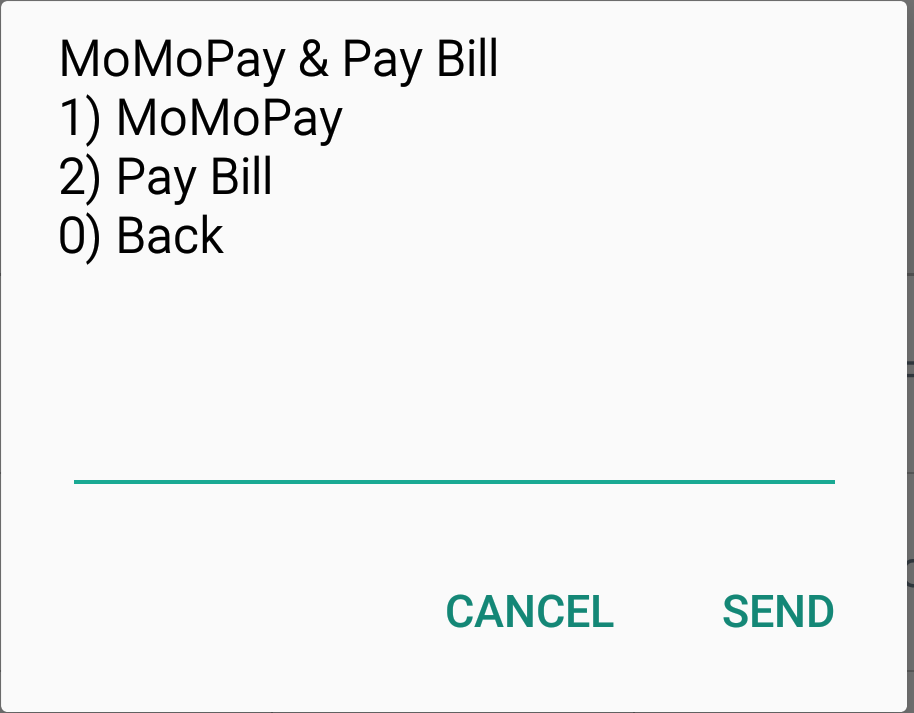
    • Now select ‘TV & Entertainment’- option 2
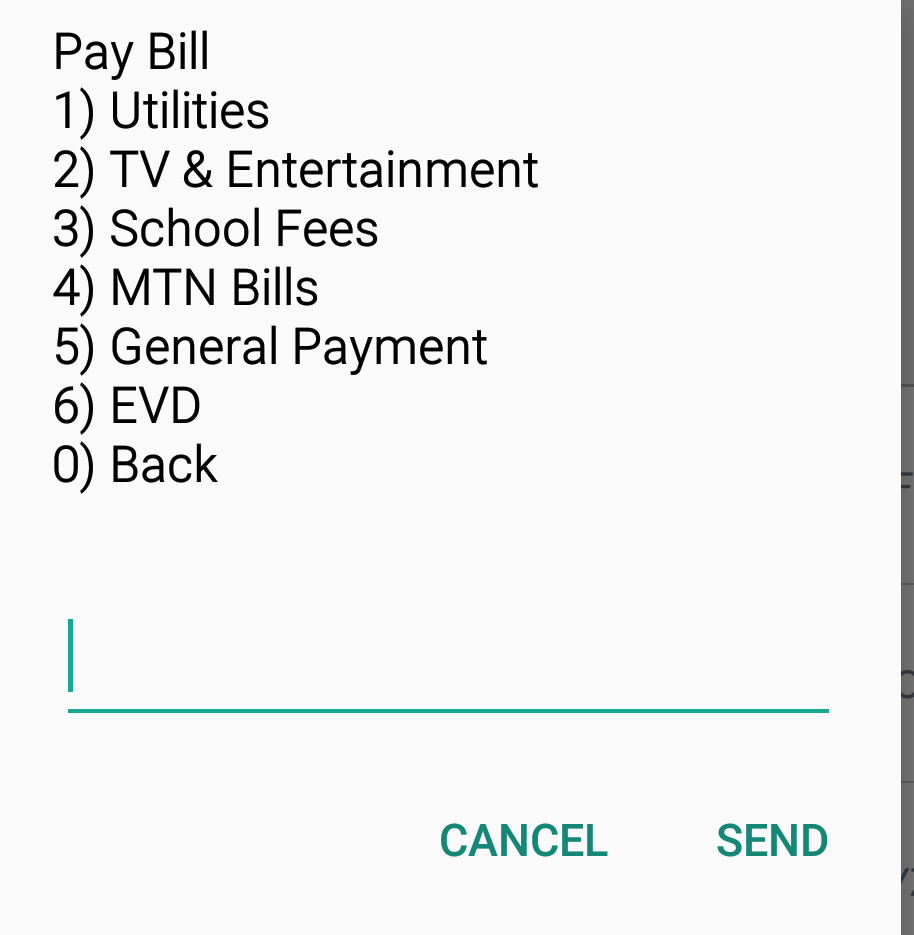
    • Here, you select StarTimes and then enter the account number to finish up the process.
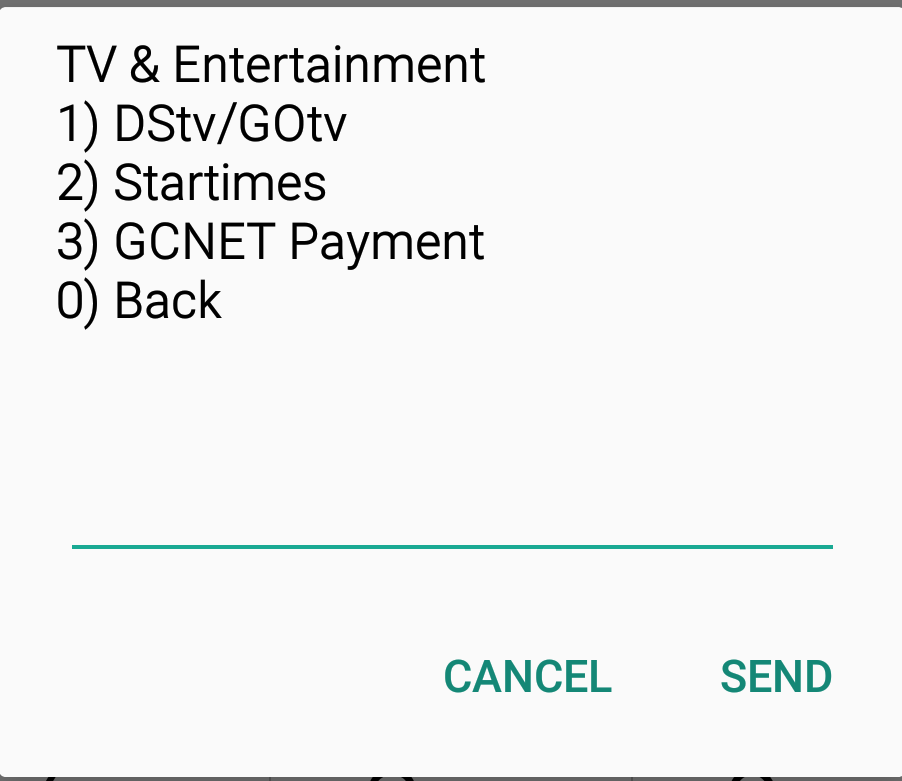
    •  Finally, enter your mobile money pin number.

    After a successful payment, your StarTimes subscription will be active and you can enjoy your favourite channels.

    You will have to pay a monthly subscription to enjoy the StarTimes bouquet channels. In case your StarTimes channels do not resume even after you have made the correct payment then contact StarTimes customer care via their contact number or different social media platforms.

    Startimes Contact

    Hotline: 0242437888

    How To Mount Your Newly Acquired StarTimes Decoder

    The success of your StarTimes decoder will depend on the signal level and strength. You can install the decoder yourself using the below step by step guide or contact an expert in your locality to help you do so.

    If you choose to do that yourself then make sure to follow the below guide on how to install your StarTimes decoder and antennae.

    • First, when opening the box try and avoid misplacing any small accessories.
    • Take the long pole and insert into the antennae hole.
    • Tighten the antennae using the provided screws.
    • Screw-in the connection cable wire to the circuit box of the antenna and insulate the ends of the wire with masking tape to prevent contact with moisture which can cause rust.
    • If the cable is too long, then tie it gently to the pole to ensure that the wire doesn’t disengage from the circuit box. Place your pole on a raised platform that is free of any obstruction.
    • The most common area to mount your antenna is on the roof. Just make sure it faces directly towards the transmission mast stationed in your locality. Insert the cable wire to the antenna in the port located behind the decoder.
    • Lastly, switch on the decoder and scan to enjoy your StarTimes pay-tv service.

    Alright, friends, this is where we bring the curtain down on the StarTimes Ghana, price, subscription and all that you need to know. We hope this post will be an eye-opener to your new world of StarTimes.

  • How To Buy Airtime With AirtelTigo Cash, MTN Mobile Money Or Vodafone Cash

    How To Buy Airtime With AirtelTigo Cash, MTN Mobile Money Or Vodafone Cash

    Every mobile phone user must recharge his or her device before making a call or surfing the internet. With the emergence of very popular messaging platforms like WhatsApp, Facebook and Instagram, many have increased their data consumption rates.

    No days pass by without buying an airtime or data bundle.

    There are instances where you find yourself in a location in which it may be difficult to get an airtime vendor to buy airtime for recharge. In that case, you will be stuck with no option.

    Mobile service providers in the country are always looking at satisfying their users to increase user retention and reduce churn.

    They have been able to foresee all these instances and have made an arrangement for them. Thanks to the mobile money services, today, every beneficiary of the mobile money service can easily buy/top-up his or her account using the mobile money balance.

    Each of the service providers has a different method to follow when recharging account from the mobile money balance. The goal of this post is to show you the method to follow for each provider when recharging from your mobile money account.

    How to top-up airtime Using MTN Mobile Money

    Follow the below simple steps to recharge your account using the mobile money balance:

    1. First, you have to make sure there is sufficient money in your Mobile Money Wallet.
    2. Go to “Mobile Money” menu dialling *170# then select option 3 “Airtime & Bundle”.

    1. Now select option one (Airtime-100% bonus self) from the sub menu

    1. Select the beneficiary- either self or other

    1. Enter the amount of airtime you want to buy.
    2.  Confirm details and enter your Mobile Money PIN. You will receive a confirmation message of the successful MTN airtime top-up.

    How To Buy Airtime With AirtelTigo Cash

    First dial *110# and then you will be taken to the AirtelTigo cash main menu

    Now once you are on the page, you will be displayed with all the mobile money menus. Select option 2 from the menu

    Now you will be given the chance to choose whether you want to buy airtime or data bundle. since your aim is to buy airtime, you choose the first option

    After choosing the buy airtime option, you select 1, if you want to buy for yourself otherwise select the option that suit your demand.

    Now you confirm the details and enter your mobile money pin to finish the process. After a successful transaction, you will receive a confirmation message from AirtelTigo.

    How to top up airtime using Vodafone cash

    Vodafone cash also offers similar steps for purchasing airtime from a user account. If you are a user of Vodafone cash, you can also follow the below steps to top up your call account using the MOMO cash balance.

    Just like MTN MOMO top-up, you need to also make sure you have sufficient balance in your Vodacash account before proceeding

    1. Dial *110# to go to the Vodafone cash menu. Once you are on the menu, select option 3 to see the options available
    2. From the submenu, choose option 3 -buy airtime or data
    3. Here you will see three submenus, choose the first option: “buy airtime”
    4. Then select the first option – my phone. If you are buying for yourself otherwise select the other options
    5. Now enter the amount
    6. Confirm details and enter your Mobile Money PIN.

    How to buy Airtime in Ghana using an App

    Another way to buy airtime using any of the service providers is to use an app. This app will help you buy your airtime with ease.

    All you need to do is to install the app and you are ready to purchase your preferred airtime. The app is an all in one app that gives you the ability to do many things at a go. The name of the app is Slydepay.

    1. First, you have to download this app from the Playstore or Appstore and then install it on your android or iOS device.
    2. Once the app is installed, follow the onscreen registration guide to register for an account on the app.
    3. After successful registration, you are done. You can now use the app to do many things including buying airtime from any of the mobile money service providers.

    Conclusion

    Buying airtime using mobile money balance is never difficult as many perceive it to be. All you need to do is to follow the above simple steps and you should buy all your desire airtime/bundle.

  • 5 Best Covers and Cases for Redmi Note 7 & Redmi Note 7 Pro

    5 Best Covers and Cases for Redmi Note 7 & Redmi Note 7 Pro

    There’re the pretty usual questions we get asked over the here. Xiaomi released one of its extremely anticipated devices, the REDMI Note 7 and the Note 7 Pro in India this year. The devices come complete glass look from front to back, which is the company’s primary attempt of full glass design in the REDMI series.

    Best cases for the REDMI Note 7 and 7 Pro devices

    In this article, we’ve line-up a list of a few of the best covers and cases that you can use with these devices. In case you’re wondering, the ports placements and dimensions are perfectly similar for both mobiles, and that is remarkable news for case developers.

    Crust REDMI Note 7 and 7 pro-Liquid Silicon Cover

    The REDMI Note 7 and 7 Pro are one of the most elegant design devices in this era. Sadly, using a cover would mean covering up the elegant back and not able to flaunt it with your buddies. Fret not; Few YouTubers in India has come out with their individual covers which protect your device while allowing you flaunt the elegant design.

    Aptly called the primary step, this liquid silicon cover has a rock-solid build, protects the camera bump and it is raised from the front side to shelter the touch screen. The Redmi Note 7 Pro back cover has keys are clickable but a bit too shaky, but it is still an amazing option for anybody looking for a Silicon cover for their devices.

    Shock Proof Carbon Fiber Armor Case

    The cover is made out of TPU, carbon fibre, and comes with tailored lip, reinforced inside and outer edge barriers, impact-resistant back bumper (to prevent accidental drop protection while maintaining a sleek and slim profile) impact-resistant backside bumper to prevent against shocks and scratches from bumps and accidental drops. It has one of the finest reviews on Amazon India for any REDMI Note 7 and 7 Pro cover.

    Ultra Slim Back Case

    This ultra-slim back case offers an ultra-slim look design with matte finished one layer TPU to provide the offer a fine quality finish on the back to provide it an overall slimmer look. It comes with accurately cut-outs to provide simple access to all the different buttons and ports. Though the cover doesn’t promise to provide the level of shield that one could otherwise get from a rugged cover, it surely does promise to withstand small bumps and scratches. It’s available in 4 elegant shades.

    Flexible Texture Pattern Back Cover

    This Redmi Note 7 Pro Cover is rubber made back case with a flexible texture pattern on the back side. It has cutouts for simple access to all the buttons and ports and slim design that reduced the unwanted bulk while offering a decent level of safety against scratches and fingerprints and also against accidental drops with unique air cushion technology. This case available in 6 elegant shades to pick that suite your mood!

    Super Frosted Shield Hard Back Cover

    This cover is made out of polycarbonate with a rubberized feel and textured look that promises to be an elegant yet long-lasting safeguard solution with solid protection and grip. It comes with precise cuts to provide simple access to every feature of the device.

  • MTN Conquest 2019 Accra Edition:  Win GHS 12,000 in FIFA 19 and Mortal Kombat 11 tournament this weekend

    MTN Conquest 2019 Accra Edition: Win GHS 12,000 in FIFA 19 and Mortal Kombat 11 tournament this weekend

    Register and play in the Accra Edition of #MTNConquest2019, Ghana’s most competitive esports event, on 21st and 22nd June at the Coconut Grove Hotel, North Ridge, Accra. As usual, the GHS 12,000 pot prize is up for grabs.

    The Accra event features:

    1. MORTAL KOMBAT 11 tournament
    2. FIFA19 “Kick-off mode” event

    Side events include:

    • Tekken 7 Gauntlet
    • Street Fighter V Gauntlet

    If you believe in your Fifa 19 and Mortal Kombat 11 skills, and couldn’t make it to the Kumasi event last weekend, then register for the 2019 MTN Conquest gaming event.

    How to register for MTN Conquest 2019 Accra Edition

    1. Visit the registration link here.
    2. Choose which tournaments you would want to compete in
    3. Enter your details and get your registration confirmation via email.

    Share with your friends and family who are into e-sports and gaming.