Author: Mfidie

  • CocoaLoan: How to Apply, Requirements, App and more

    CocoaLoan: How to Apply, Requirements, App and more

    CocoaLoan is a financial service that provides fast, easy and secure access to credit to Ghanaians. CocoaLoan is committed to helping Ghanaians who needs loan credit for their financial needs by providing them with access to affordable and reliable credit solutions.

    With CocoaLoan, you can apply for a loan online, and receive the funds in their MoMo account within 24 hours. Now, the application process is even more convenient with the launch of the CocoaLoan mobile app. The app allows you to access an accounts anytime, anywhere, and manage your loan payments securely.

    Requirements

    1. Applicants must be at least 18 years of age.
    2. You must provide valid government-issued identification card.
    3. You must have an active MoMo account with your name.
    4. You must have a steady and verifiable source of income (such as a job, self-employment, benefits, etc.).
    5. You must be a Ghanaian.
    6. You must have a valid email address.
    7. You must have a valid phone number.

    How to download the app

    1. Visit google playstore on your phone
    2. In the search bar section, type in CocoaLoan and search.
    3. The app will show up after a successful search.
    4. Click on download and wait for the app to successfully download.
    5. Now, open the app and register using your mobile number
    6. Wait for a verification code and type it inside where required
    7. You will now the given a dashboard where you can apply for your loan.

    How to apply

    The application process for CocoaLoan is simple. To obtain a loan, follow the steps described below.

    1. Download the CocoaLoan app from the Google Play store.
    2. Launch the CocoaLoan mobile App on your phone.
    3. On the Mobile App, click on request for funds.
    4. Apply by filling the loan application with your personal and mobile money account details.
    5. Your application will be reviewed and if you qualify, your requested amount will be disbursed into your MoMo wallet immediately.

    The highest and lowest loan you can get from CocoaLoan

    On CocoaLoan, your initial loan request start from GHS 100 the more you request and pay on time, the higher your request goes. The maximum you can request is GHS 5,000.

    Benefits on applying for CocoaLoan

    Below are some of the benefits you can enjoy when you decide to join the CocoaLoan family.

    1. Fast and convenient
    2. Flexible repayment terms
    3. Low interest rates
    4. No hidden fees
    5. 24/7 Customer service
    6. Online support

    How to repay CocoaLoan

    1. Open the loan app.
    2. Once you are in the CocoaLoan app, you will see ‘Repayment.’
    3. Click on that button.
    4. On the next page, they will show you the amount you are supposed to pay.
    5. To proceed, click on ‘Repay Now.’

    How to repay CocoaLoan using MTN mobile money Wallet

    You can repay your CocoaLoan directly using MTN MoMo. To do so,

    1. Dial *170#
    2. Select 1 (Transfer Money)
    3. Type 1 (momo user)
    4. Input Users Number (CocoaLoan mobile number)
    5. Confirm number
    6. Enter the amount
    7. Enter reference
    8. Confirm transaction with your MoMo PIN

    CocoaLoan contact details

    You can also get in touch with CocoaLoan via their email at [email protected]

    Conclusion

    CocoaLoan is a great way to get access to fast and easy loans for your financial needs. With an easy application process, flexible requirements, and an intuitive app, it is one of the most convenient loan options available.

    Before applying for a CocoaLoan, make sure you are aware of the terms and conditions, as well as the potential risks associated with taking out a loan. If you think a CocoaLoan could be right for you, then take the first step and apply today.

  • SikaPurse: How to Apply, Requirements, App and more

    SikaPurse: How to Apply, Requirements, App and more

    Are you looking for a hassle-free and convenient way to access loan services? Look no further than Sikapurse Online Loan. This unique platform has been created to provide users with fast, easy access to loan funds. With the Sikapurse app, you can apply for loan services in a matter of minutes.

    The process is simple and straightforward, and there are no lengthy forms or paperwork to fill out. In addition, you can get a loan in a very short time frame, with minimum requirements and the ability to access your funds immediately after approval.

    Application requirement

    To be able to apply for the sikapurse loan, there are some requirements you need to meet before you can go ahead with the application.

    1. You must be a Ghanaian.
    2. You must have a source of monthly income.
    3. You must have a Ghanaian identification card. That is; Ghana card, voter’s ID, Passport, etc.
    4. Must be within 19-55 years old.

    How to download the App

    1. Visit google playstore on your phone
    2. In the search bar section, type in Sikapurse quick loan and search
    3. The app will show up after a successful search
    4. Click on download and wait for the app to successfully download.
    5. Now, open the app and register using your mobile number
    6. Wait for a verification code and type it inside where required
    7. You will now the given a dashboard where you can apply for your loan.

    How to apply

    The application process for a SikaPurse loan is simple. To obtain a loan, follow the steps described below.

    1. The first step to follow is to download the SikaPurse app from the Google Play store.
    2. Launch the Sikapurse mobile App on your phone.
    3. On the Sika Loan Mobile App, click on request for funds.
    4. Apply by filling the loan application in the APP with your personal and mobile money Account details.
    5. Your application will be reviewed and if you qualify, your requested money will be disbursed instantly into your account.
    6. Repay on time and get a higher amount for your next loan

    The highest and lowest loan you can get from Sikapurse

    On Sikapurse, your initial loan request start from GHS 100 the more you request and pay on time, the higher your request goes. The maximum you can request is GHS 5,000.

    What is the interest rate on SikaPurse loans?

    Sikapurse loans interest rate is from 8% to 25% per annum.

    What are the benefits of SikaPurse loan?

    Below are some of the benefits you can enjoy when you decide to join the Sikapurse family.

    1. They can lend you up to GH₵5000
    2. You can select your payment tenure
    3. It is reliable, secure, and flexible
    4. There are no hidden charges
    5. They provide a credit decision
    6. They are at your service 24 hours every day of the week.

    How to repay SikaPurse loan

    1. Open the loan app.
    2. Once you are in the SikaPurse Loan app, you will see ‘Repayment.’ Kindly click on that button.
    3. On the next page, they will show you the amount you are supposed to pay. Then, to proceed click on ‘Repay Now.’

    How to repay SikaPurse loan using MTN mobile money Wallet

    The following instructions show how you can repay your SikaPurse loan with MTN Mobile Money wallet:

    1. Dial *170#
    2. Select 1 (Transfer Money)
    3. Type 1 (momo user)
    4. Input Users Number
    5. Confirm number
    6. Enter the amount
    7. Enter reference
    8. Confirm transaction with your MoMo PIN

    Sikapurse contact details

    Incase you want to reach out to Sikapurse customer care for clarification follow the contact details below:

    • Address: Mensah Wood Ave, Accra, Ghana.
    • Email: [email protected]
    • Customer Service Hotline: 0571375874

    Conclusion

    With Sikapurse quick loan service, you get the chance to request for a loan anytime you want. You don’t need to stress on loan paper signing or anything. All you need is your phone and the Sikapurse app. Don’t forget to repay your loan on time in order not to hurt your credit score for another loan.

  • How to Monitor iPhone Activity Free

    How to Monitor iPhone Activity Free

    Experts report that more than 75% of teenagers have cell phones at their disposal and most of them prefer iPhone. Because of that, bad intentions and inappropriate content are shared, posing a great risk for kids. If you are worried about your loved ones’ activities and they don’t want you to know about it, here is how to track an iPhone free.

    1. Monitor iPhone Activity Using iKeyMonitor

    While parenting is tough, online predators, stalkers, and cyberbullying make it even harder. To ensure your children stay well connected and safe, you must install the right tracking app on their iPhones, like iKeyMonitor.

    iKeyMonitor is one of the free spy apps for iPhone that helps spy on online activities on your target’s iOS device. With about 50 features, iKeyMonitor plays an important role when it comes to parental control. It effectively runs on all Apple devices and often works in stealth mode.

    The app can help track iPhone activity of your kids, not to mention keep your trading secrets safe. After installing it, access information like SMS text messages, keystrokes, Skype Messenger, conversations on WhatsApp, call history, websites visited, and GPS location.

    With iKeyMonitor, parental control becomes easier too. It tracks activities on iPhones by capturing screenshots and recording phone surroundings. Through the app, you will also be able to protect your kids from sexual predators, cyberbullying, and cyberstalkers, among other potential risks. To monitor iPhone activity for free, follow these steps:

    • Sign up for an iKeyMonitor monitoring app for free.
    • Enter your credentials to log in to the cloud panel.
    • Install the iKeyMonitor app.
    • Start to check activity on iPhone.
    1. Use iCloud to See Activity on iPhone

    iCloud is Apple-based cloud storage used to store apps, photos, music, and files, to name a few. The storage makes it much easier for users to operate on more than one Apple device and keep data securely and safely.

    Monitoring iPhones is achievable using iCloud. It works by backing up all the data through the available iCloud. If nothing is backed up, then there is nothing to monitor.

    Usually, this is a one-step process – meaning once you have iCloud details of the required device, you are good to go to start supervision. This comes in handy if you want to monitor iPhone location and don’t own a home PC or computer.

    iCloud-based trackers display a lot of details that are stored in iCloud through a dashboard. These details may include GPS locations, photos taken, Wi-Fi history, reminders, notes, and calendars.

    You must have physical access to their devices to track activity on iPhone without jailbreak. These are the steps to follow for the process:

    • Connect the target iPhone to the available Wi-Fi network.
    • Head straight to settings and click on the ‘>’ option.
    • Tap on the iCloud option.
    • Then click on the iCloud Backup icon.
    • Open your phone or PC browser to sign in with the target or your iCloud account.
    1. Track an iPhone for Free with Find My iPhone

    If you own an iPhone device, perhaps you’ve heard of or seen the Find My iPhone app. You may already know what the app does. But why would you want to use it anyway? And it’s not like you’ve lost your iPhone.

    Find My iPhone is a solution Apple provides to remotely find any iPhone’s location. This service is part of iCloud storage and can track activity on iPhone and other Apple devices if misplaced or lost. That includes your Mac, iPad, and iPod.

    However, Find My iPhone is also an amazing spy tool parents can use to track iPhone activity of their kids. Enabling Find My iPhone for kids will give you a candid glimpse into their device’s location.

    This feature can be found in your device’s settings. Here is how to enable the feature if you want to monitor iPhone activity:

    • On your iPhone, open the settings. Enter your ID if you’re requested to sign in. If you don’t have the ID, click on the ‘forgot it’ and follow onscreen commands.
    • Click ‘the Find My iPhone’ option and enable it to track an iPhone for free.
    • You may as well turn off or on two of these options – Send Last Location and Find My Network.

    The Takeaway!

    These days, the demand to monitor iPhone activity is increasingly growing. Monitoring iPhone for free with Find My iPhone is the best for parents as it is simple to get Apple ID, password, and verification code. But if they cannot do so, an iCloud-based tracker and iKeyMonitor will help track iPhone for free.

  • How to turn off auto lock on iPhone

    How to turn off auto lock on iPhone

    When you get a brand-new iPhone, the default Auto Lock settings are 30 seconds. That means after half a minute of inactivity, your phone will dim down and automatically lock the screen. This feature is designed to protect your data and keep it secure, but if you are like many users, you may find it annoying and unnecessary. Fortunately, there is a way to turn off the auto lock feature on your iPhone, and this article will show you how.

    Changing auto lock time on iOS 6 and below

    If your iPhone runs on an older operating system, follow the steps below to turn off Auto-Lock.

    1. Open the “Settings” on your iPhone
    2. Go to “General.”
    3. Select the “Auto Lock” option.
    4. Select “Never.”
    5. You will see a small blue checkmark next to that option that confirms your selection.
    6. If you don’t want to completely turn off, you can increase the minutes, which might work best for some people.

    Changing auto lock time on iOS 7 and above

    The process of turning off Auto Lock on newer iPhone operating systems is similar, it only involves one change.

    1. Open the “Settings” on your phone.
    2. Select “Display & Brightness” option.
    3. Tap “Auto Lock.”
    4. Select “Never” from the list of options.
    5. If you don’t want to completely turn off, you can increase the minutes, which might work best for some people.

    How to fix auto lock troubleshooting

    When your iPhone battery is running low, the auto lock settings cannot be changed. The device’s Low Power Mode automatically turns on and pulls back the Auto Lock feature to the default settings. But it can be changed by turning off the Low Power Mode.

    1. Go to “Settings” on your iPhone
    2. Select “Battery.”
    3. Next to the “Low Power Mode,” move the toggle button to off.
    4. Once that is done, you can go back to “Settings”.
    5. Select “Display & Brightness.” for older ios version and “General” for newer versions.
    6. Tap on “Auto Lock” and select “Never.”

    Conclusion

    With the simple steps outlined above, you should now know how to easily turn off auto lock on your iPhone. Remember to always secure your device by setting a passcode, as this is the best way to ensure that your data remains safe.

  • How to get airpods to stop reading texts

    How to get airpods to stop reading texts

    It can sometimes be frustrating with your Airpods constantly reading out loud the texts that come through your device. It can be incredibly annoying and inconvenient, especially if you’re in public. If you want to know how to stop your Airpods from reading out your texts, then this article is for you. In this article, we will show you how to stop Airpods from reading out texts and keep your conversations private.

    What are Airpods

    AirPods are a type of wireless headphones developed by Apple Inc. that can be used to listen to music, make phone calls, and others. They are designed to be lightweight, portable, and easy to use. AirPods feature a microphone, voice recognition software, and an on-board processor to provide a variety of features. AirPods also come with a charging case that allows them to be wirelessly charged while they are not in use. AirPods can be used with any device that supports bluetooth technology.

    Why disable ‘AirPods read texts’ message option

    The AirPods read text is a system that allows Siri to read your text vocally. The system is made in a way that, it will interrupt any activity you are doing on the phone to read your incoming messages. Whether you are watching a movie, doing podcast or listening to music, the text read will interrupt it. This is one major reason why many iPhone users does not like the system.

    How to stop AirPods from reading texts

    1. To turn off Siri reading texts from your iPhone, open the Settings app.
    2. Select notifications.
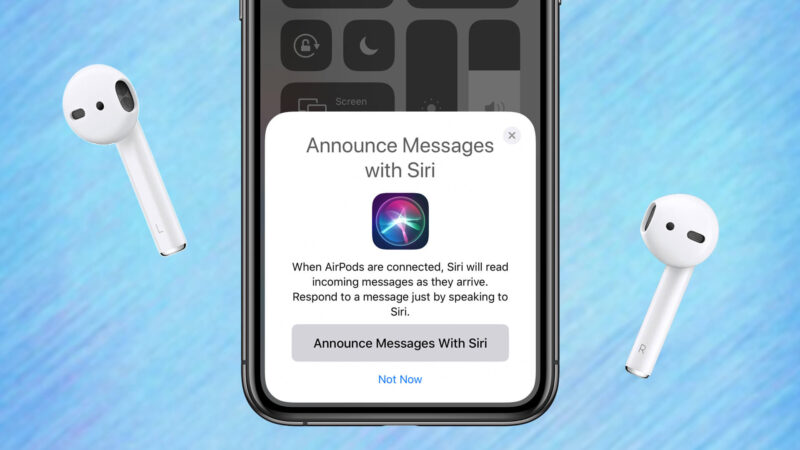
    3. A new page will open in which you will see Announce Messages with Siri dialogue box.
    4. You will see options ‘Announce Messages with Siri’ and ‘Announce messages from’.
    5. If the ‘Announce Messages with Siri’ is turned on, you will see that the toggle is green.
    6. Disable the feature by pressing on the toggle and disable the ‘Announce messages with Siri’.

    Conclusion

    AirPods are a great tool for listening to music, talking on the phone, and much more. If you finds out that AirPods are reading your text messages aloud, then it’s easy to adjust the settings and turn off that feature. All you need to do is to follow the steps above. Doing this will ensure that your AirPods no longer read aloud any of your text messages.

  • How to connect Beats to iPhone

    How to connect Beats to iPhone

    Beats headphones or earbuds are famed for their excellent sound quality, making them a popular choice among many iPhone users. Connecting Beats headphones to an iPhone is a simple process that takes just a few seconds. Whether you are using a wired or wireless connection, connecting your Beats headphones to your iPhone is fast and easy.

    How to connect Beats to iPhone

    Before all this, you must first confirm that your gadget is discoverable. After that, you can follow these simple steps.

    1. Turn on your Beats headphones by pressing the “Power” button.
    2. Go to “Settings” on your iPhone.
    3. Click on “Bluetooth” and enable it.
    4. With Bluetooth now enabled, you’ll see your “Beats” headphones under “My devices or other gadgets” section.
    5. Select “Beats Wireless” from the list of choices.
    6. Once paired, Beats and iPhone will now be connected.

    What to do if your Beats is refusing to connect to the iPhone

    If you have trouble connecting your Beats wireless device to your iPhone, then there might be some minor errors that needs to be checked. You have to check if your Beats is really on and then also check if there is no other Bluetooth devices next to it. Now, make sure your Beats is closer to your iPhone and then,

    1. Go to your phone Settings
    2. Locate Bluetooth.
    3. Look through the paired devices to see if you will find your Beats device name.
    4. If you see see click on it and tap on the lowercase “i” icon next to your device in the Bluetooth menu.
    5. On the next screen, choose “Forget This Device”, then pair your Beats with your iPhone again.
    6. Wait for a while to get your successfully connected message.

    Conclusion

    Now that your Beats headphones are connected to your iPhone, you’ll be able to enjoy the full capabilities of your device. With your headphones, you can listen to music, take calls, or control your audio playback. You will also be able to customize your listening experience with your favorite audio settings. By following the steps above, you can now easily connect your Beats wireless headphones to your iPhone.

  • How to block someone on snapchat

    How to block someone on snapchat

    The ability to connect with people via Snapchat is great, but sometimes it might reach a point where everything isn’t great anymore. For example, you don’t want someone to see your post, or you’re receiving messages that you don’t want. In such situations blocking someone can be the ideal thing to do. Blocking someone on Snapchat is a simple process, but it’s important to understand what it means and the implications that come with it. in this article, we will give a step-by-step guide on how to block someone on Snapchat.

    How to block someone on snapchat

    1. Open Snapchat on your phone
    2. Find the user you want to block by navigating to your conversations tab.
    3. If the user is not in your chat, tap on the search function at the top, marked by the magnifying glass icon at the top.
    4. Enter their name in and search.
    5. Tap on the user to open a chat with them.
    6. Tap the menu icon in the upper-left corner of the chat tab.
    7. Tap Block from the list of menu options that appear.
    8. Confirm that you want to block the user by tapping the Block button on the confirmation box.

    What happens when you block someone on Snapchat?

    Blocking means you are preventing the person from seeing any of your future activities. Blocking any Snapchat account means the user cannot reach you again with their account. To them, your account exist no more. A blocked account user will not be able to send you photo or video snaps, start a chat with you, view your stories, find your account if they search for you, etc.

    If you block someone on Snapchat, will they be alerted?

    No. Snapchat will never alert a user they’ve been blocked. The only way they will be able to find out is through their activities. That is when they try to send you a message using their blocked account or any other activity.

    Can you unblock a blocked account on Snapchat?

    Yes. It Is 100% possible to unblock a Snapchat account you have blocked. When you block an account, they are listed in a blocked users section. So anytime you are ready to unblock a blocked user, all you have to do is to visit the blocked list, tap on them and then unblock the user.

    Conclusion

    Blocking someone on Snapchat is a simple process that can help protect you from unwanted messages or content. Blocking someone prevents them from seeing your Story, adding you as a friend, or sending you any messages. If you ever decide to unblock someone, it’s just as easy to do so. With the steps above, you now have the knowledge to easily block someone on Snapchat.

  • How to turn off PS4

    How to turn off PS4

    Playing video games on a Playstation 4 can be a great way to pass the time, but you might not know how to turn the console off properly when you’re done. Turning off your PS4 in an odd way ca cause damages and that is why it is good to know how to turn off your PS4 properly. Turning off your PS4 is relatively simple, and it only takes a few steps.

    How to turn off PS4 using quick menu on your controller

    Your controller can make turning off your PS4 easier. Imagine sleeping on your bed feeling lazy and you have to get up to off your PS4. But with your controller with you on the bed, you can go ahead to turn off your PS4. The quick menu is one of the menus on your PS4 and there’s an option that allows you to switch off your phone. To do so,

    1. Press and hold down the PS button on your controller.
    2. Select Power from the Quick Menu that appears on your screen.
    3. On the right, select the Turn Off PS4 option to turn your console off.
    4. Make sure not to unplug the power cord until your PS4 has fully turned off. If you do unplug it, you risk the chance of corrupting the data on your console.

    How to turn off PS4 using the Power menu on your controller

    The Power menu is also an option you can use to turn of your PS4. It can be controlled using the controller. It is mostly located at the top of your PS4.

    1. Highlight the Power menu at the top and select it.
    2. Select Power Options on the following screen.
    3. Select Turn Off PS4 to turn the console off.

    How to turn a PS4 Off without a controller

    The controller is not the only way to turn off your PS4. Without your controller, you can still turn off your PS4. On your PS4 console, there is a power button that can be used to switch it off and turn it on. The power button on the original PS4 will be at the center on the front of the console. On the PS4 Pro, you’ll find it on the bottom left side. On the PS4 Slim, you’ll see it near the left side next to the disc eject button. 

    1. Find the Power button on the front of your PS4.
    2. Press and hold down the Power button for about seven seconds.
    3. Release the button when you hear the beep sound twice.
    4. Your PS4 will turn off.
    5. Make sure to remove your hand only after hearing the second beep. If not, your phone will enter rest mode instead of switching off.

    How to put your PS4 in rest mode

    Rest mode is a mode on your PS4 that uses significantly less energy than normal mode and allows certain activities to continue in the background. When your PS4 is in this mode it can continue tasks, like downloading games or software updates.

    In rest mode, your console uses less energy compared to when it is completely on. Also, rest mode allow some activities to continue running at the background. Activities such as when you are downloading a game or updating a software. To put your console on rest mode,

    1. Open the Power menu.
    2. Glance through the options and select Enter Rest Mode.
    3. Your PS4 will go into rest mode.
    4. To come out of the mode, press the PS button on your controller or use the Power button on your console.

    NB: In all the switching off process, allow the console to completely switch off before trying to remove the power plug. That is to safeguard the console as well as your data. Removing power before completely switching off can damage your data or even the console itself.

    Conclusion

    Turning off your PlayStation 4 is easy and should only take a few seconds. Make sure you save your progress before shutting down your console, and that you turn it off correctly. By following the steps above, you will be able to quickly and easily power off your.

  • How do you pin someone on snapchat

    How do you pin someone on snapchat

    It’s always great to stay connected with your friends and family, and one of the best ways to do that is by using the popular social media app like Snapchat. This app allows you to share photos, videos, and messages with your contacts, and even pin important conversations to the top of your list.

    When using Snapchat, you might want to pin someone important on you list for regular conversation but don’t know hpw to do it. If you are in such position, then tis article is for you. We will be discussing everything you need to know about pinning a person on Snapchat, including the steps involved and some helpful tips.

    What does “Pin Conversation” mean on Snapchat

    Pin conversation on Snapchat is a feature that allows you to pin a conversation with one or more of your contacts. This means that, when you open the chat window in Snapchat, you will see the pinned conversation at the top of your chats list. Pinning a conversation allows you to easily keep track of important conversations without having to scroll through your entire list of chats.

    How to pin a conversation with someone on Snapchat

    Method 1

    1. Open Snapchat and swipe right on the camera screen to open the Chat or Friends screen.
    2. Select the conversation or group chat you want to pin.
    3. Tap your friend’s name or profile picture to open their profile.
    4. Tap the menu icon in the top-right corner of the profile page and tap Chat Settings.
    5. Select Pin Conversation on the pop-up menu.

    Method 2

    1. Open Snapchat.
    2. Swipe to the chats page on the left side of the camera screen.
    3. Press and hold the chat of the person you want to pin.
    4. Click ‘Chat settings.’
    5. Tap ‘Pin conversation.’

    NB: After pinning your conversation, it will stick at the top of your chats making it easy to locate the particular chat anytime you open your Snapchat.

    How to unpin people on Snapchat

    Unpinning people on Snapchat is just as easy as pinning them:

    1. Open Snapchat.
    2. Swipe to the chats page on the left side of the camera screen.
    3. Press and hold the chat of the person you want to unpin.
    4. Click ‘Chat settings.’
    5. Tap ‘Unpin conversation.’

    Can I access the Snapchat Pin feature both on android and iOS ?

    The pin feature is currently available on both iOS making only iPhone users to access it. Works are been done to make android users access it but at the moment, it is only available on iPhones.

    Conclusion

    Pinning someone to your Snapchat story is a great way to stay in touch with them. By pinning someone, you can ensure that their stories always appear at the top of your Friends screen and that they never get lost in the shuffle. Pinning conversations is also a great way to show your appreciation for those closest to you and let them know you’re thinking about them.

  • Hacking definition: What is Cyber Hacking?

    Hacking definition: What is Cyber Hacking?

    Hacking is the term for the improper use of technologies like computers, smartphones, and networks to damage or destroy operating systems, track user behavior, extract data and documents, or interfere with data-related operations. It is the process of locating and then taking advantage of vulnerabilities in a computer system or network, generally to get access to confidential information about an individual or an organization. Though not always malevolent, the term “hacking” carries a lot of negative meanings because of its connection to online crime. 

    Nowadays, the majority of references to hacking and hackers refer to them as engaging in illegal conduct online, whether for monetary gain, social protest, information collection (spying), or even just for the “joy” of the task. Cybersecurity software and teams are unable to detect the increasingly sophisticated covert attack techniques used by hackers to bypass their defenses.

    You can learn more about Cyber Hacking by getting yourself enrolled in the Hacking Training program.

    Benefits of Cyber Hacking 

    • Understanding the Hacker Mentality – The primary advantage of hacking is its capacity to enhance a business organization’s network and fully protect it from online dangers. The primary danger to network security is always a hacker, thus it’s critical to understand how they function. One should always put themselves in the hacker’s position in order to carry out their task as a hacker because it is impossible to entirely remove all dangers from a system.
    • Quality Control and Development – The idea of hacking has sparked the creation of several technologies to eliminate well-known and widespread vulnerabilities. A well-trained hacker may provide a team a big boost by assisting them in conducting security testing effectively and quickly rather than depending on internal procedures that take more time and effort.
    • Control Of Cyberattacks Against Organizations – Due to the numerous data thefts and misuse of personal information that occur every day throughout the world, security is now a valued need. The core principle of ethical hacking is that in order to capture a hacker, one must possess the mindset of a hacker. To safeguard a company’s computer and network systems, ethical hackers usually always cooperate with the company’s permission.
    • Future Security Threats can be Anticipated – More news reports concerning hacking have recently been published than ever before. Hackers are becoming more knowledgeable and skilled at obtaining their goals, whether the target is an election or anything else. The only thing preventing potentially huge data breaches is our capacity to foresee dangers and move ahead of them. The more information we have on hacking, the more equipped we are to defend our systems from these ongoing security risks. Being able to identify a build’s flaws before they become a problem is really valuable.

    What are the different types of hacking? 

    • Website Hacking

    A web application is a program that users may access over a network, such as the Internet. Webmail, online storefronts for buying and selling, wikis, and many more features are examples of common web applications. When an application is exploited through HTTP, this is referred to as website hacking. This can be done by altering the program’s graphical web interface, altering the Uniform Resource Identifier, or changing HTTP components that aren’t part of the URI. SQL Injection assaults, Cross-Site Request Forgeries, Cross Site Scripting (XSS), etc. are techniques that may be used to get into web systems.

    • Network Hacking

    Making a network behave in a way that isn’t intended to involve the entire concept of network hacking. Or, to put it more simply, to misuse it for one’s personal gain or the detriment of its rightful owner. Network hacking is the process of obtaining data from computers and networks through the internet. Hacking a network doesn’t necessarily require the hacker to be there.

    • Email Hacking

    The term “email hacking” refers to a type of hacking in which a person’s email is accessed by an unauthorized party. Most often, the attacker will send a link or file to one or more of their contacts, and if they click on it or open it, it may download malware that will corrupt their machine. Hacking activities include signing in as the victim, retrieving the victim’s address book, and occasionally spreading a cyberattack to the contacts in the victim’s address book. After then, the attacker discreetly keeps track of every correspondence between the customer and the supplier and exploits it for nefarious ends. 

    • Password Hacking

    The process of retrieving passwords from data sent across a network or kept on a computer is known as password hacking, sometimes known as password cracking. An authorized user who forgets their password can get it back by using password hacking. Passwords are hacked by unauthorized users to obtain access to secure systems. Password Hacking may be done for a variety of purposes, but the most dangerous one is to get unrestricted computer access without the owner’s knowledge. As a result, one sort of cybercrime that occurs is the hacking of passwords in order to get financial details.

    • Computer Hacking

    Modifying computer hardware and software to achieve results that are unrelated to the task for which they were originally designed is known as computer hacking. On the one hand, computer hacking refers to the practices used by people, groups, and governments to obtain illegal access to a computer and technology-dependent systems. These actions might entail changing the software and hardware of the system to carry out tasks that were neither intended by the developer nor consistent with those objectives when it was first built.

    How do Ethical Hackers Differ from Malicious Hackers?

    It has never been clear-cut what is meant exactly by the word “hacker.” The term “hacker” can refer to both a person who illegally gains access to a system without authorization with malicious intent or to a person who does so just to indulge a strong interest in computer technology. Both an ethical hacker and an unethical hacker will perform comparable jobs, however, the ethical hacker is hired by the government, a private company, or a private citizen to find and exploit flaws. The term “attacker” is frequently used to distinguish between the two sorts of hackers, and it is a suitable way to refer to a malicious hacker. The phrase “security analysts” or those who perform hacking for administrative reasons is referred to as the “White Hats,” whereas the attackers are typically referred to as “Black Hats” in general usage.

    The White Hats, often known as “Ethical Hackers,” are IT security specialists who primarily concentrate on defending and safeguarding IT systems. “Ethical hacking” is the practice of targeting or breaking into a specific security system in order to find weaknesses that may be exploited by the system owners. The primary distinction is that an ethical hacker is compensated for finding vulnerabilities so that the customer may prevent an unethical hacker from making use of them. The Malicious hacker, on the other hand, penetrates network systems and uses vulnerabilities in various ways in order to inflict harm or loss to the company or individual.

    Skills & Certifications Required for Ethical Hackers 

    The following basic skills are needed in order to become an ethical hacker:

    • Networking Skills – For ethical hackers, networking skills are crucial since they help them find and seal network vulnerabilities and gaps. Network topologies like the Bus topology, Star topology, and Mesh topology must be understood by an ethical hacker.
    • Programming Skills – An ethical hacker should be familiar with the programming languages JAVA, JAVASCRIPT, C, C++, PYTHON, .NET, HTML, and PHP since there may be a flaw or defect in the code.
    • Hardware basics – An ethical hacker should understand how devices operate, including how the motherboard functions, how USBs carry data, and how CMOS and BIOS interact.
    • Database Skills – A method for building and managing databases is called a DBMS. You may check for data integrity on systems by using your knowledge of DBMS.
    • Cryptography Skills – An ethical hacker must be familiar with cryptography, which combines keys (factors) and algorithms (logic) for data protection.

    Other than that following certification is also required for a flourishing career as an Ethical hacker:

    • Certified Ethical Hacker
    • Global Information Assurance Certification Penetration Tester
    • Certified Information Systems Security Professional (CISSP®)
    • Offensive Security Certified Professional (OSCP)
    • Certified Information Security Manager (CISM®)

    Conclusion 

    As technology advances, security risks also rise, creating numerous opportunities for hackers to break in anytime they choose. Although hacking is frequently linked to illegal conduct, this isn’t always the case. This is due to the fact that some hackers utilize their abilities to get into businesses’ security systems and steal valuable data. Of course, doing such is against the law, but there are hackers—also known as ethical hackers—who are employed to find systemic flaws.

    The ethical hacking industry is expanding quickly as businesses increase their investment in defending against cyber security risks. If you have a strong interest in cyber security, certified Hacking Training is the appropriate choice for you.