Author: Mfidie

  • Useful Tips That Help Lower Your Cell Phone Bills

    Useful Tips That Help Lower Your Cell Phone Bills

    One of the biggest expenses in our lives is our cell phone bills. While it can be difficult to slash these costs, you can do a few things to lower your cell phone bills each month. Apart from looking for ATT plans for seniors, here are some tips that can help:

    Shop Around for Better Deals

    One of the best ways to lower cell phone bills is by shopping around and looking for better deals. There are a lot of different plans, networks, and providers out there, so take the time to compare them and find one that fits your needs and budget. Make sure to look at both the cost of service and features and hidden fees that some providers might charge.

    Bundle Your Services

    Consider bundling your services, such as phone and Internet. Many providers offer discounts for customers who purchase multiple services, so it can be a good way to lower your monthly cell phone bills. Thoroughly research all the different packages available, and make sure to read all the terms and conditions, so you know exactly what you’re getting into.

    Opt For Prepaid Plans

    If your usage is low and you don’t need all the features of a postpaid plan, it can be cheaper to opt for a prepaid plan. This way, you only pay for what you use and won’t be stuck with any extra fees at the end of the month.

    A prepaid plan also offers more flexibility if you’re not sure how long you’ll need it for, as there is no contract or commitment to worry about.

    Set Data Limits

    Data overage fees can be a huge drain on your wallet. To avoid this, set data limits for yourself and monitor your usage closely. Your provider usually has tools that allow you to do this, or you can use a third-party app to track and control your data usage.

    Take Advantage of Discounts

    Many providers offer discounts for students, seniors, veterans, and other groups. Make sure to check if you qualify for any of these offers so that you can get the best deal possible. Most providers also have loyalty programs and other promotions that can help lower your cell phone bills.

    Take Advantage of Wi-Fi

    Whenever possible, take advantage of free Wi-Fi hotspots to avoid using your data plan. This can be especially helpful if you’re traveling or in an area with no coverage, as it will allow you to stay connected without having to worry about a huge phone bill.

    However, note that public Wi-Fi networks can be insecure, so make sure to take the necessary security measures. This includes enabling two-factor authentication, using a VPN, and avoiding websites that ask for personal information.

    Know Your Usage

    Before signing up for a cell phone plan, take a look at how you use your phone on a daily basis. This can help you pick out which features of a plan are important to you and figure out how much data or minutes you need.

    Don’t Forget to Negotiate

    Finally, don’t forget to negotiate with your provider. Companies are often willing to offer discounts if you’re willing to commit to a certain length of the contract. It’s also possible to get lower rates by asking for a better plan or by threatening to switch providers.

    Conclusion

    With these tips, you can save some money on your cell phone bills each month. The most important thing is to shop around and compare different plans and providers, so you can find the best deal for your needs. With a little elbow grease, you can easily find ways to lower your cell phone bills and keep more money in your wallet.

  • Are South African lottery winnings taxable?

    Are South African lottery winnings taxable?

    Are you dreaming of hitting the largest of lottery jackpots? We certainly are! However, many people are wary of playing lotteries since they’re unsure of the taxing rules and regulations.

    If you wish to get rid of your lottery anxieties, you should pay attention to this article. We’ll discuss all there is to know about lottery wins, how to win lottery in South Africa, and everything taxes. Let’s dive right in.

    Lottery winnings in SA and taxes

    There is no withholding tax on lottery winnings in South Africa. The SA LOTTO prize money is not subject to income tax since it is not considered income. Winners of South African lottery prizes also enjoy a favorable exemption from the country’s Capital Gains Tax.

    Therefore, any lottery winnings are completely tax-free. Several other foreign countries impose taxes on lottery wins; thus, this is a significant benefit for South Africans. While South African tax regulations are generally strict, there is one major exemption.

    If you professionally play the lottery or engage in professional gambling, any winnings you win on a regular basis will be treated as income and taxed as such. Those who play the LOTTO but are not professional gamblers are obligated to report large wins to the South African Revenue Service (SARS). You won’t be taxed on the amount, but you should report your win nonetheless.

    How to handle your taxes if you’ve won the lottery?

    A tax attorney should be your first call after hitting it big. If you’ve just come into a large sum of money, we have no doubt that you could afford to contact a lawyer. They will be able to calm your fears and clarify your next steps. Finally, someone who knows what they’re talking about. Having said this, the chances are that you won’t have to pay any taxes on your lotto income.

    What if I want to donate my SA lotto win?

    If you are a good Samaritan and wish to donate all or a part of your win to your friends, family, or a certain cause, there may be a tax you should take care of. This is called a donation tax. If your donation is R100,000 or less, you don’t have to pay any tax on it. Any larger sum is taxed at 20%.

    Let’s illustrate this. Imagine you won R20,000. You wish to grant your family half the amount, You’re all clear as the donations of R10,000 are tax exempt. However, if you win a hefty sum of R500,000 and you wish to gift someone R250,000, this is how to proceed. Since the donations of R100,000 are tax-free, you will only be taxed on the remaining R150,000. Our nifty friend called the calculator and told us that 20% of 150,000 is 30,000. Therefore, you should pay a tax of R30,000 in this case.

    What if I play the international lottery in South Africa?

    No matter which lottery you win, you shouldn’t worry about it being taxed by the South African government. However, there may be some tax withholdings by the country of the lottery you chose to play. For example, if you were to play a US lottery, your winnings would be taxed by the US government. You don’t have to worry about filing a tax sheet. Most of the time, the amount will be withheld from your winnings automatically, and you will receive the already taxed amount. 

    If you wish to play the SA lottery but you’re from abroad, your winnings will be taxed by your country of residence. We advise you to consult a tax attorney who knows the ins and outs of your local tax law.

    Do I have to pay tax on my casino winnings?

    If you’re like the vast majority of gamblers (i.e., you have a day job and simply gamble sometimes for enjoyment), then your wins will not be taxed, but you must still report them to SARS. If, on the other hand, your only source of income is from winnings at bookmakers and casinos, then SARS would consider this to be a profit-generating plan, and you will be required to report your profits (and losses) and pay tax accordingly.

  • How to change your Airpods name

    How to change your Airpods name

    If you’ve recently purchased a pair of AirPods, you may be wondering how to customize them to your liking. One way to personalize your AirPods is to change their name. Changing the name of your AirPods makes it easier to locate them on a list of Bluetooth devices when connecting them to another device. The process of changing your AirPods’ name is easy and simple.

    Why you might want to change your airpod name

    Changing the name of your AirPods can be a great way to personalize your listening experience and make them easier to find when pairing. With a few clicks, you can have your AirPods with a name that fits your personality, making it easier to identify them in crowded spaces like airports and coffee shops. Also, changing the name of your AirPods can also be useful if you are part of a family or friends that uses multiple sets of AirPods, allowing you to distinguish yours from others.

    How to change your airpod name on iphone and ipad

    1. Take your AirPods out of their case and switch it on.
    2. Open the Settings app on your iPhone or iPad and select Bluetooth. 
    3. Tap the blue “i” icon next to your AirPods name in the list of devices. 
    4. Tap on the Name field to clear the old name and type a new name.
    5. Hit Done in the bottom-right corner of the the keypad once you’ve added a new name. 
    6. Now when you search your AirPods in your list of devices, you’ll see them in your name name.

    How to change your Airpod name on MacOS

    1. Open System Preferences on your Mac by clicking on the Apple symbol on the top left corner on your screen
    2. In System Preferences, click Bluetooth. 
    3. Switch on your Airpods and connect it to your Mac.
    4. On the Devices section of the Bluetooth page, right-click the name of your AirPods and select Rename in the drop-down menu.
    5. To right-click on a Mac, hold down the Control key while you click. 
    6. Enter a new name and click Rename again to confirm your change. 

    How to change your Airpod name on android devices

    1. Open Settings and locate Bluetooth on your device.
    2. Turn on your Bluetooth and wait until the paired devices list shows up.
    3. Press the gear icon next to your AirPods’ name.
    4. Tap the “Rename” option and give a new name to your buds.
    5. Hit Rename.
    6. Type in the new name and you are done.

    How to change your Airpod name on Windows PC

    1. Open your Control Panel from the Windows menu.
    2. Select “Devices and Printers.”
    3. Find your AirPods on the list of Bluetooth devices.
    4. Right-click them and select “Properties.”
    5. Switch to the “Bluetooth” tab.
    6. Edit the name of your device.
    7. Hit “Apply,” then “OK.”

    Conclusion

    Changing the name of your airpods is a great way to customize your device and make it easier to find. You may have forgotten what you originally named them, or you may want to give them a fun new name. Follow the steps above and make it easy.

  • How to turn off WiFi calling

    How to turn off WiFi calling

    For many people, WiFi calling is a great convenience that allows them to make phone calls and texts over a wireless internet connection instead of a traditional phone line. However, some people may want to turn off their WiFi calling for various reasons. In this article, we will provide a step-by-step guide on how to turn off WiFi calling on both Android and iOS devices.

    What is WiFi calling

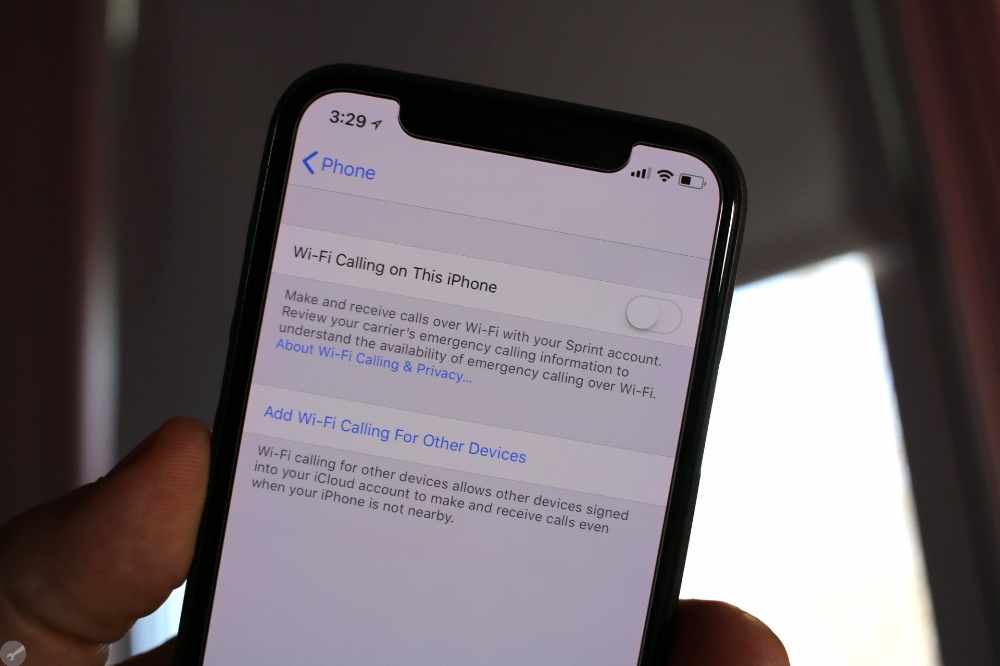
    Wi-Fi Calling is a feature on many modern smartphones that allows you to make and receive calls over Wi-Fi networks instead of using traditional cellular networks. This can be especially helpful if you live in an area with poor cell coverage or have a weak cellular signal. However, some people may not want to use this feature, so it’s important to know how to turn it off.

    How to disable WiFi calling on iPhone and iPad

    1. Open your iPhone and then go to settings options from the Menu bar.
    2. Scroll down and click Cellular
    3. Look for the Wi Fi Calling Feature.
    4. You can either see this option from the Calls menu bar under Settings
    5. Click on the Green button and let it to off to make it disable for Wi Fi Calling
    6. If it does not show green bar next to it, then it means it is already off.
    7. That’s it, the Wi Fi calling on your iOS device now disabled.

    How to disable WiFi calling on Android devices

    1. Click on the Setting icon from Menu
    2. Now click on Network and then click on SIM card settings options.
    3. Once the settings open, click on the SIM card for which to disable WiFi Calling
    4. Now scroll down and move to the WiFi Calling option in the same settings page
    5. Click on to disable and then save the same with the confirm button.
    6. That’s it, the calling on Android devices disabled.

    How to disable WiFi calling on Samsung phones

    Samsung devices has different settings compared to other android devices. So, switching off wifi settings may have a different and simpler process.

    1. From your phone’s settings app, select Connections, which should be at the top of your settings menu.
    2. You should see Wi-Fi calling as an option in the following menu, with a toggle switch right next to it.
    3. If it’s blue, that means Wi-Fi calling is currently turned on; disabling Wi-Fi calling will turn the toggle switch gray.
    4. Thats it.

    Conclusion

    WiFi calling is a great way to keep in touch with your friends and family, even when you don’t have access to a reliable cellular signal. However, if you don’t need or want to use WiFi calling, it’s important to know how to disable the feature. On iPhones, you can disable WiFi calling through the Settings app. Android users will need to look in their system settings, while Samsung users should look in their connection settings. With these simple steps, you can easily turn off WiFi calling and ensure that your phone is using the best available network connection.

  • How to ping Apple watch

    How to ping Apple watch

    The Apple Watch is a great device that offers many features, but sometimes it can be difficult to locate if you’ve misplaced it. But, the Apple Watch has a handy “ping” feature that makes it easy to track down your watch. Pinging is a great way to easily locate your apple watch when you don’t know where you’ve left it. Whether you left it in another room or simply can’t remember where you put it, pinging your Apple Watch can help you find it quickly and easily.

    What is Apple watch ping

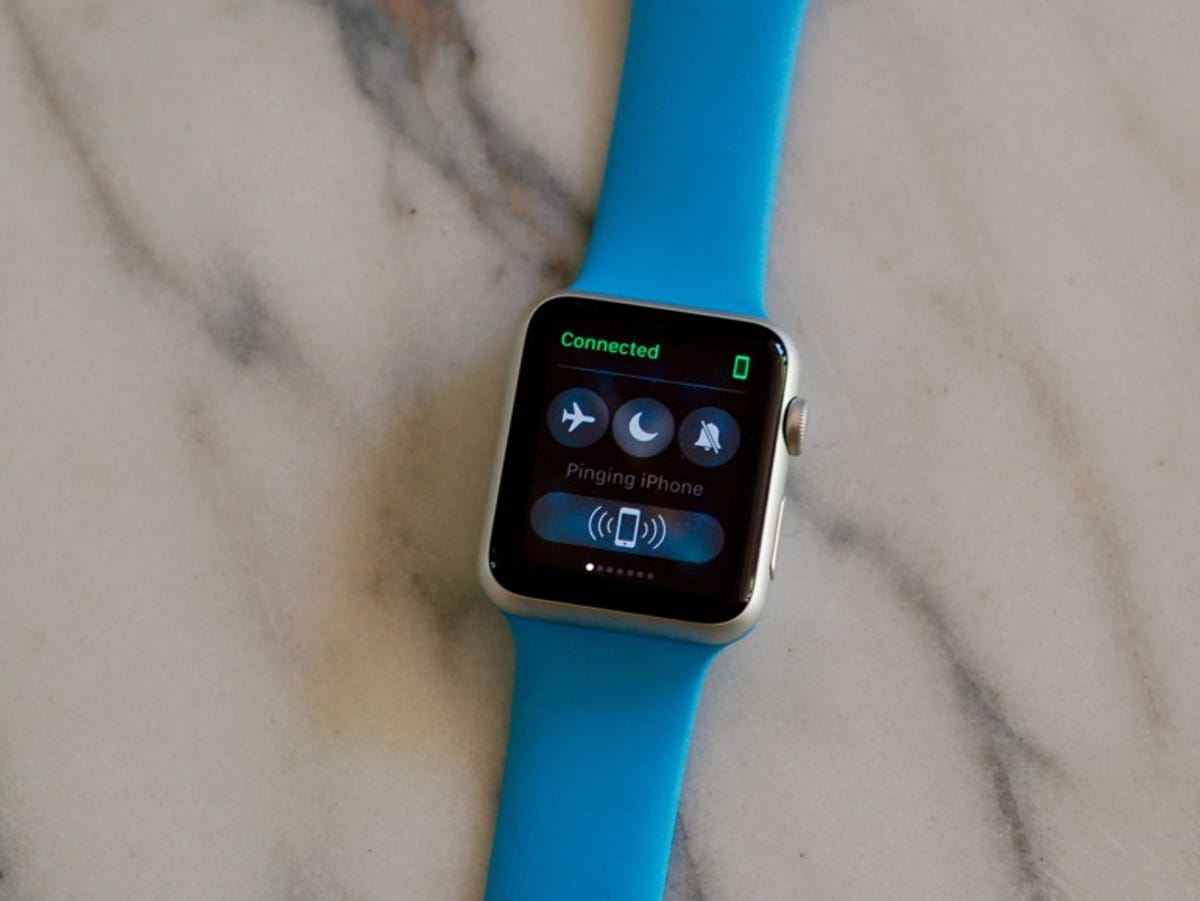
    Apple Watch ping is a feature of Apple Watch which allows you to locate your watch from any other apple device. It works by playing a sound on the Apple Watch, even if it is in silent mode. This can be very useful for when you lose your Apple Watch or if you just need to locate it in a room full of people. It’s also helpful if you’re out and about and your Apple Watch isn’t nearby.

    Why should you ping your apple watch?

    It is a great way to locate a lost Apple Watch. If you misplaced it somewhere around your house or office.

    • It can also be used to keep track of the whereabouts of your watch if you travel a lot.
    • Pinging your watch can also help you in situations where you’ve misplaced your phone and need to know where it is.
    • You can also use the ping feature to let someone else know you’re nearby.
    • Pinging your watch can be a useful tool for those who work in places with large crowds and noisy environments.

    Pinging your Apple watch

    To be able ping your apple watch using your iPhone, you need to first enable “Find my iphone” in your settings. To do that,

    1. Go to the Settings app.
    2. Tap on your name.
    3. Select “iCloud.
    4. Swipe down and tap Find My iPhone.
    5. Toggle on Find My iPhone.

    How to ping Apple watch

    Now Find my iPhone is on and you can easily ping your iPhone. To do that,

    1. Launch the “Watch app on your iPhone.
    2. Select your Apple Watch.
    3. Tap on (i) next to the Apple Watch.
    4. Toggle on Find My Apple Watch.
    5. Then turn on, Turn On Send Last Location.

    Why can’t I find my apple watch after pinging

    It can be frustrating if you cannot locate your Apple Watch after pinging. There are several reasons why you may not be able to find your Apple Watch after you have pinged it.

    • You may not find your Apple Watch is because it is not in range of your iPhone. If your Apple Watch is out of range, then it will not be able to receive the ping and you won’t be able to locate it. Make sure that your Apple Watch is within Bluetooth range of your iPhone before attempting to ping it.
    • Make sure that your Apple Watch is not in Do Not Disturb mode. This means that any sound or alert won’t be emitted from your watch, making it impossible for you to locate it. To check that this isn’t the case, go to the Settings on your Apple Watch and select “Do Not Disturb”.
    • If you recently changed the sounds on your Apple Watch then this could also affect its ability to be located. This is because the ping is dependent on the sound associated with the alert, so if this has changed then the ping won’t be loud enough for you to hear. To fix this, go to the Sounds settings on your Apple Watch and make sure that the sound is still set up correctly.
    • If you are using multiple Apple Watches then it could be possible that you are trying to ping the wrong one. Make sure that you double check that you are pinging the correct device before giving up on trying to find it.

    Conclusion

    Pinging your Apple Watch can be an effective way to locate it if it is lost or misplaced. It can also be used to find out if it is too far away from your phone or if you just want to make sure it’s on you. Pinging your Apple Watch is easy and only takes a few steps. Make sure you have the “Find My” app on your iPhone, then open the app and tap “Play Sound” to send out a ping to your Apple Watch.

  • How to cut a video on iPhone

    How to cut a video on iPhone

    Trimming or cutting a video on your iPhone is a quick and easy way to create personalized content. Whether you’re creating a short clip to share with friends, or a professional-level edit for a project, trimming and cutting videos on an iPhone can help you customize and enhance your content. For basic tasks like trimming or shortening videos and cutting out unwanted clips, you don’t need fancy editing software. In fact, most simple video editing tasks can be done in either the Photos app or iMovie.

    How to cut a video on iphone in the Photos app

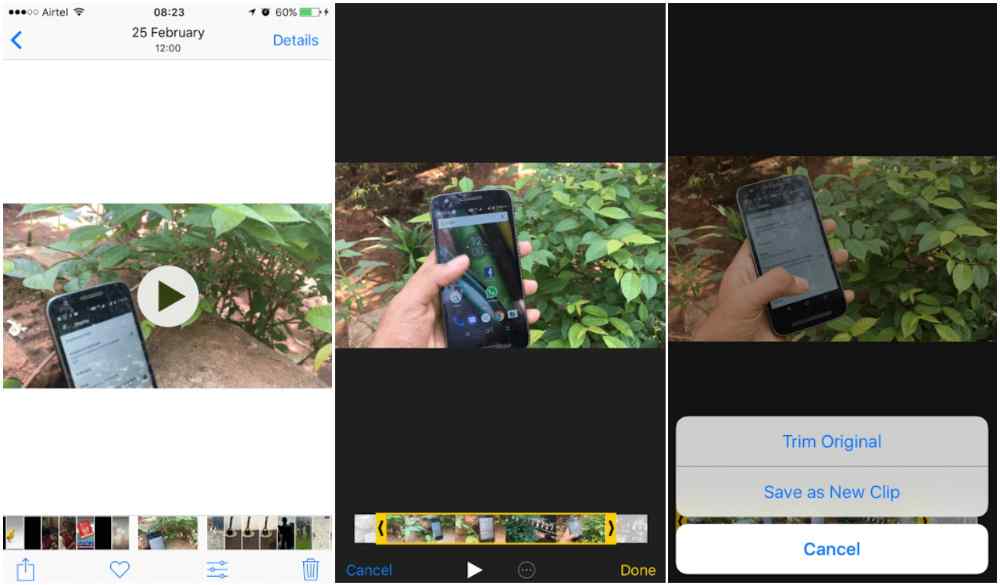
    The Photos app is not an advanced video editing tool, but it does allow for some easy video edits. To use it to cut or trim a video,

    1. Open the video you want to edit in the Photos app.
    2. Tap Edit.
    3. Tap the video camera icon at the bottom of the screen.
    4. See the slider underneath the video? Hold your finger on either of the arrows and slide them inward to effectively shorten your video clip.
    5. When you’re finished, tap Done.
    6. A pop-up menu will appear. Choose Save Video or Save Video as New Clip, depending on your preferences.

    How to cut and trim video clips using iMovie

    iMovie is a powerful app that can be used to cut or trim a video on iphone. It can also be use to split and rearrange a video. The phone app cant be used for all this but with iMovie, you can do a lot on your video. You first visit the apple store and download the iMovie app. After that, if you want to use it to cut or trim a video,

    1. Open iMovie on your iPhone and select or add the video clip that you want to cut.
    2. Your video will appear with the timeline underneath.
    3. You will see a vertical whiteline called the playhead and that is where the editing will take place.
    4. Use your finger to move the playhead to the spot where you want to cut your video.
    5. Tap the playhead, then tap cut at the bottom of the screen.
    6. iMovie will create a cut between the two newly created clips.
    7. Hold your finger on the clip you want to move and drag it to the left or the right on your movie timeline. When you have it in the proper position, take your finger off the clip.
    8. Tap Done to save your video in iMovie.
    9. Tap the upload icon to save your video to your photo library.

    Other apps that can be used to cut or trim your videos on iphone

    1. iMovie

    This is the official Apple video editing app for iPhones and iPads.

    2. Splice

    Splice is a powerful video editing app created by the folks at GoPro that can be use for cutting and trimming your iPhone videos.

    3. Video Crop

    Video Crop is a free video trimmer app that allows you to quickly crop, trim and edit videos on your iPhone or iPad.

    4. Videoshop

    Videoshop is a popular video editing app that offers a wide range of features, including the ability to trim or cut videos.

    5. InShot

    InShot is an all-in-one video editor and photo editor that can be used to trim, merge, rotate and flip videos on your iPhone or iPad.

    6. Adobe Premiere Rush

    If you’re looking for a more powerful video editing experience on your iPhone or iPad, Adobe Premiere Rush might be the perfect choice.

    Conclusion

    Cutting a video on your iPhone is a great way to make the perfect clip for sharing with friends and family. With just a few simple steps, you can easily trim down longer videos or create snippets of any length. By taking advantage of the built-in trimming feature on your iPhone, you can create amazing and memorable clips from any video.

  • How to reset notes password

    How to reset notes password

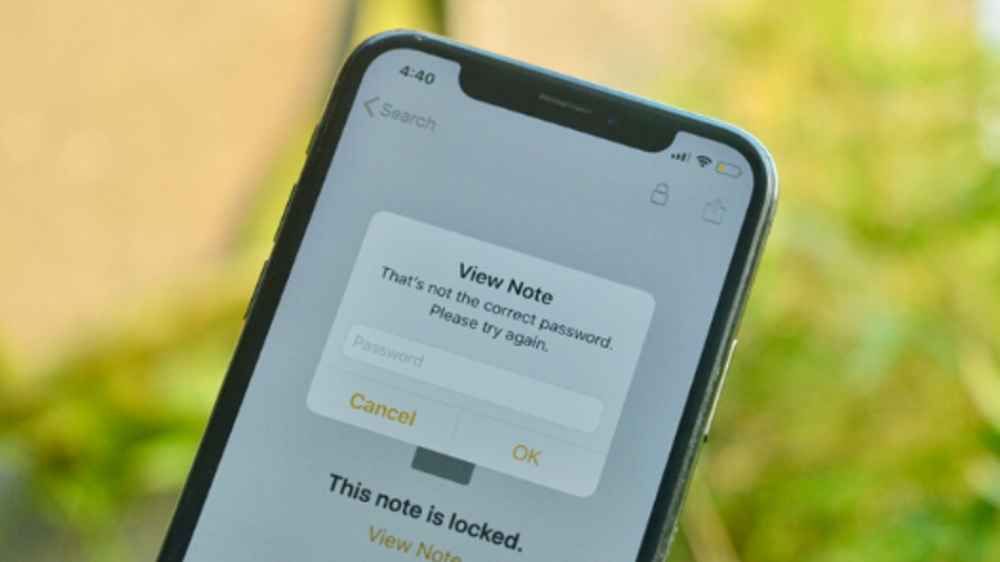
    Notes password is a feature that Apple has included in its devices to help keep your notes secure. This password is used when you open the Notes app on your iPhone, iPad, or Mac. It’s an extra layer of security to protect your data from unauthorized access. With this password set, anyone who tries to open your notes will be asked to enter the correct password before they can gain access to your content.

    If you have a password on your Notes, it can be easy to forget your password if you don’t use it regularly. If this is the case, you may be wondering how to reset your Notes password. Forgetting your password to Notes can be frustrating, especially when you need to access an important document or file. But, resetting your Notes password is a straightforward process that requires minimal effort.

    How to reset your notes password on your Iphone

    1. Open the Setting menu of your iPhone or iPad.
    2. Find Notes and Click to open it.
    3. Hit on ‘Password’
    4. Click on ‘Reset Password” button (highlighted with red colour)
    5. Enter your Apple ID Password on the next screen.
    6. Tap “Reset Password” from the pop-up option.
    7. On the reset password screen, enter your new password, verify by typing the same password again.
    8. Click on ‘Done’ to save the reset password information.

    How to Change Notes Password on iPhone and iPad?

    In the event you want to change your notes password for any reason, follow the steps below;

    1. Open Setting menu
    2. Go to Notes
    3. Click on Password
    4. Tap on ‘Change Password’
    5. On the change password screen, enter your old password, type the new password, enter the new password again.
    6. Hit ‘Done to save changes.
    7. This will update all your notes with the recently changed password on which you have applied the lock feature.

    Importance of notes password

    1. Notes password helps protect your personal information and data from being accessed by unauthorized persons. It ensures that only those who know the password can access the notes content.
    2. Keeping a notes password helps to keep your data safe from online threats and malicious attempts to access it.
    3. Having a notes password allows you to easily remember it so that you don’t have to go through the hassle of remembering various passwords for each application.
    4. Having a notes password prevents unauthorized access to your notes which might be stored on a device or in the cloud. This helps keep your data safe and secure from potential breaches or hacking attempts.

    Conclusion

    Forgetting your notes password can be a real hassle. It’s important to keep your notes safe and secure, so creating a strong password is a must. Resetting your notes password is easy. Just follow the simple steps outlined above, and you’ll have a new password in no time.

  • Mach Online Loan: How to Apply, Requirements, App and more

    Mach Online Loan: How to Apply, Requirements, App and more

    Are you looking for a loan but don’t want to go through the hassle of visiting a bank or other traditional lender? Mach Online Loan might be the perfect solution for you! Mach Online Loan is an online lending platform that makes it easy and convenient to apply for loans from the comfort of your own home. In this blog post, we will discuss everything you need to know about Mach Online Loan, including how to apply, the requirements, and the app.

    Requirements

    1. Applicants must be at least 18 years of age.
    2. You must provide valid government-issued identification card.
    3. You must have an active MoMo account with your name.
    4. You must have a steady and verifiable source of income (such as a job, self-employment, benefits, etc.).
    5. You must be a Ghanaian.
    6. You must have a valid email address.
    7. You must have a valid phone number.

    How to download the app

    1. Visit google playstore on your phone
    2. In the search bar section, type in MachLoan and search.
    3. The app will show up after a successful search.
    4. Click on download and wait for the app to successfully download.
    5. Now, open the app and register using your mobile number
    6. Wait for a verification code and type it inside where required
    7. You will now the given a dashboard where you can apply for your loan.

    How to apply

    The application process for MachLoan is simple. To obtain a loan, follow the steps described below.

    1. Launch the Mach Loan mobile App on your phone.
    2. On the Mobile App, click on request for funds.
    3. Apply by filling the loan application with your personal and mobile money account details.
    4. Your application will be reviewed and if you qualify, your requested amount will be disbursed into your MoMo wallet immediately.

    The highest and lowest loan you can get from CocoaLoan

    On Mach Loan, your initial loan request start from GHS 100 the more you request and pay on time, the higher your request goes. The maximum you can request is GHS 5,000.

    Mach Loan interest rate

    Mach loan has a daily interest rate: 0.0057% and a aximum annual interest rate APR of 20.55%.

    Benefits on applying for Mach Loan

    Below are some of the benefits you can enjoy when you decide to join the Mach Loan family.

    1. Fast and convenient
    2. Flexible repayment terms
    3. Low interest rates
    4. No hidden fees
    5. 24/7 Customer service
    6. Online support

    How to repay Mach Loan debt

    1. Open the loan app.
    2. Once you are in the Mach Loan app, you will see ‘Repayment.’
    3. Click on that button.
    4. On the next page, they will show you the amount you are supposed to pay.
    5. To proceed, click on ‘Repay Now.’

    How to repay Mach Loan using MTN mobile money Wallet

    You can repay your Mach Loan directly using MTN MoMo. To do so,

    1. Dial *170#
    2. Select 1 (Transfer Money)
    3. Type 1 (momo user)
    4. Input Users Number (mach loan mobile number)
    5. Confirm number
    6. Enter the amount
    7. Enter reference
    8. Confirm transaction with your MoMo PIN

    Mach loan contact

    For enquiries or any questions, contact mach loan service below:

    • Address: F27H+CH5, Techiman-Tamale Rd,Tanoso, Ghana
    • Tel: +233 0508647578
    • Email: [email protected]

    Conclusion

    The Mach Online Loan is a great way to access the funds you need quickly and securely. With the Mach app, you can easily manage your loan, track payments, and more. The application process is simple and straightforward, and all applicants must meet certain requirements to qualify. By taking the time to understand the process, you can make sure that the loan fits your needs and budget. With the right loan and careful planning, you can get the financial help you need without sacrificing your long-term goals.

  • GHLending Instant Loan: How to Apply, Requirements, App and more

    GHLending Instant Loan: How to Apply, Requirements, App and more

    GHLending is an online lender that offers instant loans to individuals in need of quick cash. The loan application process is now available through the mobile app, making it even easier for those looking for a fast and easy solution to their financial needs. GHLending specializes in short-term lending, meaning that you can apply for and receive funds in as little as 24 hours.

    Their instant loan service is designed to provide you with the money you need, when you need it. Through GHLending, you can get up to GHS 5000 without having to worry about long wait times or complicated paperwork.

    Requirements

    1. Applicants must be at least 18 years of age.
    2. You must provide valid government-issued identification card.
    3. You must have an active MoMo account with your name.
    4. You must have a steady and verifiable source of income (such as a job, self-employment, benefits, etc.).
    5. You must be a Ghanaian.
    6. You must have a valid email address.
    7. You must have a valid phone number.

    How to download the app

    1. Visit google playstore on your phone
    2. In the search bar section, type in GH Lending and search.
    3. The app will show up after a successful search.
    4. Click on download and wait for the app to successfully download.
    5. Now, open the app and register using your mobile number
    6. Wait for a verification code and type it inside where required
    7. You will now the given a dashboard where you can apply for your loan.

    How to apply

    The application process for GH Lending is simple. To obtain a loan, follow the steps described below.

    1. Download the GH Lending app from the Google Play store.
    2. Launch the GH Lending mobile App on your phone.
    3. On the Mobile App, click on request for funds.
    4. Apply by filling the loan application with your personal and mobile money account details.
    5. Your application will be reviewed and if you qualify, your requested amount will be disbursed into your MoMo wallet immediately.

    The highest and lowest loan you can get from GHLending

    On GH Lending, your initial loan request start from GHS 100 the more you request and pay on time, the higher your request goes. The maximum you can request is GHS 5,000.

    GH Lending interest rate

    GH Lending has a daily loan interest rate of 0.04% and an annual loan interest rate (APR) of 4%-35%.

    Benefits on applying for GHLending

    Below are some of the benefits you can enjoy when you decide to join the GHLending family.

    1. Fast and convenient
    2. Flexible repayment terms
    3. Low interest rates
    4. No hidden fees
    5. 24/7 Customer service
    6. Online support

    How to repay GH Lending

    1. Open the loan app.
    2. Once you are in the GHLending app, you will see ‘Repayment.’
    3. Click on that button.
    4. On the next page, they will show you the amount you are supposed to pay.
    5. To proceed, click on ‘Repay Now.’

    How to repay GH Lending using MTN mobile money Wallet

    You can repay your GH Lending directly using MTN MoMo. To do so,

    1. Dial *170#
    2. Select 1 (Transfer Money)
    3. Type 1 (momo user)
    4. Input Users Number (GHLending mobile number)
    5. Confirm number
    6. Enter the amount
    7. Enter reference
    8. Confirm transaction with your MoMo PIN

    GH Lending contact

    If you have any feedback, questions or concerns about GH Lending services, please feel free to contact them below:

    Address: JRGH+73C, Unnamed Road, Accra, Ghana

    Email: [email protected]

    Conclusion

    GHLending’s Instant Loan is a great solution for those who need a quick loan. With no credit check and no collateral needed, you can get the funds you need in minutes. The application process is simple, and the requirements are minimal. Also, there’s an app to make it even easier. If you need some extra cash quickly, this could be the solution for you.

  • Moco Mobile Cash Loan – How to Apply, Requirements, App and more

    Moco Mobile Cash Loan – How to Apply, Requirements, App and more

    Are you looking for an easy and convenient way to access cash when you need it? Moco Mobile Cash Loan is an innovative solution designed to help you meet your short-term financial needs. With just a few clicks, you can apply for a loan from the comfort of your home or office.

    Moco Mobile Cash Loan is a fast and convenient way to get money quickly. It is an innovative loan service available on your mobile phone that allows you to borrow money with just a few clicks. Moco Mobile Cash is a service under Sikahub.

    It is designed to provide you with quick access to cash, with minimal paperwork and no hassle. With Moco Mobile Cash Loan, you can get the money you need to cover unexpected expenses or bridge the gap until your next paycheck. The application process is now available through the mobile app, making it easier than ever to apply for a loan and get the money you need.

    Requirements

    1. Legal residents of Ghana
    2. Must have a Ghanaian identification card.
    3. Must be 18-65 years old
    4. Have the ability to work

    How to download app

    1. Visit https://www.mocoghana.com
    2. Scroll down until you see APP Download.
    3. Click on it to download
    4. Open the app and register with your mobile number
    5. You will be required to verify your number
    6. Insert the verification code where required
    7. You will be provided with a dashboard to apply for the loan.

    How to apply

    1. Launch the Moco mobile App on your phone.
    2. On the Moco Cash Mobile App, click on request for funds.
    3. Apply by filling the loan application in the APP with your personal and mobile money account details.
    4. Your application will be reviewed and if you qualify, your requested money will be disbursed instantly into your account.
    5. Repay on time and get a higher amount for your next loan

    Product Advantages

    1. High quota: the maximum quota for approval is GHS 5, 000
    2. Simple operation: fill in the application information on the mobile phone and submit the application quickly.
    3. Revolving loan: good repayment performance, you can continue to obtain products with lower rates and higher quotas

    The highest and lowest loan you can get from Sikapurse

    On Moco Mobile Cash, your initial loan request start from GHS 100 the more you request and pay on time, the higher your request goes. The maximum you can request is GHS 5,000.

    What is the interest rate on Moco Mobile Cash loans?

    Moco Cash has a loan repayment term of 90 to 180 days, a loan interest of 19.45% and 31.29% per annum with a service rate of 1% to 3%.

    How to repay Moco Mobile Cash loan

    1. Open the loan app.
    2. Once you are in the app, you will see ‘Repayment.’ Kindly click on that button.
    3. On the next page, they will show you the amount you are supposed to pay.
    4. To proceed click on ‘Repay Now.’

    How to repay SikaPurse loan using MTN mobile money Wallet

    The following instructions show how you can repay your Moco Mobile Cash loan with MTN Mobile Money Wallet:

    1. Dial *170#
    2. Select 1 (Transfer Money)
    3. Type 1 (momo user)
    4. Input Users Number
    5. Confirm number
    6. Enter the amount
    7. Enter reference
    8. Confirm transaction with your MoMo PIN

    Moco Mobile Cash contact details

    Incase you want to reach out to Moco Mobile Cash customer care for clarification follow the contact details below:

    Company Address: Lame Dwaahe St, Adenta, Accra

    Contact Number: +233 302234562

    Contact Email: [email protected]

    Website:https://www.mocoghana.com

    Conclusion

    Moco Mobile Cash is a fast, secure, and convenient way to get cash when you need it most. With no credit check required and the ability to apply from anywhere with a mobile device, it’s an ideal solution for those who are short on cash and don’t have time to wait for traditional loan applications. Be sure to read all of the requirements for the loan and make sure that you meet them before applying. That way, you can make sure that you get your money as quickly and conveniently as possible.