Category: Guides

  • Problems with your Sim Card? Learn to protect and solve Sim problems

    Problems with your Sim Card? Learn to protect and solve Sim problems

    Your Sim Card Got Corrupted? Here Is the Solution

    Purchase A Card

    Purchase a card reader, online using a visa card, Sim card reader in America is worth 7.98 dollars. Buy one suitable for your Sim card. Sometimes, you may not get a precise one for your Sim card, you just need to manage, since not all can fit at a goal. The price varies depending on the size or the shape you desire.

    Connect Card Reader to Computer

    You need to connect your card reader to your computer. Patiently, read and obey the installation guidelines very promptly. This is because some sim card readers are readily accessible once plugged, meanwhile most require appropriate software with respect to the reader.

    Insert Sim into Card Reader

    Gently put your Sim card into your Sim card reader. One must be careful since the Sim card will only fit half way into your reader. Your Sim card will not articulately fit into the card reader. Care must be taken when inserting. Kindly follow precautions to avoid damaging your device.

    Configuration and Back UP

    Click to open your Sim card reader program on your computer. There are diverse options one can select for repair. Conveniently, you configure your card, and also back up history that has both been stored and erased on the card.

    Gently Insert Sim Card into Your Phone

    Close the program and hurriedly remove your SIM card from the SIM card reader. Insert your Sim card into your phone.  So easy, right?

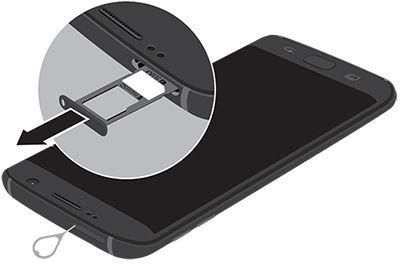
    There are various ways to properly insert a sim card in a phone. Check your phone's manual to be sure.
    There are various ways to properly insert a Sim card in a phone. Check your phone’s manual to be sure.

    Taking Proper Care of Sim Cards

    • Avoid frequently unmounting of your Sim cards.
    • Check and make sure your device is switched off as at the time of removal.
    • Don’t scratch or rub your Sim card against any metallic object.
    • Avoid, sim cards from coming in contacts with any liquid substance.
    • Keep sim cards away from heat or heat source.
    • Don’t cut out Sim cards, to fit your slot. You may end up destroying your Sim card. Few succeed, you may not. Visit the nearest networking office for such services.

    Did you break your sim? Read this

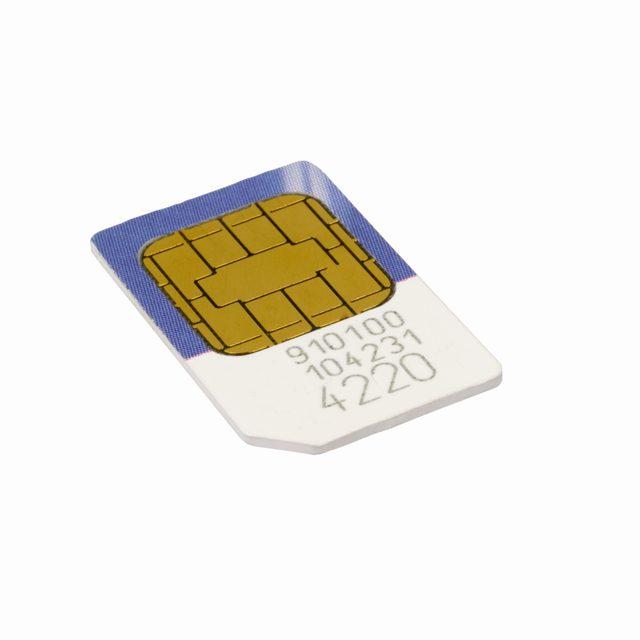
    Certain activities may leave your sim card broken. This could be forceful inserting and removal of sim cards from your phone. The Sim card is made of rubber and a semi metallic plate. When you observe, the metallic plate is in the compartment, every part has its role to play.

    So, any irresponsible handling may lead a part from not working, hence affecting the work chain in all. You can keep your Sim card in a cotton wool nicely when not in use. One must make sure, the cotton wool is dried up, and has no liquid content to avoid rusting. Now, pay extra attention to this, when your Sim card is  broken,

    Now, pay extra attention to this, when your Sim card is  broken,

    Check very well to ascertain whether or not it’s really broken. In some cases, it could be a film of dirt cast on the silver plate. In such case, you only need to wipe it with a clean cotton. Immediately you see a message like “sim error” or something similar, just remove your sim and reinsert it and switch on your phone.

    If reinserting it does not remedy the situation, call the customer care service to report the matter. They will help you get a new Sim card with the same mobile number and most importantly back up your Sim card history but before such actions, you will be invited to their office.

    Your Lost Simcard Could Be Used by Fraudsters, Read This to Prevent It

    In Ghana, most mobile users are oblivious to going through proper registration procedure to acquire a Sim card. This is where fraudsters take advantage. You should quickly inform your service provider about your lost sim card, to either block it permanently if you don’t want to use anymore.

    It’s very unsafe to stay without reporting. Firstly, you must register your Sim card with your real name and details by using a valid national identification card either voter’s id or health insurance card.

    Now, if you just found out someone is using your already lost sim card, just call your network provider for proper actions to be administered.

  • Laptop Hacking: Secrets you must know and how not to be a victim

    Laptop Hacking: Secrets you must know and how not to be a victim

    You may never know, but someone may be spying on you, as you go naked or undress behind your laptop in the comfort of your room. That’s the severity of Laptop Hacking

    Finding yourself in such a situation may give you everything but definitely not a smile.

    Yes! Hacking is that terrible.

    Hmmm! It’s unfortunate but it keeps banging the doors of our nation because its remedy is buried in some long articles. Power brokers and destitute alike have been caught in what many call sex-tapes.

    Such footages have flooded social media space since the days of yore. Interestingly, this devil of sex-tapes crops up its ugly head when nationals, are still biting the gossip of existing ones. I’m not talking about sex-tapes but am notifying, what one could be reduced to if knowledge is not sought, even for married persons. After all, this is not taught at marriage counselling sessions.

    Many of us have doubted a good number of these victims who openly confessed they don’t know how the tape came into the public space because they were not filming themselves in the act.

    If you are looking for more help to overcome this kind of situation should you fall a victim, you can look up BetterHelp.

    It’s also very disturbing, the amount of money stolen through hacking. On July 17th, 2017, CNBC online news portal reported a more than $7 million hacked of crypto-coin offering from CoinDash Company.

    It’s that serious!

    Daily, many computers in Ghana, Africa and all over the world and the hacking of other gadgets, continue to go undetected.

    It’s for this reason that I’ll cut the chase and insightfully engage you on the modus operandi of hackers and possible solutions.

    To prevent Laptop Hacking, the first step is always to think Safety.
    To prevent Laptop Hacking, the first step is always to think Safety.

    Some Laptop Hacking Red Lights and their solutions

    Promptings for access to programs you do not know.

    It’s very imperative to know that, computer security programs and firewalls help to secure the computer. They are like, security men that bounce people at entrances social functions, but they can overcome by a higher force. These security systems can be compromised when certain links are opened.

    Some hackers deliberately, programme viruses on websites.

    A computer which accesses this website becomes infected and its security systems are rendered dormant. Sites such as BitTorrent.com, adult music, and porn sites may pop up for you to accept.

    Shortened URLs such as twitter.com may be corrupted by hackers to twitteer.com and laced with a virus to corrupt your system the more if you accept them.

    To explain, a Firewall is what filters information from the internet to your computer. If the information contains viruses, it won’t be allowed access by the firewall.

    Solution

    Frequently update your antivirus and make sure your firewall is on/ secured by putting it on auto-update, this will guard against viruses created by hackers. It’s interesting to note that hackers develop new viruses almost every day.

    Changed computer passwords

    The password is your rightful key to the entrance of your room, in this context your computer. If the locker to the door has been changed, that means there has been a wrongful entry.

    Some hackers add more or one account so that they can gain entry at their will and retrieve the owners’ information.

    Solution

    If you observe such developments, report to the company in charge of that service and they will reset your account and hand legitimate security over to you. The company providing the service, for instance, yahoo, outlook and Google cannot change your passwords on their own volition only a hacker does that.

    Your mouse moves to make selections.

    In regard to my premise, this cunning move is used by some hackers to activate cameras of compromised computers. These cameras are activated without the knowledge of the owner. Bank transactions are done, letters are sent to business associates on one’s behalf in this phase.

    Solution

    One upon detection should put off the computer, or off the internet connection.

    Finally,

    Your doors can be locked and physical, social security may be beefed up but technical security can expose you to fraud among others. Most hacking is done via the internet, so please be careful.

    Owners of computers have a higher responsibility than non-owners and must be on the guard when their passwords change, their mouse move to make selections by themselves and when they continuously receive popups to open certain sites especially some torrent and porn sites. Analyse your computer.

  • Tigo Cash: How to Register, Send and Withdraw Money and Charges

    Tigo Cash: How to Register, Send and Withdraw Money and Charges

    Tigo Cash: What is it?

    Tigo Cash is a digital payment system by Tigo Ghana that relies on the telecommunication network’s already existing infrastructure to make payments, send and receive money. It is mobile financial service tailored to suit and gives answers to financial needs and facilitate a digital payment lifestyle for all subscribers on the Tigo Network.

    How to Register for Tigo Cash

    Office Registration

    In this case, you need to visit any nearby Tigo office or any Tigo customer care service centre. For the due process of registration.

    Self-Registration

    While you relax in the comfort of your home, enter *510# and choose option “8” to register.


    Tigo cash allows you to conveniently and securely send and receive your cash.
    Tigo cash allows you to conveniently and securely send and receive your cash.


    How to Send Money on Tigo Cash

    1. Dial *100#, Tigo menu will be displayed.
    2. Select option “1”, “send cash”
    3. In the space provided, enter the mobile number of the person, you are sending money to.
    4. Enter the amount of money in Ghana Cedis (Example: 20.50 or 17 or 17.00)
    5. The money will be sent; the person will receive a notification confirming to have received the amount of money.
    6. If the person is not registered, the person must show the message to any Tigo agent or Tigo customer care service centre to receive his or her money.
    7. The agent will then receive, an SMS stating that the transaction is successful

    Note: If the transaction is unsuccessful then it means you have insufficient balance or you entered an incorrect mobile number or pin.

    How to Withdraw money on Tigo Cash

    Go to any Tigo cash customer service centre, or anywhere you see Tigo agent sign board. The agent will help you redraw the money through the following steps.

    1. Enter *100# to access the Tigo Menu.
    2. In the menu, select option “3” “withdraw Cash”
    3. Enter the “5digits” agent code or mobile number of the agent.
    4. Enter the amount of money you want to withdraw in Ghana Cedis.
    5. Enter your secret pin in the space provided.
    6. The agent will give you your cash.
    7. You will receive an SMS notifying you on the confirmation of the withdrawal, agent’s location, date and time of the transaction, your new Tigo Cash account balance and the reference number.

    The person withdrawing the money needs to go with any valid national ID to an agent’s shop or any Tigo customer service centre. If the person receiving the money is not registered on Tigo cash, the person only needs to show the SMS he or she received from Tigo cash as well as a valid National ID to receive his or her money. Simple!

    Tigo Cash Charges

    1. Cashing out at an agent’s shop is 1% of amount being cashed out
    2. Cashing out on your phone is 0.5% of amount being cashed out
    3. Sending to a non-mobile user is 1.5% of the amount being sent

    Conclusion

    Just like with MTN Mobile Money, Tigo Cash has numerous advantages. Top among them is convenience and security. If you are a Tigo Subscriber, it will be really cool to register for the service and let us know if you enjoy it or not.

    Don’t forget to share this post with your family and friends.

  • These apps are killing your battery, using all your data! Delete them now!

    These apps are killing your battery, using all your data! Delete them now!

    The worst apps for draining your Android smartphone’s battery life have been revealed in a new report by AVAST.

    Perhaps unsurprisingly, highly popular and feature-rich apps including Facebook, Netflix, WhatsApp and Google Maps all feature in the list.

    The report, which was put together by Avast, also identifies the worst apps for hogging data traffic, eating into storage and draining overall performance.

    You can improve your phone’s battery life by deleting some of the apps you don’t need.

    With Facebook, for instance, you can get rid of the app and use the social network in your web browser instead. You’ll have to keep hold of Messenger though.

    Switching from Google Docs, one of the worst apps for affecting overall performance, to Microsoft Word could be sensible too.

    Some apps, however, can’t be deleted. In this case, Avast recommends limiting notifications from them and reducing background features, refresh intervals and location data usage.

    The categories have been split into two lists – one for apps that automatically run at start-up and another for those that you’ll open yourself.

    The 10 worst apps for sapping battery life, which automatically run when you turn your phone on, are:

    1. Samsung AllShare
    2. Samsung Security Policy Updates
    3. Beaming Service for Samsung
    4. ChatON Voice & Video Chat
    5. Google Maps
    6. WhatsApp Messenger
    7. Facebook
    8. WeChat
    9. AppLock
    10. DU Battery Saver

    The 10 worst apps for draining battery life, which users run themselves, are:

    1. Samsung WatchON
    2. Samsung Video Editor
    3. Netflix
    4. Spotify Music
    5. Snapchat
    6. Clean Master
    7. LINE: Free Calls & Messages
    8. Microsoft Outlook
    9. BBC News
    10. ES File Explorer File Manager

    Samsung’s built-in Video Editor app has risen up the charts, and requires heavy processing and graphical resources.

    Meanwhile, the 10 worst apps for hogging data traffic, which automatically run when you turn your phone on, are:

    1. Facebook
    2. Instagram
    3. Yahoo! Japan
    4. Firefox Browser fast & private
    5. The Weather Channel
    6. WhatsApp Messenger
    7. Google Chrome
    8. DU Battery Saver
    9. Facebook Lite
    10. Google Play Home

    The 10 worst apps for hogging data traffic, which users run themselves, are:

    1. Netflix
    2. Spotify Music
    3. Snapchat
    4. BBC News
    5. LINE: Free Calls & Messages
    6. Microsoft Outlook
    7. Clean Master
    8. Samsung WatchON
    9. Amazon for Tablets
    10. PicsArt Photo Studio & Collage

    If you’re on a limited mobile data plan, the apps listed above are the ones you need to be wary of. Most worrying is the fact that you don’t even need to have the likes of Facebook, Instagram and Chrome open for them to munch through your data.

    The 10 worst apps for eating into storage, which automatically run when you turn your phone on, are:

    1. Facebook
    2. Instagram
    3. Amazon Kindle
    4. Facebook Messenger
    5. CosmoSia
    6. Google Quick Search Box
    7. Google Maps
    8. Google Chrome
    9. Firefox Browser fast & private
    10. Tango – Free Video Call & Chat

    The 10 worst apps for eating into storage, which users run themselves, are:

    1. Spotify Music
    2. Snapchat
    3. LINE: Free Calls & Messages
    4. Samsung Video Editor
    5. SoundCloud – Music & Audio
    6. PicsArt Photo Studio & Collage
    7. Amazon Shopping
    8. BBC News
    9. Clean Master
    10. Photo Grid

    Facebook, Instagram, and Kindle are particularly bad because they store local cache files, photos or books, says Avast.

    Apps from both Samsung and Google feature heavily in the lists, which may be because both companies’ offerings come pre-installed on a lot of Android devices.

    Finally, the 10 worst apps for draining performance, which automatically runs when you turn your phone on, are:

    1. Samsung AllShare
    2. ChatON Voice & Video Chat
    3. Samsung Push Service
    4. Google TalkBack
    5. Google Play Music
    6. Google Maps
    7. Google Play Newsstand
    8. Google Plus
    9. ChatON
    10. Google Hangouts

    The 10 worst apps for draining performance, which users run themselves, are:

    1. Samsung WatchON
    2. Google Docs
    3. Samsung Media Hub
    4. SHAREit
    5. Samsung Video Editor
    6. Flipboard
    7. Google Text-to-Speech
    8. Clean Master
    9. LINE: Free Calls & Messages
    10. Adobe Acrobat Reader

    “For many of us, our smartphones are the main device in our everyday lives. Knowing which of our favourite apps are the hardest-hitting on battery life, data usage, and storage is important so we can manage any that we are regularly using on our phones,” said Gagan Singh, the SVP and GM of mobile business at Avast.

    “This quarter’s ‘Most Improved’ accolade is shared between picture Messenger tool Snapchat, social media giant Facebook and music streaming behemoth Spotify,” the report says.

    “Having previously occupied three of the four top spots for performance-draining apps run by users and on start-up, these companies have made a concerted effort this quarter to improve.”

  • 3 Reasons why Snapchat is still way better than the new WhatsApp Status

    WhatsApp Status – the latest addition to the popular Instant Messaging App seems to be fun for a lot of users. Snapchat, on the other hand, is still very much popular and I personally have not seen any significant drop in the number of snaps my friends send in.

    This morning, my friends were speaking about how WhatsApp is killing snapchat and why snapchat will not survive the hit. I personally think when it comes to the art of storytelling on smartphones, Snapchat is leading the way. Today, I look at 3 ways snapchat is killing the storytelling game. Maybe in the future, WhatsApp may catch up. For now, snapchat is doing it all right.

    1. Photo and Video Filters

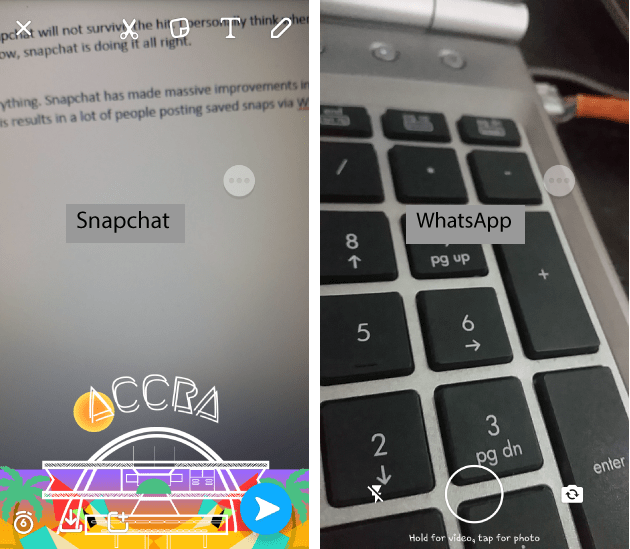
      In the world of mobile photography and videography, filters seem to be almost everything. Snapchat has made massive improvements in the scene of filters. Geofilter, Data, Color, Rewind, and all those funny faces and emotions – Snapchat is all about the filters. It’s quite sad WhatsApp does not offer any filters as at now and this results in a lot of people posting saved snaps via WhatsApp stories. What a pity!

    Filters are present in Snapchat but WhatsApp status does not have the feature
    Filters are present in Snapchat but WhatsApp status does not have the feature
    1. Snapchat Discover

      Snapchat combines the best of social networks, magazines, and television in a way that keeps users informed about the stuff that matters to them. This feature allows you to see stories from popular publishers like IGN, Buzz Feed, Cosmopolitan and Daily Mail. This helps users to get more from the app when stories get boring (which is gladly never the case for me). WhatsApp status does not have this fine feature, although I suspect it will be added soon – for the ads.

    The Snapchat Discover Feature
    The Snapchat Discover Feature
    1. Privacy

      This is one reason why it may take a long time for me to send a status on WhatsApp. Privacy is a big issue nowadays and WhatsApp’s privacy settings are just not enough. For one, a lot of people have contacts on their WhatsApp because they have saved their numbers one way or the other. Imaging sending a status that can be seen by your boss, friend, family, business friend and workmate? Snapchat solves this by giving you maximum control over you even add in the first place. Snapchat certainly handles privacy on stories better than WhatsApp.

    Well, WhatsApp just entered the storytelling game and sure has a lot of ways to improve; but right now, I would choose snapchat over it for a lot more reasons than the three mentioned in this post – including the lack of a data saver.

    Have you used the WhatsApp Status feature? What’s the experience so far?

  • How to go back to an Older Version of WhatsApp: A Step by Step Guide by Mfidie.com

    How to go back to an Older Version of WhatsApp: A Step by Step Guide by Mfidie.com

    Over the last days, WhatsApp has been trending with the latest update. This update adds additional functionality to the app in a revamp style of the “status”. Although a lot of Users are happy with the update and are enjoying the user experience, a few more people seem not to love the idea and would rather go for an older version of WhatsApp. Check out what people have been saying about the update on Social Media. Now how do you get a WhatsApp Older Version that you are used to?

    First of all, Whatsapp does not allow users to downgrade their version of the application. We would have to do this through the manual way, but relax, it is easy and not harmful. This guide applies to Android Smart Phone users only.

    WhatsApp does not want you to downgrade your app
    WhatsApp does not want you to downgrade your app

    How to Downgrade your WhatsApp

    1. On your Androip Phone, Go to Settings > Security and toggle on the Unknown Sources option that will allow you to install apps from third-party sources. The box next to “Unknown Sources” should be unchecked.
    2. You’ll get a prompt warning you that installing apps from unknown sources could put your device at risk. Tap on OK.
    unchecked. 2.You’ll get a prompt warning you that installing apps from unknown sources could put your device at risk. Tap on OK.
    unchecked.
    2. You’ll get a prompt warning you that installing apps from unknown sources could put your device at risk. Tap on OK.
    1. Open WhatsApp on your device and go to Settings > Chats > Chat Backup and click on the green back up option to take a complete backup.
    Open WhatsApp on your device and go to Settings > Chats > Chat Backup and click on the green back up option to take a complete backup.
    Open WhatsApp on your device and go to Settings > Chats > Chat Backup and click on the green back up option to take a complete backup.
    1. Uninstall WhatsApp from your device by going to Settings > Applications Manager and Tap on WhatsApp. Then Tap Uninstall.
    4.Uninstall WhatsApp from your device by going to Settings > Applications Manager and Tap on WhatsApp. Then Tap Uninstall.
    4. Uninstall WhatsApp from your device by going to Settings > Applications Manager and Tap on WhatsApp. Then Tap Uninstall.
    1. Open your smartphone browser and go to this link. It leads to WhatsApp version 2.17.60. Download V2.17.60 APK file. Download the file and wait for it to finish loading.
    5.Open your smartphone browser and go to this link. It leads to WhatsApp version 2.17.60. Download V2.17.60 APK file.
    5. Open your smartphone browser and go to this link. It leads to WhatsApp version 2.17.60. Download V2.17.60 APK file.
    1. You can click  on the notification to open the download for install or Go to the Downloads folder on your Android phone and tap on the downloaded APK file.
    1. On the next screen, tap Install at the bottom right to begin the installation.
    6.Go to the Downloads folder on your Android phone and tap on the downloaded APK file. 7. On the next screen, tap Install at the bottom right to begin the installation.
    6. Go to the Downloads folder on your Android phone and tap on the downloaded APK file. 7. On the next screen, tap Install at the bottom right to begin the installation.
    1. Open WhatsApp, Verify your number and Click on Restore. That’s it! You are back on the good old whatsapp.


    8.Open WhatsApp, Verify your number and Click on Restore. That’s it! You are back on the good old whatsapp.
    8. Open WhatsApp, Verify your number and Click on Restore. That’s it! You are back on the good old whatsapp.

    Once you do all these, remember to disable automatic updates for your WhatsApp. Would you go back to an older version of the app? Was this guide useful? Leave a comment.


  • How to use Twitter’s 140 Characters Rule to the fullest

    Everyone seems to be making updates and changes nowadays and Twitter has just made a big change to the way tweets work. This is important!

    Twitter is limiting what types of content will use up its 140-character limit.

    Slow down. This is twitter

    Now, @names in replies, media attachments (like photos, GIFs, videos) and quoted Tweets will no longer be counted against the valuable 140 characters that make up a tweet. This means that people can interact more and attach more without having to give up some bits of their text.

    Well Done Twitter. Now we can express ourselves more

    But how can you make use of these new changes? Well, here are a few tips.

    • Say More when you reply a tweet

    With this new update, @names will no longer count against the 140 characters. Now, whenever you start a tweet in reply to another user, you still have room to say everything you wanted to in your tweet, without having to consider the length of their Twitter handle.

    You could even add Media files at the end of the tweet and it would still not count into the 140 characters. Say more, express yourself better.

    • More Visuals, Engage your followers.

    A study by Twitter found that photos average a 35% boost in Retweets and videos get a 28% boost.

    Visuals give you more reach and engagements on twitter

    Although Visuals present numerous benefits, they had the tendency to reduce the length of what has to be said. That is in the past now! Photos, Videos and GIFS added at the end of tweets will not add up to the 140 Characters. Go on and add that meme.

    Why? At least we will manage this new update

    Do you love twitter? What do these updates mean to you? Tweet at me @Pidho1, let’s get the convo going. 

  • How to prevent someone from Hacking your Whatsapp using 2 step verification

    How to prevent someone from Hacking your Whatsapp using 2 step verification

    Hackers are always looking for ways to exploit individuals. Most people share sensitive information on social media every day and it is important to stay safe when using our various mobile apps. In this tutorial, we look at how to enable WhatsApp’s feature for Android, iOS and Windows Phone – the 2 step verification.

    When activated, this feature would enable you to verify your number on Whatsapp on a new device more securely by using a six-digit passcode.

    This would prevent someone from cutting you off WhatsApp and installing the app on a new device even if they successfully clone your phone number or have access to your text messages. It is strongly recommended to activate this feature and this tutorial will guide you right through it.

    When activated, this feature would enable you to verify your number on Whatsapp on a new device more securely by using a six-digit passcode.

    This would prevent someone from cutting you off WhatsApp and installing the app on a new device. It is strongly recommended to activate this feature and this tutorial will guide you right through it.

    How to Activate 2 Step Verification on WhatsApp to stop hacking

    1. Open Whatsapp, tap on the menu button and go to your settings. Click on “Account”

      Open Whatsapp, tap on the menu button and go to your settings. Click on "Account"
      Open Whatsapp, tap on the menu button and go to your settings. Click on “Account”
    2. Under account, tap on “two-step verification”. On the next screen, tap on “enable”. You will then be presented with a screen to enter a “6-digit passcode”.

      Under account, tap on “two-step verification”. On the next screen, tap on “enable”. You will then be presented with a screen to enter a “6-digit passcode”.
    3. Enter your 6 digit passcode and make sure it is passcode you can remember, but another person can not guess. Don’t use a birthday or an anniversary.
      On the next screen, you would be required to enter an email address which you can use to reset your passcode in any case you forget it.
      You could skip this, but I recommend you enter an email you have access to and confirm the email on the next screen.

      Enter your 6 digit passcode and make sure it is passcode you can remember, but another person can not guess. Don't use a birthday or an anniversary. On the next screen, you would be required to enter an email address which you can use to reset your passcode in any case you forget it. You could skip this, but I reccommend you enter an email you have access to and confirm the emal on the next screen.
      Enter your 6 digit passcode and make sure it is passcode you can remember, but another person can not guess. Don’t use a birthday or an anniversary. On the next screen, you would be required to enter an email address which you can use to reset your passcode in any case you forget it. You could skip this, but I recommend you enter an email you have access to and confirm the email on the next screen.
    4. Whatsapp will take a few seconds to apply the settings. Once completed, tap on “Done”. That’s great. You have enabled two step verification for your WhatsApp account.

      Whatsapp will take a few seconds to apply the settings. Once completed, tap on "Done". That's great. You have enabled two step verification for your whatsapp account.
      Whatsapp will take a few seconds to apply the settings. Once completed, tap on “Done”. That’s great. You have enabled two step verification for your WhatsApp account.

    Kindly note that if you ever receive an email to disable 2-step verification, but didn’t request it, do not click on the link.

    It could mean that someone is attempting to verify your phone number (hack you) on WhatsApp.


    Hackers will always try to steal your information and get into your WhatsApp. it is your responsibility to secure your account.

  • Review: Tuxler VPN

    Review: Tuxler VPN

    Tuxler VPN is becoming increasingly popular in Ghana for some reasons I do not know. Today, we look at what VPN is and review Tuxler.

    What is a VPN?

    VPN is an acronym which stands for “Virtual Private Network”. A VPN connection, gives a network of internet devices the ability to securely connect with others on the Internet as if they were part of the same private network. It’s Virtual. There are no physical cables present in this type of connection.
    VPN was mostly used to access sensitive information across large corporate networks, This time, it is available to almost all internet users.

    Why would you need to use a VPN?

    1. Anonymity on the internet

      There are many reasons a person would want to stay anonymous on the internet. Mostly for the bad, but a few more people stay anonymous for all the good reason. You would not want someone tracking you everywhere you go, right? Internet stalking could be dangerous. A VPN helps you to stay anonymous but you should also watch your browsing habits.

    2. Privacy

      There are some things that are best done Privately – like sharing sensitive information or online banking. Even when you are shopping online, you would need a certain amount of Privacy. Believe it or not, everyone on the internet is a target of a hack. A VPN can help you gain a fair amount of privacy when you surf the internet.

    3. Freedom and Security

      Not a lot of people would have imagined the Internet would get this big in the 21st The internet seems to be a real world, coupled with real world problems – Freedom and Security. VPN provides security by “hiding” your actual location. This gives you the freedom to say and do things you couldn’t have done with your real identity. Heard of Edward Snowden?

    Tuxler VPN in Use
    Tuxler VPN in Use

    My experience with Tuxler

    1. Easy to Set Up

      It was very easy to set up Tuxler on a PC running Windows 8.1, with the Google Chrome Browser. I opened Chrome, Installed the Tuxler app and Installed the Extension. That was all and Tuxler was well set up.

    2. Slow Internet

      Using Tuxler slowed my internet by more than 80%. Maybe because it was free and a paid version would be much better. The slow nature of Tuxler got my spirits down.

    Should you use Tuxler? It’s a matter of what you need to do. Are you willing to sacrifice speed for Privacy and Security? The Choice is yours. However, there are various other ways to be secured on the Internet without a VPN. They shall be covered in the coming weeks.

    Download Tuxler VPN from the Chrome Store and Start using now

    Have you used a VPN before or would you try one? Let’s hear what you make of Tuxler. Leave a comment below.

  • How to Send Secret Messages on Facebook

    How to Send Secret Messages on Facebook

    ​Facebook Messenger’s End-To-End Encryption Is Now Live For All Users after being in beta for some time now.

    WhatsApp (which is also owned by Facebook) already has end-to-end encryption. Now, Facebook has finally introduced this end-to-end encryption to it’s Messenger platform.

    You can also access the option when you click on “details” on any of your contacts on Messenger

    There are an estimated 900 million Facebook users and they can all now access this “Secret Conversations” option on Messenger. Secret Conversations is an opt-in (meaning you have to choose to use it) functionality that allows users to encrypt their messages so no one can read them, not even Facebook itself.

    Due to encryption, you can only use one device at a time to chat when using the feature.

    Once you make use of the Secret Conversations, you are presented with a message that reads, “Your messages are already secure, but Secret Conversations are encrypted from one device to another.”

    If your Messenger app has been updated, you will see a Secret option located on the top right-hand side of the “new message” screen.

    The encryption feature allows users to choose an expiration time for the message, like on Snapchat.

    Secret Conversations take you to a whole new chat screen

    The time period will range from five seconds to a complete day. This way, your messages will be deleted from the core as soon as the set time expires.

    You can choose how long it takes for your message to disappear after it has been seen.

    Remember, the feature is only available to those who have updated their apps. If you want to secure your conversations, then be sure to update your Messenger app.

    What do you think about this feature? Would you use it?