Category: Guides

  • How to break and survive Phone Addiction

    How to break and survive Phone Addiction

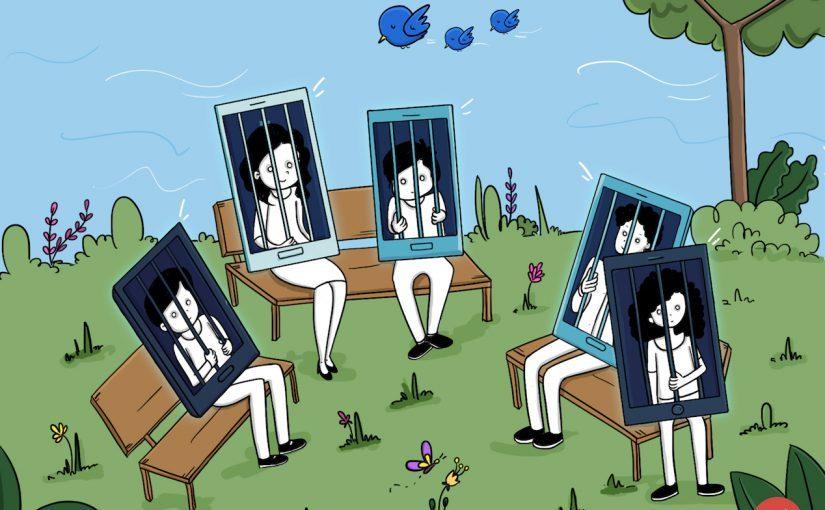
    It’s an open secret that phones which were supposed to be an accessory now take an entirety of time due most likely to social media.

    It isn’t common to find most students and sometimes SHS students on most of these social media and they spend most of their time just waiting for a WhatsApp message or scroll through Instagram photos of their celebrities in dressed they can never wear or using stuff they don’t have.

    Honestly, the idea of social media seems very silly on paper yet racks huge amounts of money due to their ability to keep most people hooked onto the apps. At one point in time, you begin to question if the amount of time on your phones can be justified. If you’ve gotten to this point in your life, then this article is here to show you how best to minimize your screen time.

    Self-actualisation

    The first step to getting out of an addiction is self-actualization.

    And by believing you are spending too much time on your phone we can work a path out. To solve a problem, we need to see how big a deal it is, so our beginning step is to find out how much screen time you spend and what apps spend the most time out of this.

    There are third-party apps on the Google play store and the Appstore such as Usage time, screentime and Zen screen.

    ZenScreen

    ZenScreen has one of the best interfaces you will see with a whole variety of cool features such as calm night(turns the phone off at an appointed time) and quiet time (which turned off the device for a short period of time ).

    It also has a feature to add other smartphones of your kids and regulate their screen on time. The downside is you have to pay for pro after a 3-month free trial but if you don’t have a problem paying 28 cedis a month($4.99) or 270($47.98) a year I guess it becomes the best for you.

    Usage time has a subtle look to it with all the settings on one page and a pie chart of your time at the upper part. It only requests payment of 28 cedis to get rid of ads and to support the developer. Screen time is almost identical to Usage time but has multiple pages to view each function differently. Both of these can lock apps, have app time limits(self-explanatory) and down limits(only a few selected apps would work for a set amount of time).

    All of these apps can help you get a general idea of your phone usage. One thing I found lacking on all these was the feature to know to save our app usage. It would really be of good help to track your usage overtimes and I expected ZenScreen to have such a feature looking at the price tag.

    Because most of the apps mentioned have app limiters and other gimmicks, they are usually enough to manage your time, but there area other stand-alone apps that solely restrict your screen time without actually checking it out.

    Flipd

    My personal favourite is Flipd. It is honestly one of the most aggressive app locks you can ever use. It has a full ock mode where you cannot access anything apart from the app’s interface and its really tough to break out. It’s great for those who have little or no self discipline in using it. It also has a light lock mode if you feel confident enough.

    The amount of time we spend looking at our devices is getting way out of hand. If you channel that time to the right stuff we will be better off in life. As you plan to spend less time on your phone, try and make a daily review so each day is better spent than the previous.

  • How To Make Money Online As A Student Or Home Mom In Ghana

    How To Make Money Online As A Student Or Home Mom In Ghana

    Money is sweet but its sweetness is only enjoyed by those who own it. There is no thought that money is what is ruling the world today.

    There are a lot of people today who leave untouchable life because they have money. These people are never wrong; likewise, they can’t tell a lie. Even if they do, their money will speak for them and makes them the ultimate winners.

    As a regular Joe, you can only get trusted and respected by your peers only when you own the papers. As a student, you go through a lot of struggle most especially if you’re from an average home or a poor background.

    Most students today go through a lot of hardship during and even after their studies. Every blessed day, I get a lot of messages from people of all manners asking me how they can make some income online to help them support their education.

    Whenever I get this kind of message, I feel it deep inside me because I can also relate to their plight. I was once in that position. During my undergrad’s studies most especially the first year of my stay in the university, I went through a lot and that was what made me to start some side hustling and today I can say the hustle I started back at the university has helped me and I am going to share with you the one reading this article how you can also start that same hustle and hopefully it will help you too.

    As a student, there are a lot of opportunities you can tap online and begin to make some side income to support your stay on campus. Being a university student is one of the best gifts one could have gotten because is during this time of your educational studies that you get to meet a lot of like-minded individuals. These individual have a lot of great ideas and when used at the best, it ends up creating a life-changing opportunity.

    Students looking for essay writing opportunities can visit customessaymeister

    If you are on this page my guess is that you are a student or a home mom who is looking for ways to make some few cash online. If I’m right then worry not because I can assure you by the time you finish reading this post you will be able to decide as to what you can do and earn your first dollar online.  

    I think I have to cut the long talk short and dive straight the main points. So if you are tired of reading the long talk then below are some of the things you can start today that will help you earn some passive income online as a student.

    1. Starting a blog
    2. Creating a YouTube channel
    3. Writing an eBook

    The above-listed points are some of the things you can start today that will help you generate passive income online. So let’s dive deep and try to explain how you can earn passive income using any of the above points.

    Alright friends, let me first start by explaining what passive income is and then show you how to use any of the above to earn the passive income.

    Passive income is short is the income that you keep earning due to some hard work you did once. It requires you doing something today and that thing will continue to bring you income on daily basis. For instance, when a person writes a book, he or she will continue to get proceeds from the sale of that book on daily, weekly or monthly basis meanwhile the author only put in some effort in coming out with the book. That’s what passive income comes from. Now that we had a small insight into what a passive income is, then let’s look at how to use any of the above points to generate passive income online,

    Starting a blog

    Every successful online entrepreneur started by owning a blog. A blog is more or less like the online presence of an individual. When you own a blog there is a lot of benefits you can drive from it. You can make money and also get a lot of exposure through your blog.

    When I wanted to start an online career, the first thing I started was to create my personal blog. Today I can say I got the whole of what I own by the help of the blog I started years back.

    A month after starting a blog I got a sponsor and by one of the companies in the United States. They wanted me to write a product review of one of their products and I did that and got paid. Today, I make some passive income through my blog. I get clients all over the world through blogging.  

    How To Make Money From Your Blog

    There are many ways you can make passive income through blogging on the best through are paid advertisement and affiliate marketing. With the paid advertisement, brands like Google and Bings will put ads on your site and when your site visitors click on the ads, you get paid by these advertisers. You can read more on Google AdSense and Bing media.net ads to get more knowledge of how paid advertisement works.

    With affiliate marketing, your companies will pay you to recommend their products to prospective buyers. That’s you get paid commission when you bring a customer to a product. Get more information about how affiliate marketing works from this link.

    Creating a YouTube channel

    Video content is one of the most consumes content today online. Everyone is now comfortable watching videos than reading articles. Due to this a lot of marketers are now shifting their marketing strategies to videos and today a lot of them are getting more results with this form of marketing.

    As a student or a stay home mom, you can make passive income by starting a YouTube channel. YouTube is own by Google and it does not cost anything to start a YouTube channel. All you need is a Gmail account and you are 99% set to start channel.

    You earn passive income from YouTube through their partner program known as AdSense. When you start a channel and you are able to reach the requirement for monetization, you channel with be approved and then YouTube will start to put ads on your video and this is how you can make income from YouTube. YouTube is one of my best sources of passive income.

    Every month I earned not less than $300 from YouTube simply because I have over 100 videos uploaded on my channel. I started this channel in 2014 when I was in the second year in the university and today this channel is bringing some passive income to my pocket.

    You can also start and when you are serious, you can be able to break through and begin to make some passive income from your channel. It is simple and easy to get through with YouTube.

    All that you need to do is to create your channel and then do more research on how to grow a YouTube channel. Apply all the information you had to your channel and hopefully, you will begin to see results.

    Writing an eBook

    A lot of students at the university are well talented and most are great writers. They are good at writing stories and other motivational speeches. But what they don’t know is the fact that they can write a simple mini book that can fetch them some cash.

    When I was starting with online, I came across a lot of eBooks written by normal students from some of the countries like Nigerian and other countries and these books are in a form of PDF.

    They sell books to support their educational studies. Today the books they have written keeps on bringing passive income to their pocket and most of these books can be found on sites like Amazon.

  • 5 Things To Look Out For When Buying A New Tv in Ghana

    5 Things To Look Out For When Buying A New Tv in Ghana

    Buying a new TV set can be confusing and time-wasting especially if you are someone who doesn’t know much about electronic gadgets. With the invention of smart TV and the introductions of the new TV brands in the system, a lot of people find it difficult to make the best choice when buying a new TV set.

    As an electronic device lover and a writer on this topic, a lot of our readership always wants to know what they should look for when buying new TV sets.

    Because of the rise in the demand for this topic, we then decide to write this article to educate our readers and everyone who is looking to buy a new TV set the 5 things they should always look for when buying a new TV set.

    In this post, we will be discussing the five features to look for when buying a new TV set. So without much, I do, let’s go straight and look at these five things.

    Screen Resolution

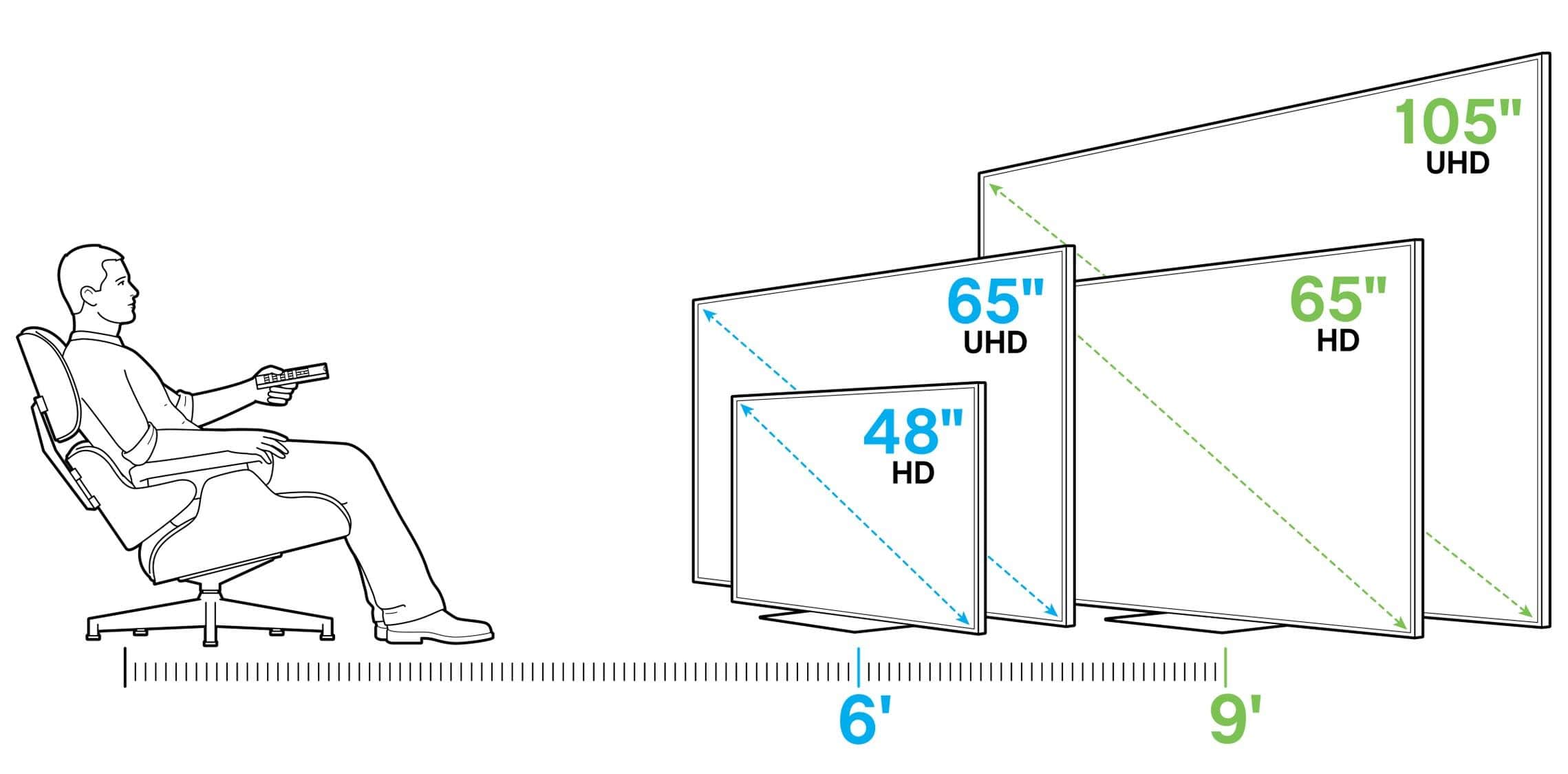
    The screen resolution of a TV set matters most these days especially if you are looking for better-looking pictures. Today a lot the TV sets are moving from HDTVs to Ultra HD sets also called 4K. TV’s with 4K models screen has four times the number of pixels the HDTV screens. The main advantage of 4K TVs is that small objects on the screen have more detail, including sharper text and images.

    When buying a new tv set one should try not to buy smart tv with less than 4K models screen. But this will also depend on the buyer’s budget. Of course, you should not expect the 4K ultra price to be the same as HDTVs price. More pixels transform into sharper pictures and better details, so higher resolution is (almost always) better.

    Refresh Rate

    The rate per seconds at which a TV set picture refreshed on the screen is what is term as refresh rate. This is measured in Hertz (Hz). The standard refresh rate is 60 times per second or 60 Hz. A low refresh rate can make things look blurry.

    To create a more solid picture, manufacturers doubled the refresh rate to 120 Hz (and in some cases up to 240 Hz). Tv sets with a higher refresh rate should e considered when buying a new set.

    HDMI and Connections

    Another feature that we can talk of is the HDMI and Connections a TV set has. If you wish to connect speakers, decoder and a game console then you should pay attention to the number of HDMI inputs a smart TV set has.

    Some smart TVs have a few HDMI inputs which make it difficult to connect more gadgets to the TV at a go. Also, make sure the set’s ports support HDMI 2.0 in other to accommodate future Ultra HD sources. Choose a television with at least 4 HDMI ports available.

    HDR

    HDR, which stands for High Dynamic Range is a new feature found in most 4K Ultra HD TV sets. It adds extra colours, contrast levels and increased brightness in the new set. Today it is advisable to buy an HDR TV set if available as that format seems to be gaining popularity.

    With a growing number of HDR shows, quite a number of new movies in the new 4K Blu-ray disc format are available via streaming services, like Amazon Prime and Netflix.

    Contrast Ratio

    Contrast ratio has to do with the range of brightness levels a set can display. TVs set with better contrast ratios display more hues and shadows when buying a new tv set, it is advisable to test this feature and see how a TV displays shadow detail using a dark scenes movie and seeing how well it reveals movie detail in the shadows.

    Also make sure to measure the TV’s brightness, sharpness and other picture settings before making a final decision to purchase the TV set.

    Conclusion

    Arriving at a decision to buy a new TV set is not all that easy but when you consider the above-listed features you can save yourself the confusion and the headache that most people go through before making a decision which sometimes still turned out to be a wrong one.

  • 3 Best Photo Editing Apps You Can Use For Free

    3 Best Photo Editing Apps You Can Use For Free

    With the advancement of the smartphone and the improvement in the camera quality, a lot of people have now come to love editing on their smartphone device than even editing photos on their pc. Social media influencers most especially Snapchat and Instagram influencers and celebrities use their smartphone for editing their photos before posting them on those platforms. Smartphones today can do virtually all what a pc or mac can do. But what makes people still love using pc and mac mostly is the ability to view their work on a wider screen. When it comes to editing apps, both pc and smartphones have the same apps that perform the same functions to its users. When a user searches for the best photo editing apps on the Play store or Appstore, millions of apps will show in from the search. Both paid and free versions of these apps will be displayed for you. But as a user which one to choose will become a problem especially now that almost all the apps have similar functions and features. If you clicked on this post and you are still reading up to this stage, it is a fact that you are looking for the best free apps that you can use for editing photos on your smartphone. If that’s the case then we are going to discuss these apps here in this post. So without wasting much time, let’s see some of these apps.

    Snapseed

    Snapseed by far is my number one best free photo editing app for smartphones. The app has awesome features and functions that anyone who is looking to edit photos using their smartphone will love. Packed with a range wide of tools such as crop, rotate, heal and vignette and including some features of such curves, DNG support, precision masking, perspective. The app makes professional looking edited pictures. What I like about this app are the double exposure, frames, text and grunge overlays. Adjust exposure and colour automatically or manually with fine, precise control. You can Position picture up to 8 points on the image and assign enhancements then the algorithm magically does the rest. This app is a must-have app if you really want a quality editor for your snaps.

    Adobe Photoshop Express

    Another great app that we can’t list best editing apps for android and ios is Adobe Photoshop Express. It has all the basic editing tools that one can expect in any professional photo editor. The ability to rotate, crop, red-eye correction and brightness adjustment is what makes this app stands tall among the other apps.  It has in it an excellent selection of smart filters designed to correct some issues with pictures, taken on with some camera. You can correct a picture colour temperature, fogging and exposure problems. A user of this app can also select from a wide variety of borders and artistic effects and can be adjusted using simple sliders. The app has a great option that allows you to make collage pictures to share memories on social media. Check the app on play store and see it for yourself.

    Canva

    Canva is one of the powerful online editing software that everyone including pro editors uses for editing their graphics online. It has premade templates that you can use and make some changes to suit your content. Most YouTubers including me used Canva to editor their thumbnails and this has made the software more popular in recent times. Canva used to be available only on the pc and mac and can be used online. But with the advancement in the smartphone and the higher demand of photo editing apps, the team Canva has also brought out their mobile version and this version is also one of the best you can think off. When I came across this mobile version of the app, I was so happy because it gives me the chance to edit all my graphics on my smartphone which does not require me being on the pc before doing so. It has all the great filters and effects that will really make your images shine. It has tons of templates to choose from and personalize with your own pictures and text. Even though some of the templates and sections are exclusively made for the paid version of this app, there are cools tools, graphics, templates and effects available free. Check the Canva app from this section and see the full details for yourself.
    Photo editing can be tedious work but with the invention of these apps, you can easily edit any photo like a professional and get the best outcome from your photos. If you are in need of best free apps for editing photos on smartphones then we hope these apps will be the best choice for you. Go ahead and give them a try. Believe me, you will enjoy them.
  • What exactly are the cores of a Computer?

    What exactly are the cores of a Computer?

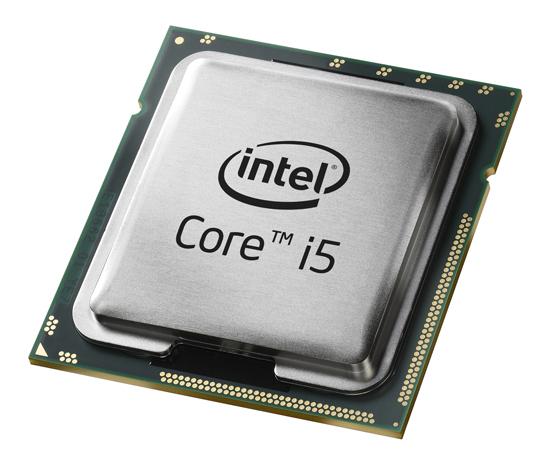
    I remember when I wanted to get a new laptop, all I was concerned about was the “core number” i.e.core i3 vs core i5 because the more cores I got the faster I thought the laptop would be and so I bought a core i7.

    However, there’s more to a computer’s performance than the number of cores or the clock speed as used some years ago and this article serves to demystify all questions and doubts.

    What is the core in the CPU? Simply put, it is the basic unit of the CPU that runs the programs. The more CPUs or cores a computer has, the more things it can do at once, helping improve performance on most tasks. Most computers now have CPUs with multiple cores (core i5 = 5 cores) which makes the computer even faster.

    (Hyperthreading is a technique used to double the number of cores by creating virtual cores to boost CPU performance. It makes a dual-core CPU with hyperthreading faster than its counterpart but still less than a quadcore CPU )

    So does that mean that core i7 machine is faster than a core i5, most of the time, yes but here are a few other determining features for computer performance example the ram size, hard drive type and size?

    Basically, Random access memory, or RAM, is the temporary holding spot for data. Thus the higher the RAM the more stuff you can process without having to go to the much slower hard drive. This means multitasking would be smoother and the overall user experience more enjoyable.

    RAM specs are listed in terms such as DDR3-1600. The number after the dash refers to the number of transfers the chip can handle ( 16 GB for the example given). The higher the number, the faster the memory is, and the more memory you have installed, the more transfers it can handle.

    The hard drive size used to be the defining factor in the performance of the laptop but with the emergence of the Solid-state Drives (SSD), this changes the game. SSD’s are 8 times faster than the old hard disk drive so the choice of drive also matters. Also the larger the hard disk size, the faster the PC.

    With all that said, the ultimate PC would be a 9th Generation core i9, 32 Gb of RAM and 1 TB of SSD which costs $4,499 or 23,847 cedis ( MSI GT75 Titan 4K-071 ).

    In reality, not everyone can but even if everyone could, not everyone can use it to its maximum capacity. If you hardly do anything strenous like gaming or video editing then a 9th generation core i3 would be enough. Also older older generation flagships can aslo do the same (7th gen core i7) and you can get 12-15 hours of video playback time.

    The core i5 set of laptops are for main stream users. Those who go everywhere with their laptops with some light gaming. The high end gamers can settle with the core i7. (There is a core ix for the very extreme gamers. )

    Inevitably, people who want to own a core i7 pc are concerned about the graphics card and we can’t talk about graphics card without talking about GPU. A graphics processing unit (GPU) is a computer chip thatis used primarily for the purpose of rendering images.

    GPU is able to render images more quickly than a central processing unit because of its parallel processing architecture, which allows it to perform multiple calculations at the same time. It is mostly used to enhance gaming. A GPU of 520 and above is great to run fifa 18 and other demanding games. You can always buy an additional GPU to better your gaming.

    The performance of a PC really goes beyond just the number of cores and for an optimum experience, the RAM, Hard disk size and GPU all factor in.

  • How to Hack Anyone’s WhatsApp Account in 6 minutes

    How to Hack Anyone’s WhatsApp Account in 6 minutes

    In this tutorial, we will show you how to hack a WhatsApp account through mac spoofing attack. Please note that this is just for educational purposes.

    What you need to Hack WhatsApp

    First of all the requirements of this procedure are:

    1. Mobile Phone Rooted
    2. Target’s Phone for 5 minutes
    3. Busybox and Terminal App installed on your android device
    4. Wifi Scanner ( if you can’t reach the target’s phone for getting his / her mac address through setting

    How to Hack WhatsApp

    Uninstall WhatsApp

    Uninstall WhatsApp from your phone or device. You’ll install it again at the end of the method, but you’ll need to configure it differently, and the easiest way to make sure you’ll be able to do that correctly is to completely uninstall it now.

    Access the “target device”

    Obtain your target’s phone. You’ll need it for two different steps throughout the process, but this shouldn’t take too long – you should be able to return it before your target starts to miss it.

    Find the target’s MAC Address

    Find your target’s phone’s Media Access Control (MAC) address. A MAC address is a unique identifier assigned to your phone or other devices that essentially serves as its online identity. Find and write down your target’s MAC address. It takes the form of six pairs of letters or numbers, separated by colons (01:23:45:67:89:ab).

    On an Android, find this in Settings → About phone → Status → Wi-Fi MAC address.

    On an iPhone, go to Settings → General → About → Wi-Fi Address.

    On a Windows phone, look in Settings → About → More info → MAC address.

    On a BlackBerry, go to Options → Device → Device and Status info → WLAN MAC.

    Find your MAC Address

    Find your MAC address using the instructions above. Make sure to save it somewhere secure, as you’ll want to change your device back to that address once you’re done.

    Change your MAC Address

    Change (“spoof”) your phone’s MAC address to that of your target. This will allow your phone to pass as your target’s, letting you convince WhatsApp that you are your target when you log in.

    On an iPhone or other devices, install a MAC spoofing app like MacDaddy X or WifiSpoof. Use that to change your MAC address.

    On Android, install BusyBox and the Terminal Emulator (apps available for free on Google Play). In the terminal, type “ip link show” to see a list of interfaces. Identify the one that has your MAC address — for this example, we’ll use the eth0 interface. In the terminal emulator, enter “ip link set eth0 address XX:XX:XX:XX:XX:XX” and “ip link set eth0 broadcast XX:XX:XX:XX:XX:XX”, where eth0 is the interface you identified and XX:XX:XX:XX:XX:XX is your target’s MAC address. To check that you’ve successfully changed your MAC address, enter “ip link show eth0.”

    Install WhatsApp again

    Install and configure WhatsApp on your phone. Enter your target’s phone number to set up WhatsApp rather than your own. This will allow you to receive their messages and send messages from their account.

    Retrieve confirmation code

    Get the confirmation code from your target’s phone. This code will be sent to their phone number as part of the WhatsApp configuration process. Access their phone one last time to get that verification code. Enter it into WhatsApp on your phone when prompted, and you’re all ready to go.

    If you don’t want your target to find out about your spoofing, make sure to delete the confirmation code from their phone before they can see it.

    Going back to normal

    When you no longer need to access your target’s WhatsApp account, change your MAC address back to what it was. Repeat the instructions to change it, but this time change it to your original address rather than your target’s. This will restore your phone to how it was originally, which will ensure that there are no future problems with Internet usage or connectivity.

    If you can’t reach the target’s .phone to get mac address you can use a WIFI SCANNER. If you can’t get the code because you don’t have physical access into the victim’s phone you can use social engineering.

  • Online Security: Ensuring your security and safety on webpages you visit

    Online Security: Ensuring your security and safety on webpages you visit

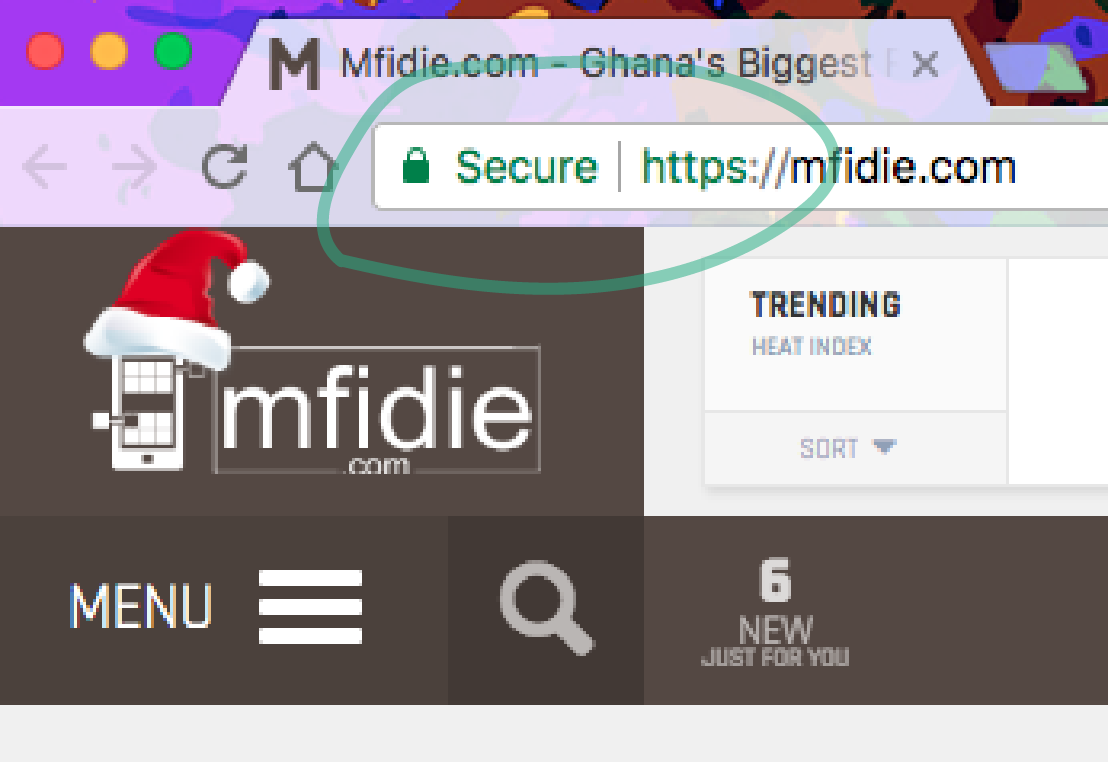
    Have you ever wondered why a lock sign appears on some web pages? Also if you pay more attention to the URL (Uniform Resource Locator) of a website, you might have come across an extra “s” after the “http”. So, for instance, you see https://www.mfidie.com instead of the normal http://www.mfidie.com. This is widely and mostly seen on sites that require sensitive information from its users.

    What does the “s” represent? How does it work? How do you get it on your webpage?

    Worry no more. This short write up seeks to answer the questions above. Without halting my typing let’s get into it.

    The additional “s” simply means that the website is secured and any data that is passed on it is encrypted on the web from the server side. An unsecured webpage is equivalent to non-encrypted data or plain-text sent back and forth. Plain-text data opens up for interceptions, eavesdropping and even stealing from unauthorized persons. The technology that powers this is called SSL, which stands for Secure Sockets Layer.

    SSL is a security protocol for creating a secure link between a web server and a web browser. This link ensures that all data passing through is private and remains private. This is done in that websites which has obtained an SSL certificate from reseller of trusted Certified Authorities or directly from CA (Certificate Authority). Browsers, Operating Systems and Mobile Devices also maintain a list of CA (Certified Authority) root certificates.

    The certificate uses public key cryptography and this makes use of two randomly generate keys – Public and Private to lock and unlock information on both ends of the communication. Some of these trusted Certified Authorities include Comodo, GlobalSign, GoDaddy, DigiCert and many others.

    Data like bank transaction or high-level information is encrypted, making it difficult for hackers who prey on web servers to get anything useful from your inputs. You are rest assured that hitting “submit” on a website is safe.

    Now here are a few tips to know if the website you are visiting is secure or otherwise.

    • Within the URL of your browser you will see https:// instead of http://
    • You will also notice a padlock icon and some browsers write “Secure” in addition. This can be found on the left or right side of the URL bar.
    • Some websites also go an extra mile to add a badge to the webpage to indicate a secure connection.

    In addition, some websites would have secured their webpages but the certificate might be expired. Therefore, when you realize that a webpage is requiring too many information you can go further to check the status of their certificate.

    This differs from browser to browser. A simple process for Google Chrome is to go the developer tools and navigate to security and holla you will see if the certificate is valid or expired. Let’s take extra precautions on the internet and happy browser to you.

  • Nigeria and Ghana among the leading crypto-markets globally for Paxful

    Nigeria and Ghana among the leading crypto-markets globally for Paxful

    While much of the recent crypto-related news headlines have focused on the softer Bitcoin price, the interest in Bitcoin in Africa has continued to grow at a rapid pace.

    Paxful, the world’s leading cryptocurrency-marketplace, reports that its total number of transactions from African consumers amount to roughly $64,357,115 per month. Nigeria and Ghana rank alongside giants like the United States, United Kingdom and Canada on Paxful’s list of top 10 markets internationally.

    The African continent accounts for the highest number of new subscribers to the portal per month. The appetite for cryptocurrency is widespread. Over the past year, transactions on the Paxful platform from South Africa increased by 25%, by 60% in Nigeria and by up to 100% in other parts of the continent.

    For Africa as a whole, Paxful has seen a 225% increase in users in the last 12 months.

    Millennials Drive The Future

    The demand for cryptocurrency is notably characterized by a marked increase in the 18-30 age group. Lagos, Akure, Abuja, Benin City, and Accra stand out as the leading centres of Bitcoin commerce in Africa.

    The average bitcoin purchase is $60, while the average Paxful wallet transaction is currently under $30.

    Many parts of the continent are already au fait with mobile money payment systems. African millennials are finding that cryptocurrencies offer alternative convenient and cost-effective access to the global financial system.

    A Peer-To-Peer Revolution

    Africans are using cryptocurrency to satisfy both personal finance needs and entrepreneurial ventures; transferring goods, services, and money domestically as well as globally.

    For some, virtual currencies have the benefit of acting as a hedge against constantly fluctuating local bourse. Virtual currencies also serve as an effective and more profitable alternative to their local currency.

    People tend to use them to buy goods and in return, merchants may double their profit since the price of bitcoin tends to fluctuate.

    There is also an emerging generation of Africans buying crypto as investment vehicles into promising blockchain start-ups. A relatively small number of Africans trade digital currencies speculatively for profit.

    “The adoption of Bitcoin across the globe re-affirms our belief that crypto will take its place as a mainstream financial system. As has been the case with other disruptive financial tech innovations like mobile money, Africa is leading the peer-to-peer financial revolution. Our aim is to continue to partner with consumers to expand access the global financial system.” Ray Youssef, CEO of Paxful.

    “As a company, we’ve learned a lot from African consumers. For instance, we’ve improved our mobile capabilities to cater to the widespread use of smartphones on the continent. Our experience in Africa has strengthened our capability to serve consumers regardless of geographical location or origin.” Artur Schaback, CTO Paxful.

  • How to create your own sticker pack for WhatsApp and wow your friends

    How to create your own sticker pack for WhatsApp and wow your friends

    Facebook-owned instant messaging platform WhatsApp has finally added the Stickers feature allowing users to send different stickers while chatting just like other instant messaging apps.

    In the latest update version 2.18, users can now see a new option in the emoji section of the app called Stickers. In the beginning, only one sticker pack comes pre-installed with the update.

    However, the built-in sticker store gives the option to download more, the store also has the option to download stickers from the Google Play Store.

    Though several third-party sticker packs are available, it still lacks some good stickers that you might want to use.

    So why not create your own stickers and use it. Well, if you are looking for creating your own stickers, follow our step-by-step guide.

    Pre-requisites:

    The latest version (2.18) or above of WhatsApp

    Working internet connection

    First step: Creating an image with no background

    The first thing you are supposed to do is click your images with the expressions you want and convert it to PNG file format with no background.

    To do that open your smartphone camera and click some images and now let’s convert them into PNG file format with no background and then will add them to WhatsApp.

    So here’s how to convert your pictures into PNG with a transparent background or no background.

    1. Open Google Play Store and search for any background eraser app
    2. Now, open any image you want to convert into Sticker
    3. Erase the background and crop it accordingly
    4. Save the image in PNG format (as WhatsApp only supports PNG format for Stickers)

    Note: Create at least three images as WhatsApp does not allow to add a Sticker pack with less than three images in it.

    If you have completed the steps mentioned above, download another app called ‘Personal Stickers for WhatsApp’.

    1. Download the app and open it, you can use this link.
    2. The app will automatically detect all the stickers you have created
    3. Tap on the ‘Add’ button located beside the sticker
    4. Again tap on ‘Add’ option when asked
    5. Once done, open WhatsApp and head to the Stickers section by tapping on the Emoji icon from the left of the text box.
    6. Select the Stickers option and look for the stickers you have added. Tap on it to send.

    iPhone Users

    At the time of writing, there are no external sticker apps that use this new feature on iOS. As soon as we know of a sticker app or one becomes available, you will be able to get them from the App Store.

    If you still want to enjoy this, get an Android and have some fun.

  • How to use Bolt (Taxify) for easy rides in Ghana

    How to use Bolt (Taxify) for easy rides in Ghana

    A lot of people don’t start with Taxify is that they don’t know how it works.

    So, below is a step by step rundown of how the app works.

    1. Set the location and confirm pickup address:

    Pro tip: tap on a service icon again to expand pricing details.

    2. Optionally you can click “Estimate Price” and enter the destination address

    3. See your driver arrive in real-time:

    4. Enjoy the ride & rate the driver after your trip!

    More Bolt features:

    • The app sets your location even if you don’t know your exact address (using GPS);
    • The rating system allows us to have the best drivers;
    • Add bank card to Bolt (Taxify) so you don’t need to pay with cash. Payment will be processed and you’ll get a receipt via email.