Category: Social Media

  • How To Protect Your Facebook Profile Photo From Theft

    How To Protect Your Facebook Profile Photo From Theft

    Adding a profile picture to your Facebook account helps in people identifying you easily, it helps in making new friends and also increases the trust of your new friends knowing that the account is not fake and they are chatting with the person that they know.

    However, fraudsters are always found copying or downloading peoples profile pictures and creating an account with the same info of that person and using it for their scam activities.

    These fraudsters mostly create a fake profile of you just to scam your close friends, some fraudsters also use it to do bad online activities.

    Majority of peoples who suffer in these Facebook profile thefts are females, most fraudsters create fake profiles of a female, copy her images and every info and then start using it to chat her mutual friends who are men.

    There has been a lot of reports and my sister has even been a victim before, she was out of the blue receiving calls from her male friends and all that these guys were asking her was why she has started asking for money in their inboxes and telling them she will send nudes in return?

    My sister was shocked, all she was saying was that is not her real account, some believed but some were not convinced that it was not her, one even said he has sent the money thinking my sister needed help.

    After telling me about what has been happening to her, I managed to report that fraudster to Facebook and within some few days, Facebook deleted that fake account.

    Maybe you have been a victim before, or maybe you have never encountered any situation like this before but let me tell you that these fraudsters are always doing that and it is not only females that they use their profile pictures, they also use males pictures for same activities.

    So How Do You Protect Your Profile Picture From Theft?

    Turning On Profile Picture Guard

    By turning on this feature, users can not download your profile picture or take a screenshot. To turn on profile picture guard, tap to view your profile, select options and click on “Turn on profile guard”.

    When this feature is enabled, you will see a badge indication your profile picture is protected. now your friends and family will still be able to see your profile picture but none of them will be able to download it.

    This feature is currently not available for all countries but some selected countries, we hope it becomes available for everyone.

    Changing Your Picture Privacy Settings

    One thing that one needs to take more serious about when uploading a picture is about the privacy options of that picture when you are uploading a picture, Facebook gives you the option to choose who you want the picture to appear to, you can choose public, friends, or you can choose all your friends except some peoples.

    So changing your profile picture privacy to only friends makes only your friends see your profile and not anyone can see to steal, although, with this feature your friends can still download, it is better than putting it in public for anybody including someone who is not even your friend to download and use it for scam activities, doing this also does not let your picture show to people that your profile has been suggested to them until you guys become friends, nobody aside your friends will be able to see your picture.

    Conclusion

    With the recent stealing of profile pictures on Facebook for scam activities, it is advised to protect your Facebook profile picture by turning on profile guard or making changes to the privacy of your photos by not setting it to public.

    Let me hear in the comment section below if you have been a victim or if I missed something that you would love to share with me.
  • How to stop Snapchat and Instagram from using all your data bundle

    How to stop Snapchat and Instagram from using all your data bundle

    Let’s stop Snapchat and Instagram from using all of our mobile data.
    Snapchat and Instagram are among the most used apps on most people’s phone.

    On the Play Store alone, there have been at least one billion and one hundred million (1,100,000,000) downloads among these apps. Not to talk about ioS and Windows (Snapchat is still not on the Windows OS).

    We use these apps every day to tell stories in various forms. I am not a big fan of Snapchat, but I do love to watch great stuff on Instagram.

    I have realised a lot of people complain these apps take a lot of their data plan, especially if you are on VodafoneX (and feel you can explore with your “free data”). These two apps are constantly updating their content in the background — whether you are using them or not. You just have to tell them to only be active when you open them up.

    Last time I met my friend Obed, I realised why Snapchat was taking up all of his data. I shared the trick with him and he was highly elated. I thought to share it with all of my readers here too.

    Snapchat

    1. Open Snapchat and tap on your Snapchat profile icon in the middle top of the screen, or swipe down
    2. Tap on the Settings cog in the upper right corner. Under Additional Services, tap on Manage Preferences
    3. Change the Travel Mode to On by making sure it is checked green

    What this does is that it prevents snaps from automatically loading, saving your data.

    If you want to view a friends’ story, you would first need to click on their name to get the snap to load. Some people have also claimed this trick helps to save battery life. I am yet to confirm that though.

    Check images below if you are confused.


    Instagram

    1. Open Instagram and go to your profile by tapping your profile photo on the lower right of the screen
    2. Tap the options in the upper right of your screen to go to the options screen
    3. Scroll down, under settings, tap Cellular Data Use
    4. Choose Use Less Data.

    Check images below if you are getting lost


    Well, let me know in the comments which apps have been using up your data and whether you plan on using these methods. I always love to hear from you.

  • 3 Reasons why Snapchat is still way better than the new WhatsApp Status

    WhatsApp Status – the latest addition to the popular Instant Messaging App seems to be fun for a lot of users. Snapchat, on the other hand, is still very much popular and I personally have not seen any significant drop in the number of snaps my friends send in.

    This morning, my friends were speaking about how WhatsApp is killing snapchat and why snapchat will not survive the hit. I personally think when it comes to the art of storytelling on smartphones, Snapchat is leading the way. Today, I look at 3 ways snapchat is killing the storytelling game. Maybe in the future, WhatsApp may catch up. For now, snapchat is doing it all right.

    1. Photo and Video Filters

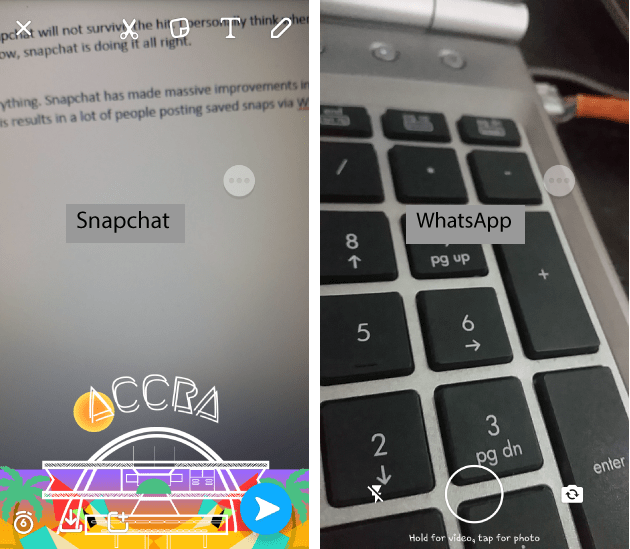
      In the world of mobile photography and videography, filters seem to be almost everything. Snapchat has made massive improvements in the scene of filters. Geofilter, Data, Color, Rewind, and all those funny faces and emotions – Snapchat is all about the filters. It’s quite sad WhatsApp does not offer any filters as at now and this results in a lot of people posting saved snaps via WhatsApp stories. What a pity!

    Filters are present in Snapchat but WhatsApp status does not have the feature
    Filters are present in Snapchat but WhatsApp status does not have the feature
    1. Snapchat Discover

      Snapchat combines the best of social networks, magazines, and television in a way that keeps users informed about the stuff that matters to them. This feature allows you to see stories from popular publishers like IGN, Buzz Feed, Cosmopolitan and Daily Mail. This helps users to get more from the app when stories get boring (which is gladly never the case for me). WhatsApp status does not have this fine feature, although I suspect it will be added soon – for the ads.

    The Snapchat Discover Feature
    The Snapchat Discover Feature
    1. Privacy

      This is one reason why it may take a long time for me to send a status on WhatsApp. Privacy is a big issue nowadays and WhatsApp’s privacy settings are just not enough. For one, a lot of people have contacts on their WhatsApp because they have saved their numbers one way or the other. Imaging sending a status that can be seen by your boss, friend, family, business friend and workmate? Snapchat solves this by giving you maximum control over you even add in the first place. Snapchat certainly handles privacy on stories better than WhatsApp.

    Well, WhatsApp just entered the storytelling game and sure has a lot of ways to improve; but right now, I would choose snapchat over it for a lot more reasons than the three mentioned in this post – including the lack of a data saver.

    Have you used the WhatsApp Status feature? What’s the experience so far?