Category: Lists

  • 5 Best Online Thumbnails Maker For YouTube Videos

    5 Best Online Thumbnails Maker For YouTube Videos

    YouTube videos go viral when four things are incorporated into them. For a video to get more clicks on the YouTube platform, the videos should at least have these elements. Well design thumbnails, nice title, well-added tags and well-written descriptions.

    According to YouTube, videos with nice thumbnails always get more clicks. Studies have shown that viewers respond better to visuals than texts. Therefore, creating visually appealing YouTube thumbnails can increase the CTR of a video and bring more traffic to the video being uploaded on a channel.

    As a YouTuber, you might have known that, creating well design thumbnails required using more advanced editing software. This software’s needs to be acquired from the developer and which cost you money. If your channel is not well optimizing to make cash from, you may not be able to purchase the software. But fortunately, there are many free tools available for making YouTube thumbnails.

    These tools have well design templates you can choose and then edit them by adding your text, images and icons to complete the design. With these tools, no editing skills are required. Anyone can have well design thumbnails when editing with these tools.

    If you’re a YouTuber, looking for the best Thumbnails maker tools to help you create a professional thumbnail for your channel, this article is for you. This article is going to list the five (+1) best thumbnail makers to help you create stunning thumbnail images for a YouTube video.

    Crello

    Among the 50,000+ design templates available in Crello for any creative need you might think of, a decent number of them are Youtube thumbnail solutions. You can start with any pre-made Youtube video template that suits your needs, change texts, images, design objects, reposition the elements, and even add some motion with animation effects. You can even do all this from your phone because, luckily, Crello is available as a free app for both iOS and Android.

    This design solution is somewhat similar to Canva in terms of the ease of use and drag-and-drop customization approach but definitely did a better job at design variations.

    Canva

    When it comes to online graphic design tools, the first we can think off is Canva. This tool is more than just a thumbnails maker; it can be used for all graphic design works. Canva is a number one tool that everyone today is taking advantage of when it comes to creating graphics.

    It has more than one million photos, graphics, templates and fonts you can use to edit your graphics for free. The smooth drag-and-drop interface provides a seamless experience as you upload your images and texts.

    The best part of this editing tool is that you can easily find all the graphics you’ve edited in your account and can re-edit them to add more text or icons to the already existing texts. Well sized templates of all the social media platform can be found on Canva.

    Snappa

    Snappa is one of the best graphic design tools for non-designers because of its flexibility and ease of use. Just like Canva, this tool offers a ton of templates for social media graphics as well as for YouTube thumbnails. Snappa tools also have a great library of social media templates that are premade for both designers and newbies. You don’t need to have skills in graphic design before using these tools. All you need is to sign up for a free account and start using the pre-made templates for your thumbnails design.

    Fotor

    Another advanced photo-editing tool that you can use for your thumbnails is the fotor tool. Fotor has the best, clean and smooth interface to edit your Video thumbnails that will compel a viewer to click and watch the video on the YouTube platform. The Fotor platform has easy to use tools, so you won’t need expert knowledge before you can create stunning thumbnails.

    Fotojet

    Unlike Canva and Snappa which provide graphic design functions in general, Fotojet pays special attention to YouTube thumbnail design. Not only does this online platform focus on YouTube thumbnails but, it also has over 500 collage making templates which can be used by anyone to create college memories. Fotojet can use this tool to add filters, resize, crop, or even rotate your images. It’s simple to use interface that allows you to create superb thumbnails without any complications. With Fotojet, you don’t need to sign up to before using the tools, just head over to the site and start designing your thumbnails.

    Picmaker

    Picmaker is another great online platform for graphic designs and other photo editing needs. This platform has one of the best interfaces for designing amazing thumbnails. On this platform, you get 100,000+ Graphic elements completely free, BG Burning Wand designed to create the perfect YouTube thumbnail and add fee Sticker Effect to give you the extra slice of creativity. All you need is to head to the site and begin to create your stunning YouTube thumbnails for your videos.


    Final Thoughts

    Creating a nice looking thumbnail can help you grow your channel by increasing the views and subscribers. Getting your hands on these free online platforms to design your thumbnails can help you come out with a great image as a video thumbnail, but that alone will not guarantee a successful channel.

    As much as thumbnails play great roles in getting viewers to a video, the content of the video will also determine whether they will watch the video to the end or they will leave the video as soon as they start to watch. So is good to always come out with good video content and then accomplish it with this nice thumbnail for a successful channel.

    Have you ever come across any online thumbnail maker that you may want to share? If yes then comment in the box below form us to also take a look at them. Thank you for stopping by to read and see you in the next post. You can sign up for our mailing list to be added to the list and be among the first to get notified whenever we publish new content on this blog.
  • List of Electronic and Computer Shops in Ghana you can buy from

    List of Electronic and Computer Shops in Ghana you can buy from

    An electronic shop is one that you can go to and purchase electronic devices. In Ghana, there are not many establishments that deal in quality electronic products. A few non-branded shops sell electronic devices on the streets.

    Still, if you want to buy quality electronic devices from trusted and loyal shops, then there are a few I can suggest for you. These shops do not have the game because they are a big company. They have fame because they earned the trust of customers with their excellent services and quality products.

    They give you access to foreign products from the USA, Japan, China, UK, and other countries that produce quality electronic devices.

    Below is a list of various electronic shops around Ghana and their contacts to reach out to if you want to purchase the same quality and affordable electronic devices. 

    Danny computers

    Danny computers is a computer and electronics parts shop located in Accra. They sell computers and other electronic products at retail.

    Location: Ring Road West Road Accra, Ghana Telephone: 0244688853, 0302668098

    Atlantic computers

    Atlantic computers deal in electronics from phones to laptops to smart televisions and other items.

    If you need quality electronic products with good warranties, then Atlantic Computers is your choice. Telephone: 0302228214. Location: Hilla Limann Hwy, Accra

    Intact Ghana

    If you’re looking to put your brand on a product, Intact Ghana is your top option. They provide the same quality products and services to customers.

    Location: North Industrial Area, Accra. Telephone: 0543008475

    Kabfam Ghana Limited

    If you’re looking to buy quality televisions at affordable prices, then visit Kabfam Limited.

    At Kabfam, whatever electronic device you want is available and provided with outstanding warranties. They were established in Ghana in 2013.

    Location: Staten-Darkuman Junction, Off the Kaneshie-Odorkor Highway (Near MTN), Accra. 

    Telephone: +233 233 458 458

    Asfam Enterprises

    Electronic appliances ranging from televisions, air conditioners, mobile phones, laptops, sound systems, and many other devices are available at Assam enterprises.

    Location: Koforidua, Opp. Reo Cinema, Ghana. Telephone : 0243201888 , 0342022960

    Electroland Ghana

    It’s best known for distributing Samsung, Toshiba, Midea, and other electronics in Ghana. They’re also the owners of the NASCO brand in Ghana. Telephone: 0302211318.

    Location: Achimota mall

    Jaydee limited Appliances

    This is an Electronics and Home appliances store that deals in Television, Deep Freezer, Fridge, Air conditioner, Gas oven, Home theatres, Microwave, Ceiling Fans, Standing Fans, stabilizers, Step Down, Rice cooker, Blenders, and other miscellaneous other items.

    Location: Kumasi. Telephone: 032 202 6107

    Freddie’s corner

    This is one of the nation’s leading electronic shops known for quality services. At Freddie’s corner, you can buy products of whatever electronic brand you want. Samsung, Apple, LG, Sony, amongst other brands at affordable prices.

    They have locations in both Accra and Kumasi. In Accra, they’re located at Circle, Tiptoe Lane, Spintex Road near Kpogas furniture, Tema Community 1 behind the C1 police station. Telephone: 0302 211 318 or 0302 817 555

    Abbey Tech Hub

    At Abbey Tech Hub, their primary purpose is to provide you with good services, quality, and affordable electronic devices. Anything electronic can be bought at Abbey Tech Hub, be it mobile phones, laptops, sound systems, medical equipment, and many other items.

    Telephone: 024 111 9559. Location: Circle, Odo rice. 

    Compu Ghana Limited

    Compu Ghana limited offers you electronic products ranging from phones, laptops, televisions, fridges and deep freezers, and other electronic items.

    They’re also into the refurbishing of electronic devices. Location: Mark Cofie House, Oxford Street, Osu, Accra, Ghana.

    Telephone: +233 (0)307 070701

    Conclusion

    For quality and affordable products of any brand you want when buying electronic and computer devices in Ghana, look no further than these shops we’ve listed above for you.

    These shops provide you with affordable products and the best of services. You’re given warranties and assurance of the performance of the products. 

  • 7 Tools You Can Use To Work Remotely from Home

    7 Tools You Can Use To Work Remotely from Home

    Gone are the days that the only way to make income was to wake up and go to work early in the morning.

    Now with the invention of the internet, everything has changed, now you can work from home and get paid.

    Recently with the new coronavirus (COVID-19) spreading across countries, people are advised to either stay at home or practice social distancing so that this virus can not spread soo fast as the virus is airborne and you can get infected when you come in contact with a person who already has the virus.

    By now you might have heard about countries going on lockdown and closing of boarders so that other foreigners will not be able to enter the country and spread the virus.

    This has led big companies like Amazon, Microsoft and Facebook instructed their employees to work from home if they can.

    You might be the CEO of a company and since your country is on lockdown you are asked to close your work, or you might be an employer, this is definitely going to affect your monthly salary.

    There is no need to be worried during this lockdown as you can work with your employees or teammates remotely.

    Working Remotely Gives You These Benefits

    • When working remotely you decide on the time that you will want to start work as compared to the daily normal works which an employer has to be at work sometimes before 7, 8 or 9 AM.
    • Working remotely only requires a PC or laptop, you can do your normal routines or get a chance to visit various tourist places and at the same time continue working.
    • There are no restrictions in working remotely, your task is to finish what you are assigned to do for the day and you can do whatever you want afterwards, unlike our daily works which even when you don’t have anything to do, you still have to wait for the work to close before you can go home.

    Tools that you can use to work remotely from home

    Slack – For team collaboration

    With slack you can create chatrooms/channels, send private messages and files, it will be searchable by anyone, as a CEO this will allow you to have a chat with all your employees and know what they are up to or what is being done. Aside from visiting slack.com for an account, slack also has an app and its available on both Google play store and Apple AppStore.

    WeTransfer – For sending large files

    WeTransfer.com was founded in 2009 and is a website for sharing large files such as videos, pictures and documents.

    Google Drive – For cloud storage

    Google Drive was launched on April 23, 2012, by Google, this service allows you to store large files on their servers and you can share and sync on any device.

    SlideUpLift – For building impactful remote presentations

    Presentations play a vital role in remote business communications today. SlideUpLift is an online library providing a vast collection of visually engaging PowerPoint templates to help you create highly impactful remote presentations. They are a great starting point for your presentations and save on time spent in making one from scratch.

    Time Doctor – For managing time

    With time doctor you can know the time your workers start work and the time they close, it also helps you track hours your workers spend doing a specific job, you get to know if they are working from their computer or somewhere else and it also provides you with a daily working summary of your workers.

    Zoom – For video calls and screen sharing

    Zoom is for remote video calling, sharing screens, meetings, presentations and sharing mobile phone screens.

    when it comes to working remotely with your teammates then zoom is definitely for you.

    Evernote – For notes keeping

    As the name suggests, Evernote is for keeping notes and it can be stored and shared and at the same time synced on all devices, teammates can use Evernote to submit a summary of their to-do works for a specific day, week or month.

    iDoneThis – For reporting

    iDoneThis is used to keep an eye of what you have been able to do or what your employees have achieved within a day, week or month.

    Conclusion 

    Now working from home has been made easy with many tools that are available online, even when due to some reasons you can not go to work, you can still work from home using these tools.

  • 4 Apps You Can Use To Access Loans in Ghana

    4 Apps You Can Use To Access Loans in Ghana

    Whatever you wish to do now, you’ll definitely need money.

    With how hard the system has become and how much people have lost trust in others, acquiring a loan could be the only reliable way of getting money for your projects.

    However, banks and financial institutions have become more and more complicated as far as loan processes are concerned.

    This creates market for the loan companies that operate via their mobile apps.

    So, in this article, we shall take you through a list of 5 loan apps you can use to access loan facilities in Ghana.

    Get Carbon (Previously Pay Later)

    The first application or website on our list here is Get carbon. Previously known as Pay Later, Get carbon is a wholistic financial payment app. It is used for payments including bills, airtime, money transfers and above all; for seeking loans.

    Individuals are entitled to loans from 80 cedis to 100 cedis on their first loan request. The chances of getting bigger loans depend on how soon and well you pay your previous loan.

    You can download the app on playstore so you register and apply for your loans.

    Fido Loans

    Fido money lending is our second money lending app here. Fido loans is a licensed institution, specialised in giving short term loans.

    Fido gives loans up to the sum of 200 cedis on first time applications.

    Based on how soon and how well someone pays for their loans, they can qualify for loans up to the sum of 600 cedis.

    You can download the Fido app from google play store and apply for your first ever Fido loan.

    Loans are usually paid into the mobile money accounts of applicants.

    Orbit Lending Gh

    Orbit Lending is one of the fastest growing online loan companies in Ghana.

    How To Apply For Loan With Orbit Lending

    1. Visit the site

    2. Click on forms/download tap

    3. Click personal loans form

    4. Click “Click here”

    5. In the first column that comes up, fill the following boxes:

    a. Surname

    b. First name

    c. Title

    d. Marital status

    e. Nationality

    f. Date of birth

    g. Your postal address

    h. Your location

    I. Your mobile number

    j. Your email address

    k. And your occupation

    l. Click on next

    In the second tab (Next of kin), fill the following spaces:

    a. Surname of next of kin

    b. First name of next of kin

    c. Title of your next of kin

    d. Nationality of your next of kin

    e. Date of birth of your next of kin

    f. The postal address of your next of kin

    g. Location of your next of kin

    h. The mobile phone number of your next of kin

    I. The email address of your next of kin

    The next tab is LOAN REQUEST DETAILS

    Under this tab, fill the following information:

    a. Enter the loan amount in Cedis in the loan amount column

    b. Enter the amount in words in the next column

    c. Enter the duration in months for your repayment

    d. Enter the purpose of your loan in the loan purpose column

    e. Enter the payment method (Cash or mobile money)

    f.Tick the “I am not a robot” box to activate the captcha

    g. Click on next

    h. Click the next button again to confirm your details and send.

    The request will be reviewed and when you qualify, you’ll be contacted via phone call to access your money.

    Sika Master

    Is an online-based financial institution which gives individuals, groups and companies loans and other credit facilities based on their credit reports and trustworthiness.

    With very low interest rates and some interest-free loans, Sika master is one of the few online loan application companies you should look forward to seeking that loan from.

    Loans from Sika Master range from between 1,000 cedis to 100,000 cedis.

    You can visit their website to find out more about their over 15 loan types and their terms and conditions.

    Conclusion: Loans are good for business and to help us out of certain unexpected situations. But, before you take a loan, you need to be sure of how soon you’ll be able to pay for it. It is therefore required that you go for loans only when you’re certain about the repayment plan and how best it fits into your budget. You are responsible for any result produced by a loan you acquired unplanned for.

  • 4 Reading Apps for Book Lovers

    4 Reading Apps for Book Lovers

    Books have for long been a cherished tool and source of information to many people.

    Whether you just want to while away time, you want to gather new pieces of information or just try to entertain yourself, books always come in as a handy choice.

    Thanks to the digitization process, the days of paperback books are finally fading and we’re wading more and more into a new world of digital books.

    Most people now own smartphones and reading devices that enable them to read quite a chunk of books online.

    But, how many reading apps do you know? And which ones have you used before?

    Did you get the books you wanted from the app you used?

    In this article, we take you through four of the best reading apps you can use on all devices as a book lover.

    Goodreads

    Goodreads is arguably synonymous with an eBook reader. It holds in its bosom a user database of over 40 million and over 1 Billion books.

    These books are drawn from various genres, categories and authors all over the world.

    Books in this app are mostly segmented based on recommendations made by the app for you, those made by your friends for you and the best collections on yearly basis.

    The Goodreads app is available on IOS and Android devices.

    What’s more, it’s completely free of charge! You can download the app now and start reading any book of your choice from the large collection available.

    Goodreads also has an interesting Barcode scanner feature that enables users to add paperback books to their digital reading list on the app.

    Wattpad

    Wattpad is more like a digital reading community. With Millions of readers scattered across the world, Wattpad offers an opportunity for readers and writers to meet and share ideas.

    Writers are provided with a rapidly growing readily-hungry audience to feed with their magnificent works of art.

    Wattpad is available on IOS, Android and also on the web as a web app. It is primarily a story reading app.

    Users can read their favourite stories in chapters as blog posts. Wattpad however makes revenue from in-service ads.

    So, you could expect to see some ads when using this application. There’s a premium version that takes off the ads though.

    You can get this for 5.99 USD per month.

    Epic!

    Top of the class! Yes, that’s how to describe Epic! It’s the leading reading app for kids younger than 12 years of age.

    Epic! provides a wide range of books for children under the age of 12. From age-based readers to books for learning languages and down to study materials.

    Due to the relevance of Epic! in teaching and learning, most schools encourage the use of it among their students.

    You can download this app on your IOS or Android device. It goes for a cool 7.99 USD per month for parents and their children.

    Educators can however get it for free.

    Inkitt

    Inkitt is the perfect fit for an online library. It has thousands of books cutting across various genres and categories.

    The app is owned by a publishing firm that stocks its online library with books from various authors and drawn from various categories.

    Users can download books from the application and save these books in their offline library.

    It is also a self-promotion platform for new authors.

    The Inkitt application is available on IOS and Android applications and it’s free of charge.

    Conclusion

    Reading is one of the best ways to entertain yourself and gather information.

    But today, paperbacks are gradually fading out and eBooks are taking over. This is highly necessitated by the influx of smartphones on the market.

    Due to this, there are hundreds of applications available for reading eBooks online. Choosing from them is merely a hard battle.

    Getting the right application to read these books on your smartphones is really necessary.

    In this article, we spoke about Goodreads, Inkitt, Wattpad and Epic! as some of the best applications for book lovers.

    We hope you found this article helpful and that you’ll share it with your friends and family.

    You can also check out our article on 5 Popular Ghanaian Ebooks You Should Read

    Kindly leave your questions, comments and reservations about this article in the comment session below. You can also get in touch with us for further enquiry.

  • 5 Best Sites To Watch Soccer Online

    5 Best Sites To Watch Soccer Online

    Soccer is a game that unites the world through the thrills, suspense and joy of eventful matches.

    Irrespective of your race, gender or age, we all have one team or the other which we support so keenly. These teams become a source of our joy when they perform creditably to win matches. On the other hand, when they lose matches, we are at the losing end – with pain.

    However, whatever happens to your team, as an avid supporter, you always want to follow their matches to know what goes on every single minute.

    For most people, this means going to soccer viewing centres where they pay some amount of money to sit in a rather choked room just to share the experience with others.

    While this is not completely bad, it can sometimes pose a problem especially when some viewers become aggressive during such games. So, as a peace-loving person, you might want to watch such games in a comfortable situation.

    The question then comes as; how do you watch soccer games at home?

    The simplest answer is that you can watch them online through some streaming platforms. The next big question is; which platforms?

    In this article, we shall introduce you to 5 of the world’s best soccer streaming platforms where you can watch live soccer games on your phone or computer.

    HESGOAL

    Hesgoal.com is one of the best streaming platforms available on the internet today. It has a simple and beautiful interface with a built-in chat application where members can chat and discuss on-going matches live.

    You can stream all matches from European leagues to Uefa Champions League, Europa League and all international competitions including international friendlies on hesgoal.com.

    Hesgoal.com however does not produce the contents shown on its platform. It is more of an aggregator which pulls together all ongoing soccer action to its platform for the benefit of those who cannot access it on their Televisions.

    Millions of people watch their favourite teams play on Hesgoal.com. And interestingly, it is completely free of charge! Once you have enough data bundle and a strong network connection, you can always access your favourite soccer matches on Hesgoal.com.

    Also, there is no registration required for streaming a live event on this platform. You just have to visit the site and start streaming!

    DSTV NOW

    DSTV is undoubtedly one of the most-respected premium TV content producers. With close to a hundred channels and worldwide coverage, DSTV provides coverage for some of the world’s leading sporting activities such as soccer, rugby, boxing, handball, basketball among many others.

    Interestingly, DSTV is not only meant to be enjoyed on your TV. You can watch live DSTV programs such as live sports event on your smartphone or on their website now.dstv.com.

    However, this platform is not free. You’ll need to be subscribed to any DSTV package in order to access the portal. The hack is that up to 4 people can use the account at a time. So, if a friend has DSTV subscription yet they don’t use the mobile app or web app, you can use their details to create an account and start enjoying your favourite sporting activities live.

    Stream 2 Watch

    More like Hesgoal.com, Stream2watch.com is also an online streaming site where you can watch thousands of live games. Ranging from soccer to handball, golf and many other sporting events.

    There are over 15,000 live and pre-recorded sporting events to watch on this platform. The soccer games streamed on this platform include European leagues, American Leagues and Asian super leagues.

    For each live streaming event, there is an integrated chat app where viewers share their views and discuss the components of the game as they happen.

    This site also has a great but simple user interface which makes it easy to use. Also, its streaming quality is pretty good. However, on the downside, it has lots of ads which can be frustrating most times. But, you can use an adblocker to get rid of the ads.

    The site is completely free of charge though.

    Feed2All

    As the name suggests, Feed2all is a platform which provides free soccer streaming feed to everyone in all parts of the world. All you need is a smartphone or a laptop and strong internet connectivity.

    This platform provides a live feed from all soccer leagues and competitions across the globe. It also displays a clock which can be adjusted to suit the viewer’s local time. In order to guide them in knowing when a future match will start.

    The site has a simple and aesthetic design with a good streaming speed and quality. It doesn’t lag so much if you have a strong internet connection.

    Sky Sport

    One of the world’s leading sports channels on TV, Sky Sport has an online platform where you can watch all live programs and some pre-recorded sports events on your phone or computer.

    It’s one of the most-used streaming platforms amongst Europeans and Americans. You can also watch other sporting events such as Cricket, Formula one, Rugby union, Golf, boxing and many others.

    Skysports has a user-friendly and interactive interface which makes it a wonderful platform to watch your soccer games on. It also gives a great customer and technical support.

    Though it is free, you need to use a VPN to access it, if you’re outside Europe or America.

    You Can Also Check Out How To Stake Sportybet Online With The Mobile App

    Conclusion

    Soccer is the world’s most patronized sporting activity. With thousands of teams across the world and millions of players, the game keeps growing day after day. For the diehard fans, it is their joy to watch their favourite teams play every single day. If not for the fulfilment it brings them emotionally, then it is for what it brings to them through sports betting.

    However, watching live soccer matches may pose a challenge to those who can’t afford premium TV contents.

    So, in this article, we discussed some top 5 websites for streaming your favourite soccer games live on your phone or computer.

    If you have any additions, comments or questions regarding this article, kindly let us know in the comment section below.

    Please, do well to share this article with your soccer-loving friends and family as well.

  • 4 Work from Home Gadgets to Give this Holiday Season

    4 Work from Home Gadgets to Give this Holiday Season

    Working from home is the new norm now. According to Stanford, around 42% percent of the US labor force are said to be working full time as a work from employee.

    There’s a good possibility that you know quite a few people now doing just that.

    For such people who are heavily dependent on working from their own location, the best gift is a gadget that aligns and helps them in their work routine.

    In this article, we share five great work from home gadgets that you can give to someone this holiday season.

    The Portable and Adjustable – ‘Roost Laptop Stand’

    People who work on their laptops for several hours straight often experience neck, shoulder, and back pain. According to a study conducted by Boston University, one in seven students said they experienced pain after working on a computer for just one hour.

    Hunching towards a laptop screen and constantly adjusting your laptop is a real issue which needs to be addressed.

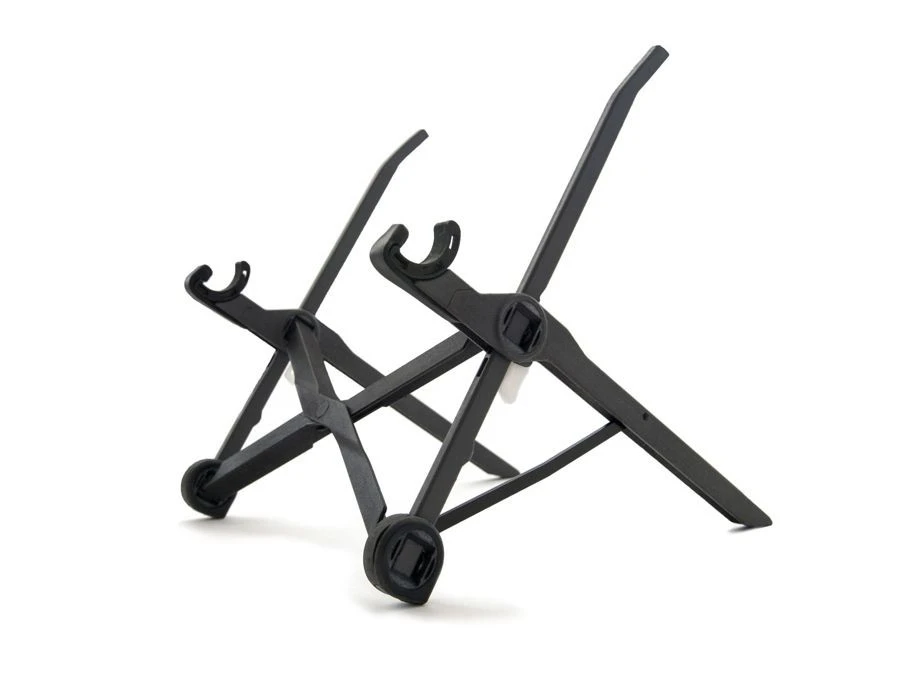
    This is where ‘Roost Laptop stand’ comes into play and might just be the best gift you could give someone.

    This major features of this laptop stand are:

    • Height-Adjustable: This stand helps laptop users adjust the height of their laptops so the screen is eye level. This stand elevates the screens between 6 – 11 inches above the table.
    • Completely Portable: Roost laptop stand is truly flexible and accounts for a weight of 170 grams. Which makes it way easier for working individuals to carry it along with them.
    • Fits All Laptops: This particular stand is said to be suitable for all laptops out there in the market. The Roost Laptop Stand can hold weight up to 50lbs and laptops with ‘front edge’ of less than 1.9cm.

    Click here to get the Roost Laptop Stand priced at $89.95

    Ergonomic Chairs by Herman Miller

    A work from the home setup is incomplete without a comfortable chair.

    Gifting an ergonomic office chair that is designed for long hours of pain free working is priceless.

    There are none better than Herman Miller chairs when it comes to ergonomic chairs.

    The Herman Miller Embody sits on top of the office chair kingdom. Business Insider says it’s worth every penny, while Ergonomic Trends ranks it as the “Best Overall Office Chair” in 2020.

    Few key features and benefits of the Embody are:

    • 12-year warranty
    • Breathable seat and back
    • Superior back support that mimics your spine
    • Fully adjustable arms (height, depth and angle)
    • Sets the benchmark for ergonomic comfort
    • Comes in multiple colours and sizes

    Click here to get the Embody Chair by Herman Miller priced at $1355

    Wireless Ergo Keyboard by Logitech

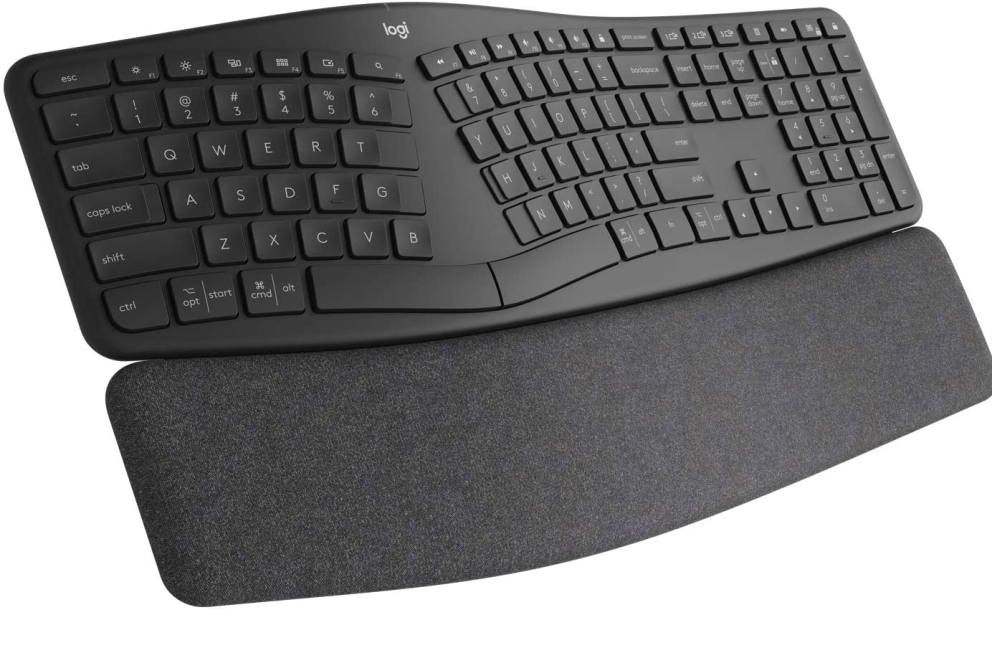
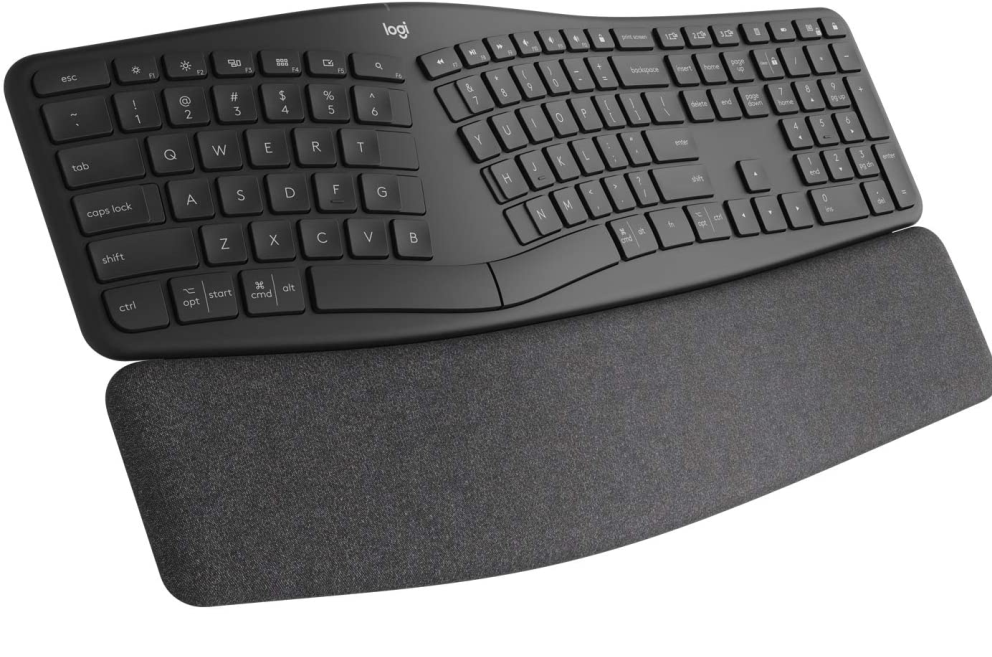
    The Logitech ERGO K860 wireless split keyboard enables you to type better, faster, and with less chances to develop the dreaded carpal tunnel syndrome.

    If you know someone who spends a lot of his/her time typing, this is a gift they will truly appreciate.

    The Logitech ERGO K860’s standout features and specs compared to normal keyboard, and those are:

    • This keyboard is designed with a natural curve wave and a split keyframe to improve typing postures.
    • The three layers of this keyboard known as a surface layer, support layer, and comfort layer are responsible for offering a good wrist support.
    • Wireless range of this keyboard is 10 m (33-ft)
    • The keyboard works on both computers and mobiles
    • 1-Year Limited Hardware Warranty

    Click here to get the Logitech ERGO K860 Wireless Keyboard priced at $129.99

    Wireless Headphones with Mic by BlueParrott

    For freelancers and work from employees, communicating with their team is everything. A good headphone with a quality mic can do them a world of good.

    Whether dealing with noisy kids or construction outside, keeping outside sounds out of your calls is vital.

    When it comes to noise cancellation, the BlueParrott B550-XT does a better job than even headphones that cost 2x as much.

    This voice-controlled mic cuts every bit of noise while you’re on calls. Some key features of this gadget are:

    • Microphone knocks out around 96% of the background noise
    • This headset can control your calls, GPS directions, music, voice assistants, and more
    • It has up to 24 hours talk time, and up to 400 hours of standby time
    • Bluetooth range of up to 300 feet/100 meters from paired devices

    Click here to get the BlueParrott B550-XT priced at $199.99

  • 5 Best Websites For Creating Avatars Online

    5 Best Websites For Creating Avatars Online

    Avatars are a great way of creating a Profile Image for yourself on social media or websites without necessarily uploading your personal photos.

    For most people, security and privacy is the main reason they are unable to put up their personal photos on social media. With scammers everywhere, looking for people’s images to use for their criminal activities, it is better to keep your photos away from social media.

    An Avatar is simply a cartoon version of a normal photo which is usually even smaller in size and can be used as a profile picture or display photo.

    If you have been searching all portals on the internet for ways to create your personal avatars for your social media handles, then you just chanced on luck.

    In this article, I shall take you through some of the best websites for creating an avatar online.

    Face Your Manga

    Looking for a trusted site that enables you to create your avatar from photos taken on your phone? Then look no further. Faceyourmanga.com is one of the world’s biggest Avatar sites. This site allows you to create an avatar with photos on your phone. Also, you can further customize your avatar by adding birthmarks, blemishes, scars, moles and a third-eye. You also get to select your eyebrow type with this website.

    Arguably, this is about the best site for creating Avatar on the internet today. You should check it out.

    You Can Also Check Out How To Create A Facebook Avatar That Looks Like You

    My Blue Robot

    Second, on this list is My Blue Robot. At mybluerobot.com, you are given the ability to add extra tools and looks to your avatar. Aside from the basic elements such as the nose size, ear size, facial appearance and hair, you can also add special magical effects to your avatar. Things such as wings, power equipment and a range of many others can be added to your Avatar when using My Blue Robot. It is one of the best apps for creating a uniquely different Avatar which stands out wherever you use it.

    You can even move your avatar’s eyes up and down or shift them from side to side when using this site. It also gives you the power to tilt the head of your avatar.

    Avachara Avatar

    With Avachara Avatar, you get the chance to not only create a beautiful Avatar but also to change the colour of the clothing, type of clothing and even accessories.

    You can manually set up your Avatar to look completely different from what others have on their profiles. The Avachara Avatar also gives you the power to change the background or wallpaper for your Avatar. It is a fully-customizable Avatar-making website and it works fine for all kinds of people.

    The only limitation however is that the backgrounds provided are limited in number and does not cover landscapes. This in itself may not be considered as a limitation, considering that the site is completely free to use.

    You can check Avacharaavatar.com to create a beautiful Avatar for yourself.

    Zmoji

    Zmoji is a web app which helps people to create their personal beautiful avatar images. With Zmoji, the whole process starts with you creating a photo of yourself. Then you upload the photo and convert it into an Avatar. So basically, Zmoji helps you to create Avatars that are 99.9 per cent like you.

    You can create your Avatar on Zmoji’s Website or download their app from the Google Playstore.

    The Good thing about the Zmoji app is that it comes with an in-built keyboard which makes it easy for you to use the Avatar created with the app on all your various social media platforms. It is a great platform for creating a personalized Avatar.

    Avatar Maker

    Finally, number 5 on this list is Avatar Maker. The Avatar Maker is a cleanly-designed website for creating your personalized avatar for social media. It enables you to create a completely personalized avatar. You can change face shape, nose shape and size, eye shape and size and other facial details with this website.

    It is completely free of charge. And it is one of the best available on the internet presently.

    Conclusion

    Personal privacy and security on the internet are very important especially in today’s world where trust is a missing ingredient in the soup of life. If you must maintain a clean profile on social media and the internet today, then posting your photos randomly should be a thing of the past.

    Therefore, using Avatars on social media and the internet as a whole is a new trend that is gradually taking over.

    In this article, we discussed 5 of the best websites for creating your personal avatar online.

    I hope the content provided in this article was able to answer your query. Kindly do well to leave your comments, reservations and questions about this topic in the comment box below.

    Please do well to share this with your family and friends as well.

  • Google Picasa Alternatives For Editing Pictures

    Google Picasa Alternatives For Editing Pictures

    Whatever your age, gender or race, photography is one thing we all have in common. Whether you own an expensive iPhone or a cheap android phone, one thing you use your phone for is photography.

    Though you may not be a professional photographer, smartphones have made us all ‘photographers’. You want to have the best DP amongst your friends and colleagues. You want to show off how elegant you are in the classy photos you post on your social media accounts.

    One application which helps smartphone users to edit their photos for best quality and appearance is Picasa. Over the years, this application has made a lot of ‘rough’ faces look smooth on social media.

    But what if you don’t want to use Picasa? What alternatives are there for you? Worry not. This article gives you a list of Picasa alternatives you can use to edit your photos.

    Google Photos

    Your best bet for a direct Picasa replacement should be Google Photos. Google photos is a free tool from Google for organizing and editing photos on their popular android systems. However, the app is also available for IOS users and Windows.

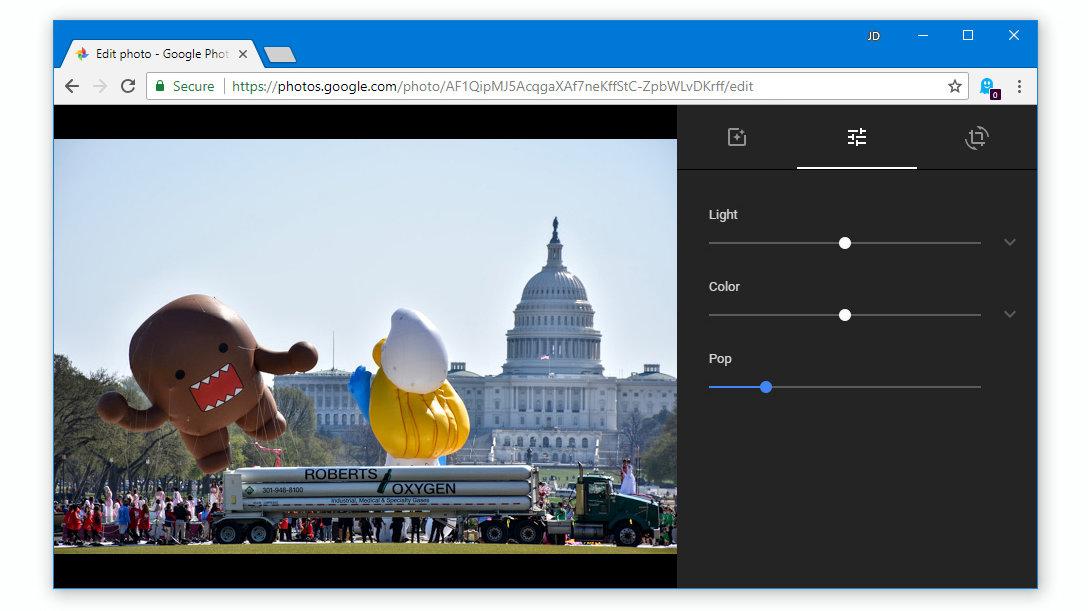
    It is one of the best free photo editing applications available on the internet today. You can use the Google Photos app to change the display of your photos. You can touch the colours, the warmth and texture of your photos. You can also apply filters, crop your photos and rotate your photos using this application.

    What’s more, the application also automatically backs up all your photos to your google account so you can be sure of the safety of your images.

    You can get your Google Photos app for your Android system here. For IOS users, you can get yours here.

    Adobe Lightroom

    The Adobe Lightroom CC is a beautiful and feature-filled software for managing and editing photos across various operating systems.

    The free version of the application enables users to set watermarks, change photo colouration, apply filters and adjust exposure among many other things.

    However, for a premium version which comes at 10 USD per month, users get to sync their photos across various devices and platforms. You can also get other premium features with 10 USD per month.

    This is certainly a good replacement for the popular Google Picasa photo editor. You can get a copy for your android phone here. For IOS users, it is available here.

    Snapseed

    Maybe it’s just coincidence that we are replacing a google product with many other Google products. But yes, Snapseed is another google product for managing and editing photos.

    This is another free application which enables users to change the appearance of old and ugly photos into superfine master crafts of photography.

    Snapseed has tools such as healing brush, crop, curves, colour adjustments, filters and many other tools.

    It is a professional photo editing app that can be used by both pros and newbies. You can get the IOS version here. The android version is available here.

    Picsart

    Very popular software for editing photos, Picsart is the last app on this list. It is definitely a high-end application for editing photos professionally. If you want your photos to look all professional and standout of the numerous photos on the internet, you should think Picsart.

    With Picsart, cloning, cropping, changing a colour grade, adding text to photos and adding filters to your photos has become much easier. You can do all these from one place – your picsart application!

    You can download the IOS version here. For android users, yours is here for free.

    You Can Also Check Applications That Have Nice Filters To Make Your Photo Beautiful.

    Conclusion

    The challenge of social media today is about the best photos. Whether it is a smile challenge on Facebook or a natural face challenge on twitter, you definitely want to show off your best photos.

    The only way to ensure that you get the best results for your social media is by touching up your pics after taking them. One app that comes to mind for this purpose is ‘Picasa’.

    But maybe you want to use some new features and tools to bring some extra touch to your photos, Picasa may not really make the cut for you. So which other applications can you use to edit your photos?

    In this article, we talked about 4 replacement apps for Google Picasa.

    I hope this list was helpful to you. Kindly do well to share with your friends and family.

    If you have any comments, reservations or questions regarding this article, kindly share them in the comment box below or get in touch with us.

  • 4 Apps That Support Self Destructing Messages

    4 Apps That Support Self Destructing Messages

    Chatting applications have multiplied over the years with numerous newbies joining the tonnes of already existing users, every single day.

    While chat and messaging apps have become an important part of our lives, there is one main thing that has been of major concern to most users.

    Security on the internet is one key thing that the internet infrastructure has not been able to guarantee 100 per cent of. As such, people keep finding ways of ensuring their safety and security online.

    This insecurity is also present in the chat or online messaging world. With what has now become known as ‘receipts’ or in common terms, screenshots pulling up here and there, the security of parties having chats on messaging apps has become an immense concern.

    You could send a message to someone, hoping it’s just between you two and the next thing you know is that the person has shared that information with the whole world via the power of social media.

    Also, kids and other minors may want to avoid people having access to confidential information on their phones, especially in their chat apps.

    With all these and many other instances taken into consideration, the concept of self-destructing messaging apps was introduced.

    Also, Checkout Some Apps On Your Partner’s Phone Which Shows They Are Tracking You.

    What Are Self-Destructing Messaging Apps?

    Self-destructing messaging apps are applications that automatically deletes messages from both the receiver and the sender’s devices upon the expiration of a certain pre-defined time by the sender. So, just like Whatsapp chats where you can delete messages from both devices after sending, in this case, you’ll time the message such that if the time elapses after the recipient had read the message, then it gets deleted on both devices.

    Apps That Support Self-Destructing Messages

    Now, let’s get into details of the various chatting apps that support self-destructing messages.

    Snapchat

    Snapchat is arguably the world’s leading photo and videos sharing app. Millions of people share various photos, texts and videos on this app that has brought about a social media craze over the years.

    For most Snapchat users, the main reason they spend their entire day on the app is that they could send photos and videos to people with the assurance that it’ll be deleted as soon as the recipient views them. This has been the prime reason for the introduction of the app and so users are always excited about it.

    It is only right therefore that Snapchat finds its way as the number one app on our list here.

    Wickr

    Wickr is one unique brand in the messaging industry. It comes with extra security features which make it difficult for any other person apart from the intended recipient to have access to the message sent by the sender.

    Wickr makes use of data encryption or cryptography to encrypt messages from the sender with 5 different security layers which make it impossible for any other person to have access to your message or for it to be forwarded to another contact.

    So wickr is the second app on this list of self-destructing messaging apps. Wickr is mostly used by secret agencies and other security forces in their works but can also be used by individuals as well.

    Bleep

    One of the finest seld-destructing messaging apps available on the internet today is Bleep. Bleep offers a wide range of login methods including mobile number, email and or incognito mode.

    Aside from the self-destruction and end-to-end encryption features available on Bleep, the platform also offers a feature called ‘Whisper’. When you Whisper a message to another person on Bleep, they cannot forward the message nor can they screenshot or do any other thing apart from reading and replying.

    Also, Bleep has an anonymous messaging feature which only shows the Initials of the sender to the recipient.

    Telegram

    Telegram is one of the most-used chat applications in the world currently. Aside from the fact that it enables users to send files, documents and applications unlike most other chat applications, Telegram also has a self-destructing feature.

    Messages sent to users on Telegram can be timed to self-destruct after the recipient has viewed the message.

    This function is available in the Secret Chat feature of Telegram.

    For more security, Telegram uses end-to-end encryption to prevent external bodies and applications from having access to messages sent between users on the platform.

    Conclusion

    Safety and privacy on the internet is one thing most people and security companies have advocated in favour of. Over the years, various people have raised concerns about the safety of data and messages on various chat platforms due to the intrusion of third parties.

    In this article, we looked at four chat applications which support self-destructing messages. These apps are responsible for preventing third-party involvement in chats.

    I hope you find this article interesting and that you would share with your friends and relatives.

    Please do share your comments, reservations and questions about this post in the comment box below or get in touch with us.