Author: Shepherd Yaw Morttey

  • Pepapa.com Review – Ghanaian online marketplace | Buy & Sell

    Pepapa.com Review – Ghanaian online marketplace | Buy & Sell

    When was the last time you visited a classifieds site? As someone involved in tech, I tend to be very interested in online classifieds and I’m here to talk to you about Pepapa.com – A Ghanaian online marketplace where you can buy & sell.

    According to Pepapa’s about page, their aim is simple: To empower everyone to be able to buy and sell without any difficulties.

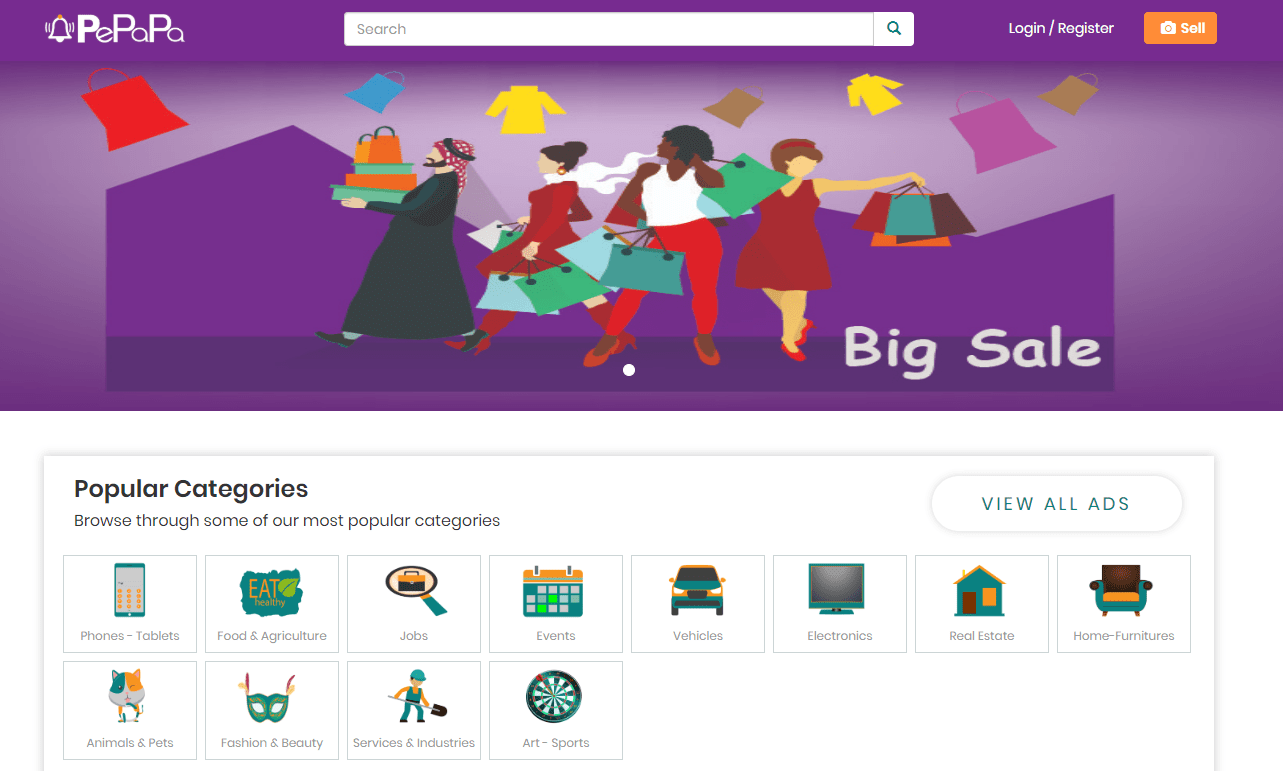
    This they do by giving both sellers and buyers a platform to post and search for goods and services. Currently, there are about 12 different categories of products and services ranging from electronics to real estate and jobs.

    I checked through some of the classifieds and although they were not as many as one would expect from a big classifieds site, they sure are quality.

    I didn’t find or flag any of the iPhones on sale as suspicious like I have seen on some other platforms over the past few months.

    Well, let’s dig deeper into the review and see all that Pepapa.com is about.

    Website Design

    Pepapa has both a website and a mobile app (for android and iOS). For the purposes of this review, I would be focusing primarily on the website, with a look at the mobile app later on.

    One thing I love about every service that I have used is that it took me zero time to get used to the interface and functionality and Pepapa does this very well. The website follows good intent practices by making sure there is a search bar on almost every page, unlike some others that we have seen in the past.

    What bugged my eyes were a few stretched images when I visited on my PC, however, it looked very organised on my phone.

    One other thing I liked about the design was how fast the website loads overall. On the average, I got a load time of 2 to 5 seconds and this was confirmed via a pingdom test I did.

    The harmonious purple, orange and white colour scheme is bright enough, sort of to keep you “alert” when on the site. As a fan of everything dark mode, I am looking at more websites giving that option although that is currently not a thing anywhere.

    Focus

    Pepapa is an online classifieds marketplace for Ghanaians and as such, people should be able to buy and sell there.

    However, everyday people do not need to sign up to view classifieds listing and it is good that the platform maintains this industry standard.

    For those that want to post their ads, they can do so as a single person (personal account) or as a Company/Brand Account.

    Signing up

    One of the things I hate is to sign up for new services. For a classifieds site, I would expect to just go straight to posting my ad without the need for long sign up forms.

    On Pepapa.com, that is possible. Once you click on the “sell” sign at the top right of the screen, you are ushered to a new page where you list your ad and add your seller information.

    What I like about it is that it is straightforward and simple. However, fraudsters may take advantage of it if there are no measures to combat that.

    For those who want to create a full account first, it’s calming to know that it was very simple to sign up for a personal account on Pepapa.com

    Note that you only need to sign up if you are looking to post ads. In my case, I wanted to explore the process and maybe list my Pixel 2 XL when I get a Pixel 4 😀

    There are a range of adverts that can be posted and/or viewed on Pepapa.com. See them below:

    Classifieds categories on Pepapa.com

    • Phones – Tablets
    • Food & Agriculture
    • Jobs
    • Events
    • Vehicles
    • Electronics
    • Real Estate
    • Home-Furnitures
    • Animals & Pets
    • Fashion & Beauty
    • Services & Industries
    • Art – Sports

    Resources

    A differentiator that Pepapa offers which I am yet to see on the other platforms is the access to information and other resources to both sellers and buyers.

    For example, I glanced through the hints page which can be found here and there were videos and articles on primarily tech advice and lots of how-tos that are very beneficial. It can be seen as the Pepapa blog.

    There is also an entertainment page with entertainment news, although there was only one entry on that page at the time of publication.

    Pepapa also has exclusive special deals and tips for businesses.

    Credibility

    When it comes to online services where cash is involved, it is important to know that it is run and managed by competent and credible people who are not just out to take your money.

    Pepapa.com in itself is credible and registered in Ghana. As they are running a 2 sided market place, the credibility of their sellers also matters to them. This is why according to the CEO, the conduct checks on all ads posted on the platform, flag suspicious ones and flag them for further action.

    This is to ensure that buyers are safe at all times. Don’t forget to check out these tips if you are transacting on an online classifieds site.

    Final Words

    If you are a seller looking to post your online Ads, you should definitely consider using Pepapa as it gives you more reach and you don’t have to pay to be on there, like other solutions on the market.

    For buyers, knowing that you will find credible ads saves you a lot of time and stress and Pepapa offers more than just classifieds, by also providing other online resources that you may need.

  • WAEC Confirmed: BECE 2019 Results Released: How to check fast & easy on Phone

    WAEC Confirmed: BECE 2019 Results Released: How to check fast & easy on Phone

    The West Africa Examinations Council has released the BECE Results for School candidates who sat for the 2019 Basic Education Certificate Examinations.

    The BECE Provisional Results 2019 is now available on the WAEC Site and school placements will soon be available.

    Have BECE 2019 Results been released?

    Yes, the BECE results were released late night on Thursday, August 29, 2019, at around 9.45PM.

    We have reports of people who have checked all over the country. A total of 517,332 candidates from 16,871 public and private basic schools wrote the 2019 BECE. They were made up of 263, 616 males and 253,716 females.

    In this tutorial, we will teach you how to check your results instantly online without the need for a scratch card.

    You need to follow the steps carefully so you can check your BECE 2019 results on phone by yourself.

    Note: Not all phone calls can be answered due to the number of people calling. Follow the steps on paying and getting the PIN through WhatsApp and the PIN will be delivered without the need to call. The number is sometimes busy because there are a lot of people calling.

    All you need to check your BECE results in 2019 is your PIN which we will provide for you. If you need help, contact our BECE Pin sales executive, IKE on 0535462067 via WhatsApp.

    How to get your BECE Results Checker PIN

    You can get the BECE Pin at selected Internet Cafes and bookshops across the country for GHS 18 or GHS 20. Beware of scammers too who will only take advantage of you and try to charge you at very low prices.

    IKE is running a special offer for all those who want the PIN to be sent directly to their phones via SMS or WhatsApp. He is giving out the BECE Pin for just GHS 17.

    Step 1: Send MTN Mobile Money GHS 17 to 0535462067, Subscriber (Isaac)

    Step 2: Send the name on the Mobile Money Account you used to send the money or the Merchant Name back to 0535462067 through WhatsApp.

    Step 3: You will receive the SERIAL and PIN to check your MAY/JUNE 2019 results once the payment is confirmed. It takes about 5 minutes to send the card after payment.

    Kindly send a WhatsApp message for further instructions or clarifications.

    Check your BECE Results 2019 with a PIN (Fast Method)

    Here is how to check WAEC results online. You need to connect your PC or your mobile phone with any internet network connection. Please don’t use Opera Mini for these steps.

    Follow the step by step instructions given below, if you get stuck, WhatsApp IKE on 0535462067 for help or for your PIN (Instructions on that above).

    Here is how to check your BECE results without a Scratch Code:

    1. Use any browser, preferably Google Chrome and visitwww.waecdirect.org
    2. On the next screen, enter your 10 Index Number: Eg: 0070202043
    3. Enter your WAEC exam year of completion. Eg: 2019
    4. Enter the exam type you sat for. Eg: BECE School 2019
    5. Now, you will need to enter your 10 Digit Pin here. Enter the secret Pin.
    6. Submit your personal information and patiently wait for your results.

    Confirm your BECE Results 2019 with a Scratch Card

    If you already have a scratch card and would not prefer the PIN Method (which is more convenient), then this is how to use the scratch card to check your results.

    1. Visit the Waec Result Checker Online Portal via the link below;
      http://ghana.waecdirect.org
    2. Enter your Index Number.
    3. Select the Type of Examination (e.g. BECE).
    4. Select your Examination Year eg. 2003.
    5. Enter the Card Serial Number found on the reverse side of your Scratch card.
    6. Enter the 12-digit Personal Identification Number (PIN) on your Scratch card eg. 012345678912.
    7. Confirm your Index Number and Examination Year. This is to ensure that your examination information is correct.
    8. Click on Submit and wait for the display in the popup window. This may take several seconds.

    WAEC Contact Details

    Head Office

    Kindly share this article with friends and family, you may be helping someone.

  • Tecno Phantom 9 (2019): Prices, Specs, Features & Best Deals

    Tecno Phantom 9 (2019): Prices, Specs, Features & Best Deals

    The growing fanbase of Tecno smartphones will be enthused with the news that the Tecno Phantom 9 is here for all.

    Although already launched in Nigeria and other countries, the smartphone is expected to hit the Ghanaian market in a couple of days.

    The story with Tecno’s phantom line is a bit of back and forth with even rumours that there would be no phantom phone again.

    This would be easy to believe given that last Phantom smartphone from Tecno Mobile was launched in late 2017

    It was widely expected that the next one would come in 2018, but then that didn’t happen and Tecno Mobile did not give any form of announcement about the future of the Phantom line.

    However, here we are in 2019 with the all-new Tecno Phantom 9. Let’s quickly look at the specs of the phone.

    Tecno Phantom 9 Specifications

    FeatureSpecs
    Display6.40-inch 1080x2340pixels
    RAM and Storage6GB RAM; 128GB internal storage
    ProcessorMediaTek MT6765 Helio P35; 2.35 GHz Octa Core Cortex A53
    CameraRear: Triple (16 MP + 8 MP + 2 MP) with Flash Support
    Front: 32 MP
    SecurityFingerprint Scanner, Face Scanner Face ID
    Battery3500mAh
    Operating SystemRuns Android 9 Pie
    NetworkSupports 4G networks

    Other features of the Tecno Phantom 9

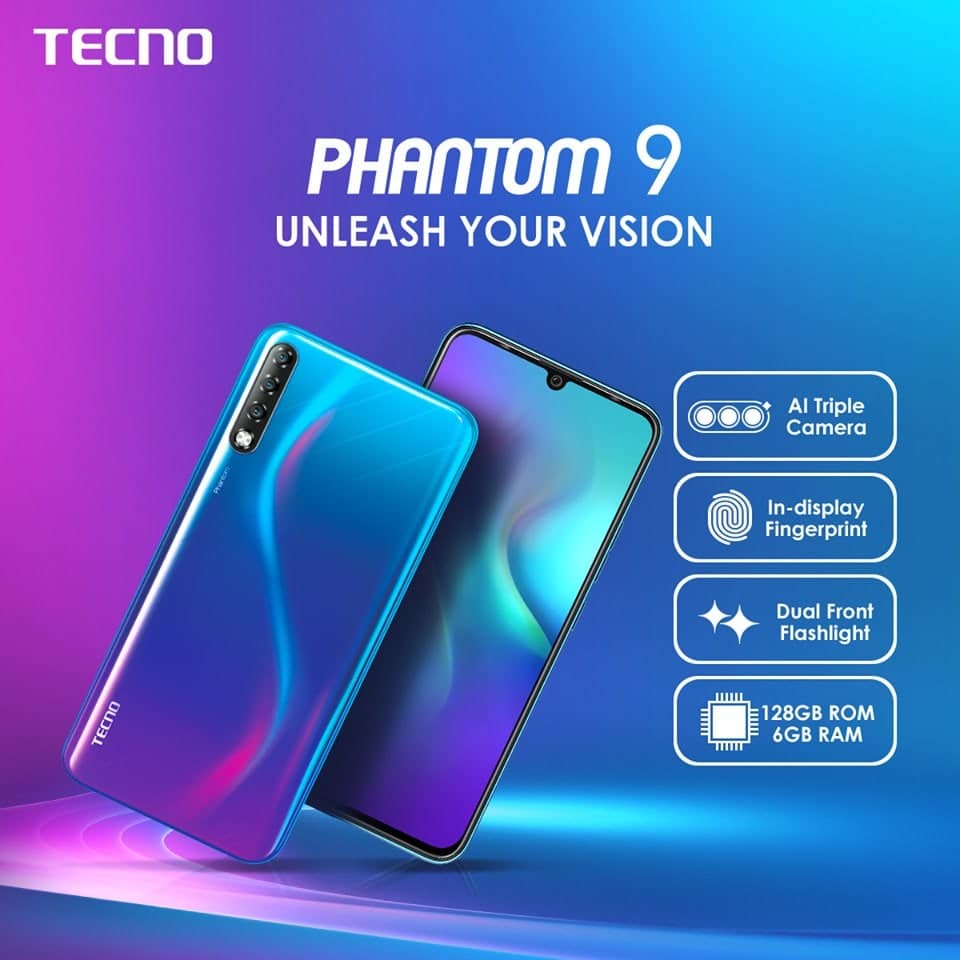
    Tripple AI Camera

    The Tecno Phantom 9’s AI triple camera function comes equipped with Google Lens, that allows the device to smartly identify objects as soon they come into the view of the camera.

    The phone does this by automatically showing all the relevant information on the object. This brings a whole new dimension to smartphone photography.

    Storage and Connectivity

    When it comes to the area of storage, the Tecno Phantom 9 unsurprisingly has 128GB of internal storage that is expandable via microSD card (up to 256GB).

    For the 4G lovers, connectivity options on the Phantom 9 include 4G VoLTE, Wi-Fi 802.11 a/b/g/n, Bluetooth v5.0, GPS/ A-GPS, Micro-USB, and a 3.5mm headphone jack.

    Like most smartphones nowadays, the device is also packed with other sensors onboard which include an accelerometer, ambient light, gyroscope, magnetometer, and proximity sensor.

    HiOS 5.0

    The Phantom 9 updates HiOS 5.0 basing on the latest AndroidTM 9 Pie operating system and truly illustrates the meaning of intelligent smartphone.

    Owing to the newly upgraded system, you would find more interesting contents such as AI Assistant, AI Video Beauty, Smart Panel and AI Battery Lab. Intelligently identify and broadcast the incoming calls, messages, news and etc.

    The AI Assistant on the Phantom 9 provides unimaginable convenience, playing an important role as an intelligent reminder.

    Pricing and Availability of the Tecno Phantom 9

    TECNO Phantom 9 Price in Ghana

    The Phantom 9 is available at the following shops and prices:

    StorePriceContact
    Mfidie Shop
    (Nationwide Delivery)
    12990546090871
    Atapsa (Nationwide Delivery)12990544991140

    However, when available, you can get free Data from MTN when you buy the devices. We will update you on this when the offer is available.

    Pre-order Tecno Phantom 9 in Ghana

    You can now pre-order the Phantom 9 with an amount of GHS 100 at any Banana Electronic Hub Shop and pay up the rest when the device is available.

    The pre-order phase for the Phantom 9 has passed.

    You will get freebies worth GHS 599 when you pre-order.

    Detailed Specs of Tecno Phantom 9

    General Information

    • Dimensions: 158.46 x 75.3 x 7.85 mm
    • Weight: – 180 g
    • OS: Android 9.0, Pie
    • Colour: Lapland Aurora,
    • SIM: Dual (SIM standby)
    • SIM Type: Nano

    Processor

    • Type: MediaTek MT6765 Helio P35
    • Frequency: 2.35 GHz Octa Core Cortex A53
    • GPU: PowerVR GE8320

    Display

    • Size: 6.4 Inches
    • Type: FHD+ AMOLED Capacitive Touchscreen (19:9)
    • Resolution: 2340 x 1080 pixels (19:9)
    • Pixel Density: ppi pixel density
    • Colour: 16 Million
    • Multi-touch: Yes
    • Protection: N/a

    Memory

    • RAM: 6 GB
    • ROM (Internal): 128 GB
    • External Memory: Yes, micro SD, Expandable by up to 256GB

    Camera

    • Back/Rear: Triple (16 MP + 8 MP + 2 MP) with Flash Support
    • Feature: Pictures, Videos, HDR, Geo-tagging, face detection, panorama
    • Front Camera: 32 MP
    • Feature: Pictures, Videos, HDR, Geo-tagging, face detection, panorama

    Battery

    • Capacity: 3500 mAh Li-Po
    • Type: Non-Removable
    • Type: Li-Po

    Network

    • 2G Bands: GSM 850 / 900 / 1800 / 1900
    • 3G Bands: WCDMA 850 / 900 / 1900 / 2100
    • 4G Bands: LTE Band 1/ 2/ 3/ 4/ 5/ 7/ 8/ 12/ 13/ 17/ 18/ 19/ 20/ 25/ 26/ 28/ 34/ 38/ 39/ 40/ 41/
    • WIFI: 802.11 a/b/g/n/ac, Wi-Fi hotspot, Wi-Fi Direct

    Connectivity

    • Bluetooth: Yes, v5.0, A2DP, LE
    • GPS: A-GPS, GLONASS
    • NFC: Yes
    • USB: micro USB 2.0
    • 2G: GPRS – Up to 85.6 kbps EDGE – Up to 236.8 kbps
    • 3G: Up to 42 Mbps Downlink Up to 5.76 Mbps Uplink
    • 4G: LTE Cat4 150/50 Mbps

    Sensors and Control

    • Fingerprint Scanner: Yes (on-screen)
    • Digital Compass: Yes
    • Accelerometer: Yes
    • Proximity Sensor: Yes
    • Light Sensor: Yes
    • Gyroscope: N/a
    • Barometer: No
    • Iris Scanner: No
    • Face Unlock: No

    Other Features

    • Radio: Yes
    • Active Noise Cancellation: Yes
    • Wireless Charging: No
    • Water Resistant: No
    • Dust Resistant: No
    • SNS integration
    • MP4/MPEG4/H.263/H.264 Player
    • MP3/WAV/eAAC+/AC3/FLAC Player
    • Document Viewer
    • Image Viewer / editor
    • Predictive Text Input
  • itel S15: Full Specs, Price, Deals and where to buy from

    itel S15: Full Specs, Price, Deals and where to buy from

    Itel is a mobile phone brand committed to providing budget-friendly, high-quality products boasting excellent user experience. They have released a new model of the selfie series (S15). The S15 will be the successor of the S13 Selfie series smartphone. The S15 comes with Google Gallery Go in order to bring the best selfie experience to the consumers.

    itel is the first global mobile phone brand to partner with Google on the Gallery Go project. In line with itel’s commitment, this initiative aims to benefit the brand’s millions of consumers in global emerging markets and empower them to enjoy mobile life at affordable price points.

    itel S15 which feature the new Gallery Go will present a number of benefits to consumers including:

    • A light and fast gallery optimized for Android Go phone
    • Smarter storage – Easily find*, manage and storage photos on the device
    • Easier editing – Make user’s photo look their best with auto-enhance

    Key Specs Of The Itel S15 Smartphone

    Display 6.1’’ HD Waterdrop FullScreen

    1560*720 19.5:9

    Size 156.7*74.7*8.9mm
    Camera 16MP FF Selfie Camera with a 4 in 1 Big Pixel

    8.0MP AF +VGA Dual rear Camera with

    Flashlight

    Processor SC7731E Quad-core 1.3GHz
    Memory 1GB RAM = 16GB ROM up to 32GB
    Battery 3000mAh
    System AndroidTM 9 Pie (Go Edition)

    Specifications Of The Itel S15 Smartphone

    The itel S15 comes with the 6.1-inches HD + IPS 19.5:9 Waterdrop Full-Screen display with a 16MP selfie camera and 8MP rear dual camera and flashlights.

    The device is packed with 1GB RAM and 16GB ROM, powered by SC7731E Quad-core 1.3GHz processor. It houses a 3000mAh big battery with AI Power Master, as well as face unlock and fingerprint sensor to protect your privacy.

    Last but not least, the AI Face Beauty 3.0 gives a major upgrade on the way to shoot. The AI algorithm identifies your facial features, skin tone and lighting environment to add beauty effects tailored to individual facial features and bring out your unique natural beauty.

    Pricing and Availability of the itel S15 in Ghana

    The itel s15 costs GHS 375.00 in major retail outlets in Ghana.

  • GBWhatsApp shuts down completely; Here is a solution

    GBWhatsApp shuts down completely; Here is a solution

    Developers of popular and feature-packed WhatsApp Mode, GBWhatsApp have announced that they have stopped all development/modding of the app and will not be releasing any more updates.

    The announcement was contained in a twitter message; see below:

    I have been a big user of WhatsApp modes, from when the very first mods appeared to now and have suffered different levels of bans from WhatsApp, but here I am, still using mods.

    As a WhatsApp mod lover, the announcement is very heartbreaking. However, there is a solution for all those who want to update and still be on some form of WhatsApp Mod.

    How to quickly switch to YoWhatsApp

    Yousef Al Basha, another WhatsApp modder has developed a very easy migration for all those who were on GBWhatsApp to switch to YoWhatsApp.

    The apk, when installed acts like an update and migrates all chats and media downloaded to the new YoWhatsApp.

    However, you would soon realise that GBWhatsApp was still miles ahead of YoWhatsApp – which has a focus on Material Design.

    Of course, being unofficial apps, you would have to sideload the apk onto their phone as you can’t find them through Google’s Play Store. If you are looking for the YoWhatsApp migration from GBWhatsApp APK, download by clicking here.

    WhatsApp has been against these mods and has been cracking down on the developers including threatening a lifetime ban in June 2019 to GBWhatsApp and WhatsApp Plus users. With GBWhatsApp shutting down, it will only be a matter of time before other mods shut down too.

    Remember, using Mods are always against the WhatsApp terms of service. You risk a lifetime ban from the service.

  • WAEC releases May/June WASSCE 2019 results for Ghana and Nigeria

    WAEC releases May/June WASSCE 2019 results for Ghana and Nigeria

    Ghana

    The West Africa Examinations Council has released results for all Senior High School Students who participated in the 2019 WASSCE.

    The results were released in the late hours of Monday, 29th July 2019.

    The WASSCE Provisional Results 2019 is now available on the WAEC Site.

    In this tutorial, we will teach you how to check your results instantly online without the need for a scratch card.

    Note: Not all phone calls can be answered due to the number of people calling. Follow the steps on paying the getting the PIN through WhatsApp. 

    All you need to check your WASSCCE results in 2019 is your PIN which we will provide for you. If you need help, contact our WASSCE Pin sales executive, IKE on 0535462067 via WhatsApp.

    How to get your WASSCE Results Checker PIN

    You can get the WASSCE Pin at selected Internet Cafes and bookshops across the country for GHS 18 or GHS 20. Beware of scammers too who will only take advantage of you and try to charge you at very low prices.

    IKE is running a special offer for all those who want the PIN to be sent directly to their phones via SMS or WhatsApp. He is giving out the WASSCE Pin for just GHS 17.

    No need to call, just follow the steps below to get your results checker.


    Step 1: Send MTN Mobile Money GHS 17 to 0535462067, Subscriber (Isaac)

    Step 2: Send the name on the Mobile Money Account you used to send the money or the Merchant Name back to 0535462067 through WhatsApp.

    Step 3: You will receive the SERIAL and PIN to check your MAY/JUNE 2019 results once the payment is confirmed. It takes 2-4 minutes to send the card after payment.


    Kindly send a WhatsApp message for further instructions or clarifications.

    Check your WASSCE Results 2019 with a PIN (Fast Method)

    Here is how to check WAEC results online. You need to connect your PC or your mobile phone with any internet network connection. Please don’t use Opera Mini for these steps.

    Follow the step by step instructions given below, if you get stuck, WhatsApp IKE on 0535462067 for help or for your PIN (Instructions on that above).

    Here is how to check your WASSCE results without a Scratch Code:

    1. Use any browser, preferably Google Chrome and visit www.waecdirect.org
    2. On the next screen, enter your 10 Index Number: Eg: 0070202043
    3. Enter your WAEC exam year of completion. Eg: 2019
    4. Enter the exam type you sat for. Eg: WASSCE School 2019
    5. Now, you will need to enter your 10 Digit Pin here. Enter the secret Pin.
    6. Submit your personal information and patiently wait for your results.

    Confirm your WASSCE Results 2019 with a Scratch Card

    If you already have a scratch card and would not prefer the PIN Method (which is more convenient), then this is how to use the scratch card to check your results.

    1. Visit the Waec Result Checker Online Portal via the link below;
      http://ghana.waecdirect.org
    2. Enter your Index Number.
    3. Select the Type of Examination (e.g.  WASSCE).
    4. Select your Examination Year eg. 2003.
    5. Enter the Card Serial Number found on the reverse side of your Scratch card.
    6. Enter the 12-digit Personal Identification Number (PIN) on your Scratch card eg. 012345678912.
    7. Confirm your Index Number and Examination Year. This is to ensure that your examination information is correct.
    8. Click on Submit and wait for the display in the popup window. This may take several seconds.

    WAEC Contact Details

    Head Office

    Kindly share this article with friends and family, you may be helping someone.

    Nigeria

    The West African Examination Council (WAEC) has released the May/June 2019 results. The examination body revealed this on Friday, July 26, to journalists.

    The news was confirmed by the examination body’s public relations officer, Demian Ejijiogu, The News Agency of Nigeria (NAN) reports.

    According to WAEC’s Head of National Office (HNO) Olu Adenipekun, 1,596161 candidates registered for the examination from 18,639 recognised secondary schools in Nigeria.

    https://mfidie.com/wassce-results-2019-mobile-money/

    Adenipekun also revealed that a total of 1,020,519 candidates who sat for the 2019 May/June WASSCE for schools obtained credits and above in a minimum of five subjects including English Language and Mathematics.

    He went on to say that of the number of candidates who registered for the examination, 1,590,173 sat for the examination which was also administered to some candidates from some schools in the Benin Republic, Cote d’Ivoire and Equatorial Guinea, where Nigerian curriculum for the senior secondary school was used.

    Even more, WAEC’s HNO said that 1,309,570 candidates also obtained credits and above in a minimum of any five subjects, with or without English Language and or mathematics, adding that 180, 205 results were withheld over cases of examination malpractice.

    The HNO said that 1,468,071 candidates who sat for the examination had their results fully processed and released while 122,102 others had a few of their subjects still being processed.

    Earlier, Legit.ng reported that WAEC had said that result of its the 2019 West Africa Senior School Certificate Examination (WASSCE) for school candidates would be released “within the next 24 hours”.

    This was contained in a statement signed by Ojijeogu and made available via the council’s official Facebook page in the early hours of Thursday, July 25.

    Thus, the 2019 WASSCE results, according to the statement, will be available latest by Friday, July 26.

    According to the statement:”Candidates who are not indebted to the council will be able to access and check their results online, using the results checker pin on their smart identity cards used during the conduct of the examination.”

    For Ghana Results, click here.

  • How To Register As A MTN Mobile Money Agent/Merchant For Commission

    How To Register As A MTN Mobile Money Agent/Merchant For Commission

    Mobile Money transactions have become an integral part of the banking system in Ghana. Many people have come to love transacting their day to day business through this new form of banking in the country.

    With the advancement in Fintech and the coming into being of the interoperability system, a lot of ventures finds it easy to accept MOMO payment instead of physical cash payments.

    Today, almost all the network providers in the country have implemented some form of the mobile banking system. We have seen the likes of MTN mobile money, Vodafone cash and then later AirtelTigo Cash Payment system. But looking at the statistics, MTN mobile money transaction is still the leading mobile banking system as it stands today.

    Because of the rise in the demand for MOMO transactions outlets, MTN and all the other mobile money providers have expanded their outlets to anyone who is qualified and therefore wishes to work as a vendor for a commission.

    The service providers have put in some requirements that you need to meet before you become a qualified applicant for the MOMO business.

    Requirements to be an MTN Mobile Money Merchant

    For you to become a merchant working for MTN, for a commission you will need to meet the following requirements.

    • Must have a registered company(limited) or its equivalent
    • Fill and submit Agents Recruitment Form
    • Fill and submit Agent Account Handler Form
    • Agent/ Merchant code of ethics

    Registered Company (limited)

    For you to be a successful applicant, you are required to have at least a limited company or its equivalent. This is to ensure that, in case of unforeseen circumstances, you can easily repay your debt and that of your customers.

    Agent Documentation Requirements

    Every business in Ghana must have official documentation to make it a binding one between the parties involved. Being an agent means you and MTN are entering in some kind of business which opts to be binding. this document will serve as a bidding contract letter. So in other to be issued the go-ahead to start a merchant business, you are required to fill and submit the agent documentation letter.

    Agents Recruitment Form

    Recruitment form, also known as MTN MOMO registration form. This form includes details like Registered Business Name, Trade No./Business Registration No, Assigned Bank, Agent Ghana Post GPS Location etc. You need to provide all the details marked as required with an asterisk. Once you are done then you submit it for a review. Get the form Here

    Agent Account Handler Form & Agent/ Merchant code of ethics

    The information needed here includes the agent’s personal details such as full name, date of birth, place of birth, nationality, occupation, Voter ID or any of the National ID’s. The code of ethics also has to do with the agents agreeing to abide by the business ethics. The handler form and that of the code of ethics can also be found here.

    Prospective Agents must also meet the required structure and location requirements as set in accordance with EMI (E-money Issuer) guidelines. The structural requirements are as follows:

    Permanent structure in the form of Brick and Mortar, Semi-permanent structure is required for an Agent outlet. These structures should be placed within 50-100 meters’ range.

    Wooden structures and Umbrella outlets should be avoided as they do not meet the standard requirement. prospective Agents are also required to have a startup capital of GHS 4,000.

    After meeting the structure and location requirement, and submitted your application, you will need to wait for sometimes before you get feedback from MTN.

    The following points should be noted whiles you wait for your application to be processed:

    • MTN Mobile Money centre shall respond via email or phone to all applicants upon receipt of their application.
    • Applications received shall be vetted to ensure they meet all requirements.
    • False documents presented during the applications process is deemed to be a criminal offence and MTN Mobile Money reserves the right to reject any applications that do not meet the requirements.
    • Processing of a successful application shall take a minimum or maximum of 23 working days from the date on which your application is received.
    • Successful applicants shall be notified about the status of their application via email or phone call upon completion of service.

    MTN Mobile Money Agent Commissions Structure

    As a mobile money agent, you get some benefits in terms of commissions. MTN mobile money agent gets rewarded commission per every transaction the carried out. This commission serves as a profit for these agents.

    The commission fees are structured in the following ways:

    Any withdrawal between GHS 1 to GHS 50 attracts a charge of GHS 0.50 whiles withdrawal above GHS 50 gets a deducted fee of 1% of the money to be withdrawn.

    You can read more on these charges and fees from the Official MTN Page. This is where we come to an end of today’s post. Hope you find it helpful. If you do please share on all the platform you find yourself.

  • OLX becomes Jiji Ghana in a forcasted move in the classifieds space

    OLX becomes Jiji Ghana in a forcasted move in the classifieds space

    OLX Ghana, in what seems like a partnership with Walie Holdings Ltd is changing its name to Jiji and users of olx.com.gh will soon be redirected to jiji.com.gh.

    Walie Holdings Ltd. owns Jiji.com.gh, which will apparently power a new OLX and give a brand new experience to traders so they can continue to buy and sell on the classifieds site.

    The redirection of the site was supposed to start from the 20th of June 2019 but as at the time of reporting, it is still not in place.

    However, there seems to be a smooth migration process as users of OLX Ghana will still be able to sign in and continue using their existing accounts on Jiji, without having to create a new one.

    Users of OLX should also note that from 20 June 2019, the Privacy Policy of Walie Holdings Ltd. will govern the use of their personal information.

    OLX has been struggling to beat Tonaton to number one spot in the classifieds sector in Ghana and it will be interesting to know how this new change will affect the classifieds landscape in Ghana.

  • TECNO partners Google for Android 10 Q Beta with Spark 3 Pro

    TECNO partners Google for Android 10 Q Beta with Spark 3 Pro

    The Google I/O developer conference where Google announces the latest updates to their ecosystem took place this week. As usual, Android fans were waiting for the next beta version of Android 10 Q.

    The Google Pixel devices are usually the devices to get the beta update first, but as Google looks forward to getting OEMs to get on the latest Android version as fast as possible and reduce fragmentation, it was not surprising to see so many more device manufacturers and phones supporting the latest beta of Android 10 Q.

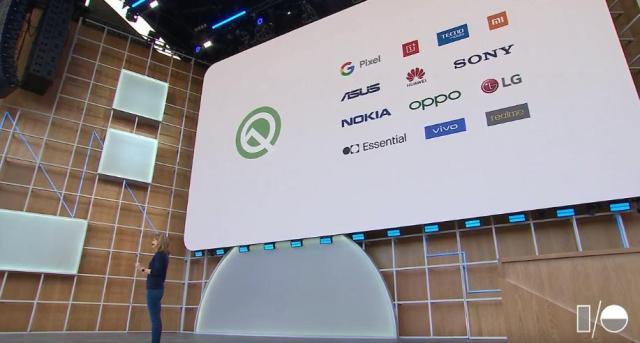
    For the latest Beta, Google announced that 21 phones from 13 manufacturers will get the update once it is released [It has been released and these devices are getting the updates].

    The list of manufacturers includes Google, OnePlus, MI, Asus, Huawei, Sony, Nokia, Oppo, LG, Essential, Vivo, Realme and TECNO.

    Yes, you read right! For the first time, we have a Tecno device that will get the Android 10 Q beta release. For those who own the Tecno Spark 3 Pro, you can now get the beta release by following this link.

    The other smartphones that you can use to get the Android Q beta release include the Google Pixel, Pixel XL, Pixel 2, Pixel 2 XL, Pixel 3, Pixel 3 XL, Vivo X27, Vivo NEX S, Vivo NEX A, Xiaomi Mi Mix 3 5G, Xiaomi Mi 9, Asus Zenfone 5z, Essential PH-1, Nokia 8.1, Huawei Mate 20 Pro, LG G8, One Plus 6T, Oppo Reno, Sony Xperia XZ3 and Realme 3 Pro.

    Hopefully, TECNO remains on the list for a long time and brings the beta as well as the full stable Android 10 Q to more of their devices.

    Way to go!

  • Ghana Based Startup Jumeni Launches Cloud Software for Optimizing Waste Management Operations

    Ghana Based Startup Jumeni Launches Cloud Software for Optimizing Waste Management Operations

    Jumeni Technologies, a Ghanaian-based software company specializing in cloud-based field service management solutions, today announced the launch of its flagship product for the waste management industry. Jumeni’s platform is designed to increase the productivity of field workers, and improve customer service, by digitizing data collection and offering access to more efficient payment options.

    Jumeni’s platform includes field apps which connect workers in the field with back office systems to reduce paper-based and administrative processes and improve accuracy.

    Jumeni was founded in 2018 by Eyram Amedzor, Kevin Gawo and Emmanuel Oduro, who graduated from the MEST Africa entrepreneurial training program in Accra. The idea came from their experience working with waste companies in Ghana.

    CEO Eyram Amedzor stated, “We believe software has a role to play in keeping our environment clean and sustainable. The waste sector is one of the biggest and most important industries, but has seen few advancements in technology. This is because waste management is complex. People, processes and technology must work seamlessly for these companies to effectively optimize their productivity, customer service and revenue. That’s why we designed a comprehensive platform to specifically address needs across waste management organizations, and believe we can accommodate any waste and recycling business.”

    The team, over the past months, piloted the platform with companies operating in Tema and Kaneshie and has seen significant results, demonstrating an increase in revenue and operational efficiency.

    Jumeni’s solutions provide field personnel and revenue collectors with tools built for any mobile phone. Its back office functions are built on a flexible, cloud-based architecture that enables managers to connect at any time and from anywhere. Jumeni’s payment software makes it possible to process cash payments in the field efficiently and allows customers to pay to companies directly using Mobile Money and payment cards. The platform also provides a portal for customers to access personalized services from their service provider.

    Jumeni will initially offer 20 prepackaged dashboards with metrics based on industry standards. The predesigned dashboards contain key indicators, including field worker performance, work progress, bins lifted and more.

    Jumeni is currently available in Ghana, with plans to expand to Kenya and Nigeria in the near future.