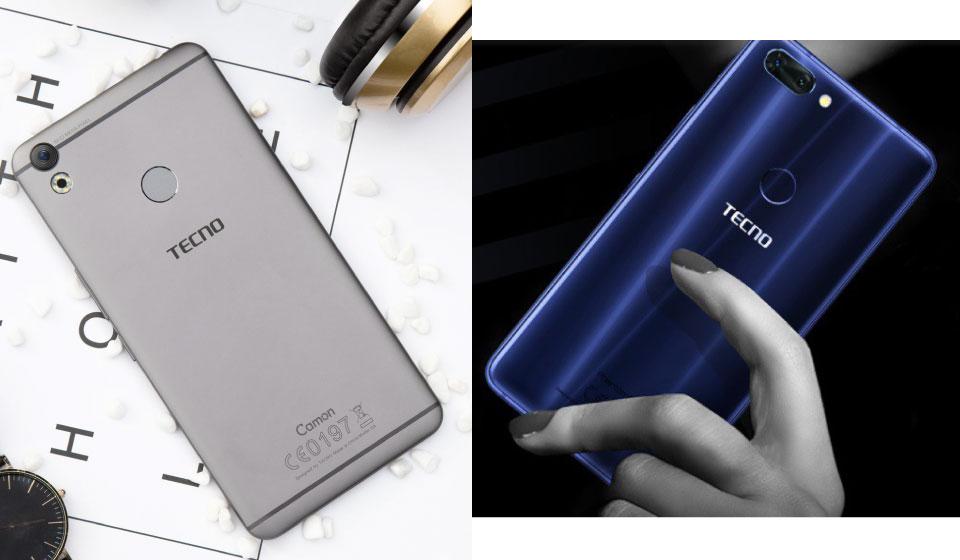
TECNO Mobile has been doing a lot this year, with the introduction of a lot of phones to suit every pocket. However, the two biggest phones from Tecno this year are obviously the TECNO Camon CX and the Tecno Phantom 8
With eight real-time portrait filters provided, the Camon CX boosts your creativity and enriches your daily life. Post your immediately share-worthy selfies to social networks at a single touch and get your friends involved in the pleasure.
The Tecno Camon CX is for the Slay Kings and Slay Queens too
The Phantom 8 will make you enjoy Your Extraordinary Night. A double mode selfie flash is a big savior as it illuminates your face appropriately even in low light conditions. And the newest imaging algorithm takes it further – it detects your skin tone and emits right amount of light to ensure more natural look.
Tecno Phantom 8 vs Tecno Camon CX: Full Specifications Comparison
Africa’s largest E-commerce platform -Jumia is hosting the biggest online voice competition called ‘The Jumia Voice’ from Friday, October 27 to Wednesday, November 22, 2017.
Jumia, with its presence in over 40 countries in the world, seeks to empower Africa’s talents to reach the greatest height. The winner of this amazing competition stands the chance of getting GHS 10,000 voucher, a trip to Dubai and an opportunity to perform on stage with a big artiste.
The Jumia Voice is here to make dreams come true as this precedes the launch of this year’s discount raining ‘Black Friday’; beginning November 24th to December 15th. To be part of this competition, the process is simple.
How to Participate in the Jumia Voice Competition 2017
Be it rap, singing or spoken word, video record your own rendition of the Jumia song using the Jumia jingle.
Post the recording with hashtag #Jumiavoice on Facebook + Instagram + Twitter and tag Jumia Ghana.
Share the post with as many friends and associates and invite them to like it and share it. The person with the most likes will be selected and rewarded.
All links for the competition will be activated on Friday, October 27th after launch on jumia.com.gh. People can then follow the links to be part of the competition. There are lots of vouchers to be won for just sharing and liking the social media pages.
Grand Prize for the Jumia Voice Competition 2017
A Trip to Dubai
GHS 10,000 Shopping Voucher
A Chance to perform live on stage with Shatta Wale.
Jumia Ghana has designed this competition for singers and vocalists who would like to challenge themselves in a very competitive environment. The Competition is open to solo vocalists of all ages.
Don’t miss this existing opportunity to build confidence and get exposure through The Jumia Voice competition.
Jumia Black Friday Voucher Giveaway
During Black Friday, shop at Jumia and use the Voucher to get additional 10% on top of the discount that Black Friday already presents. Voucher: JBFIC8c97.Read more about Black Friday here.
Jumia Black Friday is happening from 24th November 2017 to 15th December 2017. Originally, Black Friday is an American Tradition which is observed the day after Thanksgiving day where items are sold for little to no price. The tradition later spread to other parts of Europe.
Naturally, it has now become a global celebration where prices of products are slashed by almost half their prices, some products are even discounted to an all-time low and you can get them for a ridiculously cheap price.
Jumia, being the biggest E-commerce store in Africa with a $1 Billion company valuation and 1 Million unique website visitors per day joined the Black Friday trend and festivities 3 years ago.
Customers can get the best discounts prices & deals that range from mobile, tablets, games & consoles, health, beauty and so much more. Jumia will offer the best deals you can find on almost all the products in their store. Check out the Jumia Black Friday here.
Jumia Black Friday 2017 Format and Festivities
This year, following the success of Jumia Mobile Week and other events by Jumia, this year’s Black Friday will have the following features:
3-week campaign starting from Friday 24th of November
On 24th November, Get 80%
Every day after, new offers will be unlocked
Discounts up to 80%
Top brands across all categories
New Categories to be unlocked every day. There will also be three festivities during the Black Friday celebration. These are Wheel of Fortune, Voucher Giveaway and Jumia Voice Competition.
Jumia Black Friday Festivities
Wheel of Fortune
How will the Jumia Wheel of Fortune Work during Black Friday?
Anybody can visit the Jumia site and participate.
Each user is entitled to one spin daily
Participants stand the chance to win loads and loads of discount vouchers to be used during Black Friday.
Voucher Giveaway
During Black Friday, shop at Jumia and use the Voucher to get additional 10% on top of the discount that Black Friday already presents. Voucher: Shepherdea1a
Jumia Voice Competition
This competition is the most interesting of all, and the highest “paying” as well. You get to perform live on stage + a fully paid three days trip to Dubai + GHS10,000 voucher.
Record your own rendition of a Jumia song using the Jumia jingle. It can be rap, singing or even spoken word.
Post the recording with hashtag #Jumiablackfridayvoice on Facebook + Instagram and tag us.
Share the post with as many friends and associates as possible and invite them to like it and share it.
The people with the most likes will be selected and rewarded.
Update: An earlier version of this post erroneously stated that the total Cash price to be won was GHS 1280. This has been resolved.
I am Senyo Agbeblewu and I invite you to participate in my survey on crowdsourcing.
What is Crowdsourcing?
Crowdsourcing simply refers to a process of seeking IDEAS and SOLUTIONS from a group of unknown persons, called the ‘CROWD’. The crowd refers to registered members on specialized websites, called crowdsourcing PLATFORMS.
Firms and individuals, called ‘solution seekers’ therefore advertise their challenges on these websites for crowd members to solve, usually for a financial reward. Depending on the type of task, the financial reward may be given to the solver with the best solution or simply shared among members, according to their contribution to the final solution.
On other crowdsourcing platforms, crowd members can bid to solve advertised tasks/jobs. In such cases, solution seekers will select the solver with the best bid to do the job.
The purpose of my survey is to understand the factors that motivate crowd members to participate in this such activities.
To make the survey interesting and increase participation, I am planning on running the survey as a crowdsourcing with numerous CASH PRIZES for RANDOMLY selected participants on each platform.
How to Participate (Read carefully)
If you are already registered on any of the crowdsourcing platforms listed below or any other platform, simply send: REGISTERED to [email protected] and you will receive an invitation email from [email protected] with the link to the survey. Click on the link and complete the survey. Please remember to provide the name of the crowdsourcing platform and your username/ID in the spaces allocated.
For you, who may not yet be a member of a crowdsourcing platform, you can still participate and win cash prizes by following these simple steps:
How the Competition Works
REGISTER to be a member of ANY of the following crowdsourcing platforms: (Search for the names from Google; visit the site and sign up)
You will receive an invitation email from [email protected]with a link to the survey.
Click on the link and complete the survey
Keep your fingers crossed. You will be contacted if you are one of the RANDOMLY selected winners and your cash prize will be paid to you.
Prizes
If you followed the above process to participate in the contest, you could win any of the following CASH PRIZES:
GHS 320 each for TWO 1st Prize Winners
GHS 160 each for TWO 2nd Prize winners
GHS 96 each for TWO 3rd Prize Winners
GHS 64 each for TWO 4th Prize Winners
In addition, if you agree and are selected as one of 36 participants for the follow-up telephone interview, you will receive GHS 80 after the interview.
Kindly invite your colleagues to participate, as the PRIZES will INCREASE with the number of participants.
If you have any questions or need further clarification, please feel free to contact Senyo via Whatsapp on 0061415744001 or send an email to [email protected]
Android smartphones and tablets have attracted the customers throughout the world and Ghana is no exception. The Android OS has become the need of modern day smartphones. Android has also become the lifeline of modern day phone owners. Various apps have been developed to bring ease of operation for the users on Android device.
Most of these apps add functionality to your Android device and make it really easy for the users to access its exceptional features. But the question here is which app to install on your Android Smartphone.
Facebook
Facebook for Android is the official communication app of Facebook which allows you to communicate with your friends, family, and clients right from your smartphone. Not only this! You can also update your status and photos instantly from anywhere. With this App, you can send messages to anybody on your friends’ list anytime, and you can do real-time chat too. It also syncs your Phone contacts with Facebook friends and shows Facebook data in your Contact list.
Google Chrome
Google Chrome is one of the fastest, and one of the most popular browser app for Android phones. It allows you to search anything via voice commands, sync your data on other devices, translate anything and save up to 50% of data usage while you’re browsing. You can also use Incognito mode to browse secretly and anonymously.
Google Play Music
Google Play Music is one of best advert free android app to stream & download music right onto your Android device. You only need to search for the Music or Album terms and download or stream your desired music online. With this app, you can enjoy the high-quality mobile music playback experience. Additionally, the database of their tracks is very huge; since it contains more than 50,000 songs. You can locate your favorite track easily via this app. However, you need to remember streaming costs data.
As smartphones become more powerful, so have the numerous streaming entertainment services. There are many options for Android users if they wish to stream movies and TV. Google Play, Netflix, and other similar apps present the widest range and exciting selection.
All these apps are packed with wide range of features and will make sure that your smartphone turns out to be complete gadget box for you. So, install these must-have Android apps on your smartphone and make it a fully fledged device to use.
All TECNO fans have been waiting for the big one for 2017- The TECNO Phantom 8!
Today, Tecno Mobile launched the Phantom 8 in Dubai. With the introduction of the TECNO flagship device, all rumours have now been rendered useless and we can focus more on the device.
The primary camera on the Phantom 8 is a dual-camera set up with Sony-made IMX386 12 MP and 13 MP sensors. The primary (of the dual set up) is a 12 MP eye which boosts of 2X optical zoom, whereas the second sensor raises it with up to 10X Super Zoom that stitches and boosts the megapixel count of zoomed images to give sharper, better-looking shots.
The Tecno Phantom 8 comes with Android 7
Let’s look at the Key Specifications of the Phone.
Tecno Phantom 8 Key Specifications
Display: 5.7″ FHD Screen
Primary Camera Set-Up: Dual-Camera with 10x Super Zoom
Secondary Camera: 20MP with Smart Dual Selfie Flash
Available Colours: Galaxy Blue, Champagne Gold, Black
Bigger Ram means The Power to Do More
6GB of RAM of Phantom8 stacks up nicely against the rest of the flagships. It capacitates multi-tasking of about 80 apps without interference. Powered by all-new LPDDR4X standard, the phone enables way faster data transmission speed – 70% snappier than the last generation – and consumes 50% less power easily.
Powerful Processing
Packed with a robust MediaTek P25 processor, it’s far more responsive than any Phantom that came before. Whether you’re surfing online, streaming videos, playing games, or dealing with business, it all gets done at lightning speed. Thanks to the innovation of the 16nm processor that runs with less power, the processor will not tax your battery anymore, saving the juice for something more important.
Operating System on the Tecno Phantom 8
Powered by the whole new Android™ 7.0, Phantom8 boasts of a handful of useful tools to better manage your beloved device. Phone master helps analyze and safely remove the junk files that take up your memory and storage space. Clean with a single tap, free up space and boost phone speed. Also, auto-start management allows you to forbid unnecessary or unwanted apps from auto-starting, boost up your phone and keep it running smooth.
Pricing and Availability of the Tecno Phantom 8
Phantom8 4 Offer and Price in Ghana
You can buy the Tecno Phantom 8 at a recommended retail price of GHS 1499.
Additional Offer from Startimes and MTN Ghana
The new TECNO Mobile Phantom 8 comes with a StarTimes kit with one-month super bouquet subscription and 2.5GB data from mtn every month for 6months, Just like with the Tecno Camon CX.
Phantom8 Price in Kenya
The Tecno Phantom8 is not yet available for sale in Kenya.
Phantom8 Price in Nigeria
Tecno Phantom8 price is currently not in retail in Nigeria.
Swap previous Tecno model with Phantom 8
There are currently no swap deals for the Phantom 8. Check back soon
Digital Addressing is a modern and revolutionary approach to allocating addresses within a defined space with the aid of the latest geocoding technology available. This type of addressing is very robust as it stands the test of time irrespective of changes in borders and environments.
GhanaPostGPS is playing a major role in its collection of data that has been compiled and formatted into a virtual map and image. GhanaPostGPS embarks on an exercise that makes it possible to identify the location of a plot or dwelling on the ground by assigning an address using a system of maps and signs that gives the numbers or names of streets and buildings.
GhanaPostGPS is Ghana’s official digital property addressing system which ensures that all locations in the country are addressed. With GhanaPostGPS, every location has a unique digital address.
GhanaPost will be revived
The Minister for Communications, Ursula Owusu, believes that the launch of Ghana’s Digital Property Addressing System will boost the operations of the Ghana Post.
According to her, Ghana Post, which has in the last several years struggled with numerous challenges despite its prospects, will now play a key role in the roll-out of the addressing system.
“The inability to keep up with technological advances in the past bedeviled Ghana Post and almost killed it. Ironically, the technological advances of today have become the salvation and rejuvenation of Ghana Post, and this is what we are about to witness today [Wednesday],” she said at the launch of the system in Accra on Wednesday.
The launch of the digital addressing system is part of government’s grand plan of promoting effective governance through the adoption of modern technology.
Ursula Owusu remarked that the digital addressing system will unlock a new window into the area of modern technology for the country.
She added that the launch of the system will also help the country in the identification and registration of lands in the country, while banks will find it easier to locate their clients and borrowers.
Ursula, who had indicated at her ministerial vetting that her outfit will make the Ghana Post a profitable business, expressed her delight that the system, known as the Ghana Post GPS, is a partnership between a Ghanaian firm Vokacom, and the Ghana Post.
Ghana Post is a national communication and financial agency with nationwide coverage that has served its purpose for more than 5 decades.
In spite of its previous successes and dominance in the communication sector in the past, the company is currently struggling for relevance due to competition from private telecom companies, courier agencies and internet service providers.
Ghana’s Economy is on a way to be fully formalized
Processes to formalize Ghana’s economy have been given a great boost following the launch of the digital property addressing system in Accra on Wednesday.
This is the belief of the management of Ghana Post, who are partnering a Ghanaian company, Vodakom, and the Ministry of Communications to roll out the system, known as Ghana Post GPS.
The new Digital Address System, which generates unique postcodes to identify various locations in the country, gives the “business [Ghana Post] the opportunity to easily reach all Ghanaians and connect with all government agencies and other corporate networks.”
Ghana Post in a statement copied to citifmonline.com said the development will “transform and formalize the economy.”
“The National Identification Project is the second most important process of formalizing the economy. The digital address is a key requirement for registration of citizens and residents. Digital Addressing will now be the single most important tool for all citizens to locate government departments, business partners, friends, and relatives accurately and quickly. This new addressing system will change the way we do things forever, and will, therefore, lead to a formalized economy as well as change the entire business landscape,” Ghana Post said.
President Akufo-Addo at the launch said the government is committed to ensuring that the system is sustained and serves its purpose in enhancing business operations and facilitating the delivery of essential health and security services across the country.
The management of Ghana Post said every location in the country had been addressed digitally with unique codes.
“The Addressing system is nationally integrated, and it will house a comprehensive database of all properties in the country.”
“The new Post Code Range is based on the regional telephone codes used by the erstwhile Post & Telecommunications, where 02 was for Greater Accra, 05 for Ashanti and 09 for Volta, etc. Ghana Post by this has set the stage for commercial focus for the country.”
“The location system comes with all the necessary security protections including but not limited to a privacy policy protected by the Data Protection Act 843, fortified architecture, various access level controls, and an inter-ministerial data privacy committee that will monitor and ensure the security of the entire system,” it said.
The management of Ghana Post further urged the public to patronize its services as it works to bring “efficient product and services to the doorstep of Ghanaians through the digital addressing system.”
Samsung is known to be a leader in the Android Space and they have demonstrated over the years that they do not intend to lose that spot anytime soon.
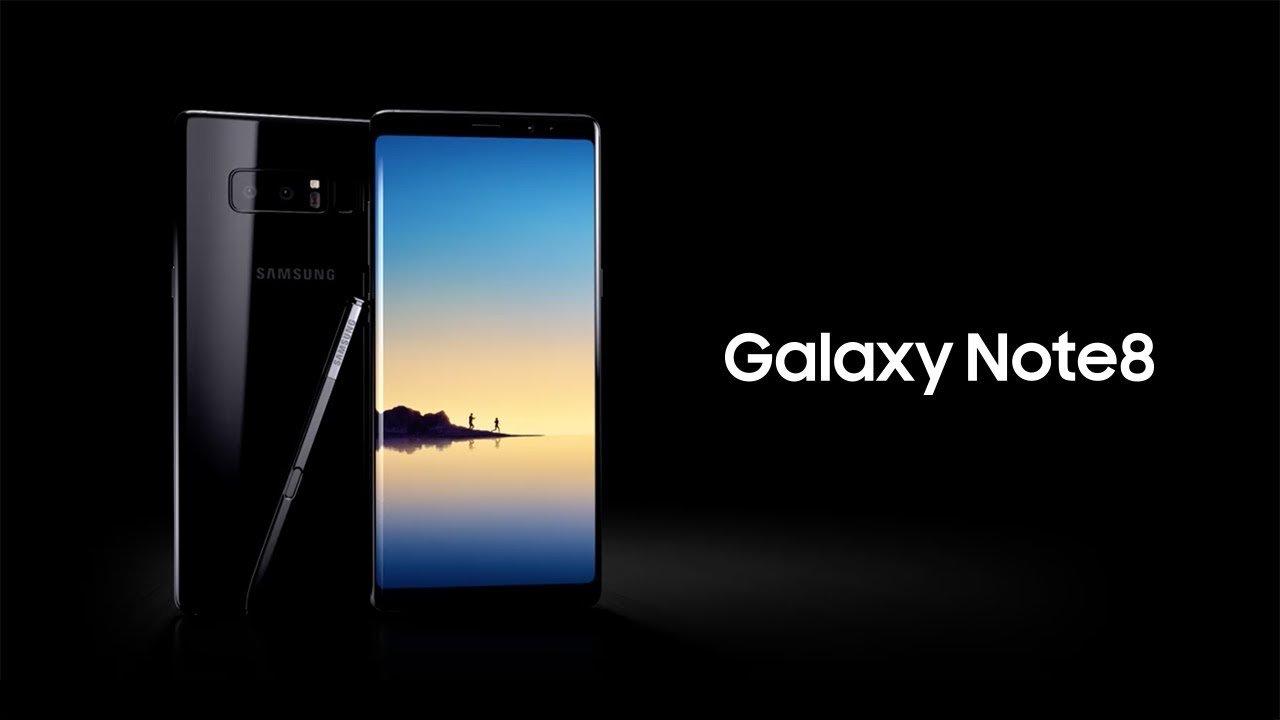
Today and tomorrow (Saturday 14th to Sunday, 15th October 2017), Samsung will be unveiling the New Galaxy Note 8 at the Accra Mall food court with Stonebwoy performing live on Saturday. But why is there so much noise about the Note 8? Well, the Note 8 is a beast of a phone, equipped with the best Qualcomm processor right now, and it outdoes the S8 in some areas. Let’s check out some of its specifications.
Earlier today, I was at the Unveiling of the Note 8 in Ghana. Photo Credit: Ben Cobbina
Samsung Galaxy Note 8 Key Specifications
Display: 6.3-inch Super AMOLED Display, 1440 x 2960 pixels (521ppi) Processor: Octa-core 10nm-class chipset (Qualcomm Snapdragon 835 or Samsung Exynos 8895 Octa) AI: Bixby Intelligent Digital Assistant with dedicated launch button OS: Android 7.1.1 (Nougat) with 6GB RAM Storage: 64GB / 128GB / 256GB Storage with support for memory card up to 256GB Cameras: Dual 12MP Rear Camera and 8MP Front Camera Sensors: Fingerprint Sensor (Rear), Iris Scan Battery: 3300 mAh Battery with Fast Charging
Quick Question: The Samsung S8+ or Galaxy Note 8
When you compare the Note 8 and the Galaxy S8+ head-to-head, choosing becomes somewhat rather simple. If you want the biggest and most capable phone that Samsung offers, you go with the Note 8. Its screen is marginally larger, it has more RAM, it offers the S Pen you can’t get anywhere else and it has the only dual camera setup in Samsung’s lineup.
Samsung Galaxy Note 8 Price and Offers in Ghana
Telefonika’s Galaxy Note 8 Offer
You can buy the Samsung Galaxy Note 8 from Telefonika for GHS 4,500. Well, Telefonika’s offer gives you more than just the Note 8. You also get the following for free:
A Dex station (It allows you to use the power of your phone to run a desktop computing environment.)
Wireless keyboard
Glass protector
Case
DSTV HD decoder (with 1-month free access) and
an EXCLUSIVE digital pencil for Note 8
Compu Ghana’s Galaxy Note 8 Offer
Compu Ghana is also selling the Note 8 at GHS 4,500, you get the following for free
Samsung Wireless speaker Bottle
Note 8 Screen Protector
Note 8 Cover
Are you going to get the Samsung Galaxy Note 8? From all of us here at Mfidie, what we can tell you is that it is definitely worth the price.