Category: Guides

  • TCL Soundbars in Ghana: Models, Prices, Specifications and More

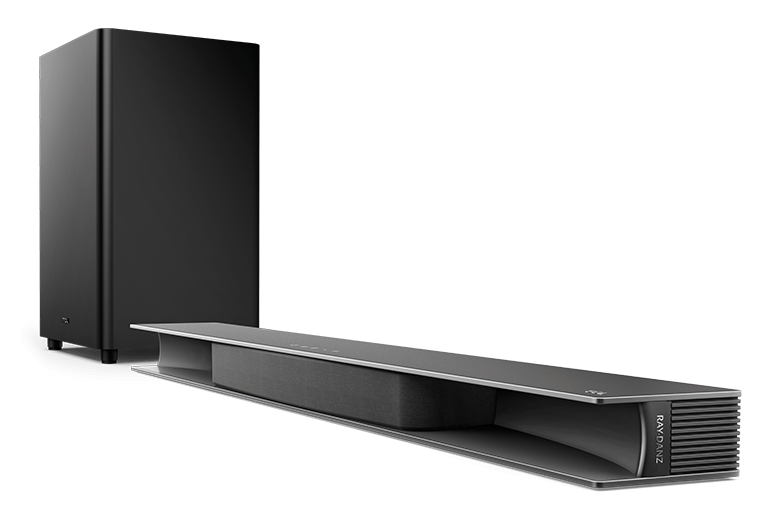
    TCL Soundbars in Ghana: Models, Prices, Specifications and More

    Are you in need of quality soundbars for your home or office in Ghana? Why don’t you try TCL soundbars? By the time you are done reading this article, I am going to show you everything you need to know about TCL soundbars in Ghana: models, prices, specifications, and many more.

    TCL Ghana has become a household name in Ghana when it comes to home appliances in recent times. Their smartphones, air conditioners, televisions, fridges and freezers, washing machines, tablets, and more importantly their soundbars are one of a kind in Ghana.

    Soundbars are very useful especially for people who love enjoying their music in crisp and nice sound either in their offices or at home. Not only are soundbars ideal for music but they are also good for watching movies with a cinema-like sound experience.  Even in schools and other smaller institutions, soundbars could be an alternative for other complicated sound system setups.

    Unlike the traditional sound systems that we know of, TCL soundbars are very sleek and come with simple setups making it easy for everyone to set it up in their homes or offices. There is no need for long wires which in the end may “shock” you. Therefore, this is ideal for females who are afraid of electricity.

    TCL Soundbar Models in Ghana and Their Prices

    Currently, in Ghana, there are three (3) main models of TCL soundbars. These are:

    • TCL Alto 6 Soundbar
    • TCL Alto 7 Soundbar
    • TCL Alto 9 Soundbar

    The price range for these soundbars is GHS 900 – 3000. On special promotion periods, the prices of the TCL soundbars can drop massively. Therefore, be on the lookout for when they have such promos.

    TCL Soundbar ModelPrice
    TCL Alto 6 SoundbarGHS 999
    TCL Alto 7 SoundbarGHS 1050
    TCL Alto 9 SoundbarGHS 2599
    TCL Alto 6+ 2.1 Channel SoundbarGHS 999
    TCL Soundbar With SubwooferGHS 2100
    TCL Soundbar With Subwoofer – FlyboyGHS 580
    TCL 2.1 inch Wireless Soundbar 240 wattsGHS 1100

    TCL Soundbars Specifications

    TCL SoundbarAlto 6 SoundbarAlto 7 SoundbarAlto 9 Soundbar
    Soundbar length31.5”36.1”41.3”
    Description32” 2.1 CH soundbar2.0 CH soundbar with built-in subwoofer performance41.3” 3.1 CH Dolby Atmos soundbar with TCL’s RAY-DANZ technology
    Channels2.1 CH2.0 CH3.1 CH
    LED Indicator5 Character Display LED indicator1 multi-colour LED indicator5 Character Display LED indicator
    Keypad5 touch keys: On/off, Bluetooth, Inputs, Vol+, Vol-5 touch keys: On/off, Bluetooth, Inputs, Vol+, Vol-5 touch keys: On/off, Bluetooth, Inputs, Vol+, Vol-
    IR pass-throughNoYes, with IRS pass-through cableNo
    Dolby ProcessingDolby DigitalDolby DigitalDolby Digital/Dolby Digital Plus/Dolby Atmos
    EQ SettingsMusic/TV/MovieMusic/News/MovieTreble/Bass Settings
    HDMI ARCYesYesYes
    BluetoothYes (Version 5.0)Yes (Version 5.0)Yes (Version 5.0)
    OpticalYesYesYes
    USB PlaybackYesYesYes
    3.55mm AUX Line-inYesYesYes
    USB Audio format supportMP3, FLACMP3, WAV, FLACMP3, FLAC, WAV
    Software UpgradeYes, via USBYes, via USBYes, via USB
    Extra features  Works with Hey Google, Amazon Alexa, Apple Airplay 2

    Where To Buy TCL Soundbars in Ghana

    You can get the TCL soundbars in all the TCL showrooms and accredited dealers in Ghana. Additionally, you can shop for the TCL soundbars on the store.tclghana website and get it delivered to you by TCL Ghana. The TCL shops in Ghana are located at Darkuman, North Industrial Area, Lapaz, Tema Community 1, Kumasi, Tamale, Sunyani, Takoradi, Ho, and Accra Central.

    Conclusion

    Since there are three (3) models of TCL soundbars in Ghana, the decision on which one to buy can sometimes be a bit difficult. You can use this article as a guide when you go to the market to buy your TCL soundbar.

    If you have the money, then I will prefer that you buy the latest model instead of the previous models. But if you cannot afford it then you can use the previous models in the meantime, once you get the money then you can upgrade to the latest models.

    Are TCL soundbars good?

    Yes. There are three (3) main TCL soundbar models in Ghana and each of them comes with amazing specs which makes them good for use in Ghana.

    Is TCL soundbar Bluetooth enabled?

    Yes. All three (3) TCL soundbar models in Ghana come with Bluetooth 5.0 featured in them. Therefore, you can connect Bluetooth and enjoy your music or movie on the TCL soundbar.

    Can I buy a subwoofer for my TCL soundbar?

    Currently, you cannot add a separate or pair another subwoofer to any of the TCL soundbar models. Unless the subwoofer came with the soundbar when you bought it.

  • How To Make Payments with GhQR Code

    How To Make Payments with GhQR Code

    Ghana is currently one of the leading countries driving the force for a cashless society in West Africa and the entire African continent at large. With the introduction of services like mobile money interoperability and the Ghana.GOV payment platforms, it is becoming obvious that we are gradually making a process in the quest to become a digitally cashless society.

    Also added to the list is the GhQR code payment system which is going to serve both businesses and their consumers in Ghana. Unlike the traditional method of payment where the consumer had to pay for goods and services with physical money, the ghQR code payment system allows users to pay for services by using their smartphones.

    The payment can be made using a bank account, mobile money wallet, or even debit or credit cards. In terms of security, all payments made using the GhQR code are safe and protected by the Ghana Interbank Payment and Settlement Systems Limited (GhIPPS).

    GhIPPS is a subsidiary of the Bank of Ghana, and its core mandate is to implement and manage interoperable payment system infrastructures for banks and non-bank financial institutions in Ghana. Therefore, the GhQR code payment system was implemented by the Ghana Interbank Payment and Settlement Systems Limited (GhIPPS).

    What is a QR Code Payment System and How Does it Work?

    A QR code payment system is a payment system where a unique code is given to merchant (company or individual providing a service) to allow for quick payments into their account without the consumer or buyer having to go through the long process of entering the details of the merchant when making the payment.

    Simply put, a QR code is given to the merchant and whenever someone wants to make a payment, all that the person has to do is to scan the code, and then he or she can make the payment in a few minutes.

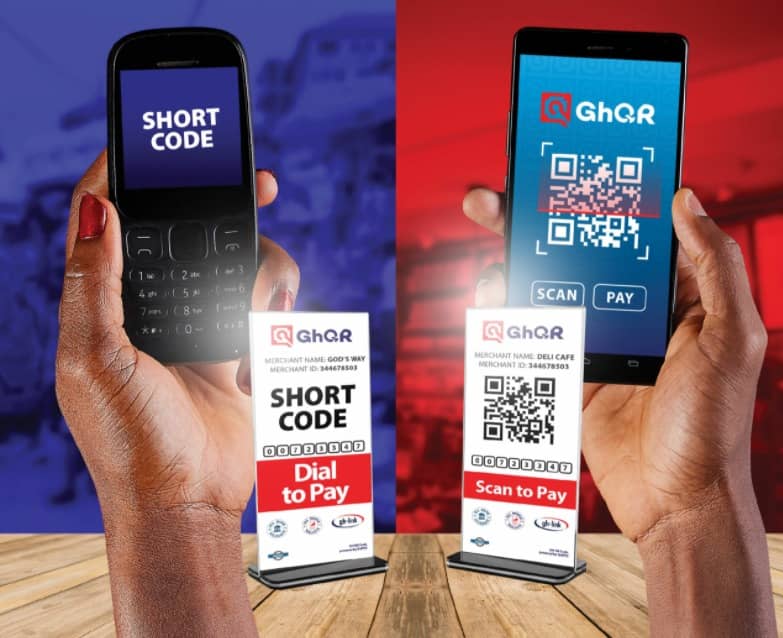
    Unlike most other QR codes, the ghQR code comes with a unique feature for persons who are not using smartphones, i.e., “yam”. People like that can simply use a USSD code to pay for their services to the merchant.

    To use the GhQR code, customers do not have to possess a bank account, they can also do so using their mobile money wallet if they have one. Merchants on the other hand are able to receive the payments made using the myGH QR payment system directly and securely into their bank accounts.

    How To Make Payment With GhQR Code

    There are two (2) ways you can make payments with the GhQR code. You can make your payments using the QR Code scanner or by using the mobile shortcode (USSD).

    How To Make Payment With GhQR Code Using The QR Code Scanner

    1. Download the myGH pay app from the Google Play Store or the Apple App Store
    2. After the installation of the app, login or sign up with your details
    3. Open the camera and point it towards the QR code displayed by the merchant
    4. A notification will be shown once the scanner recognizes the code in its database
    5. Tap on where you are asked to tap and finish the payment
    6. Follow the on-screen instructions to finish the payment with the required information
    7. Upon successful completion of the payment, both the customer and the merchant will receive a notification on their devices.

    How To Make Payment With ghQR Code Using The USSD

    1. Dial the appropriate USSD code displayed on the list by the merchant
    2. Follow the prompts to enter the required information
    3. Confirm the payment and enter your code to complete the transaction
    4. Upon successful completion of the payment, both the customer and the merchant will receive a notification on their devices.

    Conclusion

    Even in a world full of smartphones and devices, not everyone has access to some of these devices and the fact that they don’t doesn’t mean that they should be left out of the national cake. Therefore, since people with non-smart devices can also use the GhQR code payment system is very amazing.

    Depending on the amount you are paying and your mobile money service provider, some extra charges may apply. Therefore, make sure you have more than the exact amount in your wallet before you proceed to make the payment to prevent your transaction from failing.

    How does the GhQR work?

    Once you open the app and scan the QR code displayed by the merchant, you will be redirected to a page to complete the payment. Upon successful completion, both the buyer and the seller will receive a payment confirmation message.

    What is the meaning of GhQR?

    The Gh stands for Ghana and the QR also represents Quick Response. Therefore GhQR simply means Ghana Quick Response.

  • Top Sites to Watch and Download Twi Movies Online

    Top Sites to Watch and Download Twi Movies Online

    The Ghana movie industry popularly known by many as Ghallywood in the past provided us with some of the best movies. Apart from the main Ghallywood industry, the Kumasi-based Kumawood industry also contributed its quota to the development of the Ghana movie industry.

    For some reason, both the Ghana movie industry and the Kumawood industry have been inactive for a while now. Now, instead of the movies, most of the actors own their own YouTube channel where they make skits (short videos). Some of the actors who have been successful in this field include Dr. Likee (Ras Nene, Kwaku Manu, Lil Win, and a bunch of others).

    Even though new movies are not released frequently as they used to, that should not prevent you from enjoying some of the best Ghanaian Twi movies. Most TV stations show Ghanaian Twi movies on their channels, but they show movies of their preference. Sometimes, most of the channels repeat the same movies over and over again and this can sometimes be boring.

    To avoid having to watch the same Ghanaian Twi movies repeatedly, it is very useful to find sites where you can watch and download Twi Ghana movies online. Unlike the TV channels, you can watch movies of your choice and you can do so at the comfort of your home, in the car, or even at work on your smartphone or laptop.

    In this article, I am going to show some of the top sites to watch and download Twi movies.

    Top Sites to Watch And Download Twi Movies Online

    Tuga Media

    Tuga Media is one of the biggest sites where you can watch and download Ghanaian Twi movies online for free. To be able to access the movies on this site, all you need to do is to have a smartphone or laptop or any other device that can connect to the internet and an active internet connection.

    The site is regularly updated with new movies (both Ghanaian and Nigeria) as well as comedies, worship songs, twi cartoons, comedy movies, etc. To access the Twi movie catalog, click on the menu icon (the three (3) horizontal lines) and then select Twi films under Ghana Movies.

    Scroll through and click on the movie of your choice. Next, tap on the play icon on the video preview that appears below the thumbnail. You can access Tuga Media by visiting tugamedia.com on your device.

    Iroko TV

    Unlike Tuga Media and the other free sites in this article, Iroko TV is not free, i.e., you have to pay in order to be able to access the content on Iroko TV. Once you sign up and pay the subscription fee, you can watch all the latest Ghanaian and Nigerian movies.

    On the Iroko TV platform, you can choose either to download or stream the movies directly as long as you have an active internet connection. You can get the Iroko TV app on the Google Play Store or the Apple App Store for free.

    YouTube

    As the biggest video streaming platform in the world and the second biggest search engine, you can get some of the latest and oldest Ghanaian Twi movies. Most of these channels provide you with the original movies and some of them even provide free English subtitles if you don’t really understand Twi.

    Some of the channels you can check out include Twi Movies Avenue, African Twi movies, Affine Max Movies, Latest Ghana Twi Movies, Gh Movie Freak, Latest Twi Magic, etc. Interestingly, all these movies are free of charge and can be watched on either smartphone, tablet, or computer as long as it is connected to the internet.

    Conclusion

    Unlike the olden days where we had to buy CDs before we could watch movies, now with just an active internet connection and a smart device you can watch any movie of your choice. This guide showed some of the sites where you can watch Twi movies online.

    Wondering how you can download YouTube videos? Find out here how you can download all the movies on YouTube as well since it might be bothering you. All these sites have both the latest and old Ghanaian Twi movies from the likes of Agya Koo, Akrobeto, Santo, Judas, and all the other big actors and actresses who contributed to the Ghana movie industry.

    Where can I download local movies?

    You can download local movies from different sources. The three (3) main sources are Tuga Media, YouTube, and Iroko TV. Further details about each of them are given in this article.

    Is Ghana part of Nollywood?

    No. Nollywood refers to Nigerian movies while Ghallywood refers to Ghanaian movies.

  • Fusion Drive Vs SSD: Pros, Cons, Comparison and Which You Should Get

    Fusion Drive Vs SSD: Pros, Cons, Comparison and Which You Should Get

    For a long time now, whenever someone decides to buy an Apple device, there are not many customizations available but one thing that they always have the liberty to choose is the storage and storage capacity. For example, a person can choose to buy either the iPhone 13 Pro Max with the 256GB or the 512GB.

    This does not only apply to iPhones but almost all the other Apple smart devices like the iPad, Mac, and iMac. Taking on the iMac into consideration, there is always confusion on what type of drive to go for when purchasing the device and the two types of drives that always come to mind are Fusion Drive and SSD.

    iMac is an all-in-one computer series under the Apple brands, and it is regularly updated with new processors and specifications as time progresses. When in need of a desktop computer with some of the up-to-date features and amazing performance, then iMac should be on the list of your considerable devices.

    Apart from all these amazing specs and features, the decision to go for either fusion drive or SSD is very important since it will have an impact on the performance of your iMac. Just like any other two competitors, both the fusion drive and SSD have their own pros and cons. 

    To help you make the decision yourself, this article is going to give you all the information you need to know about both drives, and afterward, you will be able to make the decision on which one to go for yourself.

    What is SSD?

    Solid State Drive (SSD) is a storage device that uses integrated circuit assemblies to store data persistently, typically using flash memory, and functioning as secondary storage in the computer storage hierarchy.

    Basically, SSD performs the same functions as a hard drive, but instead, data is stored on interconnected flash memory chips that retain the data even when there’s no power flowing through them. Simply put, SSD is just like a USD drive but faster and more reliable.

    What is a Fusion Drive?

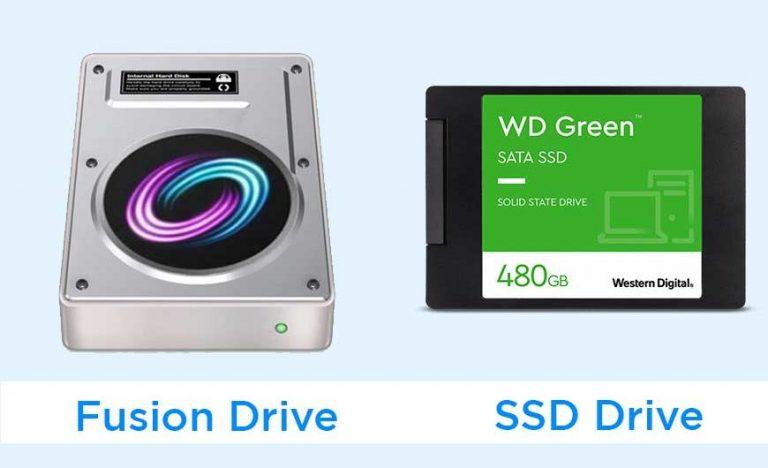
    A Fusion Drive is two separate drives fused together. It is comprised of mainly a Serial ATA drive (a regular hard drive with and a solid-state drive (SSD). The name fusion drive is used mainly in devices manufactured by Apple like the iMac.

    In the fusion drive, together with a high-capacity hard drive, dedicated storage space is available, and this uses the SSD. Some of the information like the frequently used information is stored on the hard drive, as the frequently accessed documents are stored on the SSD.

    Pros and Cons of SSD

    Pros

    • SSD offers you the best-level speed and performance. If you are a professional, you should be concerned about this.
    • SSDs does not make noise, i.e., it operates silently
    • It consumes less power
    • It does not heat up your device
    • Good for demanding tasks like video editing and gaming
    • The booting time of an SSD is much shorter
    • SSD in iMac Late 2015 Edition is 2.5x faster than previous versions according to Apple

    Cons

    • SSD is relatively expensive as compared to other drives like hard disk drives (HDDs)
    • The maximum capacity is very low. For example, the maximum SSD you may get for your iMac is 1TB (this is subject to change as time progresses)
    • SSDs have a limited lifespan. This means that the number of years they can run smoothly is limited. Currently, the estimate for SSD is 10 years, although the average lifespan is shorter. The lifespan mainly depends on the size of the drive and the manufacturer.

    Pros and Cons of Fusion Drive

    Pros

    • Fusion Drives are relatively cheaper than SSDs although they are expensive than hard disk drives (HDDs)
    • Fusion drives are a little silent as compared to traditional hard disk drives. But is not silent either
    • Fusion Drives does not affect user experience (UX) or load times since they work in a logical manner
    • There are higher capacities of fusion drives available to choose from. The most popular ones are the 1TB and 3TB sizes
    • They have better boot-up time than HDDs

    Cons

    • They may create some noise
    • Fusion Drives have lower RPM. RPM shows how many revolutions a computer hard drive makes in a single minute
    • The operation of the fusion drive is not up to the committed SSD scenario
    • They are available only in certain Macs

    Comparisons and Which You Should Go For?

    Looking at the pros and cons of both drives, it is obvious that they all have their superpowers at one point or the other. Therefore, before you go ahead to choose which one you want to buy you might consider the following.

    Function/DeviceSSDFusion Drive
    PriceRelatively expensiveRelatively cheaper
    NoiseDoes not generate any soundMakes noise sometimes
    CapacityHas low capacities availableHigher capacities are available
    LifespanShort lifespanThe lifespan might be shorter if you drop it
    PerformanceFast performanceNot the very best performance

    The decision to go for either an SSD or fusion drive should be based on the main comparisons above. SSD is a very good option to go for if you have the money to buy them, but you should also consider the limited storage capacity available. If you don’t have the money to afford SSD then you should go for Fusion Drive since it is relatively cheaper and comes with higher storage capacities available.

    Anyways, the final decision should be made by you yourself. This article just served as a guide to give you some information about both drives. Hope this article was able to serve the purpose for which it was written. Use this as a guide and make sure to share this with your friends and loved ones.

    Are fusion drives really that bad?

    No. Fusion drives have some cool features which make them one of the best. All these features have been shown in this article.

    Can I replace my iMac hard drive with SSD?

    Yes, you can replace the hard drive of your iMac with SSD. But you need a certified Apple dealer to be able to do this for you since it is a little complicated.

    Does Apple use SSD or HDD?

    Apple provides its users with SSD storage of different sizes. The available storage spaces Appler offers are 64, 128, 256, and 512GB.

    How much SSD size do I need?

    There is no particular size you should go for on your device. The decision should be made based on the size of storage you will use on your device. To be on the safer side, as long as you have the money, you should go for the bigger size.

  • How to Make a Claim on MTN aYo Insurance

    How to Make a Claim on MTN aYo Insurance

    In a world full of uncertainties and unforeseen circumstances, there is always the need to have an insurance package that keeps you in mind for your needs. There are over a dozen insurance packages in Ghana but not all of them are able to meet the needs of their policyholders.

    Among these insurance policies, one of the most popular packages is the MTN aYo Insurance. MTN aYo Insurance provides its users with fast, convenient, and easy insurance right on their mobile phones. With this insurance policy, users enjoy hospital and life insurance cover through airtime deduction (Recharge with care) or when you send Mobile Money (MoMo) to your family or loved ones (Send with care).

    Apart from the aYo Insurance being fast and convenient, it also allows its policyholders to make claims on their mobile phones without having to visit any MTN office. In this article, I am going to guide you through all the steps on how to make a claim in MTN aYo insurance.

    Things You Need To Know About MTN aYo Insurance

    MTN aYo Insurance is one of the fewer mobile insurance policies in Ghana. But before we jump into the details on how to make your claim on MTN aYo, there are some things must know.

    • With the aYo Send with Care, you get up to GHS 30,000 as hospital and life insurance cover for yourself, and up to GHS 3,000 life cover for the family member. The term or duration of this policy is 120 days.
    • With the aYo Recharge with Care, you get up to GHS 120 per night as hospital cover upon admission due to illness or accident and up to GHS 6,000 life cover for yourself plus one family member upon demise.
    • Subscribers between the ages of 18 years and 65 years can sign up to Recharge with Care and the term or duration of the policy is 30 days renewable. Once any life assured turns 70 years, the policy terminates.
    • Only active MTN users can register for the MTN aYo insurance policy.

    How To Make A Claim on MTN aYo Insurance

    There are two (2) main ways you can file for a claim on MTN aYo Insurance. You can make a claim online or via USSD.

    How To Make a Claim on MTN aYo Insurance via Online

    1. Visit ayo.com.gh on your browser
    2. Click on the three (3) horizontal lines in the left upper corner
    3. Select Initiate a claim
    4. Choose whether you want to initiate the claim for yourself by selecting MySelf or initiate the claim for another person by selecting Another Person
    5. Log in with your mobile number and PIN or click on No username and PIN (if you don’t have any)
    6. Enter your name and the required information
    7. Provide the required documents. (Evidence of death when making a death claim or evidence of hospitalization when making a hospitalization claim) and submit
    8. Your documents will be reviewed and if you meet the requirements, your claim will be sent to you via mobile money (MoMo).

    How To Make a Claim on MTN aYo Insurance via USSD

    1. Dial *296# on your phone
    2. Follow the onscreen prompts and enter the required details
    3. Provide the required documents. (Evidence of death when making a death claim or evidence of hospitalization when making a hospitalization claim)
    4. You can provide the documents by sending them on WhatsApp to 0555948648
    5. Your documents will be reviewed and if you meet the requirements, your claim will be sent to you via mobile money (MoMo).

    Conclusion

    As the saying goes, “no one knows tomorrow” therefore, having a trusted insurance policy is very necessary and important. But not all the insurance policies are the same, as some of them require you to make a claim in-person, MTN aYo allows users to file for a claim on their phones without having to visit any MTN office.

    Unfortunately, non-MTN users cannot use the MTN aYo insurance therefore if you wish to use aYo, then you must buy and register an MTN SIM card today and enjoy all the benefits that come with it. MTN is one of the biggest telecommunication networks in Ghana and as a result, by registering for insurance with them you can rest assured that your money is safe and sound.

    How do I get my aYo money?

    Before you can get your money, you must file or make a claim to aYo. Through this process, you will be asked to add the required documents. Once your documents are accurate, your money will be sent to you via SMS.

    Is MTN aYo real?

    Yes, MTN aYo insurance is real and many people have benefited from it. To verify, you can visit the MTN Ghana website to read more.

    What is aYo policy?

    The policy is what you or your beneficiary will get in case of an unforeseen circumstances.

  • How To Find out When a Twitter Account Was Created

    How To Find out When a Twitter Account Was Created

    There are several social media platforms in the world – some of them are free and some are not free. Among these social media platforms, one of the most popular and most used social media platforms is Twitter. Prominent individuals in the world like presidents, footballers, CEOs, and even companies use Twitter as their official medium of commenting on issues.

    The reason why most of them prefer Twitter is the fact that the tweets that are made on the platform are regulated in order to avoid misinformation, language, violence, etc. Users who s

    According to research conducted by Statista, there are 211 million monetizable daily active users on Twitter. Apart from Twitter being a social media platform, users can also get breaking news from entertainment to sports, technology, and politics from the top news agencies around the world.

    On certain occasions, there is the need to find out when a Twitter account was created for one reason or the other. But unlike Facebook, telling when a Twitter account was created by mere inspection will yield no good result. Instead, there are several apps, software, and websites you can use to find out when a Twitter user created his or her account in a few clicks.

    This guide is going to show you how to tell when a Twitter account was created for free in just a few clicks. To begin with, all you need is a device that can connect to the internet and an active internet connection.

    How To Tell When a Twitter Account Was Created

    There are several ways you can tell when a Twitter account was created. Some of the methods cost money and some of them are completely free. But in this guide, I am going to show some of the free methods.

    How To Tell When a Twitter Account Was Created Using Twitter Join Date

    1. Open a browser on your device and type twitterjoindate.com in the address bar and press ENTER
    2. Enter the username of the Twitter account you want to find out without adding the at sign
    3. Click on Search
    4. On the next page, you will find the day, month, and the year the Twitter account was created in addition to the first ten tweets that were made from the Twitter account.

    How To Tell When a Twitter Account Was Created by Viewing the Page Source Code

    This method is a bit technical, and it also includes two (2) main steps. The first step is by viewing the source code and the second is by doing a simple word search.

    • Visit Twitter on your computer
    • Search for the user whose account you want to find the date the account was created
    • Click on the profile to go to the person profile page
    • Right-click on any page of the screen
    • Select View Page Source or (View HTML Source). Depending on the browser, this may vary slightly
    • A bunch of code will be displayed on the screen
    • Bring up the search box of your browser. Usually, this could be done by typing Ctrl+F
    • Once the search box appears, type in created_
    • The browser will locate it and next to it you will find a date and time. This is the date and time the account was created.
    • This method changes from time to time as Twitter often changes its source code but you can try this method out and see if it works for you.

    Conclusion

    After reading this article and following all the methods, you should be able to find out when a Twitter account was created for free. This guide focused mainly on the freeways you can go around this, but you can also search online to see if there are some paid methods that are worth trying.

    The second method could be a little bit difficult for non-tech geeks but if you follow the steps one by one, you should be able to do it. Nevertheless, in case you come across any challenge in the process, you can write it in the comments section below and I will check it through for you.

    Can you check when a Twitter account was created?

    Yes. You can check when a Twitter account was created by following any of the methods in the article.

    Can you trace a Twitter account?

    Yes, you can trace a Twitter account by following the location of the Tweets made by the user. But, this only works if geotagging is enabled on the person’s device.

    Does Twitter know my IP address?

    Yes. According to the privacy policies, Twitter collects data on your IP address, the device you are using, and some other personal information. This is why Twitter is able to tell whether a tweet is made from Android, iOS, or the web.

  • What is a .crdownload File and How to Open It?

    What is a .crdownload File and How to Open It?

    Have you been finding it difficult to open a .crdownload file on your computer or laptop? Or have you been wondering what the .crdownload file means in the first place? Well, if you have then continue reading this article because I am going to show you what a .crdownload file is and to open it.

    Google Chrome is one of the most popular web browsers in the world. Developed by the developers of the biggest search engine in the world, it is no surprise that most devices come with the Google Chrome browser already installed on them.

    Most of you who have Google Chrome or Microsoft installed on your devices might have come across a file with the .crdownload file extension after downloading a video, documents, music, image, or any other file on your computer. But unlike the other file extensions, not every software can open a .crdownload file on your computer; there is some specific software you can use to open a .crdownload file.

    What is a .crdownload File?

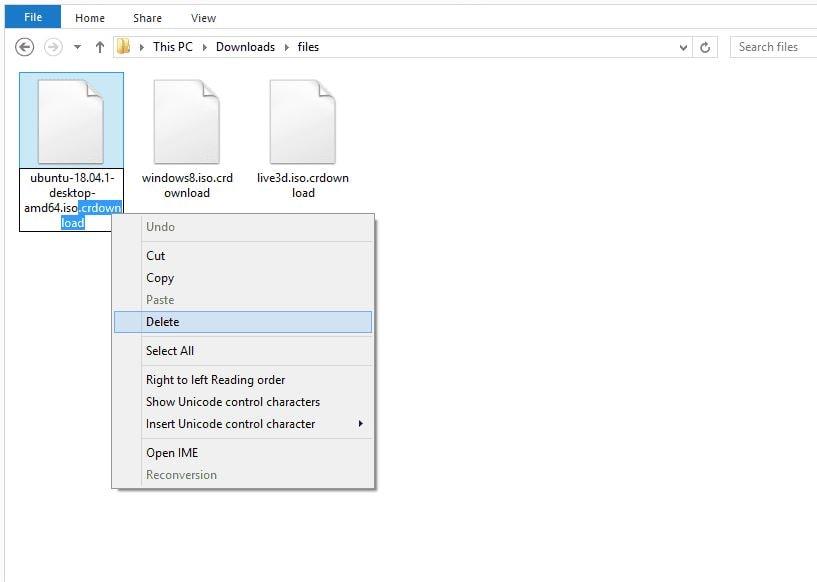
    When the browser starts to download a file, Chrome or Microsoft Edge automatically adds the .crdownload file extension to the name of the file and once the download is complete, the .crdownload file extension name is removed and replaced with the appropriate extension.

    A .crdownload file is an incomplete or partial file which is commonly known as Chrome partial download files. Thus, any file which has the .crdownload file extension is a file that is incomplete or partially downloaded, and as such, not all the contents on the file can be viewed on your device.

    Some of the reasons why a file will have this type of file extension could be as a result of poor internet connection, or some unintended interruption from you or the server. Not every browser has this type of file extension, it is specific to Chromium-based browsers like Google Chrome – and even Microsoft Edge Chromium browser.

    Chromium according to Wikipedia is a free and open-source codebase for a web browser, principally developed and maintained by Google. Simply put, it is a free open-source code used for several web browsers, mainly Google Chrome and some other browsers including Microsoft Edge, Samsung Internet, Opera, etc.

    How To Open .crdownload Files?

    Crdownload files are incompletely downloaded files and so, if you want to get access to the complete file you will have to re-download it or resume the download (if it has been paused). You can resume the download using the method below

    1. Open your browser and go to the download page
    2. Locate the file you have paused downloading
    3. Click on the resume icon to resume your download or the retry icon to start the download all over again

    Also, if you prefer to open the .crdownload file like that then below is a step-by-step method of how you can go about it.

    1. First of all, make sure you have VLC installed on your device
    2. Open the folder containing the file with the .crdownload extension
    3. Right-click on the file and then select Rename to change the name of the file
    4. At the last part of the name remove the .crdownload from the file. For example, if a file is called audio.mp4.crdownload, rename it audio2021.mp4 and press the ENTER key afterward
    5. Right-click on the renamed file and select Open With
    6. Next, select VLC from the available files to open the file

    Conclusion

    Normally, the browser will automatically remove the .crdownload name attached to the file once the download is complete. In cases where the download was interrupted or incomplete then you must rename the file to access to open the incomplete file.

    The size of a .crdownload file depends on the size of the actual file that was being downloaded. For example, a 50GB video might have a .crdownload file as big as 40GB but that is not the complete file. Therefore, you cannot just look at the size of the file and use that as a means of saying the file is complete.

    Once the file has a .crdownload file extension, then it means the file is partial or it is incomplete. The size of the file has nothing to do with it being complete or otherwise.

    How do I convert a crdownload to PDF?

    Since the file is partial or incomplete, there’s no way you can convert it to PDF.

    What is a .crdownload file?

    It is a file that hasn’t finished downloading yet. It can usually be seen in browsers like Google Chrome and Microsoft Edge.

    How do I fix crdownload?

    You can fix crdownload by going to your browser and resuming or restarting the download.

  • How to Subscribe For Unlimited AirtelTigo Call Bundles

    How to Subscribe For Unlimited AirtelTigo Call Bundles

    Call making is one of the main reasons why most people use mobile phones. But the making of calls on the phone is not free; you have to buy airtime before you can be able to call someone. The cost of airtime on the other hand is a very big problem for most people especially users of some specific telecommunication network.

    Previously, a GHS 1 worth of airtime could warrant you a talk time of some time but now, GHS 1 airtime will finish in the middle of your call after a short duration. These could be attributed to several factors other than the actions of the telecommunication network, as claimed by most Ghanaians.

    One of the biggest names in the telecommunication industry in Ghana is AirtelTigo. As a result, there are a number of Ghanaians who are active users on the network. To help customers who usually make calls on the network reduce the cost of buying airtime, AirtelTigo has introduced an unlimited call bundle.

    Just as the name suggests, the AirtelTigo unlimited call bundle gives active subscribers unlimited airtime to call all their friends and loved ones who also use AirtelTigo for up to seventy-five (75) days with as low as GHS 1 using airtime or their AirtelTigo Money wallet.

    How To Subscribe For Unlimited AirtelTigo Call Bundles

    1. Dial *111# on your mobile phone
    2. Select option 3 (Unlimited Calls)
    3. Select the package you want (GHS 1, GHS 2, GHS 5, GHS 6, GHS 10, or GHS 20)
    4. Select option 1 to Buy for Self (Auto-renewal) or option 2 to Buy for self (One-Time)
    5. Select your payment option from the available payment options listed
    6. Once the transaction is successful, a confirmation message will be sent to you via SMS

    How To To Buy Unlimited AirtelTigo Call Bundle For Someone

    Aside from you buying the unlimited AirtelTigo call bundle for yourself, you can also buy it for someone at no extra cost. To do so, follow the steps listed below.

    1. Dial *111# on your mobile phone
    2. Select option 3 (Unlimited Calls)
    3. Select the package you want (GHS 1, GHS 2, GHS 5, GHS 6, GHS 10, or GHS 20)
    4. Select option 3 (Gift it)
    5. Select your payment option from the available payment options listed
    6. Once the transaction is successful, a confirmation message will be sent to both you and the person you buy the bundle for via SMS

    How To Unsubscribe From AirtelTigo Unlimited Call Bundle

    The AirtelTigo unlimited call bindle is a very good package, and its price is relatively cheaper as compared to the normal airtime. But at some point, you may need to unsubscribe from it. In case you want to do that, then you can follow the steps below.

    1. Dial *111# on your mobile phone
    2. Select option 3 (Unlimited Calls)
    3. Select option 7 (Unsubscribe)
    4. Your request will be processed and when it’s successful, a confirmation message will be sent to you via SMS

    AirtelTigo Unlimited Call Bundle Prices and Validity Period

    PriceOn-net MinutesValidity
    GHS 1.00Unlimited (1,440 Mins FUP)1 day
    GHS 2.00Unlimited (10,080 Mins FUP)3 days
    GHS 5.00Unlimited (43,200 Mins FUP)10 days
    GHS 6.00Unlimited (86,400 Mins FUP)14 days
    GHS 10.00Unlimited (129,600 Mins FUP)30 days
    GHS 20.00Unlimited (259,200 Mins FUP)75 days

    Conclusion

    AirtelTigo since its rebranding some few years back has been introducing some cool packages for their customers. The rebranding was criticized by many but after some time, they have proven to Ghanaians that the merging was somehow beneficial.

    The AirtelTigo unlimited call bundle is available to both prepaid and hybrid AirtelTigo customers and can be paid through either airtime or AirtelTigo Money wallet. As said by AirtelTigo at the launch of the product, “in our constant quest of making consumer’s life simple, we provide innovative products that give more value to our customers and improve their experience.” “With AirtelTigo, consumers can always expect more value for their money”, customers are in the hearts of AirtelTigo.

    What is the code for AirtelTigo bundle?

    The shortcode for buying a bundle on AirtelTigo bundle is *111#

    Does AirtelTigo have bundles with no expiry?

    Yes. Dial *111#, select no expiry bundle, and follow the on-screen instructions.

    How do you borrow credit on AirtelTigo?

    You can borrow by dialing *130#.

  • How To Access and Check Your E-Payslip Online in Ghana

    How To Access and Check Your E-Payslip Online in Ghana

    Basically, a payslip is just a piece of paper that contains details about your salary or “pay”. Aside from it being just a piece of paper, a payslip is a very important document as it contains several important information about an employee and his financial records or data.

    Payslips can also perform several other important functions when you need them to. For example, you need your payslip as proof of employment when applying for a loan or mortgage for your house. This assures the bank that every month, there is some minimum amount of money that could be deducted from your salary since you have a job.

    Even in some cases, payslips are required when you are seeking a new job or promotion from your old job. In such cases, the employer uses your payslip as proof of how much you were earning in your previous job and they can either top-up or maintain the same pay structure, etc.

    These and many others are the reasons why payslips are very important for every employee. But, although payslips are very important, getting them in Ghana can be very difficult. For some jobs, this will not be the case but for others, this will be a little problem.

    Due to these unforeseen circumstances and situations, the Controller & Accountant General’s Department have introduced an E-Payslip platform where workers can access their payslips whenever and wherever they need it, and this guide is going to walk you through how you can access it and check it.

    How To Access and Check Your E-Payslip in Ghana

    Accessing your E-Payslip in Ghana is an easy and straightforward process. But, before you can access the platform, you must first register. Follow the steps below to register for the E-Payslip platform in Ghana.

    How To Register For The E-Payslip Platform

    1. Visit gogpayslip.com on your smartphone or computer
    2. Click on REGISTER FOR E-PAYSLIP
    3. Ask your Head of Department or your immediate supervisor for the first-time registration code to continue
    4. Enter the employee number and confirm it
    5. Create a password and re-enter it in the confirm box to confirm your password
    6. Enter your registration code obtained from your HoD or supervisor
    7. Enter your email (if any) and phone number (02XXXXXXXX) in the spaces provided
    8. Enter the code shown and click on the Register button to complete the process
    9. After that, you will be automatically directed to the homepage of the E-Payslip platform
    10. Enter the required login to log into the E-Payslip system or platform

    How To Access and Check Your E-Payslip Online in Ghana

    Now that you have successfully registered for the platform and you have the login details, you can now access your E-Payslip.

    1. Visit gogpayslip.com on your smartphone or computer
    2. Enter your Employee Number and the password you created to sign in
    3. Click on My Payslip and then select the month you want to have a look or download the payslip
    4. Click on Generate and then the Save or Print button at the upper part of the screen
    5. Lastly, click to save or print the payslip for that specific month

    How To View, Save and Print Your Payslip Using My Payroll

    1. Visit gogpayslip.com on your smartphone or computer
    2. Enter your Employee Number and the password you created to sign in
    3. Select My Payroll
    4. Select the Payslips tab
    5. Click on a Payslip to download it in PDF format
    6. Click on Print and the PDF will be opened in a new tab
    7. Finally, you can either print or save the payslip as a PDF on your phone or computer for future reference

    Conclusion

    Having access to your payslip should not be a very difficult task for you. Instead, it should be very easy, fast, accessible, and reliable. Therefore, this intervention by the Controller and Accountant General’s Department to introduce an E-Payslip platform in Ghana will go a long way to help Ghanaian workers.

    Now, you can simply go on your phone or computer and print or download your payslip for your loan, mortgage, proof of employment, and whatever else you may need your payslip for. Also, since this is now accessible on phones, you should be very careful about where you keep them and also be careful about your password and login details.

    Keeping them at a safer and more reliable place will go a long way to help save you from a catastrophe in the near future. Payslips are very important documents and they should be kept as such.

    How do I open an e-payslip file?

    Make sure you have a pdf reader app or software on your smartphone or computer and open your e-payslip with this pdf reader app or software preferably Adobe.

    How do I register my payslip online?

    You cannot register your payslip online unless you are the administrator of your company. But, you can register to view, access, or download your e-payslip using the steps outlined in this article.

    How can I check my payslip online in Ghana?

    Log into gogpayslip.com and then click on My Payslips, select the month and then you can view, download, or print your payslip in pdf format.

  • How To Change Your Default Music Player on an iPhone

    How To Change Your Default Music Player on an iPhone

    For many years now, many people have been of the view that once you use an Apple product (iPhone to be precise), you are being restricted to some point. Although this is not entirely true, there is some truth in it. For example, if you are an iPhone user, you are only restricted to apps on the Apple App Store and nowhere else.

    Among these, one of the things that iPhone users were limited to do was the inability to change the default music player from the default Apple Music app/player. This had been bothering many iPhone users who preferred other music players like Spotify, Pandora, YouTube Music, etc. until iOS 14.5 was introduced earlier this year.

    If you are an iPhone user, then there are several things you enjoyed from the introduction of iOS 14 in 2020. Personally, some of the new features I enjoyed include the option to set a default browser and email app on your iPhone, all of which were not available in the iOS 13 or the earlier iOS versions.

    This guide, therefore, is going to show you how to change your default music app on your iPhone and everything else related to how you can make the most out of this feature introduced by Apple in iOS 14.

    How To Change Your Default Music Player on an iPhone

    Currently, there is only one way you can change the default music player on your iPhone, i.e. using the Siri command on all iPhones running iOS 14.5 or later.

    How To Change Your Default Music Player on an iPhone Using Siri

    1. Update your iPhone to iOS 14.5 or later
    2. If you are using the newer versions of the iPhone you can ask to play an artist, song, or album. You can do so by saying “Hey Siri, play Madina to the Universe by M.anifest”
    3. If you don’t have the latest versions of the iPhone, you can press and hold the power button (iPhone X and above) or the home button (iPhone 8 Plus and below)
    4. A list of all the music apps you have installed on your iPhone will pop up and Siri will ask “Which app would you like to use”?
    5. From the list of music players shown, choose your preferred music player
    6. When asked, confirm that Siri can access data from your music player
    7. Afterward, Siri will play the music in the app of your choice. For example, if you choose YouTube Music, the music will play in YouTube Music.

    Changing Your Default Music Player on an iPhone Manually?

    As of the time of writing this article, there has not been any official document on how to change the default music player on an iPhone manually. But many iPhone and technology analysts have concluded that this feature will be introduced in the iPhone sooner or later.

    As newer versions are introduced to the iPhone’s iOS, it is likely that Apple will add this feature in some of the newer iOS versions.

    Conclusion

    Up until the introduction of iOS 14.5, iPhone users had to tell Siri which app to play music from the onset. For example, “Hey Siri, play Madina to the Universe by M.anifest in YouTube Music. But after iOS 14.5, this is no longer going to be an issue for iPhone users since they can go ahead and use Siri’s intelligence to change the default music player.

    Although you can now change the default music player on your iPhone, you can still use the old method of asking Siri to play music for you if you wish to use a different music player other than the default player. For example, you can say “Hey Siri, play Petite by NSG in Spotify” and Siri will play Petite by NSG in Spotify.

    In conclusion, this intervention by Apple to allow iPhone users to change the default music app is a good thing since it now lifts the restriction that has been placed on iPhone users. Gradually, Apple is trying to allow its users to modify their devices.

    Can you change the default music player on your iPhone?

    Yes. All you have to do is to ask Siri to play a song or an album and then choose your preferred music player from the apps listed.

    What does it mean to set a default music player on iPhone?

    Simply put, setting a default music player on an iPhone means choosing a music app that will play your music whenever you want to listen to music. Or, whenever you ask Siri to play a song, the default app is where the song will be played.

    What is iPhone’s default music player?

    The Apple Music app is the default music player on the iPhone.