Second Factor Authentication also is known as 2 Factor Authentication or 2FA is a security system used by websites and applications to ensure that users provide at least 2 evidence of ownership before they are allowed access to their accounts.
To set up two-factor authentication on your account, go through the following processes:
1. Go to settings and privacy on your Facebook app or Facebook webpage.
2. Select Settings
3. Locate Security And Login under the security heading.
4. Click on it
5. Under Two-Factor Authentication, click on “Use Two-Factor Authentication”.
6. Click on Turn on
7. Select Your Preferred Method (Mobile Phone or Email.)
8. Write your mobile number and confirm.
9. Dial the code sent to your phone for confirmation
10. You’ll be required to enter your current password for confirmation.
11. Your 2FA is setup.
Note: Setting up 2FA requires some level of precision. Be sure to select a method more appropriate to you. Select a method you’re sure of getting regular access to. If you chose text message as your verification method, be sure that the number you used will always be available. Because anytime you have to log in, you’ll need that number for verification.
Many people have wondered how they could get some graphic works done by themselves on their smartphones without paying someone else.
Well, it’s not very difficult to do this. If you’re a writer, a marketer, a blogger or content creator, you probably know how important graphics are to your craft and you definitely need it every other day.
There are many apps that can help you design your flyers, quotes, social media posts and more on your phone without so much of a hustle. But here, in this article, we shall look at just some 5 of those apps.
Canva
Canva
So the first on our list here is Canva.
Canva is a very good app which enables you to choose from over 1,000 free templates and designs for the free feature. And millions more for the premium feature. However, the app only operates online. Which means you need internet connectivity to be able to use this app. And also, after the free trial expires, you barely get to enjoy the app as you have to adopt other tricks to be able to save new designs offline on your phone. You can get this app on the google play store or Apple AppStore.
Snappa
Snappa
Just like Canva, snappa is also an easy to use app which works fine for all types of people. Both pros and newbies in the design space can use this app with its drag and drop features which enables you to choose from a wide group of tools and designs to suit your taste.
However, Snappa’s free plan is somewhat limited. You’ll get five free downloads or shares per month, which should give you a feel for whether you’d like to pay the $10 a month for unlimited downloads.
Desygner
Desygner
Just as the name suggests, desygner is also a web-based application for designing graphics. It’s similar to Canva and Snappa.
But in terms of looks and design choices, Desygner is similar to Canva. The only difference however is that Canva has more tools and customisation than Desygner does.
On the other hand, this provides Desygner with a simpler outlook than Canva.
For those who prefer simplicity, Desygner is your answer. And for those geeks who want to customise it all, you may consider Canva or any other app mentioned here.
Desygner is free but offers a $6.95 monthly plan for access to more templates and features.
Adobe Spark
Adobe Spark
We all know how powerful Adobe Inc. is in the design and info graphs space. So, aside from their professional graphics tools such as photoshop and the rest, Adobe has something for non-professionals who want to do their own graphics design without so much hustle.
Basic features are free, while the full lineup is available for $9.99 per month.
Visme
Visme
Visme is an infographic maker that’s basically the Canva of the infographic scene.
Like Canva, it is as easy as dragging and dropping as well as clicking to get a design finished in Visme.
It is the finest free software on mobile devices for anyone looking to create eye-catching information graphics for presentation, for their blogs or any other projects.
Conclusion
It’s not that difficult to do graphic works on your phone anymore. You can just do most of the work by yourself and save a few more bucks for the future vacation.
This is easy to do and literally, anyone can do it, you just got to be a little disciplined.
There’s a whole bunch of apps out there that will do the things that we’re talking about we’re just going to go over our top apps after this you want to research other apps.
You can go on any platform and research more but we’re going to give you our top apps but the main thing we want to get out while I was doing this is financial responsibility.
These apps can be used on a day-to-day basis because they just work well. I’m going to try to make it as easy as possible for you to start saving as a student.
Here are apps to help you save money as a student:
Piggyvest
Platform: Android, iOS, Web
PiggyVest is another financial related app to start saving as a student.
PiggyVest is an online saving app that helps student safely save their fund they don’t want to make use of. It is the largest growing financial app in Africa and was launched in 2016 as a fintech start-up, the first online saving and investment app in west Africa.
This is an easy app that helps you save and invest with ease, they offer various and investment plan to save cash periodically (daily, weekly, monthly), with these various plans come different interest rates. You can save as little as NGN1000 daily. The app help user maintains their saving discipline with their quarterly basis withdrawal date (withdrawal outside the agreed withdrawal date attract a 5% early withdrawal fee.
Features
Autosave
A feature that allows you to set an active debit subscription from your bank card to your PiggyVest saving (automatically till you reach your desired target).
The active debit can be set for daily, weekly, monthly, and also you can set the amount and hours you want the debit to happen.
Safelock Accounts
is a feature that allows you to decide when you want to use your money, the funds will be locked out of your fund till the desired date you fixed.
NB: the higher the duration you choose to safe lock your fund, the higher the interest rate per annum.
Target Savings
Allows you to create multiple target/group saving accounts. It helps you and other users save for a common interest or goal (this plan is beneficial to student/roommate saving to pay rent).
F&K Savings
Platform: Android, iOS, Web
F&K savings is a non-discriminatory Finance management platform that helps you plan your finances effectively, efficiently, and also helping you plan life decisions through consistent savings and Investment.
It was Created by Folarin Adeboye in 2017 with Damilare Abiodun (CTO) and Feyi Sitsofe Kwami (CIO). It aims to help people save little amounts of money periodically (Daily, weekly and monthly) towards a specific financial goal and target or invest spare cash for a specified time while also avoiding the temptation to spend.
F&K savings has made it easy for you to avoid the temptation to spend excessively from different flexible savings and investment plan with simplicity, convenience, discipline, and flexibility to enable you to grow your savings and manage your finances with ease and confidence.
With F&K saving, you earn 10% – 20% interest on savings and earn over 25% returns on investments.
Features
F&K Bronze
This is a monthly savings plan aim at helping individuals save spare cash. This savings package runs for 30 days and does allow for impulse withdrawal.
It is a short-term package available to all customers with zero interest rates and attracts a commission of NGN150. However, you are free to withdraw before or after 30 days.
F&K Silver
This is a 3 months savings plan (approximately 90 days or a semester) after which withdrawal is allowed.
Withdrawal during this plan is not allowed except for extremely serious reasons which will attract a charge. This plan is short term with a service charge of NGN400 and 1.5% interest on your savings.
F&K Gold
This is a 6 monthly savings plan which is approximately 180 days after which withdraw is allowed. A free withdrawal is allowed during this savings period of the plan.
This plan is short term with a service charge of NGN600 and 3% interest on your savings. All customers also have the option of continuity after the expiration date.
F&K Platinum
This is a Nine Months (approximately 270 days) savings plan.
This plan is for customers interested in saving in a long term thereby having a substantial amount of money to commit to a good investment. This plan attracts an interest rate of 4.5% of total savings including a service charge of NGN800.
F&K Diamond
This is 365 days or a yearly saving plan. This savings plan is a long-term subscription available to anyone.
A 6% interest rate on total savings at the end of the 365 days or year and this plan comes with a free financial investment consultancy service to help customers commit their Savings into productive projects. The commission is NGN 1000.
F&K Target
This Plan is made for those who want to save towards a particular goal this is meant for those who want to pay schools’ fees, purchase properties and assets, vacations and travels, etc.
This plan makes it possible to choose a savings target and Save towards it. Zero-interest rate and a 5% commission on total savings before the withdrawal.
F&K Unlimited
Also known as flexible savings. The customer has the privilege of saving for a long time (can save for as long as two (2) to five (5) years) and can also withdraw quarterly.
However, it comes with free quarterly withdrawal and up to 10% interest on total savings.
F&K Loan
It grants you access to the Loan facility to achieve your different goals. F&K Savings is committed to helping you achieve your goals especially Small and Medium-scale Enterprises (SME’s).
F&K Investment
This mainly for Investors and those that would want to invest their savings into profitable businesses.
They offer:
User-Friendly Interface.
Flexible saving channels.
PCI compliant payment processor to ensure that your savings and data are always safe.
Strict savings.
Cash withdrawals before the expiry date attract a 5% fine.
Instant savings.
Kolopay
Platform: Android, iOS, Web
KoloPay is similar to your local piggy bank but it’s based online. ̉Kolopay is an online savings platform that helps its users start saving as a student. It is a mobile and web application that helps people to achieve saving goals little by little over a while. The Kolopay app is a product of MYKOLO-TECH INNOVATIONS LIMITED.
Kolopay is a functional, secure, and easy app to use, privacy and security of its users are top priority, in other words, it does not save their bank credentials instead all personal information and transactions are encrypted. This platform is created on a cashless policy.
Your accounts are linked using your debit card details which are safe and secured. Your savings depend on what you desire, with freedom of customization to create your goals with their names.
This kolopay feature is flexible enough to help you save as low as NGN100 and as high as NGN100,000 at once. However, for you to stay true to achieve your goals you need the discipline of savings. Kolopay designed this application to help you maintain the required discipline to achieve goals by making the disburse button active at the due date you set for withdrawal.
Features
Autosave
Automatically save a fixed amount either Daily, weekly, or monthly. Easy save: Save any amount at any time and any day you want.
Koloshare
Invite people to contribute toward your goal (crowd-fund).
Multiple Goals
Setup savings towards many goals e.g Just Savings for Rent, School fees, Car, etc.
High Interest Rate
Enjoy up to 10% annual interest on your savings when you lock your goals.
Security
Your personal information is encrypted and transactions are securely processed.
Conclusion
As a student, you need to learn to cultivate a good savings habit. The apps mentioned in this article will help students in Ghana, Nigeria and most African Countries save enough that they can be proud of.
Developers of popular and feature-packed WhatsApp Mode, GBWhatsApp have announced that they have stopped all development/modding of the app and will not be releasing any more updates.
The announcement was contained in a twitter message; see below:
للاسف تم ايقاف تطوير برنامج GBWhatsApp لاني تلقيت رسالة اخيرة من شركة الواتساب ، اعتذر منكم جميعا كان وقت جميل جدا💙
*GBWhatsApp Shuts Down*
We are really sorry to announce that we have completely stopped the development of GBWhatsApp.
I have been a big user of WhatsApp modes, from when the very first mods appeared to now and have suffered different levels of bans from WhatsApp, but here I am, still using mods.
As a WhatsApp mod lover, the announcement is very heartbreaking. However, there is a solution for all those who want to update and still be on some form of WhatsApp Mod.
How to quickly switch to YoWhatsApp
Yousef Al Basha, another WhatsApp modder has developed a very easy migration for all those who were on GBWhatsApp to switch to YoWhatsApp.
The apk, when installed acts like an update and migrates all chats and media downloaded to the new YoWhatsApp.
However, you would soon realise that GBWhatsApp was still miles ahead of YoWhatsApp – which has a focus on Material Design.
Of course, being unofficial apps, you would have to sideload the apk onto their phone as you can’t find them through Google’s Play Store. If you are looking for the YoWhatsApp migration from GBWhatsApp APK, download by clicking here.
WhatsApp has been against these mods and has been cracking down on the developers including threatening a lifetime ban in June 2019 to GBWhatsApp and WhatsApp Plus users. With GBWhatsApp shutting down, it will only be a matter of time before other mods shut down too.
Remember, using Mods are always against the WhatsApp terms of service. You risk a lifetime ban from the service.
As smartphones evolved from call centres to computers in their own right, we learned to use them as our personal companions and its no surprise that Android phones account for the majority of the smartphones we use.
As we move around with our phones we tend to misplace them in a taxi, at school or elsewhere. By signing into your Gmail on your phone you can track your phones and here is how to do it.
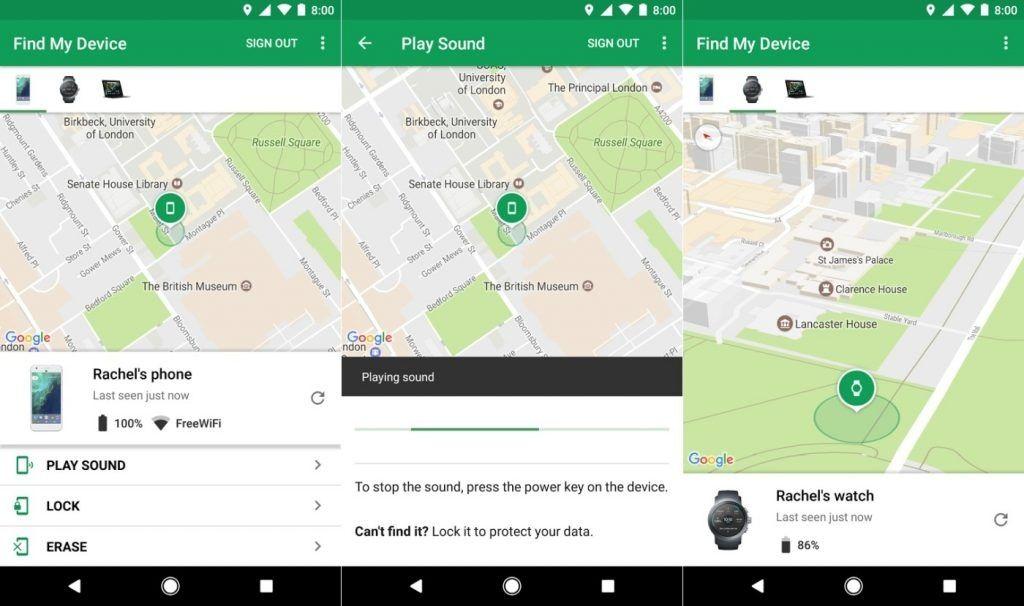
In order to use Find My Device, your lost device must be connected to mobile data or Wi-Fi, have Location turned on and have “Find My Device” turned on.
This means if your phone was stolen and turned off or flashed the Find my Device won’t work. On the other hand, provided it is just misplaced you can easily locate it. To do this, go to android.com/find and sign in to your Google Account.
In the case you have more than one device, click the lost device at the top of the screen. Sign in with a Google Account that’s on the main profile. On the map, see about where the device is or was last seen.
The location is approximate and might not be accurate. Also, if your device can’t be found, you’ll see its last known location.
In addition to being able to track your phone, you could also remotely lock, erase or play a sound. You select the play a sound link and immediately your phone starts to ring at full volume for 5 minutes.
Selecting the lock feature locks your device with your PIN, pattern, or password. If you don’t have a lock, you can set one immediately and you could also add your number or contact information to the lock screen to aid a good samaritan to locate you.
Selecting erase permanently deletes all data on your device (but might not delete SD cards). After you erase, Find My Device won’t work on the device and this is ideal if you have sensitive information on it.
Also, you can put a message on your phone in case it ever goes missing someone can easily track you. Open your device’s Settings app and select Security & location.
By “Screen lock,” select Settings .select Lock screen message and enter your message. In addition to your phone number, you can also put emergency information such as blood group or chronic sickness just in case you are caught in a crisis.
To do this, open your device’s Settings app and select About phone Emergency information. If you don’t see “Emergency information,” go back and select Users & accounts Emergency information and enter the info that you want to share. For medical info, select Edit information. (If you don’t see “Edit information,” select Info.)
For emergency contacts, select Add contact. (If you don’t see “Add contact,” select Contacts.)
To clear your info, select More, Clear all.
I would like to misplace my phone and not be able to find it said no one ever. It is nice to be able to track your phone but let’s make the first step by making sure our phone is right by us all the time.
Video editing has now become easier as compared to those days where you need to have all the complex software before you can edit a simple video. Today anyone can edit a video even if he or she is not a professional editor. With the development of Android OS and the advancement in the apps invention, video editing has become easier and simpler these days.
There are millions of video editing apps you can find on the Play store/Appstore. These apps perform almost the same functions with similar features. But some are more powerful than others. The goal of today’s post is to look at the three best video editing apps you can find on the store. These apps by far are the best apps that most of the pro video creators use for their video editing on their smartphone.
Below are the 3 best video editing apps you can find on the Play store/Appstore.
The listed apps come with a free and pro version. All the apps can be found on the Play store as well as the Appstore. Now let’s go through each app and see the features and functions that they provide.
KineMaster
This is my number one go-to app when it comes to video editing on a smartphone. Many pro android video production editors use this app. Kinemaster is a fully-featured professional video editor for Android & IOs, supporting multiple layers of video, text, and images. It also supports cutting and trimming, multi-track audio, volume envelope control, colour LUT filters, 3D transitions, and many more.
KineMaster offers an exceptional level of control over the mobile editing process, and for artists and educators, handwriting layers allow you to draw directly on the video. YouTube creators, short film producers, educators and other professionals from various industries around the world use this app for all their production.
PowerDirector
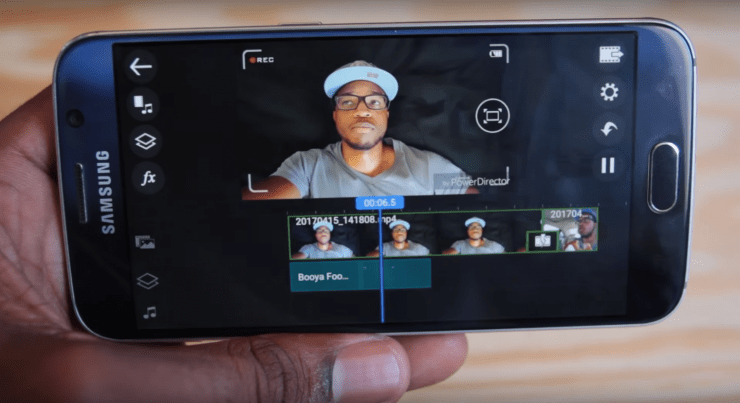
Another best video editor app after Kinemaster is power director. This app comes with powerful timeline video editing, free video effects, slow motion, reverse video, edit background & more. It helps one Create great voice overs & action movie effects using chroma key to produce 4K movies and share them on social media.
Just like any other video editing app, you can edit phone footage with Full HD movie maker using your phone, with stunning video effects and smooth transitions.
FilmoraGo
FilmoraGo is a powerful video editor app for both pc and smartphones which is used by many video creators out there. The mobile version of this app has all the basic video editing function that can be found on almost all the professional editing apps you can think off.
The ability to trim, cut, add themes, music, etc. can be easily performed on this app. you can apply fun transitions to multiple video clips or images to switch between them.
Also, the FilmoraGo app gives you the chance crop the video, change the aspect ratio and add subtitles with all the usual colour optimization options such as brightness, contrast, saturation etc, plus speed adjustment.
Once your video is produced with FilmoraGo, you can easily share the video to your friends on YouTube, Instagram, Facebook and WhatsApp.
Final words
The coming into being of smartphone and the advancement in the development of mobile application today has made the life of individuals and business less difficult.
Today everything that the traditional PC and Mac is doing, the smartphone can also do so. I could remember in the year 2011/2012 when smartphones were not all that common in most of the regions. We used to edit all our videos using PC and Mac.
But today I do all my editing on the smartphone which has increased my productivity with a great margin. I can record and edit my YouTube videos using my smartphone where ever I found myself. This is because I have access to all the powerful apps that help me do that.
If you are a video creator looking for the best powerful app for all your video editing on your smartphone then make sure to give any of the three above discussed apps a try.
That’s all for now and thank you for spending the time to read this article. Please share this post if you find it helpful and subscribe to our YouTube channel for more video updates on the latest tech gist in Ghana and beyond.
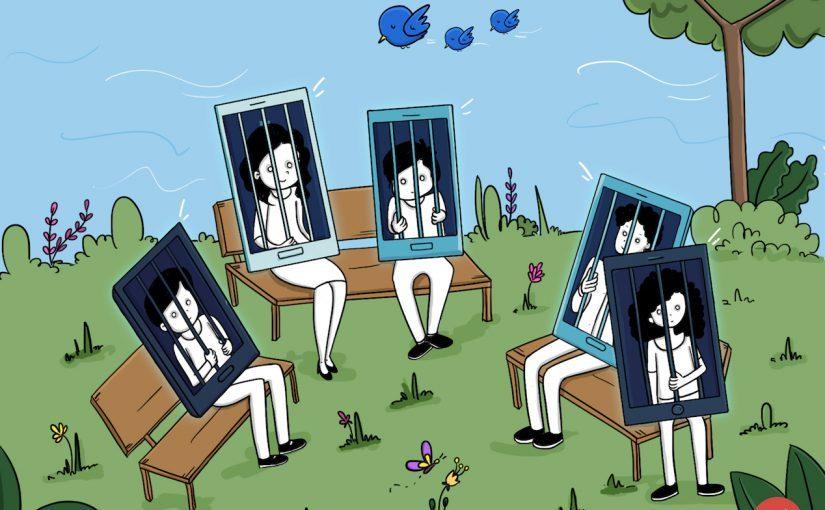
It’s an open secret that phones which were supposed to be an accessory now take an entirety of time due most likely to social media.
It isn’t common to find most students and sometimes SHS students on most of these social media and they spend most of their time just waiting for a WhatsApp message or scroll through Instagram photos of their celebrities in dressed they can never wear or using stuff they don’t have.
Honestly, the idea of social media seems very silly on paper yet racks huge amounts of money due to their ability to keep most people hooked onto the apps. At one point in time, you begin to question if the amount of time on your phones can be justified. If you’ve gotten to this point in your life, then this article is here to show you how best to minimize your screen time.
Self-actualisation
The first step to getting out of an addiction is self-actualization.
And by believing you are spending too much time on your phone we can work a path out. To solve a problem, we need to see how big a deal it is, so our beginning step is to find out how much screen time you spend and what apps spend the most time out of this.
There are third-party apps on the Google play store and the Appstore such as Usage time, screentime and Zen screen.
ZenScreen
ZenScreen has one of the best interfaces you will see with a whole variety of cool features such as calm night(turns the phone off at an appointed time) and quiet time (which turned off the device for a short period of time ).
It also has a feature to add other smartphones of your kids and regulate their screen on time. The downside is you have to pay for pro after a 3-month free trial but if you don’t have a problem paying 28 cedis a month($4.99) or 270($47.98) a year I guess it becomes the best for you.
Usage time has a subtle look to it with all the settings on one page and a pie chart of your time at the upper part. It only requests payment of 28 cedis to get rid of ads and to support the developer. Screen time is almost identical to Usage time but has multiple pages to view each function differently. Both of these can lock apps, have app time limits(self-explanatory) and down limits(only a few selected apps would work for a set amount of time).
All of these apps can help you get a general idea of your phone usage. One thing I found lacking on all these was the feature to know to save our app usage. It would really be of good help to track your usage overtimes and I expected ZenScreen to have such a feature looking at the price tag.
Because most of the apps mentioned have app limiters and other gimmicks, they are usually enough to manage your time, but there area other stand-alone apps that solely restrict your screen time without actually checking it out.
Flipd
My personal favourite is Flipd. It is honestly one of the most aggressive app locks you can ever use. It has a full ock mode where you cannot access anything apart from the app’s interface and its really tough to break out. It’s great for those who have little or no self discipline in using it. It also has a light lock mode if you feel confident enough.
The amount of time we spend looking at our devices is getting way out of hand. If you channel that time to the right stuff we will be better off in life. As you plan to spend less time on your phone, try and make a daily review so each day is better spent than the previous.
Social media apps are gradually becoming more and better as days passed by. Many developers are coming out with new messaging apps that help individuals to communicate with each other in an effective way.
Today there are a lot of people who don’t even make calls because they prefer to chat on the messaging apps than calling. There’re thousands of messaging apps out there that are more effective and powerful for texting and calling.
But the one which outstands best among the rest is the WhatsApp messenger app. This app is the most widely used messaging app in the world because it has the best features and functions that make it different from the other apps.
WhatsApp messenger has over a million users and has the best functioning community in the world. The developers of this app keep on improving the app with different feature and function in every version that is released.
The current version of WhatsApp is version 2.19.63. This has come to improve on the other features that the app has in the earlier version.
If you are a user of this app and you are not using the latest version of this app then is time to update it to the new version. Updating your WhatsApp messenger comes with many advantages and some of which are:
Get new and useful features of the new version
Gives you the chance to run WhatsApp smoothly on your device.
Updating WhatsApp on Android and iOS is simple and smartphone user can do that without any problem.
In case you try to update your WhatsApp and it failed to update then in this post we are going to look at how to update your WhatsApp on both Android and iOS.
How to update WhatsApp on Android
There are two ways that users can be used to update WhatsApp on Android.
Updating on Google Play Store
Updating WhatsApp from the play store is simple and easy. All that you need to do is to open your play store from your app menu and then go to my apps & Games.
Now you will see a list of applications that are installed on your phone. Look for WhatsApp from the list and check if it has a new update.
If there is an update available, you need to tap on WhatsApp> Update and then you can update the App easily. But makes sure you have enough memory space on your device for it to update successfully.
Update WhatsApp in the App settings
Another way to update your WhatsApp messenger is through the WhatsApp settings. You can check the update section in the WhatsApp settings to see whether there is a new update.
To check for the new update through the WhatsApp settings you follow the step below:
First, open your WhatsApp messenger on your phone and then select Options.
Now under the options menu, you tap on Settings and choose Updates.
Now Tap on “Check for updates” to see whether there is a newer version available.
If there is, you follow the instructions on the screen to download and install the new update on your device.
How To Update WhatsApp On IOS
First, open the App Store on your iPhone or iPad.
Now tap on the Updates tab at the bottom. It will open the list of all the latest, available updates for your apps.
Go through the list and find WhatsApp Messenger under the Available updates
Now tap on the update button next to WhatsApp Messenger.
Once you tap on the update button, if you’re not automatically signed in to the App Store, you will be prompted to enter your Apple ID password to confirm the update. But if you already are login, the app will begin to update. Wait until it finished then you are good to go.
The process of updating WhatsApp on Android and iOS is almost the same but what makes them different is the fact that android uses play store and iOS uses app store. If you are on iOS then follow the above-listed steps carefully and you should be able to update your iOS WhatsApp version to the latest version.
In this tutorial, we will show you how to hack a WhatsApp account through mac spoofing attack. Please note that this is just for educational purposes.
What you need to Hack WhatsApp
First of all the requirements of this procedure are:
Mobile Phone Rooted
Target’s Phone for 5 minutes
Busybox and Terminal App installed on your android device
Wifi Scanner ( if you can’t reach the target’s phone for getting his / her mac address through setting
How to Hack WhatsApp
Uninstall WhatsApp
Uninstall WhatsApp from your phone or device. You’ll install it again at the end of the method, but you’ll need to configure it differently, and the easiest way to make sure you’ll be able to do that correctly is to completely uninstall it now.
Access the “target device”
Obtain your target’s phone. You’ll need it for two different steps throughout the process, but this shouldn’t take too long – you should be able to return it before your target starts to miss it.
Find the target’s MAC Address
Find your target’s phone’s Media Access Control (MAC) address. A MAC address is a unique identifier assigned to your phone or other devices that essentially serves as its online identity. Find and write down your target’s MAC address. It takes the form of six pairs of letters or numbers, separated by colons (01:23:45:67:89:ab).
On an Android, find this in Settings → About phone → Status → Wi-Fi MAC address.
On an iPhone, go to Settings → General → About → Wi-Fi Address.
On a Windows phone, look in Settings → About → More info → MAC address.
On a BlackBerry, go to Options → Device → Device and Status info → WLAN MAC.
Find your MAC Address
Find your MAC address using the instructions above. Make sure to save it somewhere secure, as you’ll want to change your device back to that address once you’re done.
Change your MAC Address
Change (“spoof”) your phone’s MAC address to that of your target. This will allow your phone to pass as your target’s, letting you convince WhatsApp that you are your target when you log in.
On an iPhone or other devices, install a MAC spoofing app like MacDaddy X or WifiSpoof. Use that to change your MAC address.
On Android, install BusyBox and the Terminal Emulator (apps available for free on Google Play). In the terminal, type “ip link show” to see a list of interfaces. Identify the one that has your MAC address — for this example, we’ll use the eth0 interface. In the terminal emulator, enter “ip link set eth0 address XX:XX:XX:XX:XX:XX” and “ip link set eth0 broadcast XX:XX:XX:XX:XX:XX”, where eth0 is the interface you identified and XX:XX:XX:XX:XX:XX is your target’s MAC address. To check that you’ve successfully changed your MAC address, enter “ip link show eth0.”
Install WhatsApp again
Install and configure WhatsApp on your phone. Enter your target’s phone number to set up WhatsApp rather than your own. This will allow you to receive their messages and send messages from their account.
Retrieve confirmation code
Get the confirmation code from your target’s phone. This code will be sent to their phone number as part of the WhatsApp configuration process. Access their phone one last time to get that verification code. Enter it into WhatsApp on your phone when prompted, and you’re all ready to go.
If you don’t want your target to find out about your spoofing, make sure to delete the confirmation code from their phone before they can see it.
Going back to normal
When you no longer need to access your target’s WhatsApp account, change your MAC address back to what it was. Repeat the instructions to change it, but this time change it to your original address rather than your target’s. This will restore your phone to how it was originally, which will ensure that there are no future problems with Internet usage or connectivity.
If you can’t reach the target’s .phone to get mac address you can use a WIFI SCANNER. If you can’t get the code because you don’t have physical access into the victim’s phone you can use social engineering.
SoundCloud announced in a blog post today that the 200 millionth track has been uploaded to the platform.
Artist Francesca Lombardo’s ‘Eye Ring’ became the 200 millionth track uploaded to the audio-streaming service. SoundCloud celebrated the milestone with an interview with Lombardo, suggesting that her song is “actually a prime example of the boundary-pushing content that SoundCloud is known for”.
The track-count has grown from 170m at the end of 2017 (according to SoundCloud’s recent financial results) – so 30m tracks were uploaded to the service in 2018 and early 2019.
For her part, Lombardo – who has nearly 50,000 followers on the service – had warm words for SoundCloud. “I’ve worked hard to keep a steady release of music over the years, across other labels and my own, as I always want my fans to come back to something new,” she said. “SoundCloud is also a great place to archive my mixes, radio shows and remixes that have happened over the years, which I think gives a good representation of how I have evolved and what I do as an artist across my various projects.”
As the world’s largest open audio platform, SoundCloud hosts such diverse audio as Chance the Rapper’s first mixtape, the entire NASA historical audio library and BTS’ Jimin’s record-breaking track.