Author: Emmanuel Boakye Yiadom

  • How To Reply To A Whatsapp Chat Without Appearing Online

    How To Reply To A Whatsapp Chat Without Appearing Online

    We normally ignore Whatsapp messages when we are too busy to be online to have a long chat. Sometimes we might be interrupted from what we are doing immediately we get online to reply to a chat we don’t want at the said time.

    We mostly ignore chats in order to not let our contacts from seeing we are online and dragging us into long conversations. In fact, there are several ways of replying to a chat without being noticed you are online.

    There are two ways you can follow to reply to messages without being online. Continue reading to know the steps.

    Reply While Offline

    When you receive a message you don’t want to reply to lead you in long conversations, there are few things you can do to reply without anyone noticing your online status.

    Firstly, disable all connections to the internet be it WiFi or Mobile Network data on your phone. Open WhatsApp and tap on the chat you want to reply to. Write and send your message.

    Close WhatsApp and reconnect back to the internet. WhatsApp will automatically send the message without you being online. WhatsApp runs on the background and foreground.

    When running background, it is able to process your incoming and outgoing messages, that is why when you are not online and someone messages you, you receive a notification.

    Notification Reply

    Smartphones running Android 7 or higher, can reply to messages through their notification panel. Once you receive a Whatsapp notification, open the drop-down menu to reply to the message directly without opening the WhatsApp messenger.

    Messages will be sent just like you being in the app. Your online status will not show too.

    Reply Messages From Lock screen (Android)

    You can reply to messages on Android without appearing online. When you receive a notification whiles your phone is on the lock screen, tap on the down arrow of the WhatsApp message you want to reply to.

    Tap on reply, and type in your message you want to send. Some phones may demand you to type in your unlock code before you can reply.

    The message will be sent without you appearing online.

    Reply Messages From Lock screen (iOS)

    On iPhone, Swipe left to the message you want to reply to. Tap on the view option, type your message, and press send. Your message will be delivered without you being online.

    Conclusion

    In some days, we get too busy to stick to our phone in as much we even have to ignore certain messages we receive. Sometimes replying to those messages whiles online will lead to a long conversation.

    Some messages might be too important to reply, but going online will open the way for others to chat with you which we want to ignore. In such occasions or instances, we can make use of the solutions in this article to reply to your messages without going online.

  • Best Websites To Download Korean Drama Series Online (With English Subtitles) For Free

    Best Websites To Download Korean Drama Series Online (With English Subtitles) For Free

    Over the years, Korean Drama also known as Kdrama has increased in popularity worldwide. With its popularity, many people search for ways to download their favorite KDrama’s with subtitles.

    In my own experience, the reason for the popularity of KDrama is because of:

    1. Pretty Actors – The casts of K drama used by directors and producers are just like a blazing sunset. The prettiness and beautiful appearance of characters make people fall in love with Korean drama or serials.
    2. Different Culture – Korean Drama exposes different cultures to its viewers which makes fans love watching K dramas.
    3. Good and Clean Content – K drama is known for its clean content is produce.

    Below are the best websites to download K drama’s from at your own convenience.

    Best Websites To Download Korean Drama With English Subs

    1. Viki – Viki is one of the popular websites for downloading Korean Drama. The website provides subtitles to viewers in multiple languages. The only setback of the site is the many ads it offers which sometimes disrupt the user experience. Apart from the ads, the website is very good for downloading K drama.
    2. Dramago – Dramago is second on our list due to its popularity for Korean drama downloads. I personally have used this website on numerous occasions and I bet you would love it too. It has a search buttoned positioned for easy use. You can search for the top hit K dramas and download or view on the go. Subtitles are automatically generated in your video which makes users love the site.
    3. KissAsian – KissAsian is also one of the best Korean Drama downloading websites due to its easy to use design. It provides Dramas in a category based. categories based on Action, emotions, hatred, and love. All you need is register and start downloading.
    4. DramaFire – Dramafire provides High Quality (HD) Korean dramas for free. The website layout is very easy to navigate.
    5. MoviesHaven – MoviesHaven makes it 5th on our list due to its beautiful and easy navigation design. No annoying ads and one-click downloads to all its movies. The website provides a link to download subtitles for all Korean dramas and you don’t need an account to be able to log in. I personally use this website for all my downloads.
    6. LightDl – Another good website to download almost anything including Korean Dramas. It provides a one-click download to all its files. One set-back of LightDl is the too many ads it serves which disrupts the user experience. Apart from this, its one of the best sites for downloads.
    7. NewAsianTv – Easy navigation and design. The only set-back is, the website is not accessible in many countries.
    8. DramaBeans – One of the popular websites around. DramaBeans is one of the old Korean Drama downloading websites on the internet. It provides High-Quality videos with subtitles.
    9. GoodDrama.to – Very similar to Dramago. It provides a wide range of Korean Dramas and Japanese Dramas.
    10. MyDramaList – Dramalist provides High Definition Korean Drama videos for downloads. It’s one of the oldest on the internet.

    Conclusion

    If you are a fan of K dramas just like me, you can navigate the above listed Korean Downloading Dramas for view. All the above websites are free for use.

  • How To Change your normal WhatsApp To WhatsApp Business

    How To Change your normal WhatsApp To WhatsApp Business

    Whatsapp is a free social media network owned by Facebook Inc. Whatsapp was originally developed by Brian Acton and Jan Koum in 2009 and later sold to Facebook Inc in 2014.

    Whatsapp is a cross-platform available for Android and IOS. It uses your phone network to let you send messages to your friends and loved ones. Whatsapp has over 1.6 billion users making it the top most used messaging app followed by Facebook Messenger.

    Features Of WhatsApp

    Whatsapp is packed with lots of exciting features. Below are the highlighted features of Whatsapp.

    • Texts – With just your internet connection, you are just a text away from getting in touch with your loved ones. There is no limitation on the number of texts you can send. This makes Whatsapp very interesting to use.
    • Group Chat – You can keep in touch with a group of people that matters most to you. Groups about topics or entertaining subjects can be created to share ideas.
    • Whatsapp Voice and Video Calls – With a strong internet connection, you can call and speak freely to your loved once. Not just only calls, you can video call to feel the presence of your family or loved once like you are present in the moment.
    • Whatsapp Web and Desktop – Whatsapp can be synced to your web so that instead of using your phone to chat whiles using your computer, you can use the computer to perform the same function using the web. Whatsapp also has made available Desktop apps for an easy install.
    • Photos And Videos – You can share photos and videos with your loved ones at any moment.
    • End-End-Encryption – By default, Whatsapp secures your data and messages so only you and the person you had a conversation with can read or listen.
    • Document Sharing – PDFs, Slideshow, Spreadsheets, and other document types can be shared on Whatsapp.

    No wonder Whatsapp is the most used social messaging app.

    Introduction Of Whatsapp Business

    In early 2018, Whatsapp business was introduced. Whatsapp Business was introduced with small business and medium business owners in mind.

    For business owners connect easily with their customers and create some sort of easy connection with consumers and suppliers was the reason the app was made.

    Just like the normal Whatsapp, Whatsapp business has few extra features that make a business stand out. Just like Whatsapp’s personal profile option, Whatsapp business has a verifiable Business profile.

    Stats can be viewed and measured in open/read rates. Whatsapp Business has autoresponder messages that make it simpler to respond to customers when you are away.

    Broadcast list can be used to send messages to contacts or for business advertisement.

    If you are a business and want to migrate from your normal Whatsapp to Whatsapp business, follow below steps.

    Migrating From Normal Whatsapp To Whatsapp Business

    1. To begin with, first, create a backup of your normal Whatsapp account. It is highly recommended to do so in order to gain access to your previous data when inside Whatsapp Business.
    2. Download and Open the Whatsapp Business App. It is free and available in the Apple App Store and Google Play store.
    3. Review and agree to the Terms of Service and continue to accept the terms.
    4. Whatsapp business will automatically identify the number you are using in Whatsapp messenger. To proceed, tap on the option with your business number.
    5. The account transfer process will begin. Keep your Whatsapp Business App open and your phone on until the transfer process is complete. In the process where you are asked to restore from your Backup which is highly possible to be asked, Tap Continue or Restore.
    6. Allow Whatsapp Business access your Contacts and Storage so that Whatsapp Business can read from your contacts and storage.
    7. Create your Business Account. Fill out your Business name, Business category, and Profile Picture.
    8. Tap Explore to build your Business Profile. Business address and description can be added to the information to help your customers know about you.
    9. Business is now setup. You can begin using your account.

    Conclusion

    If you are business and looking forward to migrating your Whatsapp Messenger to Whatsapp Business, follow the above steps to move to Whatsapp Business to stay connected with your customers any day at any time.

  • The Best Data Recovery Software For iPhones

    The Best Data Recovery Software For iPhones

    Data loss is an unpleasant act in our digital world that is hurting many ICT users at one time or another. The most common reason for data loss is connected to our everyday lives, the way we save, store, and handle our data.

    iPhone data loss occurs when there is an accidental deletion or a failed software upgrade. Data loss can also be random. A lot of things can make your iPhone data inaccessible, in this post I will show you how you can recover your lost files.

    Below are some of the causes of data loss.

    • Human Error – Human error is a common cause of data loss. Accidental deletion of your IOS data is frequent among iPhone users. Sometimes you could accidentally delete a new iTunes backup or even restore data from a wrong backup file.
    • Software Upgrade Failure – Upgrade failure can make your iPhone unstable leading to Data Loss. Cable disconnection during an upgrade process can lead to instant data loss.
    • Physical Damage – Dropping your iPhone on the ground, mistakenly dropping your iPhone in water, and any other physical damage can cause data loss. It is advisable to always keep your device in a protected case.
    • Lost or Stolen iPhone – A lost or misplaced iPhone leads to instant data loss since you have no access to the device.
    • Factory Reset – Factory reset erases all your data from your iPhone which leads to instant data loss.
    • Virus and Malware Attacks – Security is a hallmark of Apple but installing or downloading files from unsecured sources may lead to virus disrupting your data.

    Losing data is not the end of your life. There are so many ways you can follow to recover your lost data from your IOS device. Follow below-highlighted software to use to recover files from your iPhone.

    Dr. Fone

    Dr. Fone is one of the oldest and popular recovery software in the system. You can install Dr. Fone on your computer or Mac. Connect your iPhone via lightning USB cable and Dr.Fone will start searching for your lost files.

    The software can recover files from IOS directly but can also scan iCloud or iTunes backups. For more features, you can upgrade the software at a cost.

    EaseUs Mobisaver

    EaseUs is synonymous with Dr. Fone. It can also recover dater from an iDevice or from an iCloud or iTunes Backup. Its capable of digging files we forget existed on the machine.

    Its free version is limited to 5 contacts recovery and 1 photo restore. Users can upgrade to Pro versions for full features.

    Stellar Data Recovery For iPhone

    Same as the above software, Stellar Data Recovery can recover files from iPhone or iPad. It’s also capable of recovering some iTunes and iCloud backups.

    The free version can help you know the files you can recover. For the recovery process, you will have to upgrade to the full version.

    This recovery software is the few highlighted once you can use to recover data from your iPhone device.

    Conclusion

    Data loss is a pain in the ass. Gone are the days when we lose data then we are left hanging up with no option of recovery but for now, there are numerous options available that can be used to restore our data.

    Share your experience in the use of these software’s in the comment section to help other readers. Thank you.

  • Accessories To Make Your Phone’s Camera Powerful

    Accessories To Make Your Phone’s Camera Powerful

    Phone photography is on the increase in our Tech world. Many people prefer taking photos with their mobile phones because of its smart photographic features.

    Acquiring a professional camera for Photography and videos has not been busy. One would have to have a good amount of money to acquire a camera.

    It’s not like that with Mobile phones. With a few bucks, you would be able to acquire a mobile device and make use of its camera for photography.

    Samsung and iPhone has the capability to take high-end photographs like the DSLR cameras. The Media-Tech Devices are also doing well in the Mobile Photography field.

    Techno, Infinix, Itel, are few of the rest improving their camera qualities for Mobile Photography.

    The increase in the usage of Social Media like Facebook, Instagram, Whatsapp, and others, there is a need for Mobile Phones to improve their Camera qualities and that is exactly what it’s been done.

    In every release of Smartphones, there is a better performance than the last in terms of camera. Incredible Artificial Intelligence (AI), the use of multiple lenses, camera sensors, and software makes a little pro-shooter.

    An Avid photographer sees the need to get a phone that takes quality photographs since its easier to carry around.

    Some of the best smartphones with quality photography camera features include:

    • Samsung s20
    • Iphone SE
    • Huawei P20 pro
    • HTC U 12+
    • Xaomi Mi 8
    • Google Pixel 2
    • Huawei Mate 10 Pro
    • Samsung Galaxy S9
    • Xiaomi OnePlus 6 and many more.

    Having the best camera phones does not mean you can take quality photos. To take photos like the DSLR camera’s, you need accessories added to your Mobile phone to make you take the best photos. Below are the accessories you can use to make your phones’ camera powerful.

    Lenses

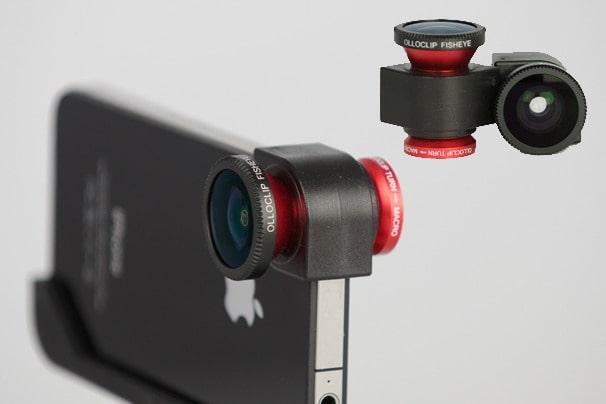
    Mobile phones also use external lenses. Adding external lenses to your smartphone device gives it extra power in taking photos or videos. With these add-on lenses, you can experience the fisheye, super-wide-angle, or macro shots beyond your existing camera.

    Some lenses also include filters such as starburst filter, radial filter, polarized lens filter, and many more. Most phones have their own external lenses specifically for their brand, but there are universal ones for almost all devices.

    Lights

    Having an extra light source reduces noise and grain in your photos. The inbuilt lights in most phones are too low for taking quality photographs. The front camera has a very low light to support quality photos at night with the rear camera with little improvement.

    There is a lot of portable LED light source around in the market that can be purchased to improve your mobile photography.

    Tripods

    If you are on a budget, tabletop tripods are the cheapest, lightest, and easy to carry tripods that make you take steady shots so that you never worry about shaky or blurry photos.

    The tabletop tripod can be adjusted to fit any surface. Alternatively, you can opt for the Gorillapod Stand. There a whole lot of tripods you can choose from, to make your photos study.

    Storage

    Storage space is very vital in mobile photography. A recent study shows quality photos take up 15% of storage spaces. With a lot of details, mobile cameras and even DSLR cameras take is something not to overlook.

    I took an image with my phone and checked the size, it was 6.06 MB file. Assume taking 50 photos and see the storage space it will take. With this, you don’t have to overlook storage.

    Most Android devices support the use of external storage devices like memory cards and pen drives. You can have an additional storage device to support your phone’s storage. There are up to 256 GB memory cards available in the market.

    Conclusion

    You can turn your mobile phone to a powerful camera device to shoot professional photos just like a pro. If you get the external accessories listed above, you are on your way to shooting professional images for your Instagram handles or personal use.

  • The Best Ways You Can Check Your Internet Speed in Ghana

    The Best Ways You Can Check Your Internet Speed in Ghana

    Faster internet is what everybody yearns for as long as the internet is into play. The United Nations (UN) declared a connection a human right. Technically, a fast internet connection is needed to be able to benefit a lot from the advancement of technology in recent times.

    The speed of your internet is what determines how much it takes for you to perform important tasks online and mostly how connected you can remain to the outside.

    Your choice of Internet provider and plan is one of the most important ones you can choose for yourself. In Ghana, a lot of Internet Service Providers (ISPs) are around but few of them delivers when it comes to speed.

    As once said, bad internet is worse than no internet. Having access to a slow internet connection is the worst thing that could happen to anyone. Today in Ghana there a lot of ISPs offering faster internet.

    History Of The Internet In Ghana

    The Internet was introduced in Ghana in the year 1993 by a collaboration between Network Computer System (NCS), Ministry of Transport and Communication, Ghana Telecom, and British Telecom.

    Ghana has more than 15 Internet Service Providers offering different forms of internet services. All the ISPs provide internet wirelessly.

    Apart from the major network service providers like MTN Ghana, Airtel Tigo, Vodafone Ghana, and Globacom we all know of, there are other internet service providers too like Africa online, ADTech IT, Busy Network, Blue cloud and many more.

    Internet Users In Ghana

    According to the 2020 statistics data released in 2020, there are over 14.76 million internet users in Ghana as of January 2020. This means there was a 7.5% increase in the use of the internet compared to 2019’s data report. 7.5% is represented by a 1 million increase.

    As of internet penetration, the data stood at a standstill as there was no increase nor decrease. Internet penetration stood at 48% in January 2020.

    Social Media Users In Ghana

    The data released in 2020 shows that there are over 6.00 million users of social media networks in Ghana as of January. This shows a percentage increment of 12% (629 thousand) between April 2019 to January 2020.

    Mobile Connections In Ghana

    Mobile connections in Ghana saw a rise in number. There are 39.97 million mobile connections as of January 2020. This saw an increase of 825 thousand (+2.1%) between January 2019 to January 2020.

    How To Test For Your Internet Connection

    First things first, before you test your internet connection speed, ensure the following guidelines are followed.

    • Don’t split up your connection with other users
    • Test under ideal but normal conditions. What is meant here is, don’t test your connection while downloading movies or music from the same connection.
    • Perform a few tests
    • Test over the course of the day.

    Below are the resources you can use to check your internet speed.

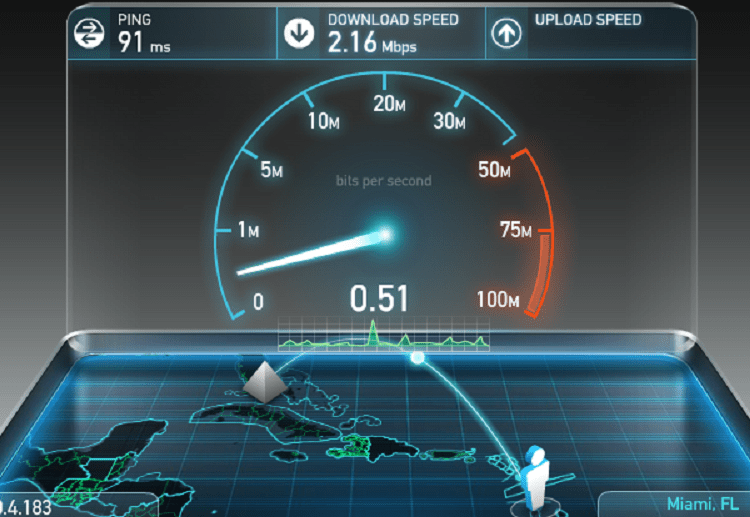
    • SpeedTest.Net – This site is one of the most popular and oldest site for testing internet speed. Each testing made is recorded for easy comparison. Its massive list of servers makes it easier to perform accurate tests.
    • SpeedOf.me – This displays tests in chart form which allows you to notice the consistency of your network over a period of time.
    • Testmy.net – Presents statistics for your speed of your ISP in a comprehensive way.
    • Xfinity Speed Test – You don’t need an account to test for your speed. No annoying pop-under ads. The only limit is, your speed test is not saved.
    • Fast.com – Netflix’s own internet testing site. You can use this as an alternative to test your connection speed.

    Apart from the websites used for speed testing, there are also mobile applications that can be used to render the same results on Android or IOS.

    1. Ookla Speed Test
    2. Speedsmart
    3. V-speed speed test
    4. Bandwidth place
    5. Speedtest master
    6. Speedcheck Internet Speed Test.

    All these apps can be downloaded from Google Playstore for Android or Apple store for IOS.

    Conclusion

    Most ISPs promise faster download and upload speed but fail to deliver behind the scenes. You can use the above resources and applications to check your real internet speed if your ISP is delivering as expected.

  • Free Data Recovery Software For MacOS you can use

    Free Data Recovery Software For MacOS you can use

    MacOs is a Graphical User Interface Operating System developed and marketed by Apple Inc. MacOs is the second most widely used Operating System after Windows.

    It has been the primary Operating System for Apple’s Mac computers since 2001.

    Data loss is a serious problem for businesses of all sizes and individuals. Losing files means wasting time and money for data restoration. Files can be lost through:

    • Mistakenly deleting files –
    • Data Corruption
    • Hard disk or storage medium crash.
    • Power cuts
    • Virus and Malware
    • Liquid Damage
    • Hackers and Insiders
    • Disasters
    • Software Corruption.

    I will highlight some of the points above and explain much deeper for better understanding.

    Mistakenly Deleting Files

    So far as we are humans, we are bound to make mistakes sometimes. Humans are not Infallible. Sometimes we might mistakenly over-write data to our existing files which will result in data loss.

    Let me use my case as an example, Someone visited me and wanted some files from my computer to his drive. I placed the drive in my machine and automatically the drive was loaded to my existing drives.

    In haste to format his drive, I mistakenly formatted my drive containing all my files. That was the most painful moment in my life. A 1 terabyte drive formatted by mistake.

    These are some of the mistakes anyone can make, with the help of powerful recovery software, I was able to recover all my files back with no problem. Today I will show you some of the powerful apps you can use to restore your deleted files just keep on following.

    Data Corruption

    Most at times, downloading files from unsecured websites may result in downloading dangerous viruses and malware to our computer. When it happens so, these viruses have the power to corrupt if not all most of our data.

    Some viruses may even make all your Desktop shortcuts unresponsive leading to data corruption.

    Hard Disk Or Storage Medium Crush

    Majority of data loss is due to hard disk crush. Hard disk crush occur due to mechanical faults or human misuse. Human misuse in the form of dropping or jostling a laptop or computer. When a hard disk crush, the success rate of recovery is very low.

    Power Cuts

    Unexpected power outages may result to data loss. I remember, losing some important documents on my pen drive due to power outage. Even if you do not lose data, the improper shutdown of the computer may result in hard disk proper lasting impacts.

    In case you come across some of these data loss problems, below are some of the free data recovery software you can use on MacOs.

    1. EaseUS Data Recovery Wizard For Mac – EaseUs Data Recovery Wizard for Mac is one of the best free data recoveries to recover data from the empty trash bin. I personally have my own experience with EaseUs.
    2. Disk Drill – Disk Drill offers a free version but if you need more features you have to upgrade to pro. Its one of the popular data recoveries in the market developed to recover lost partitions or files from Mac internal and external drive.
    3. PhotoRec – As the name sounds, PhotoRec helps to recover most common files like, photos, audios, documents, ZIP archives and others from either internal or external drive.
    4. Test Disk – Test disk also allows for multiple file recovery. It helps in fixing partition table due to software crush, virus attack or mistaken formatting.

    These are but few free data recovery softwares for your MacOs.

    Conclusion

    As humans are not infallible, data lost will always occur by human mistake or mechanical mistake. This does not mean data lost can’t be retained. With the exception of broken storage medium or hard disk, data lost can easily be restored when you use one of the above listed softwares.

  • 6 Ways You Can Use The Internet To Make Good Use Of Your Free Time

    6 Ways You Can Use The Internet To Make Good Use Of Your Free Time

    The internet is a fun place to mingle to make good use of your free time. The internet is very broad, there is so much to see, do, and learn, yet people have not been taking advantage of the internet.

    Most at times, we use our free time browsing news, idly shopping, or surfing our social feeds. The internet has too much to offer than just these. What if you can use your free time more productively on the internet?

    I personally have benefited a lot with the use of the internet in my free time. In fact, the internet has offered me many opportunities to boast of. I am very happy to share with you my experience in this article.

    With my relationship on the internet, I always ask myself what will happen if the internet goes off for even an hour. The reason I always ask myself this is because of how I benefit a lot on the internet.

    As I already said, the internet is a vast place, a network of networks. I am going to share with you some ways you can use the internet to make good use of your time below.

    Learning New Skills

    You don’t have an excuse to learn something new. Unlike the days the internet was unpopular we depended on the school system to learn or study new skills. The internet has changed that now.

    I learned Graphic Design by myself on the internet. I am a full professional designer. Not only Graphic design, but I am also a Web designer. These are a few of the skills I learned on the internet.

    Websites like Coursera, Udemy and Eduonix are an excellent source of good knowledge online. They provide both free/paid courses on a multitude of topics and skills.

    Apart from learning, below are websites that can be very beneficial to you on the internet.

    • Quora – A fun discussion community. You can ask or answer questions from Quora with or without an account but it will be very important to create an account so you don’t lose your data.
    • LifeHacker – provides tips and tricks on how to get things done.
    • StumbleUpon – Recommends website that may be of interest to you. StumbleUpon has now moved to Mix.
    • HowStuffWorks – In-depth knowledge about some of the things around you.
    • Duolingo – As the name suggests, a fun website to learn a new language.
    • Wikipedia – Knowing more about something. Data is always updated to meet the standard of time.

    All of these services are free. Learning new things every day will keep you the mind energized and strong. I know from personal experience.

    Edit Wikipedia

    Most of us have visited Wikipedia to learn about pieces of stuff. Apart from researching from there, you can add to it. Anyone can edit from Wiki. Whether an account holder or not.

    You can fix grammatical errors and spellings from other people’s work. In the same way, you can update the information when it’s outmoded.

    You can be doing this on the internet to good use of your time.

    Blogging

    A blog is a nice place to share what you love most. I personally have a blog where I do what I love most there. I share my ideas on what I know and keep people in the know.

    Am sure you might have something you love or know how to do. You can create a blog to share your ideas with others. Creating a blog it’s easy. You can visit Google’s blogger and start for free.

    Virtual Tour

    Virtual touring is my hobby. I believe it will be your hobby too. I recently became addicted to virtual touring on my desktop not long ago. Google street view is a super fun app to take a quick tour of any place in the world.

    I usually tour the world in my free time. It’s a nice experience. Visit Google Street View on your desktop to tour the world virtually.

    Review Past Purchases

    Many people overlook reviewing products. Sharing your experiences with suppliers and manufacturers’ websites helps other buyers very efficiently. If your experience with a supplier was bad, leaving a review will help another buyer escape from such a bad experience.

    Reviews help other buyers a lot but many people overlook this. You can use your free time to review your past orders to help other buyers.

    Find Out New Facts Everyday

    It’s so amazing learning new facts each day. I bumped into a site that offers amazing facts every day. It was there I found out, “no human has giant teeth”. Anyway just kidding but it’s the truth.

    The site offers amazing facts to keep you in the know. Todayifoundout.com is the site to visit to learn new stuff.

    Conclusion

    The internet has a large data of knowledge base. There are so many productive things, skills to learn on the internet. This article has highlighted 6 points you can follow to make good use of the internet.

  • 6 Best Resources To Learn Programming For Beginners

    6 Best Resources To Learn Programming For Beginners

    Simply put, programming is a way of instructing the computer to perform various tasks. Instructing the computer here means, providing the computer a set of instructions that are written in a language that the computer only understands.

    There are various types of instructions. For example:

    • adding 2 to 3 numbers
    • rounding of numbers, etc

    Synonymously, like humans, we are born to understand a few languages or more (English, Spanish, French, etc). But for the computer, it is made to understand specific syntactical form known as a programming language.

    Performing various tasks, the task could be:

    • Calculating simple interest, rate and time
    • calculating the average returns on stocks over a period of time.

    What Is Programming Language

    The programming language is the way a programmer expresses a task to a computer so that it could be understood and executed. Programming Language is the only way a computer can understand to process and perform a task. Examples of programming languages are:

    • Python – Python is an interpreted, high-level, general-purpose programming language. Python was created by Guido Van Russom and released in 1991. Python can be used for developing Graphical User Interface applications, websites and web applications, scientific and numeric applications, etc.
    • C – C was the basic language used in writing everything from Operating Systems like Windows and many others and also programs like the Oracle, Git, Python interpreter, etc. C is the most popular language worldwide. C was developed in 1972 by Dennis M. Richie. C is considered the mother language of all modern programming languages.
    • C++ – C++ was created by Bjarne Stroustrup as an extension to C programming language.
    • Java – Java is a powerful general-purpose programming language. Java is said to run on over 3 billion devices which makes it one of the popular programming languages. Java was created in 1995 and owned by Oracle.

    There are so many programming languages of which few are mentioned above. Programming is very fun to learn. In this article, I will share with you some best resources you can learn programming from.

    Turtle Academy

    Turtle Academy is a web-based tutorial teaching programming in a fun and simple way by helping you write code through moving a turtle around the screen.

    This practical way of learning programming is a great way to introduce yourself to programming and get familiar with basic programming languages as a beginner. You can visit their website on www.trustacademy.com

    Udacity

    Udacity is a web-based tutoring site that provides a huge online library of courses for all levels and all kinds of subjects. You can click on any programming course and begin to learn. All courses are beginner-level based. Visit their website on Udacity

    W3Schools

    W3Schools is basically a practical introduction to web development that anyone can follow. It’s practically full of examples and shows how different things work together. I love W3Schools personally because of the way it practically delivers and makes programming simple to learn.

    Code Academy

    There are over two dozen free courses on programming at Code Academy. All courses come with Exercises, Syllabus, lessons, and badges. All courses are free but for extra features, you need to upgrade to Code Academy Pro.

    Free Code Camp

    As the name starts with free, Free code camp offers hundreds of courses online for free on programming languages. At Free Code Camp, once you are logged in, 1200 hours of time is allocated to you to solve challenges. This makes one make good use of his free time. Visit https://www.freecodecamp.com/

    Khan Academy

    Khan Academy offers computer programming courses from scratch to advanced. All courses offered are free. With no coding skills, you can visit Khan Academy and start from the beginner level. Visit Khan Academy

    Conclusion

    Programming is important in our daily life to enhance and increase the power of computers and the internet as a whole. Big time programmers like Mark Zuckerberg, Bill Gates, Elon Musk and others, encourage others to learn to program because of it’s importance in our world today.

    If you have the interest to learn to program but don’t know where to start, this article has highlighted some of the best resources online you can learn programming from. I hope it helps your journey to programming.

  • 5 Signs That Your Phone Has Been Hacked

    5 Signs That Your Phone Has Been Hacked

    Our mobile phones have come to be part of our everyday activities. From receiving calls to checking and replying emails, SMS, Whatsapp, and many other entertaining kinds of stuff.

    Our mobile phones mostly contain some significant amount of personal and confidential information including, the contents of our texts, audio calls, and direct access to our pre-logged in social accounts which is enough for hackers to intrude in our privacy for their personal gains.

    You may ask yourself, why would anyone want to hack my device? In 2018, Facebook was hit by a major security threat. Over 50 million accounts were exposed to hackers in a breach of Facebook code.

    Hackers gained access to users’ accounts and took control of the victim’s accounts. I remember a friend was hit by this breach too. His account was taken over by hackers and was used to post unwanted materials and pornographic videos and pictures on his wall.

    Hacker’s main aim to hack users’ devices is for personal gain. To have access to your device to be able to have full control over it. Some will extort money from you before your account can be given back to you.

    Others too may sell your information/data to enrich themselves. In recent times, mobile phone hacking has been on the increase in our technology world.

    Today in this article, we are going to look at 5 signs that you can notice to be sure your phone has been hacked. Before we begin, hacking refers to activities that seek to compromise devices for some illicit purpose/unauthorized access to a victim’s device.

    Laggy Device

    Malware is mostly spread online. Sometimes we click on links to websites to download apps or files on the internet. Most of these apps are embedded with malware.

    Once we install these malicious apps on our phones, it starts to use our device’s resources at the maximum best leading to increased ram usage and memory loss resulting in lagging.

    Auto Sending And Receiving Strange Text Messages

    When you start receiving calls from friends or your contacts about messages they receive from you of which you have no idea about, something may be amiss. Quickly reset your phone to factory settings.

    New Apps Auto Installing On Your Device

    When you notice strange apps you did not install on the device, then that is odd. Apart from mobile devices auto-updating installed apps and system apps, it is weird your mobile device installing new apps.

    Battery Draining Fast

    Malware use system resources at its fullest maximum hence quick draining of battery power. When a malware is constantly monitoring and capturing user activities and relaying to third parties, your battery will drain 90% faster.

    Device Hotter Than Before

    An infected device will run very hotter even when not in use. When your device runs hotter than before frequently, you might be infected with malware.

    Conclusion

    As technology is changing rapidly day by day and mobile devices being part of us, mobile hacking has been on the increase and malware on the spread. Once you notice these signs, don’t hesitate to restore your device to factory settings.