Author: Shepherd Yaw Morttey

  • How to get the Perfect Valentine Messages for your Partner

    How to get the Perfect Valentine Messages for your Partner

    We look at Valentine messages and resources! February has long been considered as the month of Love.

    There is no facet of our lives that technology doesn’t affect.

    In February 2017, Mfidie.com will put up posts dubbed “#ValentineSpecial” with a focus on technology and our love lives. This was the Second Post in the series. You can read the first part here: #ValentineSpecial: For Lovers – Every Couple should be using this app.

    Today, we look at two resources to get our Valentine message out and clear.

    1. Canva’s Amazing Designs

    Let’s start off with Canva. This web app can help you create beautiful designs for valentines day; whether you want to send to someone or you would want to use as a profile photo.

    When you open the page, sign up with an email or with your Social Media account. You should be presented with a field to choose what you would use canva for. Choose “Personal”. You will then be directed to another screen which will guide you through a tutorial on how to use the app. It only takes 23 seconds to be fully done with the tutorial.

    Canva has a whole lot of layouts, text and font options, elements, shapes, free photos, customisable background and the option to upload your own photo to be used in the design. It is a full free customization online service you can benefit from.

    I managed to create a card on Canva in a minute. It was quite simple and if you are very design-savvy, you should be able to do more. Start designing with Canva now to reflect your best valentine messages.

    Valentine messages example - The card I created on Canva.com
    The card I created on Canva.com

    2. Valentines Day Special App – Valentine Messages and More

    In February, a lot of apps show up claiming to do a lot of things. Well, no one will want to be stuck on Valentine’s day without a good message for their lover.

    And oh, do you even know why valentines day is celebrated?

    I crushed on this cool android app and it is amazing what it has – valentine messages as well as the history of the whole Valentine celebration.

    Screenshots of the Valentines Day Special App containing Valentine Messages
    Screenshots of the Valentines Day Special App

    This app is one of those that “contain everything” related to Valentine. It has a love tester, romantic text messages you can copy, personalise and send, horoscopes as well as activities.

    Valentine will be here soon so it’s important to be fully prepared for it with this app.
    Did I mention this app has tips for single people as well?

    And it’s free. Download the app from here: Valentines Day Special App

  • Ghana to launch universal QR code payment system in March 2020

    Ghana to launch universal QR code payment system in March 2020

    Vice President of the Republic of Ghana, Dr Mahamadu Bawumia has revealed that Ghana is set to launch the Universal QR Code payment system in March this year, to reduce the handling of more cash in trade transactions.

    According to the Vice President of the Republic of Ghana, Dr Mahamadu Bawumia, Ghana will soon launch the Universal QR Code payment system next month in a bid to make Ghana cashless.

    The Vice President revealed this at the Government’s first-ever Town Hall Meeting which took place at the Kwame Nkrumah University of Science and Technology (KNUST), Kumasi in the Ashanti region

    He said: “Thanks to the Bank of Ghana, next month in March, Ghana will launch what we call, the Universal QR code payment system to make it possible for all retailers including the people who sell Kofi Brokeman and Waakye on the streets to receive payment from their customers directly on their mobile phones. Directly, without a point of sale device being necessary. This is a major transformation”

    Dr Bawumia emphasised that Ghana must take further advantage of the benefits of technology and digitisation in reaching for a major frontier of financial inclusion.

    According to Dr Bawumia, Ghana will be the first country in Africa to develop and use the Universal QR Code payment system.

    The Town Hall Meeting with the theme ‘Demonstrating Fulfillment of Our Promises’ outlined the Government’s achievements in three (3) years with a lot of focus on how the government is digitising the country.

  • ECG App: You can soon buy ECG Prepaid credit via your smartphone

    ECG App: You can soon buy ECG Prepaid credit via your smartphone

    Ghanaians who wish to buy prepaid credit from ECG will no longer need to visit a local vendor or join any long queues.

    The Vice President of Ghana, Dr Mahamudu Bawumia, at the first-ever Townhall meeting in Kumasi has revealed plans to make the purchase of ECG credit easy.

    According to the Vice President, there will soon be a mobile app for prepaid transactions so there will be no need to sleep in darkness when your credit runs out in the middle of the night.

    The new ECG app will make it very easy to buy credit any time of the day.

    He added: “Even if it is 2 am and you have run out of units, you [just] pick up your mobile phone, put in the digits and the meter will come on and all of it would go,”

    The ECG App is expected to be launched on February 18th 2020, although it is not yet clear if it will be compatible with all the current prepaid metres at launch.

    Dr Bawumia emphasized that the new ECG app is a game-changing move that would revolutionise purchasing of ECG prepaid units forever.

    “Not only will customers be able to buy for themselves, [but] you will also be able to buy units for someone else.”, he said.

    We at Mfidie.com can’t wait to see this App and of course review it.

  • 112: How to use Ghana’s new Emergency Hotline Number for Police, Fire, and Ambulance services

    112: How to use Ghana’s new Emergency Hotline Number for Police, Fire, and Ambulance services

    Today in Accra, the Government of Ghana distributed 307 ambulances to all the different constituencies in the country.

    In line with this distribution, the Government moved a step further to consolidate all the existing emergency numbers into one – the new 112 emergency hotline.

    What is an emergency number?

    An emergency number is usually a 3 digit easily memorable number that is provided to allow a caller access to local emergency services for assistance.

    In Ghana, it has been used to mainly reach the Police, Fire, and Ambulance services.

    Every country has its own emergency numbers and it is important to know the current one for Ghana and to be aware when it changes.

    What are the old emergency numbers for Ghana?

    191, 192 and 193 were dedicated to the Police, Fire, and Ambulance services of Ghana before the current move. Although 112 works for all of them, some of the services still maintain their old numbers.

    How to access the new emergency number for Ghana

    The emergency number for Ghana is 112. To access Police, Fire, and Ambulance services, just pick up your phone and dial 112.

    It is important to keep in mind that you can dial this code even when you don’t have call time on all the telecommunication networks in Ghana.

    The new emergency number for Ghana can also work from most phones even when they are locked.

    Conclusion

    Be sure not to dial the 112 emergency hotline for fun. Remember it has been put in place to save lives.

  • WhatsApp Down! Users across Ghana and Nigeria reporting issues

    WhatsApp Down! Users across Ghana and Nigeria reporting issues

    Multiple users in Ghana and Nigeria have reported that they are unable to send and receive images, videos and voice notes on the popular messaging app.

    Although stickers can be sent, they still need to be downloaded if the receiving party does not already have it and this seems not to work there.

    First reports of the downtime emerged around 11:50 GMT. Text messages and status, however, appear to work very fine.

    Many people had thought it was an issue with their service providers as countries in West Africa had experienced internet slowdowns earlier in the week.

    On Twitter, #WhatsAppDown has started trending, with many users sharing memes about the outage.

    Similar issues have been reported in Europe as well as India and other parts of Asia. It is still unknown when the issue will be resolved.


  • 2019 WAEC Ghana Result Checker: Nov/Dec Results are Out

    2019 WAEC Ghana Result Checker: Nov/Dec Results are Out

    2019 WAEC Ghana Result Checker – The West Africa Examination Council, WAEC has released the 2019 November/December West African Senior School Certificate Examination (WASSCE) results online.

    Is the NOV/DEC 2019 Wassce Private Result out?

    Yes. The West African Examination Council on Tuesday, 19th November 2019, released the provisional results for the 2019 WASSCE Private exams, also known as the NOV/DEC.

    The NOV/DEC Results 2019 is now available on the WAEC Site.

    How to get your NOV/DEC Results Checker PIN

    We are running a special offer for all those who want the PIN to be sent directly to their phones via SMS or WhatsApp.

    We are giving out the NOV/DEC Pin for just GHS 17. Please be careful not to get scammed by people who pretend to have the card and sell to you fake ones.

    You will need to send Mobile Money of GHS 17 to 0535462067 and contact 0535462067 via  WhatsApp to receive your Pin Instantly.

    For enquiries or questions enquiries, call 0535462067 Please don’t call the payment line on WhatsApp.

    How to Check your NOV/DEC Results 2019 with a PIN

    Here is how to check WAEC results online. This method works on both computers and phones. You need to connect your PC or your mobile phone with any internet network connection.

    Please don’t use Opera Mini for these steps.

    Follow the step by step instructions given below, if you get stuck, WhatsApp IKE on 0535462067  or For enquiries and questions enquiries, call 0535462067.

    Here is how to check your NOV/DEC results without a Scratch Code:

    1. Use a recommended browser, preferably Google Chrome and visit ghana.waecdirect.org
    2. On the next screen, enter your 10 Index Number: Eg: 0070202043
    3. Enter your WAEC exam year of completion. Eg: 2019
    4. Enter the exam type you sat for. Eg: WASSCE Private 2019
    5. Enter your date of birth
    6. Now, you will need to enter your 10 Digit Pin here. Enter the secret Pin.
    7. Enter your serial code, starting with WGR
    8. Submit your personal information and patiently wait for your results.

    Check your NOV/DEC Results 2019 with a Scratch Card

    If you already have a scratch card and would not prefer the PIN Method (which is more convenient), then this is how to use the scratch card to check your results.

    1. Visit the Waec Result Checker Online Portal via the link below;
      http://ghana.waecdirect.org
    2. Enter your Index Number.
    3. Select the Type of Examination (e.g. NOV/DEC).
    4. Select your Examination Year eg. 2003.
    5. Enter the Card Serial Number found on the reverse side of your Scratch card.
    6. Enter the 12-digit Personal Identification Number (PIN) on your Scratch card eg. 012345678912.
    7. Confirm your Index Number and Examination Year. This is to ensure that your examination information is correct.
    8. Click on Submit and wait for the display in the popup window. This may take several seconds.

    Check your NOV/DEC Results 2019 with a Scratch Card

    If you already have a scratch card and would not prefer the PIN Method (which is more convenient), then this is how to use the scratch card to check your results.

    1. Visit the Waec Result Checker Online Portal via the link below;
      http://ghana.waecdirect.org
    2. Enter your Index Number.
    3. Select the Type of Examination (e.g. Wassce Private).
    4. Select your Examination Year eg. 2019.
    5. Enter the Card Serial Number found on the reverse side of your Scratch card.
    6. Enter the 12-digit Personal Identification Number (PIN) on your Scratch card eg. 012345678912.
    7. Confirm your Index Number and Examination Year. This is to ensure that your examination information is correct.
    8. Click on Submit and wait for the display in the popup window. This may take several seconds.

    For enquiries or questions enquiries, call 0555475811 or send a WhatsApp message.

    Searches related to when will WAEC result Private be out

    1. is 2019 WAEC result Private out?
    2. is WAEC NOV/DEC 2019 result coming out?
    3. WAEC Private result 2019/19
    4. How to Check WASSCE Result 2019
    5. 2019 WASSCE Result Checker
    6. WAEC result Nov/Dec 2019/2019 is out
    7. WAEC Private 2019 out when
    8. WAEC 2019  NOV/DECresult will be out when
    9. WAEC result  Private be out how to check
    10. WAEC GCE result without scratch card
  • Infinix S5 (2019): Price, Specs, Features and Best deals

    Infinix S5 (2019): Price, Specs, Features and Best deals

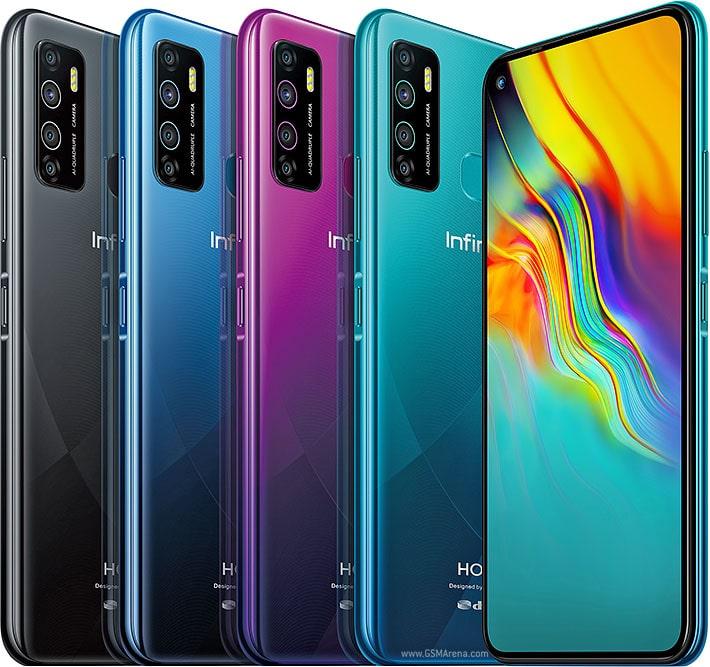
    For a lot of Infinix Fans, it’s going to be mixed feelings this Friday when the Infinix S5, the successor to the Infinix S4 is released.

    Since 2016, when the first S device launched from Infinix, we’ve had the S1, S2, S3, S3X, S4 and now, we‘ve got the Infinix S5.

    Promotional content from Infinix Mobility promises that the S5 will be brilliant devices that will offer new perspectives – a hint at a much-improved camera.

    The Infinix S5, as has already been seen in other markets, also comes with a new and improved design that is not only trendy but also offers a class for those willing to upgrade or join the Infinix family.

    The main selling points for this new device are:

    1. The hole punch display or the infinity-o camera cut-out on the 6.6-inch HD+ screen
    2. The 32MP selfie camera and
    3. The quad-camera set up on the back.

    Infinix S5 Specs

    • Dimension: 164 x 76 x 7.9 mm
    • Screen Size: 6.6-inch IPS Display, 720 x 1600 pixels (266 ppi)
    • Selfie Camera: 32 MP camera
    • Main Camera: Triple Camera Setup – 16MP (wide) F/1.8 + 5MP (Ultra-Wide) + 2MP (Depth Sensor) + 2MP (
      Macro Lens) Camera
    • OS: Android™ 9.0(Pie), XOS 5.5 Cheetah
    • Network: 2G/3G/4G LTE
    • Internal: 32 GB/64 GB built-in Storage and supports memory card up to 256GB
    • RAM: 6 GB
    • Chipset: Octa-core Mediatek MT6761 Helio P22
    • Battery Capacity: Li-Ion Non-Removable 4000mAh
    • Card Slots: 2 nano sim cards + 1 micro SD
    • Other Features: G-Sensor, Light Sensor, e-Compass, Proximity sensor, Finger Print, Gyroscope, Face ID
    • Colours: Quetzal Cyan, Violet, Nebula Black

    Features of the Infinix S5

    Design and Display

    The Infinix S5 packs A 6.6″ 20:9 HD+ display with a punch hole on its top left corner. The body is plastic and the glossy finish attracts fingerprints easily.

    The bottom part of the phone has the speaker grille, USB port, microphone and headphone jack.

    However, the device sill promises a trendy look and should be one you would feel proud to be carrying around.

    Battery

    There is now the almost standard 4,000 MaH battery on the Infinix S5.

    Camera

    There are a rear fingerprint scanner and a quad-camera setup that includes a 16MP main camera, 5MP ultrawide, 2MP for depth and a 2MP low-light sensor.

    The 5MP is not only for taking ultrawide shots but also taking macro shots of objects as close as 2.5cm. YOu get the added option of recording macro videos too.

    Performance

    The Infinix S5 is powered by an Helio P22 processor backed by 4GB of RAM and Android Pie with Infinix’s UI, XO5 5.5 on top.

    You also get 64GB of storage and a slot for expandable memory via SD card up to 256GB.

    Difference between Infinix S5 and Infinix S4

    FeatureInfinix S5Infinix S4
    Screen Size6.6-inch IPS Display6.2 inches FHD+ Notch-Display
    OSAndroid 9.0Android™ 9.0
    ProcessorMediatek MT6761 Helio P22MediaTek Helio P22
    Main Camera16MP (wide) F/1.8 + 5MP (Ultra-Wide) + 2MP (Depth Sensor) + 2MP (
    Macro Lens) Camera
    13 MP, f2.0 + 2 MP + 8 MP, f/2.0 Wide Angle
    Front Camera32 MP camera32 MP, f2.0, 1.6µm AI selfie camera
    Storage32 GB/64 GB32 GB/64 GB
    RAM6GB3GB/6GB
    Battery Capacity4000mAh4000mAh

    Infinix S5: In the retail box

    • 1 Phone (Infinix S5)
    • 1 Power Adapter
    • 1 USB-Cable
    • 1 User Guide
    • 1 Broken Screen Warranty Card
    • 1 Earphone
    • 1 Back case
    • 1 Sim Ejector

    Why you should buy the Infinix S5

    If you are a big Inifnix fan and are looking to upgrade from any of the hot series or S series, then the S5 might just be the phone for you.

    If you want to enjoy a good camera at a decent price with a battery that should last for the most part of the day, the Infinix S5 will definitely do the trick.

    Infinix S5 Pricing and Availability

    Infinix S5 Price in Ghana

    In Ghana, the selling price for the Infinix S5 is GHS 799 for the 64GB model while the bigger storage option model (128 GB) goes for GHS 949 in all major retail centres.

    You can pre-order the new Infinix S5 and pay a deposit of GHS 100. You pay the remainder on delivery or when you go to the shop to pick the phone up.

    Infinix S5 (6GB RAM + 32 GB Storage); Where to buy in Ghana

    StorePrice (GHS)Contact
    Atapsa (Nationwide Delivery)GHS 8490547204973
    Mfidie Shop (Nationwide Delivery)GHS 8490546090871

    Infinix S5 (6GB RAM + 128 GB Storage); Where to buy in Ghana

    StorePrice (GHS)Contact
    Atapsa (Nationwide Delivery)GHS 9690547204973
    Mfidie Shop (Nationwide Delivery)GHS 9690546090871

    Infinix S5 Price in Nigeria

    In Nigeria, the Infinix S5 is selling 53,000 Naira for the 64GB variant and 62,500 Naira for the bigger storage 128GB model.

    Infinix S5 Price in Kenya

    The standard Infinix S5 costs Ksh 13,000 in Kenya.

    Infinix S5 Full Specs

    General Features

    PlatformAndroid 9 (Pie), XOS 5.5
    ProcessorOcta-core Mediatek MT6761 Helio P22, 1.3GHz (12nm)
    GPUPowerVR GE8320
    Memory6GB RAM
    ColoursQuetzal Cyan, Violet, Nebula Black
    Dimension164 x 76 x 7.9 mm
    Weight178g
    SIM TypeNano-SIM
    SIM CountDual SIM

    Display

    Display6.6-inch, IPS LCD capacitive touchscreen, 720 x 1600 pixels (266 ppi)
    Foldable DisplayNo

    Camera

    Rear Camera16MP (wide) F/1.8 + 5MP (Ultra-Wide) + 2MP (Depth Sensor) + 2MP ( Macro Lens) Camera
    Rear Camera Featurespanorama, HDR, 1080 @ 30fps
    Front Camera32MP Camera, 720P @ 30fps

    Storage

    Built-in Storage64GB / 128GB
    Memory Card SupportYes, up to 256GB microSD

    Network Support

    2G GSM850 / 900 / 1800 / 1900
    3G WCDMAYes
    4G LTE1(2100), 3(1800), 5(850), (900), 38(2600), 40(2300), 41(2500), 7(800)
    5GNo

    Internet & Connectivity

    GPRSYes
    EDGEYes
    3G/WCDMA/HSPAYes
    HSPA+Yes
    4G LTEYes
    5GNo
    WLANYes, Wi-Fi 802.11 a/b/g/n
    Wi-Fi HotspotYes
    BluetoothYes, Bluetooth 5.0, A2DP, LE
    NFCNo
    Infrared BlasterNo
    USB PortYes, Micro-USB (USB 2.0)

    Messaging

    SMS/MMSYes
    Instant MessagingYes
    Push EmailsYes
    Email ProtocolYes

    Entertainment

    Music PlayerYes
    Video PlayerYes
    FM RadioYes
    LoudspeakerYes
    3.5mm JackYes

    Navigation

    NavigationYes
    MapsYes

    Sensors and Control

    Digital CompassYes
    AccelerometerYes
    Proximity SensorYes
    Light SensorYes
    GyroscopeYes
    Fingerprint ScannerYes ( Rear Mounted)
    Face UnlockYes
    Stylus PenNo
    Intelligent Digital AssistantYes
    Voice ControlYes

    Battery

    Battery4000 mAh Non-Removable Li-Po Battery

    Other Features

    Video StreamingYes
    Active Noise CancellationYes
    Wireless ChargingNo
    Built-in Mobile PaymentYes
    Image EditorYes
    Video EditorYes
    Document ViewerYes
    Document EditorYes
  • #RollOverUnusedData: Ghanaians want no expiry on purchased Data Bundles

    #RollOverUnusedData: Ghanaians want no expiry on purchased Data Bundles

    In the last few days, social media, especially Twitter has seen the hashtag #RollOverUnusedData trending over what most Ghanaians are referring to as unfair treatment by telecommunication companies with regard to how data bundles are bought and used.

    Most data bundles in Ghana expire after a specific number of days or hours, even if the bundle was not used.

    AirtelTigo, earlier this year, introduced data bundles that do not expire and this has led most Ghanaians to believe that the Telcos can actually implement this.

    In view of this, social media has set the stage to put pressure on Telcos. See some of the tweets below:

    https://twitter.com/Osumatey/status/1190207271357296640

    https://twitter.com/FlorentJAYB/status/1190237915177246720


  • TECNO Camon 12, Pro & Air (2019); Price, Specs And Best Deals

    TECNO Camon 12, Pro & Air (2019); Price, Specs And Best Deals

    Tecno Mobile is due to launch 3 new mobile phones in the Camon Series this Saturday, 25th of October 2019. Last years’ Camon 11 series was a success and fans of TECNO are enthused about the new devices.

    The Tecno Camon series is a set of photography oriented, usually mid-range priced mobile devices from Tecno. This year, the Tecno Camon 12 series comes in 3 variants:

    1. Tecno Camon 12 (Standard Variant)
    2. Tecno Camon 12 Air (Lite Variant)
    3. Tecno Camon 12 Pro (Pro Variant)
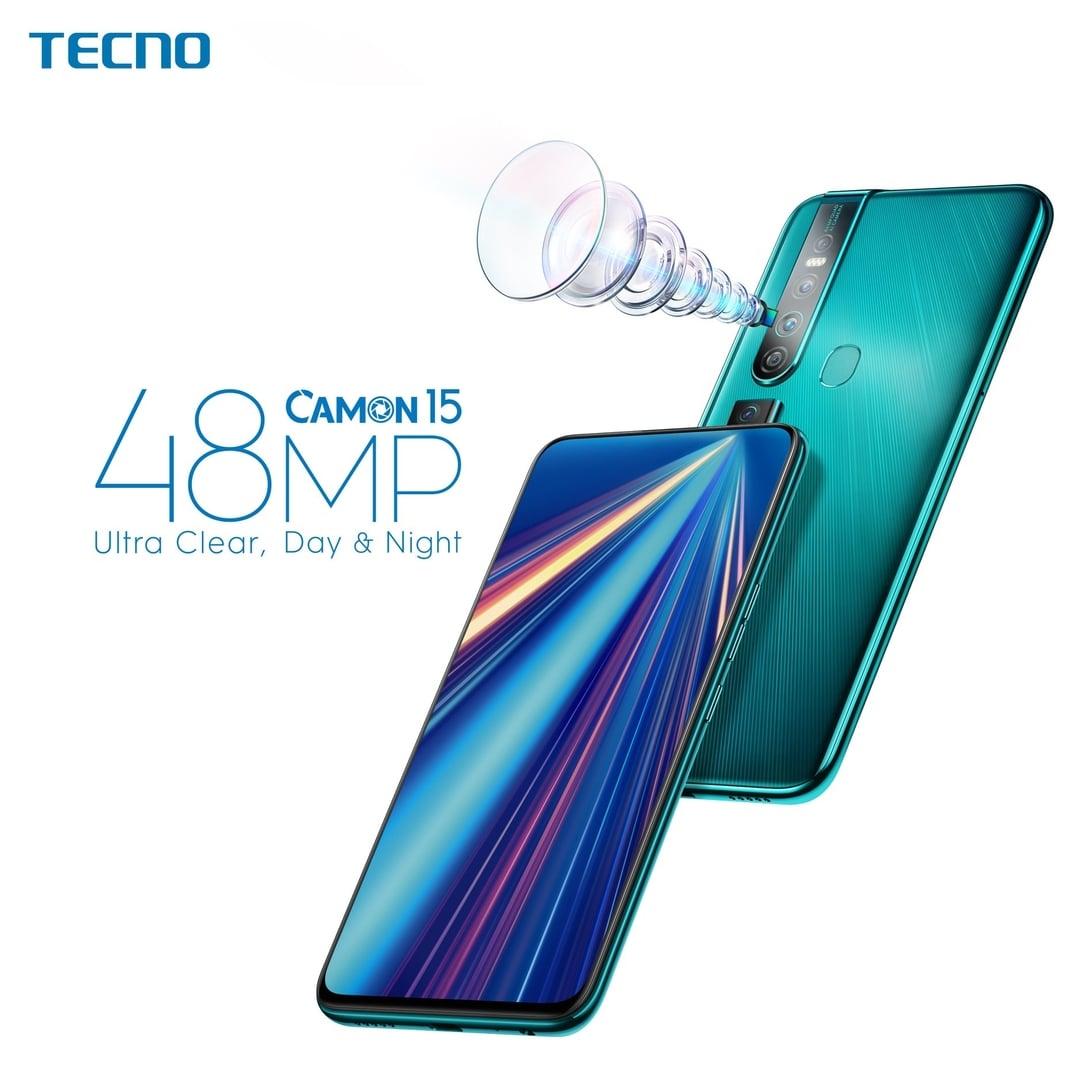
    https://mfidie.com/tecno-camon-15-camon-15-pro/

    TECNO Camon 12 Specs

    • Display: 6.52″ IPS LCD capacitive Crystal Dot Notch Screen
    • Front Camera: 16 MP with Dual Flash
    • Rear Camera: 16 MP + 2 MP + 5 MP with Quad Flash
    • OS: Android™ 9 Pie with HiOS 5.5
    • Network: 4G LTE/3G/2G
    • Storage: 64GB
    • RAM: 4GB
    • Processor: Mediatek Helio P22 octa-core processor
    • Battery: 4000mAh
    • Card Slots: 2 nano sim cards + 1 micro SD (up to 128GB)
    • Other Features: Compass, Fingerprint Sensor, GPS, Proximity, Touchscreen, WiFi, I Clear Selfie, AI Max Triple Camera
    • Colours: Dawn Blue, Dark Jade, Sky Cyan

    Tecno Camon 12 Air Specs

    • Display: 6.55″ IPS LCD capacitive touchscreen with punch hole notch
    • Front Camera: 8 MP with Dual Flash
    • Rear Camera: 16 MP + 2 MP + 5 MP with Quad Flash
    • OS: Android™ 9 Pie with HiOS 5.5
    • Network: 4G LTE/3G/2G
    • Storage: 32GB
    • RAM: 3GB
    • Processor: Mediatek MT6761 Helio A22
    • Battery: 4000mAh
    • Card Slots: 2 nano sim cards + 1 micro SD (up to 128GB)
    • Other Features: Compass, Fingerprint Sensor, GPS, Proximity, Touchscreen, WiFi,
    • Colours: Aura Blue, Gradient Gray

    Tecno Camon 12 Pro Specs

    • Display: 6.35″ AMOLED capacitive touchscreen with a teardrop notch and on-screen fingerprint sensor
    • Front Camera: 32 MP with Dual Flash
    • Rear Camera: 16 MP + 2 MP + 8 MP with Quad Flash
    • OS: Android™ 9 Pie with HiOS 5.5
    • Network: 4G LTE/3G/2G
    • Storage: 64GB
    • RAM: 6GB
    • Processor: Mediatek MT6762 Helio P22 (12 nm)
    • Battery: 3500mAh
    • Card Slots: 2 nano sim cards + 1 micro SD (up to 128GB)
    • Other Features: Compass, Screen Fingerprint Sensor, GPS, Proximity, Touchscreen, WiFi,
    • Colours: Aura Blue

    Difference between Tecno Camon 12, Tecno Camon 12 Air and Tecno Camon 12 Pro

    FeatureTecno Camon 12Tecno Camon 12 AirTecno Camon 12 Pro
    Display6.52″ IPS LCD capacitive Crystal Dot Notch Screen6.55″ IPS LCD capacitive touchscreen with punch hole notch6.35″ AMOLED capacitive touchscreen with a teardrop notch and on-screen fingerprint sensor
    Front Camera16 MP with Dual Flash8 MP with Dual Flash32 MP with Dual Flash
    Rear Camera16 MP + 2 MP + 5 MP with Quad Flash16 MP + 2 MP + 5 MP with Quad Flash16 MP + 2 MP + 8 MP with Quad Flash
    OSAndroid™ 9 Pie with HiOS 5.5Android™ 9 Pie with HiOS 5.5Android™ 9 Pie with HiOS 5.5
    Network4G LTE/3G/2G4G LTE/3G/2G4G LTE/3G/2G
    Storage64GB32GB64GB
    RAM4GB3GB6GB
    ProcessorMediatek Helio P22 octa-core processorMediatek MT6761 Helio A22Mediatek MT6762 Helio P22 (12 nm)
    Battery4000mAh4000mAh3500mAh
    Card Slots2 nano sim cards + 1 micro SD (up to 128GB)2 nano sim cards + 1 micro SD (up to 128GB)2 nano sim cards + 1 micro SD (up to 128GB)
    Other FeaturesCompass, Fingerprint Sensor, GPS, Proximity, Touchscreen, WiFi, Clear Selfie, AI Max Triple CameraCompass, Fingerprint Sensor, GPS, Proximity, Touchscreen, WiFiCompass, Screen Fingerprint Sensor, GPS, Proximity, Touchscreen, WiFi, Clear Selfie, AI Max Triple Camera
    ColoursDawn Blue, Dark Jade, Sky CyanAura Blue, Gradient GrayAura Blue

    Why you should buy the any of the 2019 Tecno Camon Series

    All three phones are pretty decent at the price that they come with and for most people, the features of the Camon 12 Pro, including the screen fingerprint and the Amoled Display (perfect for dark mode) should make it a clear choice.

    You should be looking at buying the Camon 12 Pro if you run a lot of heavy apps and don’t mind dishing out a higher amount to enjoy the 6GB of RAM and a high 32MP selfie camera experience.

    However, for the fact that the Camon 12 Pro packs in a smaller battery (3500MaH Capacity) compared to the Camon 11 and Camon 11 Air (both have a 4000MaH battery) means the two other devices are worth exploring.

    For those who are tight on a budget but are willing to enjoy the goodies that the Camon 12 offers, then the TECNO Camon 12 Air should be appealing enough. However, it only has 32 GB of internal space and 3GB of RAM, almost making it feel like the TECNO Spark 4 which was released earlier this year.

    The Standard Tecno Spark 12 should be your buy if you are not looking to spend too much but willing to pay just a little higher to enjoy almost all of the features of the 2019 Tecno Camon phones. With the 4GB of RAM, you should be able to run a lot of the high memory consuming games with ease. Definitely buy this if you are looking to use the phone for a long time.

    Pricing and Availability of the Tecno Camon 12 Series

    The phones are yet to be officially released to the Ghanaian market and are currently in the pre-order phase. With just GHS 100, you can pre-order any of the devices and enjoy the following gifts:

    • Pre-order the Standard Tecno Camon 12 and get Watch and MC Band for free.
    • Pre-order the Tecno Camon 12 Air and get a selfie stick and phone stand for free.
    • Pre-order the Tecno Camon 12 Pro and get a free power bank and water bottle.

    Where to buy the TECNO Camon 12 Series from

    You can get any of the TECNO Camon 12 series phones from the following stores:

    StoreContact
    Mfidie Shop0546090871
    Atapsa Jumia Sales Agent (Nationwide Delivery)0547204973
    Franko Phones (No Delivery)Contact Store

    Price of Tecno Camon 12

    In Ghana, the Tecno Camon 12 is selling for GHS 769. In Nigeria, it is confirmed to retail at 45,000 Naira.

    Price of Tecno Camon 12 Air

    In Ghana, the Tecno Camon 12 Air is selling for GHS 699. In Nigeria, it is confirmed to retail at 35,000 Naira.

    Price of Tecno Camon 12 Pro

    In Ghana, the Tecno Camon 12 Pro is selling for GHS 989. In Nigeria, it is confirmed to retail at 60,000 Naira.

  • Blogging Ghana presents the #BloggingMarathon2019 Competition

    Blogging Ghana presents the #BloggingMarathon2019 Competition

    As part, of the upcoming Blogging and Social Media Awards, Blogging Ghana is calling on all writers to put pen to paper and show their skills.

    All writer/bloggers can participate in the Blogging Marathon by following the following steps:

    1. Write and an original article on any one of the following topics:
      1. Practical ways Ghana can ditch single-use plastics
      2. 5 ways to encourage Ghanaians to consume locally made in Ghana products
    2. Properly source and reference any photo or video contents if you don’t have the rights to them
    3. Publish the article on any blogging platform or under your own blog (Eg: Blogger, Tumblr, WordPress or hosted domain)
    4. Share the published article on Twitter and Facebook and tag BloggingGhana

    The deadline for submission is 30th October 2019.