Category: Guides

  • How to Detect & Deactivate Call Forwarding on MTN

    How to Detect & Deactivate Call Forwarding on MTN

    Call forwarding can be useful when you want to move your cell phone number to another carrier or if you’re traveling far and want to avoid roaming charges.

    However, call forwarding can also be used as a type of fraud that lets criminals reach victims who don’t actually answer the phone. Here are some tips on how to detect call forwarding so you can keep your personal information safe and secure.

    About MTN Call forwarding

    Call forwarding is an important safety feature on your phone. If you are traveling in a foreign country and are robbed or need emergency assistance, you can configure your phone to automatically send all incoming calls directly to an MTN customer care agent or chosen number.

    Why would someone need to forward calls?

    Call forwarding is a popular service that customers may use for various reasons. For example, the person on the phone may be in a meeting or can’t take the call, so they forward it to another number.

    Sometimes companies offer an outbound caller ID so their customers know who is calling them from an unknown number and can choose whether or not they want to answer it.

    Employees who work remotely sometimes forward their calls back into the office when they are away on vacation or other business travel.

    How to detect call forwarding on your phone

    Now, depending on your phone, you can use the following settings to identify call forwarding:

    1. Dial *#62# on your mobile phone (on all networks).
    2. If you see “Not Forwarded” in all the list, it means none of them is being forwarded to a third person and vice versa.

    How to setup call forwarding on your phone

    You may want to forward your calls from a different sim in a different phone to another sim but don’t know how to do it. Follow this steps and get yourself sorted.

    Android

    1. Open the phone app on your Android device.
    2. Select the three-dot menu icon to access Settings.
    3. Select Call settings and then Call forwarding.
    4. Select one of the settings depending on your needs.
    5. Add the number for calls to be forwarded to.
    6. Select Enable and then OK to confirm.

    iPhone

    1. Go to Settings.
    2. Tap Phone.
    3. Next, tap Call Forwarding.
    4. Turn on call forwarding and enter the number you want your calls forwarded to.

    How to deactivate call forwarding on your phone

    Deactivate call forwarding using USSD code

    You can directly deactivate your call forwarding activities by dialing a ussd code on your phone which will simply do the magic.

    USSD CodeCall Divert Cancellation Function
    ##002#Cancel all call diverts
    ##61When you don’t want to pick up the call
    ##67#When you have a busy schedule
    ##62#When the phone number is unreachable

    Select any of the codes that meet your need and deactivate if you fee there has been any sort of call forwarding activation on your phone.

    Deactivate Call Forwarding in Settings

    You can also cancel call diverts directly from your phone’s settings or call settings. Here’s how to go about it:

    1. Open your phone dialer icon
    2. Tap the 3-dot menu button or the 3-line menu button at the top right corner
    3. Scroll through and look for call forwarding or more settings.
    4. Tap on call forwarding.
    5. Select voice calls.
    6. Press Cancel or disable.
    7. After that, check on your notification bar to see if the call forwarding icon has left and thats it!

    With this technique, you can successfully cancel all call diverts on your handset at a go which includes,

    1. Always forward calls.
    2. Forward phone calls when unanswered.
    3. Forward phone calls when busy.
    4. Forward calls when the dialed number is not reachable.

    Conclusion

    Call forwarding cometh its positive and negative. The best is for you to use it well and be positive. Its also necessary to check your phone call forwarding regularly to make sure no third party is tapping your voice calls

  • CashJunkie: Can you Earn Money There? Is it Real or Scam?

    CashJunkie: Can you Earn Money There? Is it Real or Scam?

    Many people have started using the cash junky app, looking to earn money online. Is this app legit? Is it safe? Find out everything you need to know about this new way to make money in this article.

    What is Cash Junky

    Cash Junky is a freelance website where you can complete tasks from companies and clients, getting paid in cash. People are interested in the site because they may need to top up their budget with quick cash and this way it can be achieved without any hassle.

    The tasks on the site vary, for example, an employer might want someone to do data entry work or someone might want help installing software. There is always something for everyone.

    How does Cash Junky work

    Cash Junky offers work for cash and cash for work, for a fee. Run surveys, play games, sign up for sites and others on your phone or pc and make some cool cash..

    Who is eligible for Cash Junky

    The website Cash Junky was created for people with too much free time on their hands and a desire to get paid for nothing.

    The site is for those who enjoy being entertained but want to also be rewarded for it. The website is available to all members mostly in the United States and Canada, 18 years of age or older, who are not in violation of any law.

    How to sign up on cash junky

    A sign-up is free on Cash Junky, but they do require that you enter an email address and a working phone number to confirm your account. Once confirmed, simply complete your profile.

    You’ll need to fill out your earnings preferences, set up a personal savings goal, and update the frequency of surveys you’d like to complete (depending on how much time you want to spend).

    Finally, take advantage of their welcome offer. They’re giving away $5 just for joining up now.

    Is Cash Junky real or fake?

    A lot of reviews from people seems to think that Cash Junky is fake. They say it just gives out free trials for products and that the only thing that you get paid for is when someone does a good review.

    But with Cash Junky, you can get cash every day from filling out surveys, shopping on sites, as well as surveys, and more.

    There are other ways to make some extra cash too like taking advantage of deals they offer, offers from their partner companies, or just sharing your opinion about something via their opinion polls.

    Is it possible to withdraw my earned money from Cash Junky?

    Yes, it is possible to withdraw your earned money from Cash Junky. You will be required to have a PayPal account in order to cash out your funds.

    This process is very easy as long as you know what your PayPal email address is and you have access to the email account that’s attached to the PayPal account.

    The withdrawals are processed automatically by PayPal for Cash Junky users.

    When can you withdraw your Cash Junky earnings?

    Once you have made $10 worth of cash junky earnings, you can withdraw your earnings. Cash junky pays out via PayPal, Amazon Gift Card, iTunes Gift Card, or Money Gram.

    You may choose which one you would like to receive your cash junky earnings in. You are allowed to cash out 5 times a day.

    How to withdraw my earned money on cash junky

    A lot of people want to know how to withdraw their earned money on cash junky. This can be done by doing the following steps, which involve a few clicks on the site and waiting for about 24 hours or so.

    1. Go to cash junky and log in.
    2. Click User Funds.
      3) Hover over the user funds tab, and find the button that says Click Here To Withdraw (it’s next to your account balance).
    3. Click it! You’ll see a dialog box that asks what type of withdrawal you would like to make – e-wallet, PayPal, check/bank transfer, direct deposit.
    4. If you choose the e-wallet option then it will give instructions on what information is needed in order to complete the withdrawal process.
    5. It will also say how long it will take before you receive your earnings once they have been processed.

    Ways to withdraw money from cash junky includes PayPal. All payments made with PayPal are immediate and instant transfers.

    What are some precautionary measures I should follow while signing up with a site like Cash Junky?

    Check out reviews, do your research and take it slow. Researching is the most important precautionary measure when considering a site like Cash Junky. It is also a good idea to be cautious of fraud.

    Legitimate sites will often y a more stringent verification process for access. Be wary of long-term commitments or early termination fees that are left unanswered before signing up with Cash Junky or any other work-at-home site like this one.

    Is this type of earning system sustainable in the long run?

    The system is sustainable in the long run if all parties involved are using the system in a legitimate way. It is not sustainable if some of the participants of the system abuse it.

    This type of earning system provides good opportunities for people who need a little more help saving but will benefit from this type of encouragement from time to time.

    There are a lot of different ways to save and invest your money that might be better suited for certain types of people with specific needs.

    If you find yourself spending too much on impulse buys or other wasteful spending habits, it might be beneficial to cut out one or two luxuries or stop spending so much on them altogether.

    You may find that after cutting out these small expenses your savings balance is growing at an exponential rate.

    Conclusion

    The bottom line is that it’s completely possible to make money on CashJunkie. You’re not going to get rich overnight, but the reality is that it’s not unheard of for people to take home a few hundred dollars from the site every month.

  • MTN Midnight Data Bundles: Bundle Prices & How to subscribe

    MTN Midnight Data Bundles: Bundle Prices & How to subscribe

    We look at MTN Ghana’s Data Bundles, their prices and how to subscribe for yourself or a friend, either via airtime or Mobile Money.

    If you love working or staying online while midnight and if you need to stay connected with your family members who are far from you, MTN Midnight data bundles are the best way to go.

    With it, you can browse, chat, tweet and watch what you want at any time of the day at a very affordable price. In this article, we will be talking about MTN Midnight data bundle prices, how to subscribe and best available deals.

    About MTN Midnight data bundle

    An MTN midnight data bundle is an affordable monthly data bundle designed for the late-night browsing sessions. It’s priced affordably so you don’t feel guilty about reading your social media updates or catching up on emails.

    With a cheap option available, this data bundle is perfect for when you need internet access at night but don’t want to spend too much.

    How to subscribe to MTN Midnight data bundle using airtime

    1. Dial *138#
    2. Select Midnight Bundles (Option 2).
    3. Select Buy For Self (Option 1).
    4. Select Flexi (Option 1).
    5. Enter the preferred amount you want to purchase.
    6. Choose 1.
    7. Select Option 1 with Airtime.
    8. Confirm purchase.

    How to subscribe to MTN Midnight data bundle using MoMo

    You may want to subscribe for the midnight bundle at some point but may not be having airtime. You can save that stress of having to buy airtime before activating the bundle.

    You can directly pay for your midnight bundle directly from MTN mobile money wallet.

    1. Dial *138#
    2. Select Option 2 (Midnight Bundles).
    3. Select Option 1 (Buy For Self).
    4. Select Option 1 (Flexi).
    5. Enter the Preferred amount you want to purchase.
    6. Select Option 1.
    7. Choose Payment  (Select Option 2 with Mobile Money).
    8. Enter your Mobile Money Pin.
    9. Confirm Purchase.

    MTN Midnight data bundle prices

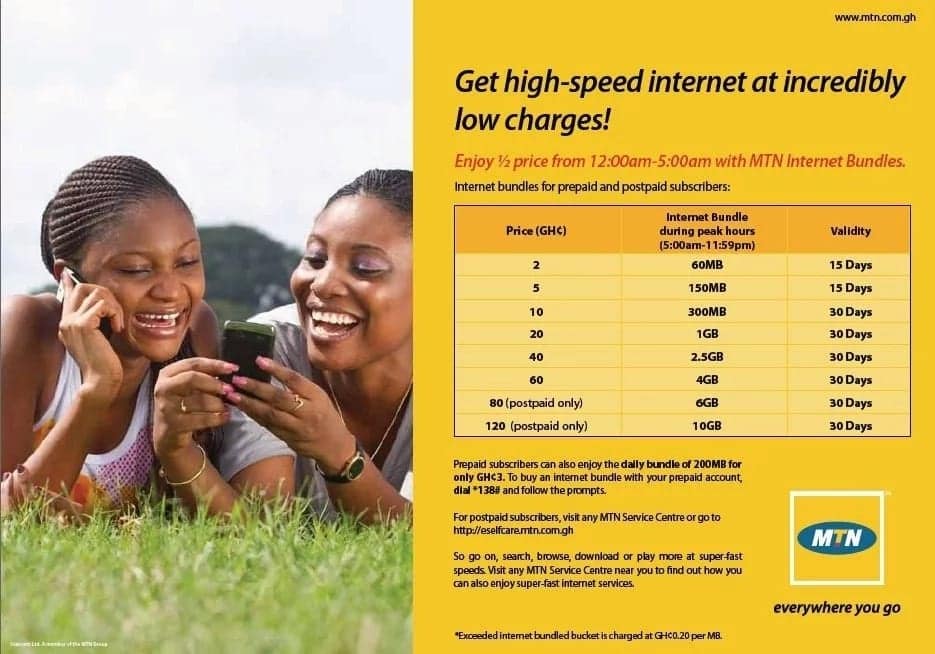
    MTN Midnight bundle prices ranges from as low as GHS0.01 to GHS2.99. Data bundle within this range can be purchased. However, if you want more than the said amount, you can purchase double within the amount range until you’ve gotten the gigabyte you want.

    Data bundle range starts from 29.15MB to 8.51GB, with 29.15MB for GHS0.01 and 8.51GB for GHS2.99. Any amount you buy has its designated bundle which will be allocated to you.

    How to purchase MTN Midnight data bundle for another MTN number

    1. Dial *138#
    2. Select Buy For Others (Option 2).
    3. Enter the receiver’s phone number
    4. Repeat Phone Number.
    5. Select Flexi (Option 1).
    6. Enter the amount you want to purchase.
    7. Select Buy (Option 1)
    8. Select Mode Of Payment (Airtime or Mobile Money).

    What time does MTN Midnight data bundle starts

    The name midnight means it starts from 12:00am.

    What time does MTN Midnight data bundle ends

    The MTN midnight data bundle ends at 5:00am.

    Can you use MTN Midnight data bundle during day time?

    No. MTN midnight data bundle cannot be used during day time and that is why the name midnight. Meaning, it is specially made for midnight when everyone is asleep and you have this big gigabyte file you want to download.

    Does MTN Midnight data bundle expires?

    MTN Midnight data bundle does not expire. It can be used every midnight so far as you have it purchased. During day time, it switches for you to use your normal data bundle and during midnight, you can then use your midnight bundle.

    Conclusion

    MTN Midnight data bundle is a great offer for mtn users who want to enjoy surfing the Internet without worrying about spending huge amount for it. With a less amount of money in your account, you can purchase a huge midnight bundle for your dealings.

  • List of Top 10 Facebook Video Downloaders

    List of Top 10 Facebook Video Downloaders

    Facebook video downloaders allow you to download Facebook videos with ease, which means you can save them on your hard drive and watch them whenever you want, whether they’re saved in original format or converted into MP4 files.

    Without any additional configuration on your part, the downloaded videos can be played right away.

    Here are 10 of the best Facebook video downloaders to help you get started with this easy process.

    About Facebook

    Facebok is a social networking site with around 2 billion users worldwide, making it the most popular social media platform in the world. There are many reasons to join and stay on facebook.

    Whether you are trying to find old friends from your past or just keeping up with friends and family members, there are plenty of reasons to join facebook.

    Facebook video downloader

    Social media is evolving and a new way to share content is through Facebook videos. Videos are an excellent way to get the attention of your audience, generate more shares, and improve user engagement.

    There are many different ways you can use Facebook video downloader from sharing clips with friends and family to using Facebook Live as a business strategy.

    As these videos continue to be used for all sorts of purposes, you might want to download your favorite ones offline so that you can watch them at any time without having an internet connection available.

    Top 10 Facebook Video Downloaders

    1. iTubeGo

    With this tool, you can simply open a browser and navigate to iTubeGo and copy the YouTube URL from your browser address bar.

    You can then paste the copied URL in the search box and hit ‘enter’ to start downloading your video files in various formats like MP4, FLV, M4A etc. It has easy steps for free downloads and is a one-stop destination for all your video download needs.

    Download iTubeGo.

    2. 4k downloader

    4k Video Downloader is one of the best free ways to save and share your favorite videos from Facebook.

    After downloading the extension, you can capture any page on the social media platform with a single click. All content will be saved on your computer in high quality and ready to share.

    Download 4K Downloader.

    3. Snap video downloader

    Snap Video Downloader is one of the most downloaded and rated Facebook video downloaders with an average rating 4.5 stars out of 5 based on 7,827 user reviews.

    With a simple interface, you can use this app to convert videos on your hard drive to a format that plays in Windows Media Player and more. The free trial version lets you capture one minute of footage and has none of the other features.

    Download Snap Video Downloader.

    4. All video downloader

    The videos are automatically downloaded and transferred to your computer or Android device as soon as they’re finished.

    Along with being simple to use, it is also very fast in its downloading speed, whether you’re using your browser on a PC or the APK file on an Android device.

    Download All Video Downloader.

    5. YTD video downloader

    There are so many third-party applications out there, it is difficult to determine which is the best one.

    If you have an Android phone and want to use an app that makes your videos look their best, try YTD Video Downloader. It has a 4.5 star rating and appears to be the most popular on Google Play.

    6. Freemake video downloader

    Freemake is one of the best video downloaders for Facebook videos. It can be used on mobile and desktop, and it lets you pause, stop, and save downloads as often as you want.

    It also has a 1GB transfer limit which is plenty for social media needs. The only downside is that Freemake is an ad-supported program with intrusive ads that can interfere with the downloading process.

    Visit Freemake Video downloader to begin your downloads.

    7. Snaptube downloader

    Snaptube is a free online service that lets you download any and all videos from Facebook, YouTube, Vimeo, Vine, etc. It’s super easy to use: sign up with your email or log in with Facebook or just use your phone number and start downloading within seconds.

    You’ll be able to find any video you can think of. They have tons of categories available so it won’t take long to find what you’re looking for.

    Download Snaptube app.

    8. Internet Download manager

    You can get this award-winning, professional-grade software for free as long as you agree to test it out for a limited time. This system is a must-have for every student who has assignments due and every busy office worker with a hectic workload.

    It comes with an automatic scheduler and even allows custom scheduling if necessary. To take full advantage of this program’s powerful capabilities, do not be afraid to use it while running other programs.

    Download Internet Download Manager

    9. Media Clip Video Downloader

    Media Clip Video Downloader is a video downloader that can download videos, songs, and other multimedia files from any webpage. What sets it apart from the rest is its capability to stream and download at the same time.

    Users can even extract audio files as well. It has a wide variety of formats including 3GP, 3G2, MP4, AVI, FLV, SWF and MP3. It also supports batch downloading where you have more than one file to be downloaded in one session.

    You may also set up your preferences like resolution and codecs before the downloads start so you will not have to bother about those later on.

    Download Media Clip Downloader

    10. FB Video Saver

    FB Video Saver offers a simple and attractive tool to help you download videos from Facebook. Following a three-step simple download process, you can easily download any videos you like from Facebook, in any resolution you want.

    There are absolutely no restrictions on your download, and any ads or registration prompts interrupting your downloading endeavors. Plus, the tool also offers a Chrome extension to help you download videos directly from Facebook without any hassle.

    Visit FB Video Saver to start your downloads.

    Conclusion

    There are many tools on the market to help you download your favorite videos, but we tested the most popular and reliable apps. We narrowed our list down to ten.

    Some offer specific functionality such as extracting audio, downloading subtitles or converting file formats, while others are less particular about the types of videos they’ll allow you to save from the social media site.

  • How to Play and Win Aviator on Msport

    How to Play and Win Aviator on Msport

    Aviator is one of the most played card games at Msport, the leading online sportsbook in Ghana and other parts of the world.

    It’s also one of the more difficult games to learn to play and win consistently, as there are many different variants of Aviator, some of which have drastically different rules than others.

    Here’s our guide on how to play and win Aviator on Msport.

    What is the aviator game about?

    The object of the game is to be the last player flying after destroying all other players. All players start off at 25,000 feet with a full tank of fuel, an unlocked weapons system and they are free to attack anyone they want until they run out of fuel.

    The first step in the game is planning your attack strategy while finding safe routes that are far away from enemy territory.

    How does the aviator game works?

    In the aviator game, you are controlling a plane by using either your computer mouse or your arrow keys. Your goal is to stay in the air as long as possible without crashing.

    The faster you fly, the higher you score, but don’t crash because it’s game over. Aviator also features an option for players who need help so that they can enjoy more successful flights by automatically aiming their plane based on your current altitude.

    What makes aviator game special?

    Aviator is a mobile game that doesn’t require any internet connection. It also has no ads or in-app purchases. Other than these two things, this game may seem like your typical mobile game, but there’s one thing that sets it apart from others: the gameplay.

    Most games let you fly in four directions – up, down, left, and right, with tilt controls but aviator instead puts the player into an aircraft cockpit with buttons for flying in all eight directions.

    Where can I play aviator

    Aviator can be found on any major browser including Chrome, Firefox, Safari, Opera, or Internet Explorer.

    The game requires a lot of skill and concentration as players must maneuver an airplane around some perilous hills. Aviator can also be played on Msports.com with all the needed tools available to support.

    How to register an account on Msports

    1. Open up https://msports.com.
    2. Click on the sign-up button in the top right corner of the screen.
    3. Create a username, password, and email address/phone number.
    4. Complete your registration information with a legitimate email address/phone number.
    5. Choose your country and tap register.
    6. Wait for verification code to verify your email/phone number.
    7. Congratulations. You have now created an account on Msports.

    How to play aviator on Msports

    In aviator on Msports, there are two types of jumps, solo and team. Solo jumps award points for the distance traveled. Team jumps are awarded points for the speed of getting from one zone to another zone.

    Each player can choose how many zones they want to go through in their turn. Zone are visible by the color around them. The first zone is yellow, second is red, third is blue. If a player goes through all three zones, they will earn an extra 100 points.

    One thing to note: If a solo jump finishes in a blue zone or starts in a blue zone, the person gets an extra 50 points for finishing or starting respectively.

    In order to get more than one jump off per round, it’s important to know that each time you finish a solo jump you have five seconds before you can start your next one.

    What is the best strategy to play and win Aviator on Msports

    Aviator is a game in which two players make moves simultaneously. Whoever goes last automatically wins the game, unless that player has been eliminated from the game before.

    To eliminate a player from the game, you must make a sequence of moves that forces that player to be unable to move any of their pieces for at least one turn.

    For example, if it is your turn and you make an L shape by placing pieces so your opponent’s green tile touches both black tiles, the opponent cannot move his or her green tile.

    You can try to adopt bankroll and risk management techniques. This technique will not guarantee you a 100% win but, they could make your session last longer.

    One of these strategies is placing a big bet that you withdraw early and at the same time placing a low bet on which you aim for a big multiplier. Another one could just be to play volatile and cash out early.

    Conclusion

    In conclusion, this is how you can play the game of Aviator. The rules are very simple, but the game takes some practice to master.

    It’s a good idea to have a strategy in mind before you start playing because you don’t want to let your opponents know what you’re up to. Practice makes perfect with this game.

  • How to Check and Update Your MTN Mobile Money Registration Details

    How to Check and Update Your MTN Mobile Money Registration Details

    MTN Mobile Money registration details are the particulars that are used to validate any MTN Mobile Money transaction you make in Nigeria.

    The security of your Mobile Money account depends on the validity of your registration details, so it’s important to keep them updated at all times to prevent fraudsters from misusing them to drain your account balance and lock you out of your account.

    Here’s how to check and update your MTN Mobile Money registration details if you haven’t done so in some time or at all.

    About MTN mobile money

    MTN Mobile Money is a service offered by MTN Ghana, where customers can send money using the MTN network.

    What this means is that you don’t need internet connection to send money or recharge someone’s phone.

    You only need an MTN number, which as most people know, is available everywhere in Ghana.

    What does it take to register for an MTN Mobile Money account

    Unlike the other networks which you can register directly from home, MTN hardly does that. The best way to register for MTN mobile money is to visit an authorised vendor with the necessary details:

    1. Mobile number.
    2. National ID Card (Ghana Card, Voter’s ID, NHIS Card, Passport or Drivers License).

    With your ID card, details such as first name, last name and age will be taken for the registration process.

    You will be asked to input your secret pin at the end of the process. In just some few minutes, your Mobile money account will be ready.

    Steps to check your MTN Mobile Money Registration Details

    There is the need to check your mobike money details and confirm if all details are correct. This helps you to prevent fraudulent activities on your account and also does not put you into difficulties whenever there is a problem with your account. To check your registration details;

    1. Dial *170#
    2. Choose my wallet (option 6)
    3. In the next pop up, type # (for more)
    4. Then choose option 10.
    5. Your Mobile Money Name and Next of Kin will be displayed to you.
    6. Choose of option 1 if you want to change your next of kin.

    What to do if your Mobile Money Registration details are incorrect

    With an incorrect mobile money details, you need to act as fast as possible to make a change if you really want to use your account for a good cause. Incase you find your account details to be incorrect,

    1. Visit the nearest MTN Office with any valid national identification card (Ghana Card, Voter’s ID, NHIS Card, Passport or Drivers License).
    2. You will be directed to a customer care agent where you will be asked to make your complaint.
    3. Your ID card will be required after you give out your complaint.
    4. In some few minutes, your correct details will be amended in their systems.
    5. Recheck your registration details again to confirm the new change.

    How to know if your Mobile Money account is innactive

    There are a few indicators that suggest your account might be inactive.

    1. If you have not used it in the last six months. It becomes dormant.
    2. When you’ve attempted to make an inquiry but are unable to because of the account being frozen.
    3. When you try to use the account for an activity such as making transaction or buying airtime, data and it doesn’t go through.

    Conclusion

    In conclusion, it is necessary to check your mobile money details in order to confirm and make sure every detail is in your name. That will help you reduce fraud activities on your account or for you not to have difficulties when there is an issue with your account.

  • How to get Virtual Debit and Credit Cards in Ghana

    How to get Virtual Debit and Credit Cards in Ghana

    Have you ever wanted to buy something online but don’t have a Credit Card or Debit Card? Many companies like Amazon, Facebook and iTunes require you to have a card before they will let you make purchases on their sites so how do you purchase from them if you don’t have one?

    The solution comes in the form of Virtual Credit and Debit Cards. These are similar to their real-world counterparts, but allow you to only spend the money that you have available in your account.

    What is a virtual debit Card

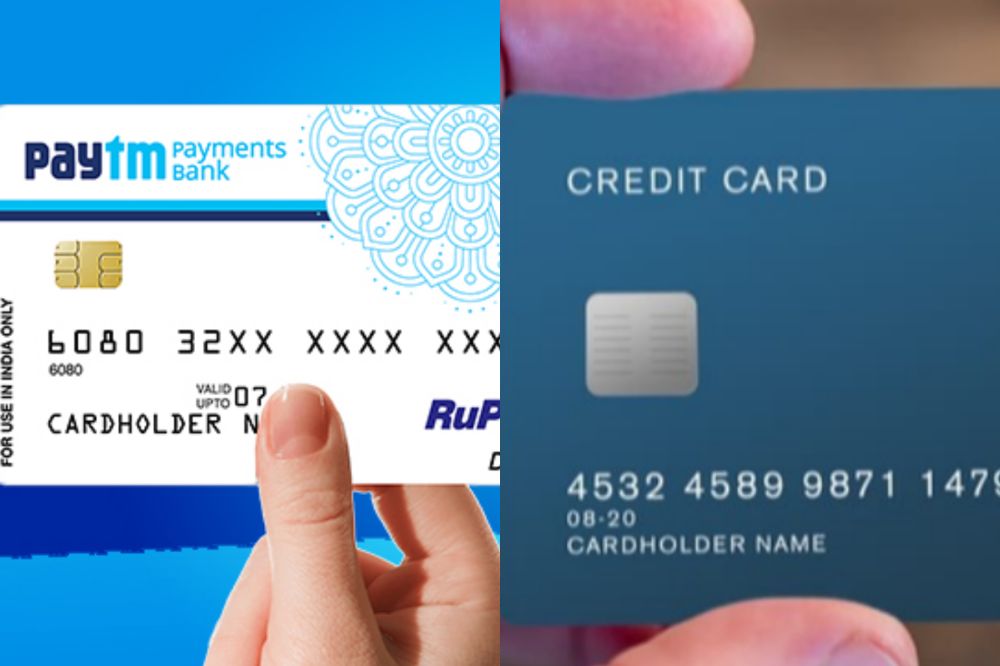
    A virtual debit card is a credit card that can be used online or at stores that do not accept magnetic stripe cards. Cardholders are assigned an account number and expiration date, which replaces the need for a physical card.

    What is a credit card

    A credit card is a plastic card issued by a bank that allows an individual to purchase goods and services up to a certain limit. It is a line of credit which the borrower draws on whenever required.

    Is debit card and credit card the same?

    Virtual debit card and credit cards are not the same, even though they have both been referred to as virtual credit cards. The biggest difference between the two is that a virtual debit card is linked directly to a bank account while a credit card, or prepaid card, links directly to your financial institution account.

    How to get a virtual debit card in Ghana

    Getting a virtual debit card and credit card in Ghana is less difficult compared to the european and american countries. In Ghana, all you have to do is to visit the preferred bank you want to host your account with and let them know your interest.

    From there, you will be asked some questions and if you qualify with all the necessary requirements, you get your card as desired.

    How to get a credit card in Ghana

    Just like the virtual debit card, acquiring a credit card in Ghana also follows similar process. All you have to do is to visit the preferred bank you want to host your account with and let them know your interest.

    From there, you will be asked some questions and possibly asked to create a bank account and if you qualify with all the necessary requirements, get your card as desired.

    Banks in Ghana that gives virtual debit card

    1. Guaranty Trust Bank gives virtual debit card.
    2. Ecobank Ghana also gives virtual credit cards.

    Banks that provide virtual debit cards in Ghana are few. However, there are other methods online that one can register for a virtual debit card if they so desire.

    1. Neteller.
    2. PalmPay.
    3. Barter by FlutterWave.

    Benefit of virtual debit card

    1. Virtual debit cards in Ghana work the same way as regular debit cards except that they do not require any money on hand.
    2. They are a convenient and safe way of paying for your purchases, withdrawing money from an ATM, sending remittances abroad, or paying for services and goods online.
    3. The main benefits of virtual debit cards in Ghana include lower fraud risk, anonymity in transactions, and there is no need to carry cash when travelling.

    Banks in Ghana that gives credit card

    Credit card is physical unlike virtual debit card and almost all the banks holds the capacity to sanction one for their customers. Banks like,

    1. Guaranty Trust Bank
    2. EcoBank
    3. Bank of Africa
    4. ABSA Bank
    5. Access Bank
    6. Standard Chartered
    7. Zenith Bank
    8. Fidelity Fidelity
    9. Societe Generale Ghana
    10. First National Bank
    11. Cal Bank. Etc

    Your favorite bank may have not been mentioned above. That doesn’t mean they don’t have the possibility of giving out a credit card. Its best you find out by either paying them a visit for such enquiries and possibly call their customer support line and ask.

    Also, not all banks mentioned above could still be sanctioning credit cards to their customers so just like explained above, its best you give them a visit for further enquiries.

    Benefit of credit cards in Ghana

    1. The benefits of credit cards in ghana are that they can be used to purchase items online, and they don’t require carrying around a lot of cash.
    2. It is also helpful for those who want convenience when shopping, paying bills or making small transactions.

    Conclusion

    There are many things you can do with virtual cards. These cards are helpful for those who want or need a credit card but have been denied one, such as college students. For example, many retailers will offer discounts if you pay with your phone instead of handing over cash.

    These cards also come in handy for international travelers since it gives them access to the currency where they may be visiting and protects their money from being stolen or lost while they are away from home.

  • How to Know if Someone Has Added You to Their Snapchat Private Story

    How to Know if Someone Has Added You to Their Snapchat Private Story

    Snapchat has become one of the most popular social media applications in recent years, and it’s no surprise why. It allows you to send pictures and videos that only your friends can see, with some clever added features like stories and stickers.

    So how do you know if someone has added you to their Snapchat private story?

    What is Snapchat private story

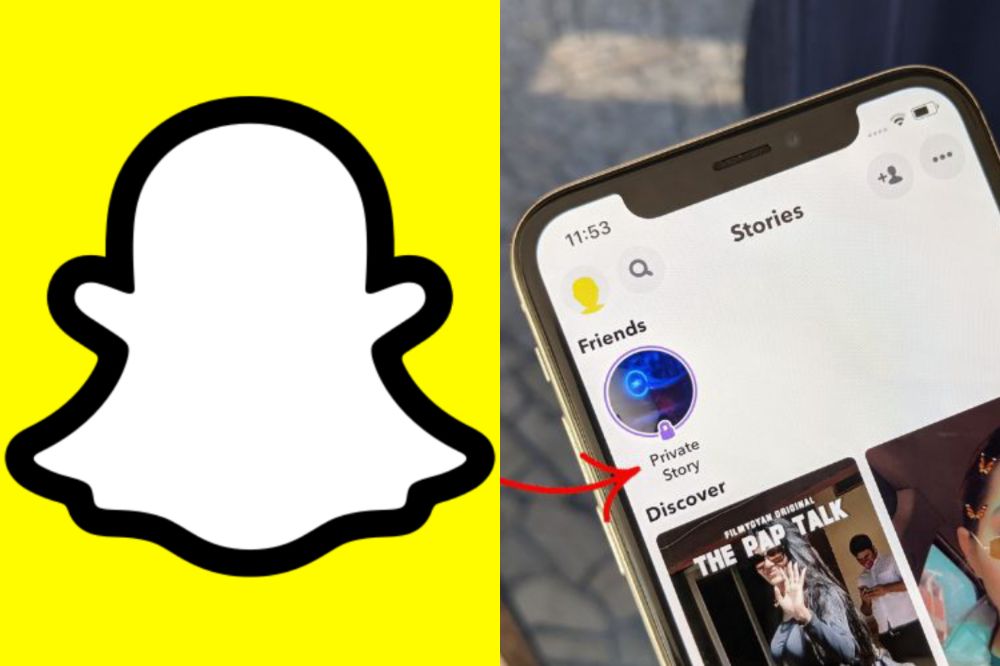
    Snapchat private story is a semi-public way of capturing moments in your life and sharing them with a select few. If you have been added to someone’s private story, then they probably like you. The person will see that you are watching the story so it’s not rude.

    Can someone join my snachat private story without adding them?

    If someone adds you on Snapchat and sends a message, they will automatically be able to see your story. However, if they just add your account without sending a message, they won’t be able to see it unless you are also following them.

    The best way to find out is to look at the Add Friends page of the app where they’ll have an option to See My Story.

    To join someone’s private story without adding them, just open up the Snapchat app and click on their name in the recent stories section. Clicking on the person’s name will take you to that person’s story and allow you to view their story as a guest.

    How to know if someone has added you to their Snapchat private story

    There are a few ways to find out if you were added to someone’s snapchat private story. The easiest way is to go on snapchat and open up their snap story, and see the full names of all people who have added you that day.

    You can also go through your own contacts list and see how many new names popped up today. Also, you can ask the person in question about it in a text message or other type of chat.

    How to know if someone has left your snapchat private story

    Method 1

    1. If you’re currently viewing the private story, look for a ghost next to the name of whoever you added.
    2. If you can’t see it, swipe left or right to find them and see the ghost next to their name.
    3. If they’ve already left the private story, there will be no ghost by their name.

    Method 2

    1. Open snapchat.
    2. Click on the small circular avatar at the top right corner and tap on stories.
    3. Find the private story you want to see if the person has joined in and select “More” button next to the story title (this option is for iphone users only).
    4. Click on see viewers.
    5. The new window will display everyone who can view this private story. Scroll through and find the person you are looking for.
    6. If you see the person in the list, it means he/she has joined.

    How to create a snapchat private story

    1. Press the camera button to take a snap. You can take up to 10 pictures with one video and send them to your story or videos.
    2. You can also hold down on the screen for up to 30 seconds for a photo slide show.
    3. Press Done when you’re finished with your story.

    How to remove someone from your Snapchat private story

    1. Open the private chat with the person that you want to remove
    2. Scroll to the right until you find a Delete Chat button.
    3. Press and hold on that button, or tap it if your phone is locked.
    4. Select Delete on the pop-up menu and confirm by pressing it again.
    5. You’ll now notice that they have been removed from your private story.

    How to know if someone has joined your snapchat private story

    1. Open snapchat.
    2. Click on the small circular avatar at the top right corner and tap on stories.
    3. Find the private story you want to see of the person has joined in and select “More” button next to the story title on iphone. On Android, just go straight to the next option (4).
    4. Click on “see viewers”.
    5. The new window will display everyone who can view this private story.
    6. Scroll through and find the person you are looking for. If you see the person in the list, it means he/she has joined.

    Private stories also show up on notifications and as small circular avatars next to your friends name under Who’s Online. They disappear after 24 hours of being uploaded and cannot be seen again once deleted or after viewing them for the first time.

    How to leave a snapchat private story

    1. Open snapchat
    2. Tap on the my friend tab.
    3. Tap on the story you want to remove yourself from. The story will have a padlock icon if it’s set as private.
    4. Press the screen of the phone and hold on until a menu pops up.
    5. Tap on leave story and ta leave again in the next popup.

    Conclusion

    Just remember that one of the perks of being friends with someone on social media is getting to see glimpses into their life. If they want you to be a part of that experience, they will make sure they include you. But in case they forget or don’t realize you are even following them, go ahead and send them a message asking them to add you.

  • How to See the Exact Time a YouTube Video Was Uploaded

    How to See the Exact Time a YouTube Video Was Uploaded

    Have you ever wondered how to know when exactly a YouTube video was uploaded? It’s certainly something that could be useful when trying to check up on the history of a certain video or when trying to find out whether or not something was uploaded recently.

    This article will walk you through the steps to find the exact time stamp of any YouTube video.

    Youtube video upload time

    When watching YouTube videos, you may have wondered about the date and time the video was uploaded. Generally speaking, only the view count and name of the video are shown on the website, with one exception being some large events like presidential speeches.

    A specific time stamp showing when that particular video was uploaded is not always available on YouTube. However, there are ways to find out what the timestamp is in order to see when a YouTube video was first published online.

    Why Can’t I see the time a YouTube video was uploaded?

    The time a YouTube video was uploaded does not show up like how the views, likes and others do. To know the time a video was uploaded, there are external miles you have to go to see that. The reason as to why you can’t see it is not any big problem.

    How will I see the time a YouTube video was posted

    1. Once you’ve found the video you’re looking for, double-click on it to open it up in the YouTube interface.
    2. Underneath the player are some tabs, click on About.
    3. At the bottom of this information is where the upload date and time is located.
    4. Clicking on that link will bring up even more information about when the video was published, such as the last time it was uploaded or any comments posted on it.

    Different ways on how you can see the time a YouTube video was uploaded also be used.

    1.Use Youtube Data Viewer

    1. Visit the YouTube Data Viewer website.
    2. Enter in the video URL click ‘search’.
    3. After clicking search, your results will populate with columns including ID, Title, Views, and Posted on time stamp information.
    4. The title of each column is self-explanatory.
    5. You can also select the data you want to see by checking off which rows you want to display and unchecking any rows you don’t want displayed by clicking on the little box next to them.

    2. Using Youtube Upload Time

    Youtube records the video’s upload time when a Youtuber uploads a video. If you are interested in knowing when a video was posted, you might consider downloading the YouTube Upload Time extension in chrome.

    The Youtube Upload Time extension is an addon that uses the Google API to determine the date and time a video was posted. You can view the time and date by clicking on the extension’s icon while watching the particular video.

    Conclusion

    If you ever wanted to know the exact time that a YouTube video was uploaded, now you know how. Follow any of the steps above and get yourself sorted.

  • How to Connect Alexa to PS4 and PS5

    How to Connect Alexa to PS4 and PS5

    The PS4 and PS5 come with the ability to control them with Alexa, the virtual assistant that comes with Amazon Echo devices, and Microsoft’s Cortana.

    You can command the PS4 and PS5 to turn on or off, or you can play or pause content without having to use your controller.

    About Alexa

    Alexa is a personal voice assistant app developed by Amazon. As the world’s most popular voice assistant, people are using it in many different ways.

    There are now more than 10,000 skills that can be accessed through the service. One of these skills is connecting with your Playstation 4 or 5 console.

    Can you connect Alexa to a gaming console?

    Yes! You can easily connect Alexa to your favourite gaming console as the new systems coming has the ability to do so. Technology is now advancing and things you never imagined can be possible is now being made possible.

    How to connect Alexa to PS4

    To be able to connect Alexa to your PS4, you need an extra device called Logitech’s Harmony Hub.

    This Logitech Harmony uses the Harmony Hub app, and then you need to connect your TV or other devices to the Logitech via the Harmony App using an internet connection. You will also need to use Bluetooth to add your PS4 to the Harmony App.

    1. First, head to Devices in the Harmony APP and then go to the Edit Devices and add the new device.
    2. Next, click on the Entertainment device category and follow the instructions by entering the manufacturer’s name, model number, and others. In the model number, you can type PlayStation 4.
    3. Now, click on Add to complete the step.
    4. After adding the device, you’ll need to set up the activity using Your PS4.
    5. To do so, you’ll simply need to choose your inputs and then turn on PS4. This will help you choose the devices you want to control through the Harmony Hub.
    6. Head to the PS4 Settings and then go to the Devices and Bluetooth Settings. Now search for the Harmony Hub device under visible devices. If it doesn’t appear for pairing, press the Hub pairing button.
    7. Both devices will be paired and setup will be done.

    You’re now left with connecting Harmony to Alexa.

    1. Download the harmony sill for Alexa in the Alexa App.
    2. Enable it to control both Harmony and your PS4. You would do this control through voice commands like you may ask Alexa to turn on the TV, and it will do so as per your command without any stress.

    How to connect Alexa to PS5

    Connecting PS5 to Alexa is much simpler than doing so with PS4. To do that, you will need HDMI Consumer Electronics Control (CEC). It’s a feature that is usually available on TVs. The HDMI link is available so you can have complete control of the devices you want.

    To opt for this option, follow the steps below:

    • Head to the Settings, Systems, and HDMI on your PS5.
    • Next, select the Activate link of the HDMI device function. Your TV should be modern enough or have an HDMI CEC to work well with Alexa.

    In addition, note that this feature is only limited to turning on your TV. Therefore, whenever you command Alexa to open your device connected, such as TV, it will be able to do it pretty quickly.

    How to connect Alexa to Xbox

    There are three ways available to connect your Xbox to Alexa. Using Xbox console, using the Alexa app, and by using a computer. You may opt for any of them depending upon your convenience and suitability. In this article, we will be talking about connecting using the Xbox console.

    1. Press the Xbox button on your console’s remote.
    2. Next, head to the Profile and system.
    3. Then, go to the Settings and then Devices and Connections.
    4. Next, select Digital Assistants and enable it.
    5. Now, press the Xbox button again on your console’s remote.
    6. Head to the Profile and Systems and then Settings. Go to the General and select Power mode and start-up.
    7. Lastly, select instant-on under the power mode.

    Can you turn on PlayStation with Google Assistant?

    Alexa and Google Assistant can connect and be able to read all of your account’s activities and available gadgets, so you may say “Alexa, turn on PS4” or “OK Google, tell Harmony to turn on PS4”, and your command will be answered.

    Conclusion

    Technology is now advancing and things you never thought could be possible is now being made possible. Connecting Alexa to your favourite console is now easier. Follow the steps above and enjoy.