Category: Guides

  • 4 Ways You Can Use The Internet To Follow Election News in Ghana

    4 Ways You Can Use The Internet To Follow Election News in Ghana

    Once again the entire Ghanaian citizenry is about to go to the polls to select who is going to lead our constituencies and the entire country at large for the next four years. During this period, everything we see or hear on our phones and TV are reported by journalists.

    Unlike the olden days where we relied on only radio and TV broadcasts, we can now access all the news on the internet. In Ghana nowadays, almost all radio stations have a website or stream their programs live on Facebook or YouTube.

    Because of that, election coverage can be accessed by everyone who has a mobile phone, tablet, or computer with an internet connection. Also, one of the problems associated with this easy access to news is misinformation.

    What is Misinformation?

    Misinformation is the process whereby false or inaccurate information is shared, especially that which is deliberately intended to deceive. This means that, the person who shared the news knew that the news was false but intentionally shared it with the public.

    To prevent all these from happening, I am coming to show you 4 ways you can use the internet to follow election news in Ghana.

    4 Ways You Can Use The Internet To Follow Election News in Ghana

    The election news is going to be covered by both local and international news outlets and media houses. Some of these companies are going to cover fake news and others are going to cover original news.

    Below are the 4 ways you can use the internet to follow election news in Ghana:

    1. Subscribe to the Facebook and YouTube channels of all the top news channels in Ghana

    As I stated earlier almost all the radio and TV stations in Ghana stream their programs on either Facebook or YouTube or both. Unlike the radio where you only hear the presenters talking, you can now see them and also watch the footages they will be covering.

    Once you subscribe to the YouTube channel or follow them on Facebook, you will receive a notification once they start a live broadcast. You can then click on it to follow the live news broadcast from these top news outlets.

    2. Continually check the website of the renowned news companies

    Apart from social media, one other place we usually find news is via a news website. In Ghana alone, there are over 200 news websites; some of which consists of untrained news writers.

    Because some of these websites are not trained in the field of journalism, or they lack adequate reporters, they copy the news stories from the renowned news companies in the country. This is the reason why I recommend that you only check the website of popular or renowned news companies.

    This is because these companies have enough reporters on the ground and as such, report news that are trustworthy and authentic. This doesn’t mean that you cannot check the other websites, but to stay away from misinformation, I will advise you to stay away from them for only the election.

    3. Download the mobile app of your preferred news channel (if any)

    Technology they say has indeed changed the world. Ghana although not a total technology country, has a very high technological potential as compared to the other African countries.

    If you are someone who cannot check the Facebook and YouTube channel of your preferred news company or visit the website, then this is going to be the best solution for you. To do this, you, first of all, need to visit the Google Play Store or the Apple App Store and search the name of your news company and then download their app.

    Once you allow the app to send you notifications, whenever the company publishes a news story, you will be notified. Some of the apps even allow you to stream their programs live through the app without visiting any external link.

    4. Use fact-checking tools to check whether the news is true or false

    Finally, misinformation is the main problem associated with online news publications. Because of this, you need to use fact-checking tools to check the authenticity of the news story.

    Manually, you can check more than one news publications to see whether they are also covering the same news or you can use some of the online tools below:

    • Google fact check
    • Reverse image checker
    • Ghana Fact
    • Dubawa Ghana
    • Snopes, etc.

    These are all fact-checking tools you can use to check whether a news story is true or false.

    Conclusion

    In conclusion, use all the above points stated to follow the election news in the upcoming elections.

    Also, we are mfidie.com will like to advise everyone to cast their vote safely and avoid any form of disagreement which can escalate to violence. We only have one Ghana so let’s try and protect it.

    The entire mfidie.com team stands for PEACE before, during, and after the 2020 elections.

  • How To Update the iOS Version On Your iPhone

    How To Update the iOS Version On Your iPhone

    iOS users are one of the people who suffer the most. They buy music from the Apple Music store, they are unable to download external apps, they are not able to download anything that is not from Apple and its related developers.

    Aside from all that, iPhone users have to update their devices almost every month. Although you can automatically enable your iPhone to update itself, it is good if you know how to update your iPhone yourself.

    How To Update Your iOS Version On Your iPhone

    To update your iOS version on your iPhone, you need to follow the steps outlined below:

    1. Plug your iPhone into power and connect your iPhone to the internet via WiFi.
    2. On your iPhone, open the Settings app.
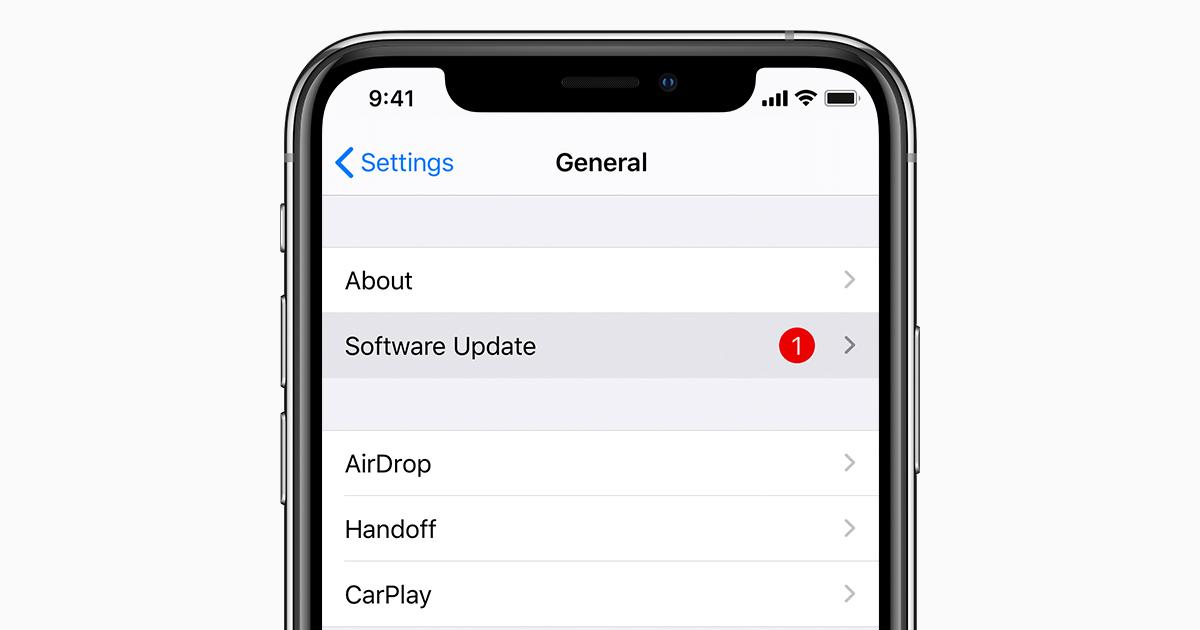
    3. From the list of available options, tap on General and then tap Software Update.
    4. Next, tap Download and Install. If you don’t have enough space, you’ll be asked to either remove apps or cancel.
    5. If you want to download it now, tap on Install or you can tap Later and choose Install Tonight or Remind Me Later. If you choose Install Tonight, you need to connect your iPhone to power and then connect it to a strong WiFi connection.
    6. If you have a passcode set on your iPhone, you will be asked to enter it.

    How To Update Your iOS Version On Your PC

    Although you can update your iOS version on your iPhone, you can also update your iPhone’s iOS version using your PC.

    To use this method, it is recommended that you have iTunes on your PC before you proceed. Once you have the iTunes software, make sure to allow your iPhone to trust the PC.

    Also, if your computer is using Personal Hotspot on the device that you’re updating, connect your computer to a different WiFi before you update. Once you are done, follow the steps listed below:

    1. Open the iTunes app on your PC.
    2. After that, connect your device to your computer.
    3. Once you have connected your device to the computer, locate your device on your computer.
    4. Click Settings and/or General, then Check for Update.
    5. Select Download and Update.

    How To Update Your iOS Version On Your Mac

    1. For macOS Catalina 10.15, open Finder. For macOS Major 10.14 or earlier, open the iTunes app.
    2. After that, connect your device to your computer.
    3. Once you have connected your device to the computer, locate your device on your computer.
    4. Click Settings and/or General, then Check for Update.
    5. Select Download and Update.

    Conclusion

    Updating your iPhone allows different latest features to work on your iPhone and so I recommend that you regularly check to see whether your iPhone is updated to the latest version.

    You can follow the steps discussed in this article to update your iPhone and even iPad as well.

  • How To Spot A Fake Review On Amazon

    How To Spot A Fake Review On Amazon

    Do you know how to spot a fake review on Amazon? I guess not but, don’t worry because I am going to guide you on how you can spot a fake review on Amazon and any other e-commerce website in the world.

    One of the most frustrating things that could ever happen to you is buying a fake product online. As a result of the COVID-19 pandemic, almost everyone has migrated to online shopping.

    Although Amazon is one of the most popular e-commerce shops online, fake shop owners find their way of selling their fake products on the platform. What these fake shop owners do is that they take original photos from other shops and post them on their store. After that, they will then ask their partners to review their products and say good things about the product to attract buyers.

    These fake reviews are sometimes targeted at original and authentic shops on the platform. With this, what they do is that they write bad reviews about the product to drive away customers and then direct them to their store.

    When this happens, the store which sells the original products will lose customers and the fake store will rather earn customers. It’s as a result of this that I have decided to show you how you can spot a fake review on Amazon.

    What Is The Difference Between a Fake Review And a Paid Review?

    Before we proceed, you need to know the difference between a fake review and a paid review. A fake review is the one that is done without actually purchasing the product that is being sold. With the paid review, the seller contacts a person to use the product for free and then give their review about the product.

    How To Spot A Fake Review On Amazon By Yourself

    To spot a fake review on Amazon by yourself, you need read through the points listed below and if most of the points hear checks out, you might be looking at a fake review:

    To make it a little easy for you to identify a fake review, Amazon has a Verified Purchase label that shows that the person who reviewed the product purchased the product before doing the review.

    An Amazon Verified Purchase label

    Secondly, check whether the stars given are moderate with just a few words. Mostly, legitimate reviewers give 3 or 4 stars and then write a few words explaining why they are pleased in the product or why they are not pleased. Serious people don’t have time to write a 100-words review.

    Also, check reviews about the same product on different e-commerce websites. For example, if you are buying a laptop with the name Mfidie Book Pro, make sure to check other websites and read the reviews others are saying about the same Mfidie Book Pro.

    Although the points listed above gives you a comprehensive guide on how to spot a fake review on Amazon, the following are some of the red flags:

    • A low number of reviews compared to similar products on the platform.
    • All the reviews given under the product are recent (unless the product was released recently).
    • All the reviews are paid. This is when the reviewer states that they received a free product in exchange for the review.

    How To Spot A Fake Review On Amazon Using Third-Party Tools

    Several third-party tools can be used to spot a fake review on Amazon. Some of these are:

    • FakeSpot
    • ReviewMeta
    • The Review Index, etc.

    These third-party tools analyze the authenticity of the review. The algorithms look at the reviews and reviewers, analyze language, previous reviews, and purchase history to determine the trustworthiness of the review.

    To check the review, copy the URL (link) of the page and paste it into the third-party site and it will investigate and give you the score. The tool will then explain the score to you to know whether the review is fake or not.

    DISCLAIMER: The points listed here doesn’t automatically guarantee that the review you saw was fake.

    Conclusion

    Now that you have an idea of how to spot a fake review on Amazon, make sure to make use of it whenever you are buying a product on Amazon.

  • How To Find Interesting Telegram Groups In Ghana

    How To Find Interesting Telegram Groups In Ghana

    Telegram Groups are the simplest place to socialize with your friends and colleague. Are you trying to find best Telegram group link to join, then I need to say that you simply are within the right place.

    Before directly going towards the simplest groups on Telegram, I would like to share with you some basic stuff which I feel many of you’ll be familiar with but there are many that are new to it also, so please skip it if you already know it or if interested please continue following it, who knows you’ll gain something from it also.

    There was a time when SMS ruled our messaging service. The users got to recharge their phones with a Message Pack. Now the whole scene has changed and therefore, the Messaging or Chats has been replaced by Instant Messaging Service like WhatsApp and Telegram.

    Because of Telegram’s advantages, they have dominated the Messaging Service. While within the traditional messaging one can only send messages to a limited receiver, now the limited thing has risen to an excessive amount of texts.

    The Telegram group link has made it more popular among its competitors. A lot of features comes packed in telegram and the group

    What is Telegram Groups Chat?

    Like any other Groups, Telegram groups are an astounding tool for building communities. Where the Telegram group members can interact with each other. Like, Family groups can share photos, videos, Gifs, documents and communicate with each other.

    A Companies official group can explain their plans, business and other necessary things with their team members and boards to coordinate their work. The best thing is that you can build any amount of groups which support up to 100,000 members.

    Nowadays the Telegram Channels and groups are the best places to get information and knowledge on critical topics than the Facebook pages, Instagram pages or even the Internet because here we get the researched information in an abridged form. So you don’t have to spend your time researching them.

    Types of Telegram Groups

    The best telegram group links are mainly divided into two types on the number of members :

    • Basic Group. – Basic groups are the groups where the maximum number of the members can contain 200. it’s considerably ideal for little teams, family groups as here they will easily share kinds of stuff with friends, family or with their team members.

      Telegram group search also is possible. Also, there are many features which make communicating in classes easy regardless of their size or purpose.
    • Supergroup. – Supergroups are those groups where the maximum number of members it can have is 100,000. By its member size, you’ll easily guess that it’s meant just for a very large community.

      Supergroups are designed and optimized to sponsor an outsized social network and can load quickly. Additionally, they provide more high-level admin tools to the admins alongside others.

    Find Interesting Telegram Groups In Ghana

    There are a lot of groups available on Telegram. Finding these groups is very easy and to join them is also easy. It becomes easier if you know the name of the group but you are not limited if you don’t know the name of the group.

    To find groups on telegram, all you have to do is press the search icon and type in any category of the group of your choice. For example, if I need a group about ‘shopping’ I will just type shopping in the search and groups about shopping will be displayed to me.

    You can try with any category or niche you want and groups about your interests will be displayed.

    Conclusion

    In-depth information is shared on telegram groups, unlike any other social platforms. You don’t need a group link or someone don’t need to add you before you can join a Telegram group. Search for a category of your choice in the search bar and all interest groups will be displayed to you.

  • 7 Reasons Why the Android OS Sucks

    7 Reasons Why the Android OS Sucks

    Everyone seems to be Ok using Android phones these days and prefer not to go with IOS because of some of the reasons listed here. In actual fact, I have studied both devices and come to realize that, most of those who criticize IOS do not actually have it and never used it even once.

    Quite unlike the IOS, it’s like the popularity and Android fever is spreading and almost everyone carries Android device around. In this article, we are going to look at 7 reasons why Android Os sucks. Below are the reasons;

    Exposure To Virus And Malware

    When it comes to security, no one beats that of IOS, no doubt, and even in the App Store, there is no single antivirus application for IOS because practically, IOS does not get attacked by virus and malware.

    By visiting unsecured websites, downloading or connecting your android device to your computer for file transfer through USB, your Android device can be infected with Virus or malware.

    Because of this, there are so many anti-virus applications on the official Play Store of Android devices because they already know the OS is not protected from virus attacks. Anyone can send you a virus through the internet or Bluetooth. This sucks!

    Low-Quality Apps

    There are a whole lot of crappy apps that fill the Play Store. Anyone can just decide to create an Android application and get it approved for users to download.

    The Play Store has a poor regulation leading to loads of apps that can even brick your device. Some of these apps can even steal your personal information.

    Software Updates Not For All

    As witnessed, Google can decide to launch a new OS for the Android but this will never be available for all devices at once. Someone using Samsung galaxy S4 may get the update whereas someone on S3 wouldn’t.

    Samsung S3 users may have to wait for some months before they can roll on to the new update and enjoy its features. Even the worse, some Android devices like the Sony Xperia Acro would have to wait for six (6) months before getting to Update, whiles others may not get it at all.

    Battery Consumption

    We all know that having a good battery on mobile gadgets is one of the ways to enjoy its functionality fully. IOS beats Android when it comes to battery life span.

    iPhone batteries are already sealed and cannot be removed easily unless going for a replacement. This they do because the battery comes with a longer life span, unlike Android.

    Android background applications and data consumes battery life quicker to last a day.

    Lots Of Fake Devices

    While it is very easy to identify a genuine Apple device, the same cannot be said of Android with several fake products bearing the name of popular OEMs that are hard to detect.

    Fragmentation is the biggest issue of Android, with the numerous OEMs saddled with the running out of devices, the possibility of getting fake devices is higher with Android.

    Buggy Apps

    The fact that just anyone can submit an app to Play Store, is another ugly side of Android that has led to an increase in the high amount of crappy software on Playstore.

    As mentioned earlier. the Play Store regulation is very poor hence, the truck-load of buggy apps that can even steal your personal data on your device.

    Many Phones Experience Performance Issues

    There are plenty of great Android phones that don’t have performance issues and don’t even slow down significantly if you use them for a year or two.

    This doesn’t happen to most android phones. Users complain that their devices slow down, the user interface freezes, to add to, the battery life drains fast.

    Additionally, some run into connectivity issues with Bluetooth or Wi-Fi or both. Any smartphone, regardless of the operating system, in one way or the other will have its quirks and bugs. But some Android phones seem particularly prone to lagging and slowing down.

    Conclusion

    Undoubtedly, Android is one of the most popular and used Operating System in the world now, but that does not make it fully perfect.

    Android sucks in so many ways. In this article, we looked at some of the reasons why Android OS sucks.

  • How To Register For Netflix In Ghana

    How To Register For Netflix In Ghana

    Undoubtedly, Netflix is the biggest all-movie and TV show streaming platform in the world (this is open for debate). Although not all countries are allowed to view the same contents as others, each country is given its own unique types of movies.

    Unlike the other platforms that exclude Ghanaians like PayPal (read on how to create a PayPal account in Ghana here), Ghanaians can sign up and stream Netflix right here in Ghana.

    That’s right. You can read on to know how to register for Netflix in Ghana in just a few minutes.

    What is Netflix?

    Wait, this you just say what is Netflix? Yes, I did. I know many of you might be wondering who doesn’t know what Netflix is but, that’s our mission here at mfidie.com; and that is to make technology accessible to the everyday person.

    Basically, Netflix is a paid premium movie streaming platform that provides registered users with original and uncopied movies, series, and TV shows that are free from copyright infringement.

    Once you sign up, you choose your preferred subscription package (can be changed later), you will then have fun while enjoying your favourite movies. If you find a show or movie you like, you can download it and then watch it later even if you are offline.

    How To Register For Netflix In Ghana

    To register for your Netflix account in Ghana, follow the steps listed below:

    1. Open a browser and visit the Netflix Ghana website (netflix.com/gh).
    2. Click on SIGN UP.
    3. Type in your email address and your preferred password.
    4. Choose your preferred subscription plan. The available subscription plans are:
      • BASIC ($7.99/month): The basic plan includes HD streaming with 480p resolution, and can be viewed on only one (1) device at a time.
      • STANDARD ($9.99/month): This plan on the other hand includes a better video quality with 1080p resolution and can be streamed on two (2) devices at a time.
      • PREMIUM ($11.99/month): Finally, the premium plan has the best video quality among them all with a 4K+HDR resolution and can be streamed on 4 devices at the same time.
    5. Once you are done selecting your preferred plan, click Continue, and enter your payment information.
    6. If you are using your credit/debit card, enter your card information and click on Start Membership.
    7. If you are using PayPal, click continue to PayPal, then enter your PayPal information.
    8. Finally, if you are using a Netflix Gift Card, enter your gift card code and enter your zip code and then click Redeem Gift Card.
    9. Next, enter your phone number and click Continue.
    10. Choose a device(s) you will stream your movies or shows on. (This solely depends on the plan you choose).
    11. That’s it, you are all set now. You can now enter your email/phone and then password to log in and enjoy your Netflix experience.

    Conclusion

    Now that you know how to register for Netflix in Ghana, feel free to try it out, and please note that the first 30 days are free. But you will be charged once you sign up.

    If you encounter any challenges, please do not hesitate to write them in the comments section below, and I will attend to you as soon as possible.

  • All You Need To Know About The New WhatsApp Disappearing Messages Feature

    All You Need To Know About The New WhatsApp Disappearing Messages Feature

    WhatsApp has officially announced that it’ll be introducing ‘Disappearing Messages’ feature through an update that rolls out worldwide in its latest update.

    The details of the new feature, however, are out in a Frequently Asked Questions (FAQs) created by WhatsApp in their official page sighted by us. In this article, we are going to talk about the new WhatsApp Disappearing Message feature.

    WhatsApp is filled with a lot of wonderful features already including preventing someone from adding you to WhatsApp groups. This particularly focuses on privacy.

    The long-anticipated temporary messaging feature championed by Snapchat was first recognised last month through a WhatsApp beta version. it’ll allow users to enable an option on individual and group chats that deletes new messages after seven days.

    ‘Disappearing Messages’ has started rolling out from today, and can be available across Android, iOS, and Linux-based KaiOS devices, alongside WhatsApp Web and Desktop platforms, by the latter of this month.

    WhatsApp had beforehand in the week detailed the way to enable/ disable the new ‘Disappearing Messages’ feature on different devices and published FAQs on its usage on a support page.

    The ‘Disappearing Messages’ feature on WhatsApp is quite different from Telegram’s.

    While Telegram lets users decide the duration before the messages disappear during a chat, messages sent to a chat on WhatsApp will disappear after seven days.

    Snapchat, on the opposite hand, deletes Snaps after they have been opened, erases unopened Snaps sent to a group chat in 24 hours, and everyone other unopened Snaps in 30 days.

    WhatsApp has explained why they are rolling out with seven days because it looks like an appropriate window for its users to end a specific conversation while giving them the peace of mind that the conversations aren’t permanent and can be deleted.

    “We’re starting with 7 days because we expect it offers peace of mind that conversations aren’t permanent while remaining practical so you do not forget what you were chatting about.

    The shopping list or store address you received a couple of days ago are going to be there while you would like it, then disappear after you do not,” the corporate announced during a statement.

    The ‘Disappearing Messages’ feature has got to be enabled individually for every chat window — individual or group conversations — and may be accessed by clicking the name of the individual contact or the group on WhatsApp.

    When activated, the new messages sent by a user will disappear for the chosen contacts after seven days. However, the preview of disappearing messages might display in notifications until WhatsApp is opened on the receiving devices.

    Disappearing messages that are forwarded to a replacement chat window, which has the choice turned off, won’t be removed either. And when a user replies to a disappearing message, the quoted text may additionally remain within the chat after seven days.

    A tip you can use if you want to keep the messages is, users receiving the messages also can still copy the text and take screenshots of the messages within seven days.

    Disappearing messages also will land in user backups but are going to be deleted after the user restores messages from it.

    As long as there are some ways to retain chats shared through disappearing messages, it seems more like a choice to clear up conversations than a feature to share information that deletes automatically.

    How To Enable Disappearing Messages Feature On WhatsApp

    • Open the desired contact and tap on the contact’s name.
    • Now scroll down and tap on the ‘Disappearing messages’ option
    • Tap on Continue> On

    Conclusion

    When it comes to Privacy, everybody is concerned. This wonderful feature is a boost to Privacy as it will improve on user Privacy.

    In this article, we talked about the most anticipated WhatsApp new feature ‘Disappearing messages” rolled out in their latest update.

  • MTN Magic Number: Shortcode, How To Register, Benefits & More

    MTN Magic Number: Shortcode, How To Register, Benefits & More

    One might ask, what is MTN magic Number? Well, I won’t be surprised if you did ask that after seeing the heading of the post. The MTN Magic number is a simple service that allows new subscribers to make calls with a selected MTN number for six months.

    It is as simple as that however, it comes with lots of instructions in order to get it right. In this article, I will provide you with the steps to follow in order to activate the MTN Magic Number.

    How To Register/Activate MTN Magic Number

    First of all, your magic number is the preferred number you would want to have free calls with. That number can be your friend, girlfriend, mother, father or any other person you want. The steps are provided below,

    • First step, dial *550#
    • Choose option 7 (magic number) from the prompt
    • Select option 1 from the next prompt to enter the magic number.
    • The number will be activated for the service successfully now.

    That’s all, you are on the free call plan with the magic number until 6 months period.

    What You Should Know About This Service

    • The SIM should be a newly registered MTN Sim card under 3 months old
    • It is confined to only one preferred MTN number. This means that you can only select one number per every new SIM card.
    • You enjoy free calls only for a period of 6 months. After this period, any call you make to your magic number will be charged.

    Benefits Of Activating The Magic Number

    There are so many benefits you enjoy when you activate the MTN Magic number. I mean come to think of it, if you have this particular number you speak with for more than an hour, look at the amount of credit you lose but with the magic number, you can talk all day without paying a dime.

    Also, another benefit of the magic number is that it saves money and credit. The money you would use to purchase credit to call that number can be saved and used for another purpose.

    Other MTN Short Codes And Services

    • Dial free short code *156# to check MTN Ghana network mobile numbers.
    • Dial *124# to check your credit
    • Dial *138# for Internet bundle, SMS bundles
    • *170# for mobile money services
    • To borrow credit dial *506#
    • To generate Nobile Money ATM token dial *511#
    • To know if your number is registered dial *400#
    • Request internet settings. Send a blank text message (SMS) to 585 from your MTN. Save the settings you received, to your phone. Select MTN DATA as a default access point.

    More elaborated other MTN Short codes and services are available in another post in the site.

    Conclusion

    Most people never knew there is a free call to a particular number for 6 months. The MTN magic number is a game changer. In this article, I have provided you with the steps to activate the service.

  • How To Transfer GBWhatsApp Messages To Normal WhatsApp

    How To Transfer GBWhatsApp Messages To Normal WhatsApp

    Probably, WhatsApp offers a wide range of features to be in touch with our contacts but users often look for more functions. To help users customize their WhatsApp experience, modded versions like GBWhatsApp, WhatsApp plus, FM WhatsApp and the others are available.

    Though these WhatsApp mods have their pitfalls and their continuous usage can render your account blocking. Since your account can be blocked anytime without prompt, I deem it fit to learn how to transfer GBWhatsApp messages to Normal WhatsApp.

    In this article, I will show you how to transfer GBWhatsApp messages to your normal WhatsApp.

    What Is GBWhatsApp And How Is It Different From WhatsApp

    GBWhatsApp is a modified version of WhatsApp released by a third-party developer. It offers a wide range of features that are currently absent in the standard WhatsApp app.

    The app is not hosted on play Store as it ‘violates its terms’, you would have to download it from a third-party source. Below are some of the major features of GBWhatsApp.

    • Users can have two WhatsApp applications in one phone configured with different numbers for use.
    • You can share all types of files with your contacts
    • You can share 50 MB of videos and 100 MB of audios in one go
    • Copy WhatsApp status in one tap
    • Customize app fonts, ticks and stickers
    • Share up to 90 pictures in one go.
    • Send automatic reply to your contacts
    • Customize your last seen and online status for selected contacts
    • Restore messages easily
    • Hide selected conversations
    • A whole new range of emojis, stickers and GIFS to pick from
    • A whole lot to themes present for looks.

    Option 1: Transfer GBWhatsApp Data To WhatsApp With One Click

    This first option is the simplest to take if you don’t want to go through the hassle of transferring your data from GB to WhatsApp. We are going to use the assistance of MobileTrans – WhatsApp transfer. It provides a one-click solution to backup your data to the computer and restore it as well.

    In this way, you can therefore maintain a dedicated backup of your GBWhatsApp data and restore it to your WhatsApp. Below are the steps to follow to transfer GBWhatsApp data to your phone easily.

    • To begin, just connect your phone to your computer and launch the MobileTrans app.
    • Once your device gets detected by the software, just click on the Backup WhatsApp messages section and confirm your choice to Backup the GBWhatsApp data on the computer.
    • Simply wait for a while as MobileTrans would maintain a dedicated backup of your GBWhatsApp data and would store it on the location.
    • Immediately the backup is completed, the app will prompt you

    Option 2: Transfer GBWhatsApp Data To WhatsApp Manually

    To transfer GBWhatsApp data to WhatsApp, follow below steps;

    • Open GBWhatsApp and navigate to Settings > Chats > Chat Backup. At this moment, you can take a backup of your GBWhatsApp chats on your storage.
    • Once the backup has been completed, just go to the Play Store and download the official WhatsApp on your device.
    • Open any file manager on your phone and locate your storage.
    • Navigate to GBWhatsApp > Database and view a list of the available backup files. Just select the most recent completed backup file and rename it to “msgstore.db” by clearing the date from the filename.
    • After this, copy the “msgstore.db” file and go to the WhatsApp > Database folder to paste the file.
    • That’s all! once the file completes moving, you can now launch WhatsApp on your phone and enter the same number you were using with the GBWhatsApp. WhatsApp would detect an existing backup, simply press “restore”.

    Conclusion

    As mentioned earlier, GBWhatsApp is an unofficial version of WhatsApp and with that matter, a user’s security is not guaranteed. You can just lose all your chats mistakenly when the app stops receiving updates.

    At this time, your only option is to relocate back to the Official version. In this article, I have provided you with two methods you can follow to restore your GBWhatsApp chats to WhatsApp.

  • How To Actually Hide The Hidden Photos Album On Your iPhone

    How To Actually Hide The Hidden Photos Album On Your iPhone

    Do you really want to hide the hidden photo album on your iPhone? Continue reading because in this article I am going to show you how to actually hide the hidden photos album on your iPhone.

    The hidden photos album on iPhones has for the past years been just a folder that can be easily assessed by anyone. Although the name of the folder is “Hidden Photos”, the folder can easily be found in the list of folders.

    Because of that, Apple has made it possible to now hide the “Hidden Photos” if you have an iPhone with iOS14 and above. If your device has/can be updated to iOS14 and above, then you can follow the rest of the article.

    In case your device doesn’t support iOS14 and above, you can still read through and then later follow the steps when you get an iPhone that supports iOS14 and above.

    How To Hide A Photo in iOS 14

    how to actually hide the hidden photos album on iphone

    You can’t just hide an empty Hidden Photos album; you need to add photos to the album.

    This is simply known as hiding a photo. This is because, whenever you hide a photo, it automatically goes into the Hidden Photos album.

    To hide a photo, follow the steps below:

    • On your iPhone, open the Photos app.
    • Scroll through and tap on the picture/video you want to hide.
    • You can also tap on the Select option in the upper right corner and then tap on multiple photos/videos.
    • Tap on the Share button in the lower-left corner.
    • Scroll through the options and tap on Hide.
    • You will then need to confirm your selection by tapping on Hide Photo.

    How To Actually Hide The Hidden Photos Album On Your iPhone

    There are several reasons why you may want to hide your photos. Maybe they may not be appropriate for your kids or you just feel like hiding it.

    Whatever the reasons are, once you really want to hide the hidden photos album, you can follow the steps listed below.

    • Open the Settings app on your iPhone.
    • Scroll through the apps and tap on Photos.
    • Scroll down and toggle the Hidden Album off.

    The Hidden Photos album will now appear in the Utilities section of your Photos app.

    How To Show The Hidden Photos Album

    In case you now want to show the hidden photos album, you can follow the steps below:

    • Open the Settings app on your iPhone.
    • Scroll through the apps and tap on Photos.
    • Scroll down and toggle the Hidden Album off.