Author: Gabriel Agbobli

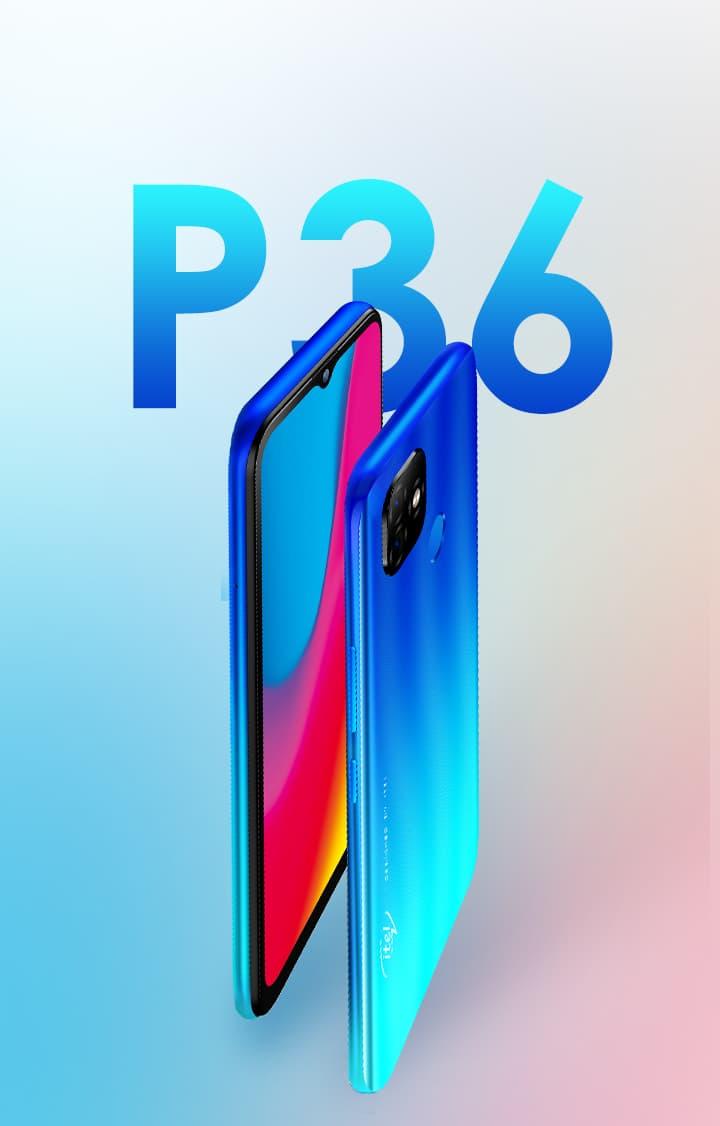
  • itel P36 (2020); Price, Specs, Features, Where To Buy & Best Deals

    itel P36 (2020); Price, Specs, Features, Where To Buy & Best Deals

    In these past few years, itel has been dominating in the mobile phone manufacturing industry. Year in and year out, they have been announcing new phones into the system.

    2020 has not been an exception even though the coronavirus become a global pandemic in the world. itel launched the itel S16, P36, P36 Pro, and other smartphones.

    Although the price of these two (2) smartphones are fair for mid-budget buyers, these smartphones have some awesome features and specifications that they use to compete with the other competitors.

    The itel P36 is the direct successor of the itel P33 which was released last year. On the downside, the itel P36 lacks 4G LTE. But, that is not a limitation to the special features the itel P36 has.

    In terms of display, the P36 comes with a 720 x 1600 pixels on a 6.5-inch HD+ screen. The screen is IPS, and there is also a notch on top of the display. The device runs on Android 9.0 Go Edition.

    On the camera side, the rear camera comprises of two lenses that are kept at the back of the phone; an 8MP main snapper and a 0.3MP depth-sensing lens. While the front camera has a single 8MP selfie camera for your selfies.

    The phone has a rear placed fingerprint scanner, AI FaceID and a two-SIM slot. The P36 is also powered by a 5000mAh battery.

    itel comes with a quad-core UNISOC SC7731E @1.3GHz, along with a Mali-T820 MP1 GPU, making you enjoy your favourite games on your smartphone. Also, the P36 has a 1 GB RAM and 16 GB ROM storage.

    itel P36 Specs

    itel P36Specs
    Operating SystemAndroid 9.0 Pie (Go Edition)
    Display6.5” IPS LCD capacitive touchscreen
    ChipsetUniSoc Spreadtrum SC7731E
    Memory1GB RAM
    Storage16GB ROM (expandable up to 32GB using microSD)
    Main CameraDual 8MP + 0.3MP
    Selfie Camera8 MP
    BatteryLi-ion 5000 mAh, non-removable
    ConnectivityDual SIM (Nano SIM) SIM1: Support 3G SIM2: Support 3G
    Special FeaturesFingerprint (rear mounted) Accelerometer, Proximity 3.55mm headphone jack present
    ColoursDeep Blue, Gradient Purple and Gradient Blue

    What Will You Find In The Box of the itel P36?

    When you unbox the Huawei Y8s, you find the following:

    • 1 itel P36 phone
    • 1 USB Cable
    • 1 Power adapter
    • 1 TPU Protective case
    • 1 Quick start guide
    • 1 Eject tool
    • 1 Warranty card
    • 1 Earpiece

    Features of the itel P36

    5000mAh Battery With Power Master

    The itel P36 is powered by a 5000mAh. In addition to the high capacity of the battery, the P36 also comes with an upgraded AI Power Master which enables the phone to last for a long period of time.

    When the battery is on standby, it can last up to a period of 75 hours, 30 hours of calling, 77 hours of non-stop music playing, 10 hours of video watching, and 7 hours of non-stop gaming.

    Capture Your Unforgettable Memories in Incredible Clarity

    One of the important things most of us look at when buying a new smartphone is picture quality and the itel P36 doesn’t disappoint.

    The P36 provides you with an incomparable camera with an 8MP state-of-the-art technology that makes your photos unique. For the girls who like doing snap, TikTok and the rest, the itel P36 is ideal for you. At just an affordable price you enjoy the great camera that comes with the P36.

    6.5” HD + Waterdrop Full Screen

    The itel P36 has a full-screen display with a 6.5” HD+ narrow waterdrop display with a big screen enough for whatever you use your phone for. Being it streaming movies, working, having meetings, playing games, etc.

    Also, thanks to the 100 x 720-pixel display, everything you see on the screen is as clear and neat as you want it to be. Even you have an eye problem, the display is clear enough for you to see and read whatever is on screen.

    Ultra Slim Unibody Design

    In terms of body design, the P36 has a slim body with a thickness of 8.66mm with rounded curved-edge housing. As a result, the curved back of the phone fits very well in your hand when you are using it with one thing.

    This makes the itel P36’s body look very sleek and classy. That is too much for a phone with such an affordable price, but itel has done that for their users.

    Pricing and Availability of the itel P36

    Price of itel P36 in Ghana

    The new itel P36 is selling at retail shops in Ghana for GHS 969. 

    Below is a list of shops in Ghana you can buy the itel P36 from:

    StorePriceContact
    Mfidie Store (Nationwide Delivery)GHS 4200546090871
    Franko Phones (No Delivery)GHS 420Contact Store

    Price of itel P36 in Nigeria

    The new itel P36 is expected to be sold at retail shops in Nigeria starting at NGN 28,000. 

    Price of itel P36 in Kenya

    itel P36 is selling in Kenya for around 78,900 Kenyan Shillings. This is however subject to availability and local retail price changes.

  • 4 Ways You Can Become Popular On Snapchat In Ghana And Nigeria

    4 Ways You Can Become Popular On Snapchat In Ghana And Nigeria

    Social media has become one of the safest places where young people are at ease of doing whatever they like without any parental supervision. There are over a hundred social media platforms available for use.

    One of these popular social media platforms is Snapchat. Snapchat has one of the easiest and user-friendly UI (User Interface) that allows everyone to enjoy contents they like.

    Just as the name suggests, Snapchat is a social media platform where you take photos, videos, and share them with the rest of the world; you just snap and chat. Also, entrepreneurs and other business owners use Snapchat to grow their business and business ideas.

    There are several reasons why you may want to become on Snapchat and whatever your reasons are, I’m here to give you some tips on how you can become popular on Snapchat in Ghana and Nigeria.

    NOTE: The points that are going to be listed are just tips and recommendations.  This means that the fact that you heed these tips doesn’t mean you will become 100%.

    4 Ways You Can Become Popular On Snapchat In Ghana And Nigeria

    As I stated earlier, there are over a million reasons why you may want to become popular on Snapchat. With over 170 million average active users daily, you have a high chance of becoming popular on Snapchat in Ghana and Nigeria.

    Similarly, there are over a million ways you can also become popular on Snapchat in Ghana and Nigeria. But these four (4) ways are the ones that have proven to be working perfectly especially for those who are starting from scratch.

    Post entertaining videos that will gain an impression

    As you might be aware already, videos are one of the best ways you can drag a lot of people to follow you on Snapchat; hence, giving you a high chance of becoming popular.

    But, the fact that you post videos does not mean that a lot of people will watch them or follow you. So, you need to stand out from the rest of the users who post videos.

    To do this, your type of videos should be entertaining and educative at the same time. Also, you need to know when people are active so that you post and also, the type of videos they like best.

    For you to know the type of video people like, post different types of videos and take note of the one that gains more views or likes. Once you can find that, always post those types of videos and you will start gaining followers in no time.

    Post memes that will get people to talk

    Secondly, if you want to become popular on Snapchat in Ghana and Nigeria, you need to post a lot of memes. Memes are text or photos that contains funny picture or messages; mostly about trending issues.

    Recently, a lot of people like reading memes because they are short funny and can be easily shared. This means you need to know the trending issues and post memes that are related to them.

    Once you start posting interesting memes, you will start getting a lot of followers who will share your memes and then drag other users to come and follow you also. This will in return make you popular as the “The King of Memes” or “The Queen of Memes”.

    Copy content ideas from the accounts that are already popular

    According to one of the world’s most successful digital marketers and SEO (Search Engine Optimization) experts Neil Patel, one of the best to become popular on Snapchat is by copying (not stealing) content ideas from those who are already ahead of you.

    Almost everyone has a particular account they look up. All you need to do is to monitor that account and copy ideas from the type of content they post and try to create some unique out of that.

    If you can make something unique out of that, you will soon start coming for the followers from that particular thereby leading to become popular.

    Use Bitmoji and augmented reality to create viral content

    Finally, one other way you can become popular by using Bitmoji and augmented reality to create videos and content that will go viral. Bitmoji is one of the Snapchat tools that allows you to create interesting content.

    With Bitmoji, you can create avatars that look exactly like you based on your preferences. They work just like Facebook avatars and Memoji on iOS devices.

    Bitmoji helps in the use of augmented reality features on Snapchat. Augmented Reality (AU) features on Snapchat are one of the types of content that goes viral on Snapchat.

    Therefore, using both Bitmoji and AR at the same time helps to create contents that go viral easily. And if you can consistently provide these types of content over a period of time, your account will start blowing with followers who will convert you to become a Snapchat celebrity.

    Conclusion

    To wrap up, I urge you to follow the recommendations given above in the article and you might become the next popular person on Snapchat in Ghana and Nigeria.

    Also, if you have any other ways you think can help someone become popular on Snapchat in Ghana and Nigeria; make sure to write it in the comments section below and I will make sure to add it to the article.

  • Huawei Y8s (2020); Price, Specs, Features, Where To Buy & Best Deals

    Huawei Y8s (2020); Price, Specs, Features, Where To Buy & Best Deals

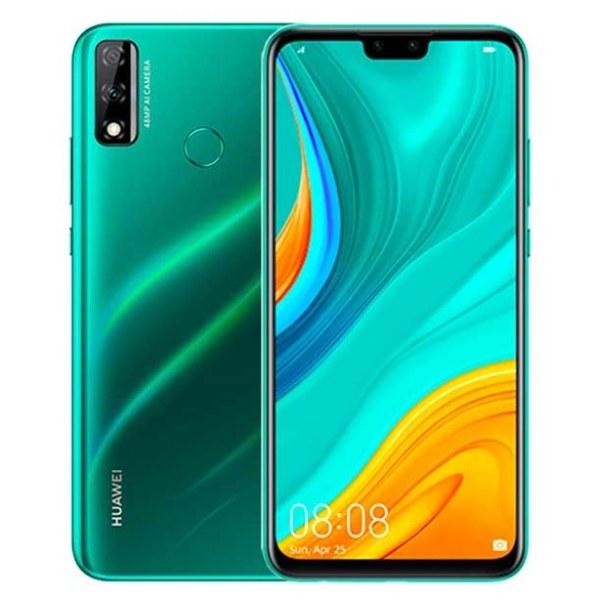
    2020 saw the launch of several smartphones around the world amidst the coronavirus pandemic. One of such smartphones was the Huawei Y7p and Huawei Y8s smartphone which was launched on 6th May 2020 and released on 21st May 2020.

    The Huawei Y8s is powered by a 1.7GHz Octa-core HiSilicon Kirin 710 processor. The processor features 4 cores clocked at 2.2GHz and 4 cores clocked at 1.7GHz.

    In the display department, the Y8s comes with a 6.5-inch touchscreen display that has a resolution of 1080×2340 pixels. The Y8s also runs Android Pie that is powered by a 4000mAh battery capacity.

    One of the most important updates that are added to every new phone is a camera and the Huawei Y8s is no exception. It has a rear camera that has a 48-megapixel primary camera with an aperture of f/1.8, and a second 2-megapixel camera with an f/2.4 aperture.

    The front on the other hand has an 8-megapixel primary camera with an f/2.0 aperture and a second 2-megapixel camera with an f/2.4 aperture.

    Huawei Y8s Specs

    Huawei Y8s Specs

    Huawei Y8sSpecs
    Operating SystemAndroid 9.0 (Pie), EMUI 9.1
    Display6.5” TFT LCD (IPS)
    ChipsetKirin 710 (12 nm)
    Memory4GB RAM
    Storage64GB ROM (expandable up to 512GB using microSD)
    Main CameraDual Setup48 MP, f/1.8 (wide) + 2 MP, f/2.4 (depth)
    Selfie Camera8 MP, f/2.0 (wide)+ 2 MP, f/2.4, (depth)
    BatteryLi-Po 4000 mAh, non-removable
    ConnectivityDual SIM with SIM1: Supports 4G, 3G SIM2: Supports 4G, 3G
    Special FeaturesFingerprint (rear-mounted), Accelerometer, Proximity, Compass 3.55mm headphone jack present
    ColoursEmerald Green, Midnight Black

    What Will You Find In The Box of the Huawei Y8s?

    When you unbox the Huawei Y8s, you find the following:

    • 1 Huawei Y8s phone
    • 1 USB Cable
    • 1 Power adapter
    • 1 TPU Protective case
    • 1 Quick start guide
    • 1 Eject tool
    • 1 Warranty card

    Features of the Huawei Y8s

    6.5” FHD + Display

    The Huawei is a top-notch full-screen smartphone that is available for full-screen smartphone lovers. With the new 6.5” FHD + Display, the Huawei Y8s delivers an ultra-clear cinematic viewing smartphone experience.

    This makes it interesting for those who love streaming their favourite Netflix movies on your smartphone, or those who love real gaming experience. No matter what you use your smartphone for, the Huawei Y8s’s screen display is at your service.

    4000 mAh Powerful Battery

    Powering the Huawei Y8s is a 4000 mAh non-removable battery. The battery can last a period of 42 hours after non-stop music playing, 50 hours of calling, 76 hours of non-stop video playback with just one full charge.

    If you are someone who uses your smartphone all the time like myself, you good to go whenever and wherever you are. There’s no need to worry about where to charge your smartphone; after one simple full charge, you can do whatever you want with your phone without worrying about any battery problems.

    4 GB RAM + 64 GB ROM Storage Space

    Storage space is one of the problems most smartphone users face nowadays. As such, Huawei has made enough storage space for you to store your photos, videos, and other important documents. Interestingly, you can expand your storage up to 512 GB using Micro SD.

    The EROFS super file compression technology also improves transmission speed and also saves some storage space for you.

    Ultra Clear 48MP Rear Camera And Dual AI Selfie Cameras

    Take all the nice photos you want with your Huawei Y8s in a just a single shot without editing anything. It has two AI dual camera comprising of a 48MP ultra-clear camera and a 2MP depth camera that makes your photos stand out from the rest.

    The front camera on the other end provides you with a new selfie experience with its 8MP beauty camera and 2MP depth camera. Now, you can make that video call and snap all your selfies with your Huawei Y8s.

    Upgraded Gaming Experience

    The new gaming experience on the Huawei Y8s is powered by the new generation GPU Turbo which improves CPU and GPU processor performance. This accelerates the graphics processing, leveraging the Kirin 710 chipset for an immersive gaming experience.

    Super Night Shot

    Due to the presence of the superior light sensor and AI algorithm, the night shot is sharper, clearer, and brighter than ever before. You can now capture your nice photos at night; whether it is a party or gathering, you also have the best photo to share.

    Pricing and Availability of the Huawei Y8s

    Price of Huawei Y8s in Ghana

    The new Huawei Y8s is selling at retail shops in Ghana for GHS 969. 

    Below is a list of shops in Ghana you can buy the Huawei Y8s from:

    StorePriceContact
    Mfidie Store (Nationwide Delivery)GHS 9990546090871
    Franko Phones (No Delivery)GHS 999Contact Store

    Price of Huawei Y8s in Nigeria

    The new Huawei Y8s is expected to be sold at retail shops in Nigeria starting at NGN 68,000. 

    Price of Huawei Y8s in Kenya

    Huawei Y8s is selling in Kenya for around 18,900 Kenyan Shillings. This is however subject to availability and local retail price changes.

  • How To Backup All Your WhatsApp Messages To Google Drive

    How To Backup All Your WhatsApp Messages To Google Drive

    WhatsApp backup is one of the most important things every WhatsApp users need to do. But why is that so? Let’s keep that question, for now, we discuss it later.

    Due to unforeseen circumstances, such as loosing of phones, mobile phone faults, and others, it is always ideal to have a backup.

    A backup is a copy of the data on a computer or device so that it may be used to restore the original after a data loss event.

    So basically, a WhatsApp backup is a copy of your WhatsApp data that is used to restore your WhatsApp after you lose your data or mobile phone.

    These include media, messages, and some WhatsApp settings that were used on the previous device. Now, you know the answer to the question I asked in the introduction; Why is Backup important?

    Similar to iPhone users who can back up their WhatsApp data to iCloud, Android devices can also backup their WhatsApp to Google Drive. As a result, you always a copy of your WhatsApp data on your Google Drive account.

    What Do You Need Before You Can Backup Your WhatsApp Messages To Google Drive

    Before you can backup your WhatsApp, you’ll need the following:

    • Google account activated on your device.
    • Google Play services installed on your device. Google Play service is an app that is used to update Google apps and apps from Google Play Store.
    • Also, you need enough space on your device to create the backup.
    • Finally, you need a strong and stable internet connection.

    How To Backup All Your WhatsApp Messages To Google Drive

    There are two main ways you can backup your WhatsApp messages to Google Drive and these are:

    1. How to backup all your messages to Google Drive automatically, and
    2. How to backup all your messages to Google Drive manually.

    How To Backup All Your Messages To Google Drive Automatically

    Once your device meets all the requirements, follow the steps below:

    1. Open WhatsApp on your phone.
    2. Tap More options (the three dots) > Settings > Chats > Chat backup > Back up to Google Drive.
    3. Choose your preferred backup frequency (Daily, Weekly, Monthly).
    4. From the list of Google accounts listed, chose the one you’d like to back up your WhatsApp data.
    5. Tap Back up over to choose the network you’d like to use for backups.
    6. After that, WhatsApp will automatically back up on the chosen frequency.

    How To Backup All Your Messages To Google Drive Automatically

    1. Open WhatsApp on your phone.
    2. Tap More options (the three dots) > Settings > Chats > Chat backup > BACK UP.

    Conclusion

    In this guide, I have shown you how you can easily backup your WhatsApp messages to Google Drive.

    Once you follow the steps listed carefully, you will be able to do that. But, if you come across any challenge feel free to write it in the comments section below and I will attend to you as soon as possible.

  • How To Recover Your TIN (Taxpayer Identification Number) Online in Ghana

    How To Recover Your TIN (Taxpayer Identification Number) Online in Ghana

    Have you forgotten your TIN (Taxpayer Identification Number)? Or do you need to recover your TIN for something important as soon as possible?

    There’s no need to worry, I am going to show you how you can recover your TIN online in Ghana in less than 24 hours.

    What is a TIN (Taxpayer Identification Number)?

    TIN (Taxpayer Identification Number) is a unique number issued to individuals, institutions, or companies to identify them as registered Ghanaian taxpayers.

    Once you apply for a TIN in Ghana and you become a registered taxpayer with Ghana Revenue Authority (GRA), you will now be able to register a vehicle, register a company, etc.

    Currently, before you can even open a bank account with some banks, you need to have a TIN before you can proceed. This was as a result of the government announcing that all forms of allowances need to be taxed.

    How To Recover Your TIN (Taxpayer Identification Number) Online in Ghana

    Once you lose your TIN (Taxpayer Identification Number) you will need to recover it. Since the TIN (Taxpayer Identification Number) is issued by only the Ghana Revenue Authority (GRA), they are only the only company that can help you recover it.

    NOTE: Do not be fooled by any third–party that claims to recover TIN (Taxpayer Identification Number) for you at a fee.

    There are several ways you can recover your TIN (Taxpayer Identification Number) online in Ghana. These are:

    • How to recover your TIN (Taxpayer Identification Number) online in Ghana via WhatsApp, and
    • How to recover your TIN (Taxpayer Identification Number) online in Ghana via email.

    Now let’s look at each of the ways you can recover your TIN online in Ghana.

    How to recover your TIN (Taxpayer Identification Number) online in Ghana via WhatsApp

    1. Open WhatsApp on your phone, iPad, tablet, or any device you want to use.
    2. Start a chat with the official Ghana Revenue Authority (0200631664, or 0552990000) explaining the reason for sending them the message.
    3. Send the following details to the number stated above:
    • Full name
    • Date of birth
    • Mother’s maiden name
    • The type of ID you used to register your TIN and the ID number
    1. GRA will review the submitted information and recover your TIN for you in a few hours.

    How to recover your TIN (Taxpayer Identification Number) online in Ghana via email

    1. Submit the following information to [email protected]:
    • Full name
    • Date of birth
    • Mother’s maiden name
    • The type of ID you used to register your TIN and the ID number
    1. Use “TIN Recovery” as the subject for the email.
    2. GRA will review the submitted information and recover your TIN for you as soon as possible.
  • How To Monitor Your Heart Rate With An Apple Watch

    How To Monitor Your Heart Rate With An Apple Watch

    Among all the exciting and amazing things, the Apple Watch does, you can monitor your heart rate. In this article, I will show you how to monitor your heart rate with an Apple Watch.

    The heart is the most organ in the body. According to scientists and from personal experiences, we all know that the heart is the only organ in the human body that stops ONLY when you die.

    As a result, regular monitoring of your heart and heart rate can go a long way to help your health. Before the coronavirus (COVID-19) struck, everyone taught they could never care more about their health.

    Just some few months after the coronavirus became a global pandemic, almost everyone in the world is now concerned about their health; especially, their circulatory system (the heart, lungs, etc).

    With the help of your smart Apple Watch, you can monitor your heart rate to prevent any unforeseen situations. Enough of the plenty talk, let’s jump right into it.

    How To Monitor Your Heart Rate With An Apple Watch

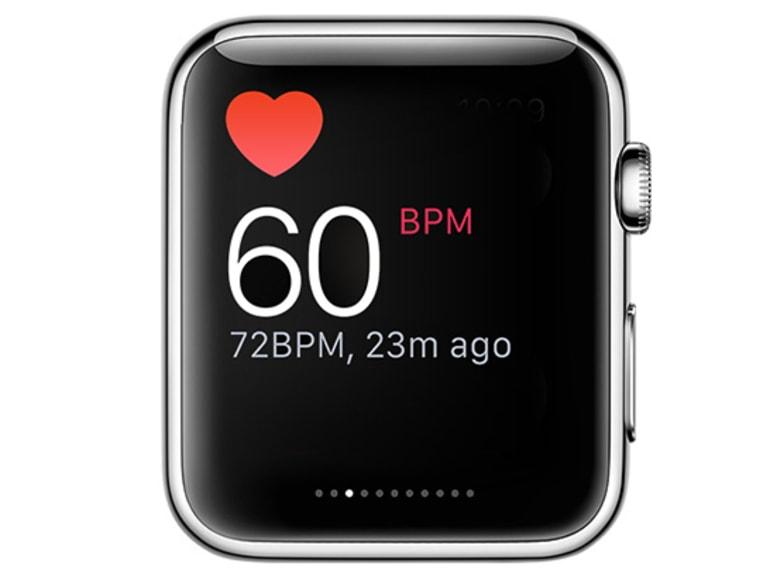
    The Apple Watch heart rate monitor can display your current, sleeping (resting) and walking heart rates. Also, you can instruct the Watch to notify you of any rise in your heart rate during a period of inactivity.

    To get started:

    1. First of all, update your Apple Watch to the latest watchOS version.
    2. To confirm this, you can open the Apple Watch app on your iPhone, and go to General and then Software Update. This option will show you to either install the latest version or inform you that you have the latest watchOS version.
    3. On your Apple Watch, open the Heart Rate app.
    4. Tap on Next and then another message will tell you how the Heart app can notify you when your heart rate rises over 120bpm (beats per minute).
    5. After you agree to this, tap Turn On. From then, the Apple Watch will alert you whenever your heart beats more than the normal 120 beats.
    6. Also, the Watch will alert you if there’s an increase in your heart rate after 10 minutes of being inactive.
    7. To get more details about the heart rates, swipe up the screen to see your resting heart rate for the day. Also, you can swipe up once again to see your average walking heart rate for the day.
    8. Finally, to see all the heart rates together (current, resting, and walking) at the same time, tap the Current link at the top of the screen. All these three heart rates will be displayed together.

    Conclusion

    The heart as I stated earlier, is the most important organ of the human body. Therefore, if you have the Apple Watch, I entreat you to follow these simple steps listed above and get your heart rate monitored.

    If you don’t have or cannot afford the Apple Watch, make sure to exercise daily and check your heart rates at least once every week to know where you stand.

    NOTE: Heart attacks do not affect only the old or the young. Everyone is at risk of having a cardiac arrest (heart attack). So take good care of your health.

  • 4 Ways You Can Use The Internet To Follow Election News in Ghana

    4 Ways You Can Use The Internet To Follow Election News in Ghana

    Once again the entire Ghanaian citizenry is about to go to the polls to select who is going to lead our constituencies and the entire country at large for the next four years. During this period, everything we see or hear on our phones and TV are reported by journalists.

    Unlike the olden days where we relied on only radio and TV broadcasts, we can now access all the news on the internet. In Ghana nowadays, almost all radio stations have a website or stream their programs live on Facebook or YouTube.

    Because of that, election coverage can be accessed by everyone who has a mobile phone, tablet, or computer with an internet connection. Also, one of the problems associated with this easy access to news is misinformation.

    What is Misinformation?

    Misinformation is the process whereby false or inaccurate information is shared, especially that which is deliberately intended to deceive. This means that, the person who shared the news knew that the news was false but intentionally shared it with the public.

    To prevent all these from happening, I am coming to show you 4 ways you can use the internet to follow election news in Ghana.

    4 Ways You Can Use The Internet To Follow Election News in Ghana

    The election news is going to be covered by both local and international news outlets and media houses. Some of these companies are going to cover fake news and others are going to cover original news.

    Below are the 4 ways you can use the internet to follow election news in Ghana:

    1. Subscribe to the Facebook and YouTube channels of all the top news channels in Ghana

    As I stated earlier almost all the radio and TV stations in Ghana stream their programs on either Facebook or YouTube or both. Unlike the radio where you only hear the presenters talking, you can now see them and also watch the footages they will be covering.

    Once you subscribe to the YouTube channel or follow them on Facebook, you will receive a notification once they start a live broadcast. You can then click on it to follow the live news broadcast from these top news outlets.

    2. Continually check the website of the renowned news companies

    Apart from social media, one other place we usually find news is via a news website. In Ghana alone, there are over 200 news websites; some of which consists of untrained news writers.

    Because some of these websites are not trained in the field of journalism, or they lack adequate reporters, they copy the news stories from the renowned news companies in the country. This is the reason why I recommend that you only check the website of popular or renowned news companies.

    This is because these companies have enough reporters on the ground and as such, report news that are trustworthy and authentic. This doesn’t mean that you cannot check the other websites, but to stay away from misinformation, I will advise you to stay away from them for only the election.

    3. Download the mobile app of your preferred news channel (if any)

    Technology they say has indeed changed the world. Ghana although not a total technology country, has a very high technological potential as compared to the other African countries.

    If you are someone who cannot check the Facebook and YouTube channel of your preferred news company or visit the website, then this is going to be the best solution for you. To do this, you, first of all, need to visit the Google Play Store or the Apple App Store and search the name of your news company and then download their app.

    Once you allow the app to send you notifications, whenever the company publishes a news story, you will be notified. Some of the apps even allow you to stream their programs live through the app without visiting any external link.

    4. Use fact-checking tools to check whether the news is true or false

    Finally, misinformation is the main problem associated with online news publications. Because of this, you need to use fact-checking tools to check the authenticity of the news story.

    Manually, you can check more than one news publications to see whether they are also covering the same news or you can use some of the online tools below:

    • Google fact check
    • Reverse image checker
    • Ghana Fact
    • Dubawa Ghana
    • Snopes, etc.

    These are all fact-checking tools you can use to check whether a news story is true or false.

    Conclusion

    In conclusion, use all the above points stated to follow the election news in the upcoming elections.

    Also, we are mfidie.com will like to advise everyone to cast their vote safely and avoid any form of disagreement which can escalate to violence. We only have one Ghana so let’s try and protect it.

    The entire mfidie.com team stands for PEACE before, during, and after the 2020 elections.

  • How To Update the iOS Version On Your iPhone

    How To Update the iOS Version On Your iPhone

    iOS users are one of the people who suffer the most. They buy music from the Apple Music store, they are unable to download external apps, they are not able to download anything that is not from Apple and its related developers.

    Aside from all that, iPhone users have to update their devices almost every month. Although you can automatically enable your iPhone to update itself, it is good if you know how to update your iPhone yourself.

    How To Update Your iOS Version On Your iPhone

    To update your iOS version on your iPhone, you need to follow the steps outlined below:

    1. Plug your iPhone into power and connect your iPhone to the internet via WiFi.
    2. On your iPhone, open the Settings app.
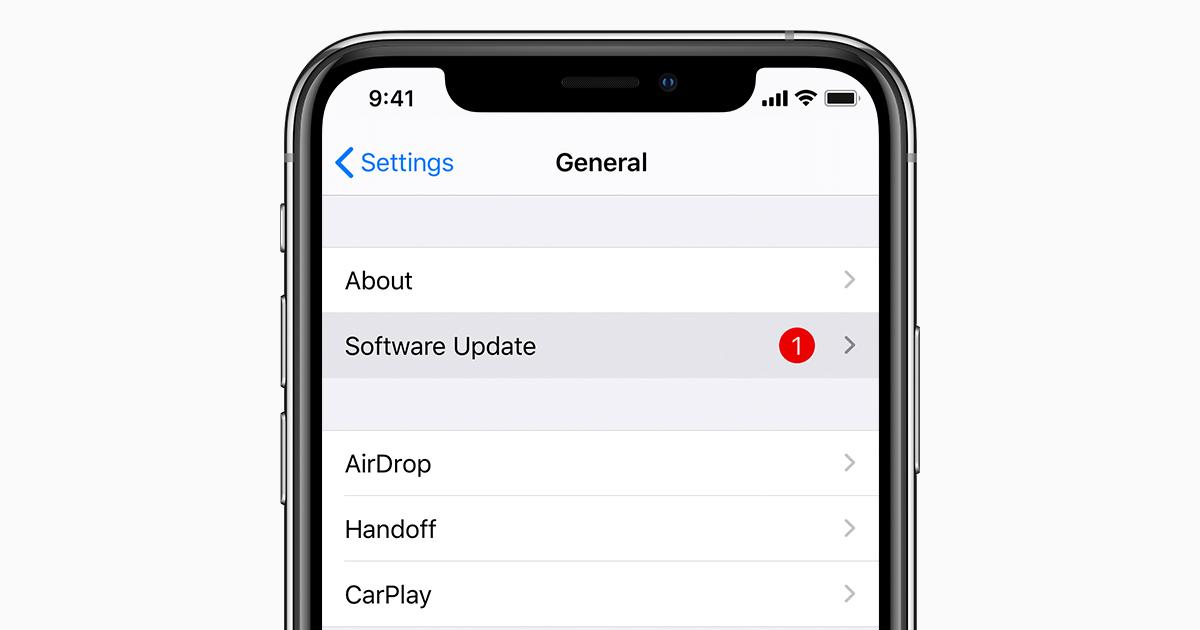
    3. From the list of available options, tap on General and then tap Software Update.
    4. Next, tap Download and Install. If you don’t have enough space, you’ll be asked to either remove apps or cancel.
    5. If you want to download it now, tap on Install or you can tap Later and choose Install Tonight or Remind Me Later. If you choose Install Tonight, you need to connect your iPhone to power and then connect it to a strong WiFi connection.
    6. If you have a passcode set on your iPhone, you will be asked to enter it.

    How To Update Your iOS Version On Your PC

    Although you can update your iOS version on your iPhone, you can also update your iPhone’s iOS version using your PC.

    To use this method, it is recommended that you have iTunes on your PC before you proceed. Once you have the iTunes software, make sure to allow your iPhone to trust the PC.

    Also, if your computer is using Personal Hotspot on the device that you’re updating, connect your computer to a different WiFi before you update. Once you are done, follow the steps listed below:

    1. Open the iTunes app on your PC.
    2. After that, connect your device to your computer.
    3. Once you have connected your device to the computer, locate your device on your computer.
    4. Click Settings and/or General, then Check for Update.
    5. Select Download and Update.

    How To Update Your iOS Version On Your Mac

    1. For macOS Catalina 10.15, open Finder. For macOS Major 10.14 or earlier, open the iTunes app.
    2. After that, connect your device to your computer.
    3. Once you have connected your device to the computer, locate your device on your computer.
    4. Click Settings and/or General, then Check for Update.
    5. Select Download and Update.

    Conclusion

    Updating your iPhone allows different latest features to work on your iPhone and so I recommend that you regularly check to see whether your iPhone is updated to the latest version.

    You can follow the steps discussed in this article to update your iPhone and even iPad as well.

  • How To Spot A Fake Review On Amazon

    How To Spot A Fake Review On Amazon

    Do you know how to spot a fake review on Amazon? I guess not but, don’t worry because I am going to guide you on how you can spot a fake review on Amazon and any other e-commerce website in the world.

    One of the most frustrating things that could ever happen to you is buying a fake product online. As a result of the COVID-19 pandemic, almost everyone has migrated to online shopping.

    Although Amazon is one of the most popular e-commerce shops online, fake shop owners find their way of selling their fake products on the platform. What these fake shop owners do is that they take original photos from other shops and post them on their store. After that, they will then ask their partners to review their products and say good things about the product to attract buyers.

    These fake reviews are sometimes targeted at original and authentic shops on the platform. With this, what they do is that they write bad reviews about the product to drive away customers and then direct them to their store.

    When this happens, the store which sells the original products will lose customers and the fake store will rather earn customers. It’s as a result of this that I have decided to show you how you can spot a fake review on Amazon.

    What Is The Difference Between a Fake Review And a Paid Review?

    Before we proceed, you need to know the difference between a fake review and a paid review. A fake review is the one that is done without actually purchasing the product that is being sold. With the paid review, the seller contacts a person to use the product for free and then give their review about the product.

    How To Spot A Fake Review On Amazon By Yourself

    To spot a fake review on Amazon by yourself, you need read through the points listed below and if most of the points hear checks out, you might be looking at a fake review:

    To make it a little easy for you to identify a fake review, Amazon has a Verified Purchase label that shows that the person who reviewed the product purchased the product before doing the review.

    An Amazon Verified Purchase label

    Secondly, check whether the stars given are moderate with just a few words. Mostly, legitimate reviewers give 3 or 4 stars and then write a few words explaining why they are pleased in the product or why they are not pleased. Serious people don’t have time to write a 100-words review.

    Also, check reviews about the same product on different e-commerce websites. For example, if you are buying a laptop with the name Mfidie Book Pro, make sure to check other websites and read the reviews others are saying about the same Mfidie Book Pro.

    Although the points listed above gives you a comprehensive guide on how to spot a fake review on Amazon, the following are some of the red flags:

    • A low number of reviews compared to similar products on the platform.
    • All the reviews given under the product are recent (unless the product was released recently).
    • All the reviews are paid. This is when the reviewer states that they received a free product in exchange for the review.

    How To Spot A Fake Review On Amazon Using Third-Party Tools

    Several third-party tools can be used to spot a fake review on Amazon. Some of these are:

    • FakeSpot
    • ReviewMeta
    • The Review Index, etc.

    These third-party tools analyze the authenticity of the review. The algorithms look at the reviews and reviewers, analyze language, previous reviews, and purchase history to determine the trustworthiness of the review.

    To check the review, copy the URL (link) of the page and paste it into the third-party site and it will investigate and give you the score. The tool will then explain the score to you to know whether the review is fake or not.

    DISCLAIMER: The points listed here doesn’t automatically guarantee that the review you saw was fake.

    Conclusion

    Now that you have an idea of how to spot a fake review on Amazon, make sure to make use of it whenever you are buying a product on Amazon.

  • Must-Have Apps For Entrepreneurs in 2021

    Must-Have Apps For Entrepreneurs in 2021

    Being an entrepreneur comes with a lot of struggles; some of these ranges from preparing for meetings, schedules, making sales, and a whole lot of other stressful stuff. But the interesting thing is that, after you work hard you will enjoy the fruit of your labour.

    In the olden days, if you had a reminder you needed to write it somewhere you will remember. Sometimes, you will forget and miss something important.

    All these things are a thing of the past as technology is taking over the world. With the introduction of technology, being an entrepreneur in the 21st Century is very interesting and a little more fun compared to the 20th century and the past centuries.

    This article is going to recommend to you some must have-have apps for entrepreneurs in 2021. All the apps listed below are the best on the market; in terms of everything.

    Must-Have Apps For Entrepreneurs in 2021

    The top must-have apps for entrepreneurs in 2021 are:

    • Asana
    • Wunderlist
    • LastPass
    • Medium
    • Accompany
    • Pocket

    Let’s now have a brief look at each of the apps listed above.

    ASANA

    If you are an entrepreneur who is or wants to be productive this app is the best app for you. But since every entrepreneur is or wants to be productive, I think this is one of the best apps you need to download on your device. Asana makes task collaboration and management very easy and fast. The interface is very user-friendly and one of the best compared to some of the other apps.

    WUNDERLIST

    One of the The main problems entrepreneurs face every day are stress and when you are stressed you are like to forget things. This is why I am recommending Wunderlist for you as one of the must-have apps for entrepreneurs in 2020. Wunderlist syncs all your to-do lists, errands, and many other things you are likely to forget in one place. Some reminders can be set making you stay up-to-date on every meeting or activity.

    LASTPASS

    LastPass was designed for entrepreneurs like myself who easily forget their passwords. This application will store all your passwords in a safe place where you can always access it on any device. If you think you are likely to forget the password to your company’s email make sure to check this app out.

    MEDIUM

    If you are an entrepreneur who is always willing to learn something new then I recommend Medium to you. This app provides intuitive articles that are geared towards making enlightening you on what is up-to-date in the world of business and entrepreneurship. This app is the best place to go and learn from the experts in the business field you are operating.

    POCKET

    Pocket is simply an app meant to store information in your pocket. This is how it works; if you come across an article or news story you like but cannot read at the moment, you can save it in Pocket. Whenever you are ready to read you can go into the app and read your article.

    ACCOMPANY

    The last app on our list is Accompany. This app is my favourite among all the apps listed below. Accompany emails you briefing before your meeting including a summary of each person attending the meeting. It does so by going through your email, calendar, and social media to gather the information. This app is like having the virtual assistant you’ve always wished for.

    Conclusion

    In conclusion to the apps listed above, you can also make good use of the available social media platforms also.